LTP(linux test project)使用方法
首要参考官方手册:https://linux-test-project.readthedocs.io/en/latest/users/quick_start.htmlgithub工程源码:https://github.com/linux-test-project/ltp。
一、环境准备&软件安装
首要参考官方手册:https://linux-test-project.readthedocs.io/en/latest/users/quick_start.html
github工程源码:https://github.com/linux-test-project/ltp
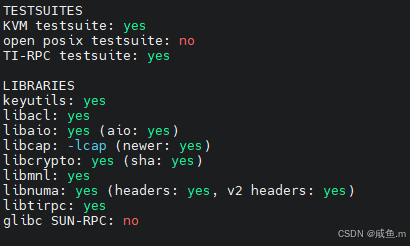
1、yum安装各种依赖包
yum install bison
yum install byacc
yum install flex
yum install make
yum install automake
yum install autoconf
yum install m4
yum install pkgconf / pkg-config  # 用于寻找库和链接库

需要依赖
gcc
libc headers(包含许多libc的头文件,具体可以根据configure执行结果检查)
linux headers(包含许多kernel的头文件,具体可以根据configure执行结果检查)
部分libc header和linux headers安装
yum install libacl-devel
yum install libaio-devel
yum install libcap-devel
yum install libmnl-devel
sudo yum install numactl-devel
yum update glibc
yum install libtirpc-devel
yum install kernel-devel
yum install kernel-headers
2、安装ltp
将ltp安装包放到/home/ltp/目录下,解压安装包,进入解压目录
安装后ltp会安装到/opt/ltp
make autotools
./configure
# 编译整个LTP
make  # 编译c代码
make install  # 安装ltp套件到/opt/ltp
/opt/ltp/runltp   #测试ltp是否可以执行
二、 LTP套件说明
LTP的测试套件放在其路径下runtest目录中,每个套件中包含多个用例。
下面摘选部分文件测试相关的介绍:
1、 fs
fs测试套件下包含growfiles、rwtest、iogen、fsinod、linktest、openfile、inode、stream、ftest、lftest、writetest、fs_di、proc、read_all、fs_racer、quota_remount_test、isofs、fs_fill、binfmt_misc、squashfs。
growfiles
C代码脚本路径:./testcases/kernel/fs/doio/growfiles.c
growfiles 会通过 write 和 lseek 命令逐步创建和截断文件,系统调用会检查返回值是否正确,可以验证写入的内容或整个文件内容是否正确,但是会引起磁盘碎片。
growfiles 参数解析,只列出部分常用参数
[root@vmnode161 doio]# ./growfiles -h
Usage: growfiles [-bhEluy][[-g grow_incr][-i num][-t trunc_incr][-T trunc_inter]
[-d auto_dir][-e maxerrs][-f auto_file][-N num_files][-w][-c chk_inter][-D debug]
[-s seed][-S seq_auto_files][-p][-P PANIC][-I io_type][-o open_flags][-B maxbytes]
[-r iosizes][-R lseeks][-U unlk_inter][-W tagname] [files]
  -b             从默认异步模式切换到同步模式
  -C write_chk   设置检查最近写入的频率(default 1)
  -c file_chk    设置检查整个文件的频率(default 0)
  -d auto_dir    设置自动创建文件的目录. (default .)
  -D debug_lvl   设置DEBUG级别 (default 1)
  -E             打印例程
  -e errs        累积多少个错误会退出程序 (def 100)
  -f auto_file   指定创建文件的base name. (default "gf")
  -g grow_incr   Specfied to grow by incr for each num. (default 4096)
                 grow_incr may end in b for blocks
                 If -r option is used, this option is ignored and size is random
  -i iteration   指定每个文件grow的次数. 0 means forever (default 1)
  -l             write/read/trunc时对文件加锁
                 If specified twice, file locking after open to just before close
  -L time        Specfied to exit after time secs, must be used with -i.
  -n num_procs   Specifies the number of copies of this cmd.
  -o op_type     设置open flags: (def O_RDWR,O_CREAT) op_type can be 'random'
  -R [min-]max   random lseek before write and trunc, max of -1 means filesz,
                 -2 means filesz+grow, -3 filesz-grow. (min def is 0)
  -r [min-]max   随机io大小 (min def is 1)
  -S seq_auto_files Specifies the number of seqental auto files (default 0)
  -s seed[,seed...] 指定随机种子号 (default time(0)+pid)
  -t trunc_incr  Specfied the amount to shrink file. (default 4096)
                 trunc_inter may end in b for blocks
                 If -R option is used, this option is ignored and trunc is random
  -T trunc_inter Specfied the how many grows happen before shrink. (default 0)
  -u             退出之前unlink文件
  -W tag-name    Who-am-i.  My Monster tag name.  (used by Monster).
rwtest
shell脚本路径:.testcases/kernel/fs/doio/rwtest
用于对一组文件进行基本输入/输出操作的程序。文件偏移量、输入/输出长度、输入/输出操作以及打开文件的标志都是从预先定义或命令行指定的集合中随机选择的。所有写入的数据都可以进行验证。“rwtest” 是一个 shell 脚本,它是 iogen 和 doio 的外壳程序。
[root@vmnode161 doio]# ./rwtest -h
    -c           退出之前清理文件
    -N Name      Pan-style name to be printed with error messages.
    Options passed through to iogen: iogen的参数
    -[afiLmOstT] arg
    -o
    -q           Set rwtest to be quiet and pass the flag on to iogen.
    Options passed through to doio: doio的参数
    -D[rmMVUC] arg
    -D[aekv]
    -n nprocs    # procs to do simultanious io to the test files.
                 Default is 1.  If -n is non-zero, doio's -k option (use
                 file locking) is forced.
    files        Files to test on.  File names have the following format:
                 [ size: ] path
                 [ free% [ max size ] : ] path
                 If no size is specified, the files must exist
                 and the contents will be overwritten if testing write or
                 writea system calls.  If a size is supplied, an attempt to
                 create/grow/shrink path to the desired size will be made.
                 size is an integer which defaults to bytes, but may be
                 suffixed by 'b', 'k', or 'm' for blocks (4096 byte units),
                 kilobytes (1024 byte units), or megabytes (2^20 byte units).

                 If the size is a percentage, df is used to find how much
                 free space there is (in blocks), and uses that.  The maximum
                 size is implied to be in blocks.
linktest
shell脚本路径:./testcases/kernel/fs/linktest
默认使用路径为TMPDIR,在single run时候会使用默认TMPDIR:/tmp
[root@vmnode161 linktest]# ./linktest.sh -h
linktest 1 TINFO: Running: linktest.sh -h
linktest 1 TINFO: Tested kernel: Linux vmnode161 5.10.0-136.12.0.86.4.nos1.x86_64 #6 SMP Thu Sep 14 22:12:44 CST 2023 x86_64 x86_64 x86_64 GNU/Linux
Usage: linktest.sh {-a n} {-s n}
-a n    Hard link count
-s n    Soft link count
-h      Prints this help
-i n    Execute test n times

Environment Variables
---------------------
KCONFIG_PATH         Specify kernel config file
KCONFIG_SKIP_CHECK   Skip kernel config check if variable set (not set by default)
LTPROOT              Prefix for installed LTP (default: /opt/ltp)
LTP_COLORIZE_OUTPUT  Force colorized output behaviour (y/1 always, n/0: never)
LTP_DEV              Path to the block device to be used (for .needs_device)
LTP_DEV_FS_TYPE      Filesystem used for testing (default: ext2)
LTP_SINGLE_FS_TYPE   Testing only - specifies filesystem instead all supported (for TST_ALL_FILESYSTEMS=1)
LTP_TIMEOUT_MUL      Timeout multiplier (must be a number >=1, ceiled to int)
TMPDIR               Base directory for template directory (for .needs_tmpdir, default: /tmp)
openfile
C代码路径:.testcases/kernel/fs/openfile/openfile
功能:Create files and open simultaneously
默认使用路径为TMPDIR,在single run时候会使用默认TMPDIR:/tmp
[root@vmnode161 openfile]# ./openfile -h
Usage: openfile [-d] -f FILES -t THREADS
inode
C代码路径:.testcases/kernel/fs/inode
功能:验证 file system and I/O management, system resource constraints,具体可见其C代码
calls:mkdir, stat, open
默认使用路径为TMPDIR,在single run时候会使用默认TMPDIR:/tmp
stream
C代码路径:.testcases/kernel/fs/stream
功能:验证流操作 freopen()fseek() mknod() fopen()ftell()fwrite() fread()ferror() feof() clearerr() fileno()
默认使用路径为TMPDIR,在single run时候会使用默认TMPDIR:/tmp
[root@vmnode161 stream]# ./stream01 -h
  -h      Show this help screen
  -i n    Execute test n times
  -I x    Execute test for x seconds
ftest
C代码路径:.testcases/kernel/fs/ftest
功能:测试file io、inode things等待,具体见其C代码
默认使用路径为TMPDIR,在single run时候会使用默认TMPDIR:/tmp
[root@vmnode161 ftest]# ./ftest01 -h
  -h      Show this help screen
  -i n    Execute test n times
  -I x    Execute test for x seconds
lftest
C代码路径:.testcases/kernel/fs/lftest
功能:The purpose of this test is to verify the file size limitations
默认使用路径为TMPDIR,在single run时候会使用默认TMPDIR:/tmp
[root@vmnode161 lftest]# ./lftest -h
Options
-------
-i n     Execute test n times
-I x     Execute test for n seconds
-D       Prints debug information
-n       COUNT Number of megabytes to write (default 100)
writetest
C代码路径:.testcases/kernel/io/writetest
功能:The purpose of this test is to verify that writes to disk occur without corruption.
默认使用路径为TMPDIR,在single run时候会使用默认TMPDIR:/tmp
[root@vmnode161 writetest]# ./writetest -h
writetest    0  TINFO  :  Using /tmp/LTP_wridyM4bA as tmpdir (tmpfs filesystem)
./writetest [-v] [-b blocks] [-s seed] [-o filename]

   -v          - increase verbosity level
   blocks      - number of blocks to write
   seed        - seed to use (0 to use timestamp)
   filename    - name of output file
fs_di
C代码路径:.testcases/kernel/fs/fs_di
功能:Data Integrity tests
默认使用路径为TMPDIR,在single run时候会使用默认TMPDIR:/tmp
proc
C代码路径:.testcases/kernel/fs/proc
功能:Read every file in /proc,与文件系统测试无关
默认使用路径为TMPDIR,在single run时候会使用默认TMPDIR:/tmp
read_all
C代码路径:.testcases/kernel/fs/read_all
功能:Perform a small read on every file in a directory tree
默认使用路径为TMPDIR,在single run时候会使用默认TMPDIR:/tmp
[root@vmnode161 read_all]# ./read_all -h
Options
-------
-i n     Execute test n times
-I x     Execute test for n seconds
-v       Print information about successful reads.
-q       Don't print file read or open errors.
-d       Path to the directory to read from, defaults to /sys.
-e       Pattern Ignore files which match an 'extended' pattern, see fnmatch(3).
-r       Count The number of times to schedule a file for reading.
-w       Count Set the worker count limit, the default is 15.
-W       Count Override the worker count. Ignores (-w) and the processor count.
-p       Drop privileges; switch to the nobody user.
-t       Milliseconds a worker has to read a file before it is restarted
fs_racer
C代码路径:.testcases/kernel/fs/fs_racer
功能:文件系统竞争条件测试,This test creates 20 files (0 thru 19) and then shuffles them around,deletes, and recreates them as fast as possible.
默认使用路径为TMPDIR,在single run时候会使用默认TMPDIR:/race
[root@vmnode161 racer]# ./fs_racer.sh -h
usage: fs_racer.sh -t DURATION [Execute the testsuite for given DURATION seconds]
quota_remount_test
C代码路径:.testcases/kernel/fs/quota_remount
功能:/proc/sys/fs/quota 测试linux内核文件系统配额,与挂载文件系统测试无关
fs_fill
C代码路径:.testcases/kernel/fs/fs_fill
功能:Runs several threads that fills up the filesystem repeatedly
挂载/dev/loop0到TMPDIR/mountpoint,写满数据
**
binfmt_misc**
C代码路径:.testcases/kernel/fs/binfmt_misc
功能:使用各种无效输入来注册一个新的二进制类型,与挂载文件系统测试无关
“register a new binary type” 指的是在操作系统,特别是类 Unix 系统中,注册一种新的可执行文件格式的方法。
squashfs
C代码路径:.testcases/kernel/fs/squashfs
功能:内核相关,与挂载文件系统测试无关
执行示例
To run a particular test suite
$ ./runltp -f syscalls
To run all tests with `madvise` in the name
$ ./runltp -f syscalls -s madvise
Also see
$ ./runltp --help
官方示例
Running single tests
LTP provides the possibility to build and run single tests:
cd testcases/kernel/syscalls/foo
make
PATH=$PATH:$PWD ./foo01
Shell testcases are a bit more complicated, since they need to setup PATH as well as to compiled binary helpers:
cd testcases/lib
make
cd ../commands/foo
PATH=$PATH:$PWD:$PWD/../../lib/ ./foo01.sh
Open Posix Testsuite has it’s own build system which needs Makefiles to be generated first:
cd testcases/open_posix_testsuite/
make generate-makefiles
cd conformance/interfaces/foo
make
./foo_1-1.run-test
相关资讯页
Project pages are located at: http://linux-test-project.github.io/
The latest image is always available at:
https://github.com/linux-test-project/ltp/releases
说明书:https://linux-test-project.readthedocs.io/en/latest/users/quick_start.html
中文 说明:https://blog.51cto.com/u_11529070/9161716
Posix接口测试
1、posix接口的testcase要进行编译
cd testcases/open_posix_testsuite/
make generate-makefiles
cd conformance/interfaces/foo
make
编译后
在conformance、functional、stress等子模块中会存在C代码编译后的obj文件,这个文件就是直接执行的测试文件,测试的内容可以参照对应的c代码。如下: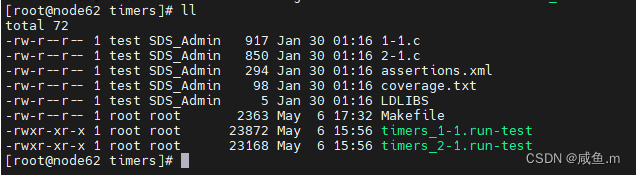
C代码例如fsync: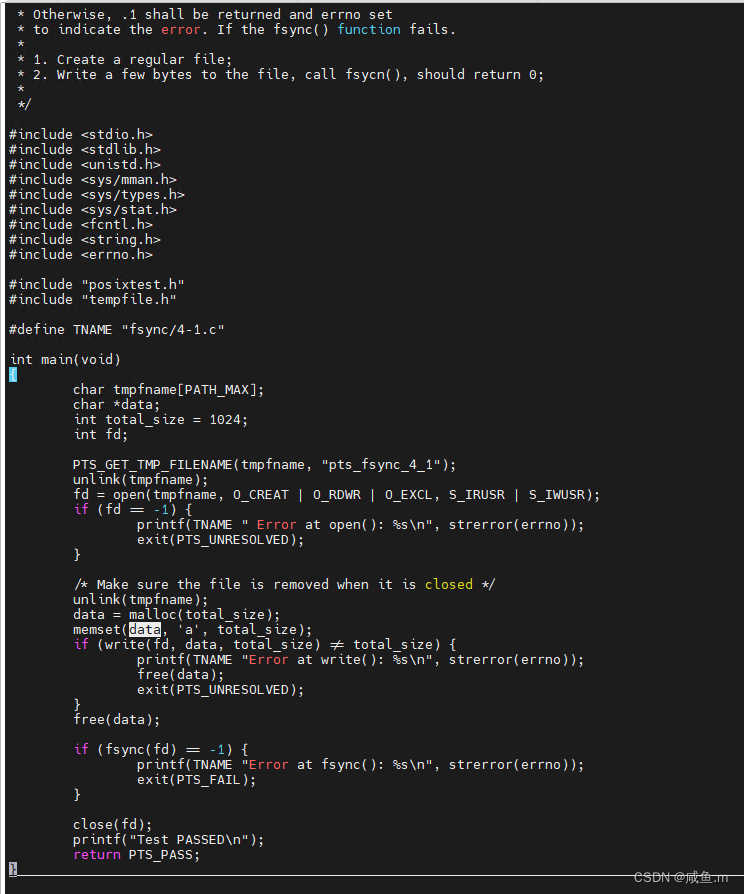
2、编译后就需要执行每个目录下的obj目标文件,但是一个一个执行太慢了,LTP提供了脚本来执行,脚本在目录testcases/open_posix_testsuite/bin下
其中run-all-posix-option-group-tests.sh会执行所有的posix测试文件,run-posix-option-group-test.sh会分模块执行posix测试文件,具体模块分为[AIO|MEM|MSG|SEM|SIG|THR|TMR|TPS]
[root@node62 bin]# ./run-posix-option-group-test.sh -h
usage: run-posix-option-group-test.sh [AIO|MEM|MSG|SEM|SIG|THR|TMR|TPS]
Build and run the tests for POSIX area specified by the 3 letter tag
in the POSIX spec
AIO为asynchronous I/O tests
MEM为mapped, process and shared memory tests
MSG为message queues tests
SEM为semaphores tests
SIG为signals tests
THR为threads tests
TMR 为timers and clocks tests
TPS为process and thread scheduling tests

魔乐社区(Modelers.cn) 是一个中立、公益的人工智能社区,提供人工智能工具、模型、数据的托管、展示与应用协同服务,为人工智能开发及爱好者搭建开放的学习交流平台。社区通过理事会方式运作,由全产业链共同建设、共同运营、共同享有,推动国产AI生态繁荣发展。
更多推荐



 13
13 0
0- 0


 已为社区贡献1条内容

所有评论(0)