2202-04-04 西安 mybatis(3) resultMap 和 动态sql、延迟加载
动态sql是为了拼关键字或者说是条件。mapper接口中定义一个多条件查询//多条件查询List <Emp> getEmpByCondition(Emp emp);在mapper映射文件中怎么写嘞方式一:<if test="">这时候就必须要加恒成立条件1=1了。。因为要是所有条件都不成立,那么就会多出来where关键字。<!-- List <Emp> g
一、resultMap
1、resultMap和resultType
标签select必须设置属性resultType或resultMap,用于设置实体类和数据库表的映射关系
resultMap和resultType的关系与区别
resultType: 自动映射,用于属性名和表中字段名一致的情况
resultMap: 自定义映射,用于一对多或多对一或字段名和属性名不一致的情况。
resultType设置的是一个已经存在的、具体的类型
resultMap设置的是某个resultMap标签的id属性
2、字段名和属性名不一致
字段名和实体类中的属性名不一致
如下:emp_id 和 empId emp_name 和 empName
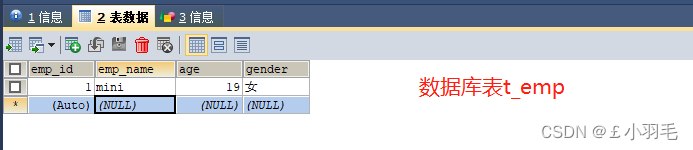
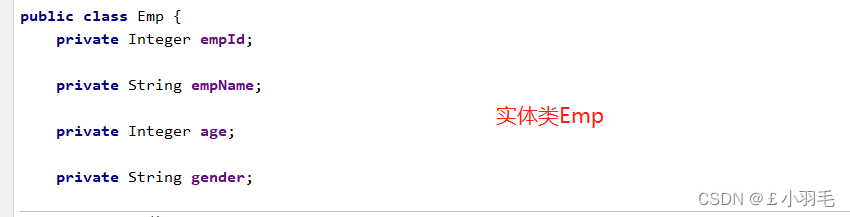
这时候,我们是这么使用mybatis的,mapper接口中:
    /**
     * 通过员工id获取员工信息
     * @param empId
     * @return
     */
    Emp getEmpByEmpId(@Param("empId") String empId);
mapper映射文件中:
    <select id="getEmpByEmpId" resultType="Emp">
        select * from t_emp where emp_id = #{empId}
    </select>
测试类里:
        Emp emp = empMapper.getEmpByEmpId("1");
        System.out.println(emp);
测试结果:查询回来以后emp_id是无法封装到EMP的empId中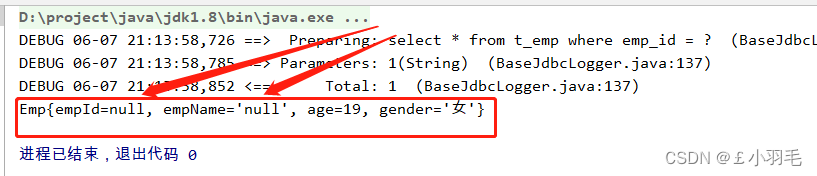
3、方式:起别名
方法1:起别名,在mapper映射文件中
    <select id="getEmpByEmpId" resultType="Emp">
        select emp_id empId,emp_name empName, age, gender from t_emp where emp_id = #{empId}
    </select>
4、方式:配置下划线转驼峰
方法2:全局配置,让下划线自动映射为驼峰,在mybatis-config.xml中,
放在起别名标签<typeAliases>的上方,注意标签的顺序。
    <settings>
        <!--将表中字段的下划线映射为驼峰-->
        <setting name="mapUnderscoreToCamelCase" value="true"/>
    </settings>
5、方式:自定义映射
方法3:自定义映射 resultMap
标签select中resultMap和resultType不能同时存在也不能同时没有 ,注意不管字段和属性名一样不一样都要设置。如age、gender
    <resultMap id="map1" type="Emp">
        <id column="emp_id" property="empId"></id>
        <result column="emp_name" property="empName"></result>
        <result column="age" property="age"></result>
        <result column="gender" property="gender"></result>
    </resultMap>
    <select id="getEmpByEmpId" resultMap="map1">
        select * from t_emp where emp_id = #{empId}
    </select>
6、resultMap标签
resultMap标签有俩个属性
id:自定义映射的唯一标识,不能重复
type:查询的数据要映射的实体类的类型
resultMap标签的子标签:
id子标签:设置主键的映射关系
result子标签:设置普通字段的映射关系
association子标签:设置多对一、一对一的映射关系(处理实体类类型的数据)
collection子标签:设置一对多、多对多的映射关系(处理集合类型的数据)resultMap标签的子标签属性:
column:设置映射关系中表中的字段名,或者说是sql查出来的字段名更准确
property:设置映射关系中实体类中的属性名
二、resultMap对一关系
1、对一关系
"对一"对应实体类类型,实际上处理实体类类型的属性。
如:查询员工信息以及员工所对应的部门信息
public class Emp {
    private Integer empId;

    private String empName;

    private Integer age;

    private String gender;

    private Dept dept;
}
2、方式:级联(用的不多)
    <resultMap id="map1" type="Emp">
        <id column="emp_id" property="empId"></id>
        <result column="emp_name" property="empName"></result>
        <result column="age" property="age"></result>
        <result column="gender" property="gender"></result>
        <result column="dept_id" property="dept.deptId"></result>
        <result column="dept_name" property="dept.deptName"></result>
    </resultMap>

<!--    Emp getEmpByEmpId(@Param("empId") String empId);-->
    <select id="getEmpByEmpId" resultMap="map1">
        select * from t_emp left join t_dept on t_emp.dept_id=t_dept.dept_id where t_emp.emp_id=#{empId}
    </select>
结果如下:

3、方式:association
association中的俩个属性:
- property:设置映射关系中实体类中的属性名
- javaType="Dept" 设置该属性的类型
    <resultMap id="map1" type="Emp">
        <id column="emp_id" property="empId"></id>
        <result column="emp_name" property="empName"></result>
        <result column="age" property="age"></result>
        <result column="gender" property="gender"></result>

        <association property="dept" javaType="Dept">
            <id column="dept_id" property="deptId"></id>
            <result column="dept_name" property="deptName"></result>
        </association>
    </resultMap>

<!--    Emp getEmpByEmpId(@Param("empId") String empId);-->
    <select id="getEmpByEmpId" resultMap="map1">
        select * from t_emp left join t_dept on t_emp.dept_id=t_dept.dept_id where t_emp.emp_id=#{empId}
    </select>
4、方式:分步查询
需要2个sql语句。他有自己优点,可以延迟加载。
先查出来员工的信息
property:设置映射关系中实体类中的属性名
select:分步查询,对应sql的唯一标识(namespace.SQLId)
column:写的是分步查询的条件,将当前sql语句查询的某个字段作为条件
fetchType="lazy"/eager 分步查询延迟加载/立即加载
    <!--
        association实现分步查询:
    -->
    <resultMap id="empAndDeptThree" type="Emp">
        <id column="emp_id" property="empId"></id>
        <result column="emp_name" property="empName"></result>
        <result column="age" property="age"></result>
        <result column="gender" property="gender"></result>
        <association property="dept"
                     select="com.atguigu.mybatis.mapper.DeptMapper.getEmpByStepTwo"
                     column="dept_id" fetchType="eager">
        </association>
    </resultMap>

    <!--Emp getEmpByStepOne(@Param("empId") String empId);-->
    <select id="getEmpByStepOne" resultMap="empAndDeptThree">
        select * from t_emp where emp_id = #{empId}
    </select>
DeptMapper.getEmpByStepTwo如下:
    <!--Dept getEmpByStepTwo(@Param("deptId") String deptId);-->
    <select id="getEmpByStepTwo" resultMap="deptResultMap">
        select * from t_dept where dept_id = #{deptId}
</select>小技巧:select中的值是sql的唯一标识,可以如下,在mapper接口的方法中右键,选择
Copy Reference

这里是立即加载模式, fetchType="eager",测试代码如下:
    public void testGetEmpByEmpId(){
        Emp emp = empMapper.getEmpByStepOne("1");
    }
立即加载模式 :结果是2条sql都直接加载了,注意我的测试方法里就只有一行代码
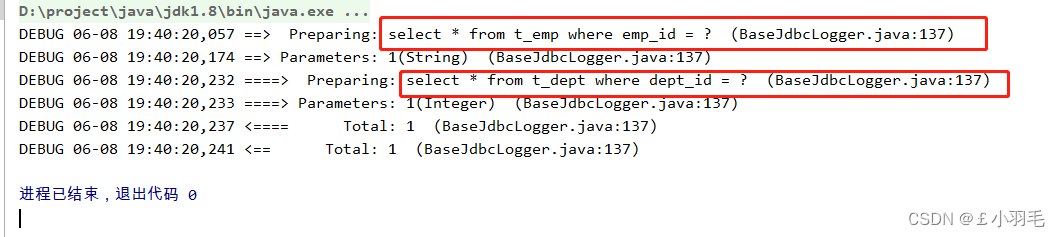
5、开启延迟加载
延迟加载:延迟加载是指在查询主对象时,仅加载其基本属性,而将关联对象(如一对一、一对多关系)的查询推迟到实际访问该属性时执行。
在mybatis-config.xml中(配置全局的延迟加载)
lazyLoadingEnabled,默认false
aggressiveLazyLoading,默认false<settings> <!--将表中字段的下划线映射为驼峰--> <setting name="mapUnderscoreToCamelCase" value="true"/> <!--开启延迟加载--> <setting name="lazyLoadingEnabled" value="true"/> <!--设置按需加载(false表示仅访问关联属性时加载)--> <setting name="aggressiveLazyLoading" value="false"/> </settings>
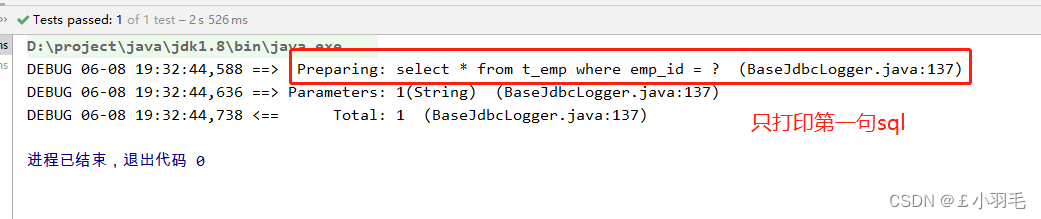
改为fetchType="lazy",测试代码如下:
@Test
public void testGetEmpByEmpId(){
    Emp emp = empMapper.getEmpByStepOne("1");
}
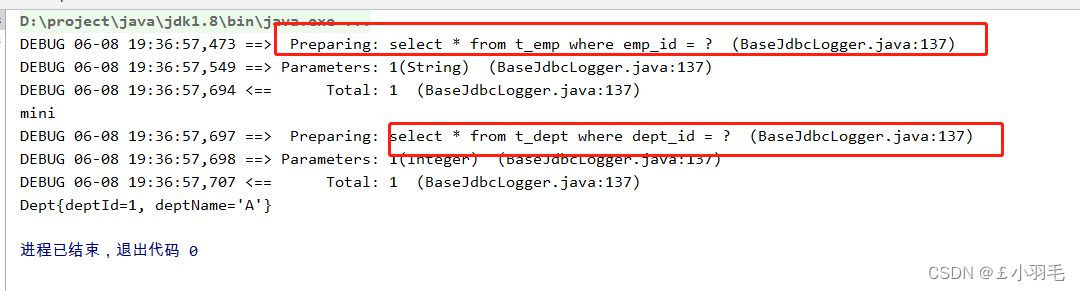
延迟加载是第二句sql延迟加载了,先不加载第二句sql,用到的时候再加载,只加载第一句sql
    public void testGetEmpByEmpId(){
        Emp emp = empMapper.getEmpByStepOne("1");
        System.out.println(emp.getEmpName());//不会触发第二句sql的加载
        System.out.println(emp.getDept());//会触发第二句sql的加载
    }
6、延迟加载原理
MyBatis 使用 CGLIB 动态生成主对象的代理类。当调用未加载的关联属性(如 emp.getDept())时,代理对象会拦截该操作,触发关联查询并填充数据。
三、resultMap对多关系
1、对多关系
"对多"对应集合类型,一对多就是来处理集合类型的属性
根据部门id查询部门以及部门中的员工信息,
public class Dept {
    private Integer deptId;

    private String deptName;

    private List<Emp> emps;
}
2、方式:collection标签
主要在collection中标签内不需要再写<association>获取部门信息,不需要套娃!
collection:处理一对多的映射关系(处理集合类型的属性)
属性:
property:设置需要处理的映射关系中的属性的属性名
ofType:表示要处理的集合类型的属性中存储的数据的类型
    <resultMap id="deptAndEmpOne" type="Dept">
        <id column="dept_id" property="deptId"></id>
        <result column="dept_name" property="deptName"></result>
        <collection property="emps" ofType="Emp">
            <id column="emp_id" property="empId"></id>
            <result column="emp_name" property="empName"></result>
            <result column="age" property="age"></result>
            <result column="gender" property="gender"></result>
        </collection>
    </resultMap>

    <!--Dept getDeptById(@Param("deptId") String deptId);-->
    <select id="getDeptById" resultMap="deptAndEmpOne">
        SELECT * FROM t_dept LEFT JOIN t_emp ON t_dept.dept_id = t_emp.dept_id WHERE t_dept.dept_id = #{deptId}
    </select>

3、方式:分步查询
分步查询部门和部门中的员工
public class Dept {
    private Integer deptId;

    private String deptName;

    private List<Emp> emps;
}
DeptMapper接口中:
Dept getDeptByStepOne(@Param("deptId") String deptId);collection实现分步查询
    <resultMap id="deptAndEmpTwo" type="Dept">
        <id column="dept_id" property="deptId"></id>
        <result column="dept_name" property="deptName"></result>
        <collection property="emps"
                    select="com.atguigu.mybatis.mapper.EmpMapper.getDeptByStepTwo"
                    column="dept_id"
                    fetchType="lazy"></collection>
    </resultMap>

    <!--Dept getDeptByStepOne(@Param("deptId") String deptId);-->
    <select id="getDeptByStepOne" resultMap="deptAndEmpTwo">
        select * from t_dept where dept_id = #{deptId}
    </select>
<collection>标签的属性解释:
property:需要处理的映射关系中的属性的属性名
select:分步查询的sql的唯一标识(namespace.SQLId)
column:将当前sql语句查询的某个字段作为分步查询的条件
fetchType:设置当前的分步查询为 eager(立即加载)|lazy(延迟加载)
----------------------
EmpMapper接口中
getDeptByStepTwo()方法对应的mapper映射文件如下:
    <!--List<Emp> getDeptByStepTwo(@Param("deptId") String deptId);-->
    <select id="getDeptByStepTwo" resultType="Emp">
        select * from t_emp where dept_id = #{deptId}
    </select>
运行结果如下:也是有延迟加载效果的

四、动态sql 多条件查询
mapper接口中定义一个多条件查询, 条件越多,查出来的越精确。用and拼接
//多条件查询
List <Emp> getEmpByCondition(Emp emp);
在mapper映射文件中怎么写嘞
方式一:<if test="">
<if test="表达式">,表达式为true则拼接到sql中
这时候就必须要加恒成立条件1=1了。。因为要是所有条件都不成立,那么就会多出来where关键字。
<!-- List <Emp> getEmpByCondition(Emp emp);-->
<select id="getEmpByCondition" resultType="emp">
    select * from t_emp where 1=1
    <if test="ename !=null and ename!='' ">
    and ename=#{ename}
    <if>
    <if test="age!=null and age!='' ">
    and age=#{age}
    <if>
    <if test="sex!=null and sex!='' ">
    and sex=#{sex}
    <if>
</select>
方式二:<where>标签
- 当where标签有内容时,会自动生成where关键字,并且将内容最前方的多余的and或者or去掉
- 当where标签没有内容时,此时where标签没有任何效果,就是不会生成where关键字
<!-- List <Emp> getEmpByCondition(Emp emp);-->
<select id="getEmpByCondition" resultType="emp">
    select * from t_emp
    <where>
        <if test="ename !=null and ename!='' ">
        ename=#{ename}
        <if>
        <if test="age!=null and age!='' ">
        and age=#{age}
        <if>
        <if test="sex!=null and sex!='' ">
        and sex=#{sex}
        <if>
    </where>
</select>
<where>注意事项:
要是把and放后面,<where>会自动帮我们去掉and或者or吗,如下....就会报错。因为<where>不能将其中内容后面多余的and或者or去掉。
<!-- List <Emp> getEmpByCondition(Emp emp);-->
<select id="getEmpByCondition" resultType="emp">
    select * from t_emp
    <where>
        <if test="ename !=null and ename!='' ">
        ename=#{ename} and
        <if>
        <if test="age!=null and age!='' ">
        age=#{age} and
        <if>
        <if test="sex!=null and sex!='' ">
        sex=#{sex}
        <if>
    </where>
</select>
方式三:<trim>
1、若<trim>中有内容时:
prefix | suffix: 向trim标签中内容前面或者内容后面添加指定内容
prefixOverrides|suffixOverrides :在trim标签中内容的前面或者后面去掉指定内容
2、若<trim>标签中没有内容时,trim标签没有任何效果(同where标签)
其实,where标签底层就是用trim
<!-- List <Emp> getEmpByCondition(Emp emp);-->
<select id="getEmpByCondition" resultType="emp">
    select * from t_emp
    <trim prefix="where" suffixOverrides="and|or">
        <if test="ename !=null and ename!='' ">
        ename=#{ename} and
        <if>
        <if test="age!=null and age!='' ">
        age=#{age} and
        <if>
        <if test="sex!=null and sex!='' ">
        sex=#{sex}
        <if>
    </trim>
</select>
五、动态sql 批量删除和添加
<foreach>标签
标签属性
- collection:设置需要循环的集合或数组,配合@param()使用
- item:表示集合或者数组中的每一个元素
- separator:循环之间的分隔符
- open:所有循环内容的开始符
- close:所有循环内容的结尾符
批量删除(in方式)
delete from t_emp where eid in ( ? , ? , ? )
<!--int deleteMoreByArray(@Param("eids) Integer[] eids)-->
 <delete id="deleteMoreByArray">
     delete from t_emp where eid in(
        <foreach collection="eids" item="eid" separartor=",">
            #{eid}
        </foreach>
        )
 </delete>
也可以这么写
<!--int deleteMoreByArray(@Param("eids) Integer[] eids)-->
 <delete id="deleteMoreByArray">
     delete from t_emp where eid in
                       <!--open和close表示当前循环由什么内容开始和结束 -->
        <foreach collection="eids" item="eid" separartor="," open="(" close=")">
            #{eid}
        </foreach>
 </delete>
打印出来sql如下,实现批量删除
delete from t_emp where eid in ( ? , ? , ? )批量删除(or方式)
delete from t_emp where eid=?or eid = ?or eid = ?参数是数组,则用array。参数是List,则用list,当然最好用@param(),省的麻烦
<!--int deleteMoreByArray(@Param("eids) Integer[] eids)-->
 <delete id="deleteMoreByArray">
     delete from t_emp where
        <foreach collection="eids" item="eid" separartor="or">
           eid= #{eid}
        </foreach>
 </delete>
打印出的sql,也可以批量删除
delete from t_emp where eid=?or eid = ?or eid = ?批量添加
先复习一下添加的sql怎么写
--单个插入sql
insert into student (id,name,age,gender)
values (1,'bob',16,'male'); --每个字段与其值是严格一一对应的
--批量插入sql
insert into student (id,name,age,gender)
values (2,'lucy',17,'female'),(3,'jack',19,'male'),(4,'tom',18,'male');
批量添加 (用的很多很多)
<!-- int insertMoreByList(@Param("emps") List<Emp> emps)-->
<insert>
    insert into t_emp values
    <foreach collection="emps" item="emp" separator=",">
         (null,#{emp.empName},#{emp.age},#{emp.sex})
    </foreach>
</insert>
六、动态sql sql片段
sql片段,可以记录一段公共sql片段,在使用的地方通过include标签引用。
<sql id="empColumns">
	eid,ename,age,sex,did
</sql>
select <include refid="empColumns"></include> from t_emp
延迟加载
1、mybatis是否支持延迟加载
支持,需要手动开启。比如用户表和订单表,查询用户信息的是否把用户的订单列表也查询出来。
1、局部 在mapper映射文件中 增加fetchType='lazy'。
mybatis支持一对一关联对象和一对多关联集合对象的延迟加载,例如在
<association>或<collection>中指定fetchType。2、全部 在setting lazyLoadingEnabled 设置 为true,就会开启延迟加载
<settings>
    <!-- 启用延迟加载 -->
    <setting name="lazyLoadingEnabled" value="true"/>
</settings>
只获取用户信息,则只查询用户,只有获取订单信息的时候,才会执行第二条sql
2、延迟加载原理
延迟加载的主要原理是在当开启了延迟加载功能时,当查询主对象时,MyBatis会生成一个代理对象,并将代理对象返回给调用者。
当后面需要访问这些关联对象时,代理对象会检查关联对象是否已加载。如果未加载,则触发额外的查询。
查询结果返回后,MyBatis会将关联对象的数据填充到代理对象中,使代理对象持有关联对象的引用。这样,下次访问关联对象时,就可以直接从代理对象中获取数据,而无需再次查询数据库。

魔乐社区(Modelers.cn) 是一个中立、公益的人工智能社区,提供人工智能工具、模型、数据的托管、展示与应用协同服务,为人工智能开发及爱好者搭建开放的学习交流平台。社区通过理事会方式运作,由全产业链共同建设、共同运营、共同享有,推动国产AI生态繁荣发展。
更多推荐



 0
0 0
0- 0


 已为社区贡献5条内容

所有评论(0)