TensorRT加速网络推理-后处理(以Yolov3为例):推理之后的显存、内存及网络输出层之间的关系
TensorRT加速网络推理-后处理(以Yolov3为例):推理之后的显存、内存及网络输出层之间的关系重要数据定义后处理过程第一步:device2host第二步:输出内存组合为一块第三步:输出内存重组为人能看懂的排序方式声明1:本测试用例为单批次推理网络重要数据定义首先定义网络输出层的大小,yolov3网络输出层存在三个部分,分别是不同比例下采样之后结果,分别是32、16、8倍下采样。根据网络输入
·
TensorRT加速网络推理-后处理(以Yolov3为例):推理之后的显存、内存及网络输出层之间的关系
声明1:本测试用例为单批次推理网络
重要数据定义
首先定义网络输出层的大小,yolov3网络输出层存在三个部分,分别是不同比例下采样之后结果,分别是32、16、8倍下采样。根据网络输入图片大小为416*416,得到如下关系:
std::vector<std::vector<int>> g_output_shape = {{1, 255, 13, 13}, {1, 255, 26, 26}, {1, 255, 52, 52}};
其中,每个数组顺序为都为NCHW,如下:
g_output_shape[0] = {1, 255, 13, 13};
// N = g_output_shape[0][0] = 1
// C = g_output_shape[0][1] = 255 = 3 * (4 + 1 + 80), 3个框、4个预测值、1个置信度、80分类
// H = g_output_shape[0][2] = 13 = 416 / 32
// W = g_output_shape[0][3] = 13 = 416 / 32
声明2:推理过程,不是本次重点,略过,感兴趣的小伙伴可以搜索其他人的推理博客
后处理过程
第一步:device2host
在使用TensorRT进行加速的最后一步,就是将device上显存同步到host上,例如yolov3:
std::vector<std::vector<DetectionRes>> YoloV3::do_inference(cv::Mat &org_img, std::vector<float> &curInput)
    {
        float *out1 = _device2host_out[0];
        float *out2 = _device2host_out[1];
        float *out3 = _device2host_out[2];
        int outSize1 = _bufferSize[1] / sizeof(float);
        int outSize2 = _bufferSize[2] / sizeof(float);
        int outSize3 = _bufferSize[3] / sizeof(float);

        CHECK(cudaMemcpyAsync(_buffers[0], curInput.data(), _bufferSize[0], cudaMemcpyHostToDevice, _stream));

        // auto t_start = std::chrono::high_resolution_clock::now();
        _context->execute(_batch_size, _buffers);
        // auto t_end = std::chrono::high_resolution_clock::now();
        // float total = std::chrono::duration<float, std::milli>(t_end - t_start).count();
        // std::cout << "Inference take: " << total << " ms." << std::endl;

        CHECK(cudaMemcpyAsync(out1, _buffers[1], _bufferSize[1], cudaMemcpyDeviceToHost, _stream));
        CHECK(cudaMemcpyAsync(out2, _buffers[2], _bufferSize[2], cudaMemcpyDeviceToHost, _stream));
        CHECK(cudaMemcpyAsync(out3, _buffers[3], _bufferSize[3], cudaMemcpyDeviceToHost, _stream));

        cudaStreamSynchronize(_stream);

        float *out = merge3(out1, out2, out3, outSize1, outSize2, outSize3);
        auto all_detections = postProcess(org_img, out);
        delete[] out;
        return all_detections;
    }
其中,out1、out2、out3即为拷贝到host上的内存,outSize1、outSize2、outSize3分别是三块内存对应的大小
第二步:输出内存组合为一块
注意:通过merge3函数将三块内存组成一块,形成线性结构
static float *merge3(float *out1, float *out2, float *out3, int bsize_out1, int bsize_out2, int bsize_out3)
    {
        float *out_total = new float[bsize_out1 + bsize_out2 + bsize_out3];

        for (int j = 0; j < bsize_out1; ++j)
        {
            int index = j;
            out_total[index] = out1[j];
        }

        for (int j = 0; j < bsize_out2; ++j)
        {
            int index = j + bsize_out1;
            out_total[index] = out2[j];
        }

        for (int j = 0; j < bsize_out3; ++j)
        {
            int index = j + bsize_out1 + bsize_out2;
            out_total[index] = out3[j];
        }
        return out_total;
    }
第三步:输出内存重组为人能看懂的排序方式
std::vector<std::vector<DetectionRes>> YoloV3::postProcess(cv::Mat &image, float *output)
    {
        int total_size = 0;
        /*
	     * 一共有几个输出,yolov3是3个,yolov3tiny是2个。
	     * 然后遍历每个输出的结果,并保存。
	     */
        for (int i = 0; i < output_shape.size(); i++)
        {
            auto shape = output_shape[i];
            int size = 1;
            for (int j = 0; j < shape.size(); j++)
                size *= shape[j];

            total_size += size;// 用于计算总输出数据维度大小
        }
#if 1
		/*
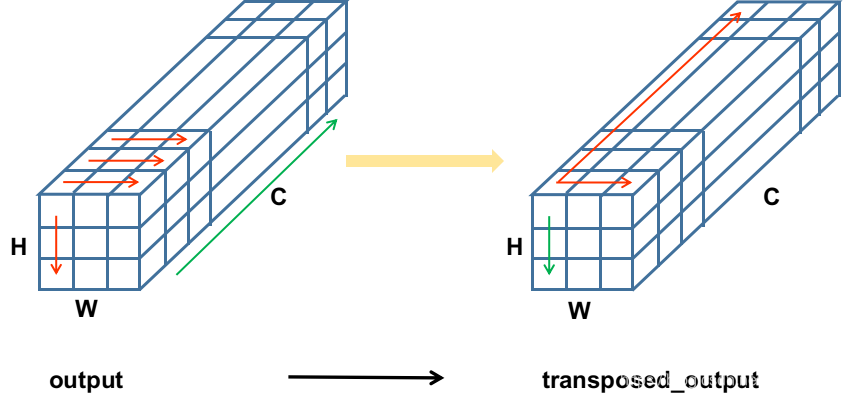
		 * 注意到输出内容是被拉成了一维向量,存储在output里面的,需要按照一定的顺序将其取出来;
		 * 现在的output存储方式,是沿着通道方向盘旋上升的,即以H*W为平面,沿着C的方向一层一层往
		 * 上叠加。需要将它转换为transposed_output,以W*C为平面,沿着H的方向一层一层往叠加。
		 * 这样转换的目的是为了便于按照C的方向解析预测结果。
		 */
        int offset = 0;
        float *transposed_output = new float[total_size];

        for (int i = 0; i < output_shape.size(); i++)
        {
            auto shape = output_shape[i]; // nchw
            int chw = shape[1] * shape[2] * shape[3];
            int hw = shape[2] * shape[3];
            for (int n = 0; n < shape[0]; n++)
            {
                int offset_n = offset + n * chw;
                for (int h = 0; h < shape[2]; h++)
                {
                    for (int w = 0; w < shape[3]; w++)
                    {
                        int h_w = h * shape[3] + w;
                        for (int c = 0; c < shape[1]; c++)
                        {
                            int offset_c = offset_n + hw * c + h_w;
                            *transposed_output++ = output[offset_c];
                        }
                    }
                }
            }
            offset += shape[0] * chw;
        }
#endif
        vector<vector<int>> shapes;
        for (int i = 0; i < output_shape.size(); i++)
        {
            auto shape = output_shape[i];
            std::vector<int> tmp = {shape[2], shape[3], 3, 4 + 1 + _category};
            shapes.push_back(tmp);
        }

        int outIndex = 0;

        offset = 0;
        std::vector<float> label_score;
        std::vector<std::vector<DetectionRes>> all_detections(_category);
#if 1
        for (int i = 0; i < output_shape.size(); i++)
        { // batch size
            auto masks = g_masks[i];
            std::vector<std::vector<int>> anchors;
            for (auto mask : masks)
                anchors.push_back(g_anchors[mask]);

            auto shape = shapes[i];

            for (int h = 0; h < shape[0]; h++)
            {
                int offset_h = offset + h * shape[1] * shape[2] * shape[3];
                for (int w = 0; w < shape[1]; w++)
                {
                    int offset_w = offset_h + w * shape[2] * shape[3];
                    for (int c = 0; c < shape[2]; c++)
                    {
                        outIndex++;

                        int offset_c = offset_w + c * shape[3];

                        float *ptr = transposed_output + offset_c;
                        const float *cls_ptr = ptr + 5;

                        ptr[4] = sigmoid(ptr[4]); // conf
                        float maxProb = 0.0f;
                        int maxIndex = -1;

                        for (uint i = 0; i < _category; ++i)
                        {
                            float prob = ptr[5 + i];

                            if (prob > maxProb)
                            {
                                maxProb = prob;
                                maxIndex = i;
                            }
                        }
                        float score = ptr[4] * sigmoid(maxProb);

                        if (score < _obj_threshold)
                            continue;

                        // 这里简单来说就是在做yololayer的步骤
                        // 将基于anchors预测到的值,还原到在输入图上(416*416),基于右上角的坐标
                        ptr[0] = (sigmoid(ptr[0]) + w) * _current_dim / shape[0]; // center x
                        ptr[1] = (sigmoid(ptr[1]) + h) * _current_dim / shape[1]; // center y
                        ptr[2] = exponential(ptr[2]) * anchors[c][0];             // cal w
                        ptr[3] = exponential(ptr[3]) * anchors[c][1];             // cal h

                        DetectionRes det;
                        det.prob = ptr[4];
                        det.label1 = ptr[5];
                        det.label2 = ptr[6];
                        det.x1 = ptr[0] - ptr[2] / 2;
                        det.y1 = ptr[1] - ptr[3] / 2;
                        det.x2 = ptr[0] + ptr[2] / 2;
                        det.y2 = ptr[1] + ptr[3] / 2;
                        det.score = score;
                        det.max_label = maxProb;
                        det.max_id = maxIndex;

                        all_detections[det.max_id].push_back(det);
                    }
                }
            }
            offset += shape[0] * shape[1] * shape[2] * shape[3];
        }
#endif

        delete[] transposed_output;

        for (int i = 0; i < all_detections.size(); i++)
        {
            // 每个类别排序,然后做一遍NMS
            std::sort(all_detections[i].begin(), all_detections[i].end(), [=](const DetectionRes &left, const DetectionRes &right) {
                return left.score > right.score;
            });
            DoNms(all_detections[i], _nms_threshold);
        }
        // 返回
        return all_detections;
    }
转换前后内存排列方式:output -> transposed_output
欢迎大家讨论,并提出宝贵意见,特别在做TensorRT部署的小伙伴欢迎交流,我自己也有很多问题,期待大家评论交流。微信:CcozzzZ

魔乐社区(Modelers.cn) 是一个中立、公益的人工智能社区,提供人工智能工具、模型、数据的托管、展示与应用协同服务,为人工智能开发及爱好者搭建开放的学习交流平台。社区通过理事会方式运作,由全产业链共同建设、共同运营、共同享有,推动国产AI生态繁荣发展。
更多推荐



 2
2 0
0- 0


 已为社区贡献1条内容

所有评论(0)