react Ant Design 中 craco 配置 及 装饰器的配置
官方文档 查阅下载安装yarn add antd安装 antdyarn add @craco/craco安装 cracoyarn add craco-less 下载 less ,支持 less 格式文件yarn add @babel/plugin-proposal-decorators下载支持装饰器使用的模块package.json 中修改属性"scripts": {"start": "craco
·
- 下载安装
yarn add antd安装 antdyarn add @craco/craco安装 cracoyarn add craco-less下载 less ,支持 less 格式文件yarn add @babel/plugin-proposal-decorators下载支持装饰器使用的模块
- package.json 中修改属性
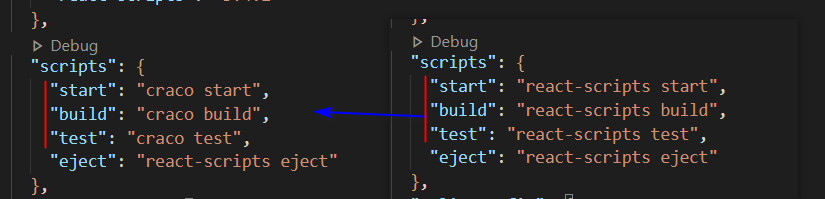
  "scripts": {
    "start": "craco start",
    "build": "craco build",
    "test": "craco test",
    "eject": "react-scripts eject"
  },
- 根目录创建 craco.config.js 文件
- 里面的代码:
const CracoLessPlugin = require('craco-less');

module.exports = {
  babel: {   //用来支持装饰器
	   plugins: [["@babel/plugin-proposal-decorators", { legacy: true }]]
  },
  plugins: [
    {
      plugin: CracoLessPlugin,
      options: {
        lessLoaderOptions: {
          lessOptions: {
            modifyVars: { '@primary-color': '#1DA57A' },
            javascriptEnabled: true,
          },
        },
      },
    },
  ],
};
- 引入 less 文件
- 在 src 目录下的 index.js 文件中
import 'antd/dist/antd.less'
- 某个组件中使用 antD 组件
import {Button} from 'antd'
render(){
	return(
		<div>
			<Button>点击一下</Button>
		</div>
	)
}
- 某个组件中使用 装饰器
- 主要用于高阶组件
import React, { Component } from 'react'

import WithCopy from "./WithCopy"  //WithCopy 是一个高阶组件
import {Button} from "antd"

@WithCopy
class About extends Component {
    render() {
        return (
            <div>
                <Button>点击一下</Button>
            </div>
        )
    }
}
// export default WithCopy(About)
export default About
//写法不同,功能下同
1. @WithCopy + export default About
	===
2. export default WithCopy(About)

魔乐社区(Modelers.cn) 是一个中立、公益的人工智能社区,提供人工智能工具、模型、数据的托管、展示与应用协同服务,为人工智能开发及爱好者搭建开放的学习交流平台。社区通过理事会方式运作,由全产业链共同建设、共同运营、共同享有,推动国产AI生态繁荣发展。
更多推荐



 2
2 0
0- 0


 已为社区贡献23条内容

所有评论(0)