typescript egg mysql_egg + ts + myspl + sequelize
一、egg 初始化$ mkdir egg-example$ cd egg-example$ npm init egg --type=simple$ npm i$ npm run dev二、egg ts里面集成了有ts编译功能将我们的 js 文件改成 ts需要将 sequelize 换成 sequelize-typescriptimport { Sequelize } from 'sequelize
一、egg 初始化
$ mkdir egg-example
$ cd egg-example
$ npm init egg --type=simple
$ npm i
$ npm run dev
二、egg ts
里面集成了有ts编译功能
将我们的 js 文件改成 ts
需要将 sequelize 换成 sequelize-typescript
import { Sequelize } from 'sequelize-typescript';
// import * as Sequelize from 'sequelize'
将后续用sequelize-typescript写的模型类加入到sequlize实例中
import Car from '../app/models/Car';
const db = new Sequelize({
dialect: 'mysql',
operatorsAliases: true, //是否识别字段别名中的下划线
database: 'shaliang',
username: 'root',
password: 'root',
timezone: '+08:00',//更改为北京时区
});
db.addModels([Car]);
运行 npm run dev
访问页面 报错 Please set config.keys first
配置文件 config.default.ts 没有生成对应的 *.d.ts
添加 tsconfig.json
{
"compileOnSave": true,
"compilerOptions": {
"target": "es2017",
"module": "commonjs",
"strict": true,
"noImplicitAny": false,
"experimentalDecorators": true,
"emitDecoratorMetadata": true,
"charset": "utf8",
"allowJs": false,
"pretty": true,
"noEmitOnError": false,
"noUnusedLocals": true,
"noUnusedParameters": true,
"allowUnreachableCode": false,
"allowUnusedLabels": false,
"strictPropertyInitialization": false,
"noFallthroughCasesInSwitch": true,
"skipLibCheck": true,
"skipDefaultLibCheck": true,
"inlineSourceMap": true,
"importHelpers": true
},
"exclude": [
"app/public",
"app/web",
"app/views"
]
}
package.json
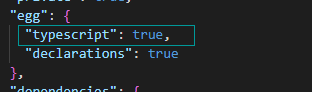
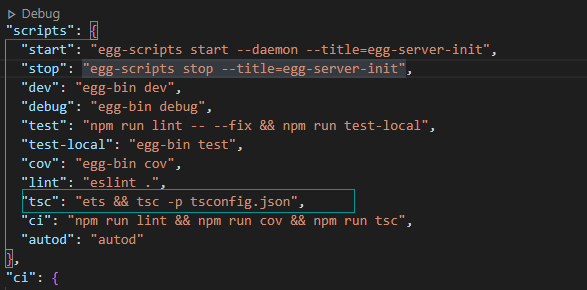
在删除 node_modules 重新 运行 npm i
在运行 npm run dev
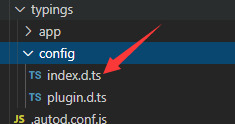
有index.d.ts就正常了,具体看实际情况
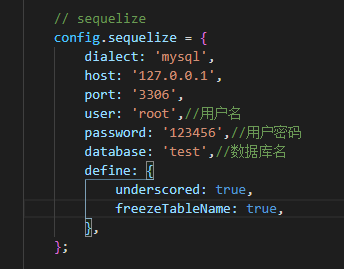
三、egg myspl sequelize
依赖包
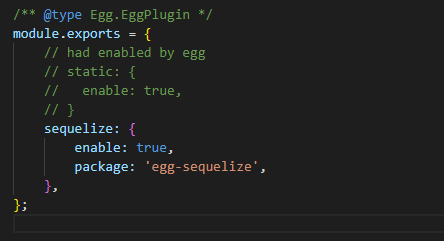
npm install --save egg-sequelize mysql2
plugin.ts
config.default.ts
app/model/user.ts
'use strict';
const moment = require('moment');
module.exports = app => {
const { INTEGER, DATE, STRING, ENUM } = app.Sequelize;
const User = app.model.define('user', {
id: { type: INTEGER(11), primaryKey: true, autoIncrement: true },
username: { type: STRING(255), allowNull: false },
password: { type: STRING(255), allowNull: false },
age: { type: ENUM('未知', '男', '女'), defaultValue: '未知', allowNull: false },
created_at: { type: DATE, allowNull: false, get() { return moment((this as any).getDataValue('created_at')).format('YYYY-MM-DD HH:mm:ss'); } },
updated_at: { type: DATE, allowNull: false, get() { return moment((this as any).getDataValue('updated_at')).format('YYYY-MM-DD HH:mm:ss'); } },
}, {
paranoid: false,
timestamps: true,
});
return User;
};
app/controller/user.ts
'use strict';
import { Controller } from "egg";
function toInt(str) {
if (typeof str === 'number') return str;
if (!str) return str;
return parseInt(str, 10) || 0;
}
class UserController extends Controller {
async index() {
const { ctx } = this;
const query = { limit: toInt(ctx.query.limit), offset: toInt(ctx.query.offset) };
ctx.body = await ctx.model.User.findAll(query);
}
async show() {
const { ctx } = this;
ctx.body = await ctx.model.User.findByPk(toInt(ctx.params.id));
}
async create() {
const { ctx } = this;
const { username } = ctx.request.body;
const user = await ctx.model.User.create({ username });
ctx.status = 201;
ctx.body = user;
}
async update() {
const { ctx } = this;
const id = toInt(ctx.params.id);
const user = await ctx.model.User.findByPk(id);
if (!user) {
ctx.status = 404;
return;
}
const { username } = ctx.request.body;
await user.update({ username });
ctx.body = user;
}
async destroy() {
const { ctx } = this;
const id = toInt(ctx.params.id);
const user = await ctx.model.User.findByPk(id);
if (!user) {
ctx.status = 404;
return;
}
await user.destroy();
ctx.status = 200;
}
}
module.exports = UserController;
四、sequelize 生成模型 创建数据表
(一)、利用 sequelize-cli 可以快速生成表模型
1、全局安装
npm install sequelize-cli -g
2、 初始化 项目的数据库配置信息
npx sequelize init
生成 database/
1.migrate 目录
2.model 目录
3.config.json
3、 创建 user 表模型
npx sequelize model:generate --name user --attributes name:string,deadline:date,content:string
4、 根据模型创建数据表
npx sequelize db:migrate
5、 sequelize-cli 配置文件
.sequelizerc
'use strict';
const path = require('path');
module.exports = {
config: path.join(__dirname, 'database/config.json'),
'migrations-path': path.join(__dirname, 'database/migrations'),
'seeders-path': path.join(__dirname, 'database/seeders'),
'models-path': path.join(__dirname, 'app/model'),
};
(二)、利用 egg-sequelize-auto 可以快速生成表模型
比较重要的参数说明
Options:
-h, --host [required] * 数据库地址
-d, --database [required] * 数据库名称
-u, --user # 数据库用户名
-x, --pass # 数据库密码
-p, --port # 数据库端口号
-c, --config # Sequelize的构造函数“options”标记对象的JSON文件路径
-o, --output # 输出文件路径
-e, --dialect # 数据库类型:postgres, mysql, sqlite
-a, --additional # 包含在model的配置参数中define的模型定义的JSON文件路径
-t, --tables # 要导出的表名,多个表名逗号分隔,空值就导出所有表模型
-T, --skip-tables # 要跳过的表名,多个表名逗号分隔
-C, --camel # 使用驼峰命名模型和字段
-n, --no-write # 是否写入文件
-s, --schema # 从中检索表的数据库架构(翻译不动,也没明白作用,原文:Database schema from which to retrieve tables)
-z, --typescript # 将模型输出为typescript文件
1、全局安装依赖
npm install -g egg-sequelize-auto
npm install -g mysql2
2、生成需要的表结构
egg-sequelize-auto -o "./model" -d databaseName -h localhost -u username -p port -x password -t tableName
3、生成用户日志表模型
在model中就可以看到生成了一个文件,是针对用户日志的表的模型userlogs.js
egg-sequelize-auto -o "./model" -h 192.168.0.205 -d digapisids -u root -x MVfagsbHHFQnjUmf# -p 3306 -t userlogs
4、一次性生成所有表结构
egg-sequelize-auto -o "./model" -d digapisids -h 192.168.0.205 -u root -x MVKafZN39QnjUmf# -p 13306 -e mysql
5、命令脚本 sequelize.model.js
'use strict';
// sequelize.model.js
const child_process = require('child_process');
const { exec } = child_process;
const modelName = process.argv[2];
const database = {
// [required] * 数据库地址
host: 'localhost',
// [required] * 数据库名称
database: 'ips',
// 数据库用户名
user: 'root',
// 数据库密码
pass: '',
// 数据库端口号
port: 3306,
// Sequelize的构造函数“options”标记对象的JSON文件路径
config: '',
// 输出文件路径
output: './dbModel',
// 数据库类型:postgres, mysql, sqlite
dialect: 'mysql',
// 包含在model的配置参数中define的模型定义的JSON文件路径
additional: '',
// 表名,多个表名逗号分隔
tables: modelName || '',
// 要跳过的表名,多个表名逗号分隔
'skip-tables': '',
// 使用驼峰命名模型和字段
camel: true,
// 是否写入文件
'no-write': false,
// 从中检索表的数据库架构
schema: false,
// 将模型输出为typescript文件
typescript: false,
};
let connectShell = 'sequelize-auto';
for (const i in database) {
const value = database[i];
if (value) {
if (value === true) {
connectShell += ` --${i}`;
} else {
connectShell += ` --${i} ${value}`;
}
}
}
exec(connectShell, (err, stdout, stderr) => {
console.log(`stderr: ${stderr}`);
console.log(`stdout: ${stdout}`);
if (err) {
console.log(`exec error: ${err}`);
}
});
6、package.json
// package.json
{
"scripts": {
"model": "node sequelize.model.js"
}
}
# 把所有表model文件
npm run model
# 把单个对应表名model文件
npm run model user
五、egg + vscode debug 调试模式

魔乐社区(Modelers.cn) 是一个中立、公益的人工智能社区,提供人工智能工具、模型、数据的托管、展示与应用协同服务,为人工智能开发及爱好者搭建开放的学习交流平台。社区通过理事会方式运作,由全产业链共同建设、共同运营、共同享有,推动国产AI生态繁荣发展。
更多推荐



 0
0 0
0- 0


 已为社区贡献8条内容

所有评论(0)