vue elementui的Upload上传阿里云文件,以及删除文件,自定义上传文件格式
vue elementui的Upload上传阿里云文件,以及删除文件,自定义上传文件格式,
·
一、整体过程大概叙述以及完整上传预览
我这边的上传流程是需要在上传图片以前请求一次后端给的阿里云接口,接口会返回阿里云字段的上传图片的链接必要参数,再将本次上传的文件根据自己定义的字段拼接起来就成功拿到完整的文件路径
还可以让上传的文件实现下载功能,这个功能一般配合后端进行,我就没放入,感兴趣的小伙伴可以研究下
二、上传主要代码字段解释
 <el-upload class="upload-demo" :action="uploadUrl" :on-preview="handlePreview" :data="headerObj"
            :on-remove="handleRemove" multiple :limit="3" :on-success="handleAvatarSuccess" :file-list="fileList"
            :on-change="handleChange" :before-upload="beforeAvatarUpload" :show-file-list="false">
            <el-button size="small" type="primary">上传文件</el-button>
            <div slot="tip" class="el-upload__tip">只能上传jpg/png文件,且不超过500kb</div>
        </el-upload>
        <el-table :data="uploadedFiles" style="margin-top: 20px;" v-if="uploadedFiles.length > 0">
            <el-table-column prop="name" label="文件名" />
            <el-table-column label="操作">
                <template slot-scope="scope">
                    <el-button @click="removeFile(scope.row)">删除</el-button>
                </template>
            </el-table-column>
        </el-table>
action:上传图片路径,
:show-file-list=“false” 禁用默认上传成功之后的展示列表
before-upload:上传之前的钩子
data:极为重要,阿里云的上传的额外参数是用data上传的,不是headers,我一开始就是用错了headers才上传失败,卡了好长时间
on-success:图片上传成功之后的钩子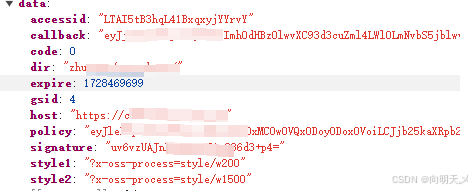
请求成功后的阿里云返回结果,根据字段进行拼接完整路径
三、完整代码
<template>
    <div>
        <!-- 待办事项 -->
        <el-upload class="upload-demo" :action="uploadUrl" :on-preview="handlePreview" :data="headerObj"
            :on-remove="handleRemove" multiple :limit="3" :on-success="handleAvatarSuccess" :file-list="fileList"
            :on-change="handleChange" :before-upload="beforeAvatarUpload" :show-file-list="false">
            <el-button size="small" type="primary">上传文件</el-button>
            <div slot="tip" class="el-upload__tip">只能上传jpg/png文件,且不超过500kb</div>
        </el-upload>
        <el-table :data="uploadedFiles" style="margin-top: 20px;" v-if="uploadedFiles.length > 0">
            <el-table-column prop="name" label="文件名" />
            <el-table-column label="操作">
                <template slot-scope="scope">
                    <el-button @click="removeFile(scope.row)">删除</el-button>
                </template>
            </el-table-column>
        </el-table>
    </div>
</template>
<script>
export default {
    name: "AddProject",
    data() {
        return {
            fileList: [],
            uploadUrl: '', // 上传地址
            headerObj: {},
            uploadedFiles: [], // 已上传文件列表
        }
    },
    methods: {
        getCurrentDate() {
            const now = new Date();
            const year = now.getFullYear(); // 获取年份
            const month = String(now.getMonth() + 1).padStart(2, '0'); // 获取月份,并补齐为两位数
            const day = String(now.getDate()).padStart(2, '0'); // 获取日期,并补齐为两位数
            return `${year}${month}${day}`; // 返回格式化后的年月日字符串
        },
        getCurrentTime() {
            const now = new Date();
            const hours = String(now.getHours()).padStart(2, '0'); // 获取小时,并补齐为两位数
            const minutes = String(now.getMinutes()).padStart(2, '0'); // 获取分钟,并补齐为两位数
            const seconds = String(now.getSeconds()).padStart(2, '0'); // 获取秒,并补齐为两位数
            return `${hours}${minutes}${seconds}`; // 返回格式化后的时分秒字符串
        },

        async beforeAvatarUpload(file) {
            console.log("beforeAvatarUpload,file", JSON.parse(JSON.stringify(file)));
            // await this.ossGongcheng()
            const fileExt = file.name.slice(((file.name.lastIndexOf(".") - 1) >>> 0) + 2);
            //此处是我的网络请求,我的网络请求是封装后的格式,用的时候记得在这里
            //替换掉我的请求,换成你们自己阿里云请求
            const res = await this.$axios("project/ossGongcheng");
            console.log("res", JSON.parse(JSON.stringify(res)));
            if (res.data.code == 0) {
                this.data = res.data
                this.uploadUrl = res.data.host
                // console.log("this.uploadUrl", JSON.parse(JSON.stringify(this.uploadUrl)));
                this.filename = res.data.dir + res.data.gsid + '/' + this.getCurrentDate() + '/' + this.getCurrentTime() + '-' + Math.floor(Math.random() * 1000000) + '.' + fileExt
                this.headerObj = {
                    'key': this.filename,
                    'policy': res.data.policy,
                    'OSSAccessKeyId': res.data.accessid,
                    'success_action_status': "200",
                    'signature': res.data.signature,
                    'callback': res.data.callback,
                }
            }
            const extension = file.name.substring(file.name.lastIndexOf('.') + 1).toLowerCase();
            const isXLS = extension == 'xls' || extension == 'xlsx' || extension == 'pdf';
            if (!isXLS) {
                this.$message({
                    message: '上传文件只能是 xls、xlsx、pdf 格式!',
                    type: 'warning'
                });
                return false
            }
            return true
        },
        handleRemove(file, fileList) {
            console.log("fileList,handleRemove", JSON.parse(JSON.stringify(fileList)));
            console.log("file,handleRemove", JSON.parse(JSON.stringify(file)));
            this.uploadedFiles = this.uploadedFiles.filter(item => item.name !== file.name);
        },
        handleChange(file, fileList) {
            // console.log("response,handleChange",JSON.parse(JSON.stringify(response)));
            console.log("fileList,handleChange", JSON.parse(JSON.stringify(fileList)));
            console.log("file,handleChange", JSON.parse(JSON.stringify(file)));
        },
        handlePreview(file) {
            console.log("file,handlePreview", JSON.parse(JSON.stringify(file)));
        },

        handleAvatarSuccess(file, fileList, response) {
            console.log("response,handleAvatarSuccess", JSON.parse(JSON.stringify(response)));
            console.log("fileList,handleAvatarSuccess", JSON.parse(JSON.stringify(fileList)));
            console.log("file,handleAvatarSuccess", JSON.parse(JSON.stringify(file)));
            this.uploadedFiles.push({
                name: fileList.name,
                url: fileList.response.data.filename
            });
        },
        removeFile(file) {
            console.log("file", JSON.parse(JSON.stringify(file)));
            this.uploadedFiles = this.uploadedFiles.filter(item => item.name !== file.name);
            console.log("this.uploadedFiles", JSON.parse(JSON.stringify(this.uploadedFiles)));
        },
    }
}
</script>

魔乐社区(Modelers.cn) 是一个中立、公益的人工智能社区,提供人工智能工具、模型、数据的托管、展示与应用协同服务,为人工智能开发及爱好者搭建开放的学习交流平台。社区通过理事会方式运作,由全产业链共同建设、共同运营、共同享有,推动国产AI生态繁荣发展。
更多推荐



 3
3 0
0- 0


 已为社区贡献8条内容

所有评论(0)