android webview 放大缩小,Android 上的 Web 视图缩放
Android 上的 Web 视图缩放WebView Zoom on Android05/09/2019本文内容此 Android 平台特定平台支持 "缩小到缩放" 和 "缩放" 控件 WebView 。This Android platform-specific enables pinch-to-zoom and a zoom control on a WebView. 它通过将 WebView
Android 上的 Web 视图缩放WebView Zoom on Android
05/09/2019
本文内容
此 Android 平台特定平台支持 "缩小到缩放" 和 "缩放" 控件 WebView 。This Android platform-specific enables pinch-to-zoom and a zoom control on a WebView. 它通过将 WebView.EnableZoomControls 和 WebView.DisplayZoomControls 可绑定属性设置为值,在 XAML 中使用 boolean :It's consumed in XAML by setting the WebView.EnableZoomControls and WebView.DisplayZoomControls bindable properties to boolean values:
xmlns:android="clr-namespace::::no-loc(Xamarin.Forms):::.PlatformConfiguration.AndroidSpecific;assembly=:::no-loc(Xamarin.Forms):::.Core">
android:WebView.EnableZoomControls="true"
android:WebView.DisplayZoomControls="true" />
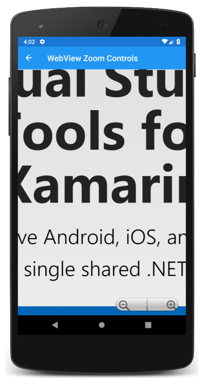
WebView.EnableZoomControls可绑定属性控制是否在上启用了 "缩小到缩放" WebView ,并 WebView.DisplayZoomControls 控制是否在上覆盖缩放控件 WebView 。The WebView.EnableZoomControls bindable property controls whether pinch-to-zoom is enabled on the WebView, and the WebView.DisplayZoomControls bindable property controls whether zoom controls are overlaid on the WebView.
或者,可以使用 Fluent API 从 c # 中使用特定于平台的:Alternatively, the platform-specific can be consumed from C# using the fluent API:
using :::no-loc(Xamarin.Forms):::.PlatformConfiguration;
using :::no-loc(Xamarin.Forms):::.PlatformConfiguration.AndroidSpecific;
...
webView.On()
.EnableZoomControls(true)
.DisplayZoomControls(true);
WebView.On方法指定此平台特定的仅在 Android 上运行。The WebView.On method specifies that this platform-specific will only run on Android. The WebView.EnableZoomControls method, in the :::no-loc(Xamarin.Forms):::.PlatformConfiguration.AndroidSpecific namespace, is used to control whether pinch-to-zoom is enabled on the WebView. WebView.DisplayZoomControls同一命名空间中的方法用于控制缩放控件是否在上重叠 WebView 。The WebView.DisplayZoomControls method, in the same namespace, is used to control whether zoom controls are overlaid on the WebView. 此外, WebView.ZoomControlsEnabled 和 WebView.ZoomControlsDisplayed 方法可用于分别返回是否启用了 "缩小到缩放" 和 "缩放" 控件。In addition, the WebView.ZoomControlsEnabled and WebView.ZoomControlsDisplayed methods can be used to return whether pinch-to-zoom and zoom controls are enabled, respectively.
因此,可以在上启用 "缩小到缩放 WebView ",并在上重叠缩放控件 WebView :The result is that pinch-to-zoom can be enabled on a WebView, and zoom controls can be overlaid on the WebView:
重要
缩放控件必须通过各自的可绑定属性或方法启用和显示,才能在上重叠 WebView 。Zoom controls must be both enabled and displayed, via the respective bindable properties or methods, to be overlaid on a WebView.
相关链接Related links

魔乐社区(Modelers.cn) 是一个中立、公益的人工智能社区,提供人工智能工具、模型、数据的托管、展示与应用协同服务,为人工智能开发及爱好者搭建开放的学习交流平台。社区通过理事会方式运作,由全产业链共同建设、共同运营、共同享有,推动国产AI生态繁荣发展。
更多推荐



 0
0 0
0- 0


 已为社区贡献7条内容

所有评论(0)