Vue3 + TypeScript + Element Plus + el-table 表格出现双滚动条的解决方案
只需将包裹 el-table 的 div 的高度设置为 100% 即可。1)、div 添加类名 <div class="table-container">display: flex;// 使用flex布局。// 继承父容器高度。// 隐藏外部滚动条。// 建立定位上下文。// 滚动区域填充表格。2)、设置 div 样式。父容器必须设置高度(如。
·
原来的代码:
<script setup lang="ts" name="ReagentTable">
import { useSetTableColumnWidth } from "@/hooks/useSetTableColumnWidth";
import { useSystemOptionKeyVal } from "@/hooks/useSystemOptionKeyVal";
import type { ElTableExtendedInstance, IColumnConfig } from "@/interface";
import { computed, nextTick, onMounted, ref } from "vue";
import useReagentStore from "../stores";
import type { IReagent } from "../types";

const emit = defineEmits<{
  (e: "modify-click", index: number, row: IReagent): void;
  (e: "logout-click", id: number): void;
  (e: "detail-click", id: number): void;
}>();

const store = useReagentStore();
// 表格实例对象
const tableRef = ref<ElTableExtendedInstance | null>(null);
// 表格列配置列表
// todo: 从数据库中获取,或者传递参数,由 useSetTableColumnWidth 从数据库中获取
const columnConfigs = ref<IColumnConfig[]>([
  { prop: "index", label: "序号", width: 60 },
  { prop: "batchNo", label: "批号", width: 120 },
  { prop: "validityDate", label: "有效期至", width: 110 },
  { prop: "amount", label: "库存数量", width: 80 }
]);
// 设置表格列宽,使用 computed 定义组合式函数 hook,并且自动处理 null 情况
const setTableColumnWidth = computed(() => {
  return tableRef.value ? useSetTableColumnWidth(tableRef, columnConfigs, ref("Reagent_reagent")) : null;
});
// 边框标识
const isBorder = ref(false);
// 过期提醒颜色,CSS 变量,通过 v-bind() 绑定给元素样式
// const cssColorVar = ref("#fdd4e5");
// const cssColorObj = ref({ color: "skyblue" });
const expirationReminderColor = useSystemOptionKeyVal("ResourcesExpirationReminderColor");

// 查改
const onModifyClick = async (index: number, row: IReagent) => {
  emit("modify-click", index, row);
};

// 注销
const onLogoutClick = async (id: number) => {
  emit("logout-click", id);
};

// 明细
const onDetailClick = async (id: number) => {
  emit("detail-click", id);
};

// 重置列宽
const resetColumnWidth = async () => {
  setTableColumnWidth.value?.resetColumnWidth();
};

// 设置表格行类名
const setRowClassName = ({ row, rowIndex }: { row: IReagent; rowIndex: number }) => {
  if (!row.validityDate) return;

  // 过期, 当前日期 大于 有效期至
  // row.validityDate = 2025-06-15,Date(row.validityDate) = Sun Jun 15 2025 08:00:00 GMT+0800 (中国标准时间)
  // 这样 new Date() > new Date(row.validityDate) 就会返回 true,有效期至2025-06-15就是过期的
  // 但实际上2025-06-15还没有过,所以这里需要加1天,把row.validityDate = 2025-06-16去计算是否过期
  let validityDate = new Date(row.validityDate!);
  // 天数加1
  validityDate.setDate(validityDate.getDate() + 1);
  if (new Date() > validityDate) {
    return "expire-row";
  }
};

onMounted(async () => {
  // 等待表格加载完成
  await nextTick();
  // 加载表格列宽
  setTableColumnWidth.value?.loadColumnWidth();
});

defineExpose({
  isBorder,
  resetColumnWidth
});
</script>

<template>
  <div>
    <el-table
      ref="tableRef"
      :data="store.reagentPageList"
      v-loading="store.loading"
      :border="isBorder"
      highlight-current-row
      :row-class-name="setRowClassName"
      style="width: 100%; height: 100%"
      @header-dragend="setTableColumnWidth?.saveColumnWidth">
      <el-table-column
        type="index"
        prop="index"
        label="序号"
        width="60"
        fixed="left"
        header-align="center"
        align="center" />
      <el-table-column
        prop="reagentName"
        label="名称 规格"
        min-width="200"
        fixed="left"
        header-align="left"
        sortable
        show-overflow-tooltip>
        <template #default="scope">
          <span class="material-name">{{ scope.row.reagentName }}</span>
          <span class="material-spec">{{ scope.row.reagentSpec }}</span>
        </template>
      </el-table-column>
      <el-table-column prop="batchNo" label="批号" width="120" header-align="left" show-overflow-tooltip />
      <el-table-column
        prop="validityDate"
        label="有效期至"
        width="110"
        header-align="center"
        align="center"
        show-overflow-tooltip />
      <el-table-column prop="amount" width="80" header-align="center" align="center" resizable show-overflow-tooltip>
        <template #header>
          <div class="custom-table-column-header-amount-unit-div">库存数量</div>
        </template>
        <template #default="scope">
          <div class="custom-table-row-default-amount-unit-div">
            <span>{{ scope.row.amount }}</span>
            <span>{{ scope.row.reagentUnit }}</span>
          </div>
        </template>
      </el-table-column>
      <!-- <el-table-column prop="total" label="余额" width="110" header-align="right" align="right" show-overflow-tooltip>
          <template #default="scope">
            {{ formatMoney(scope.row.total, "¥", 2) }}
          </template>
        </el-table-column> -->
      <el-table-column
        label="操作"
        header-align="center"
        align="center"
        fixed="right"
        :width="store.authorityList.includes(300101) ? 150 : 70">
        <template #default="scope">
          <el-button
            v-if="store.authorityList.includes(300101)"
            class="table-btn"
            type="primary"
            size="default"
            text
            @click="onModifyClick(scope.$index, scope.row)"
            >查改</el-button
          >
          <el-button
            v-if="store.authorityList.includes(300101)"
            class="table-btn"
            type="warning"
            size="default"
            text
            @click="onLogoutClick(scope.row.id)"
            >注销</el-button
          >
          <el-button class="table-btn" type="primary" size="default" text @click="onDetailClick(scope.row.id)"
            >明细</el-button
          >
        </template>
      </el-table-column>
    </el-table>
  </div>
</template>

<style scoped lang="scss">
.table-btn {
  margin: 0;
  padding: 0 5px;
}
.custom-table-column-header-amount-unit-div {
  text-align: justify;
  text-align-last: justify;
}
.custom-table-row-default-amount-unit-div {
  display: flex;
  justify-content: space-between;
}
// 过期颜色
:deep .el-table .expire-row {
  // 基础变量,推荐使用双引号包裹
  // background-color: v-bind("cssColorVar");
  // 基础变量,可以省略双引号
  // background-color: v-bind(cssColorVar);
  // 对象变量,必须使用双引号包裹
  // background-color: v-bind("cssColorObj.color");
  // 对象变量,必须使用双引号包裹,属性 systemOptionValue 为 Ref,需 .value 取值
  background-color: v-bind("expirationReminderColor.systemOptionValue.value");
}
</style>
AI修改方案:
解决方案要点:
-
HTML结构:
-
添加
.table-container作为包裹容器 -
设置
<el-table height="100%">让表格填充容器高度
-
-
CSS样式:
scss
复制
下载
.table-container { height: 100%; // 继承父容器高度 min-height: 300px; // 确保最小高度 display: flex; // 使用flex布局 flex-direction: column; overflow: hidden; // 隐藏外部滚动条 position: relative; // 建立定位上下文 :deep(.el-table) { flex: 1; // 填充容器 display: flex; flex-direction: column; .el-table__body-wrapper { flex: 1; // 滚动区域填充表格 overflow: auto; // 启用内部滚动 } } } -
使用注意事项:
-
父容器必须设置高度(如
height: 100vh或固定高度) -
如果使用嵌套布局,确保所有父级都有高度:
html
复制
下载
运行
<div style="height: 100vh;">
  <div style="height: 100%;">
    <ReagentTable />
  </div>
</div>
-
<script setup lang="ts" name="ReagentTable">
import { useSetTableColumnWidth } from "@/hooks/useSetTableColumnWidth";
import { useSystemOptionKeyVal } from "@/hooks/useSystemOptionKeyVal";
import type { ElTableExtendedInstance, IColumnConfig } from "@/interface";
import { computed, nextTick, onMounted, ref } from "vue";
import useReagentStore from "../stores";
import type { IReagent } from "../types";

const emit = defineEmits<{
  (e: "modify-click", index: number, row: IReagent): void;
  (e: "logout-click", id: number): void;
  (e: "detail-click", id: number): void;
}>();

const store = useReagentStore();
// 表格实例对象
const tableRef = ref<ElTableExtendedInstance | null>(null);
// 表格列配置列表
// todo: 从数据库中获取,或者传递参数,由 useSetTableColumnWidth 从数据库中获取
const columnConfigs = ref<IColumnConfig[]>([
  { prop: "index", label: "序号", width: 60 },
  { prop: "batchNo", label: "批号", width: 120 },
  { prop: "validityDate", label: "有效期至", width: 110 },
  { prop: "amount", label: "库存数量", width: 80 }
]);
// 设置表格列宽,使用 computed 定义组合式函数 hook,并且自动处理 null 情况
const setTableColumnWidth = computed(() => {
  return tableRef.value ? useSetTableColumnWidth(tableRef, columnConfigs, ref("Reagent_reagent")) : null;
});
// 边框标识
const isBorder = ref(false);
// 过期提醒颜色,CSS 变量,通过 v-bind() 绑定给元素样式
// const cssColorVar = ref("#fdd4e5");
// const cssColorObj = ref({ color: "skyblue" });
const expirationReminderColor = useSystemOptionKeyVal("ResourcesExpirationReminderColor");

// 查改
const onModifyClick = async (index: number, row: IReagent) => {
  emit("modify-click", index, row);
};

// 注销
const onLogoutClick = async (id: number) => {
  emit("logout-click", id);
};

// 明细
const onDetailClick = async (id: number) => {
  emit("detail-click", id);
};

// 重置列宽
const resetColumnWidth = async () => {
  setTableColumnWidth.value?.resetColumnWidth();
};

// 设置表格行类名
const setRowClassName = ({ row, rowIndex }: { row: IReagent; rowIndex: number }) => {
  if (!row.validityDate) return;

  // 过期, 当前日期 大于 有效期至
  // row.validityDate = 2025-06-15,Date(row.validityDate) = Sun Jun 15 2025 08:00:00 GMT+0800 (中国标准时间)
  // 这样 new Date() > new Date(row.validityDate) 就会返回 true,有效期至2025-06-15就是过期的
  // 但实际上2025-06-15还没有过,所以这里需要加1天,把row.validityDate = 2025-06-16去计算是否过期
  let validityDate = new Date(row.validityDate!);
  // 天数加1
  validityDate.setDate(validityDate.getDate() + 1);
  if (new Date() > validityDate) {
    return "expire-row";
  }
};

onMounted(async () => {
  // 等待表格加载完成
  await nextTick();
  // 加载表格列宽
  setTableColumnWidth.value?.loadColumnWidth();
});

defineExpose({
  isBorder,
  resetColumnWidth
});
</script>

<template>
  <!-- 修改:添加高度控制容器 -->
  <div class="table-container">
    <!-- 修改:设置100%高度(无注释) -->
    <el-table
      ref="tableRef"
      :data="store.reagentPageList"
      v-loading="store.loading"
      :border="isBorder"
      highlight-current-row
      :row-class-name="setRowClassName"
      style="width: 100%"
      height="100%"
      @header-dragend="setTableColumnWidth?.saveColumnWidth">
      <el-table-column
        type="index"
        prop="index"
        label="序号"
        width="60"
        fixed="left"
        header-align="center"
        align="center" />
      <el-table-column
        prop="reagentName"
        label="名称 规格"
        min-width="200"
        fixed="left"
        header-align="left"
        sortable
        show-overflow-tooltip>
        <template #default="scope">
          <span class="material-name">{{ scope.row.reagentName }}</span>
          <span class="material-spec">{{ scope.row.reagentSpec }}</span>
        </template>
      </el-table-column>
      <el-table-column prop="batchNo" label="批号" width="120" header-align="left" show-overflow-tooltip />
      <el-table-column
        prop="validityDate"
        label="有效期至"
        width="110"
        header-align="center"
        align="center"
        show-overflow-tooltip />
      <el-table-column prop="amount" width="80" header-align="center" align="center" resizable show-overflow-tooltip>
        <template #header>
          <div class="custom-table-column-header-amount-unit-div">库存数量</div>
        </template>
        <template #default="scope">
          <div class="custom-table-row-default-amount-unit-div">
            <span>{{ scope.row.amount }}</span>
            <span>{{ scope.row.reagentUnit }}</span>
          </div>
        </template>
      </el-table-column>
      <!-- <el-table-column prop="total" label="余额" width="110" header-align="right" align="right" show-overflow-tooltip>
          <template #default="scope">
            {{ formatMoney(scope.row.total, "¥", 2) }}
          </template>
        </el-table-column> -->
      <el-table-column
        label="操作"
        header-align="center"
        align="center"
        fixed="right"
        :width="store.authorityList.includes(300101) ? 150 : 70">
        <template #default="scope">
          <el-button
            v-if="store.authorityList.includes(300101)"
            class="table-btn"
            type="primary"
            size="default"
            text
            @click="onModifyClick(scope.$index, scope.row)"
            >查改</el-button
          >
          <el-button
            v-if="store.authorityList.includes(300101)"
            class="table-btn"
            type="warning"
            size="default"
            text
            @click="onLogoutClick(scope.row.id)"
            >注销</el-button
          >
          <el-button class="table-btn" type="primary" size="default" text @click="onDetailClick(scope.row.id)"
            >明细</el-button
          >
        </template>
      </el-table-column>
    </el-table>
  </div>
</template>

<style scoped lang="scss">
/* 修改:添加容器样式解决双滚动条问题 */
.table-container {
  height: 100%; /* 继承父容器高度 */
  min-height: 300px; /* 最小高度确保可见 */
  display: flex;
  flex-direction: column;
  overflow: hidden; /* 隐藏外部滚动条 */
  position: relative; /* 确保定位上下文 */

  /* 确保表格填充容器 */
  :deep(.el-table) {
    flex: 1;
    display: flex;
    flex-direction: column;

    /* 表格内部滚动区域 */
    .el-table__body-wrapper {
      flex: 1;
      overflow: auto;
    }
  }
}

.table-btn {
  margin: 0;
  padding: 0 5px;
}
.custom-table-column-header-amount-unit-div {
  text-align: justify;
  text-align-last: justify;
}
.custom-table-row-default-amount-unit-div {
  display: flex;
  justify-content: space-between;
}
// 过期颜色
:deep .el-table .expire-row {
  // 基础变量,推荐使用双引号包裹
  // background-color: v-bind("cssColorVar");
  // 基础变量,可以省略双引号
  // background-color: v-bind(cssColorVar);
  // 对象变量,必须使用双引号包裹
  // background-color: v-bind("cssColorObj.color");
  // 对象变量,必须使用双引号包裹,属性 systemOptionValue 为 Ref,需 .value 取值
  background-color: v-bind("expirationReminderColor.systemOptionValue.value");
}
</style>
我的修改方案:
1、极简!只需将包裹 el-table 的 div 的高度设置为 100% 即可。
1)、div 添加类名 <div class="table-container">
2)、设置 div 样式
.table-container {
  height: 100%; /* 只要设置容器高度为100%,就可以隐藏浏览器的滚动条 */
}
2、确保el-table 的高度也为 100%
优化使用属性设置:height="100%"
  <div class="table-container">
    <el-table
      ......
      height="100%">
也可使用样式设置:style="width: 100%; height: 100%"
完整代码:
<script setup lang="ts" name="ReagentTable">
import { useSetTableColumnWidth } from "@/hooks/useSetTableColumnWidth";
import { useSystemOptionKeyVal } from "@/hooks/useSystemOptionKeyVal";
import type { ElTableExtendedInstance, IColumnConfig } from "@/interface";
import { computed, nextTick, onMounted, ref } from "vue";
import useReagentStore from "../stores";
import type { IReagent } from "../types";

const emit = defineEmits<{
  (e: "modify-click", index: number, row: IReagent): void;
  (e: "logout-click", id: number): void;
  (e: "detail-click", id: number): void;
}>();

const store = useReagentStore();
// 表格实例对象
const tableRef = ref<ElTableExtendedInstance | null>(null);
// 表格列配置列表
// todo: 从数据库中获取,或者传递参数,由 useSetTableColumnWidth 从数据库中获取
const columnConfigs = ref<IColumnConfig[]>([
  { prop: "index", label: "序号", width: 60 },
  { prop: "batchNo", label: "批号", width: 120 },
  { prop: "validityDate", label: "有效期至", width: 110 },
  { prop: "amount", label: "库存数量", width: 80 }
]);
// 设置表格列宽,使用 computed 定义组合式函数 hook,并且自动处理 null 情况
const setTableColumnWidth = computed(() => {
  return tableRef.value ? useSetTableColumnWidth(tableRef, columnConfigs, ref("Reagent_reagent")) : null;
});
// 边框标识
const isBorder = ref(false);
// 过期提醒颜色,CSS 变量,通过 v-bind() 绑定给元素样式
// const cssColorVar = ref("#fdd4e5");
// const cssColorObj = ref({ color: "skyblue" });
const expirationReminderColor = useSystemOptionKeyVal("ResourcesExpirationReminderColor");

// 查改
const onModifyClick = async (index: number, row: IReagent) => {
  emit("modify-click", index, row);
};

// 注销
const onLogoutClick = async (id: number) => {
  emit("logout-click", id);
};

// 明细
const onDetailClick = async (id: number) => {
  emit("detail-click", id);
};

// 重置列宽
const resetColumnWidth = async () => {
  setTableColumnWidth.value?.resetColumnWidth();
};

// 设置表格行类名
const setRowClassName = ({ row, rowIndex }: { row: IReagent; rowIndex: number }) => {
  if (!row.validityDate) return;

  // 过期, 当前日期 大于 有效期至
  // row.validityDate = 2025-06-15,Date(row.validityDate) = Sun Jun 15 2025 08:00:00 GMT+0800 (中国标准时间)
  // 这样 new Date() > new Date(row.validityDate) 就会返回 true,有效期至2025-06-15就是过期的
  // 但实际上2025-06-15还没有过,所以这里需要加1天,把row.validityDate = 2025-06-16去计算是否过期
  let validityDate = new Date(row.validityDate!);
  // 天数加1
  validityDate.setDate(validityDate.getDate() + 1);
  if (new Date() > validityDate) {
    return "expire-row";
  }
};

onMounted(async () => {
  // 等待表格加载完成
  await nextTick();
  // 加载表格列宽
  setTableColumnWidth.value?.loadColumnWidth();
});

defineExpose({
  isBorder,
  resetColumnWidth
});
</script>

<template>
  <div class="table-container">
    <el-table
      ref="tableRef"
      :data="store.reagentPageList"
      v-loading="store.loading"
      :border="isBorder"
      highlight-current-row
      :row-class-name="setRowClassName"
      height="100%"
      @header-dragend="setTableColumnWidth?.saveColumnWidth">
      <el-table-column
        type="index"
        prop="index"
        label="序号"
        width="60"
        fixed="left"
        header-align="center"
        align="center" />
      <el-table-column
        prop="reagentName"
        label="名称 规格"
        min-width="200"
        fixed="left"
        header-align="left"
        sortable
        show-overflow-tooltip>
        <template #default="scope">
          <span class="material-name">{{ scope.row.reagentName }}</span>
          <span class="material-spec">{{ scope.row.reagentSpec }}</span>
        </template>
      </el-table-column>
      <el-table-column prop="batchNo" label="批号" width="120" header-align="left" show-overflow-tooltip />
      <el-table-column
        prop="validityDate"
        label="有效期至"
        width="110"
        header-align="center"
        align="center"
        show-overflow-tooltip />
      <el-table-column prop="amount" width="80" header-align="center" align="center" resizable show-overflow-tooltip>
        <template #header>
          <div class="custom-table-column-header-amount-unit-div">库存数量</div>
        </template>
        <template #default="scope">
          <div class="custom-table-row-default-amount-unit-div">
            <span>{{ scope.row.amount }}</span>
            <span>{{ scope.row.reagentUnit }}</span>
          </div>
        </template>
      </el-table-column>
      <!-- <el-table-column prop="total" label="余额" width="110" header-align="right" align="right" show-overflow-tooltip>
          <template #default="scope">
            {{ formatMoney(scope.row.total, "¥", 2) }}
          </template>
        </el-table-column> -->
      <el-table-column
        label="操作"
        header-align="center"
        align="center"
        fixed="right"
        :width="store.authorityList.includes(300101) ? 150 : 70">
        <template #default="scope">
          <el-button
            v-if="store.authorityList.includes(300101)"
            class="table-btn"
            type="primary"
            size="default"
            text
            @click="onModifyClick(scope.$index, scope.row)"
            >查改</el-button
          >
          <el-button
            v-if="store.authorityList.includes(300101)"
            class="table-btn"
            type="warning"
            size="default"
            text
            @click="onLogoutClick(scope.row.id)"
            >注销</el-button
          >
          <el-button class="table-btn" type="primary" size="default" text @click="onDetailClick(scope.row.id)"
            >明细</el-button
          >
        </template>
      </el-table-column>
    </el-table>
  </div>
</template>

<style scoped lang="scss">
.table-container {
  height: 100%; /* 只要设置容器高度为100%,就可以隐藏浏览器的滚动条 */
}
.table-btn {
  margin: 0;
  padding: 0 5px;
}
.custom-table-column-header-amount-unit-div {
  text-align: justify;
  text-align-last: justify;
}
.custom-table-row-default-amount-unit-div {
  display: flex;
  justify-content: space-between;
}
// 过期颜色
:deep .el-table .expire-row {
  // 基础变量,推荐使用双引号包裹
  // background-color: v-bind("cssColorVar");
  // 基础变量,可以省略双引号
  // background-color: v-bind(cssColorVar);
  // 对象变量,必须使用双引号包裹
  // background-color: v-bind("cssColorObj.color");
  // 对象变量,必须使用双引号包裹,属性 systemOptionValue 为 Ref,需 .value 取值
  background-color: v-bind("expirationReminderColor.systemOptionValue.value");
}
</style>
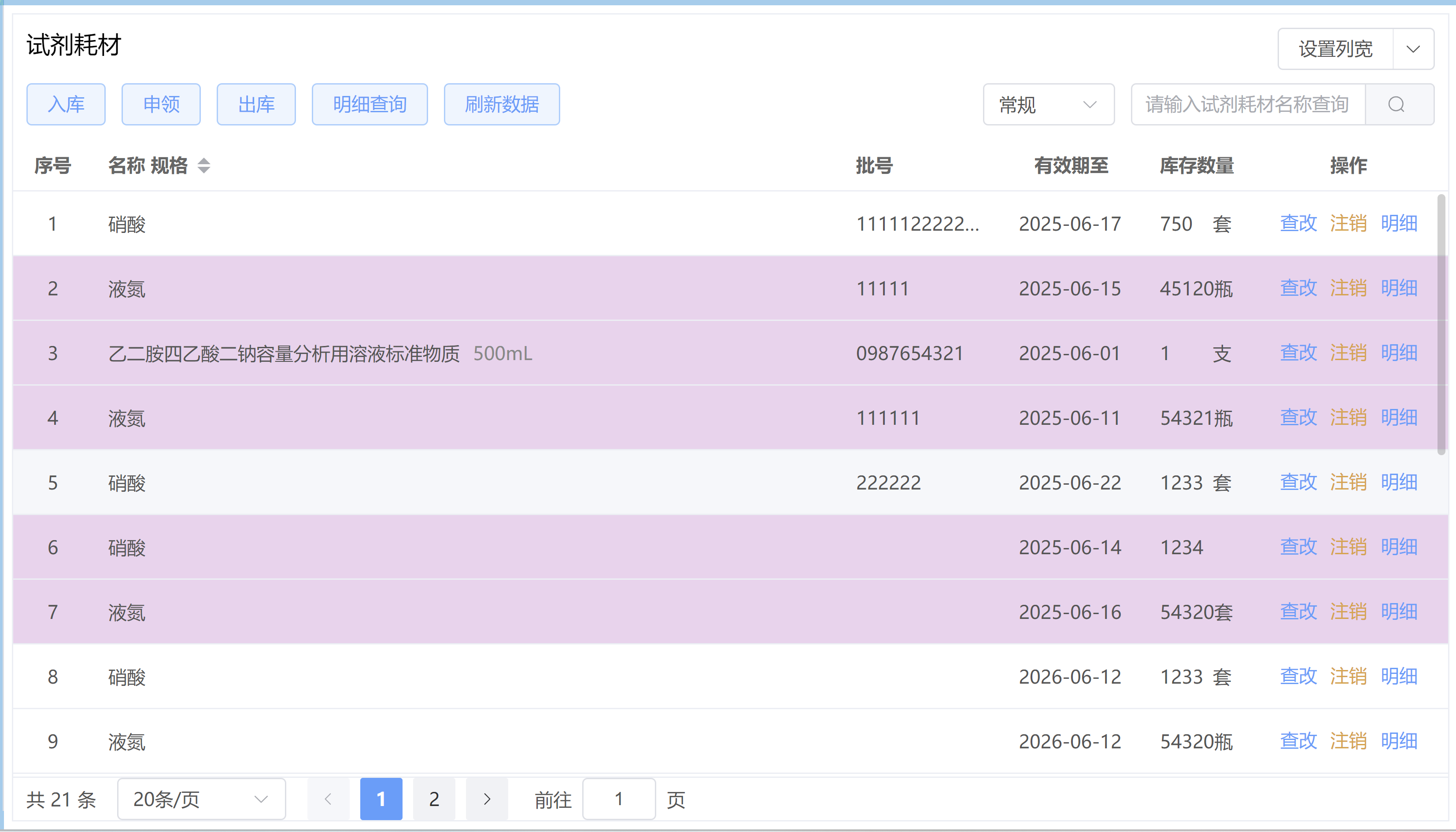
应用效果:

魔乐社区(Modelers.cn) 是一个中立、公益的人工智能社区,提供人工智能工具、模型、数据的托管、展示与应用协同服务,为人工智能开发及爱好者搭建开放的学习交流平台。社区通过理事会方式运作,由全产业链共同建设、共同运营、共同享有,推动国产AI生态繁荣发展。
更多推荐



 3
3 0
0- 0


 已为社区贡献35条内容

所有评论(0)