矩池云使用 Ollama API接口,像使用OpenAI一样
Ollama 是一个轻量级、可扩展的框架,用于在本地机器上构建和运行大型语言模型。它提供了一个简单的API,用于创建、运行和管理模型,以及一个预构建模型库,这些模型可以轻松地在各种应用程序中使用。Ollama 支持多种模型,包括 Llama 3.2、Mistral、Gemma 2 等,并且可以自定义模型和提示,以适应不同的应用场景。此外,Ollama 还提供了 REST API,方便开发者在本地或
Ollama 是一个轻量级、可扩展的框架,用于在本地机器上构建和运行大型语言模型。它提供了一个简单的API,用于创建、运行和管理模型,以及一个预构建模型库,这些模型可以轻松地在各种应用程序中使用。
Ollama 支持多种模型,包括 Llama 3.2、Mistral、Gemma 2 等,并且可以自定义模型和提示,以适应不同的应用场景。此外,Ollama 还提供了 REST API,方便开发者在本地或通过远程服务器运行和管理模型,还适配了OpenAI的调用接口。
本文将给大家介绍如何在矩池云租用启动 ollama 环境,在本地调用 ollama API进行推理服务,包括对话模型 llama3.1 和 嵌入式模型mxbai-embed-large的调用。
租用机器
本次教程使用的是 NVIDIA Tesla V100-16GB 机器,镜像使用的是 Ollama,在矩池云平台,选择好机器和镜像后,然后点击租用即可。
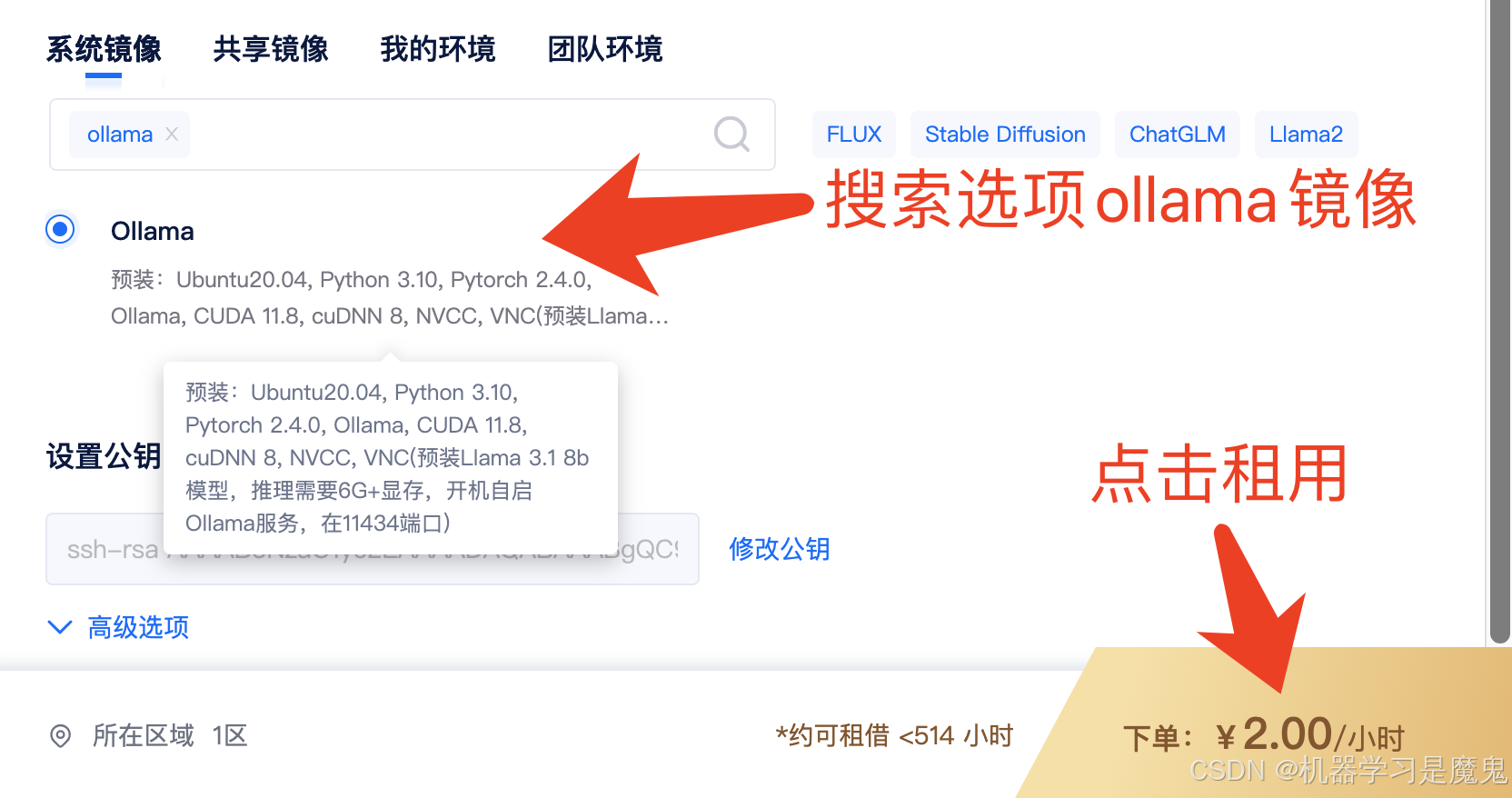
机器启动成功后,默认会开启 ollama server 服务,部署在 11434端口,后续我们访问租用页面11434端口对应链接即可请求 ollama 里的模型。
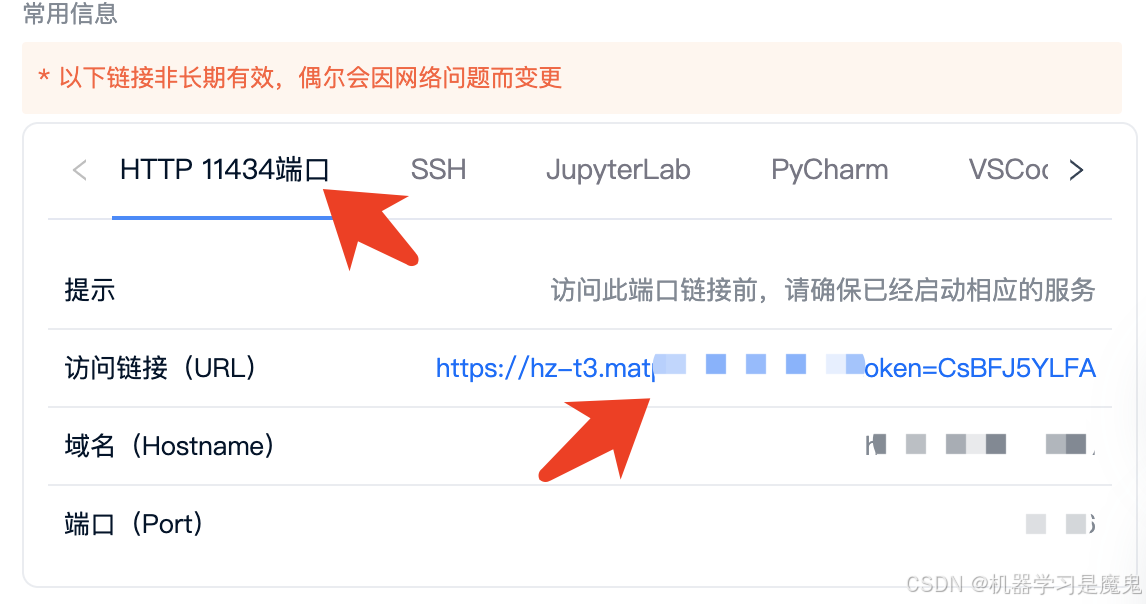
简单测试
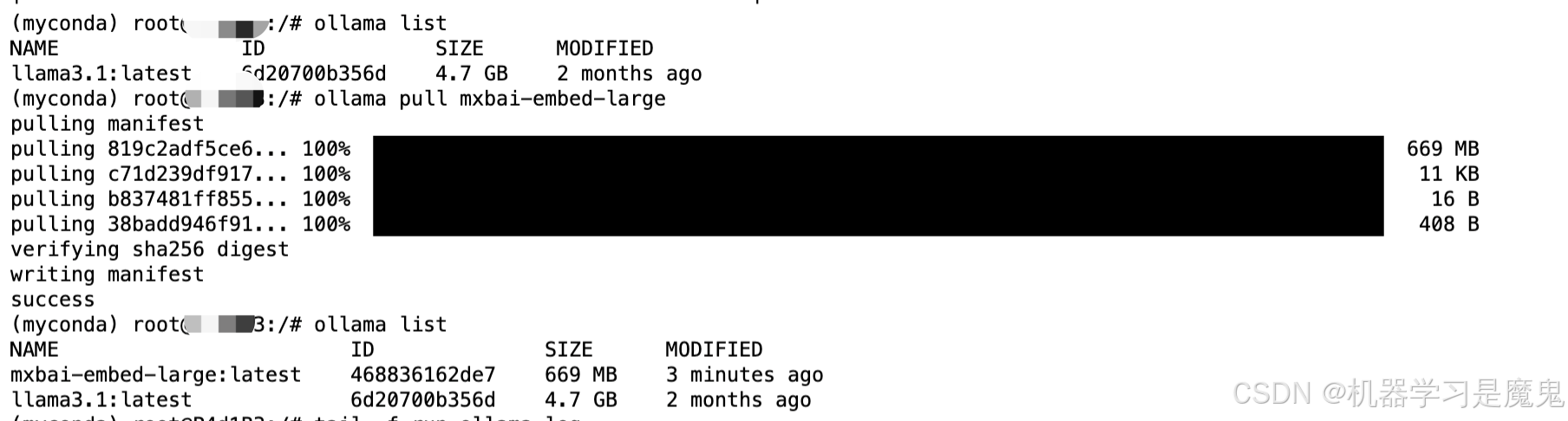
在浏览器,我们直接访问租用页面 11434端口对应链接,页面会显示Ollama is running,表示 Ollama server 正常运行。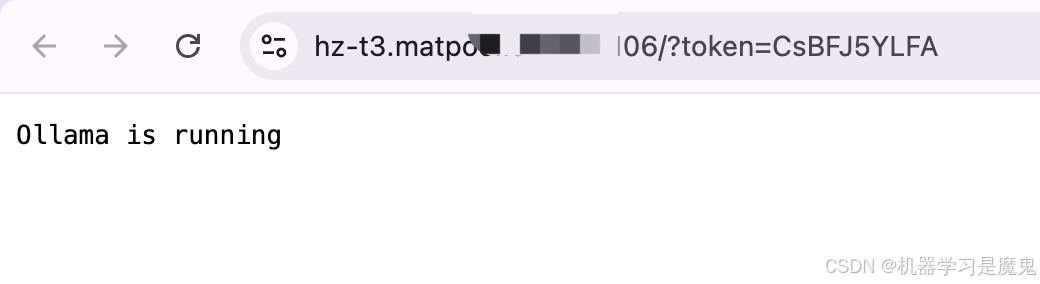 接下来我们可以租用页面打开jupyterlab,新建一个terminal,然后输入
ollama list查看已经有的模型,可以看到已经有了llama3.1-7b模型,我们可以使用ollama pull xxx拉取我们需要的模型,比如截图中ollama pull mxbai-embed-large,从ollama拉取了一个 embedding 模型。
OpenAI 式调用
本部分代码案例来自《手搓一个土得掉渣的RAG》:https://github.com/datawhalechina/wow-rag
调用Chat模型:llama3.1-7b
将代码中的 base_url 改成你自己租用机器的 11134 端口对应链接即可,注意格式。
chat_model 改成你要用的语言模型名称,镜像里内置的是叫 llama3.1:latest
from openai import OpenAI

api_key = "ollama"
base_url = "https://hz-t3.matpool.com:xxxx/v1"
chat_model = "llama3.1:latest"

client = OpenAI(
    api_key = api_key,
    base_url = base_url
)

# 使用 OpenAI 的 Chat Completions API 创建一个聊天完成请求
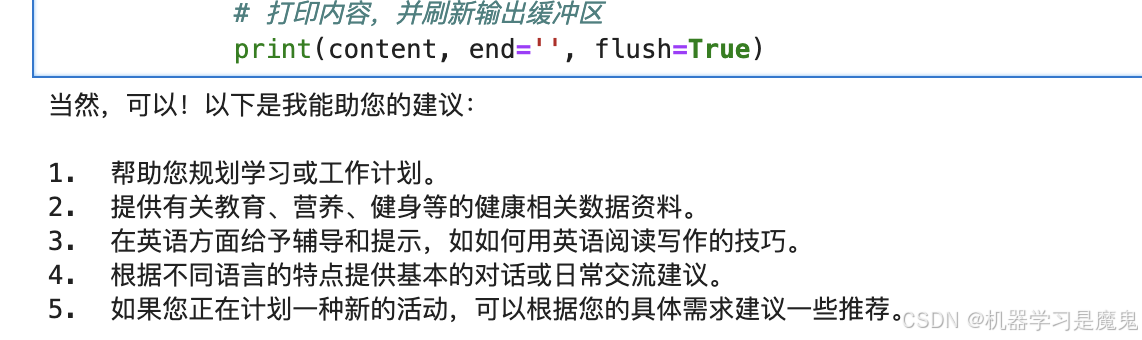
prompt = "你可以做些什么,列5点"
response = client.chat.completions.create(
    model=chat_model,  # 填写需要调用的模型名称
    messages=[
        {"role": "user", "content": prompt},
    ],
    stream=True,
)
# 流式输出
if response:
    # 遍历响应中的每个块
    for chunk in response:
        # 获取当前块的内容
        content = chunk.choices[0].delta.content
        # 如果内容存在
        if content:
            # 打印内容,并刷新输出缓冲区
            print(content, end='', flush=True)
调用 Embedding 模型:llama3.1-7b
导入文本,对文本进行分块。
embedding_text = """
Multimodal Agent AI systems have many applications. In addition to interactive AI, grounded multimodal models could help drive content generation for bots and AI agents, and assist in productivity applications, helping to re-play, paraphrase, action prediction or synthesize 3D or 2D scenario. Fundamental advances in agent AI help contribute towards these goals and many would benefit from a greater understanding of how to model embodied and empathetic in a simulate reality or a real world. Arguably many of these applications could have positive benefits.

However, this technology could also be used by bad actors. Agent AI systems that generate content can be used to manipulate or deceive people. Therefore, it is very important that this technology is developed in accordance with responsible AI guidelines. For example, explicitly communicating to users that content is generated by an AI system and providing the user with controls in order to customize such a system. It is possible the Agent AI could be used to develop new methods to detect manipulative content - partly because it is rich with hallucination performance of large foundation model - and thus help address another real world problem.

For examples, 1) in xhealth topic, ethical deployment of LLM and VLM agents, especially in sensitive domains like healthcare, is paramount. AI agents trained on biased data could potentially worsen health disparities by providing inaccurate diagnoses for underrepresented groups. Moreover, the handling of sensitive patient data by AI agents raises significant privacy and confidentiality concerns. 2) In the gaming industry, AI agents could transform the role of developers, shifting their focus from scripting non-player characters to refining agent learning processes. Similarly, adaptive robotic systems could redefine manufacturing roles, necessitating new skill sets rather than replacing human workers. Navigating these transitions responsibly is vital to minimize potential socio-economic disruptions.

Furthermore, the agent AI focuses on learning collaboration policy in simulation and there is some risk if directly applying the policy to the real world due to the distribution shift. Robust testing and continual safety monitoring mechanisms should be put in place to minimize risks of unpredictable behaviors in real-world scenarios. Our “VideoAnalytica" dataset is collected from the Internet and considering which is not a fully representative source, so we already go through-ed the ethical review and legal process from both Microsoft and University Washington. Be that as it may, we also need to understand biases that might exist in this corpus. Data distributions can be characterized in many ways. In this workshop, we have captured how the agent level distribution in our dataset is different from other existing datasets. However, there is much more than could be included in a single dataset or workshop. We would argue that there is a need for more approaches or discussion linked to real tasks or topics and that by making these data or system available.

We will dedicate a segment of our project to discussing these ethical issues, exploring potential mitigation strategies, and deploying a responsible multi-modal AI agent. We hope to help more researchers answer these questions together via this paper.

"""

# 设置每个文本块的大小为 150 个字符
chunk_size = 150
# 使用列表推导式将长文本分割成多个块,每个块的大小为 chunk_size
chunks = [embedding_text[i:i + chunk_size] for i in range(0, len(embedding_text), chunk_size)]
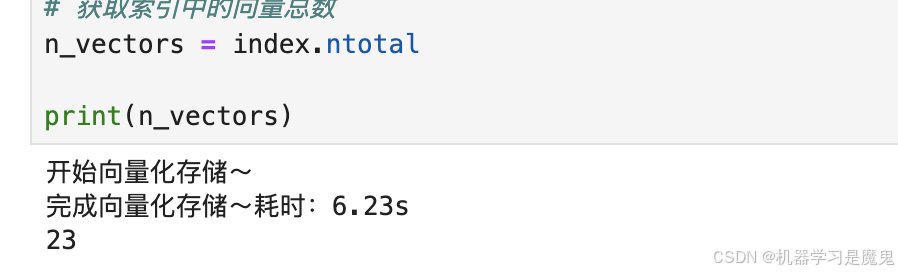
调用 embedding 模型,对每个块进行 embedding,并将处理好的结果使用Faiss存储。
# 这里复用前面创建的 openai client
# 只需要设置 emb_model 模型名称即可
emb_model = "mxbai-embed-large:latest"

# 用于对数据进行归一化处理,使每个嵌入向量的模为1
from sklearn.preprocessing import normalize
import numpy as np
# 一个高效的相似性搜索库,用于存储和检索向量
import faiss
import time

# 初始化一个空列表来存储每个文本块的嵌入向量
embeddings = []

print("开始向量化存储~")
t1 = time.time()
# 遍历每个文本块
for chunk in chunks:
    # 使用 OpenAI API 为当前文本块创建嵌入向量
    response = client.embeddings.create(
        model=emb_model,
        input=chunk,
    )

    # 将嵌入向量添加到列表中
    embeddings.append(response.data[0].embedding)

# 使用 sklearn 的 normalize 函数对嵌入向量进行归一化处理
normalized_embeddings = normalize(np.array(embeddings).astype('float32'))

# 获取嵌入向量的维度
d = len(embeddings[0])

# 创建一个 Faiss 索引,用于存储和检索嵌入向量
index = faiss.IndexFlatIP(d)

# 将归一化后的嵌入向量添加到索引中
index.add(normalized_embeddings)

print(f"完成向量化存储~耗时:{round(time.time()-t1, 2)}s")
t1 = time.time()

# 获取索引中的向量总数
n_vectors = index.ntotal

print(n_vectors)
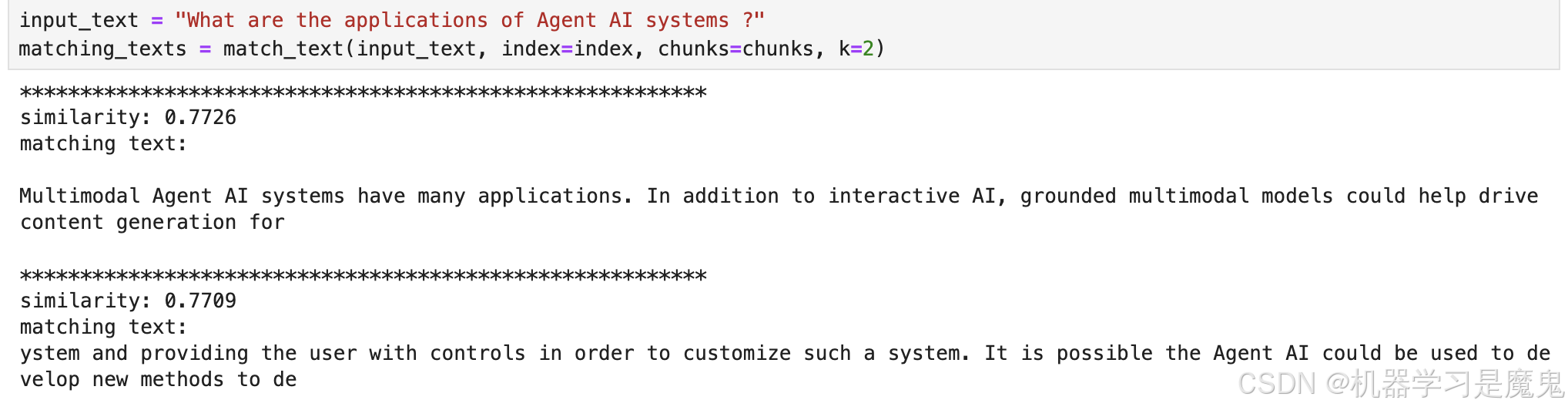
 这里写了一个代码实现向量库查找功能,在给定的文本块集合中,找到与输入文本最相似的前k个文本块。
from sklearn.preprocessing import normalize
def match_text(input_text, index, chunks, k=2):
    """
    在给定的文本块集合中,找到与输入文本最相似的前k个文本块。

    参数:
        input_text (str): 要匹配的输入文本。
        index (faiss.Index): 用于搜索的Faiss索引。
        chunks (list of str): 文本块的列表。
        k (int, optional): 要返回的最相似文本块的数量。默认值为2。

    返回:
        str: 格式化的字符串,包含最相似的文本块及其相似度。
    """
    # 确保k不超过文本块的总数
    k = min(k, len(chunks))

    # 使用OpenAI API为输入文本创建嵌入向量
    response = client.embeddings.create(
        model=emb_model,
        input=input_text,
    )
    # 获取输入文本的嵌入向量
    input_embedding = response.data[0].embedding
    # 对输入嵌入向量进行归一化处理
    input_embedding = normalize(np.array([input_embedding]).astype('float32'))

    # 在索引中搜索与输入嵌入向量最相似的k个向量
    distances, indices = index.search(input_embedding, k)
    # 初始化一个字符串来存储匹配的文本
    matching_texts = ""
    # 遍历搜索结果
    for i, idx in enumerate(indices[0]):
        # 打印每个匹配文本块的相似度和文本内容
        print("*********************************************************")
        print(f"similarity: {distances[0][i]:.4f}\nmatching text: \n{chunks[idx]}\n")
        # 将相似度和文本内容添加到匹配文本字符串中
        matching_texts += f"similarity: {distances[0][i]:.4f}\nmatching text: \n{chunks[idx]}\n"

    # 返回包含匹配文本块及其相似度的字符串
    return matching_texts
调用函数。
input_text = "What are the applications of Agent AI systems ?"
matching_texts = match_text(input_text, index=index, chunks=chunks, k=2)
 最后将匹配到的最相关的文本块内容和问题一起丢给大模型,总结回答问题。
def get_completion_stream(prompt):
    """
    使用 OpenAI 的 Chat Completions API 生成流式的文本回复。

    参数:
        prompt (str): 要生成回复的提示文本。

    返回:
        None: 该函数直接打印生成的回复内容。
    """
    # 使用 OpenAI 的 Chat Completions API 创建一个聊天完成请求
    response = client.chat.completions.create(
        model=chat_model,  # 填写需要调用的模型名称
        messages=[
            {"role": "user", "content": prompt},
        ],
        stream=True,
    )
    # 如果响应存在
    if response:
        # 遍历响应中的每个块
        for chunk in response:
            # 获取当前块的内容
            content = chunk.choices[0].delta.content
            # 如果内容存在
            if content:
                # 打印内容,并刷新输出缓冲区
                print(content, end='', flush=True)

prompt = f"""
根据找到的文档
{matching_texts}
生成
{input_text}
的答案,尽可能使用文档语句的原文回答。不要复述问题,直接开始回答,注意使用中文回复。
"""
get_completion_stream(prompt)

查看 ollama server 运行日志
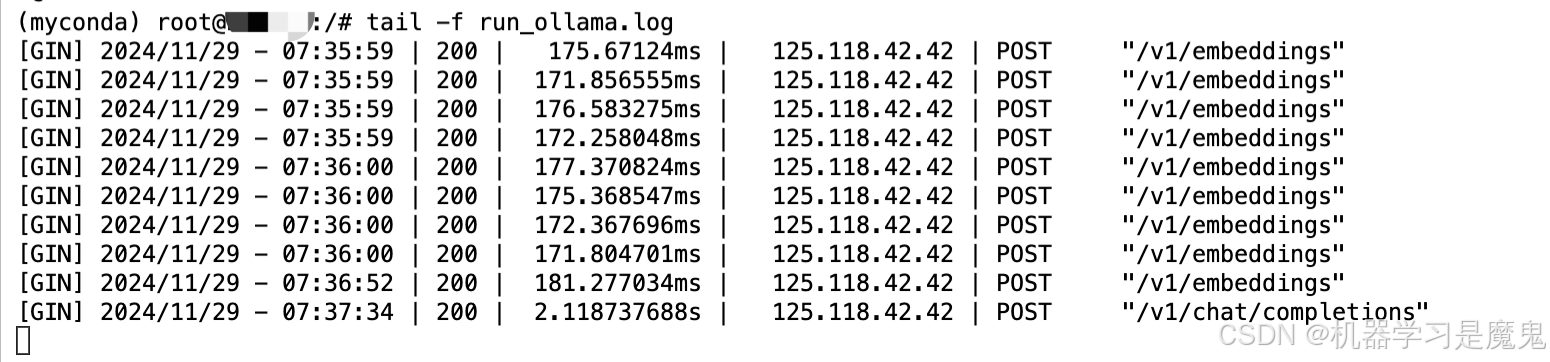
ollama server 运行日志默认放在根目录下,名称为 run_ollama.log,输入以下指令可以查看日志动态变化。
cd /
tail -f run_ollama.log
到这里我们就已经完全学会了如何在矩池云使用 ollama 镜像,像使用OpenAI APIKEY 一样使用 ollama 接口。
如果你复现有什么问题,或者有什么AI项目复现需求,欢迎评论交流,知无不言。

魔乐社区(Modelers.cn) 是一个中立、公益的人工智能社区,提供人工智能工具、模型、数据的托管、展示与应用协同服务,为人工智能开发及爱好者搭建开放的学习交流平台。社区通过理事会方式运作,由全产业链共同建设、共同运营、共同享有,推动国产AI生态繁荣发展。
更多推荐

 7
7 0
0- 0


 已为社区贡献1条内容

所有评论(0)