【实用工具】Gradio快速部署深度学习应用1:图像分类
在AI快速发展的今天,我们作为算法开发人员,也应该有一些趁手的工具帮助我们快速开发并验证自己的想法,Gradio可以实现快速搭建和共享的功能,能够展示出一个前端界面,把我们的算法包裹起来,快速验证算法的有效性,文档也丰富,通俗易懂,喜欢的小伙伴可以学一手。
·
前言
在AI快速发展的今天,我们作为算法开发人员,也应该有一些趁手的工具帮助我们快速开发并验证自己的想法,Gradio可以实现快速搭建和共享的功能,能够展示出一个前端界面,把我们的算法包裹起来,快速验证算法的有效性,文档也丰富,通俗易懂,喜欢的小伙伴可以学一手。
环境安装
使用pip install安装
gradio
gradio_client
torch
torchvision
代码
完整代码链接:
链接: https://pan.baidu.com/s/1x4ZTN7cTASv8cZe_iBoYVw
提取码: r425
from torchvision import transforms
import gradio as gr
import torch

model = torch.hub.load('pytorch/vision:v0.6.0', 'resnet18', pretrained=True).eval()


# 打开文本文件
file_path = 'labels.txt'  # 将文件路径替换为你实际的文本文件路径
with open(file_path, 'r') as file:
    # 读取文件内容
    labels = file.readlines()
#去掉每个label的换行符
labels = [label.rstrip() for label in labels]


#预测函数
def predict(inp):
  inp = transforms.ToTensor()(inp).unsqueeze(0)
  with torch.no_grad():
    prediction = torch.nn.functional.softmax(model(inp)[0], dim=0)
    confidences = {labels[i]: float(prediction[i]) for i in range(1000)}
  return confidences


#fn表示触发函数,当我们点击提交按钮时,触发predict函数进行推理
#inputs表示图像会被转换为PIL.Image格式
#outputs将以label的形式展示出来
#examples可以将图片作为示例展示出来,供用户使用
gr.Interface(fn=predict,
             inputs=gr.Image(type="pil"),
             outputs=gr.Label(num_top_classes=3),
             examples=["sheep.jpeg", "panda.jpg", "dog.jpg", "tiger.jpg"]).launch()
运行

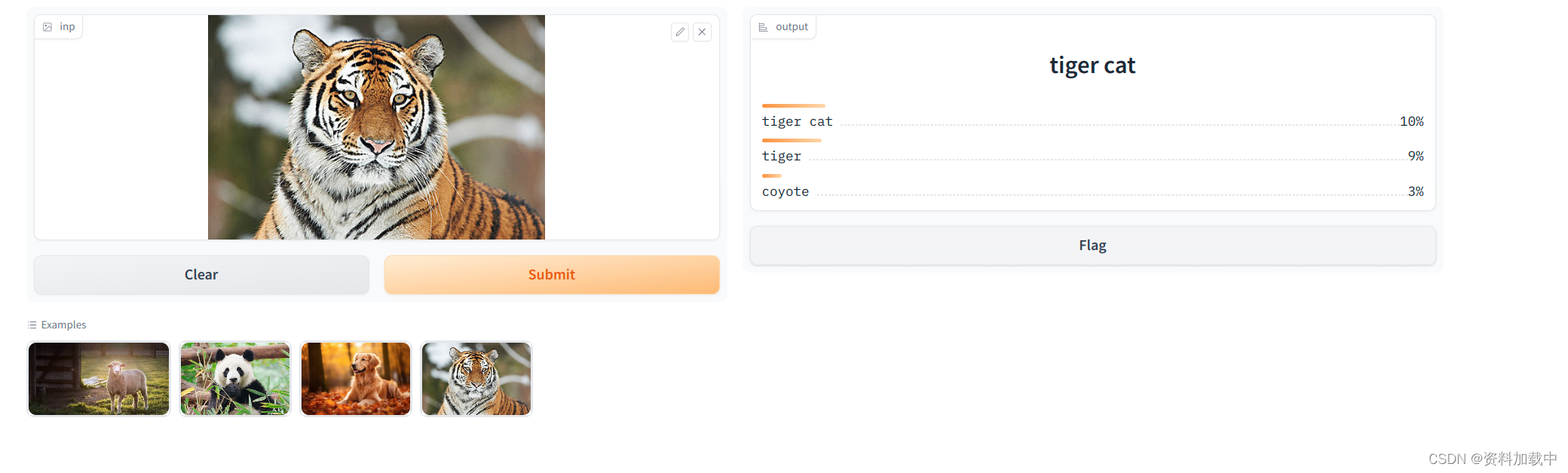
点击http://127.0.0.1:7860,会出现前端展示页面
页面展示
参考链接:

魔乐社区(Modelers.cn) 是一个中立、公益的人工智能社区,提供人工智能工具、模型、数据的托管、展示与应用协同服务,为人工智能开发及爱好者搭建开放的学习交流平台。社区通过理事会方式运作,由全产业链共同建设、共同运营、共同享有,推动国产AI生态繁荣发展。
更多推荐



 8
8 0
0- 0


 已为社区贡献10条内容

所有评论(0)