多模态大模型InternVL 2.5重磅发布
我们很高兴推出InternVL 2.5,这是一个基于 InternVL 2.0 构建的先进多模式大型语言模型 (MLLM) 系列,它保留了其核心模型架构,同时在训练和测试策略以及数据质量方面进行了显著的改进。图片/pngInternVL 2.5 系列在下表中,我们提供了 InternVL 2.5 系列的概述。模型架构如下图所示,InternVL 2.5 保留了与前代产品 InternVL 1.5
我们很高兴推出InternVL 2.5,这是一个基于 InternVL 2.0 构建的先进多模式大型语言模型 (MLLM) 系列,它保留了其核心模型架构,同时在训练和测试策略以及数据质量方面进行了显著的改进。
图片/png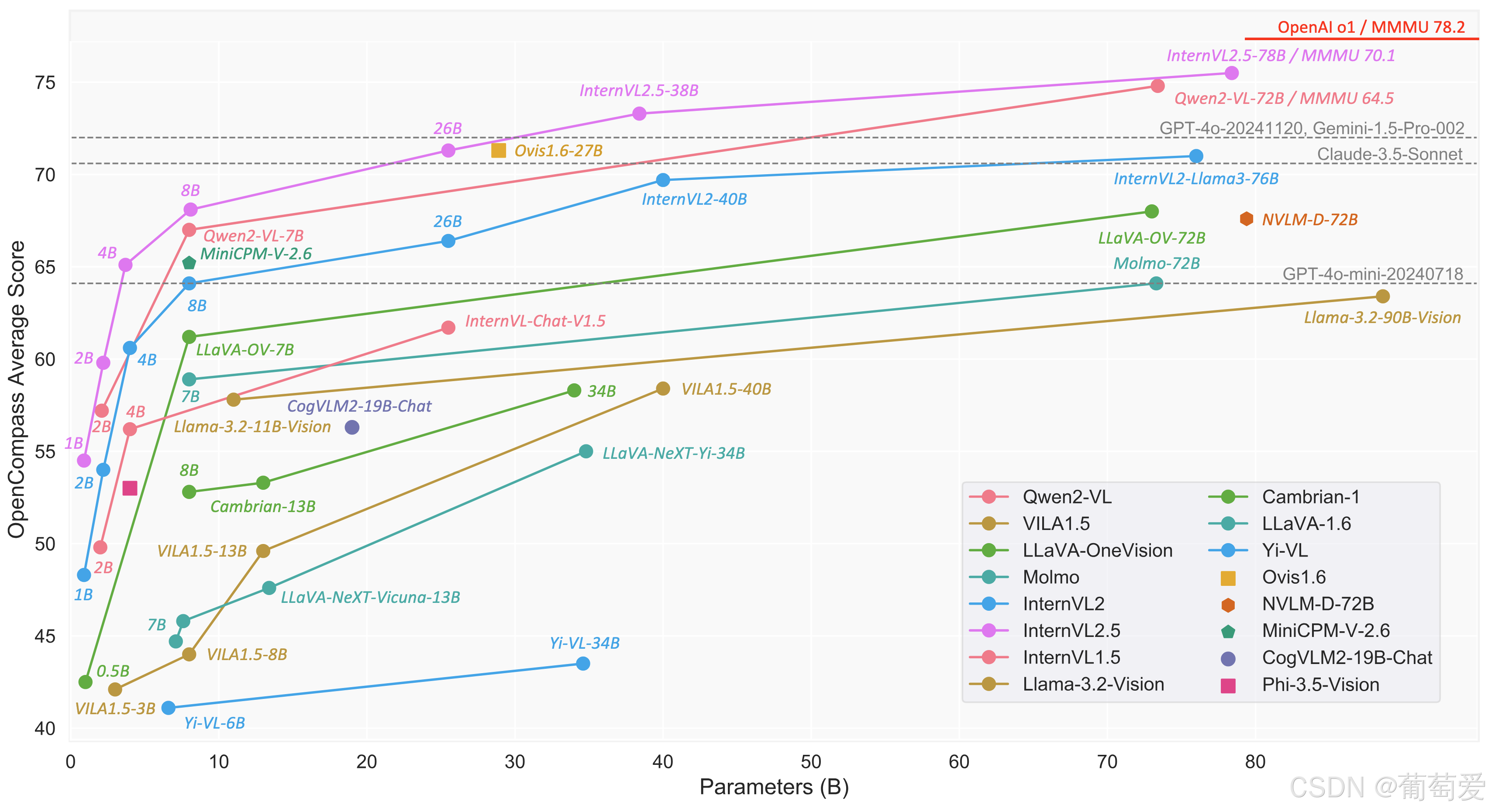
InternVL 2.5 系列
在下表中,我们提供了 InternVL 2.5 系列的概述。
模型架构
如下图所示,InternVL 2.5 保留了与前代产品 InternVL 1.5 和 2.0 相同的模型架构,遵循“ViT-MLP-LLM”范式。在这个新版本中,我们使用随机初始化的 MLP 投影仪,将新增量预训练的 InternViT 与各种预训练的 LLM(包括 InternLM 2.5 和 Qwen 2.5)集成在一起。
图片/png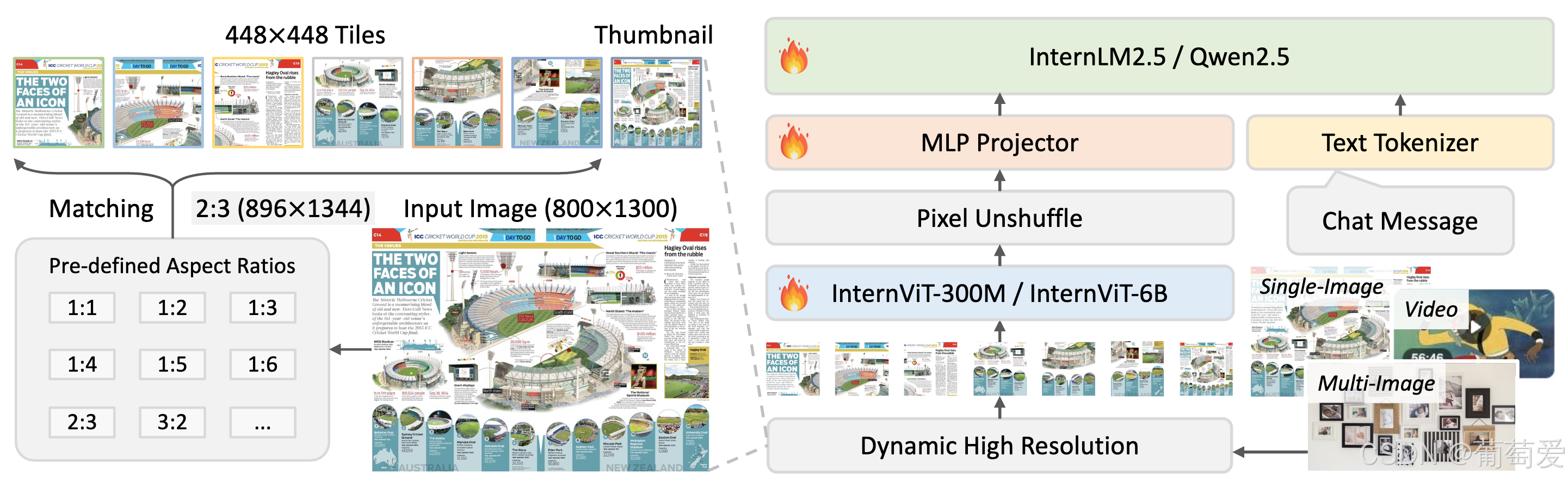
与上一版本一样,我们应用了像素反混排操作,将视觉标记的数量减少到原来的四分之一。此外,我们采用了与 InternVL 1.5 类似的动态分辨率策略,将图像划分为 448×448 像素的图块。从 InternVL 2.0 开始,关键区别在于我们额外引入了对多图像和视频数据的支持。
培训策略
多模态数据的动态高分辨率
在 InternVL 2.0 和 2.5 中,我们扩展了动态高分辨率训练方法,增强了其处理多图像和视频数据集的能力。
图片/png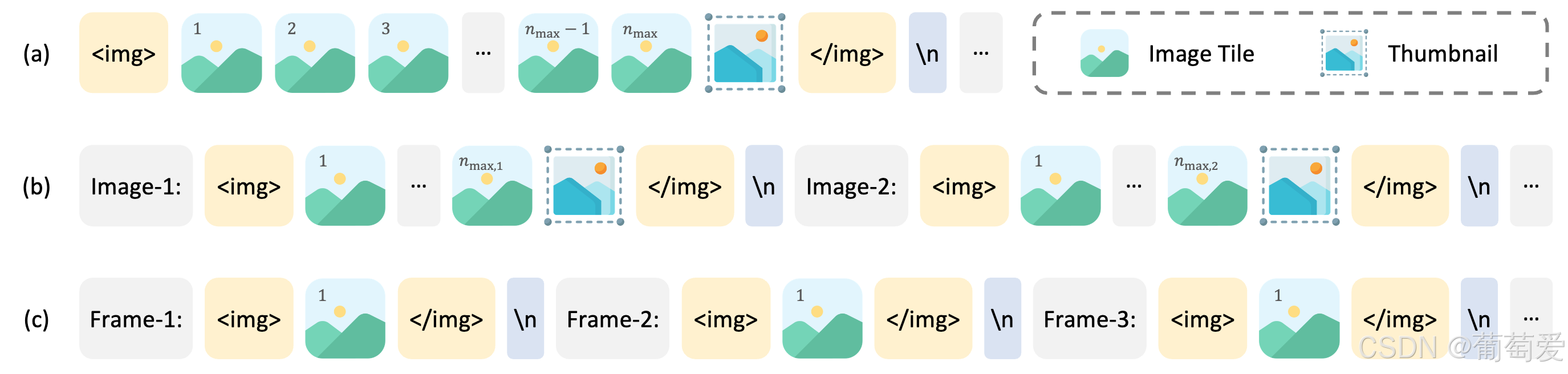
对于单幅图像数据集,将总图块数n_max分配给单幅图像以获得最大分辨率。视觉标记包含在和标签中。
对于多图像数据集,图块总数n_max分布在样本中的所有图像上。每幅图像都标有辅助标签,例如 和Image-1,并包含在和标签中。
对于视频,每帧的大小都会调整为 448×448。帧会使用标签(如 和 )进行标记Frame-1,标签中包含和,与图像类似。
单一模型训练管道
InternVL 2.5 中单个模型的训练流程分为三个阶段,旨在增强模型的视觉感知和多模式能力。
图片/png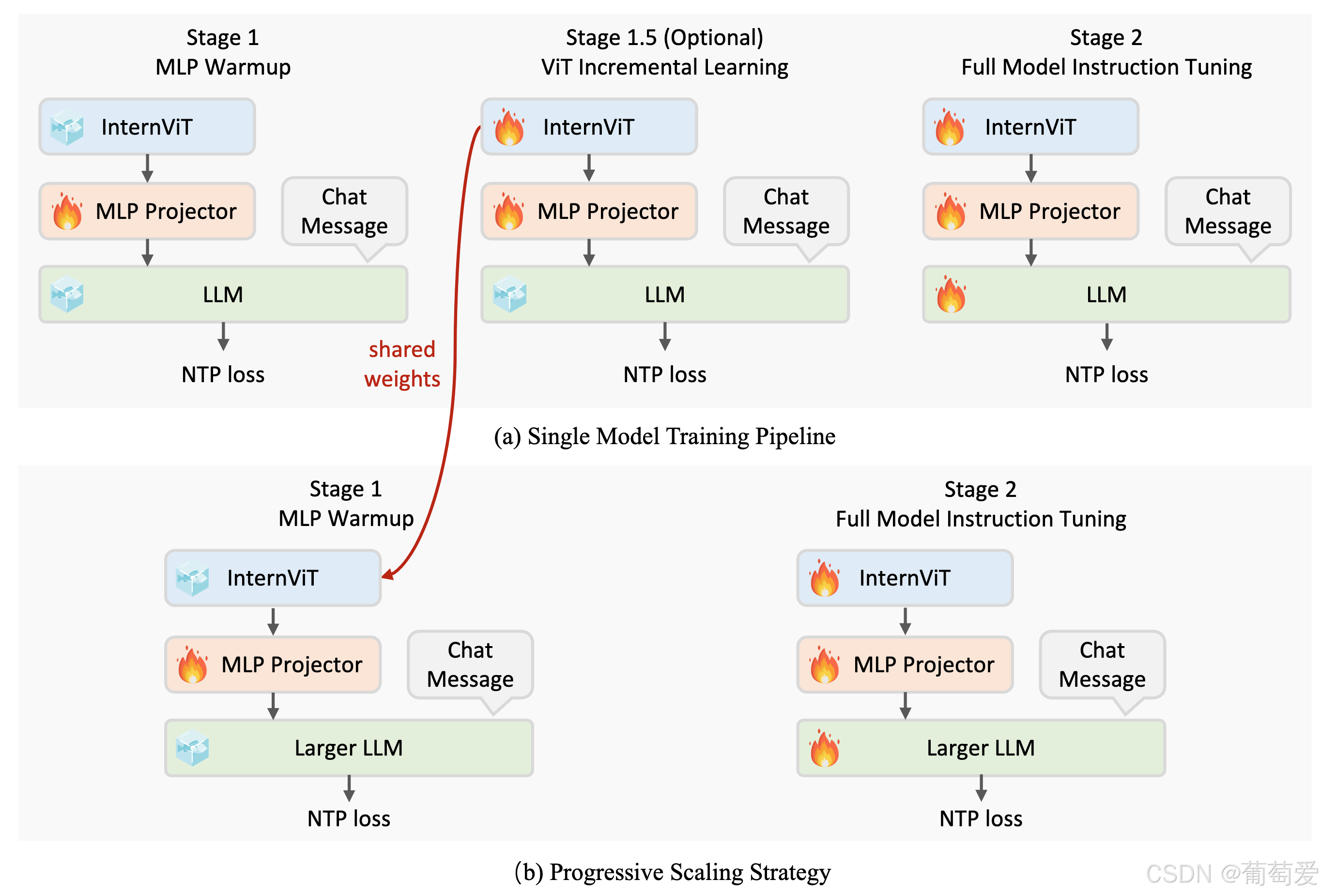
第 1 阶段:MLP 预热。在此阶段,仅训练 MLP 投影仪,同时冻结视觉编码器和语言模型。尽管成本增加,但仍采用动态高分辨率训练策略以获得更好的性能。此阶段可确保稳健的跨模态对齐并为稳定的多模态训练模型做好准备。
阶段 1.5:ViT 增量学习(可选)。此阶段允许使用与阶段 1 相同的数据对视觉编码器和 MLP 投影仪进行增量训练。它增强了编码器处理多语言 OCR 和数学图表等罕见领域的能力。经过训练后,编码器可以在 LLM 中重复使用而无需重新训练,除非引入新领域,否则此阶段是可选的。
第 2 阶段:完整模型指令调整。整个模型在高质量的多模态指令数据集上进行训练。实施严格的数据质量控制以防止 LLM 性能下降,因为噪声数据可能会导致重复或不正确的输出等问题。在此阶段之后,训练过程就完成了。
渐进式扩展策略
我们引入了一种渐进式缩放策略,以便有效地将视觉编码器与 LLM 对齐。这种方法首先使用较小的 LLM(例如 20B)进行训练,以优化基础视觉能力和跨模态对齐,然后将视觉编码器转移到较大的 LLM(例如 72B)而无需重新训练。这种重复使用可以跳过较大模型的中间阶段。
图片/png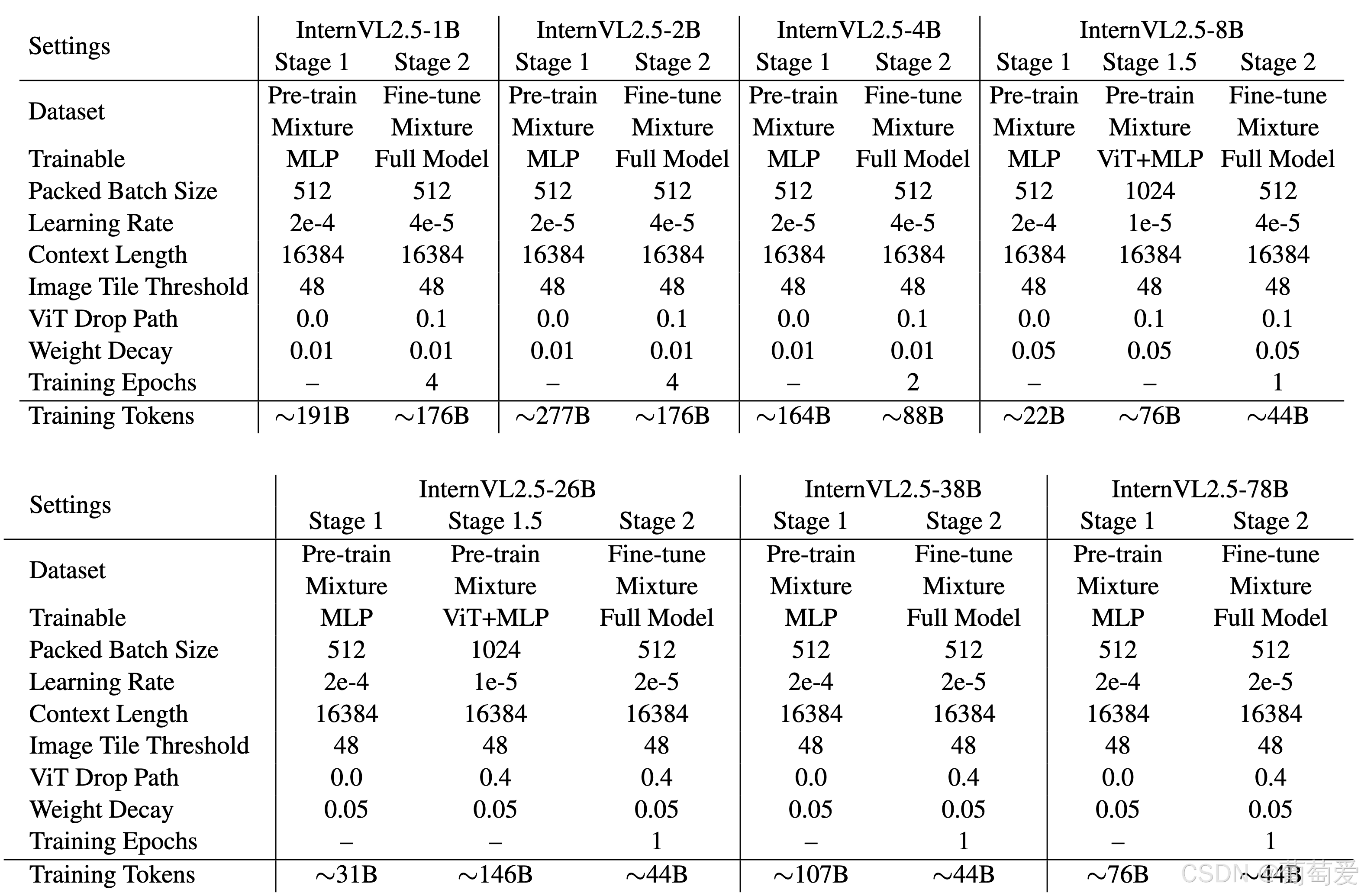
与 Qwen2-VL 的 1.4 万亿个 token 相比,InternVL2.5-78B 仅使用了 1200 亿个 token,不到十分之一。这一策略最大程度地减少了冗余,最大程度地重用了预训练组件,并实现了对复杂视觉语言任务的高效训练。
培训增强功能
为了提高现实世界的适应性和性能,我们引入了两项关键技术:
随机 JPEG 压缩:采用质量级别在 75 到 100 之间的随机 JPEG 压缩作为数据增强技术。这模拟了来自互联网源的图像退化,增强了模型对噪声图像的鲁棒性。
损失重新加权:为了平衡不同长度响应的 NTP 损失,我们使用一种称为平方平均的重新加权策略。此方法平衡了不同长度响应的贡献,减轻了对较长或较短响应的偏差。
数据组织
数据集配置
在 InternVL 2.0 和 2.5 中,训练数据的组织由几个关键参数控制,以优化训练期间数据集的平衡和分布。
图片/png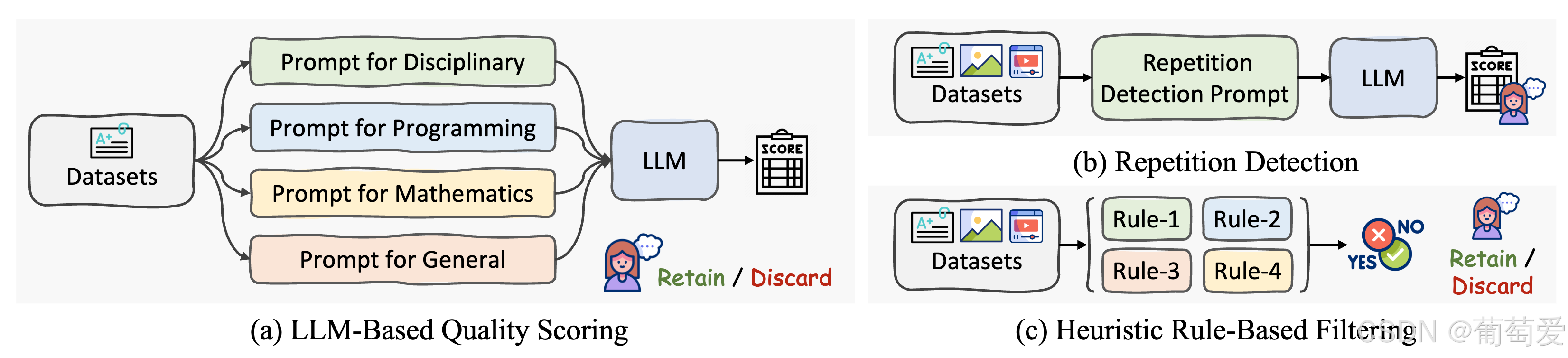
数据增强: JPEG 压缩有条件地应用:对图像数据集启用以增强鲁棒性,对视频数据集禁用以保持一致的帧质量。
最大图块数:该参数n_max控制每个数据集的最大图块数。例如,多图像或高分辨率数据使用较高的值 (24–36),标准图像使用较低的值 (6–12),视频使用 1。
重复因子:重复因子r调整数据集采样频率。低于 1 的值会降低数据集的权重,而高于 1 的值会增加数据集的权重。这可确保跨任务的平衡训练并防止过度拟合或欠拟合。
数据过滤管道
在开发过程中,我们发现 LLM 对数据噪声非常敏感,即使是很小的异常(如离群值或重复数据)也会导致推理过程中的异常行为。事实证明,重复生成(尤其是在长格式或 CoT 推理任务中)尤其有害。
图片/png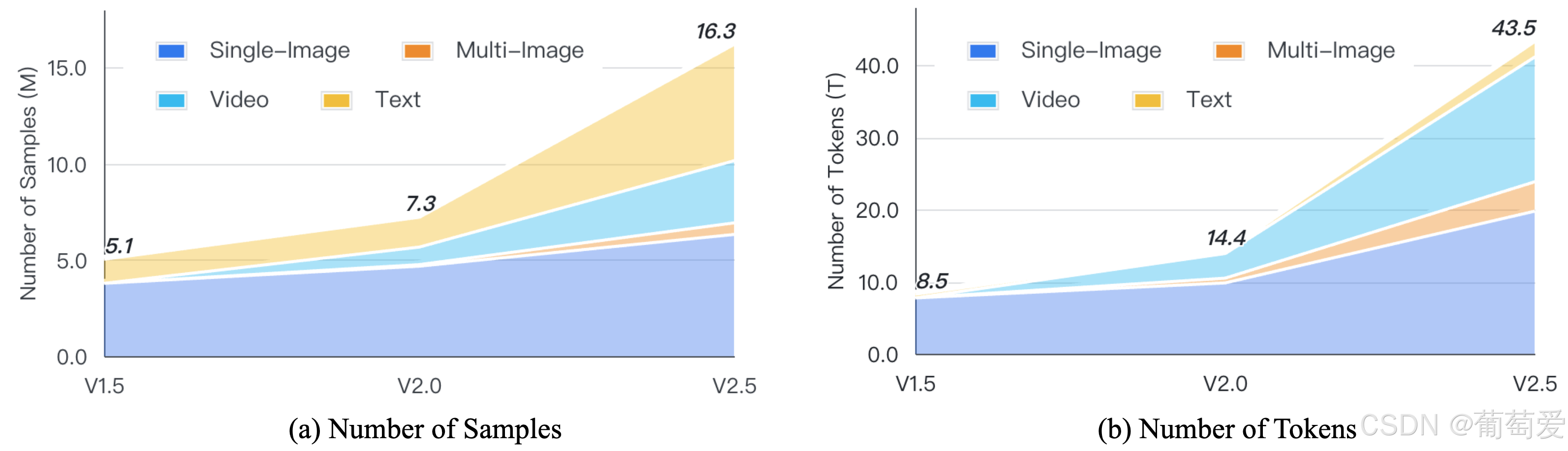
为了应对这一挑战并支持未来的研究,我们设计了一个高效的数据过滤流程来删除低质量的样本。
图片/png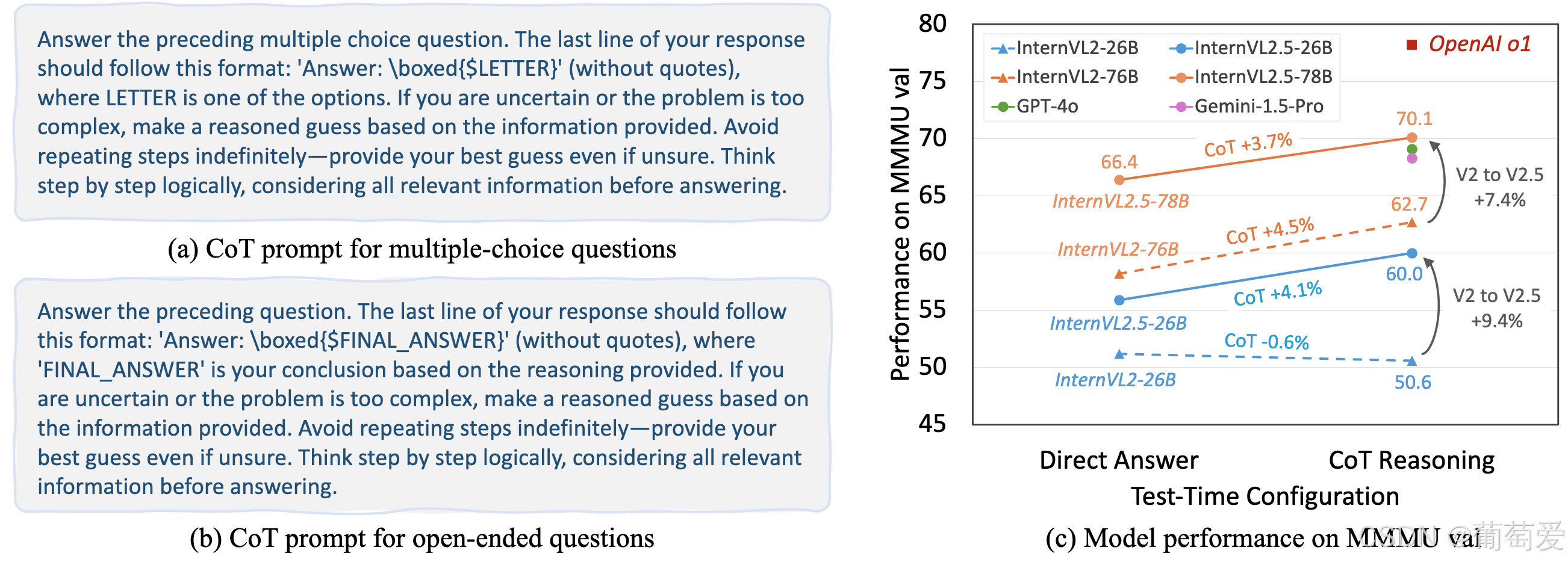
该流程包括两个模块,对于纯文本数据,使用了三个关键策略:
基于 LLM 的质量评分:使用预先训练的 LLM 和特定领域的提示对每个样本进行评分(0-10)。得分低于阈值(例如 7)的样本将被删除,以确保数据质量高。
重复检测:使用基于 LLM 的提示标记重复样本并进行人工审核。得分低于更严格阈值(例如 3)的样本将被排除,以避免出现重复模式。
基于启发式规则的过滤:使用规则检测异常句子长度或重复行等异常情况。标记的样本经过人工验证,以确保准确性,然后删除。
对于多模态数据,采用两种策略:
重复检测:非学术数据集中的重复样本会被标记并进行人工审核,以防止出现模式循环。高质量数据集无需经过此过程。
启发式基于规则的过滤:应用类似的规则来检测视觉异常,并手动验证标记的数据以保持完整性。
训练数据
如下图所示,从InternVL 1.5到2.0再到2.5,微调数据混合在规模、质量、多样性上不断迭代改进。关于训练数据的更多信息,可以参考我们的技术报告。
图片/png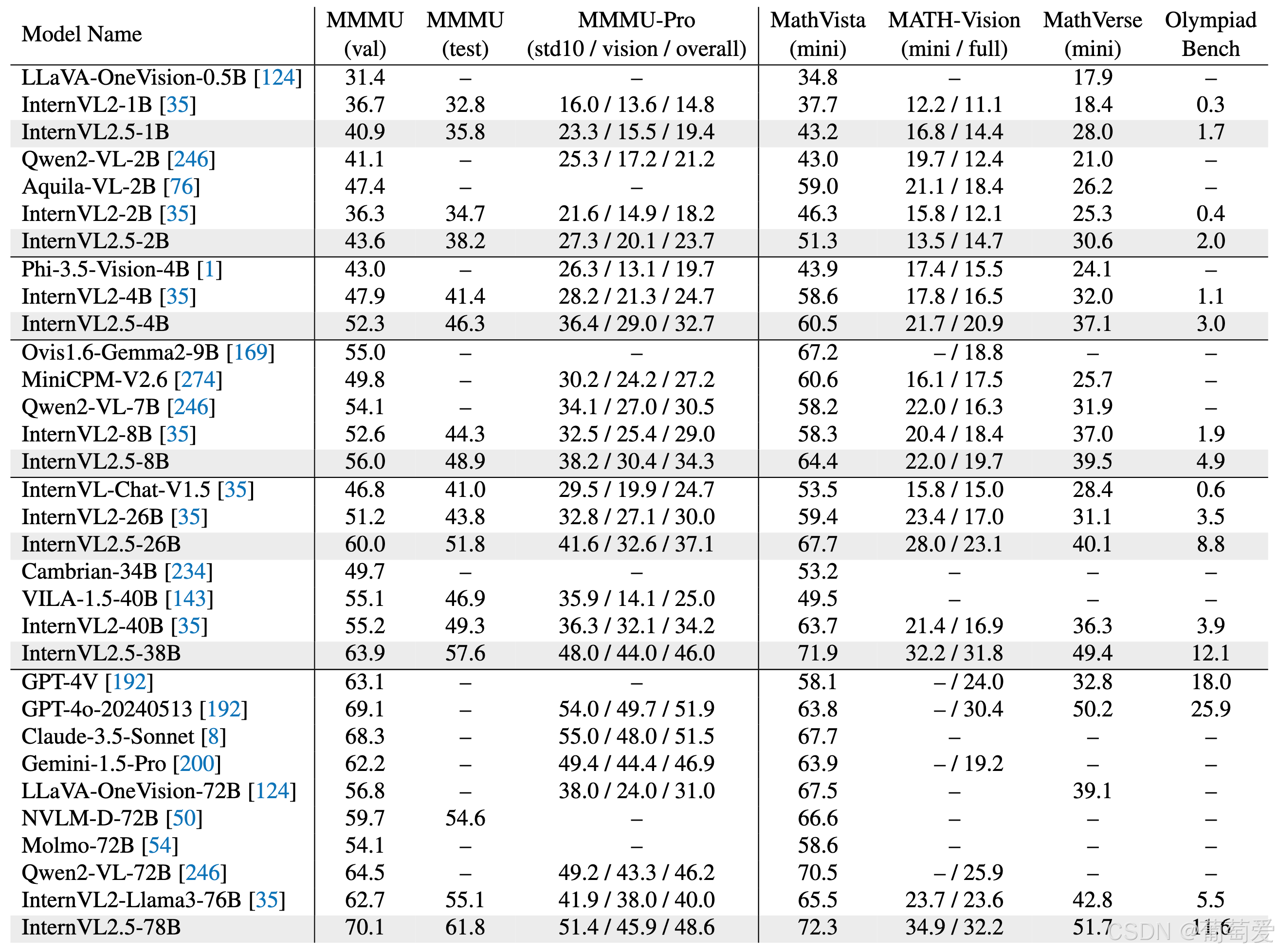
多模态能力评估
多模态推理和数学
图片/png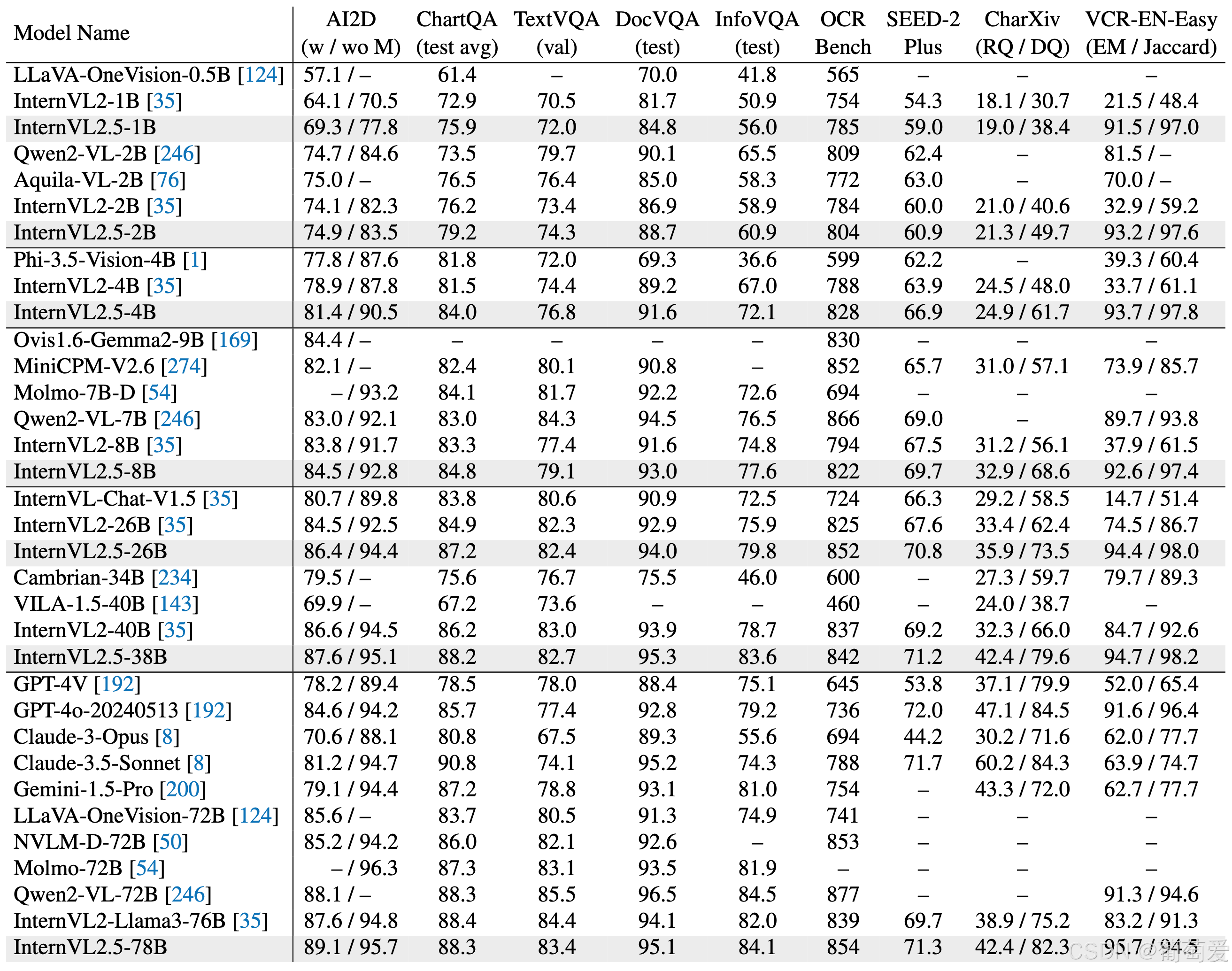
图片/png
OCR、图表和文档理解
图片/png
多图像和真实世界理解
图片/png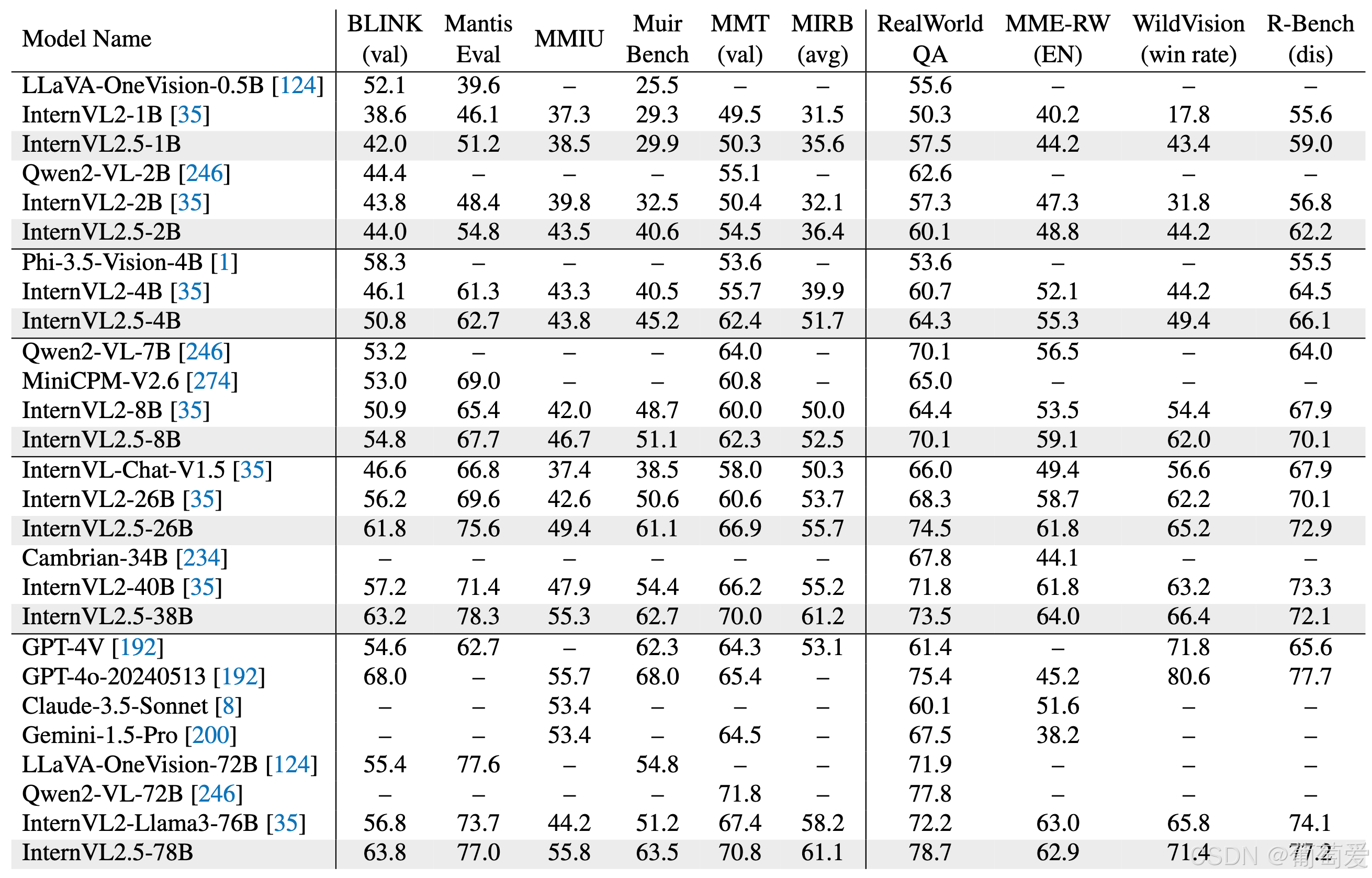
综合多模式及幻觉评估
图片/png
视觉接地
图片/png
多模态多语言理解
图片/png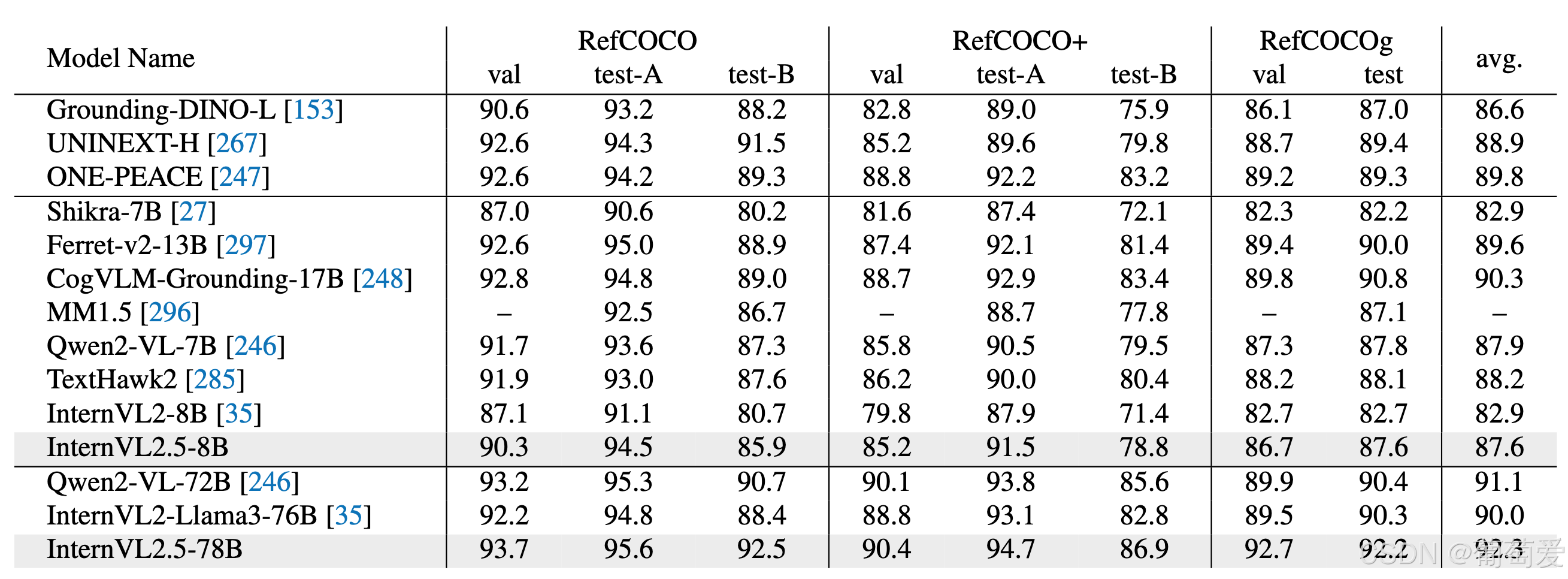
视频理解
图片/png
语言能力评估
InternVL 2.0模型训练过程中,存在纯语言能力下降的问题。InternVL 2.5通过收集更多优质开源数据,过滤掉低质量数据,实现了更好的纯语言性能保留。
图片/png
快速入门
InternVL2_5-78B我们提供了一个使用来运行的示例代码transformers。
请使用>=4.37.2的变压器以确保模型正常工作。
模型加载
16 位(bf16/fp16)
import torch
from transformers import AutoTokenizer, AutoModel
path = "OpenGVLab/InternVL2_5-78B"
model = AutoModel.from_pretrained(
    path,
    torch_dtype=torch.bfloat16,
    low_cpu_mem_usage=True,
    use_flash_attn=True,
    trust_remote_code=True).eval().cuda()
BNB 8 位量化
import torch
from transformers import AutoTokenizer, AutoModel
path = "OpenGVLab/InternVL2_5-78B"
model = AutoModel.from_pretrained(
    path,
    torch_dtype=torch.bfloat16,
    load_in_8bit=True,
    low_cpu_mem_usage=True,
    use_flash_attn=True,
    trust_remote_code=True).eval()
多 GPU
这样编写代码的原因是为了避免在多 GPU 推理过程中由于张量不在同一设备上而发生的错误。通过确保大型语言模型 (LLM) 的第一层和最后一层在同一设备上,我们可以避免此类错误。
import math
import torch
from transformers import AutoTokenizer, AutoModel

def split_model(model_name):
    device_map = {}
    world_size = torch.cuda.device_count()
    num_layers = {
        'InternVL2_5-1B': 24, 'InternVL2_5-2B': 24, 'InternVL2_5-4B': 36, 'InternVL2_5-8B': 32,
        'InternVL2_5-26B': 48, 'InternVL2_5-38B': 64, 'InternVL2_5-78B': 80}[model_name]
    # Since the first GPU will be used for ViT, treat it as half a GPU.
    num_layers_per_gpu = math.ceil(num_layers / (world_size - 0.5))
    num_layers_per_gpu = [num_layers_per_gpu] * world_size
    num_layers_per_gpu[0] = math.ceil(num_layers_per_gpu[0] * 0.5)
    layer_cnt = 0
    for i, num_layer in enumerate(num_layers_per_gpu):
        for j in range(num_layer):
            device_map[f'language_model.model.layers.{layer_cnt}'] = i
            layer_cnt += 1
    device_map['vision_model'] = 0
    device_map['mlp1'] = 0
    device_map['language_model.model.tok_embeddings'] = 0
    device_map['language_model.model.embed_tokens'] = 0
    device_map['language_model.output'] = 0
    device_map['language_model.model.norm'] = 0
    device_map['language_model.lm_head'] = 0
    device_map[f'language_model.model.layers.{num_layers - 1}'] = 0

    return device_map

path = "OpenGVLab/InternVL2_5-78B"
device_map = split_model('InternVL2_5-78B')
model = AutoModel.from_pretrained(
    path,
    torch_dtype=torch.bfloat16,
    low_cpu_mem_usage=True,
    use_flash_attn=True,
    trust_remote_code=True,
    device_map=device_map).eval()
使用 Transformer 进行推理
import math
import numpy as np
import torch
import torchvision.transforms as T
from decord import VideoReader, cpu
from PIL import Image
from torchvision.transforms.functional import InterpolationMode
from transformers import AutoModel, AutoTokenizer

IMAGENET_MEAN = (0.485, 0.456, 0.406)
IMAGENET_STD = (0.229, 0.224, 0.225)

def build_transform(input_size):
    MEAN, STD = IMAGENET_MEAN, IMAGENET_STD
    transform = T.Compose([
        T.Lambda(lambda img: img.convert('RGB') if img.mode != 'RGB' else img),
        T.Resize((input_size, input_size), interpolation=InterpolationMode.BICUBIC),
        T.ToTensor(),
        T.Normalize(mean=MEAN, std=STD)
    ])
    return transform

def find_closest_aspect_ratio(aspect_ratio, target_ratios, width, height, image_size):
    best_ratio_diff = float('inf')
    best_ratio = (1, 1)
    area = width * height
    for ratio in target_ratios:
        target_aspect_ratio = ratio[0] / ratio[1]
        ratio_diff = abs(aspect_ratio - target_aspect_ratio)
        if ratio_diff < best_ratio_diff:
            best_ratio_diff = ratio_diff
            best_ratio = ratio
        elif ratio_diff == best_ratio_diff:
            if area > 0.5 * image_size * image_size * ratio[0] * ratio[1]:
                best_ratio = ratio
    return best_ratio

def dynamic_preprocess(image, min_num=1, max_num=12, image_size=448, use_thumbnail=False):
    orig_width, orig_height = image.size
    aspect_ratio = orig_width / orig_height

    # calculate the existing image aspect ratio
    target_ratios = set(
        (i, j) for n in range(min_num, max_num + 1) for i in range(1, n + 1) for j in range(1, n + 1) if
        i * j <= max_num and i * j >= min_num)
    target_ratios = sorted(target_ratios, key=lambda x: x[0] * x[1])

    # find the closest aspect ratio to the target
    target_aspect_ratio = find_closest_aspect_ratio(
        aspect_ratio, target_ratios, orig_width, orig_height, image_size)

    # calculate the target width and height
    target_width = image_size * target_aspect_ratio[0]
    target_height = image_size * target_aspect_ratio[1]
    blocks = target_aspect_ratio[0] * target_aspect_ratio[1]

    # resize the image
    resized_img = image.resize((target_width, target_height))
    processed_images = []
    for i in range(blocks):
        box = (
            (i % (target_width // image_size)) * image_size,
            (i // (target_width // image_size)) * image_size,
            ((i % (target_width // image_size)) + 1) * image_size,
            ((i // (target_width // image_size)) + 1) * image_size
        )
        # split the image
        split_img = resized_img.crop(box)
        processed_images.append(split_img)
    assert len(processed_images) == blocks
    if use_thumbnail and len(processed_images) != 1:
        thumbnail_img = image.resize((image_size, image_size))
        processed_images.append(thumbnail_img)
    return processed_images

def load_image(image_file, input_size=448, max_num=12):
    image = Image.open(image_file).convert('RGB')
    transform = build_transform(input_size=input_size)
    images = dynamic_preprocess(image, image_size=input_size, use_thumbnail=True, max_num=max_num)
    pixel_values = [transform(image) for image in images]
    pixel_values = torch.stack(pixel_values)
    return pixel_values

def split_model(model_name):
    device_map = {}
    world_size = torch.cuda.device_count()
    num_layers = {
        'InternVL2_5-1B': 24, 'InternVL2_5-2B': 24, 'InternVL2_5-4B': 36, 'InternVL2_5-8B': 32,
        'InternVL2_5-26B': 48, 'InternVL2_5-38B': 64, 'InternVL2_5-78B': 80}[model_name]
    # Since the first GPU will be used for ViT, treat it as half a GPU.
    num_layers_per_gpu = math.ceil(num_layers / (world_size - 0.5))
    num_layers_per_gpu = [num_layers_per_gpu] * world_size
    num_layers_per_gpu[0] = math.ceil(num_layers_per_gpu[0] * 0.5)
    layer_cnt = 0
    for i, num_layer in enumerate(num_layers_per_gpu):
        for j in range(num_layer):
            device_map[f'language_model.model.layers.{layer_cnt}'] = i
            layer_cnt += 1
    device_map['vision_model'] = 0
    device_map['mlp1'] = 0
    device_map['language_model.model.tok_embeddings'] = 0
    device_map['language_model.model.embed_tokens'] = 0
    device_map['language_model.output'] = 0
    device_map['language_model.model.norm'] = 0
    device_map['language_model.lm_head'] = 0
    device_map[f'language_model.model.layers.{num_layers - 1}'] = 0

    return device_map

# If you set `load_in_8bit=True`, you will need two 80GB GPUs.
# If you set `load_in_8bit=False`, you will need at least three 80GB GPUs.
path = 'OpenGVLab/InternVL2_5-78B'
device_map = split_model('InternVL2_5-78B')
model = AutoModel.from_pretrained(
    path,
    torch_dtype=torch.bfloat16,
    load_in_8bit=True,
    low_cpu_mem_usage=True,
    use_flash_attn=True,
    trust_remote_code=True,
    device_map=device_map).eval()
tokenizer = AutoTokenizer.from_pretrained(path, trust_remote_code=True, use_fast=False)

# set the max number of tiles in `max_num`
pixel_values = load_image('./examples/image1.jpg', max_num=12).to(torch.bfloat16).cuda()
generation_config = dict(max_new_tokens=1024, do_sample=True)

# pure-text conversation (纯文本对话)
question = 'Hello, who are you?'
response, history = model.chat(tokenizer, None, question, generation_config, history=None, return_history=True)
print(f'User: {question}\nAssistant: {response}')

question = 'Can you tell me a story?'
response, history = model.chat(tokenizer, None, question, generation_config, history=history, return_history=True)
print(f'User: {question}\nAssistant: {response}')

# single-image single-round conversation (单图单轮对话)
question = '<image>\nPlease describe the image shortly.'
response = model.chat(tokenizer, pixel_values, question, generation_config)
print(f'User: {question}\nAssistant: {response}')

# single-image multi-round conversation (单图多轮对话)
question = '<image>\nPlease describe the image in detail.'
response, history = model.chat(tokenizer, pixel_values, question, generation_config, history=None, return_history=True)
print(f'User: {question}\nAssistant: {response}')

question = 'Please write a poem according to the image.'
response, history = model.chat(tokenizer, pixel_values, question, generation_config, history=history, return_history=True)
print(f'User: {question}\nAssistant: {response}')

# multi-image multi-round conversation, combined images (多图多轮对话,拼接图像)
pixel_values1 = load_image('./examples/image1.jpg', max_num=12).to(torch.bfloat16).cuda()
pixel_values2 = load_image('./examples/image2.jpg', max_num=12).to(torch.bfloat16).cuda()
pixel_values = torch.cat((pixel_values1, pixel_values2), dim=0)

question = '<image>\nDescribe the two images in detail.'
response, history = model.chat(tokenizer, pixel_values, question, generation_config,
                               history=None, return_history=True)
print(f'User: {question}\nAssistant: {response}')

question = 'What are the similarities and differences between these two images.'
response, history = model.chat(tokenizer, pixel_values, question, generation_config,
                               history=history, return_history=True)
print(f'User: {question}\nAssistant: {response}')

# multi-image multi-round conversation, separate images (多图多轮对话,独立图像)
pixel_values1 = load_image('./examples/image1.jpg', max_num=12).to(torch.bfloat16).cuda()
pixel_values2 = load_image('./examples/image2.jpg', max_num=12).to(torch.bfloat16).cuda()
pixel_values = torch.cat((pixel_values1, pixel_values2), dim=0)
num_patches_list = [pixel_values1.size(0), pixel_values2.size(0)]

question = 'Image-1: <image>\nImage-2: <image>\nDescribe the two images in detail.'
response, history = model.chat(tokenizer, pixel_values, question, generation_config,
                               num_patches_list=num_patches_list,
                               history=None, return_history=True)
print(f'User: {question}\nAssistant: {response}')

question = 'What are the similarities and differences between these two images.'
response, history = model.chat(tokenizer, pixel_values, question, generation_config,
                               num_patches_list=num_patches_list,
                               history=history, return_history=True)
print(f'User: {question}\nAssistant: {response}')

# batch inference, single image per sample (单图批处理)
pixel_values1 = load_image('./examples/image1.jpg', max_num=12).to(torch.bfloat16).cuda()
pixel_values2 = load_image('./examples/image2.jpg', max_num=12).to(torch.bfloat16).cuda()
num_patches_list = [pixel_values1.size(0), pixel_values2.size(0)]
pixel_values = torch.cat((pixel_values1, pixel_values2), dim=0)

questions = ['<image>\nDescribe the image in detail.'] * len(num_patches_list)
responses = model.batch_chat(tokenizer, pixel_values,
                             num_patches_list=num_patches_list,
                             questions=questions,
                             generation_config=generation_config)
for question, response in zip(questions, responses):
    print(f'User: {question}\nAssistant: {response}')

# video multi-round conversation (视频多轮对话)
def get_index(bound, fps, max_frame, first_idx=0, num_segments=32):
    if bound:
        start, end = bound[0], bound[1]
    else:
        start, end = -100000, 100000
    start_idx = max(first_idx, round(start * fps))
    end_idx = min(round(end * fps), max_frame)
    seg_size = float(end_idx - start_idx) / num_segments
    frame_indices = np.array([
        int(start_idx + (seg_size / 2) + np.round(seg_size * idx))
        for idx in range(num_segments)
    ])
    return frame_indices

def load_video(video_path, bound=None, input_size=448, max_num=1, num_segments=32):
    vr = VideoReader(video_path, ctx=cpu(0), num_threads=1)
    max_frame = len(vr) - 1
    fps = float(vr.get_avg_fps())

    pixel_values_list, num_patches_list = [], []
    transform = build_transform(input_size=input_size)
    frame_indices = get_index(bound, fps, max_frame, first_idx=0, num_segments=num_segments)
    for frame_index in frame_indices:
        img = Image.fromarray(vr[frame_index].asnumpy()).convert('RGB')
        img = dynamic_preprocess(img, image_size=input_size, use_thumbnail=True, max_num=max_num)
        pixel_values = [transform(tile) for tile in img]
        pixel_values = torch.stack(pixel_values)
        num_patches_list.append(pixel_values.shape[0])
        pixel_values_list.append(pixel_values)
    pixel_values = torch.cat(pixel_values_list)
    return pixel_values, num_patches_list

video_path = './examples/red-panda.mp4'
pixel_values, num_patches_list = load_video(video_path, num_segments=8, max_num=1)
pixel_values = pixel_values.to(torch.bfloat16).cuda()
video_prefix = ''.join([f'Frame{i+1}: <image>\n' for i in range(len(num_patches_list))])
question = video_prefix + 'What is the red panda doing?'
# Frame1: <image>\nFrame2: <image>\n...\nFrame8: <image>\n{question}
response, history = model.chat(tokenizer, pixel_values, question, generation_config,
                               num_patches_list=num_patches_list, history=None, return_history=True)
print(f'User: {question}\nAssistant: {response}')

question = 'Describe this video in detail.'
response, history = model.chat(tokenizer, pixel_values, question, generation_config,
                               num_patches_list=num_patches_list, history=history, return_history=True)
print(f'User: {question}\nAssistant: {response}')
流式输出
除了此方法之外,您还可以使用以下代码来获取流输出。
from transformers import TextIteratorStreamer
from threading import Thread

# Initialize the streamer
streamer = TextIteratorStreamer(tokenizer, skip_prompt=True, skip_special_tokens=True, timeout=10)
# Define the generation configuration
generation_config = dict(max_new_tokens=1024, do_sample=False, streamer=streamer)
# Start the model chat in a separate thread
thread = Thread(target=model.chat, kwargs=dict(
    tokenizer=tokenizer, pixel_values=pixel_values, question=question,
    history=None, return_history=False, generation_config=generation_config,
))
thread.start()
# Initialize an empty string to store the generated text
generated_text = ''
# Loop through the streamer to get the new text as it is generated
for new_text in streamer:
    if new_text == model.conv_template.sep:
        break
    generated_text += new_text
    print(new_text, end='', flush=True)  # Print each new chunk of generated text on the same line
微调
现在许多存储库都支持对 InternVL 系列模型进行微调,包括InternVL、SWIFT、XTurner等。有关微调的更多详细信息,请参阅其文档。
部署
LM部署
LMDeploy 是一个用于压缩、部署和服务 LLM 的工具包,由 MMRazor 和 MMDeploy 团队开发。
pip install lmdeploy>=0.5.3
LMDeploy 将多模态视觉语言模型 (VLM) 的复杂推理过程抽象为易于使用的管道,类似于大型语言模型 (LLM) 推理管道。
“Hello, world”示例
from lmdeploy import pipeline, TurbomindEngineConfig
from lmdeploy.vl import load_image

model = 'OpenGVLab/InternVL2_5-78B'
image = load_image('https://raw.githubusercontent.com/open-mmlab/mmdeploy/main/tests/data/tiger.jpeg')
pipe = pipeline(model, backend_config=TurbomindEngineConfig(session_len=8192, tp=4))
response = pipe(('describe this image', image))
print(response.text)
若ImportError执行该案例时出现此问题,请根据提示安装所需的依赖包。
多图像推理
处理多幅图像时,可以将它们全部放在一个列表中。请记住,多幅图像会导致输入标记数量增加,因此通常需要增加上下文窗口的大小。
问题 =‘详细描述该视频。’
from lmdeploy import pipeline, TurbomindEngineConfig
from lmdeploy.vl import load_image
from lmdeploy.vl.constants import IMAGE_TOKEN

model = 'OpenGVLab/InternVL2_5-78B'
pipe = pipeline(model, backend_config=TurbomindEngineConfig(session_len=8192, tp=4))

image_urls=[
    'https://raw.githubusercontent.com/open-mmlab/mmdeploy/main/demo/resources/human-pose.jpg',
    'https://raw.githubusercontent.com/open-mmlab/mmdeploy/main/demo/resources/det.jpg'
]

images = [load_image(img_url) for img_url in image_urls]
# Numbering images improves multi-image conversations
response = pipe((f'Image-1: {IMAGE_TOKEN}\nImage-2: {IMAGE_TOKEN}\ndescribe these two images', images))
print(response.text)
批量提示推理
使用批处理提示进行推理非常简单;只需将它们放在列表结构中:
from lmdeploy import pipeline, TurbomindEngineConfig
from lmdeploy.vl import load_image

model = 'OpenGVLab/InternVL2_5-78B'
pipe = pipeline(model, backend_config=TurbomindEngineConfig(session_len=8192, tp=4))

image_urls=[
    "https://raw.githubusercontent.com/open-mmlab/mmdeploy/main/demo/resources/human-pose.jpg",
    "https://raw.githubusercontent.com/open-mmlab/mmdeploy/main/demo/resources/det.jpg"
]
prompts = [('describe this image', load_image(img_url)) for img_url in image_urls]
response = pipe(prompts)
print(response)
多轮对话
使用管道进行多轮对话有两种方式,一种是按照OpenAI的格式构造消息,使用上面介绍的方法,另一种是使用接口pipeline.chat。
from lmdeploy import pipeline, TurbomindEngineConfig, GenerationConfig
from lmdeploy.vl import load_image

model = 'OpenGVLab/InternVL2_5-78B'
pipe = pipeline(model, backend_config=TurbomindEngineConfig(session_len=8192, tp=4))

image = load_image('https://raw.githubusercontent.com/open-mmlab/mmdeploy/main/demo/resources/human-pose.jpg')
gen_config = GenerationConfig(top_k=40, top_p=0.8, temperature=0.8)
sess = pipe.chat(('describe this image', image), gen_config=gen_config)
print(sess.response.text)
sess = pipe.chat('What is the woman doing?', session=sess, gen_config=gen_config)
print(sess.response.text)
服务
LMDeployapi_server只需一条命令即可轻松将模型打包成服务。提供的 RESTful API 与 OpenAI 的接口兼容。以下是服务启动的示例:
lmdeploy serve api_server OpenGVLab/InternVL2_5-78B --backend turbomind --server-port 23333 --tp 4
要使用 OpenAI 风格的界面,您需要安装 OpenAI:
pip install openai
然后,使用以下代码进行 API 调用:
from openai import OpenAI

client = OpenAI(api_key='YOUR_API_KEY', base_url='http://0.0.0.0:23333/v1')
model_name = client.models.list().data[0].id
response = client.chat.completions.create(
    model=model_name,
    messages=[{
        'role':
        'user',
        'content': [{
            'type': 'text',
            'text': 'describe this image',
        }, {
            'type': 'image_url',
            'image_url': {
                'url':
                'https://modelscope.oss-cn-beijing.aliyuncs.com/resource/tiger.jpeg',
            },
        }],
    }],
    temperature=0.8,
    top_p=0.8)
print(response)
执照
本项目采用 MIT 许可发布。本项目使用预训练的 Qwen2.5-72B-Instruct 作为组件,该组件采用 Qwen 许可授权。
引用
如果您发现该项目对您的研究有用,请考虑引用:
```go
@article{chen2024expanding,
  title={Expanding Performance Boundaries of Open-Source Multimodal Models with Model, Data, and Test-Time Scaling},
  author={Chen, Zhe and Wang, Weiyun and Cao, Yue and Liu, Yangzhou and Gao, Zhangwei and Cui, Erfei and Zhu, Jinguo and Ye, Shenglong and Tian, Hao and Liu, Zhaoyang and others},
  journal={arXiv preprint arXiv:2412.05271},
  year={2024}
}
@article{gao2024mini,
  title={Mini-internvl: A flexible-transfer pocket multimodal model with 5\% parameters and 90\% performance},
  author={Gao, Zhangwei and Chen, Zhe and Cui, Erfei and Ren, Yiming and Wang, Weiyun and Zhu, Jinguo and Tian, Hao and Ye, Shenglong and He, Junjun and Zhu, Xizhou and others},
  journal={arXiv preprint arXiv:2410.16261},
  year={2024}
}
@article{chen2024far,
  title={How Far Are We to GPT-4V? Closing the Gap to Commercial Multimodal Models with Open-Source Suites},
  author={Chen, Zhe and Wang, Weiyun and Tian, Hao and Ye, Shenglong and Gao, Zhangwei and Cui, Erfei and Tong, Wenwen and Hu, Kongzhi and Luo, Jiapeng and Ma, Zheng and others},
  journal={arXiv preprint arXiv:2404.16821},
  year={2024}
}
@inproceedings{chen2024internvl,
  title={Internvl: Scaling up vision foundation models and aligning for generic visual-linguistic tasks},
  author={Chen, Zhe and Wu, Jiannan and Wang, Wenhai and Su, Weijie and Chen, Guo and Xing, Sen and Zhong, Muyan and Zhang, Qinglong and Zhu, Xizhou and Lu, Lewei and others},
  booktitle={Proceedings of the IEEE/CVF Conference on Computer Vision and Pattern Recognition},
  pages={24185--24198},
  year={2024}
}

魔乐社区(Modelers.cn) 是一个中立、公益的人工智能社区,提供人工智能工具、模型、数据的托管、展示与应用协同服务,为人工智能开发及爱好者搭建开放的学习交流平台。社区通过理事会方式运作,由全产业链共同建设、共同运营、共同享有,推动国产AI生态繁荣发展。
更多推荐

 13
13 0
0- 0


 已为社区贡献4条内容

所有评论(0)