使用 SQL 和表格数据进行问答和 RAG(2)—通过 langchain_community.utilities 和 SQLAlchemy 来完成不同的查询和信息提取任务
这里先操作 SQLite 数据库,分别通过和SQLAlchemy来完成不同的查询和信息提取任务。
·
这里先操作 SQLite 数据库,分别通过 langchain_community.utilities 和 SQLAlchemy 来完成不同的查询和信息提取任务。
代码分块解析
1. 设置数据库路径
from pyprojroot import here
db_path = str(here("data")) + "/sqldb.db"
- 使用
pyprojroot动态定位data目录下的数据库文件路径,确保路径正确无误。 - 数据库文件为
sqldb.db。
2. 使用 langchain_community.utilities 操作数据库
from langchain_community.utilities import SQLDatabase
db = SQLDatabase.from_uri(f"sqlite:///{db_path}")
print(db.dialect)
print(db.get_usable_table_names())
db.run("SELECT * FROM Employee LIMIT 10;")
- 初始化数据库对象:
SQLDatabase.from_uri使用 SQLite 的 URI 格式连接数据库。 - 获取数据库方言:
db.dialect返回当前数据库使用的 SQL 方言(SQLite)。 - 获取可用表名:
db.get_usable_table_names()获取当前数据库中所有可用的表。 - 运行 SQL 查询:
db.run运行 SQL 语句,这里限制从Employee表中取 10 条记录。
输出: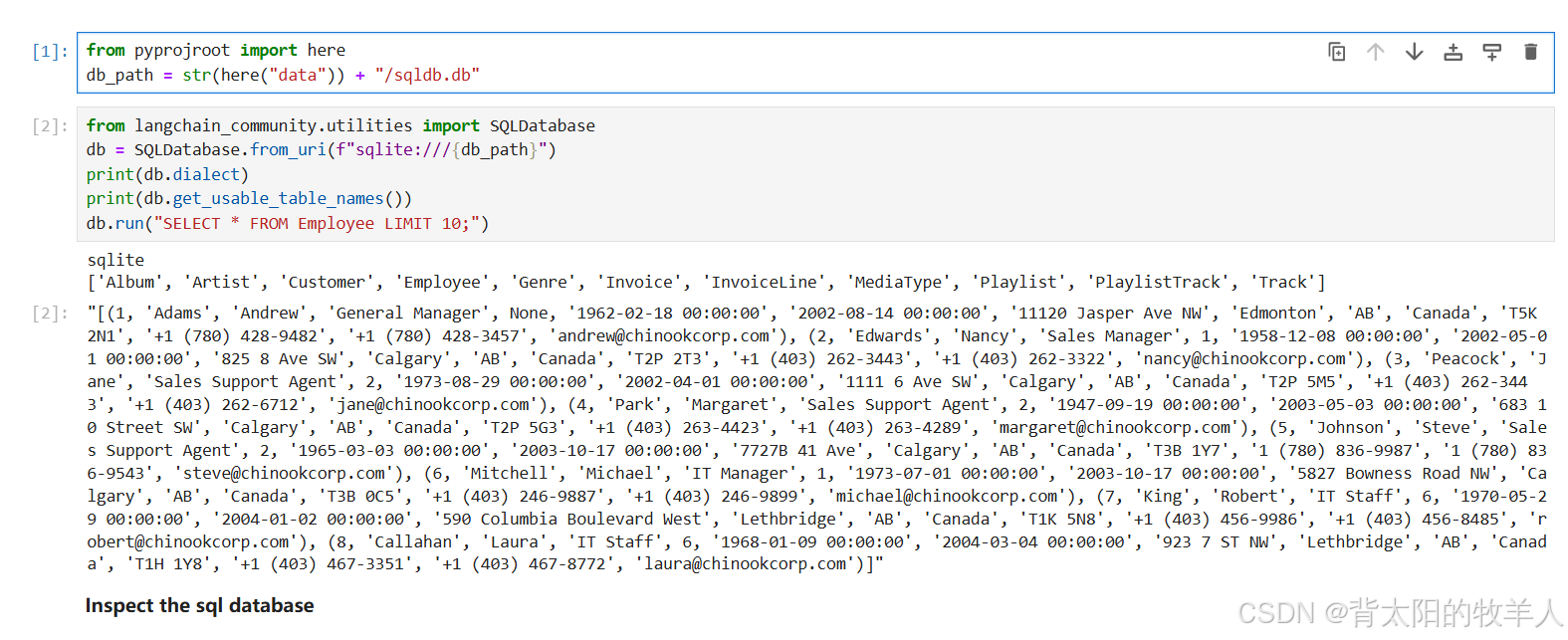
注意:
- 如果
Employee表不存在,会抛出错误,确保表名正确。
3. 使用 SQLAlchemy 获取数据库表信息
from sqlalchemy import create_engine, inspect
engine = create_engine(f"sqlite:///{db_path}")
connection = engine.connect()
inspector = inspect(engine)
- 创建引擎:
create_engine连接到 SQLite 数据库。 - 连接数据库:
connection = engine.connect()创建数据库连接。 - 初始化检查器:
inspect提供了一个接口,允许获取表的元信息。
4. 获取表和列的详细信息
table_names = inspector.get_table_names()
print("Tables:", table_names)
- 获取表名:
inspector.get_table_names()返回数据库中所有表的名称。
循环遍历每个表:
for table_name in table_names:
    print(f"Information for table: {table_name}")
    print(f"Schema: {inspector.get_schema_names()}")
    columns = inspector.get_columns(table_name)
    for column in columns:
        print(f"Column: {column['name']} Type: {column['type']}")
    pk_constraint = inspector.get_pk_constraint(table_name)
    print(f"Primary Key Constraint: {pk_constraint}")
    foreign_keys = inspector.get_foreign_keys(table_name)
    print(f"Foreign Keys: {foreign_keys}")
- 获取模式(Schema):
inspector.get_schema_names()返回数据库的模式名。- 对 SQLite 来说,通常只返回
main。
- 对 SQLite 来说,通常只返回
- 获取列信息:
inspector.get_columns(table_name)返回指定表的所有列及其类型。 - 主键约束:
inspector.get_pk_constraint(table_name)返回主键列的定义。 - 外键约束:
inspector.get_foreign_keys(table_name)返回表中定义的所有外键。
输出: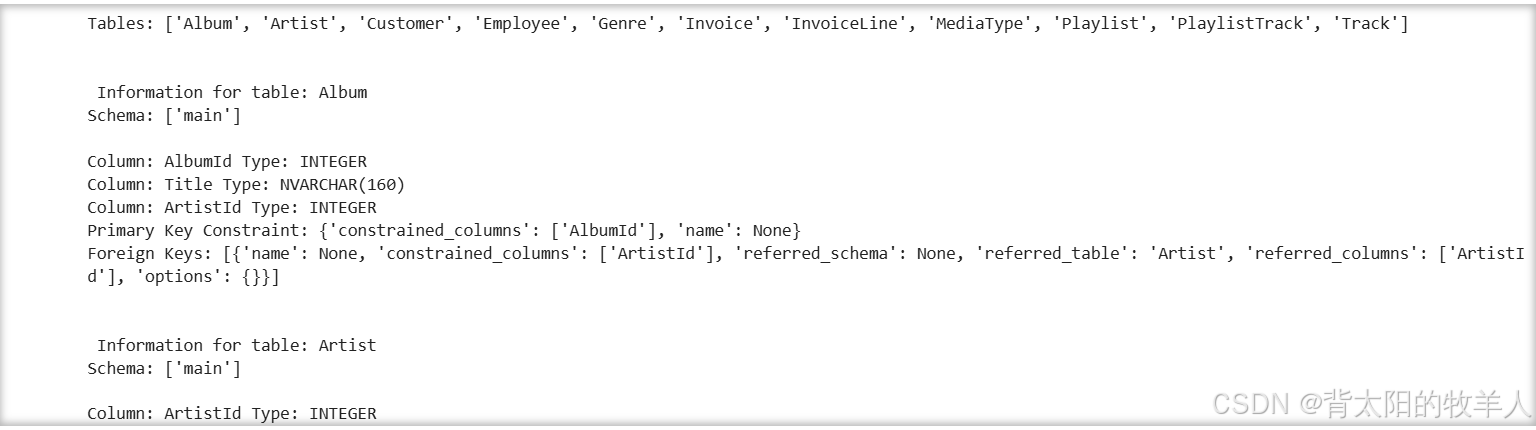
5. 关闭连接
connection.close()
- 确保资源释放: 数据库连接关闭,避免资源占用。
代码运行结果简单举例
假设数据库包含以下内容:
表 Employee
| id | name | age |
|---|---|---|
| 1 | Alice | 30 |
| 2 | Bob | 25 |
表 Department
| dept_id | dept_name |
|---|---|
| 1 | HR |
| 2 | IT |
查询结果:
Dialect: sqlite
Usable Tables: ['Employee', 'Department']

Tables: ['Employee', 'Department']

Information for table: Employee
Schema: ['main']
Column: id Type: INTEGER
Column: name Type: TEXT
Column: age Type: INTEGER
Primary Key Constraint: {'constrained_columns': ['id'], 'name': None}
Foreign Keys: []

Information for table: Department
Schema: ['main']
Column: dept_id Type: INTEGER
Column: dept_name Type: TEXT
Primary Key Constraint: {'constrained_columns': ['dept_id'], 'name': None}
Foreign Keys: []
总结
langchain_community.utilities: 用于快速运行 SQL 查询和获取基本信息。- SQLAlchemy: 更详细地访问数据库的元信息,如主键、外键和列属性。
- 适用场景:
- 需要高层封装时,使用
langchain_community.utilities。 - 需要底层控制和详细元数据时,选择 SQLAlchemy。
- 需要高层封装时,使用
可以根据需求选择适合的工具组合,提升开发效率。

魔乐社区(Modelers.cn) 是一个中立、公益的人工智能社区,提供人工智能工具、模型、数据的托管、展示与应用协同服务,为人工智能开发及爱好者搭建开放的学习交流平台。社区通过理事会方式运作,由全产业链共同建设、共同运营、共同享有,推动国产AI生态繁荣发展。
更多推荐


 7
7 0
0- 0


 已为社区贡献6条内容

所有评论(0)