使用hugging face在本地运行llama3.1
·
hugging face地址
注意:注册hugging face时选择国籍请选择美国,不要选择中国,否则获取模型时不会被审核通过!
方法一:
在Models模型搜索Meta-Llama-3.1-8B-Instruct并点击“Use this model",将代码粘贴到本地运行
# Use a pipeline as a high-level helper
from transformers import pipeline

messages = [
    {"role": "user", "content": "Who are you?"},
]
pipe = pipeline("text-generation", model="meta-llama/Llama-3.1-8B-Instruct")
pipe(messages)
使用该方法可能会报以下错误:
Cannot access gated repo for url xxx
Access to model meta-llama/Meta-llama-3.1-8B-Instruct is restricted. You must be authenticated to access it.
方法二
1、在设置里面创建access token并保存获取的令牌(注意勾选读写权限)
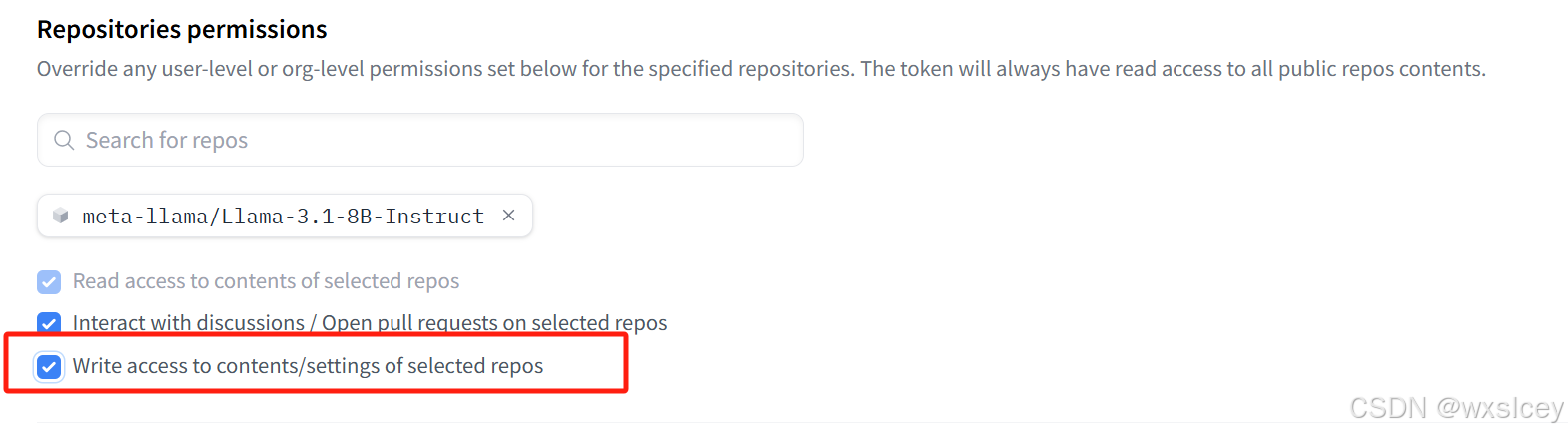
2、在Models模块搜索Meta-Llama-3.1-8B-Instruct并使用git命令下载该模型
git clone https://huggingface-user-name:ACCESS_TOKEN@huggingface.co/meta-llama/Meta-Llama-3.1-8B-Instruct
3、运行llama3.1模型
import transformers
import torch

model_id = "D:\\model\\Meta-Llama-3.1-8B-Instruct"

pipeline = transformers.pipeline(
	"text-generation",
	model=model_id,
	model_kwargs={"torch_dtype": torch.bfloat16},
	device_map="auto",
}

messages = [
	{"role": "user", "content": "Who are you?"},
]

outputs = pipeline(
	messages,
	max_new_token=256,
)
print(outputs[0]["generated_text][-1])

魔乐社区(Modelers.cn) 是一个中立、公益的人工智能社区,提供人工智能工具、模型、数据的托管、展示与应用协同服务,为人工智能开发及爱好者搭建开放的学习交流平台。社区通过理事会方式运作,由全产业链共同建设、共同运营、共同享有,推动国产AI生态繁荣发展。
更多推荐


 1
1 0
0- 0


 已为社区贡献2条内容

所有评论(0)