ollama执行模型启动命令报错:Error: pull model manifest: Get “https://registry.ollama.ai/v2/library/deepseek-r1“
·
背景
在使用ollama下载模型的时候,执行 ollama run 命令报错:
pulling manifest
Error: pull model manifest: Get “https://registry.ollama.ai/v2/library/deepseek-r1/manifests/7b”: dial tcp 127.0.0.1:443: connectex: No connection could be made because the target machine actively refused it.
解决方法
这个问题出现的原因是因为你的电脑/服务器上有开启代理服务器的功能,以windows为例 在 设置->网络->代理->使用代理服务器 中如果使用代理服务器 是打开状态的话就会出现这个问题。如下图所示:

所以解决方法就是在系统环境变量中添加两个环境变量:http_proxy 和 https_proxy 变量的值设置为上面代理服务器的地址,像下面这样:
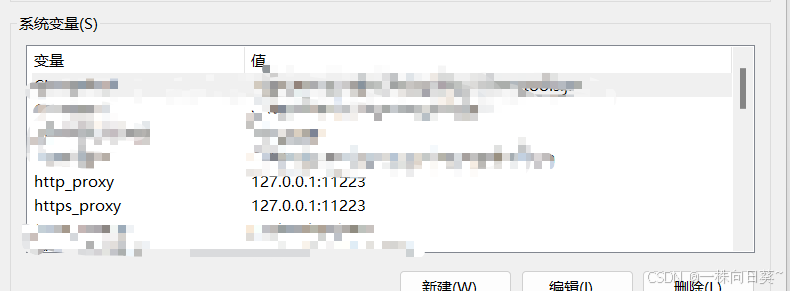
然后重新执行模型运行命令就可以了,亲测有效。
如果你是Linux操作系统,可以问一下AI怎么进行上面的设置。

魔乐社区(Modelers.cn) 是一个中立、公益的人工智能社区,提供人工智能工具、模型、数据的托管、展示与应用协同服务,为人工智能开发及爱好者搭建开放的学习交流平台。社区通过理事会方式运作,由全产业链共同建设、共同运营、共同享有,推动国产AI生态繁荣发展。
更多推荐


 5
5 0
0- 0


 已为社区贡献3条内容

所有评论(0)