深度学习 —— 个人学习笔记6(权重衰减)
本文章为个人学习使用,版面观感若有不适请谅解,文中知识仅代表个人观点,若出现错误,欢迎各位批评指正。文中部分知识参考:B 站 —— 跟李沐学AI;
·
声明
本文章为个人学习使用,版面观感若有不适请谅解,文中知识仅代表个人观点,若出现错误,欢迎各位批评指正。
十三、权重衰减
使用以下公式为例做演示:
y=0.05+∑i=1d0.01xi+εwhereε ~ N(0,0.012) y = 0.05 + \sum_{i=1}^{d} 0.01x_i + \varepsilon \quad where \quad \varepsilon \; ~ \; N ( 0 , 0.01^2 ) y=0.05+i=1∑d0.01xi+εwhereε~N(0,0.012)
- 权重衰减的从零开始实现
import torch
from IPython import display
import matplotlib.pyplot as plt
from matplotlib_inline import backend_inline

class Accumulator:                                                                  # 定义一个实用程序类 Accumulator,用于对多个变量进行累加
    """在n个变量上累加"""
    def __init__(self, n):
        self.data = [0.0] * n

    def add(self, *args):
        self.data = [a + float(b) for a, b in zip(self.data, args)]

    def reset(self):
        self.data = [0.0] * len(self.data)

    def __getitem__(self, idx):
        return self.data[idx]

def evaluate_loss(net, data_iter, loss):
    reshape = lambda x, *args, **kwargs: x.reshape(*args, **kwargs)
    reduce_sum = lambda x, *args, **kwargs: x.sum(*args, **kwargs)
    size = lambda x, *args, **kwargs: x.numel(*args, **kwargs)
    metric = Accumulator(2)  # Sum of losses, no. of examples
    for X, y in data_iter:
        out = net(X)
        y = reshape(y, out.shape)
        l = loss(out, y)
        metric.add(reduce_sum(l), size(l))
    return metric[0] / metric[1]

def set_axes(axes, xlabel, ylabel, xlim, ylim, xscale, yscale, legend):
    axes.set_xlabel(xlabel), axes.set_ylabel(ylabel)
    axes.set_xscale(xscale), axes.set_yscale(yscale)
    axes.set_xlim(xlim),     axes.set_ylim(ylim)
    if legend:
        axes.legend(legend)
    axes.grid()

class Animator:                                                                   # 定义一个在动画中绘制数据的实用程序类 Animator
    """在动画中绘制数据"""
    def __init__(self, xlabel=None, ylabel=None, legend=None, xlim=None,
                 ylim=None, xscale='linear', yscale='linear',
                 fmts=('-', 'm--', 'g-.', 'r:'), nrows=1, ncols=1,
                 figsize=(3.5, 2.5)):
        # 增量地绘制多条线
        if legend is None:
            legend = []
        backend_inline.set_matplotlib_formats('svg')
        self.fig, self.axes = plt.subplots(nrows, ncols, figsize=figsize)
        if nrows * ncols == 1:
            self.axes = [self.axes, ]
        # 使用lambda函数捕获参数
        self.config_axes = lambda: set_axes(
            self.axes[0], xlabel, ylabel, xlim, ylim, xscale, yscale, legend)
        self.X, self.Y, self.fmts = None, None, fmts

    def add(self, x, y):
        # Add multiple data points into the figure
        if not hasattr(y, "__len__"):
            y = [y]
        n = len(y)
        if not hasattr(x, "__len__"):
            x = [x] * n
        if not self.X:
            self.X = [[] for _ in range(n)]
        if not self.Y:
            self.Y = [[] for _ in range(n)]
        for i, (a, b) in enumerate(zip(x, y)):
            if a is not None and b is not None:
                self.X[i].append(a)
                self.Y[i].append(b)
        self.axes[0].cla()
        for x, y, fmt in zip(self.X, self.Y, self.fmts):
            self.axes[0].plot(x, y, fmt)
        self.config_axes()
        display.display(self.fig)
        # 通过以下两行代码实现了在PyCharm中显示动图
        plt.draw()
        plt.pause(interval=0.001)
        display.clear_output(wait=True)
        plt.rcParams['font.sans-serif'] = ['Microsoft YaHei']

def load_array(data_arrays, batch_size, is_train=True):
    dataset = torch.utils.data.TensorDataset(*data_arrays)
    return torch.utils.data.DataLoader(dataset, batch_size, shuffle=is_train)

def synthetic_data(w, b, num_examples):
    """生成 y = Xw + b + 噪声。"""
    X = torch.normal(0, 1, (num_examples, len(w))).cuda()                    # 均值为 0,方差为 1,有 num_examples 个样本,列数为 w 长度
    y = torch.matmul(X, w).cuda() + b                                        # y = Xw + b
    y += torch.normal(0, 0.01, y.shape).cuda()                               # 随机噪音
    return X, y.reshape((-1, 1))                                             # x,y作为列向量返回

n_train, n_test, num_inputs, batch_size = 20, 100, 200, 5
true_w, true_b = torch.ones((num_inputs, 1)).cuda() * 0.01, 0.05
train_data = synthetic_data(true_w, true_b, n_train)
train_iter = load_array(train_data, batch_size)
test_data = synthetic_data(true_w, true_b, n_test)
test_iter = load_array(test_data, batch_size, is_train=False)

##############    权重衰减的从零开始实现    #############
def init_params():
    """ 初始化参数 """
    w = torch.normal(0, 1, size=(num_inputs, 1)).cuda()
    b = torch.zeros(1).cuda()
    w.requires_grad_(True)
    b.requires_grad_(True)
    return [w, b]

def l2_penalty(w):
    """ 定义 L2 范数惩罚 """
    return (torch.sum(w.pow(2)) / 2).cuda()

def linreg(X, w, b):
    return torch.matmul(X, w) + b

def squared_loss(y_hat, y):
    reshape = lambda x, *args, **kwargs: x.reshape(*args, **kwargs)
    return (y_hat - reshape(y, y_hat.shape)) ** 2 / 2

def sgd(params, lr, batch_size):
    with torch.no_grad():
        for param in params:
            param -= lr * param.grad / batch_size
            param.grad.zero_()

def train(lambd):
    flag_button = "使用"
    w, b = init_params()
    net, loss = lambda X: linreg(X, w, b), squared_loss
    num_epochs, lr = 150, 0.005
    animator = Animator(xlabel='epochs', ylabel='loss', yscale='log',
                        xlim=[5, num_epochs], legend=['train', 'test'])
    for epoch in range(num_epochs):
        for X, y in train_iter:
            # 增加了 L2 范数惩罚项,、
            # 广播机制使 l2_penalty(w) 成为一个长度为 batch_size 的向量
            l = loss(net(X), y) + lambd * l2_penalty(w)
            l.sum().backward()
            sgd([w, b], lr, batch_size)
        if (epoch + 1) % 5 == 0:
            animator.add(epoch + 1, (evaluate_loss(net, train_iter, loss),
                                     evaluate_loss(net, test_iter, loss)))
    # print('w的L2范数是:', torch.norm(w).item())
    if lambd == 0:flag_button = "禁用"
    plt.title(f"{flag_button}权重衰减 (lambda = {lambd})\nw 的 L2 范数是:{torch.norm(w).item()}")
    plt.show()


train(lambd=0)

train(lambd=15)


- 权重衰减的简洁实现
import torch
from torch import nn
from IPython import display
import matplotlib.pyplot as plt
from matplotlib_inline import backend_inline

class Accumulator:                                                                  # 定义一个实用程序类 Accumulator,用于对多个变量进行累加
    """在n个变量上累加"""
    def __init__(self, n):
        self.data = [0.0] * n

    def add(self, *args):
        self.data = [a + float(b) for a, b in zip(self.data, args)]

    def reset(self):
        self.data = [0.0] * len(self.data)

    def __getitem__(self, idx):
        return self.data[idx]

def evaluate_loss(net, data_iter, loss):
    reshape = lambda x, *args, **kwargs: x.reshape(*args, **kwargs)
    reduce_sum = lambda x, *args, **kwargs: x.sum(*args, **kwargs)
    size = lambda x, *args, **kwargs: x.numel(*args, **kwargs)
    metric = Accumulator(2)  # Sum of losses, no. of examples
    for X, y in data_iter:
        out = net(X)
        y = reshape(y, out.shape)
        l = loss(out, y)
        metric.add(reduce_sum(l), size(l))
    return metric[0] / metric[1]

def set_axes(axes, xlabel, ylabel, xlim, ylim, xscale, yscale, legend):
    axes.set_xlabel(xlabel), axes.set_ylabel(ylabel)
    axes.set_xscale(xscale), axes.set_yscale(yscale)
    axes.set_xlim(xlim),     axes.set_ylim(ylim)
    if legend:
        axes.legend(legend)
    axes.grid()

class Animator:                                                                   # 定义一个在动画中绘制数据的实用程序类 Animator
    """在动画中绘制数据"""
    def __init__(self, xlabel=None, ylabel=None, legend=None, xlim=None,
                 ylim=None, xscale='linear', yscale='linear',
                 fmts=('-', 'm--', 'g-.', 'r:'), nrows=1, ncols=1,
                 figsize=(3.5, 2.5)):
        # 增量地绘制多条线
        if legend is None:
            legend = []
        backend_inline.set_matplotlib_formats('svg')
        self.fig, self.axes = plt.subplots(nrows, ncols, figsize=figsize)
        if nrows * ncols == 1:
            self.axes = [self.axes, ]
        # 使用lambda函数捕获参数
        self.config_axes = lambda: set_axes(
            self.axes[0], xlabel, ylabel, xlim, ylim, xscale, yscale, legend)
        self.X, self.Y, self.fmts = None, None, fmts

    def add(self, x, y):
        # Add multiple data points into the figure
        if not hasattr(y, "__len__"):
            y = [y]
        n = len(y)
        if not hasattr(x, "__len__"):
            x = [x] * n
        if not self.X:
            self.X = [[] for _ in range(n)]
        if not self.Y:
            self.Y = [[] for _ in range(n)]
        for i, (a, b) in enumerate(zip(x, y)):
            if a is not None and b is not None:
                self.X[i].append(a)
                self.Y[i].append(b)
        self.axes[0].cla()
        for x, y, fmt in zip(self.X, self.Y, self.fmts):
            self.axes[0].plot(x, y, fmt)
        self.config_axes()
        display.display(self.fig)
        # 通过以下两行代码实现了在PyCharm中显示动图
        plt.draw()
        plt.pause(interval=0.001)
        display.clear_output(wait=True)
        plt.rcParams['font.sans-serif'] = ['Microsoft YaHei']

def load_array(data_arrays, batch_size, is_train=True):
    dataset = torch.utils.data.TensorDataset(*data_arrays)
    return torch.utils.data.DataLoader(dataset, batch_size, shuffle=is_train)

def synthetic_data(w, b, num_examples):
    """生成 y = Xw + b + 噪声。"""
    X = torch.normal(0, 1, (num_examples, len(w))).cuda()                    # 均值为 0,方差为 1,有 num_examples 个样本,列数为 w 长度
    y = torch.matmul(X, w).cuda() + b                                        # y = Xw + b
    y += torch.normal(0, 0.01, y.shape).cuda()                               # 随机噪音
    return X, y.reshape((-1, 1))                                             # x,y作为列向量返回

n_train, n_test, num_inputs, batch_size = 20, 100, 200, 5
true_w, true_b = torch.ones((num_inputs, 1)).cuda() * 0.01, 0.05
train_data = synthetic_data(true_w, true_b, n_train)
train_iter = load_array(train_data, batch_size)
test_data = synthetic_data(true_w, true_b, n_test)
test_iter = load_array(test_data, batch_size, is_train=False)

##############    权重衰减的简洁实现    #############

def train_concise(wd):
    flag_button = "使用"
    net = nn.Sequential(nn.Linear(num_inputs, 1)).cuda()
    for param in net.parameters():
        param.data.normal_().cuda()
    loss = nn.MSELoss(reduction='none').cuda()
    num_epochs, lr = 150, 0.005
    # 偏置参数没有衰减
    trainer = torch.optim.SGD([
        {"params":net[0].weight,'weight_decay': wd},
        {"params":net[0].bias}], lr=lr)
    animator = Animator(xlabel='epochs', ylabel='loss', yscale='log',
                        xlim=[5, num_epochs], legend=['train', 'test'])
    for epoch in range(num_epochs):
        for X, y in train_iter:
            trainer.zero_grad()
            l = loss(net(X), y)
            l.mean().backward()
            trainer.step()
        if (epoch + 1) % 5 == 0:
            animator.add(epoch + 1,
                         (evaluate_loss(net, train_iter, loss),
                          evaluate_loss(net, test_iter, loss)))
    # print('w的L2范数:', net[0].weight.norm().item())
    if wd == 0:flag_button = "禁用"
    plt.title(f"{flag_button}权重衰减 (lambda = {wd})\nw 的 L2 范数是:{net[0].weight.norm().item()}")
    plt.show()


train_concise(0)

train_concise(-2)


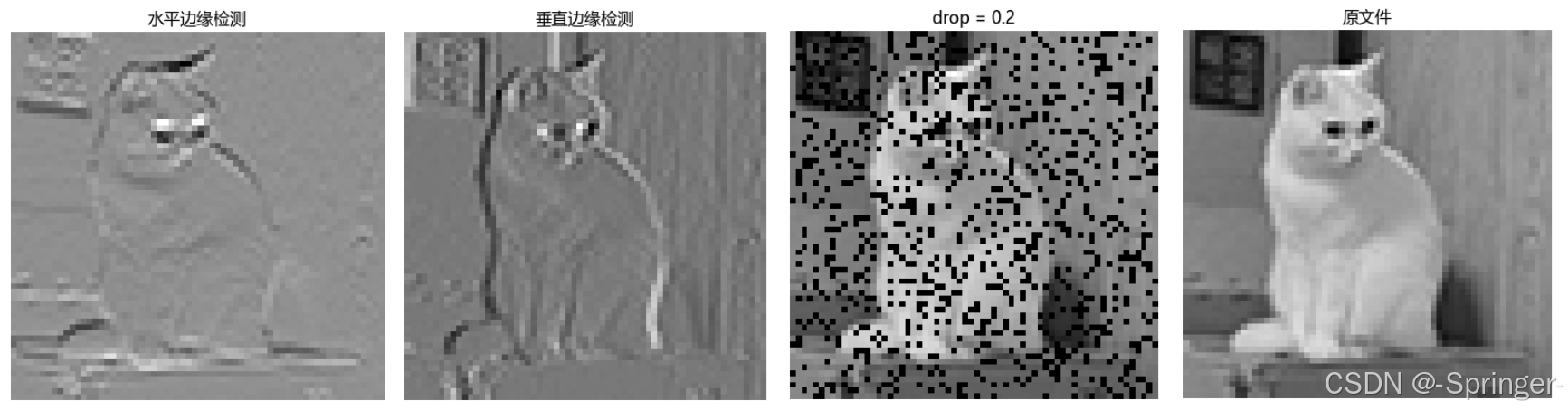
- 样例演示:演示所需文件在文章顶部下载,也可使用自己的图片转为 tensor 尝试。
import torch
import matplotlib.pyplot as plt

device = torch.device("cuda:0" if torch.cuda.is_available() else "cpu")

def show_images(imgs, titles=None, cmap=None):
    plt.imshow(imgs, cmap=cmap)
    plt.axis('off')
    plt.rcParams['font.sans-serif'] = ['Microsoft YaHei']
    if titles:
        plt.title(titles)
    plt.show()

def corr2d(X, K):
    """计算二维互相关运算"""
    h, w = K.shape  # 获取输入张量维度
    Y = torch.zeros((X.shape[0] - h + 1, X.shape[1] - w + 1)).to(device)  # 初始化输出张量
    for i in range(Y.shape[0]):
        for j in range(Y.shape[1]):
            Y[i, j] = (X[i:i + h, j:j + w] * K).sum().to(device)  # 二维互相关计算
    return Y

def dropout_layer(X, dropout):
    assert 0 <= dropout <= 1
    # 在本情况中,所有元素都被丢弃
    if dropout == 1:
        return torch.zeros_like(X).cuda()
    # 在本情况中,所有元素都被保留
    if dropout == 0:
        return X.cuda()
    mask = (torch.rand(X.shape).cuda() > dropout).float()
    return (mask * X / (1.0 - dropout)).cuda()


cat = torch.load('E:\\cat\\cat_small')
cat_gray = cat[:, :, 0:1].to(device)

show_images(cat_gray.cpu(), cmap='gray', titles="原文件")

cat_drop = dropout_layer(cat_gray, 0.2).cpu()

show_images(cat_drop, cmap='gray', titles='drop = 0.2')

K = torch.tensor([[1.0, -1.0]]).to(device)

cat_vertical = corr2d(cat[:, :, 0].to(device), K).cpu()
cat_level = corr2d(cat[:, :, 0].to(device), K.t()).cpu()

show_images(cat_vertical.cpu(), cmap='gray', titles='垂直边缘检测')
show_images(cat_level.cpu(), cmap='gray', titles='水平边缘检测')
文中部分知识参考:B 站 —— 跟李沐学AI;百度百科

魔乐社区(Modelers.cn) 是一个中立、公益的人工智能社区,提供人工智能工具、模型、数据的托管、展示与应用协同服务,为人工智能开发及爱好者搭建开放的学习交流平台。社区通过理事会方式运作,由全产业链共同建设、共同运营、共同享有,推动国产AI生态繁荣发展。
更多推荐

 9
9 0
0- 0


 已为社区贡献6条内容

所有评论(0)