windows下,opencv4.8.0+cuda编译及在vs2022中使用的详细教程
1、准备好opencv、opencv_contrib-4.8.0、cmake、vs2022,cuda
配置不好的话,可直接找我要配置好的build文件:可进群:482742815,问题答案:opencv,也可加qq:1401682937,请备注好,否则不同意
另外,我上传了一部分文件,可以查看链接:https://download.csdn.net/download/Word_And_Me_/88605111
opencv:Release OpenCV 4.8.0 · opencv/opencv · GitHub
opencv:Release OpenCV 4.8.0 · opencv/opencv · GitHub
opencv_contrib:Release 4.8.0 · opencv/opencv_contrib · GitHub
cmake:https://cmake.org/files/v3.23/cmake-3.23.0-rc1-windows-i386.msi
cuda我使用的是11.7,可以配置其他版本一样,具体不再介绍
2、开始使用cmake编译
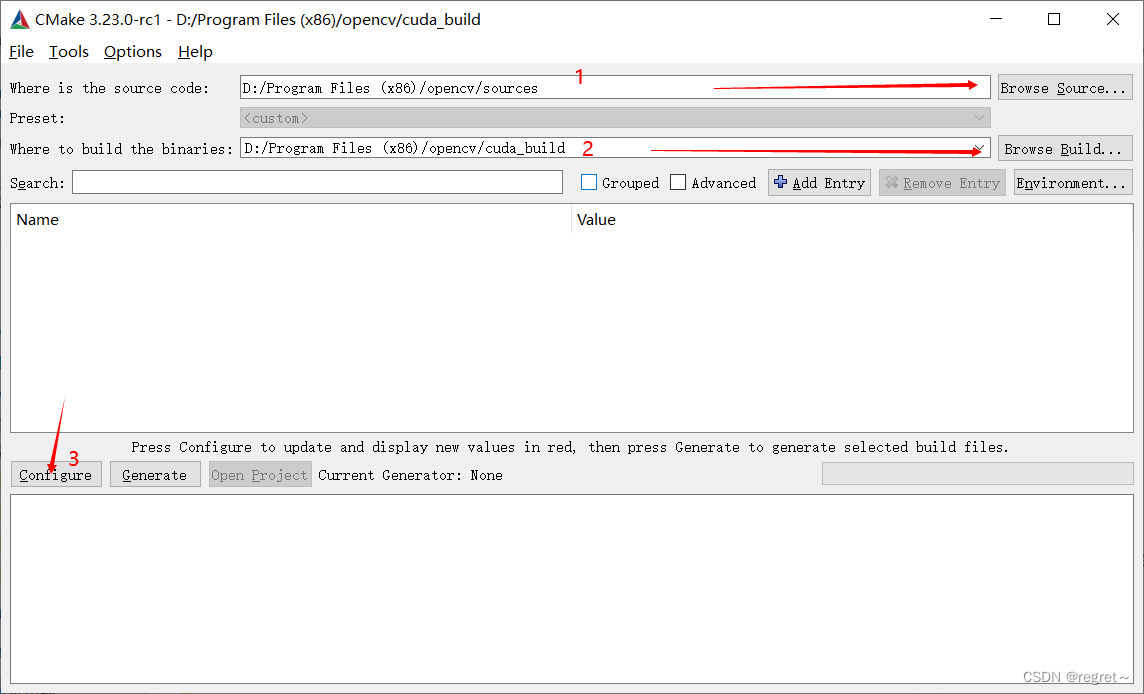
首先,选择好路径,source为本来就有的,cuda_build为自定义名称,设置好点击configure
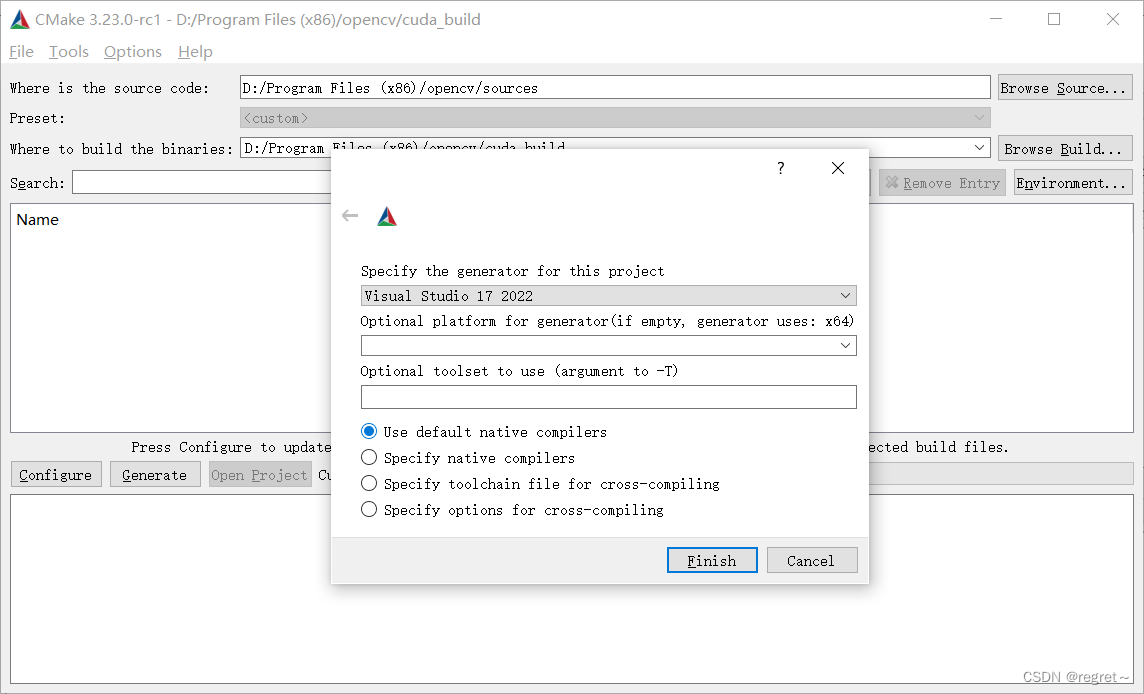
点击configure之后会弹出选择编译器,选好之后finish
编译过程中,或出现一些错误(红字体),这里第一个关于python的不用理会
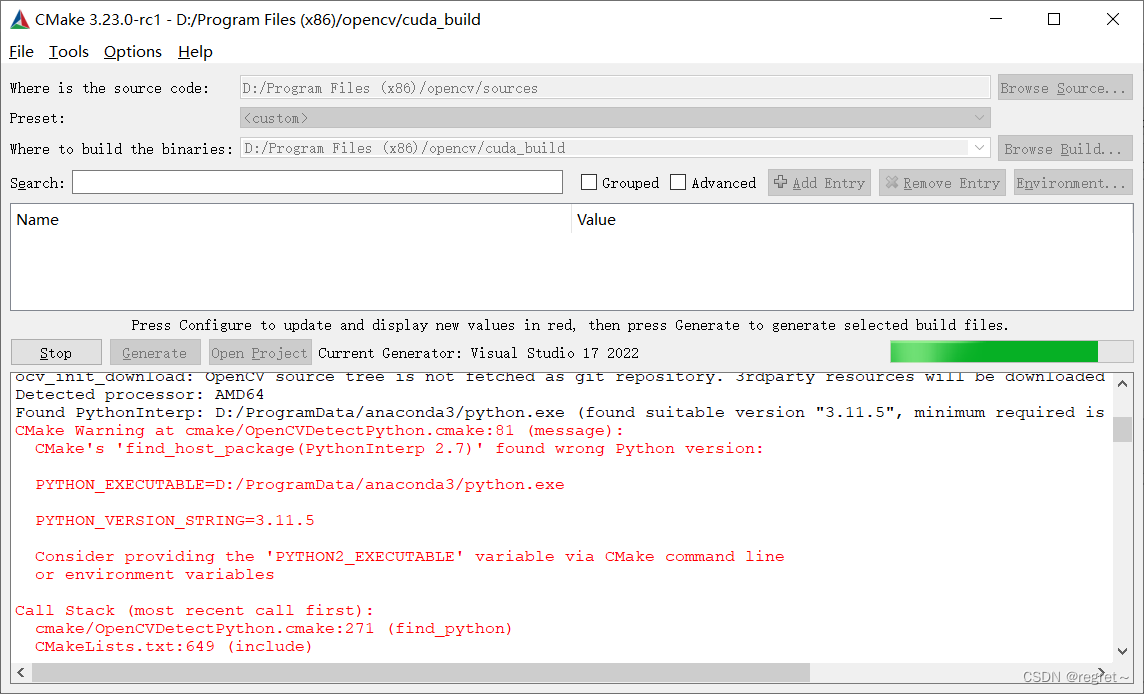
另外一些问题是因为一些包不能下载,例如ffmpeg,ippicv
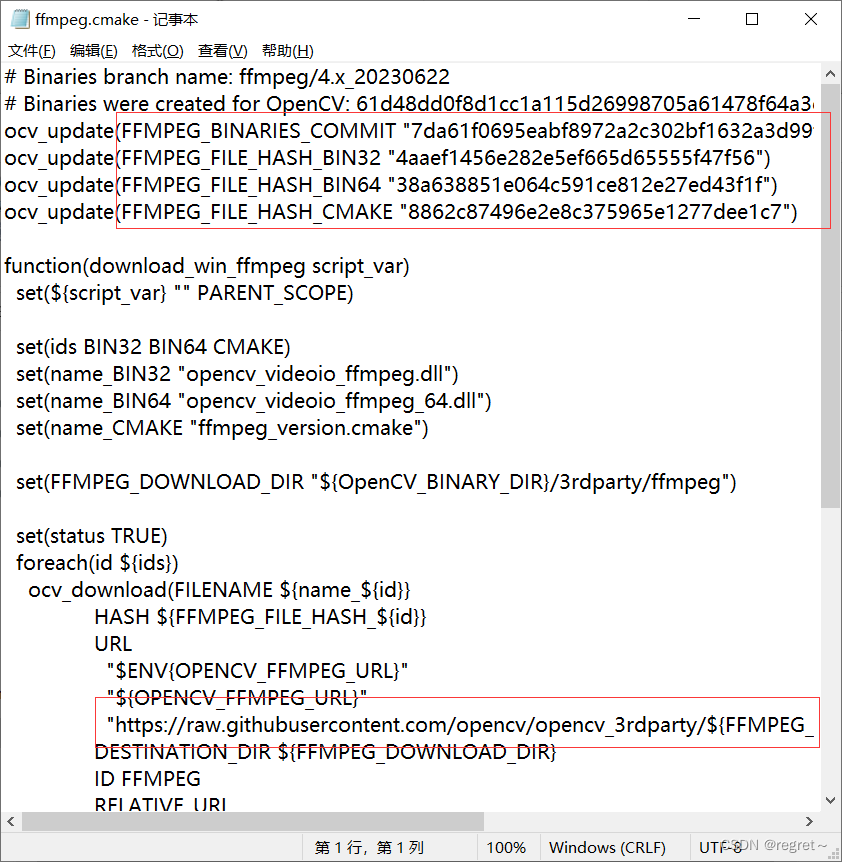
对应的文件可以在source源码中,找到对应的cmake文件,里面有下载地址,如果实在下不下来,我后面将提供文件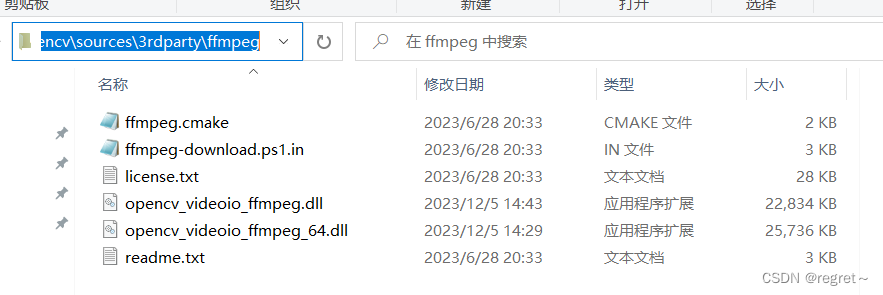
文件下载的地址为:(注意:新下载的文件命名需要在前面再加一段哈希字符,可在上面所说的cmake文件中找到)
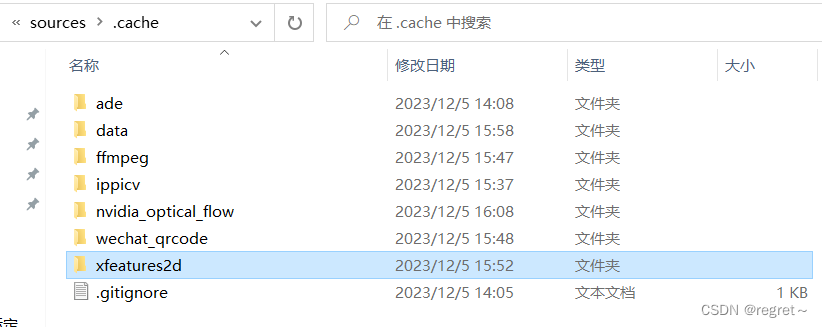
cmake中需要查找的信息:
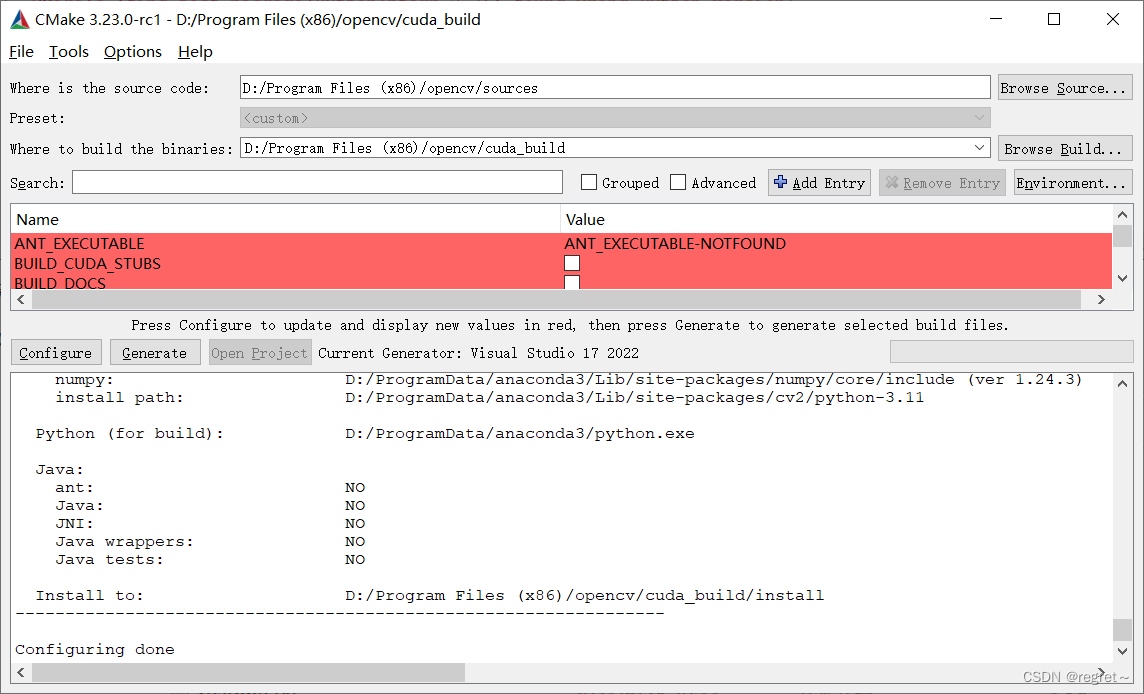
缺失的包下载完毕,并存储到相应位置后,点击generate
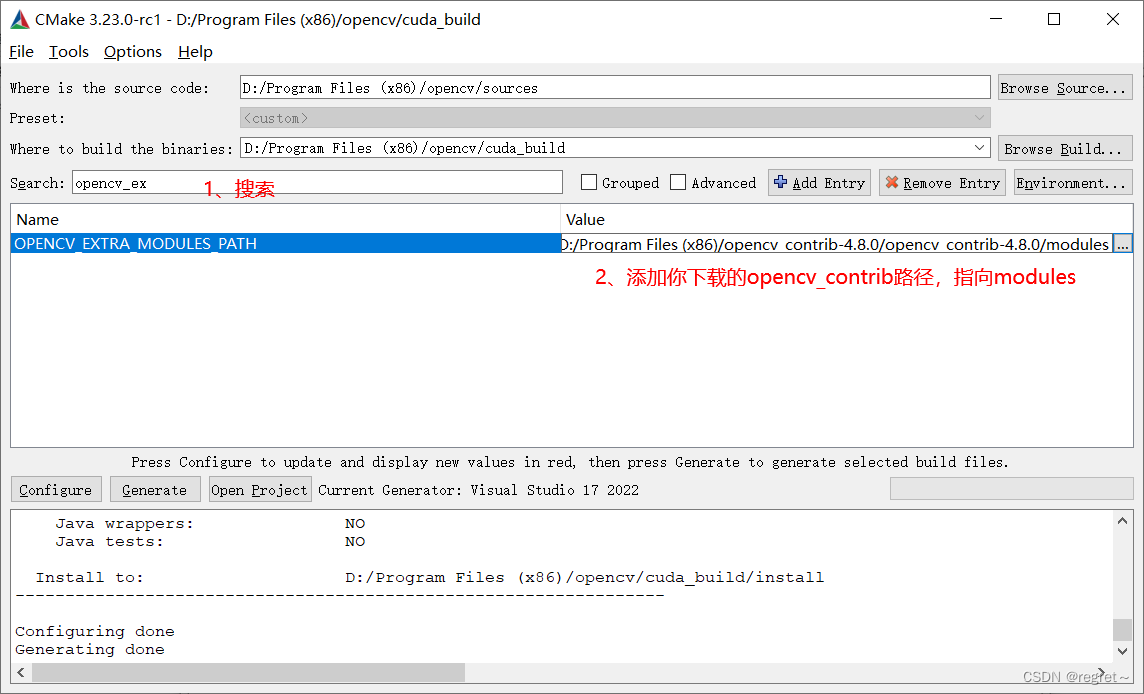
generate之后,配置opencv_ex目录,如下图:
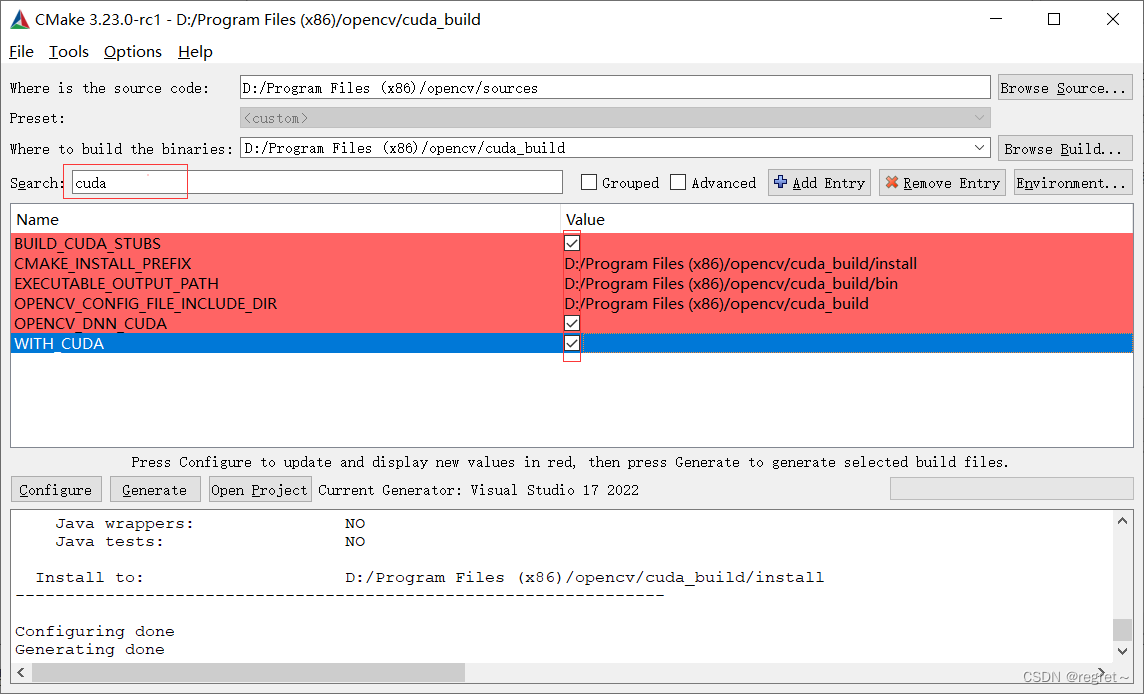
搜索cuda,全部勾选,如图:
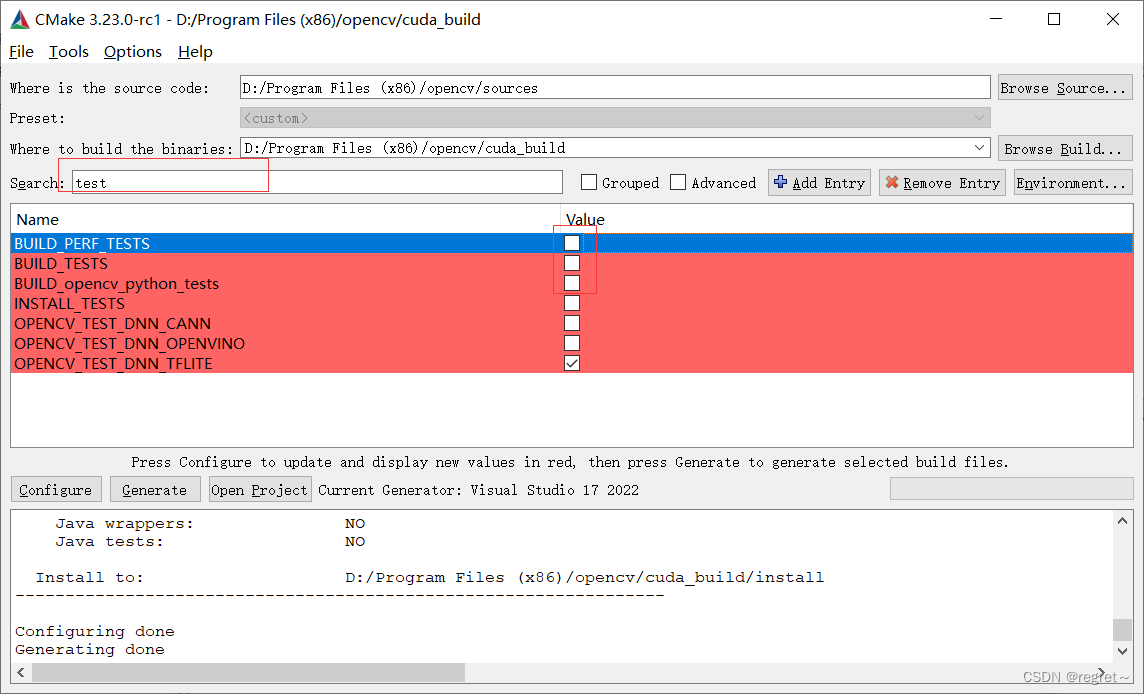
搜索test,取消勾选前三个,没有用,如图:
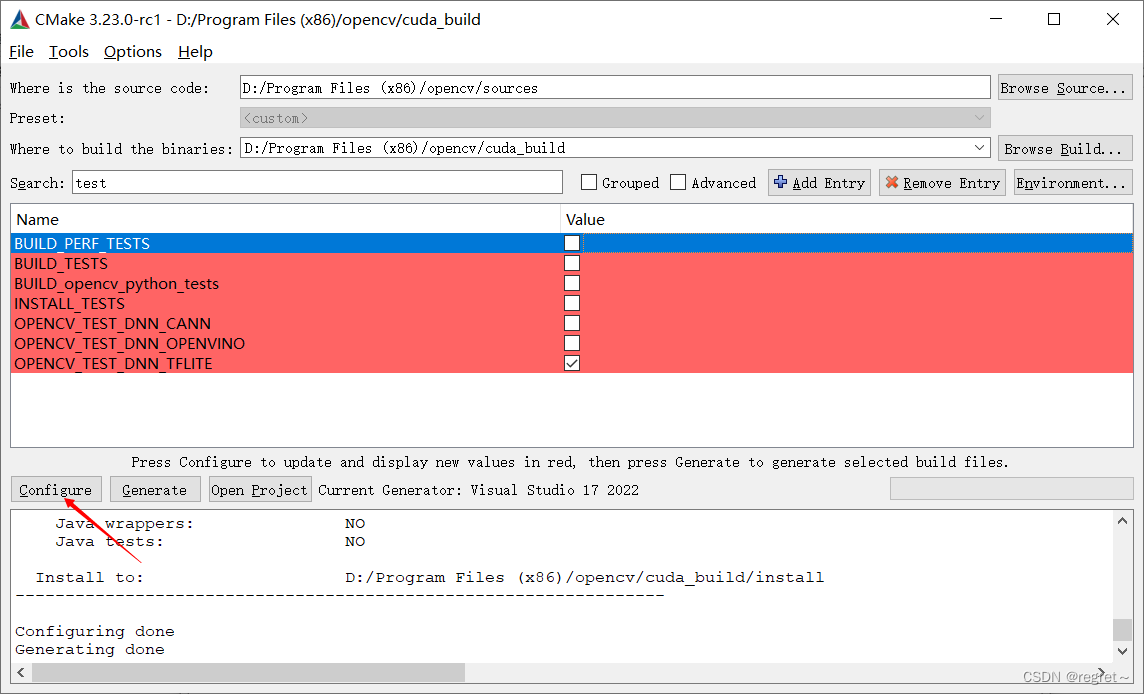
完成以上内容后,继续点击configure,如图:(注意,这一次的configure时间稍微较长)
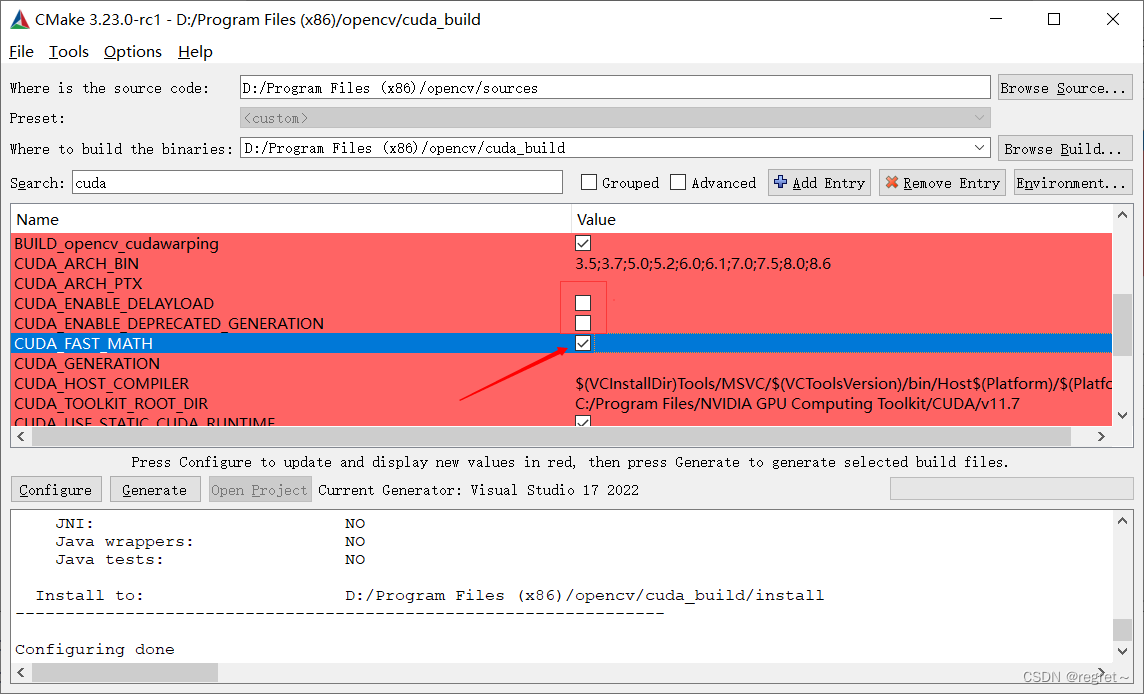
configure完成之后,搜索cuda,会发现有一堆东西,这里我们找到cuda_fast_math勾选,其余不要动,如图:
在上个configure之后,你还会发现一些错误,这里也是因为下载失败,需要手动下载:(这里我选择不要face,其余两个尝试下载,同样方法找到cmake文件,找url,这里的cmake文件在opencv_contrib/moudules中)
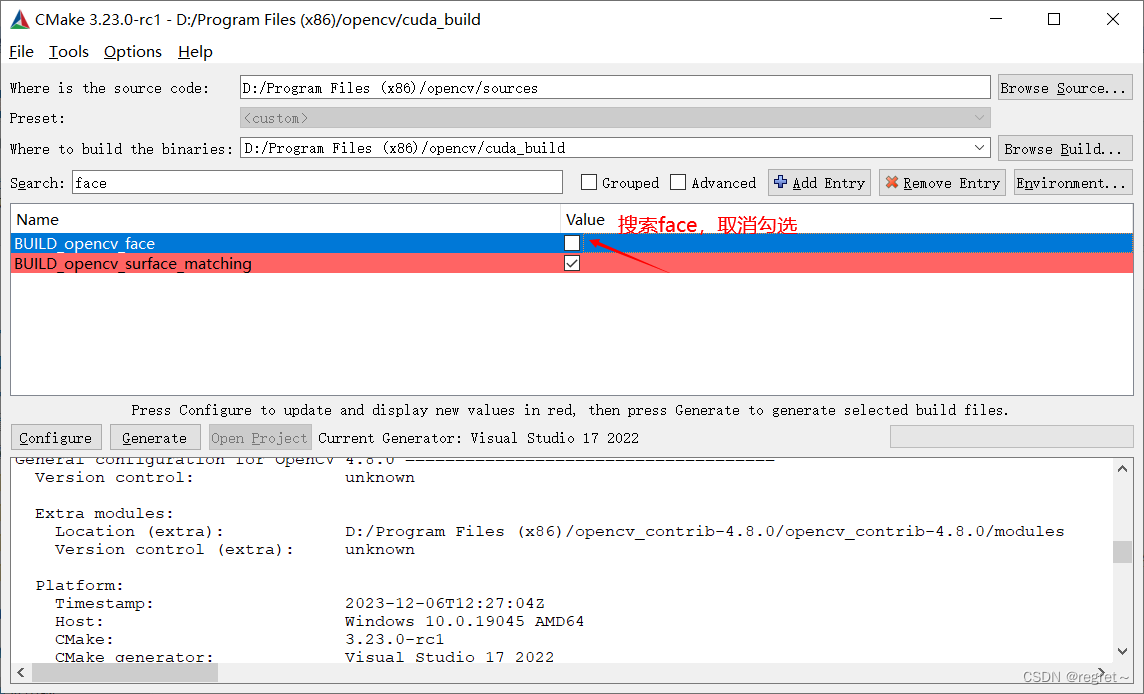
这里如果你不用xfeatures2d,wechat_qrcode,也可以搜索相应的文件,取消勾选;以上操作完成之后,点击gengrate,如下图:
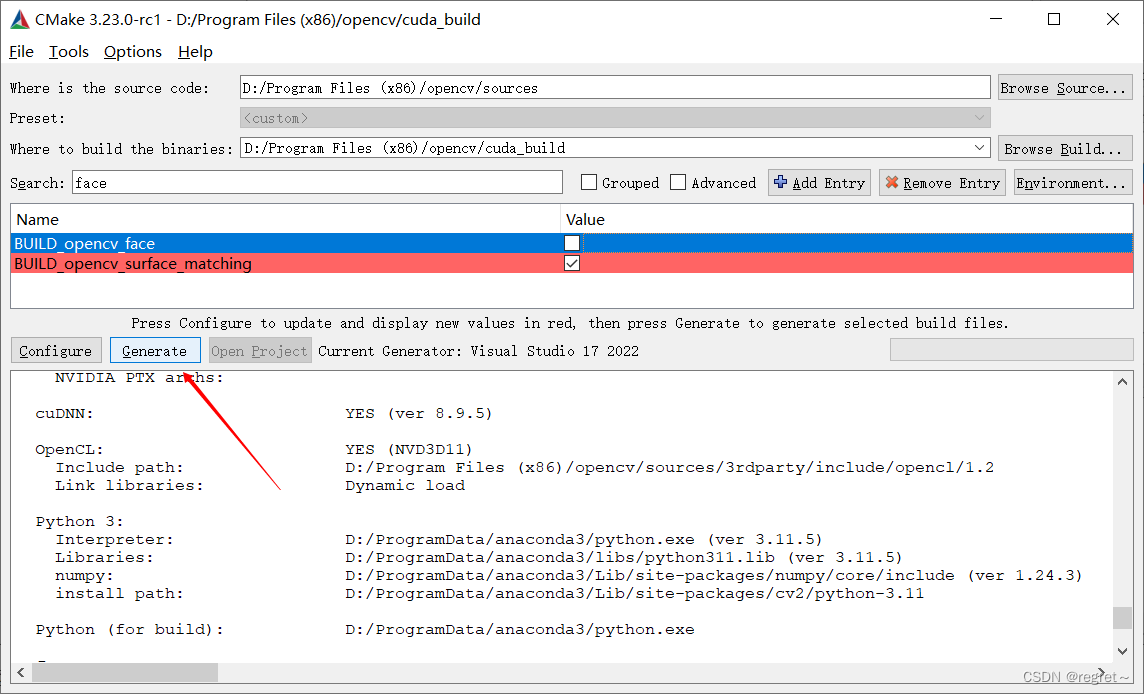
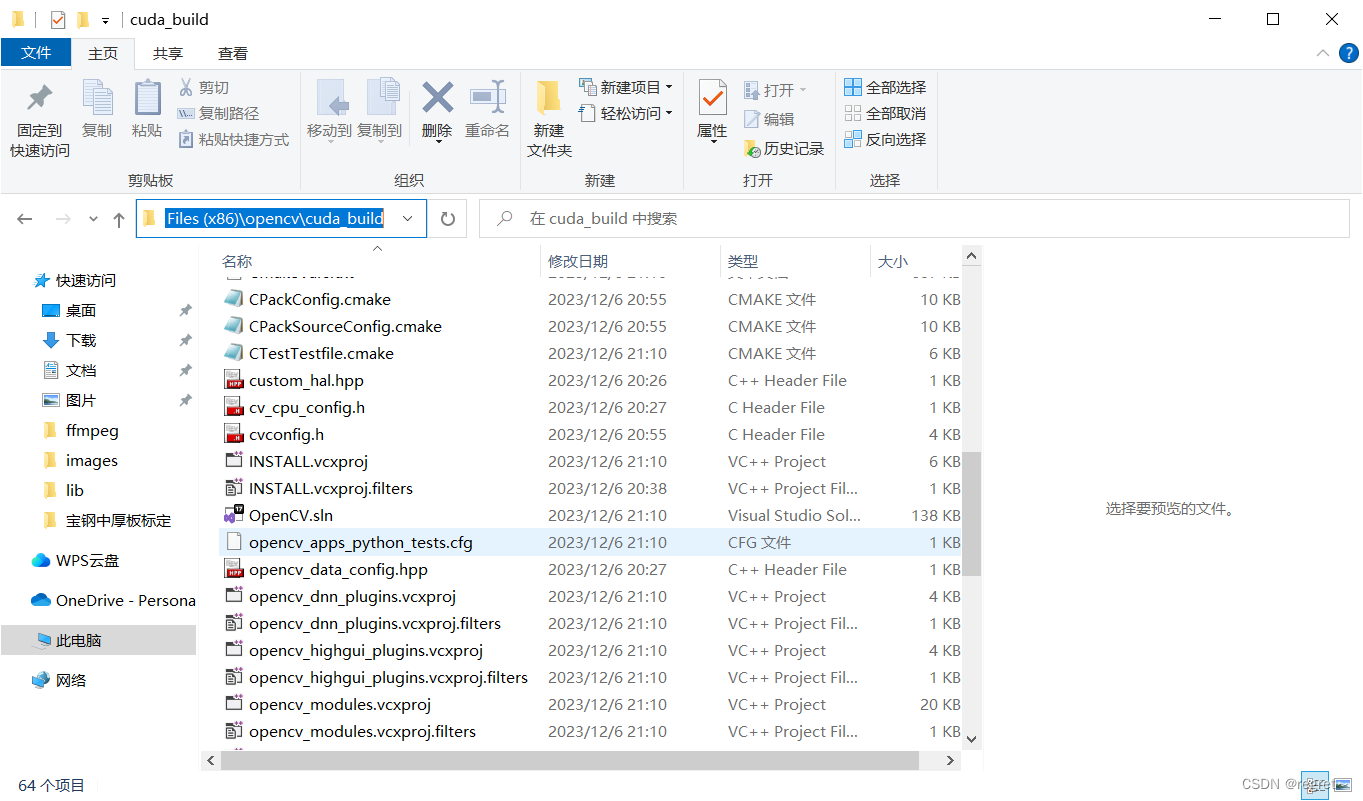
generate完成之后,进入对应的文件夹(cuda_build),打开opencv.sln
将debug改为release,生成对应的文件,如图:(生成一般需要1-2个小时,我使用了3个半小时,这里根据自己的设备不同,时间不一样,我了解到有人使用8个小时)
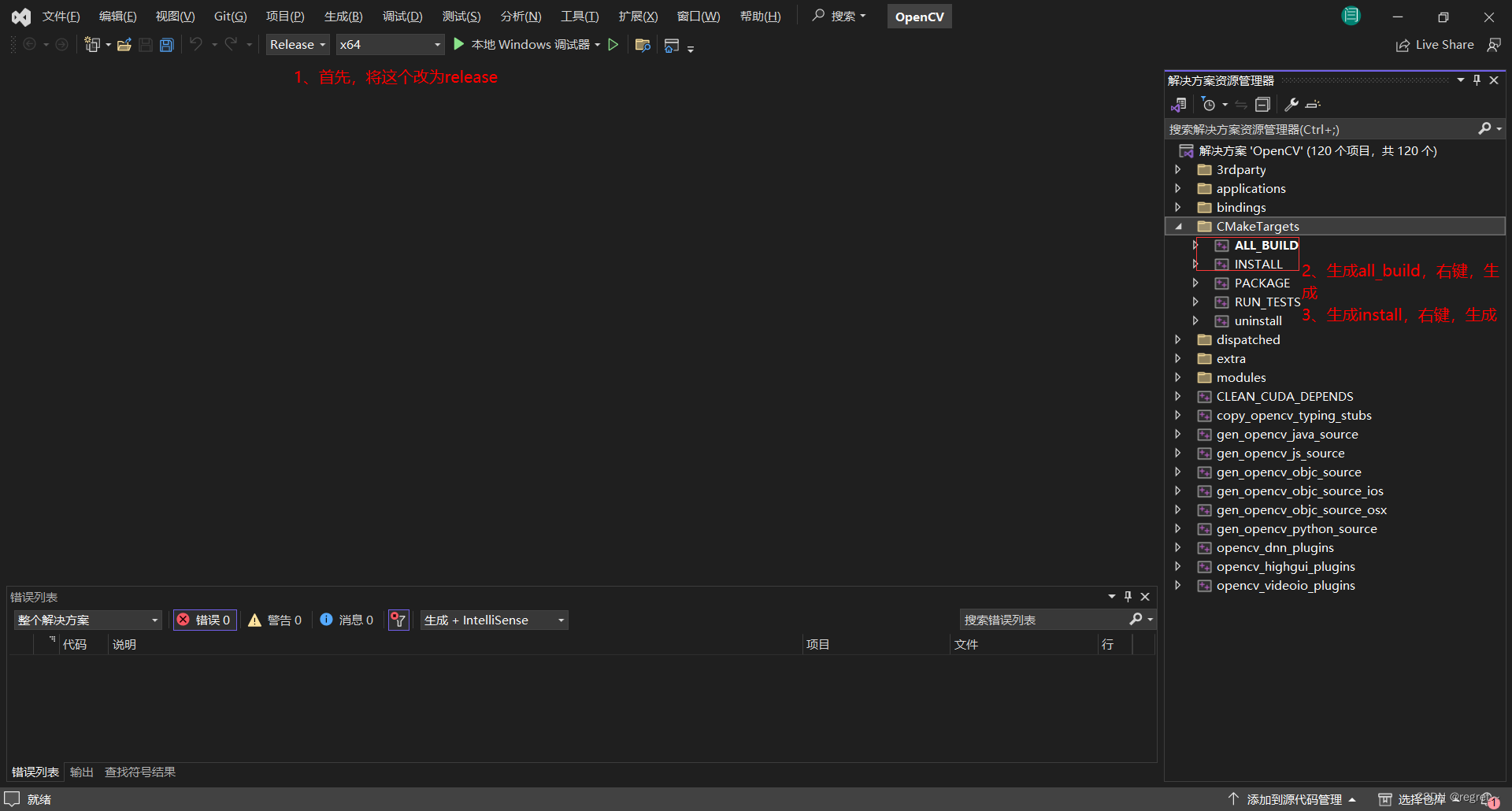
all_build生成完毕:

install生成完毕:
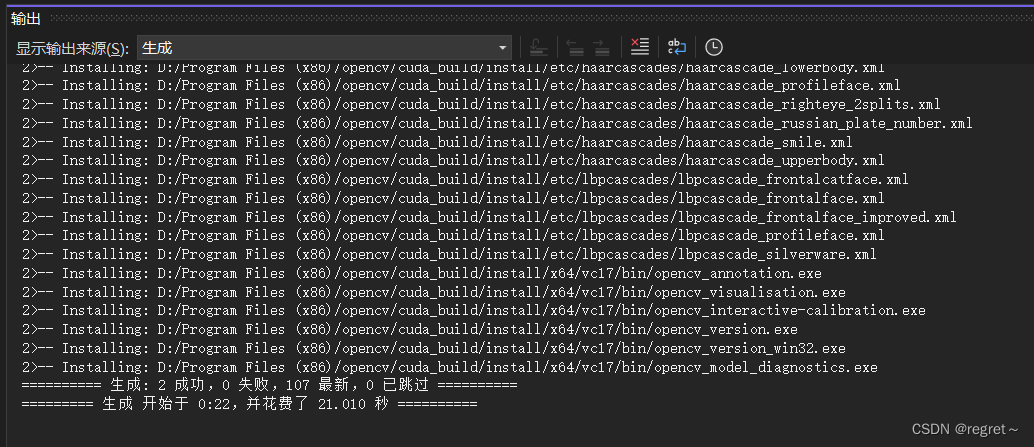
使用配置
1、打开自己创建的项目,右键-->属性-->vc++目录
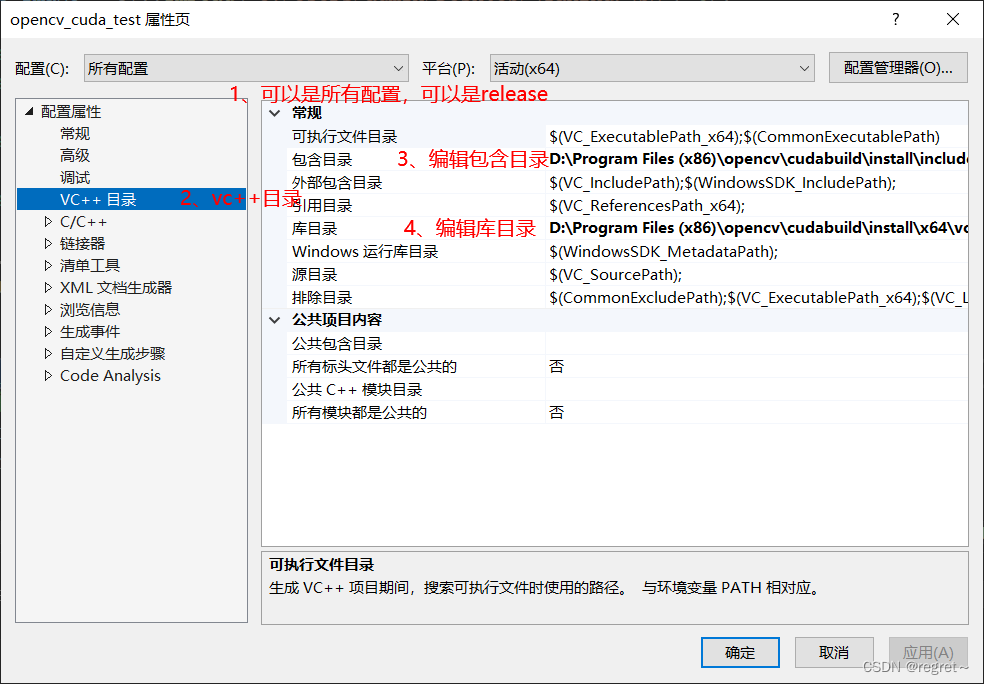
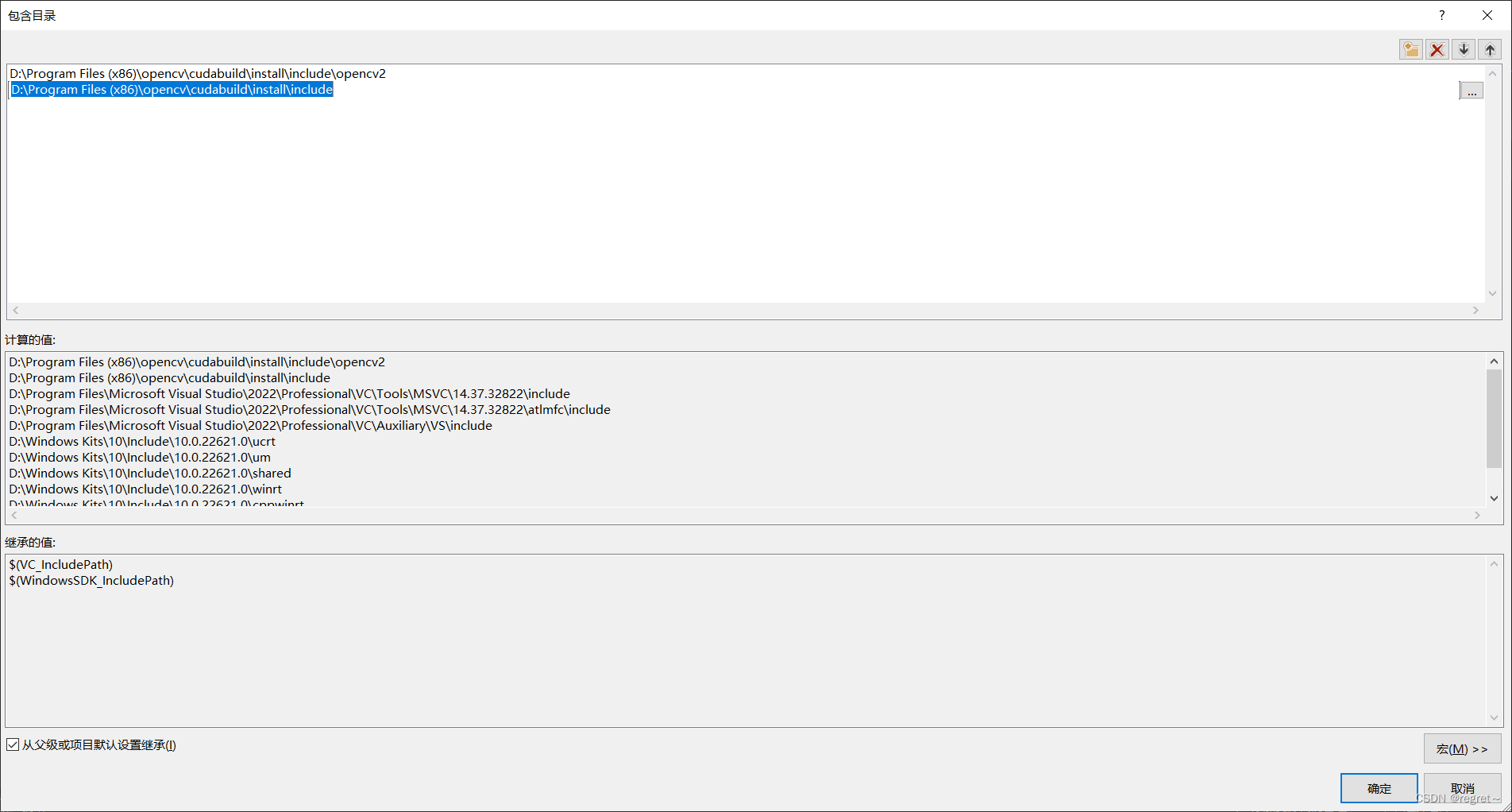
包含目录:
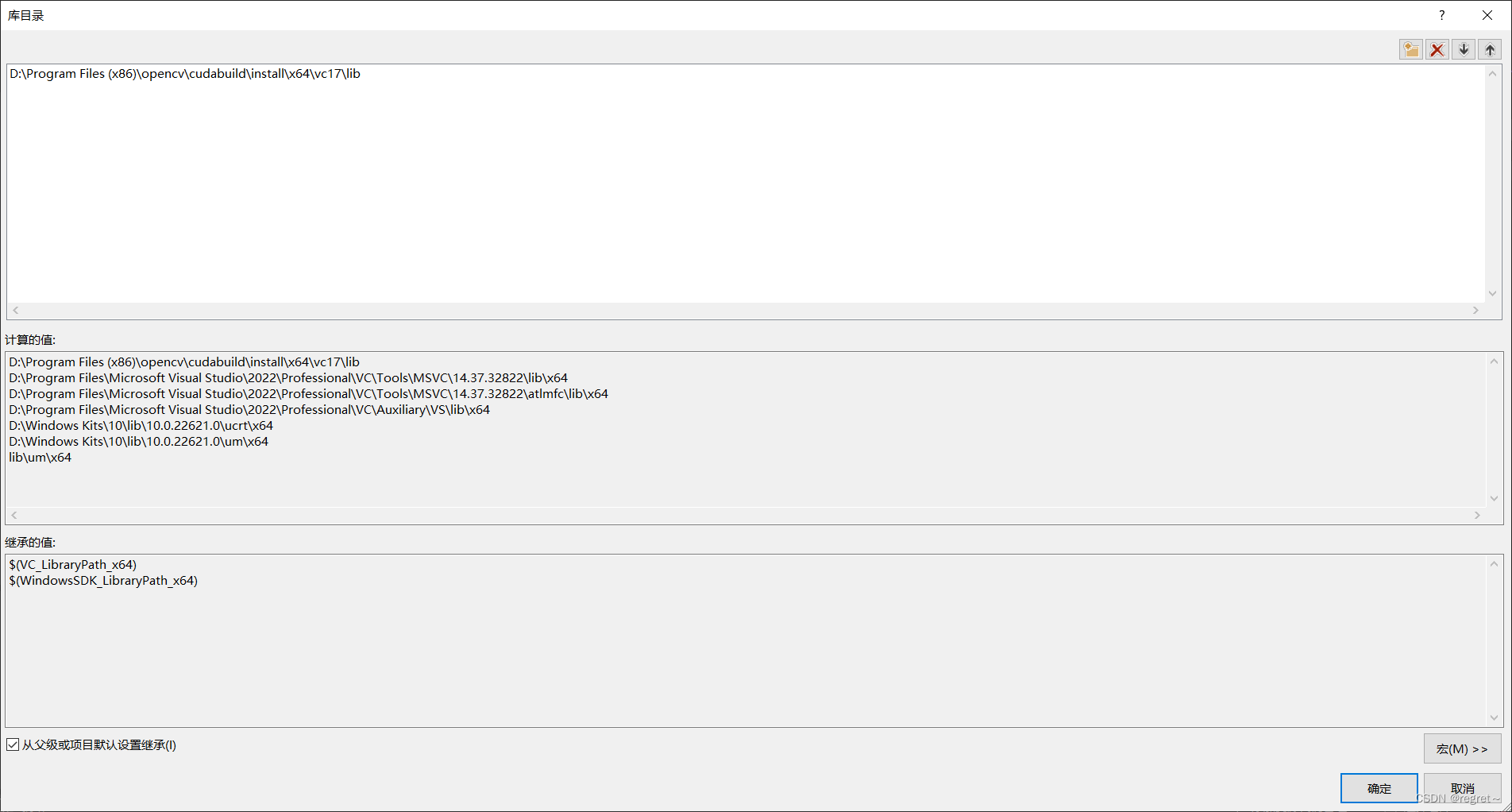
库目录:
2、打开自己创建的项目,右键-->属性-->链接器-->输入-->编辑附加依赖项
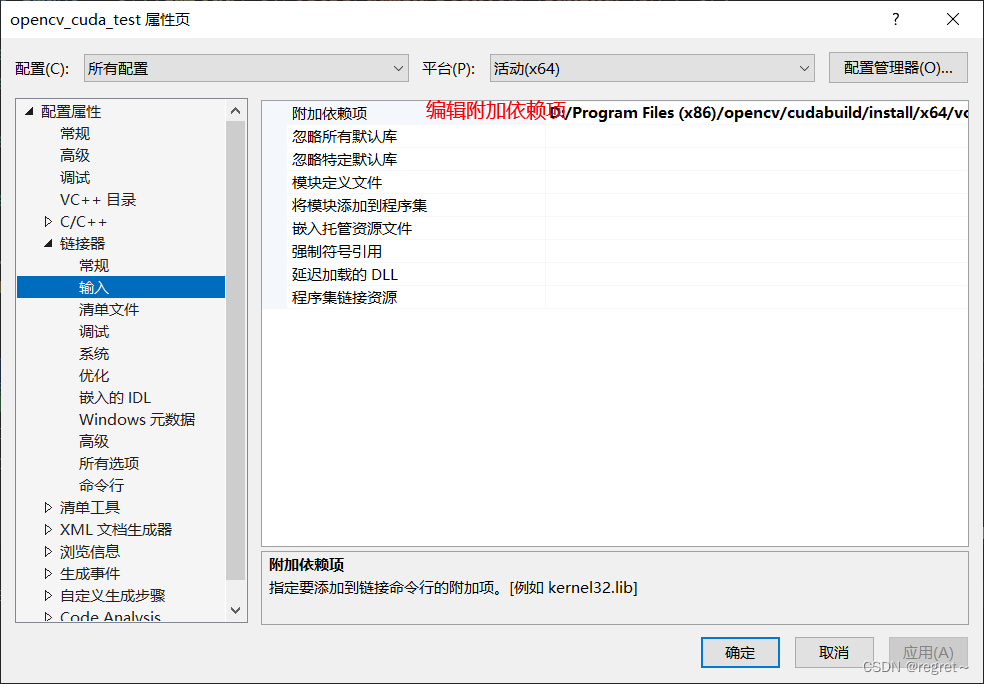
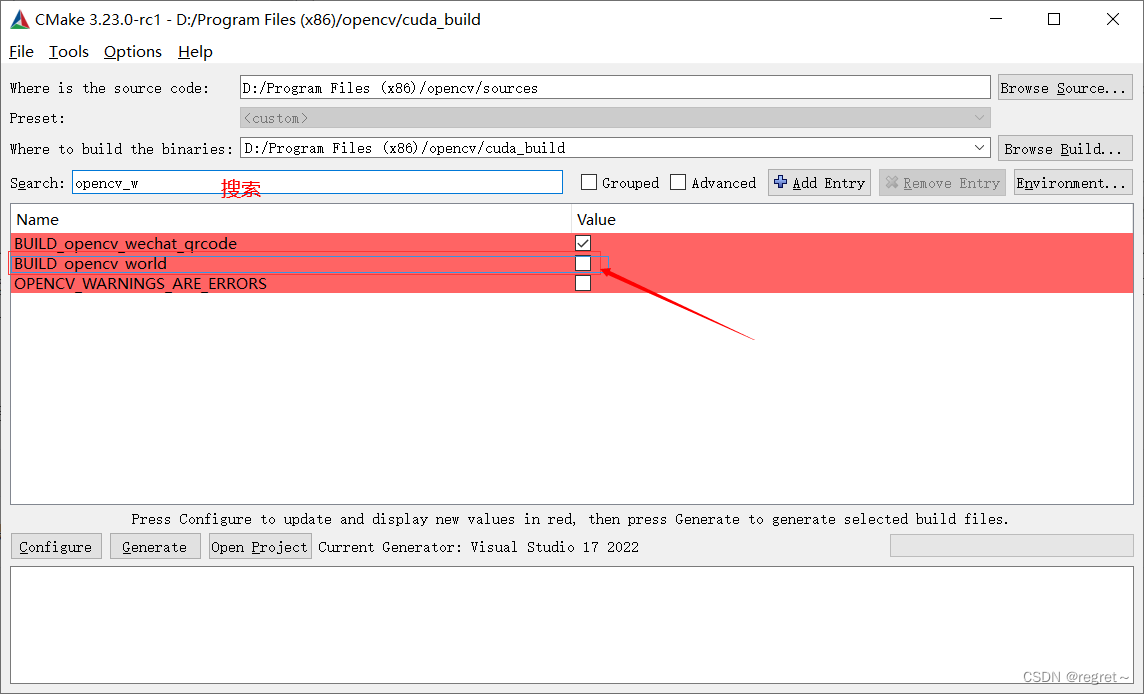
这里依赖项可能是一堆,没有集成起来,可以使用Python获得所有的.lib文件,如果想要一个文件可以在编译阶段勾选,然后生成即可获得一个封装好的,但是存在风险,一旦有一个编译不成功,则不会生成这一个集成的文件,勾选项如下图:
我的有.lib文件有:
D:/Program Files (x86)/opencv/cuda_build/install/x64/vc17/lib/opencv_aruco480.lib
D:/Program Files (x86)/opencv/cuda_build/install/x64/vc17/lib/opencv_bgsegm480.lib
D:/Program Files (x86)/opencv/cuda_build/install/x64/vc17/lib/opencv_bioinspired480.lib
D:/Program Files (x86)/opencv/cuda_build/install/x64/vc17/lib/opencv_calib3d480.lib
D:/Program Files (x86)/opencv/cuda_build/install/x64/vc17/lib/opencv_ccalib480.lib
D:/Program Files (x86)/opencv/cuda_build/install/x64/vc17/lib/opencv_core480.lib
D:/Program Files (x86)/opencv/cuda_build/install/x64/vc17/lib/opencv_cudaarithm480.lib
D:/Program Files (x86)/opencv/cuda_build/install/x64/vc17/lib/opencv_cudabgsegm480.lib
D:/Program Files (x86)/opencv/cuda_build/install/x64/vc17/lib/opencv_cudacodec480.lib
D:/Program Files (x86)/opencv/cuda_build/install/x64/vc17/lib/opencv_cudafeatures2d480.lib
D:/Program Files (x86)/opencv/cuda_build/install/x64/vc17/lib/opencv_cudafilters480.lib
D:/Program Files (x86)/opencv/cuda_build/install/x64/vc17/lib/opencv_cudaimgproc480.lib
D:/Program Files (x86)/opencv/cuda_build/install/x64/vc17/lib/opencv_cudalegacy480.lib
D:/Program Files (x86)/opencv/cuda_build/install/x64/vc17/lib/opencv_cudaobjdetect480.lib
D:/Program Files (x86)/opencv/cuda_build/install/x64/vc17/lib/opencv_cudaoptflow480.lib
D:/Program Files (x86)/opencv/cuda_build/install/x64/vc17/lib/opencv_cudastereo480.lib
D:/Program Files (x86)/opencv/cuda_build/install/x64/vc17/lib/opencv_cudawarping480.lib
D:/Program Files (x86)/opencv/cuda_build/install/x64/vc17/lib/opencv_cudev480.lib
D:/Program Files (x86)/opencv/cuda_build/install/x64/vc17/lib/opencv_datasets480.lib
D:/Program Files (x86)/opencv/cuda_build/install/x64/vc17/lib/opencv_dnn480.lib
D:/Program Files (x86)/opencv/cuda_build/install/x64/vc17/lib/opencv_dnn_objdetect480.lib
D:/Program Files (x86)/opencv/cuda_build/install/x64/vc17/lib/opencv_dnn_superres480.lib
D:/Program Files (x86)/opencv/cuda_build/install/x64/vc17/lib/opencv_dpm480.lib
D:/Program Files (x86)/opencv/cuda_build/install/x64/vc17/lib/opencv_features2d480.lib
D:/Program Files (x86)/opencv/cuda_build/install/x64/vc17/lib/opencv_flann480.lib
D:/Program Files (x86)/opencv/cuda_build/install/x64/vc17/lib/opencv_fuzzy480.lib
D:/Program Files (x86)/opencv/cuda_build/install/x64/vc17/lib/opencv_gapi480.lib
D:/Program Files (x86)/opencv/cuda_build/install/x64/vc17/lib/opencv_hdf480.lib
D:/Program Files (x86)/opencv/cuda_build/install/x64/vc17/lib/opencv_hfs480.lib
D:/Program Files (x86)/opencv/cuda_build/install/x64/vc17/lib/opencv_highgui480.lib
D:/Program Files (x86)/opencv/cuda_build/install/x64/vc17/lib/opencv_imgcodecs480.lib
D:/Program Files (x86)/opencv/cuda_build/install/x64/vc17/lib/opencv_imgproc480.lib
D:/Program Files (x86)/opencv/cuda_build/install/x64/vc17/lib/opencv_img_hash480.lib
D:/Program Files (x86)/opencv/cuda_build/install/x64/vc17/lib/opencv_intensity_transform480.lib
D:/Program Files (x86)/opencv/cuda_build/install/x64/vc17/lib/opencv_line_descriptor480.lib
D:/Program Files (x86)/opencv/cuda_build/install/x64/vc17/lib/opencv_mcc480.lib
D:/Program Files (x86)/opencv/cuda_build/install/x64/vc17/lib/opencv_ml480.lib
D:/Program Files (x86)/opencv/cuda_build/install/x64/vc17/lib/opencv_objdetect480.lib
D:/Program Files (x86)/opencv/cuda_build/install/x64/vc17/lib/opencv_optflow480.lib
D:/Program Files (x86)/opencv/cuda_build/install/x64/vc17/lib/opencv_phase_unwrapping480.lib
D:/Program Files (x86)/opencv/cuda_build/install/x64/vc17/lib/opencv_photo480.lib
D:/Program Files (x86)/opencv/cuda_build/install/x64/vc17/lib/opencv_plot480.lib
D:/Program Files (x86)/opencv/cuda_build/install/x64/vc17/lib/opencv_quality480.lib
D:/Program Files (x86)/opencv/cuda_build/install/x64/vc17/lib/opencv_rapid480.lib
D:/Program Files (x86)/opencv/cuda_build/install/x64/vc17/lib/opencv_reg480.lib
D:/Program Files (x86)/opencv/cuda_build/install/x64/vc17/lib/opencv_rgbd480.lib
D:/Program Files (x86)/opencv/cuda_build/install/x64/vc17/lib/opencv_saliency480.lib
D:/Program Files (x86)/opencv/cuda_build/install/x64/vc17/lib/opencv_shape480.lib
D:/Program Files (x86)/opencv/cuda_build/install/x64/vc17/lib/opencv_stereo480.lib
D:/Program Files (x86)/opencv/cuda_build/install/x64/vc17/lib/opencv_stitching480.lib
D:/Program Files (x86)/opencv/cuda_build/install/x64/vc17/lib/opencv_structured_light480.lib
D:/Program Files (x86)/opencv/cuda_build/install/x64/vc17/lib/opencv_superres480.lib
D:/Program Files (x86)/opencv/cuda_build/install/x64/vc17/lib/opencv_surface_matching480.lib
D:/Program Files (x86)/opencv/cuda_build/install/x64/vc17/lib/opencv_text480.lib
D:/Program Files (x86)/opencv/cuda_build/install/x64/vc17/lib/opencv_tracking480.lib
D:/Program Files (x86)/opencv/cuda_build/install/x64/vc17/lib/opencv_video480.lib
D:/Program Files (x86)/opencv/cuda_build/install/x64/vc17/lib/opencv_videoio480.lib
D:/Program Files (x86)/opencv/cuda_build/install/x64/vc17/lib/opencv_videostab480.lib
D:/Program Files (x86)/opencv/cuda_build/install/x64/vc17/lib/opencv_wechat_qrcode480.lib
D:/Program Files (x86)/opencv/cuda_build/install/x64/vc17/lib/opencv_xfeatures2d480.lib
D:/Program Files (x86)/opencv/cuda_build/install/x64/vc17/lib/opencv_ximgproc480.lib
D:/Program Files (x86)/opencv/cuda_build/install/x64/vc17/lib/opencv_xobjdetect480.lib
D:/Program Files (x86)/opencv/cuda_build/install/x64/vc17/lib/opencv_xphoto480.lib
提供一个代码:
import os
path = os.getcwd()
for file in os.listdir(path):
with open('all.txt', 'a', encoding='utf-8') as f:
if file.endswith('.lib'):
newpath = path + "/" + file
newpath = newpath.replace("\\", "/")
print(newpath)
f.write(f"{newpath}\n")我目前完成的测试:
#include <iostream>
#include <opencv2/opencv.hpp>
#include <opencv2/core/cuda.hpp>
#include <opencv2/cudaimgproc.hpp> // cvtColor
#include <opencv2/cudafilters.hpp> // createGaussianFilter()
#include <opencv2/cudafeatures2d.hpp>
#include <opencv2/xfeatures2d.hpp>
#include <opencv2/xfeatures2d/cuda.hpp>
#include <opencv2/cudaimgproc.hpp>
#include <opencv2/cudaarithm.hpp>
#include <vector>
int main() {
// =================================cuda 测试=======================================
/*cv::cuda::printCudaDeviceInfo(cv::cuda::getDevice());
int count = cv::cuda::getCudaEnabledDeviceCount();
std::cout << "可以使用的数量:" << count << std::endl;
return 0;*/
// ==================================灰度转换=======================================
/*cv::Mat src_host = cv::imread("C:/Users/admin/Desktop/lena.jpg");
cv::cuda::GpuMat src, gray;
src.upload(src_host);
cv::cuda::cvtColor(src, gray, cv::COLOR_BGR2GRAY);
cv::Mat gray_host;
gray.download(gray_host);
cv::imshow("src", src_host);
cv::imshow("gray", gray_host);
cv::waitKey();
cv::destroyAllWindows();
return 0;*/
// ==================================高斯模糊=======================================
/*cv::Mat h_img1 = cv::imread("C:/Users/admin/Desktop/lenasp.jpg");
cv::cuda::GpuMat d_img1, d_result3x3, d_result5x5, d_result7x7;
// 加载数据
d_img1.upload(h_img1);
// 创建高斯
auto filter3x3 = cv::cuda::createGaussianFilter(CV_8UC3, CV_8UC3, cv::Size(3, 3), 5);
auto filter5x5 = cv::cuda::createGaussianFilter(CV_8UC3, CV_8UC3, cv::Size(5, 5), 5);
auto filter7x7 = cv::cuda::createGaussianFilter(CV_8UC3, CV_8UC3, cv::Size(7, 7), 5);
// 执行
filter3x3->apply(d_img1, d_result3x3);
filter5x5->apply(d_img1, d_result5x5);
filter7x7->apply(d_img1, d_result7x7);
// 获取结果
cv::Mat h_result3x3, h_result5x5, h_result7x7;
d_result3x3.download(h_result3x3);
d_result5x5.download(h_result5x5);
d_result7x7.download(h_result7x7);
// 显示
cv::imshow("original image", h_img1);
cv::imshow("Blurred with kernel size 3x3", h_result3x3);
cv::imshow("Blurred with kernel size 5x5", h_result5x5);
cv::imshow("Blurred with kernel size 7x7", h_result7x7);
cv::waitKey();
cv::destroyAllWindows();
return 0;*/
// ==============================shi-tomas角点检测============================
/*cv::Mat src_host = cv::imread("C:/Users/admin/Desktop/jianzhu.jpg");
cv::imshow("input", src_host);
cv::cuda::GpuMat src, gray, corners;
cv::Mat dst;
src.upload(src_host);
cv::cuda::cvtColor(src, gray, cv::COLOR_BGR2GRAY);
auto corner_detector = cv::cuda::createGoodFeaturesToTrackDetector(gray.type(), 1000, 0.01, 15, 3);
corner_detector->detect(gray, corners);
corners.download(dst);
printf("detected corners %d....\n", corners.cols);
printf("detected corners %d....\n", dst.cols);
cv::RNG rng(123456);
for (int i = 0; i < dst.cols; i++) {
int r = rng.uniform(0, 255);
int g = rng.uniform(0, 255);
int b = rng.uniform(0, 255);
cv::Point2f pt = dst.at<cv::Point2f>(0, i);
circle(src_host, pt, 3, cv::Scalar(b, g, r), 2, 8, 0);
}
imshow("corner detect", src_host);
cv::waitKey();
cv::destroyAllWindows();
return 0;*/
// ================================双边模糊(美颜)===========================
/*try {
cv::Mat src_host = cv::imread("C:/Users/admin/Desktop/hh.jpg");
cv::imshow("input", src_host);
cv::cuda::GpuMat src(src_host);
cv::cuda::GpuMat dst;
cv::cuda::bilateralFilter(src, dst, 0, 100, 15, 4);
cv::Mat dst_host;
dst.download(dst_host);
cv::imshow("result", dst_host);
}
catch (const cv::Exception& ec) {
std::cout << "Error" << ec.what() << std::endl;
}
cv::waitKey();
return 0;*/
// ==============================ORB 特征匹配==========================
/*// cpu data
cv::Mat h_object_image = cv::imread("C:/Users/admin/Desktop/jianzhu1.jpg", 0);
cv::Mat h_scene_image = cv::imread("C:/Users/admin/Desktop/jianzhu.jpg", 0);
assert(h_object_image != nullptr && h_scene_image != nullptr), "======没有读取成功=====";
cv::waitKey();
// gpu data
cv::cuda::GpuMat d_object_image;
cv::cuda::GpuMat d_scene_image;
cv::cuda::GpuMat d_keypoints_scene, d_keypoints_object; // GPU key points
std::vector<cv::KeyPoint> h_keypoints_scene, h_keypoints_object; // CPU key points
cv::cuda::GpuMat d_descriptors_scene, d_descriptors_object; // GPU descriptor
// Image CPU uploaded to GPU
d_object_image.upload(h_object_image);
d_scene_image.upload(h_scene_image);
// 对象检测
auto orb = cv::cuda::ORB::create();
// 检测特征点并提取相应的描述符
// Detect feature points and extract corresponding descriptors
orb->detectAndCompute(d_object_image, cv::cuda::GpuMat(), h_keypoints_object, d_descriptors_object);
orb->detectAndCompute(d_scene_image, cv::cuda::GpuMat(), h_keypoints_scene, d_descriptors_scene);
// 暴力匹配器
// Brute Force Violence Matcher
cv::Ptr<cv::cuda::DescriptorMatcher> matcher = cv::cuda::DescriptorMatcher::createBFMatcher(cv::NORM_HAMMING);
std::vector<std::vector<cv::DMatch> > d_matches;
matcher->knnMatch(d_descriptors_object, d_descriptors_scene, d_matches, 2);
std::cout << "match size:" << d_matches.size() << std::endl;
std::vector< cv::DMatch > good_matches;
for (int k = 0; k < std::min(h_keypoints_object.size() - 1, d_matches.size()); k++)
{
if ((d_matches[k][0].distance < 0.9 * (d_matches[k][1].distance)) &&
((int)d_matches[k].size() <= 2 && (int)d_matches[k].size() > 0))
{
good_matches.push_back(d_matches[k][0]);
}
}
std::cout << "size:" << good_matches.size() << std::endl;
cv::Mat h_image_result;
cv::drawMatches(h_object_image, h_keypoints_object, h_scene_image, h_keypoints_scene,
good_matches, h_image_result, cv::Scalar::all(-1), cv::Scalar::all(-1),
std::vector<char>(), cv::DrawMatchesFlags::DEFAULT);
std::vector<cv::Point2f> object, scene;
for (int i = 0; i < good_matches.size(); i++) {
object.push_back(h_keypoints_object[good_matches[i].queryIdx].pt);
scene.push_back(h_keypoints_scene[good_matches[i].trainIdx].pt);
}
cv::Mat Homo = cv::findHomography(object, scene, cv::RANSAC);
std::vector<cv::Point2f> corners(4), scene_corners(4);
corners[0] = cv::Point(0, 0);
corners[1] = cv::Point(h_object_image.cols, 0);
corners[2] = cv::Point(h_object_image.cols, h_object_image.rows);
corners[3] = cv::Point(0, h_object_image.rows);
cv::perspectiveTransform(corners, scene_corners, Homo);
cv::line(h_image_result, scene_corners[0] + cv::Point2f(h_object_image.cols, 0), scene_corners[1] + cv::Point2f(h_object_image.cols, 0), cv::Scalar(255, 0, 0), 4);
cv::line(h_image_result, scene_corners[1] + cv::Point2f(h_object_image.cols, 0), scene_corners[2] + cv::Point2f(h_object_image.cols, 0), cv::Scalar(255, 0, 0), 4);
cv::line(h_image_result, scene_corners[2] + cv::Point2f(h_object_image.cols, 0), scene_corners[3] + cv::Point2f(h_object_image.cols, 0), cv::Scalar(255, 0, 0), 4);
cv::line(h_image_result, scene_corners[3] + cv::Point2f(h_object_image.cols, 0), scene_corners[0] + cv::Point2f(h_object_image.cols, 0), cv::Scalar(255, 0, 0), 4);
cv::imshow("Good Matches & Object detection", h_image_result);
cv::waitKey(0);
return 0;*/
// ==============================surf 特征检测==============================
cv::Mat h_object_image = cv::imread("C:/Users/admin/Desktop/jianzhu1.jpg", 0);
cv::Mat h_scene_image = cv::imread("C:/Users/admin/Desktop/jianzhu.jpg", 0);
cv::cuda::GpuMat d_object_image;
cv::cuda::GpuMat d_scene_image;
cv::cuda::GpuMat d_keypoints_scene, d_keypoints_object;
std::vector<cv::KeyPoint> h_keypoints_scene, h_keypoints_object;
cv::cuda::GpuMat d_descriptors_scene, d_descriptors_object;
d_object_image.upload(h_object_image);
d_scene_image.upload(h_scene_image);
// 对象检测
cv::cuda::SURF_CUDA surf(100);
// 检测特征点并提取相应的描述符
surf(d_object_image, cv::cuda::GpuMat(), d_keypoints_object, d_descriptors_object);
surf(d_scene_image, cv::cuda::GpuMat(), d_keypoints_scene, d_descriptors_scene);
// 暴力匹配器
cv::Ptr<cv::cuda::DescriptorMatcher> matcher = cv::cuda::DescriptorMatcher::createBFMatcher();
std::vector<std::vector<cv::DMatch>> d_matches;
matcher->knnMatch(d_descriptors_object, d_descriptors_scene, d_matches, 2);
surf.downloadKeypoints(d_keypoints_scene, h_keypoints_scene);
surf.downloadKeypoints(d_keypoints_object, h_keypoints_object);
std::vector<cv::DMatch> good_matches;
for (int k = 0; k < std::min(h_keypoints_object.size() - 1, d_matches.size()); k++)
{
if ((d_matches[k][0].distance < 0.6 * (d_matches[k][1].distance)) && ((int)d_matches[k].size() <= 2 && (int)d_matches[k].size() > 0))
{
good_matches.push_back(d_matches[k][0]);
}
}
std::cout << "size:" << good_matches.size();
cv::Mat h_image_result;
cv::drawMatches(h_object_image, h_keypoints_object, h_scene_image, h_keypoints_scene,
good_matches, h_image_result, cv::Scalar::all(-1), cv::Scalar::all(-1),
std::vector<char>(), cv::DrawMatchesFlags::DEFAULT);
std::vector<cv::Point2f> object;
std::vector<cv::Point2f> scene;
for (int i = 0; i < good_matches.size(); i++)
{
object.push_back(h_keypoints_object[good_matches[i].queryIdx].pt);
scene.push_back(h_keypoints_scene[good_matches[i].trainIdx].pt);
}
cv::Mat Homo = cv::findHomography(object, scene, cv::RANSAC);
std::vector<cv::Point2f> corners(4);
std::vector<cv::Point2f> scene_corners(4);
corners[0] = cv::Point(0, 0);
corners[1] = cv::Point(h_object_image.cols, 0);
corners[2] = cv::Point(h_object_image.cols, h_object_image.rows);
corners[3] = cv::Point(0, h_object_image.rows);
cv::perspectiveTransform(corners, scene_corners, Homo);
cv::line(h_image_result, scene_corners[0] + cv::Point2f(h_object_image.cols, 0), scene_corners[1] + cv::Point2f(h_object_image.cols, 0), cv::Scalar(255, 0, 0), 4);
cv::line(h_image_result, scene_corners[1] + cv::Point2f(h_object_image.cols, 0), scene_corners[2] + cv::Point2f(h_object_image.cols, 0), cv::Scalar(255, 0, 0), 4);
cv::line(h_image_result, scene_corners[2] + cv::Point2f(h_object_image.cols, 0), scene_corners[3] + cv::Point2f(h_object_image.cols, 0), cv::Scalar(255, 0, 0), 4);
cv::line(h_image_result, scene_corners[3] + cv::Point2f(h_object_image.cols, 0), scene_corners[0] + cv::Point2f(h_object_image.cols, 0), cv::Scalar(255, 0, 0), 4);
cv::imshow("Good Matches & Object detection", h_image_result);
cv::waitKey(0);
return 0;
// =================================ORB特征检测================================
/*cv::Mat h_image = cv::imread("C:/Users/admin/Desktop/jianzhu.jpg", 0);
cv::Ptr<cv::cuda::ORB> detector = cv::cuda::ORB::create();
std::vector<cv::KeyPoint> keypoints;
cv::cuda::GpuMat d_image;
d_image.upload(h_image);
detector->detect(d_image, keypoints);
cv::drawKeypoints(h_image, keypoints, h_image);
cv::imshow("Final Result", h_image);
cv::waitKey(0);
return 0;*/
}

魔乐社区(Modelers.cn) 是一个中立、公益的人工智能社区,提供人工智能工具、模型、数据的托管、展示与应用协同服务,为人工智能开发及爱好者搭建开放的学习交流平台。社区通过理事会方式运作,由全产业链共同建设、共同运营、共同享有,推动国产AI生态繁荣发展。
更多推荐


 36
36 0
0- 0


 已为社区贡献2条内容

所有评论(0)