阿里云 SUSE linux 安装谷歌浏览器Chrome 安装goole浏览器报错
费了一天时间研究,kaz1,下载和自己系统版本匹配的Chrome查看自己的linux系统版本方式,区分SUSE还是Ubuntu and Debian查看版本参考:https://blog.csdn.net/zhengyunling/article/details/104446427方式一:https://repo.fdzh.org/chrome/rpm/x86_64/我使用的g...
费了一天时间研究,卡在了安装依赖包上。稍后补充安装方式
1,下载和自己系统版本匹配的Chrome
查看自己的linux系统版本方式,区分SUSE还是Ubuntu and Debian 查看版本参考:https://blog.csdn.net/zhengyunling/article/details/104446427
方式一:https://repo.fdzh.org/chrome/rpm/x86_64/
我使用的google-chrome-stable-69.0.3497.81-1.x86_64.rpm 和 google-chrome-unstable-70.0.3538.9-1.x86_64.rpm最后均实现正常安装。70版本比69版本多依赖了liberation-fonts包。后面以google-chrome-unstable-70.0.3538.9-1.x86_64.rpm实际操作
方式二:https://www.chrome64bit.com/index.php/google-chrome-64-bit-for-linux 我选择的Chrome 64-bit for OpenSuSE and Fedora版本。这个chrome版本是80版本,比方式一的版本高。安装方式和70完全一样。如图

2,FTP上传到SUSE linux服务器,
上传方式参考:https://blog.csdn.net/zhengyunling/article/details/104441497
上传成功后:
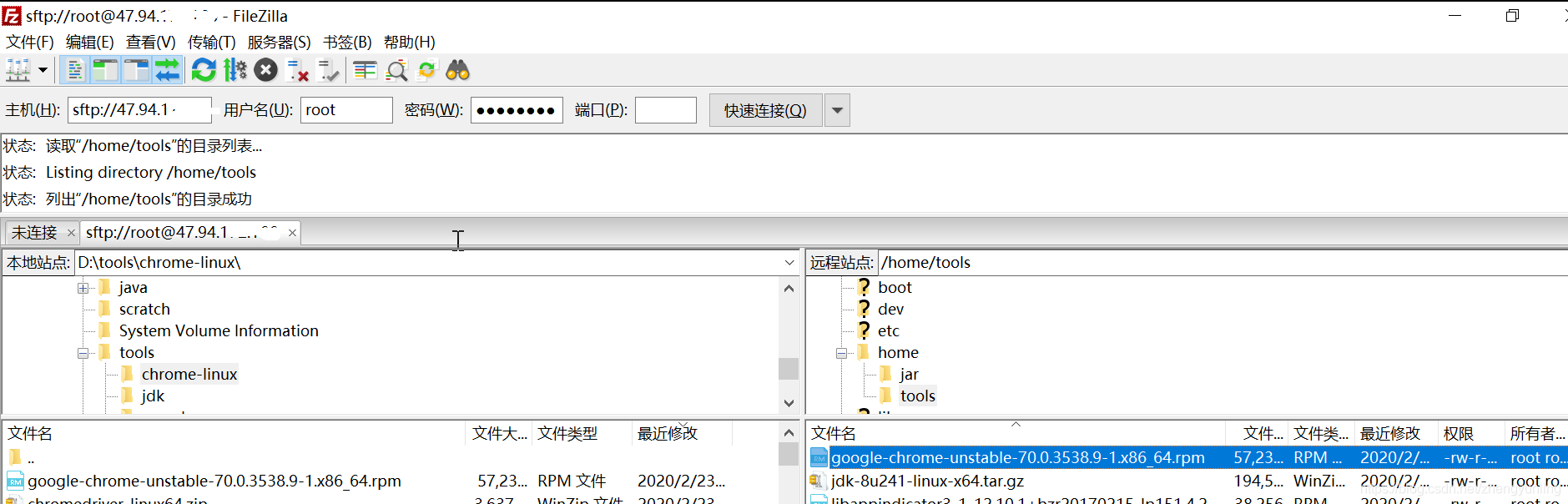
3,安装Chrome
rpm -ivh google-chrome-unstable-70.0.3538.9-1.x86_64.rpm
不出意外的话你会遇到如下问题:
iZ2zebqcdjzdz5nry750seZ:/home/tools # rpm -ivh google-chrome-stable-69.0.3497.81-1.x86_64.rpm
warning: google-chrome-stable-69.0.3497.81-1.x86_64.rpm: Header V4 DSA/SHA1 Signature, key ID 7fac5991: NOKEY error: Failed dependencies: libX11-xcb.so.1()(64bit) is needed by google-chrome-stable-69.0.3497.81-1.x86_64 libXcomposite.so.1()(64bit) is needed by google-chrome-stable-69.0.3497.81-1.x86_64 libXcursor.so.1()(64bit) is needed by google-chrome-stable-69.0.3497.81-1.x86_64 libXdamage.so.1()(64bit) is needed by google-chrome-stable-69.0.3497.81-1.x86_64 libXfixes.so.3()(64bit) is needed by google-chrome-stable-69.0.3497.81-1.x86_64 libXi.so.6()(64bit) is needed by google-chrome-stable-69.0.3497.81-1.x86_64 libXrandr.so.2()(64bit) is needed by google-chrome-stable-69.0.3497.81-1.x86_64 libXss.so.1()(64bit) is needed by google-chrome-stable-69.0.3497.81-1.x86_64 libXtst.so.6()(64bit) is needed by google-chrome-stable-69.0.3497.81-1.x86_64 libappindicator3.so.1()(64bit) is needed by google-chrome-stable-69.0.3497.81-1.x86_64 libasound.so.2()(64bit) is needed by google-chrome-stable-69.0.3497.81-1.x86_64 libatk-1.0.so.0()(64bit) is needed by google-chrome-stable-69.0.3497.81-1.x86_64 libatk-bridge-2.0.so.0()(64bit) is needed by google-chrome-stable-69.0.3497.81-1.x86_64 libgdk-3.so.0()(64bit) is needed by google-chrome-stable-69.0.3497.81-1.x86_64 libgdk_pixbuf-2.0.so.0()(64bit) is needed by google-chrome-stable-69.0.3497.81-1.x86_64 libgtk-3.so.0()(64bit) is needed by google-chrome-stable-69.0.3497.81-1.x86_64 libpango-1.0.so.0()(64bit) is needed by google-chrome-stable-69.0.3497.81-1.x86_64 libpangocairo-1.0.so.0()(64bit) is needed by google-chrome-stable-69.0.3497.81-1.x86_64
这是因为安装chrome依赖的包不存在。解决此问题有两种方式,参考https://blog.csdn.net/zhengyunling/article/details/104467633
把这些依赖的包安装完成后再执行:
rpm -ivh google-chrome-unstable-70.0.3538.9-1.x86_64.rpm
成功安装如下图:

默认安装路径如下:


魔乐社区(Modelers.cn) 是一个中立、公益的人工智能社区,提供人工智能工具、模型、数据的托管、展示与应用协同服务,为人工智能开发及爱好者搭建开放的学习交流平台。社区通过理事会方式运作,由全产业链共同建设、共同运营、共同享有,推动国产AI生态繁荣发展。
更多推荐

 0
0 0
0- 0


 已为社区贡献2条内容

所有评论(0)