esp32,基于阿里云平台,配置实现Node.js SDK接入示例出现description: ‘Failed to authenticate: 4‘ BUG
esp32,基于阿里云平台,配置实现Node.js SDK接入示例出现报错:description: 'Failed to authenticate: 4'
项目场景:
需要esp32板子一块,一个wifi热点,最好是自己手机的
问题描述
当你配置好阿里云官方文档所需要的信息后,出现报错:description: 'Failed to authenticate: 4'
node:events:491
      throw er; // Unhandled 'error' event
      ^
ConnectionError: Failed to authenticate: 4
    at Connection._handle_error (C:\Users\晨\Desktop\esp32test\node_modules\.store\rhea@3.0.2\node_modules\rhea\lib\connection.js:479:36)
    at Connection.sasl_failed (C:\Users\晨\Desktop\esp32test\node_modules\.store\rhea@3.0.2\node_modules\rhea\lib\connection.js:454:10)
    at SaslClient.on_sasl_outcome (C:\Users\晨\Desktop\esp32test\node_modules\.store\rhea@3.0.2\node_modules\rhea\lib\sasl.js:314:25)
    at c.dispatch (C:\Users\晨\Desktop\esp32test\node_modules\.store\rhea@3.0.2\node_modules\rhea\lib\types.js:948:33)
    at Transport.read (C:\Users\晨\Desktop\esp32test\node_modules\.store\rhea@3.0.2\node_modules\rhea\lib\transport.js:117:36)
    at SaslClient.read (C:\Users\晨\Desktop\esp32test\node_modules\.store\rhea@3.0.2\node_modules\rhea\lib\sasl.js:346:31)
    at Connection.input (C:\Users\晨\Desktop\esp32test\node_modules\.store\rhea@3.0.2\node_modules\rhea\lib\connection.js:567:37)
    at TLSSocket.emit (node:events:513:28)
    at addChunk (node:internal/streams/readable:315:12)
    at readableAddChunk (node:internal/streams/readable:289:9)
Emitted 'error' event on Container instance at:
    at Container.dispatch (C:\Users\晨\Desktop\esp32test\node_modules\.store\rhea@3.0.2\node_modules\rhea\lib\container.js:41:33)
    at Connection.dispatch (C:\Users\晨\Desktop\esp32test\node_modules\.store\rhea@3.0.2\node_modules\rhea\lib\connection.js:261:40)
    at Connection.input (C:\Users\晨\Desktop\esp32test\node_modules\.store\rhea@3.0.2\node_modules\rhea\lib\connection.js:593:18)
    at TLSSocket.emit (node:events:513:28)
    at addChunk (node:internal/streams/readable:315:12)
    at readableAddChunk (node:internal/streams/readable:289:9)
    at TLSSocket.Readable.push (node:internal/streams/readable:228:10)
    at TLSWrap.onStreamRead (node:internal/stream_base_commons:190:23) {
  condition: 'amqp:internal-error',
  description: 'Failed to authenticate: 4'
}
原因分析:
const container = require('rhea'); const crypto = require('crypto'); //创建Connection。 var connection = container.connect({ //接入域名,请参见AMQP客户端接入说明文档。 'host': '${YourHost}', 'port': 5671, 'transport':'tls', 'reconnect':true, 'idle_time_out':60000, //userName组装方法,请参见AMQP客户端接入说明文档。 'username':'${YourClientId}|authMode=aksign,signMethod=hmacsha1,timestamp=1573489088171,authId=${YourAccessKeyId},iotInstanceId=${YourIotInstanceId},consumerGroupId=${YourConsumerGroupId}|', //计算签名,password组装方法,请参见AMQP客户端接入说明文档。 'password': hmacSha1('${YourAccessKeySecret}', 'authId=${YourAccessKeyId}×tamp=1573489088171'), });
你的如上信息表单配置错误,请配置的时候仔细按照官方文档指示配置
官方文档:Node.js SDK接入示例 (aliyun.com)
解决方案:
我遇到的问题是因为YourClientId 如果你是window11用户直接用直接的mac地址,你的格式是这样'00:DD:B6:BF:32:30,字符用:隔开的,但是就是因为这个原因,出现以上报错,你需要将: 修改成 -
例如: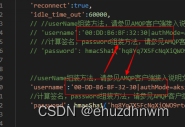

魔乐社区(Modelers.cn) 是一个中立、公益的人工智能社区,提供人工智能工具、模型、数据的托管、展示与应用协同服务,为人工智能开发及爱好者搭建开放的学习交流平台。社区通过理事会方式运作,由全产业链共同建设、共同运营、共同享有,推动国产AI生态繁荣发展。
更多推荐
 1
1 0
0- 0


 已为社区贡献2条内容

所有评论(0)