基于Python和JavaScript编写物联网温度计程序
Zerynth作为Android和iOS手机端应用程序,在物联网项目中,可以对图形界面进行快速原型设计。借助Zerynth可以把任何手机作为智能对象加入控制器组成物联网系统。尤其是通过建立双向通信信道,可以管理和控制与它连接的手机设备。本文我们将介绍使用单片机微控制器连接Zerynth,开发一个简单但强大的物联网温度计。准备工作首先你需要一块电路板,选择Zerynth支持...
Zerynth作为Android和iOS手机端应用程序,在物联网项目中,可以对图形界面进行快速原型设计。
借助Zerynth可以把任何手机作为智能对象加入控制器组成物联网系统。尤其是通过建立双向通信信道,可以管理和控制与它连接的手机设备。
本文我们将介绍使用单片机微控制器连接Zerynth,开发一个简单但强大的物联网温度计。
准备工作
首先你需要一块电路板,选择Zerynth支持的32位微控制器设备即可。我们选择的是Flip&Click Mikroelektronika,它拥有许多和Arduino平台产品一样的属性,其中就包括作为Arduino Due核心的32位AT91SAM3X8E微芯片。
接着选择带有温度(HTS221)和相对湿度传感器的Temp&Hum Click来测量温度。
然后采用WiFi PLUS Click将电路板连接到互联网,WiFi PLUS Click具有MRF24WB0MA-2.4GHz特性,能兼容IEEE std 802.11微芯片模块,并且是车载TCP/IP栈和802.11连接管理器匹配的MCW1001的控制器。
最后也是最重要的一点,你需要
-
Zerynth Studio,为物联网服务的强大的开发工具,能使用Python嵌入式编程。点击下载。
-
Zerynth APP,点击下载。
组装物联网温度计
Flip&Click是Arduino的衍生品,一方面它属于Arduino产品,但另一方面,你会发现它身上包含“单机电路板”才有的四个开放mikroBUS套接字的模块。从本质上讲,这些模块是组装Arduino原型的附加模块,但如果缩减去掉,Flip&Click也能勉强适用,只是需要在电路板上的A槽和B槽分别加入Temp&Hum和Wifi Plus clicks。
使用Python来编程物联网温度计
参考示例
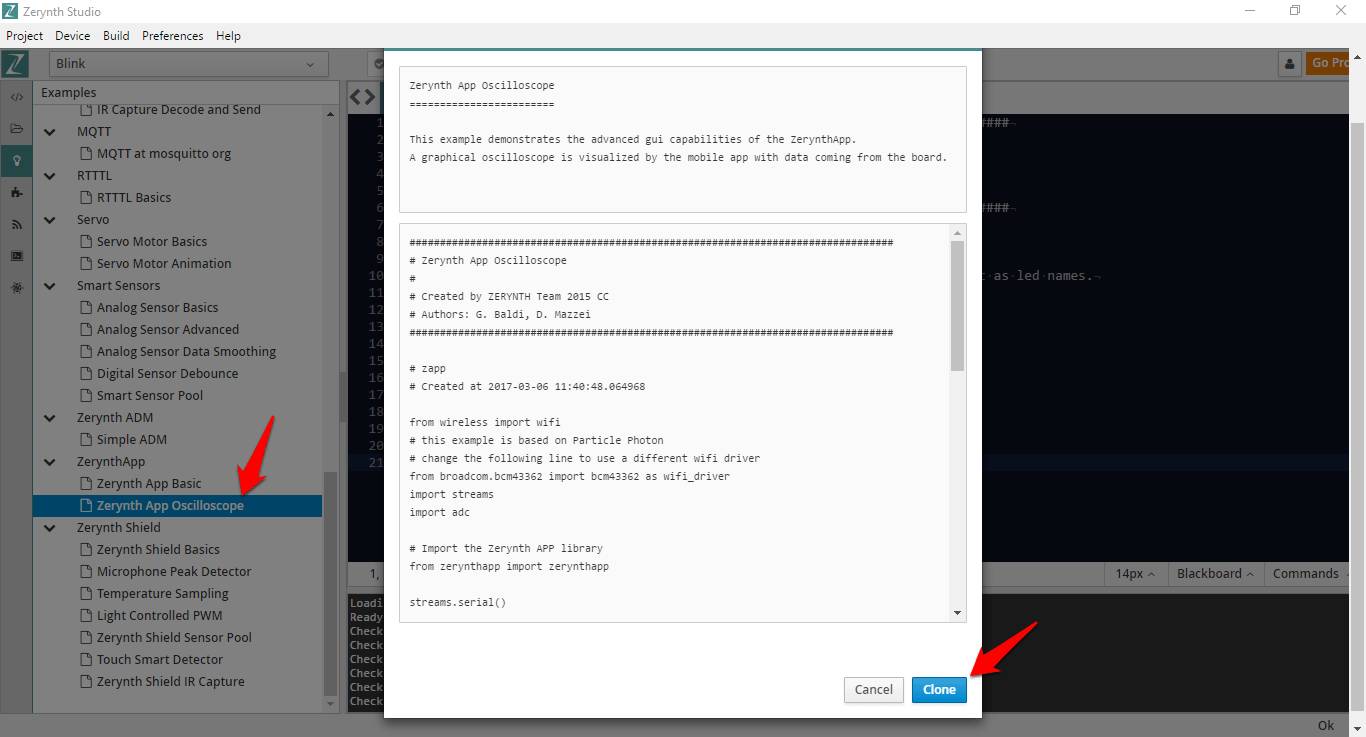
一旦你安装Zerynth Studio并创建Zerynth用户,就可以克隆“Zerynth应用示波器”示例。请参考以下学习如何克隆一个示例。
我们来看一段“main.py”中的原始代码文件,这里是编写Python脚本逻辑的地方。我们将从这段代码开始,开发特定项目的程序。################################################################################ # IoT Thermometer ################################################################################ from wireless import wifi # this example is based on Particle Photon # change the following line to use a different wifi driver from broadcom.bcm43362 import bcm43362 as wifi_driver import streams import adc # Import the Zerynth APP library from zerynthapp import zerynthapp streams.serial() sleep(1000) print("STARTING...") try: # Device UID and TOKEN can be created in the ADM panel zapp = zerynthapp.ZerynthApp("DEVICE UID", "DEVICE TOKEN", log=True) # connect to the wifi network (Set your SSID and password below) wifi_driver.auto_init() for i in range(0,5): try: wifi.link("SSID",wifi.WIFI_WPA2,"PASSWORD") break except Exception as e: print("Can't link",e) else: print("Impossible to link!") while True: sleep(1000) # Start the Zerynth app instance! # Remember to create a template with the files under the "template" folder you just cloned # upload it to the ADM and associate it with the connected device zapp.run() # Read ADC and send values to the ADM while True: sleep(1000) x = (adc.read(A4)*100)//4096 zapp.event({"data":x}) if x>95: # send mobile notification # (there is a limit of one notification per minute per device on the ADM sandbox) zapp.notify("ALARM!","The value is greater than 95!") except Exception as e: print(e)
这个示例中,Zerynth将从相连的电路板获取的数据转变成可视化的图形示波器,这些模拟传感器的数据通过“模拟”pin A4产生。
导入正确的wifi驱动程序和传感器库
正如你在注释中看到的,示例是基于粒子光子板和wifi驱动的。想要使用WiFi Plus Click,必须修改以下几行:from broadcom.bcm43362 import bcm43362 as wifi_driver
修改为from microchip.mcw1001a import mcw1001a as wifi_driver
同时wifi_driver.auto_init()
修改为wifi_driver.init(SERIAL2,D24) # slot B
为了使用Temp&Hum Click温度传感器,需要添加以下几行代码来导入库并设置传感器,这些可以在帮助文档里面看到。# Import the HTS221 library from stm.hts221 import hts221 temp_hum = hts221.HTS221(I2C0, D21) # sl
同时为了读取到传感器,有必要编写下面一行。tmp, hum = temp_hum.get_temp_humidity() # Read tmp and hum
设置SSID名称和密码
当然,你还需要编辑想要连接的wifi网络的SSID名称和密码:wifi.link("SSID",wifi.WIFI_WPA2,"PASSWORD")
创建并设置一个连接设备
现在我们要创建一个“连接装置”以便关联“zerynth”的实例。请看下面截图中的步骤。查看文档了解更多的技术细节。
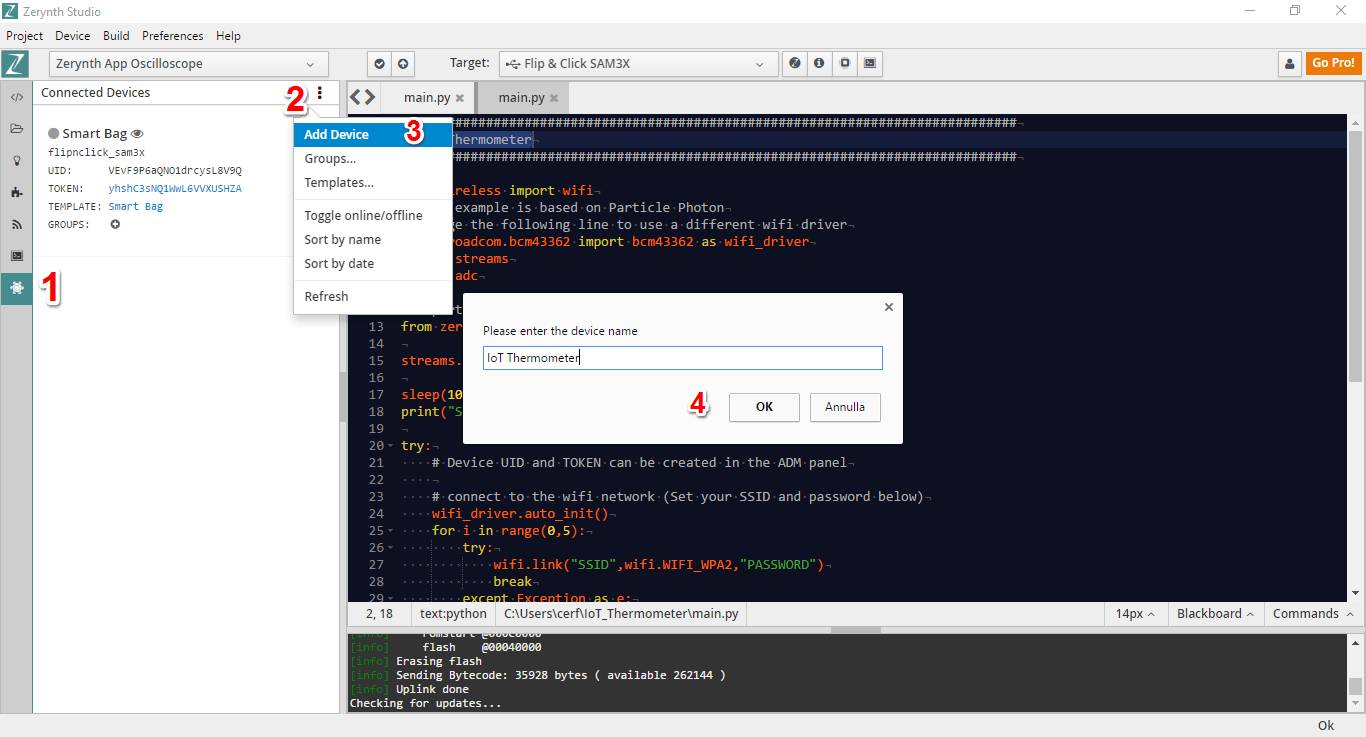
设备的证书(UID和TOKEN)可以从开发工具Zerynth Studio的ADM面板直接复制粘贴过来。
“IP”是Zerynth ADM的IP地址。当网络驱动不支持主机名解析时填写的这些参数可以派上用场。
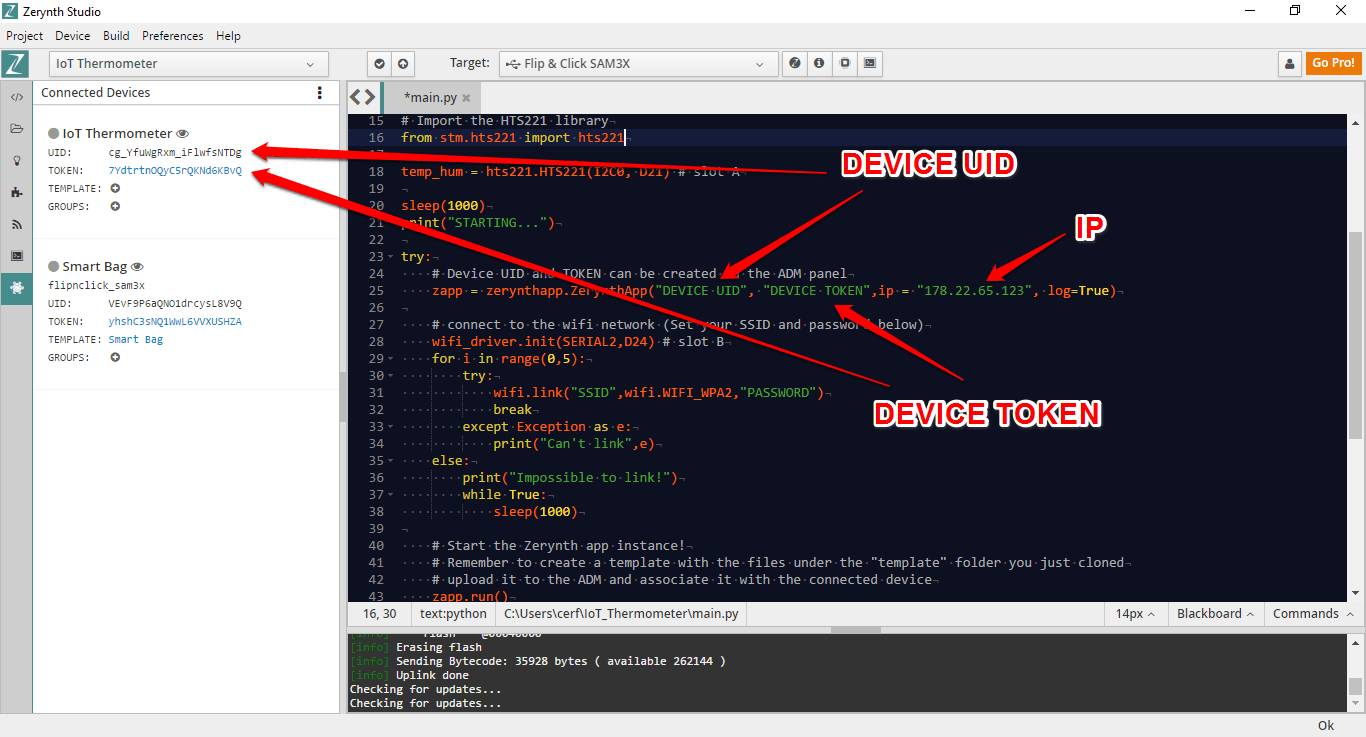
创建、上传和设置模板
Zerynth可以直接运行由HTML、CSS和JavaScript构成的漂亮的图形用户界面,根本不需要Android或iOS代码!
此外,每个装置的图形界面托管于Zerynth ADM sandbox,并由一些列可在App上加载并显示的HTML5、Javascript、Css和图片文件组成。Zerynth添加模板后ADM Javascript库允许应用程序与连接设备互相通信。
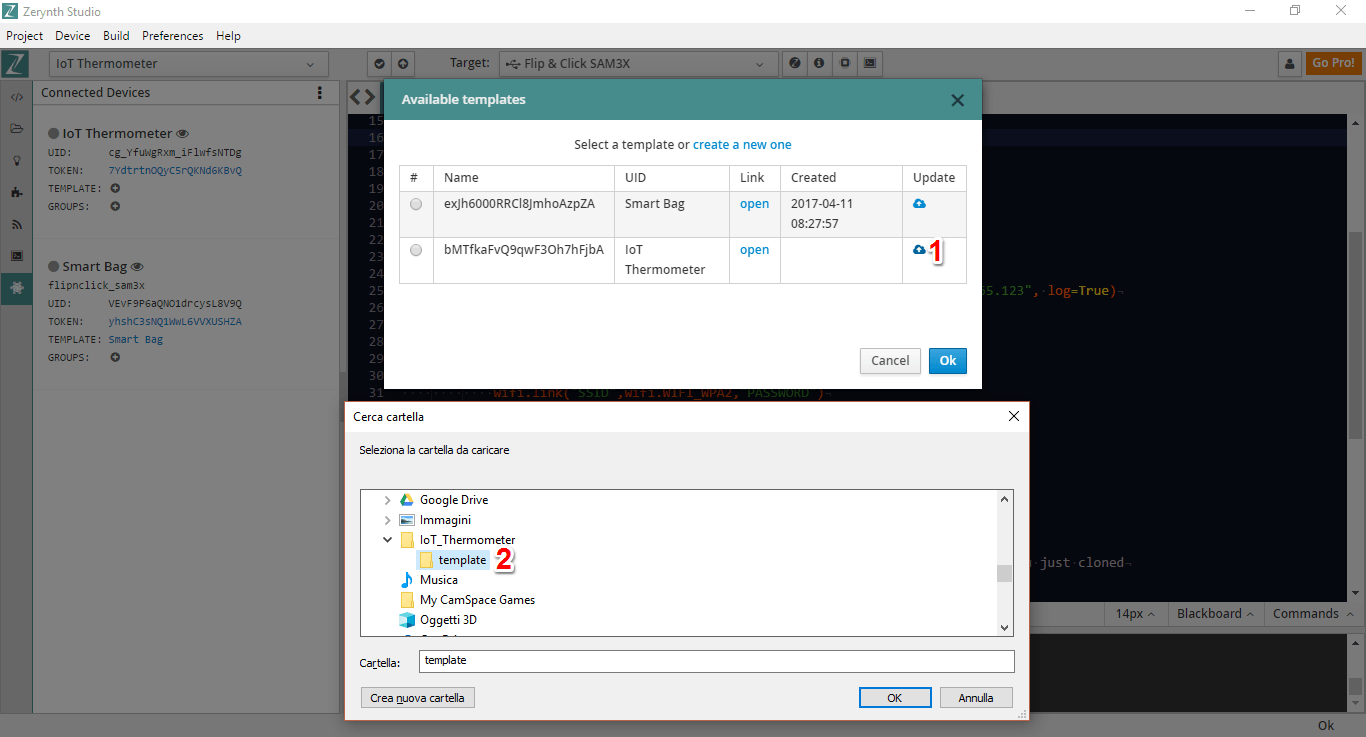
单击相应的“Plus”图标来添加模板。
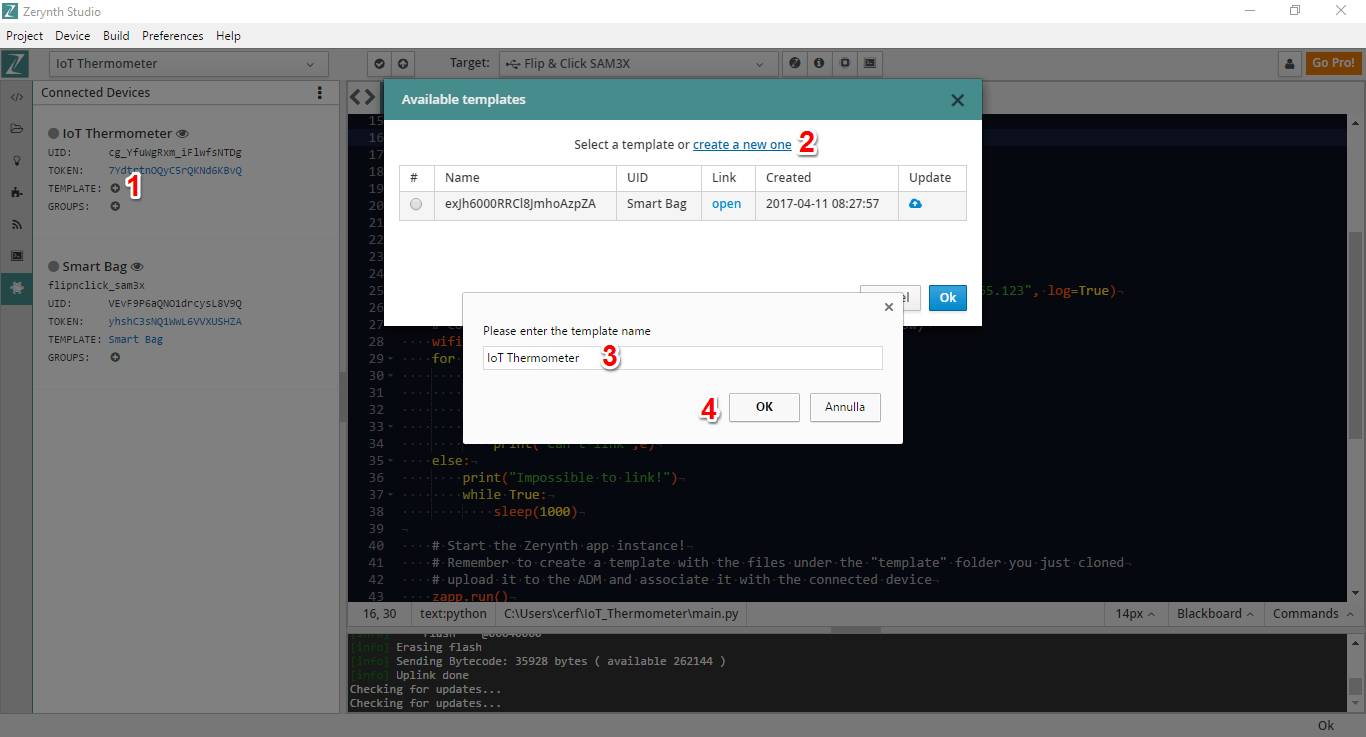
然后从包含模板目录上传模板。注意,你可以修改模板定义文件“index.html”进行自定义。这里我们保留原样。
部署脚本
经过几次修改后,代码大概是这样:################################################################################ # Zerynth App Oscilloscope ################################################################################ from wireless import wifi from microchip.mcw1001a import mcw1001a as wifi_driver import streams import adc streams.serial() # Import the Zerynth APP library from zerynthapp import zerynthapp # Import the HTS221 library from stm.hts221 import hts221 temp_hum = hts221.HTS221(I2C0, D21) # slot A sleep(1000) print("STARTING...") try: # Device UID and TOKEN can be created in the ADM panel zapp = zerynthapp.ZerynthApp("DEVICE UID", "DEVICE TOKEN",ip = "178.22.65.123", log=True) # connect to the wifi network (Set your SSID and password below) wifi_driver.init(SERIAL2,D24) # slot B for i in range(0,5): try: wifi.link("SSID",wifi.WIFI_WPA2,"PASSWORD") break except Exception as e: print("Can't link",e) else: print("Impossible to link!") while True: sleep(1000) # Start the Zerynth app instance! # Remember to create a template with the files under the "template" folder you just cloned # upload it to the ADM and associate it with the connected device zapp.run() # Read the sensor and send values to the ADM while True: sleep(1000) tmp, hum = temp_hum.get_temp_humidity() # Read tmp and hum print("Temp is:", tmp, "Humidity is:", hum) try: zapp.event({"data":tmp}) except Exception as e: print(e) if tmp>30: # send mobile notification # (there is a limit of one notification per minute per device on the ADM sandbox) try: zapp.notify("ALARM!","High Temperature!") except Exception as e: print(e) except Exception as e: print(e)
切记“设备UID”、“设备令牌”、“名称”和“密码”必须符合自己的参数。
编写完成即可部署脚步到你的设备。
如何在Zerynth应用上查看物联网温度计仪表板
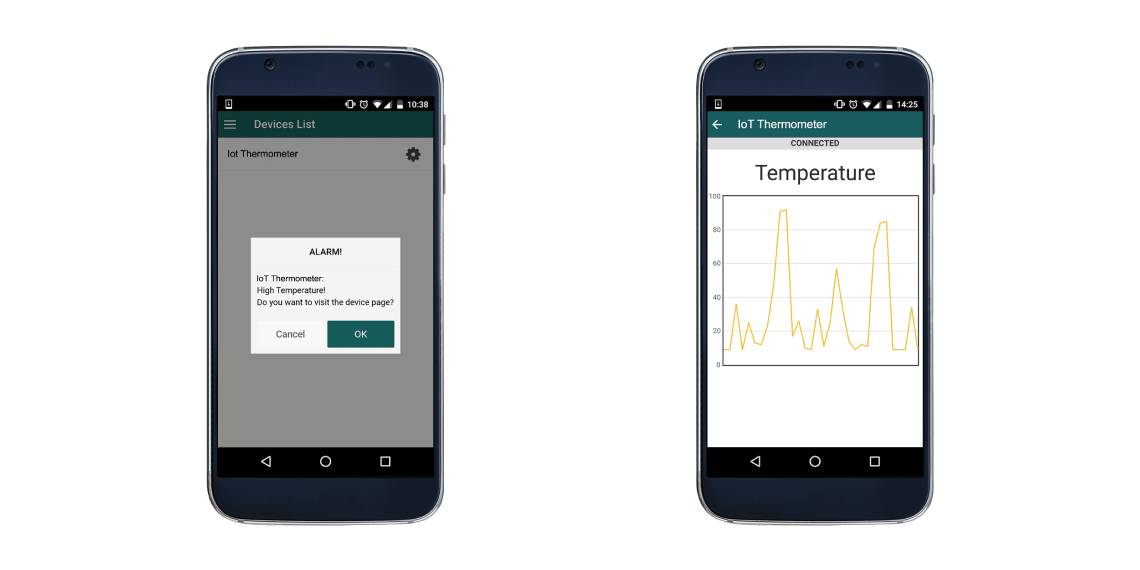
在这个极简教程里,你只需打开Zerynth应用,登录并选择指定的设备即可查看对应的物联网温度计指示板。最后,Zerynth也可以通过连接设备接收推送通知。比如当温度大于阈值时,就会出现通知。
原文:Getting started with the Zerynth App: how to build an IoT Thermometer
作者:Luigi F.Cerfeda
翻译:黑色巧克力


魔乐社区(Modelers.cn) 是一个中立、公益的人工智能社区,提供人工智能工具、模型、数据的托管、展示与应用协同服务,为人工智能开发及爱好者搭建开放的学习交流平台。社区通过理事会方式运作,由全产业链共同建设、共同运营、共同享有,推动国产AI生态繁荣发展。
更多推荐

 0
0 0
0- 0


 已为社区贡献5条内容

所有评论(0)