vue3阿里云验证码2.0:无痕+滑块弹窗验证码对接
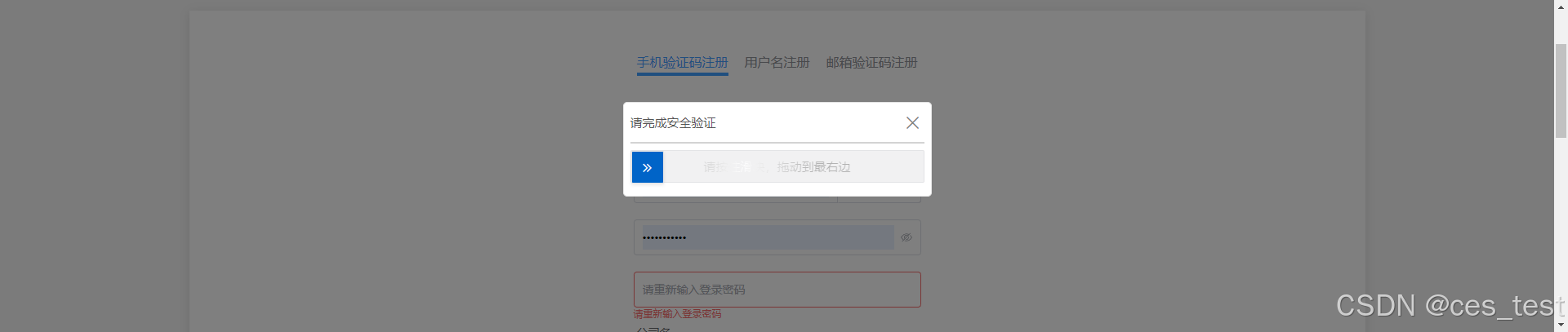
1.在项目的入口文件 index.html中引入阿里云验证码。第一次点击,无痕验证不通过,第二次点击,弹出滑块验证。第一次点击,无痕验证通过,不弹窗滑块 完成逻辑。3.在需要验证的地方引入验证码模块。
·
1.在项目的入口文件 index.html中引入阿里云验证码
<script type="text/javascript" src="https://o.alicdn.com/captcha-frontend/aliyunCaptcha/AliyunCaptcha.js"></script>2.将验证码封装
<template>
    <div class="verify-btn">
        <div id="captcha-button">
            <p>
                <slot></slot>
            </p>
        </div>
        <div id="captcha-element"></div>
    </div>
</template>
<script>
import { getCurrentInstance, reactive, onMounted, onBeforeUnmount } from "vue";
export default {
    setup() {
        const { proxy } = getCurrentInstance();
        const state = reactive({
            captcha: null,
            captchaButton: null,
            popupId: null,
        });
        onBeforeUnmount(() => {
            state.captchaButton = null;

            // 必须删除相关元素,否则再次mount多次调用 initAliyunCaptcha 会导致多次回调 captchaVerifyCallback
            document.getElementById("aliyunCaptcha-mask")?.remove();
            document.getElementById("aliyunCaptcha-window-popup")?.remove();
        });
        onMounted(() => {
            state.captchaButton = document.getElementById("captcha-button");
            // 滑动验证码
            window.initAliyunCaptcha({
                SceneId: "xxxxxxx", // 场景ID
                prefix: "xxxxxx", // 身份标
                mode: "popup", // 验证码模式:弹窗
                element: "#captcha-element",
                button: "#captcha-button",
                captchaVerifyCallback: captchaVerifyCallback, // 业务请求(带验证码校验)回调函数
                onBizResultCallback: onBizResultCallback, // 业务请求结果回调函数
                getInstance: getInstance, // 绑定验证码实例函数
                slideStyle: {
                    width: 360,
                    height: 40,
                },
                immediate: false,
                language: "cn", // 验证码语言类型,支持简体中文(cn)、繁体中文(tw)、英文(en)
            });
        });
        // 调出验证滑动条
        const getInstance = (instance) => {
            state.captcha = instance;
        };
        const captchaVerifyCallback = async (captchaVerifyParam, flag) => {
            // 1.向后端发起业务请求,获取验证码验证结果和业务结果
            let data = {
                CaptchaVerifyParam: captchaVerifyParam,
            };
            const result = await new Promise((resolve) => {
                proxy.$emit("verifiedBy", data, (response) => {
                    resolve(response);
                });
            });
            console.log(result);
            return {
                captchaResult: result, // 验证码验证是否通过
            };
        };
        // 验证通过后调用
        const onBizResultCallback = (bizResult) => {
            if (bizResult === true) {
                // 验证通过
                console.log("通过");
            } else {
                // 如果业务验证不通过,给出不通过提示。
                console.log("业务验证不通过!");
            }
        };
        // 弹出验证框,popupId为组件id,用于支持验证通过后继续触发业务逻辑
        const popup = (popupId) => {
            state.popupId = popupId;
            state.captchaButton.click();
        };
        return {
            popup, // 返回 popup 方法供外部调用
        };
    },
};
</script>
3.在需要验证的地方引入验证码模块
 <captcha @verifiedBy="getCode" ref="captchaRef">
        <el-button
            type="primary"
            :disabled="disabled"
            class="get-code-btn"
            @click.stop="show"
            :loading="isLoading"
        >
            发送验证码
        </el-button>
    </captcha>
const captchaRef = ref(null);
function show() {
if (valid.value === true) {
captchaRef.value.popup("verify");
} else if (valid.value === false) {
ElMessage.error(
store.state.auth.language
.please_fill_in_the_mobile_phone_number_correctly
);
}
}
const getCode = (obj, callback) => {
if (obj && Object.keys(obj).length) {
// 滑动验证码参数
setPwdInfo = Object.assign(setPwdInfo, obj);
}
proxy.$request.Auth.sendFindPwdCode(setPwdInfo)
.then((res) => {
if (res.code === 0) {
callback(true); //要返回给弹窗验证码 值
}
})
.catch(() => {
ElMessage.error("短信发送失败");
})
.finally(() => {
clearLoadingState();
});
})4. 实现效果
第一次点击,无痕验证通过,不弹窗滑块 完成逻辑
第一次点击,无痕验证不通过,第二次点击,弹出滑块验证

魔乐社区(Modelers.cn) 是一个中立、公益的人工智能社区,提供人工智能工具、模型、数据的托管、展示与应用协同服务,为人工智能开发及爱好者搭建开放的学习交流平台。社区通过理事会方式运作,由全产业链共同建设、共同运营、共同享有,推动国产AI生态繁荣发展。
更多推荐
 4
4 0
0- 0


 已为社区贡献1条内容

所有评论(0)