azure云数据库_使用Azure Active Directory和Azure SQL数据库
azure云数据库 介绍 (Introduction)By default, when someone creates an Azure SQL Server, an Administrator with SQL Authentication is created by default. However, for administrative purposes, it is a best...
azure云数据库
介绍 (Introduction)
By default, when someone creates an Azure SQL Server, an Administrator with SQL Authentication is created by default. However, for administrative purposes, it is a best practice to use Azure Active Directory.
默认情况下,当有人创建Azure SQL Server时,默认情况下会创建具有SQL身份验证的管理员。 但是,出于管理目的,最佳实践是使用Azure Active Directory。
Azure Active Directory (AD) can be used to access to several Azure resources like Azure SQL Database, Azure SQL Data Warehouse, Office 365, Salesforce, Dropbox, Adobe Create Cloud, ArcGis and more. Azure Active Directory is a cloud directory and an identity management service.
Azure Active Directory(AD)可用于访问多个Azure资源,例如Azure SQL数据库,Azure SQL数据仓库,Office 365,Salesforce,Dropbox,Adobe Create Cloud,ArcGis等。 Azure Active Directory是一个云目录和身份管理服务。
Having different credentials for each application is a chaos. That is why using Azure for Azure SQL Database or other Azure applications is necessary. You can centralize the authentication management. It also provides stronger security to your Azure SQL Databases.
每个应用程序具有不同的凭据是一个混乱。 这就是为什么必须将Azure用于Azure SQL数据库或其他Azure应用程序。 您可以集中进行身份验证管理。 它还为Azure SQL数据库提供了更强的安全性。
目标观众 (Target audience)
- If you do not have any experience in AD on-premises or Azure AD, this article is for you. 如果您没有本地AD或Azure AD的任何经验,那么本文适合您。
- If you have experience in AD on-premises and you do not have experience in Azure AD, this article is also for you! 如果您具有本地AD的经验,并且没有Azure AD的经验,那么本文也很适合您!
总览 (Overview)
In this new article, we will learn how to:
在这篇新文章中,我们将学习如何:
- Create an Azure Active Directory user 创建一个Azure Active Directory用户
- Create an Azure Active Directory group and assign the user the group 创建一个Azure Active Directory组并为用户分配该组
- How to add an Azure Active Directory user/group as an Azure SQL Administrator 如何将Azure Active Directory用户/组添加为Azure SQL管理员
- How to Add Azure Active Directory users to Azure SQL Database 如何将Azure Active Directory用户添加到Azure SQL数据库
要求 (Requirements)
- A subscription to Azure 订阅Azure
- Working with Visual Studio and SQL Azure databases) 使用Visual Studio和SQL Azure数据库来创建一个)
入门 (Getting started)
By default, an Azure AD directory is already created by default. We will first create the user and then add it to a group. Finally, we will add it to Azure SQL Database.
默认情况下,默认情况下已创建一个Azure AD目录。 我们将首先创建用户,然后将其添加到组中。 最后,我们将其添加到Azure SQL数据库。
创建一个Azure Active Directory用户 (Create an Azure Active Directory User)
In the Azure Portal, right click on the account and select your directory:
在Azure门户中,右键单击该帐户,然后选择您的目录:
The directory stores information like users and groups in Azure. In this example, the directory is dani671hotmail.onmicrosoft.com.
该目录在Azure中存储诸如用户和组之类的信息。 在此的示例目录是dani671hotmail.onmicrosoft.com。
To create a user, in the Azure Portal press the > icon and look for Users and Groups:
若要创建用户,请在Azure门户中按>图标,然后查找“ 用户和组”:
Go to all users and press New user:
转到所有用户 ,然后按“ 新用户”:
Add information about the user like the name, user name, first name, last name, work information, etc.:
添加有关用户的信息,例如姓名,用户名,名字,姓氏,工作信息等:
You can assign roles like the User, Global and Limited administrator role. Once that you select the options, press create:
您可以分配诸如用户,全局和受限管理员角色之类的角色。 选择选项后,按创建:
的角色 (Roles)
- User can access to the resouces, but cannot manage the directory resources. 用户可以访问资源,但不能管理目录资源。
- Global administrator can do anything, except changing the password of another administrator. 全局管理员可以执行任何操作,但更改其他管理员的密码除外。
- Limited administrator is limited to the role assigned. It can be a password administrator, Service administrator, SharePoint administrator, Security Administrator, etc. 受限管理员仅限于分配的角色。 它可以是密码管理员,服务管理员,SharePoint管理员,安全管理员等。
You will notice that the new user was created successfully:
您会注意到新用户创建成功:
If you click on the new users, you have the options to reset the password or to delete it. By default, the user is created with a temporary password that you are forced to change after the first login in the portal:
如果单击新用户,则可以选择重置密码或删除密码。 默认情况下,将使用临时密码创建用户,在您首次登录门户网站后,您将被迫更改该临时密码:
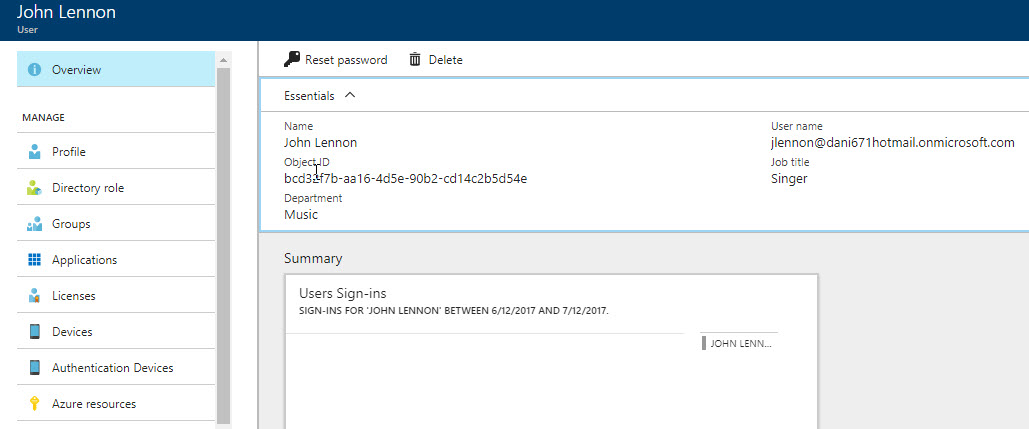
You also have the option to check the Profile:
您还可以选择检查配置文件:
In the Profile, you can add your photo, block the permissions to sign in, specify usage location and more information:
在个人资料中,您可以添加照片,阻止登录权限,指定使用位置以及更多信息:
创建一个Azure Active Directory组并为用户分配该组 (Create an Azure Active Directory Group and assign the user the group)
It is a best practice to work with groups instead of working with individual users. It simplifies the administration and it is more intuitive. Also it is easier to handle when the people moves to another office or another company. When a new person comes, you only need to assign him to the role instead of adding the user to each resource.
与组一起工作而不是与单个用户一起工作是一种最佳实践。 它简化了管理,并且更加直观。 当人们搬到另一间办公室或另一家公司时,也更容易处理。 当一个新人来时,您只需要将他分配给该角色,而无需将用户添加到每个资源中。
To create a new user, in the Azure Portal, go to User and Groups and then go to All Groups and select New Group:
若要创建新用户,请在Azure门户中,转到“ 用户和组” ,然后转到“所有组”,然后选择“ 新建组”:
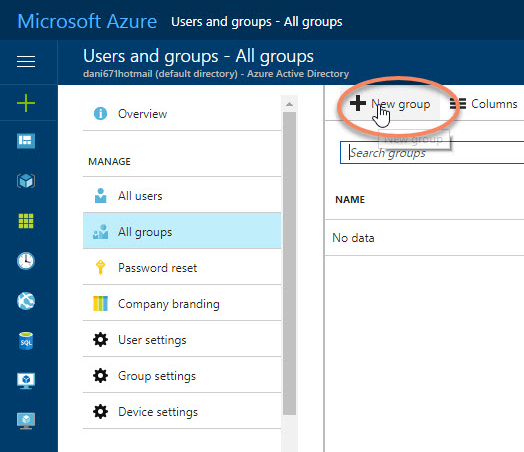
You can assign users to the group now. In Members, check the users that you want to add to the group:
您可以立即将用户分配给该组。 在成员中,检查要添加到组中的用户:
如何将Azure Active Directory用户/组添加为Azure SQL管理员 (How to add an Azure Active Directory user/group as an Azure SQL Administrator)
To assign an Azure Active Directory user/group to Azure SQL Database as an Administrator, in the Azure Portal, click the > icon and search for SQL servers:
若要以管理员身份将Azure Active Directory用户/组分配给Azure SQL数据库,请在Azure门户中,单击>图标并搜索SQL服务器:
Select the SQL Server with an Azure SQL Database:
选择带有Azure SQL数据库SQL Server:
Click Active Directory admin and press the option Set admin option:
单击Active Directory管理员,然后按选项设置管理员选项:
You can select a User or a Group as the Active Directory administrator:
您可以选择一个用户或一个组作为Active Directory管理员:
Once you select the user or group, press save:
选择用户或组后,按保存:
In SSMS, try to login using the new Azure Active Directory User created:
在SSMS中,尝试使用创建的新Azure Active Directory用户登录:
A typical error message is this one:
一个典型的错误消息是:
Cannot connect to sqlshackserver.database.windows.net.
– – – – – – – – – –
ADDITIONAL INFORMATION:
Failed to authenticate the user jlennon@dani671hotmail.onmicrosoft.com in Active Directory (Authentication=ActiveDirectoryPassword).
Error code 0xCAA20064; state 10
AADSTS50055: Force Change Password.
Trace ID: 3c10ceb7-d998-4a94-9013-59efcc8f3900
Correlation ID: 19b78a89-ba7e-402d-bbc8-7b004b2ec523
Timestamp: 2017-07-14 00:16:07Z (Microsoft SQL Server, Error: 0)
无法连接到sqlshackserver.database.windows.net。
– – – – – – – – – –
附加信息:
无法对Active Directory中的用户jlennon@dani671hotmail.onmicrosoft.com进行身份验证(Authentication = ActiveDirectoryPassword)。
错误代码0xCAA20064; 状态10
AADSTS50055:强制更改密码。
跟踪ID:3c10ceb7-d998-4a94-9013-59efcc8f3900
相关编号:19b78a89-ba7e-402d-bbc8-7b004b2ec523
时间戳记:2017-07-14 00:16:07Z(Microsoft SQL Server,错误:0)
This error happens if you keep your user with the default password. You need to login to the Azure Portal specify your credentials and the Portal will ask you to provide a new password:
如果您为用户保留默认密码,则会发生此错误。 您需要登录到Azure门户并指定您的凭据,门户将要求您提供新密码:

If you do not remember your password, you can always reset it. If everything is OK, you will login with your user in SSMS:
如果您不记得密码,可以随时重置它。 如果一切正常,您将在SSMS中用您的用户登录:
如何将Azure Active Directory用户添加到Azure SQL数据库 (How to Add Azure Active Directory Users to Azure SQL Database)
We added Azure Active Directory Users as Administrators of Azure SQL Database. Is it possible to work with non-administrator users?
我们将Azure Active Directory用户添加为Azure SQL数据库的管理员。 是否可以与非管理员用户一起使用?
Yes, you can basically work with Azure Active Directory Users in the same way that you do with an Azure SQL Database User. The following lines of code shows how to add a user named jgonzales from the domain dani671hotmail.onmicrosoft.com to Azure SQL:
是的,您基本上可以使用与Azure SQL数据库用户相同的方式来使用Azure Active Directory用户。 以下代码行显示如何将名为jgonzales的用户从域dani671hotmail.onmicrosoft.com添加到Azure SQL:
CREATE USER [jgonzales@dani671hotmail.onmicrosoft.com] FROM EXTERNAL PROVIDER;
Note that we are assuming the user jgonzales is already created in Azure Active Directory. Also, you can only add AD with an Azure AD Account. If you try to run the T-SQL code provided before using SQL Authentication you will receive the following error message:
请注意,我们假设用户jgonzales已在Azure Active Directory中创建。 另外,您只能使用Azure AD帐户添加AD。 如果您尝试运行在使用SQL身份验证之前提供的T-SQL代码,则会收到以下错误消息:
Msg 33159, Level 16, State 1, Line 1
Principal ‘jgonzales@dani671hotmail.onmicrosoft.com’ could not be created. Only connections established with Active Directory accounts can create other Active Directory users.
消息33159,第16级,状态1,第1行
无法创建主体“ jgonzales@dani671hotmail.onmicrosoft.com”。 只有使用Active Directory帐户建立的连接才能创建其他Active Directory用户。
The following example shows how to grant select permissions to the AD user jgonzales on the table SalesLT.Customer. The table SalesLT.Customer is included in the AdventureworksLT that can be installed with the Azure SQL Database:
以下示例显示如何向表SalesLT.Customer上的AD用户jgonzales授予选择权限。 表SalesLT.Customer包含在AdventureworksLT中,可以与Azure SQL数据库一起安装:
GRANT SELECT ON [SalesLT].[Customer] TO [jgonzales@dani671hotmail.onmicrosoft.com];
The following example shows how to add the AD user jgonzales to the dbmanager role. You need to run the sentence in the master database:
以下示例显示如何将AD用户jgonzales添加到dbmanager角色。 您需要在master数据库中运行该语句:
ALTER ROLE dbmanager ADD MEMBER [jgonzales@dani671hotmail.onmicrosoft.com];
As you can see, working with Azure AD is a straightforward process.
如您所见,使用Azure AD是一个简单的过程。
结论 (Conclusion)
Azure Active Directory allows to create a unique authentication to the thousands of resources in Azure including Azure SQL Database and Azure SQL Data Warehouse. In this article, we learned how to add an Azure Active Directory user, how to create an Azure Active Directory Group and add a member to it. Finally, we learned to create an Azure Admin for our Azure SQL. With that user, we login and we can create other Azure Active Directory users in Azure SQL Database with lower privileges.
Azure Active Directory允许对Azure中数千种资源(包括Azure SQL数据库和Azure SQL数据仓库)创建唯一身份验证。 在本文中,我们学习了如何添加Azure Active Directory用户,如何创建Azure Active Directory组以及向其中添加成员。 最后,我们学习了为Azure SQL创建Azure管理员。 与该用户一起登录,并可以在Azure SQL数据库中以较低的特权创建其他Azure Active Directory用户。
Finally, to address a common question, if you have Active Directory on-premises, yes, you can integrate with Azure Active Directory. Please check the references below for more information.
最后,要解决一个常见问题,如果您有本地Active Directory,则可以与Azure Active Directory集成。 请检查以下参考资料以获取更多信息。
Other articles in this series:
本系列的其他文章:
- How to migrate MySQL tables to Microsoft Azure SQL database如何将MySQL表迁移到Microsoft Azure SQL数据库
- How to create an Azure SQL Database using the Cloud Shell如何使用Cloud Shell创建Azure SQL数据库
- How to copy an Azure SQL database using the Azure Portal, Cloud Shell and T-SQL如何使用Azure门户,Cloud Shell和T-SQL复制Azure SQL数据库
- How to automate Azure Active Directory (AAD) tasks using the Cloud Shell如何使用Cloud Shell自动化Azure Active Directory(AAD)任务
翻译自: https://www.sqlshack.com/working-azure-active-directory-azure-sql-database/
azure云数据库

魔乐社区(Modelers.cn) 是一个中立、公益的人工智能社区,提供人工智能工具、模型、数据的托管、展示与应用协同服务,为人工智能开发及爱好者搭建开放的学习交流平台。社区通过理事会方式运作,由全产业链共同建设、共同运营、共同享有,推动国产AI生态繁荣发展。
更多推荐

 1
1 0
0- 0


 已为社区贡献16条内容

所有评论(0)