利用声音传感器控制led灯功能_云中树莓派(4):利用声音传感器控制Led灯
1. 声音传感器及其配置声音传感器如下图所示: 将 VCC 引脚接入树莓派 5V 引脚,将 GND 引脚接入树莓派 GND 引脚,将 OUT 引脚接入树莓派 GPIO20。要注意,模块在环境声音强度达不到设定阈值时,OUT输出高电平(1),当外界环境声音强度超过设定阈值时,模块OUT输出低电平(0)。2. GPIO Event 机制树莓派提供了三种电信号事件反馈机制。(1)GPIO.wait_fo
1. 声音传感器及其配置
声音传感器如下图所示:
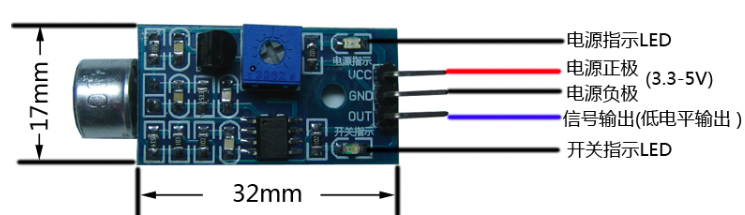
将 VCC 引脚接入树莓派 5V 引脚,将 GND 引脚接入树莓派 GND 引脚,将 OUT 引脚接入树莓派 GPIO20。
要注意,模块在环境声音强度达不到设定阈值时,OUT输出高电平(1),当外界环境声音强度超过设定阈值时,模块OUT输出低电平(0)。
2. GPIO Event 机制
树莓派提供了三种电信号事件反馈机制。
(1)GPIO.wait_for_edge:直接等待电信号达到某种条件(升高还是降低或者任意),并且可以设置超时时间。在超时时间内,函数会一直等待,直到期望的电信号改变出现,或者超时。
#wait for up to 5 seconds for a rising edge (timeout is in milliseconds)
channel = GPIO.wait_for_edge(channel, GPIO_RISING, timeout=5000)if channel isNone:print('Timeout occurred')else:print('Edge detected on channel', channel)
(2)GPIO.add_event_detect:设置事件触发检测,一旦检测到,会返回True。
GPIO.add_event_detect(channel, GPIO.RISING) #add rising edge detection on a channel
do_something()ifGPIO.event_detected(channel):print('Button pressed')
(3)GPIO.add_event_detect:回调函数机制。注册回调函数,一旦指定事件触发,回调函数会被调用。
defmy_callback(channel):print('This is a edge event callback function!')print('Edge detected on channel %s'%channel)print('This is run in a different thread to your main program')
GPIO.add_event_detect(channel, GPIO.RISING, callback=my_callback) #add rising edge detection on a channel
3. 利用声音检查模块控制Led灯
实现目标:当检测到声音时,改变Led 灯的状态。
3.1 代码
importRPi.GPIO as GPIOimporttimefrom time importsleep
SOUND_PIN_NUM= 20 #声音模块的输出引脚接的GPIOLED_PIN_NUM= 26 #LED 的长脚接的GPIOstate=0 #保存led 的状态
timeLast=time.time() #保存上次触发的时间#in one sounding, the callback function will be invoked for a few times, so need wait for some time to
validDuration = 0.1GPIO.setmode(GPIO.BCM)
GPIO.setup(SOUND_PIN_NUM, GPIO.IN)
GPIO.setup(LED_PIN_NUM, GPIO.OUT)defcallback_fun_soundOccurred(input_pint):globaltimeLast
timeNow=time.time()
duration= timeNow -timeLastif (duration
timeLast=timeNowreturn
print("accepted for valid duration" +str(duration))
timeLast=timeNow
switchLed()defswitchLed():globalstateif(state):
turnOffLed()
state=0else:
turnOnLed()
state= 1
defturnOnLed():print("Turn on")
GPIO.output(LED_PIN_NUM,GPIO.HIGH)defturnOffLed():print("Turn off")
GPIO.output(LED_PIN_NUM, GPIO.LOW)
GPIO.add_event_detect(SOUND_PIN_NUM, GPIO.RISING, callback=callback_fun_soundOccurred)try:whileTrue:
sleep(0.1)exceptKeyboardInterrupt:
GPIO.remove_event_detect(SOUND_PIN_NUM)
GPIO.cleanup()
3.2 两个小技巧
(1)尽管一个只需要一块五毛钱,但声音检测模块的灵敏度是可以调节的。使用螺丝刀转动上面的旋钮,边转变说话,看其开关指示灯的反应,亮表示检测到声音,亮度表示声音大小。旋到合适的位置即可。默认时,它非常灵敏,任何细小的声音都会触发它。
(2)在一句话说话过程中,回调函数会被触发好多次。因此,需要的话,如上面代码,可以计算两次调用之间的事件间隔,把太短的间隔过滤掉。下面是一句短话过程中函数被触发的情况:
ignored because duration 0.000501155853271 istoo short
ignored because duration0.000110864639282 istoo short
ignored because duration0.00215411186218 istoo short
ignored because duration0.000218868255615 istoo short
ignored because duration0.000470161437988 istoo short
ignored because duration0.000167846679688 istoo short
ignored because duration0.000583171844482 istoo short
ignored because duration0.000425815582275 istoo short
ignored because duration0.0010621547699 istoo short
ignored because duration0.000314950942993 istoo short
ignored because duration0.000555038452148 istoo short
ignored because duration0.000130891799927 istoo short
ignored because duration0.000461101531982 istoo short
ignored because duration0.00022292137146 istoo short
ignored because duration0.00274705886841 istoo short
ignored because duration0.000133037567139 istoo short
ignored because duration0.00597095489502 istoo short
ignored because duration0.000155925750732 istoo short
ignored because duration0.00107598304749 istoo short
ignored because duration0.000198125839233 is too short
参考链接:
欢迎大家关注我的个人公众号:


魔乐社区(Modelers.cn) 是一个中立、公益的人工智能社区,提供人工智能工具、模型、数据的托管、展示与应用协同服务,为人工智能开发及爱好者搭建开放的学习交流平台。社区通过理事会方式运作,由全产业链共同建设、共同运营、共同享有,推动国产AI生态繁荣发展。
更多推荐



 2
2 0
0- 0


 已为社区贡献3条内容

所有评论(0)