图像分类--预训练模型预测
图像分类--预训练模型预测
·
预训练模型预测
代码流程
使用百度爬取的图片微调pytorch的预训练resnet模型。在0.13版本后预训练模型中取消了参数pretrain,使用参数weights进行取代。该改进主要由于新版pytorch预训练模型可以选择不同的最优参数组合。
1.引入库
import os
import cv2
import time
import wandb
import torch
import warnings
import numpy as np
import pandas as pd
from tqdm import tqdm
from PIL import Image
import torch.nn as nn
import torch.optim as optim
from torchvision import models
import matplotlib.pyplot as plt
import torch.nn.functional as F
from torchvision import datasets
from torchvision import transforms
2.预训练模型使用
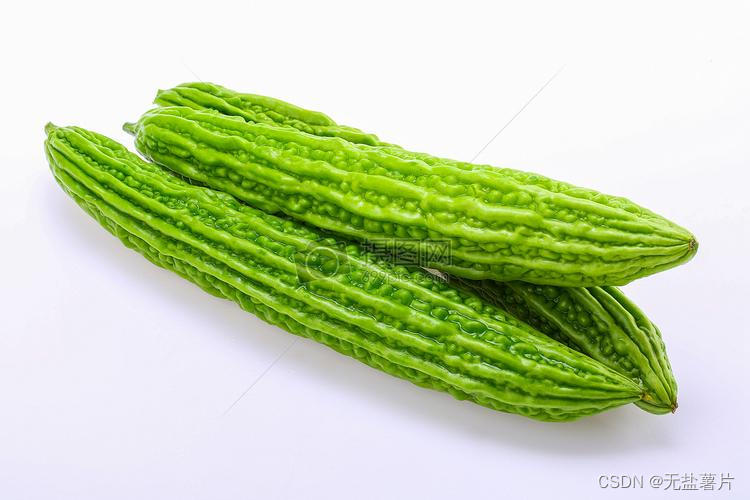
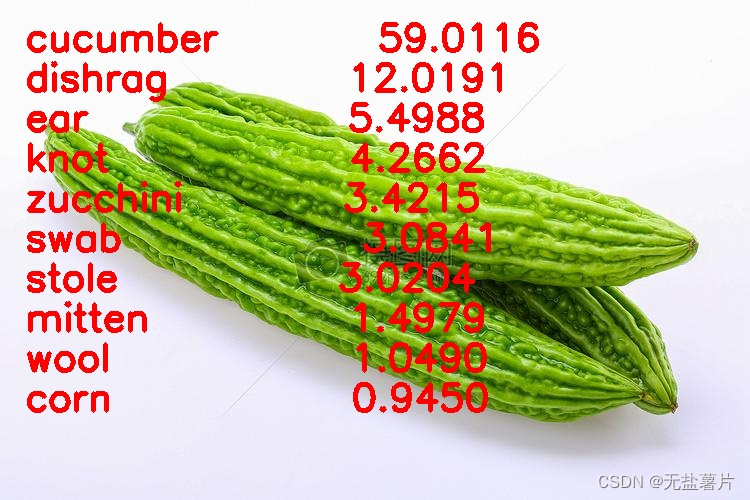
使用默认第一版参数的pytorch预训练resnet18,输入单张图片(苦瓜)如图1,模型预测输出也为单张图片(59%为黄瓜)如图2。因此,若在使用预训练模型的前提下,期望实现对图片的细粒度分类,则需要通过模型微调等其他手段。
model = models.resnet18(weights=models.ResNet18_Weights.IMAGENET1K_V1)
model = model.eval()
model = model.to(device)
test_transform = transforms.Compose([transforms.Resize(256),
                                     transforms.CenterCrop(224),
                                     transforms.ToTensor(),
                                     transforms.Normalize(
                                         mean=[0.485, 0.456, 0.406],
                                         std=[0.229, 0.224, 0.225])
                                     ])
img_pil = Image.open(test_img_path)
input_img = test_transform(img_pil)
input_img = input_img.unsqueeze(0).to(device)
pred_logits = model(input_img)
pred_softmax = F.softmax(pred_logits, dim=1)  # 对 logit 分数做 softmax 运算
n = 10
top_n = torch.topk(pred_softmax, n)
pred_ids = top_n[1].cpu().detach().numpy().squeeze()
confs = top_n[0].cpu().detach().numpy().squeeze()
idx_to_labels = {}
for idx, row in df.iterrows():
    idx_to_labels[row['ID']] = [row['wordnet'], row['class']]
img_bgr = cv2.imread(test_img_path)
for i in range(n):
    class_name = idx_to_labels[pred_ids[i]][1]  # 获取类别名称
    confidence = confs[i] * 100  # 获取置信度
    text = '{:<15} {:>.4f}'.format(class_name, confidence)
    print(text)
    # !图片,添加的文字,左上角坐标,字体,字号,bgr颜色,线宽
    img_bgr = cv2.putText(img_bgr, text, (25, 50 + 40 * i), cv2.FONT_HERSHEY_SIMPLEX, 1.25, (0, 0, 255), 3)
cv2.imwrite('img_pred.jpg', img_bgr)
img_pred = Image.open('img_pred.jpg')
|
|

魔乐社区(Modelers.cn) 是一个中立、公益的人工智能社区,提供人工智能工具、模型、数据的托管、展示与应用协同服务,为人工智能开发及爱好者搭建开放的学习交流平台。社区通过理事会方式运作,由全产业链共同建设、共同运营、共同享有,推动国产AI生态繁荣发展。
更多推荐
 0
0 0
0- 0


 已为社区贡献4条内容

所有评论(0)