[已解决] pycharm debug时一直显示collecting data或者Frames are not available
如题,在pycharm中debug时一直显示collecting data或者Frames are not available。
·
问题描述
如题,在pycharm中debug时一直显示collecting data或者Frames are not available。
参考文献
参见博客:解决PyCharm调试查看变量时一直显示collecting data并报错Timeout waiting for response且看不到任何内容
解决方法
在PyCharm,打开Setting界面,在如下设置项中勾选“Gevent compatible”即可,如下图所示: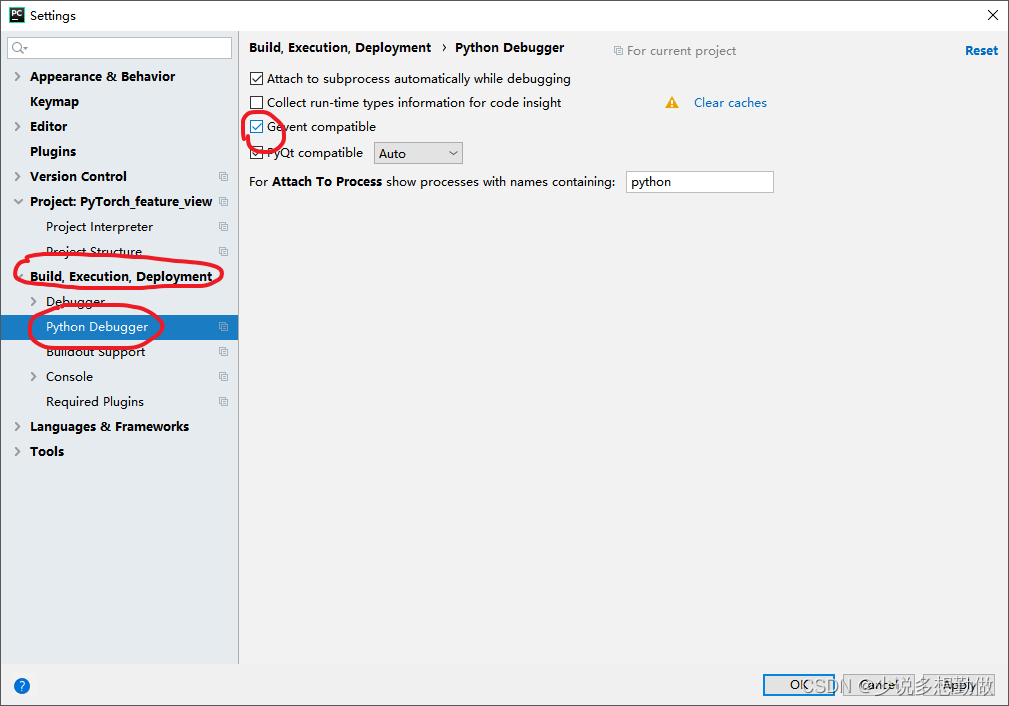

魔乐社区(Modelers.cn) 是一个中立、公益的人工智能社区,提供人工智能工具、模型、数据的托管、展示与应用协同服务,为人工智能开发及爱好者搭建开放的学习交流平台。社区通过理事会方式运作,由全产业链共同建设、共同运营、共同享有,推动国产AI生态繁荣发展。
更多推荐

 1
1 0
0- 0


 已为社区贡献11条内容

所有评论(0)