物联网从HomeAssistant开始
Home Assistant 是一款开源的本地化家庭自动化解决方案,强调隐私保护和本地控制,由全球 DIY 爱好者社区支持。其核心架构包括事件总线、状态机、服务注册表和定时器,通过集成扩展功能,支持多种智能家居设备。文章详细介绍了在树莓派 5 上通过 Docker 安装 Home Assistant 的步骤,并提供了接入米家、公牛和海尔等智能设备的插件安装与配置方法。通过手动安装插件并重启 Hom
文章目录
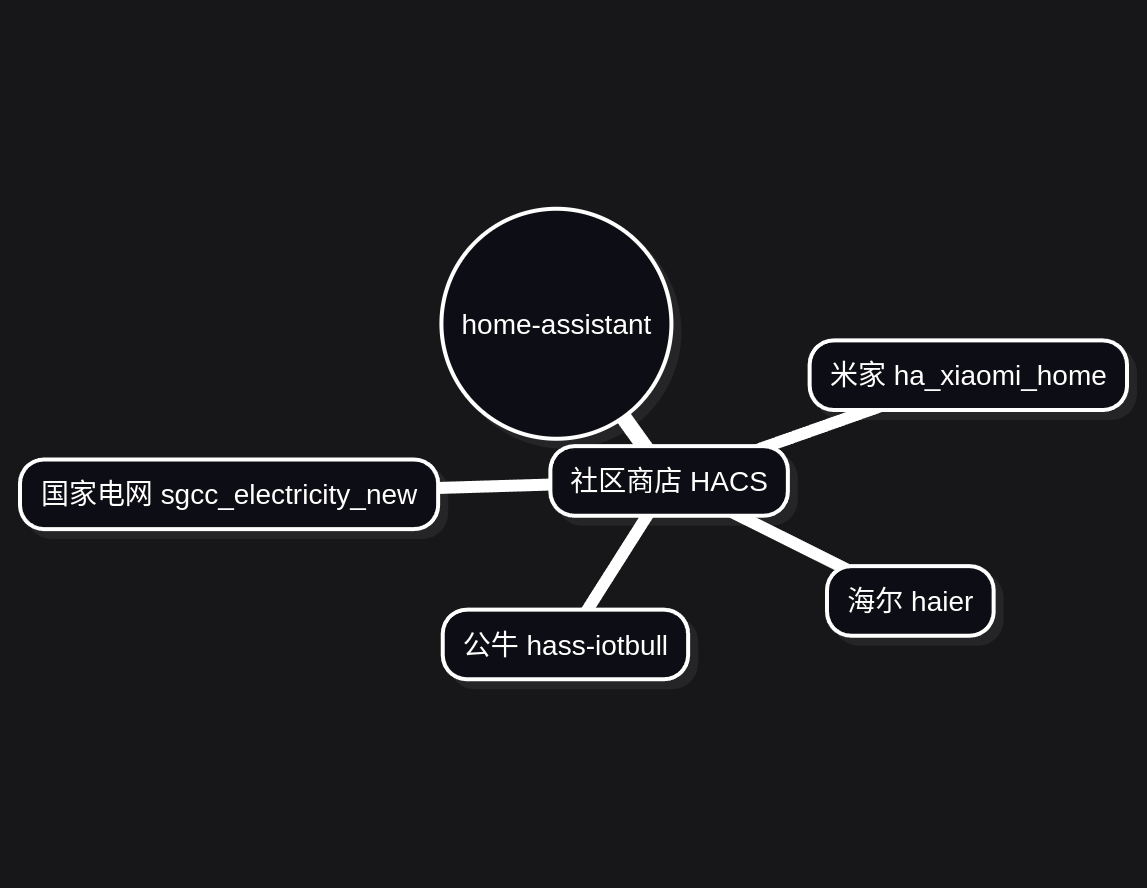
一、什么是home-assistant?
Open source home automation that puts local control and privacy first. Powered by a worldwide community of tinkerers and DIY enthusiasts.
一款将本地控制与隐私置于首位的开源家庭自动化解决方案,由全球各地的 DIY 爱好者与技术极客玩家社区共同驱动。
1.核心架构
Home Assistant 核心由四个主要部分组成。除此之外,它还包含许多辅助类用于处理常见场景,例如提供实体或处理位置信息。
- 事件总线(Event Bus):负责协调事件的触发与监听 —— 这是 Home Assistant 的核心命脉。
- 状态机(State Machine):跟踪各类实体的状态,并在状态变更时触发 state_changed 事件。
- 服务注册表(Service Registry):在事件总线上监听 call_service 事件,并允许其他代码注册服务操作。
- 定时器(Timer):每秒在事件总线上发送一次 time_changed 事件。
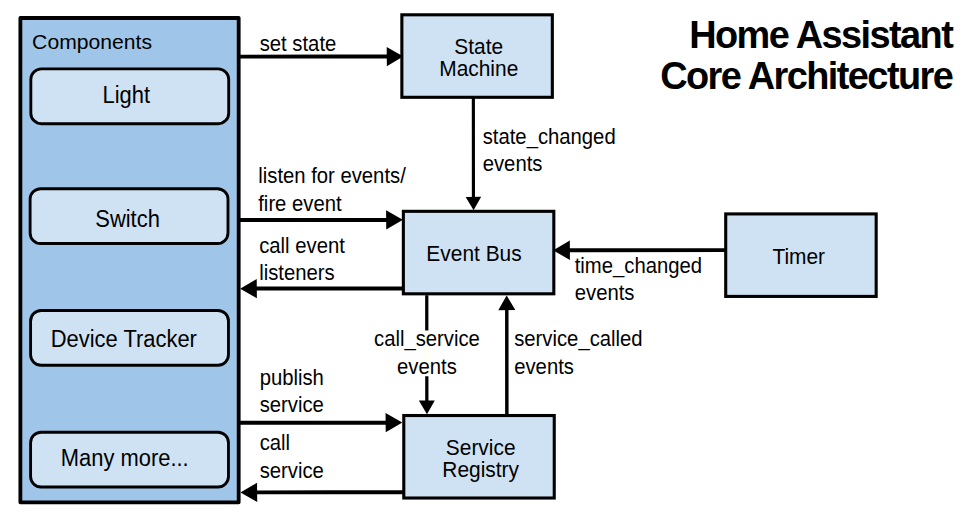
来源:https://developers.home-assistant.io/docs/architecture/core
2.集成架构
Home Assistant Core 可以通过 集成(integrations) 进行扩展。每个集成负责 Home Assistant 中的一个特定 领域(domain)(如灯光、传感器、媒体设备等)。集成能够监听或触发事件、提供操作功能,并维护实体状态。
集成由两部分组成:组件(component)(基础逻辑)和 平台(platforms)(与其他集成交互的模块)。集成使用 Python 编写,能够充分利用 Python 的所有优势。开箱即用的 Home Assistant 提供了大量内置集成,覆盖常见的智能家居设备和服务。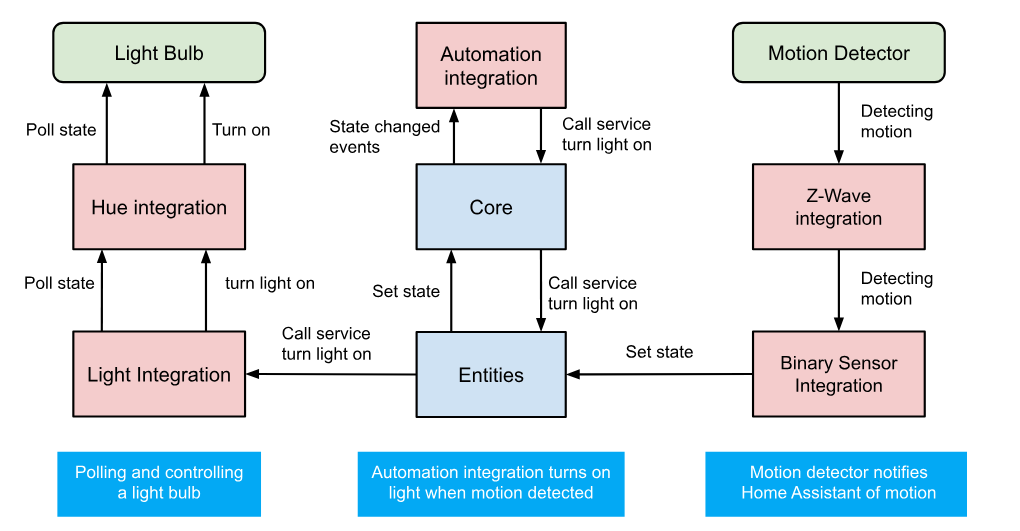
来源:https://developers.home-assistant.io/docs/architecture_components
二、在树梅派5上安装home-assistant
https://www.home-assistant.io/installation/
https://github.com/home-assistant/operating-system/releases
目前是在树梅派安装docker运行的home-assistant,后面打算采用HA OS。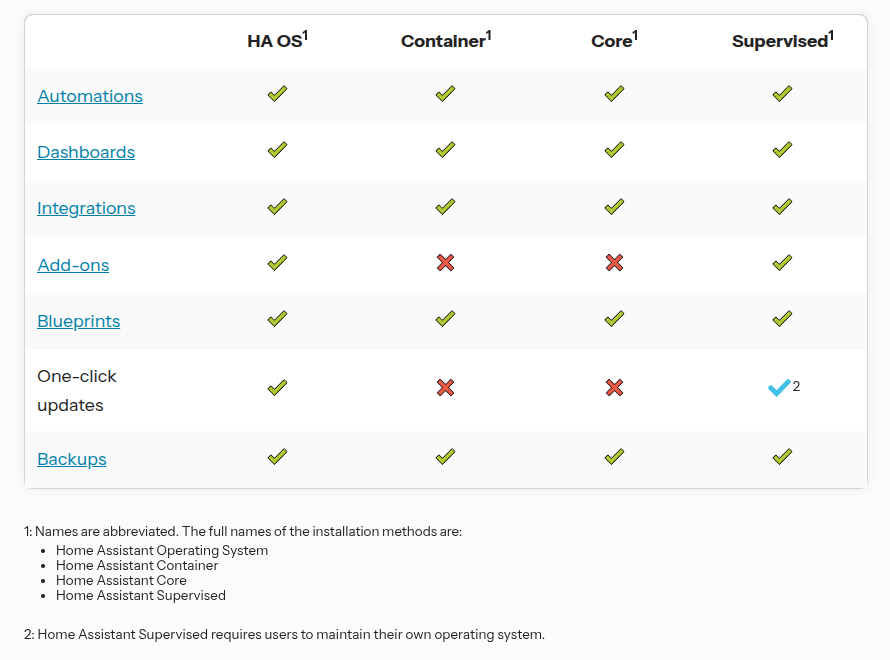
docker-compose up -d
version: '3'
services:
  # https://www.home-assistant.io/installation/linux#docker-compose
  homeassistant:
    container_name: homeassistant
    image: "homeassistant/home-assistant"
    environment:
      - TZ=Asia/Shanghai
    ports:
      - "8123:8123"
    volumes:
      - /root/homeassistant:/config
      - /etc/localtime:/etc/localtime:ro
      - /etc/hosts:/etc/hosts:ro
      - /run/dbus:/run/dbus:ro
    restart: unless-stopped
    privileged: true
    network_mode: host
三、集成组件
1. 接入HACS
Home Assistant 社区商店 ( HACS ) 是一种自定义集成,它提供了一个 UI 来管理Home Assistant中的自定义元素。
HACS可以做什么:
帮助您发现新的自定义元素。
帮助您下载新的自定义元素。
管理(更新/删除)自定义元素。
发布您自己的自定义元素存储库并创建存储库或问题跟踪器的快捷方式。
docker exec -it <name of the container running homeassistant> bash
wget -O - https://get.hacs.xyz | bash -
https://hacs.xyz/docs/use/download/download/#to-download-hacs-container
2. 接入米家
好久没更新了:https://github.com/ha0y/xiaomi_miot_raw
最近还在更新:https://github.com/al-one/hass-xiaomi-miot
官方强势来袭:https://github.com/XiaoMi/ha_xiaomi_home
2.1 对比下趋势
https://ossinsight.io/analyze/XiaoMi/ha_xiaomi_home?vs=al-one%2Fhass-xiaomi-miot#overview
还是建议用小米官方的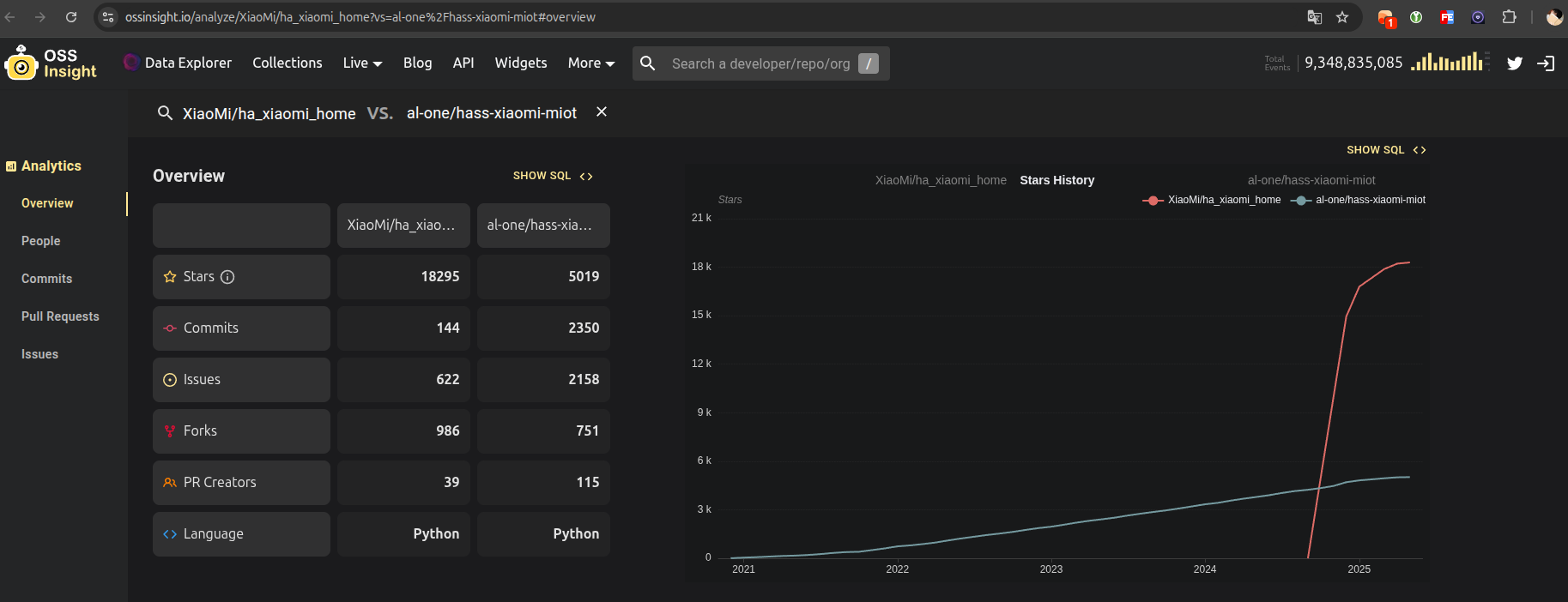
2.2 手动安装插件
git clone https://github.com/XiaoMi/ha_xiaomi_home
cp -r ha_xiaomi_home/custom_components/xiaomi_home /root/homeassistant/custom_components
2.3 配置方式
安装完成后,重启 Home Assistant。待 Home Assistant 启动后,在「设置」菜单中点击「设备与服务」选项,在新界面中选择「添加集成」,搜索「xiaomi home」,按照提示操作即可。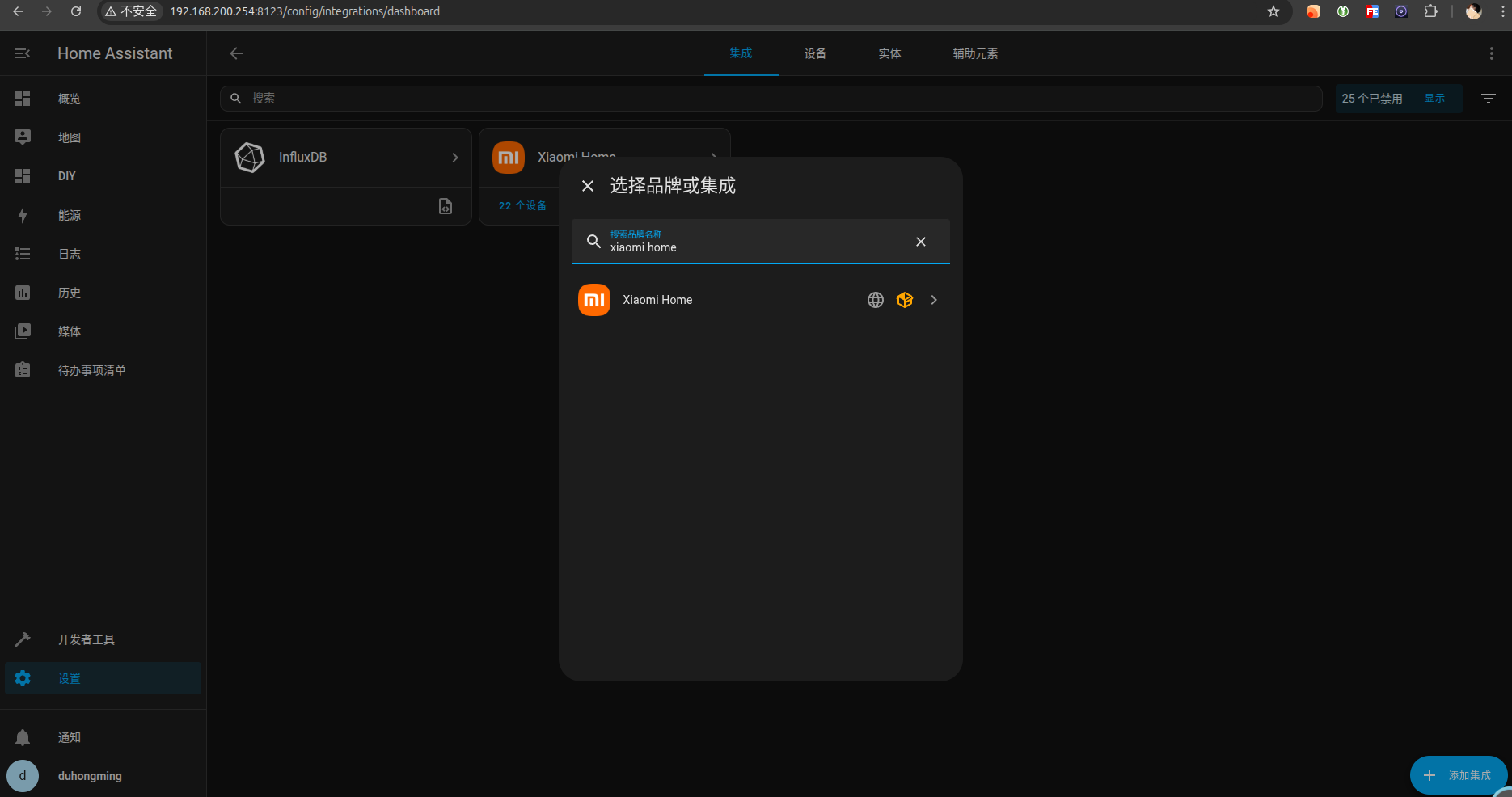
3.接入公牛
3.1 手动安装插件
https://github.com/stevenjoezhang/hass-iotbull
git clone https://github.com/stevenjoezhang/hass-iotbull
cp -r hass-iotbull/custom_components/bull /root/homeassistant/custom_components
3.2 配置方式
安装完成后,重启 Home Assistant。待 Home Assistant 启动后,在「设置」菜单中点击「设备与服务」选项,在新界面中选择「添加集成」,搜索「Bull IoT」,按照提示操作即可。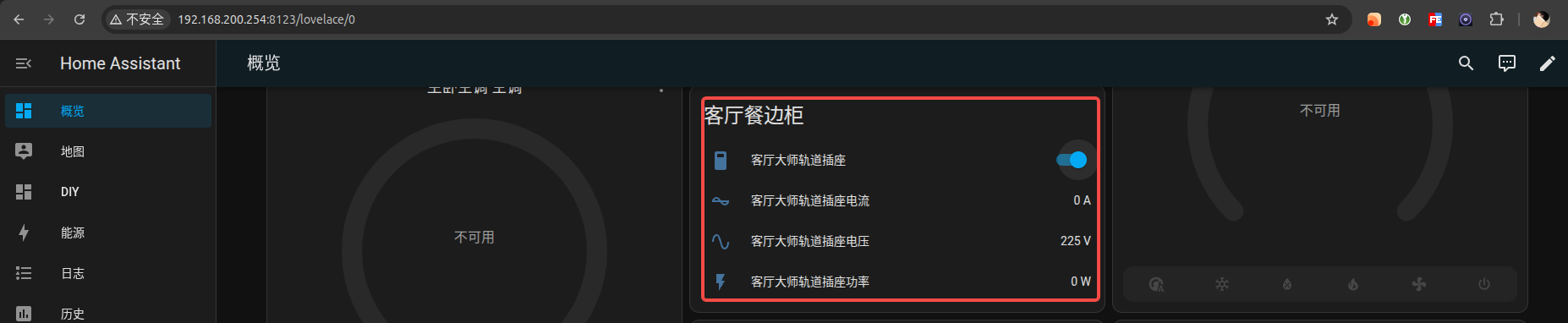
4. 接入海尔
4.1 手动安装插件
git clone https://github.com/banto6/haier
cp -r haier/custom_components/haier /root/homeassistant/custom_components
4.2 配置方式
通过Stream抓包,搜索关键词:assign,点击查看json即可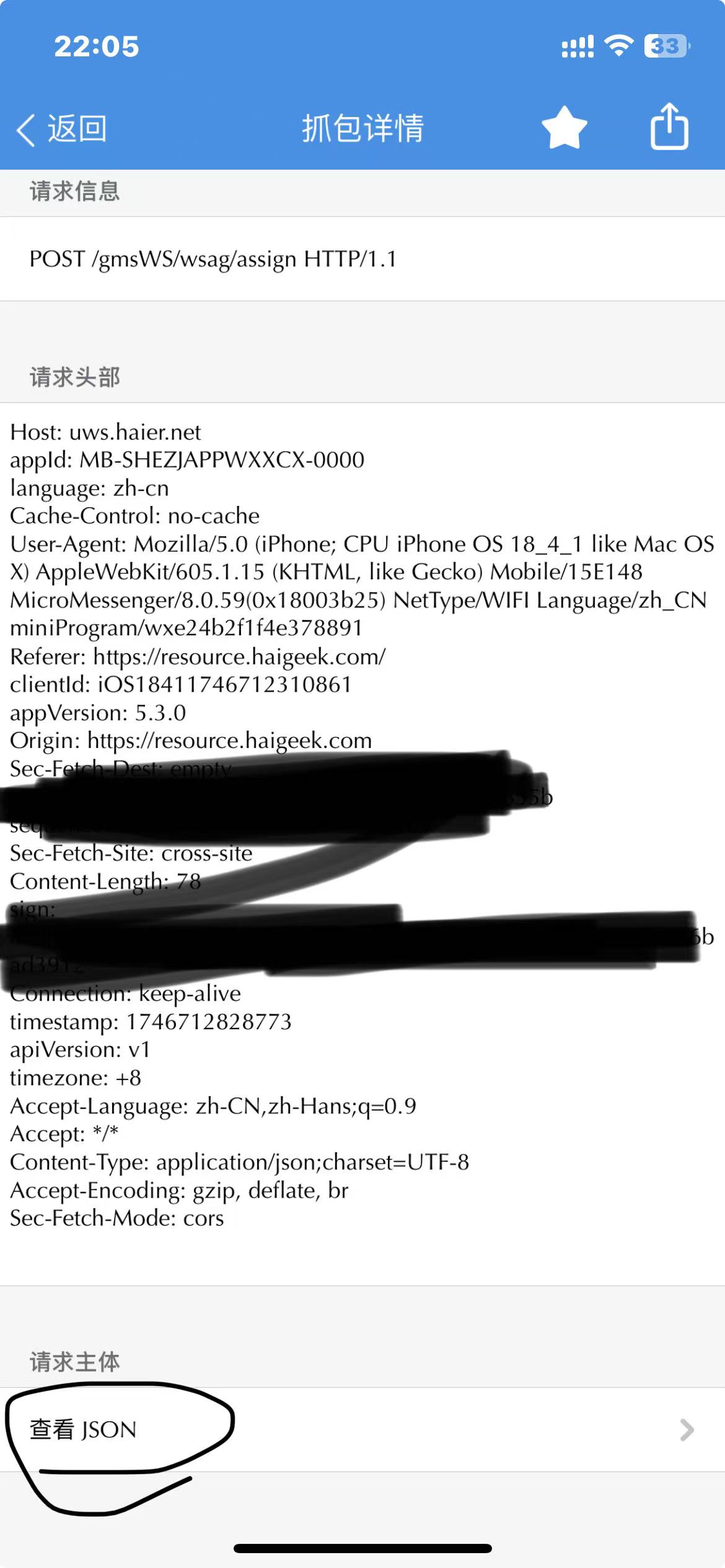
https://zhuanlan.zhihu.com/p/697084466
5. 接入国家电网
这种感觉不太好:https://github.com/ARC-MX/sgcc_electricity_new/blob/master/ha_addons_doc/Add-on%E6%95%99%E7%A8%8B.md
还是老本行,用docker吧
services:
  sgcc_electricity_app:
    env_file:
      - .env
    image: registry.cn-hangzhou.aliyuncs.com/arcw/sgcc_electricity:latest # for use docker.io: arcw/sgcc_electricity:latest
    container_name: sgcc_electricity
    network_mode: "host"
    environment:
      - SET_CONTAINER_TIMEZONE=true
      - CONTAINER_TIMEZONE=Asia/Shanghai
    restart: unless-stopped
    volumes:
      - ./:/data        # if you want to read homeassistant.db, homeassistant.db is in the container at /data/
    command: python3 main.py
    init: true
.env如下:
### 以下项都需要修改
## 国网登录信息
# 修改为自己的登录账号
PHONE_NUMBER="xxx"
# 修改为自己的登录密码
PASSWORD="xxxx"
# 排除指定用户ID,如果出现一些不想检测的ID或者有些充电、发电帐号、可以使用这个环境变量,如果有多个就用","分隔,","之间不要有空格
IGNORE_USER_ID=xxxxxxx,xxxxxxx,xxxxxxx

# SQLite 数据库配置
# or False 不启用数据库储存每日用电量数据。
ENABLE_DATABASE_STORAGE=False
# 数据库名,默认为homeassistant
DB_NAME="homeassistant.db"

## homeassistant配置
# 改为你的localhost为你的homeassistant地址
HASS_URL="http://localhost:8123/"
# homeassistant的长期令牌
HASS_TOKEN="eyxxxxx"

## selenium运行参数
# 任务开始时间,24小时制,例如"07:00”则为每天早上7点执行,第一次启动程序如果时间晚于早上7点则会立即执行一次,每隔12小时执行一次。
JOB_START_TIME="07:00"
# 每次操作等待时间,推荐设定范围为[2,30],该值表示每次点击网页后所要等待数据加载的时间,如果出现“no such element”诸如此类的错误可适当调大该值,如果硬件性能较好可以适当调小该值
RETRY_WAIT_TIME_OFFSET_UNIT=15


## 记录的天数, 仅支持填写 7 或 30
# 国网原本可以记录 30 天,现在不开通智能缴费只能查询 7 天造成错误
DATA_RETENTION_DAYS=7

## 余额提醒
# 是否缴费提醒
RECHARGE_NOTIFY=False
# 余额
BALANCE=5.0
# pushplus token 如果有多个就用","分隔,","之间不要有空格
PUSHPLUS_TOKEN=xxxxxxx,xxxxxxx,xxxxxxx
四、集成储存
1. 接入关系数据库
https://www.home-assistant.io/integrations/recorder/#custom-database-engines
默认是储存在SQLite中:home-assistant_v2.db
# https://www.home-assistant.io/integrations/recorder/#custom-database-engines
recorder:
  purge_keep_days: 14
  db_url: mysql://home-assistant:xxxxxx@1panel.example.top:3366/home-assistant?charset=utf8mb4
purge_keep_days为数据储存的范围,超过14天会删除,可以设置大点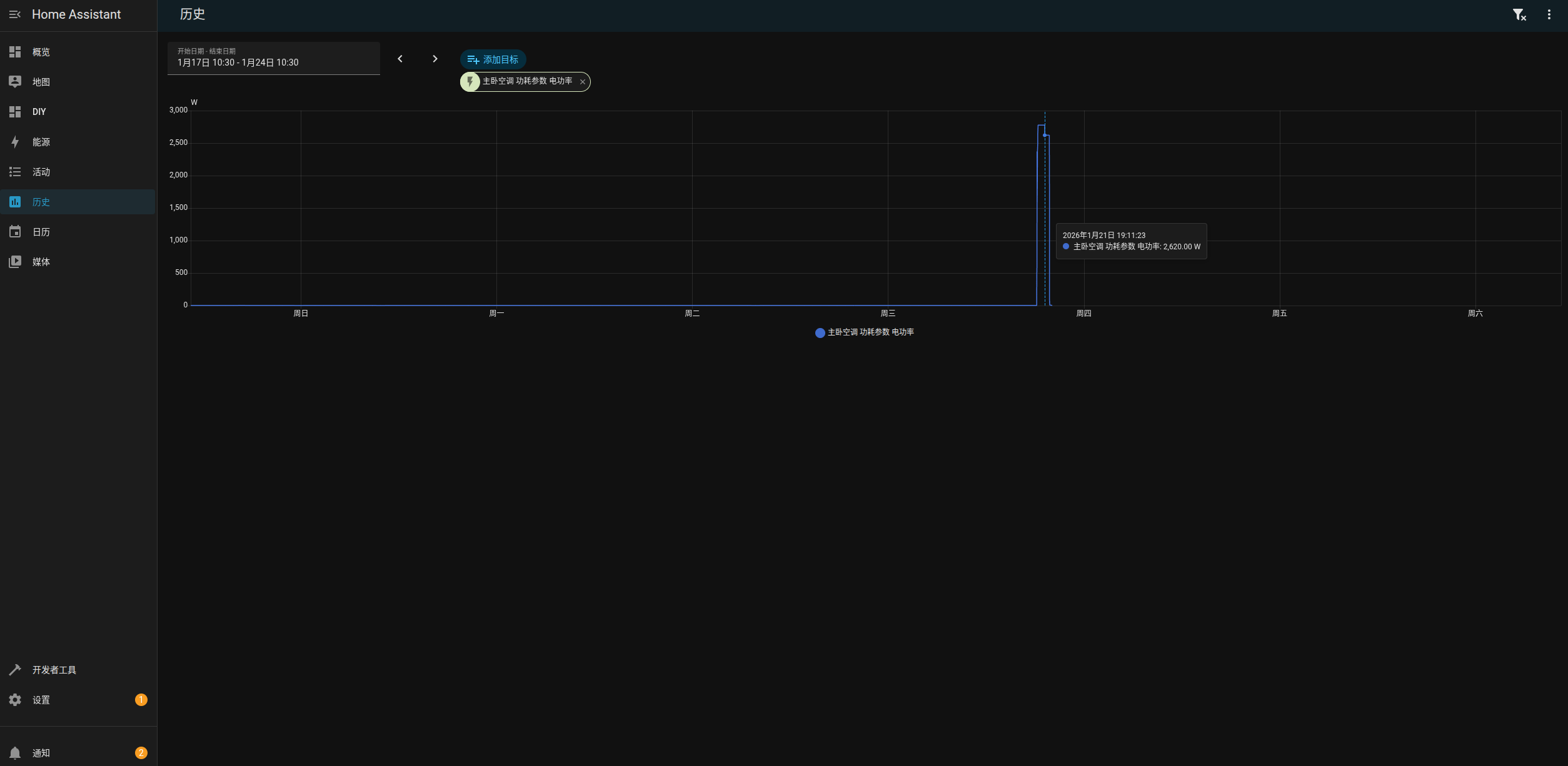
2. 接入InfluxDB时序数据库
https://www.home-assistant.io/integrations/influxdb/#full-configuration-for-2xx-installations
# https://www.home-assistant.io/integrations/influxdb/#full-configuration-for-2xx-installations
influxdb:
  api_version: 2
  ssl: false
  host: influxdb.example.top
  port: 80
  token: xxxxxx
  organization: homelab
  bucket: home-assistant
  tags:
    source: HA
  tags_attributes:
    - friendly_name
  default_measurement: units
可以设置永久储存,关系数据库可能存着存着就慢了(200G 500w条),而时序数据库专门为传感器生成的时序数据进行压缩和查询效率的优化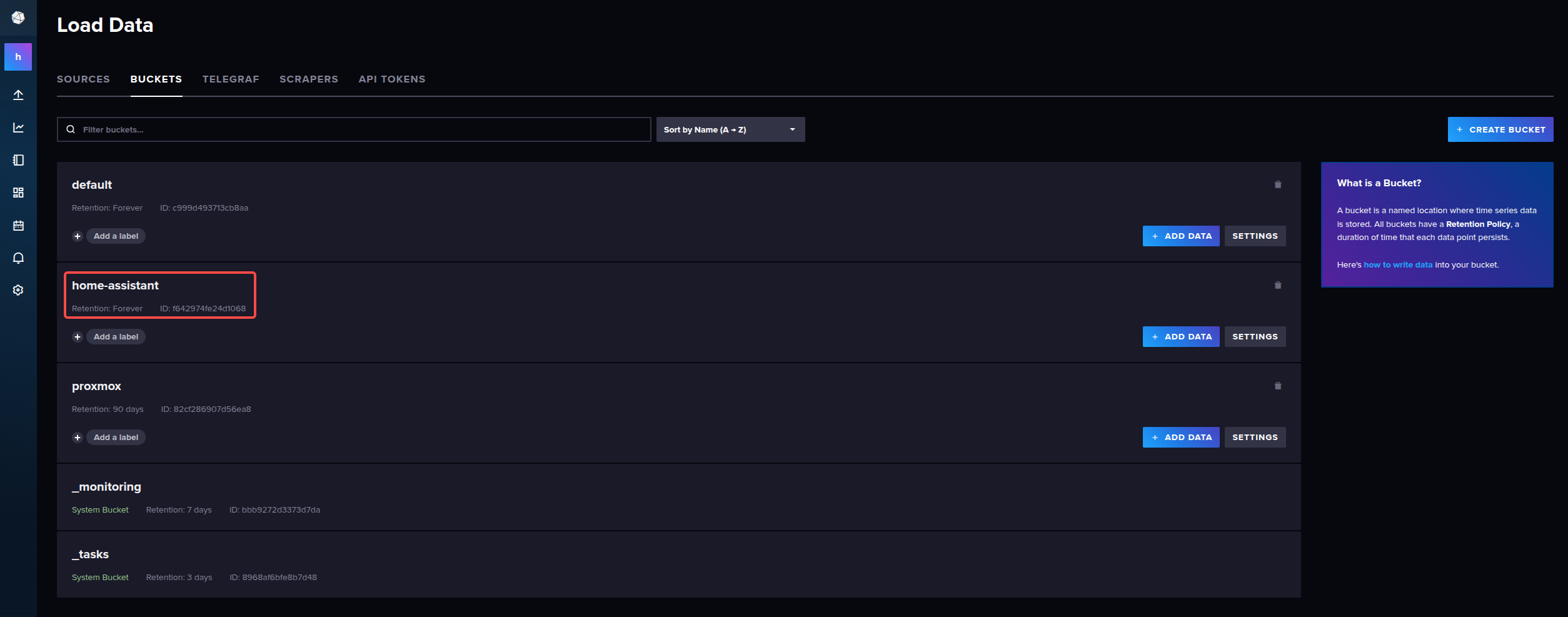
效果如下和HomeAssistant节目一致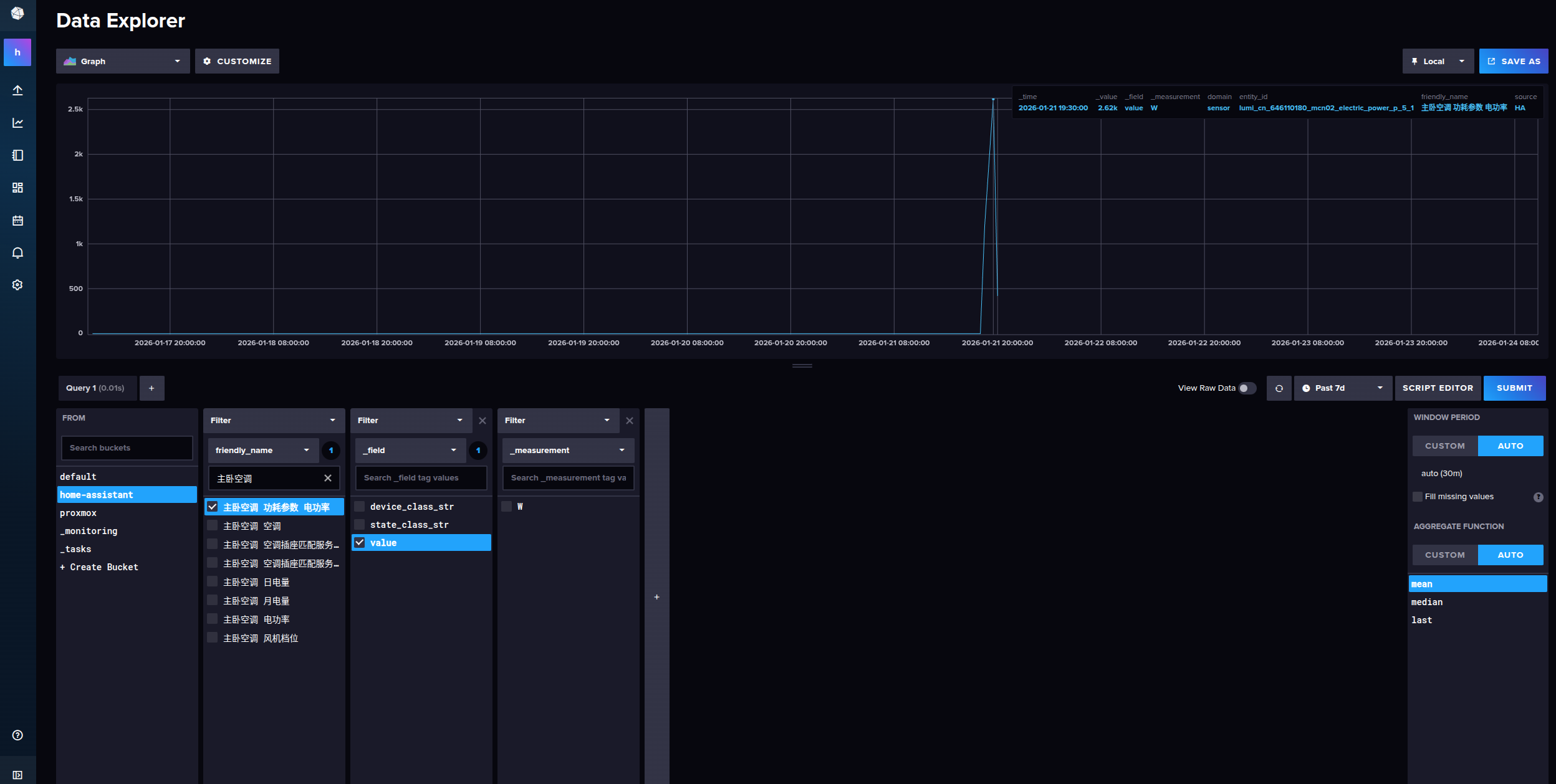
3. 接入Kafka消息队列
https://www.home-assistant.io/integrations/apache_kafka/
后续我们可以通过Flink将数据储存到Hive中
# https://www.home-assistant.io/integrations/apache_kafka/
apache_kafka:
  ip_address: kafka01.example.top
  port: 9094
  topic: HomeAssistant
我们可以通过Offset Explorer查看Kafka消息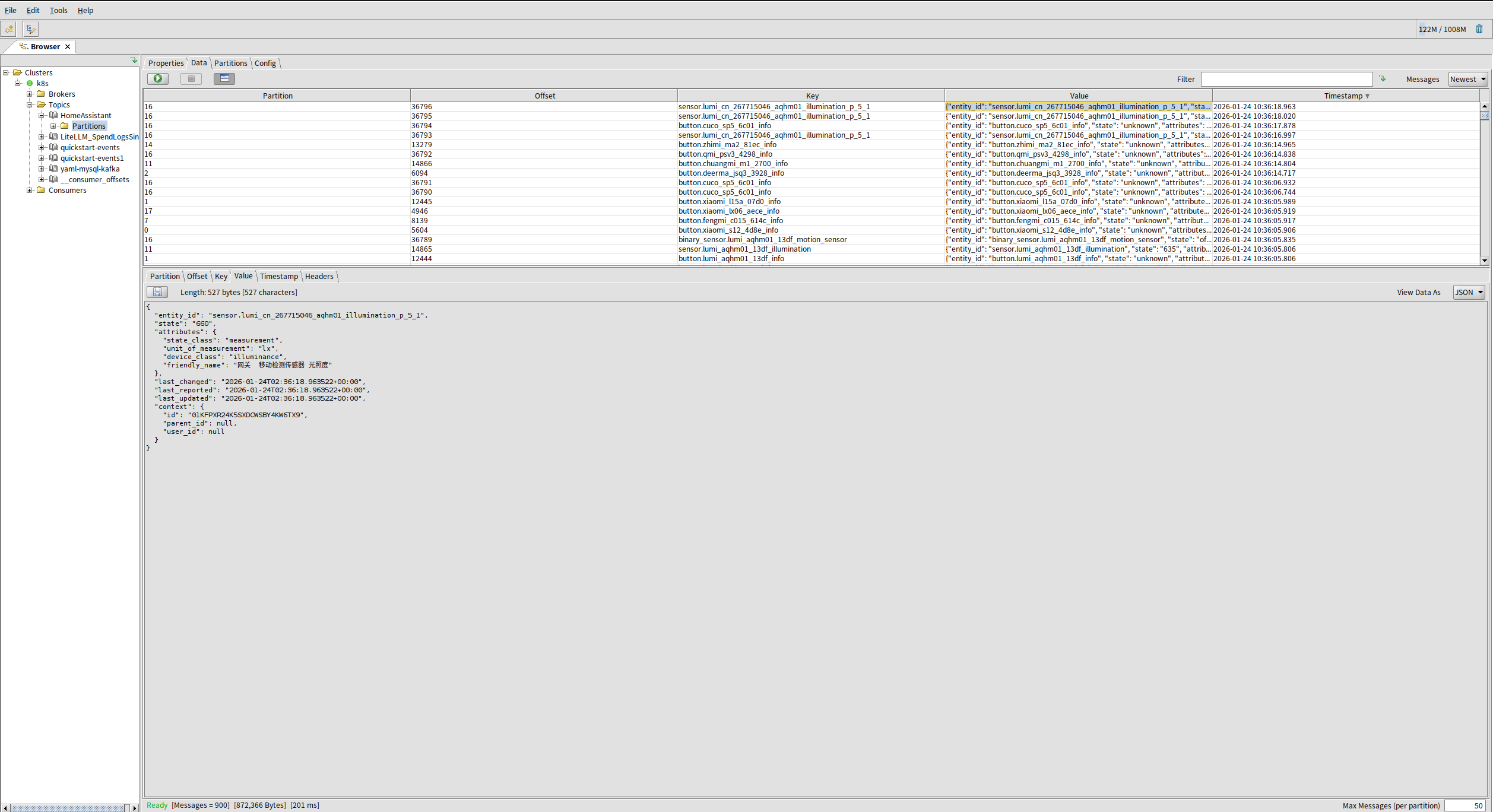
消息如下:
{
  "entity_id": "sensor.lumi_cn_267715046_aqhm01_illumination_p_5_1",
  "state": "660",
  "attributes": {
    "state_class": "measurement",
    "unit_of_measurement": "lx",
    "device_class": "illuminance",
    "friendly_name": "网关  移动检测传感器 光照度"
  },
  "last_changed": "2026-01-24T02:36:18.963522+00:00",
  "last_reported": "2026-01-24T02:36:18.963522+00:00",
  "last_updated": "2026-01-24T02:36:18.963522+00:00",
  "context": {
    "id": "01KFPXR24K5SXDCWSBY4KW6TX9",
    "parent_id": null,
    "user_id": null
  }
}
后期我们需要解析,先将字段说明放上
/**
 * 核心标识与状态:entity_id 是实体唯一 ID,state 是核心状态值,attributes 是补充属性;
 * 时间戳关键区别:
 * last_changed:仅 state 真正变化时更新;
 * last_updated:state/attributes 任意变化时更新;
 * last_reported:设备主动上报数据时更新;
 * 溯源信息:context 记录状态变化的来源和触发者,用于审计和调试。
 *
 * @see
 * @since 1.0.0
 */
@NoArgsConstructor
@AllArgsConstructor
@Data
public class HomeAssistantDTO {
    /**
     * 核心含义:实体的唯一标识符,是 Home Assistant 中最基础、最核心的字段。
     * 格式规则:采用 域.对象ID 的格式(例如 light.living_room、sensor.temperature_kitchen),其中:
     * 域(domain):代表实体类型(如 light 灯光、sensor 传感器、switch 开关);
     * 对象ID:该类型下的唯一名称,由用户或系统自定义。
     * 作用:通过这个 ID 可以精准定位、控制或查询某个具体设备 / 传感器的状态,是操作实体的 “身份证”。
     */
    private String entity_id;
    /**
     * 核心含义:实体的核心状态值,是最常用的字段,通常为简单的字符串 / 数值类型。
     * 示例:
     * 灯光实体:on / off;
     * 温度传感器:25.5;
     * 开关实体:unavailable(设备离线)。
     * 特点:仅存储核心状态,不包含附加信息,是实体最直观的状态体现。
     */
    private String state;
    /**
     * 核心含义:实体的附加属性集合,是一个 JSON 格式的字符串(你代码中定义为 String 类型,实际是结构化数据序列化后的结果),用于存储 state 之外的补充信息。
     * 示例:
     * 温度传感器的 attributes 可能包含:unit_of_measurement: "°C"(单位)、friendly_name: "厨房温度"(友好名称)、device_class: "temperature"(设备类型);
     * 灯光实体的 attributes 可能包含:brightness: 80(亮度)、color_temp: 350(色温)。
     * 作用:扩展 state 的信息维度,存储实体的细节参数,让状态描述更完整。
     */
    private String attributes;
    /**
     * 核心含义:实体的实际状态(state)发生变化的时间戳(字符串格式,通常为 ISO 8601 格式,如 2026-01-21T10:30:00+08:00)。
     * 关键区别:仅当 state 的值真正改变时才会更新(例如灯光从 off 变 on),如果只是 attributes 变化,该字段不变。
     */
    private String last_changed;
    /**
     * 核心含义:设备 / 传感器主动上报状态的时间戳。
     * 适用场景:主要用于有主动上报机制的设备(如物联网传感器定时上报数据),无论 state 是否变化,只要设备上报了数据,该字段就会更新。
     * 与 last_changed 区别:即使 state 没变化(比如温度一直是 25℃,但传感器仍上报),last_reported 也会更新,而 last_changed 不会。
     */
    private String last_reported;
    /**
     * 核心含义:实体的任意数据(state 或 attributes)发生变化的时间戳。
     * 关键特点:范围最广 —— 无论是 state 改变,还是 attributes 改变(如灯光亮度从 80 变 90,state 仍为 on),该字段都会更新。
     * 与 last_changed 关系:last_changed 是 last_updated 的子集(state 变化时,两者都会更新;仅 attributes 变化时,只有 last_updated 更新)。
     */
    private String last_updated;
    /**
     * context
     * 核心含义:实体状态变化的上下文信息,是一个 JSON 格式的字符串,记录状态变化的 “溯源信息”。
     * 包含内容:通常包含:
     * id:唯一标识本次状态变更的 UUID;
     * user_id:触发变更的用户 ID(如用户手动操作);
     * parent_id:关联的上游操作 ID(如自动化触发的变更);
     * origin:变更来源(如 local 本地操作、mqtt MQTT 消息触发)。
     * 作用:用于追溯状态变化的原因、来源,方便调试和审计(比如排查 “谁 / 什么操作改变了灯光状态”)。
     */
    private String context;
}

魔乐社区(Modelers.cn) 是一个中立、公益的人工智能社区,提供人工智能工具、模型、数据的托管、展示与应用协同服务,为人工智能开发及爱好者搭建开放的学习交流平台。社区通过理事会方式运作,由全产业链共同建设、共同运营、共同享有,推动国产AI生态繁荣发展。
更多推荐

 4
4 0
0- 0


 已为社区贡献7条内容

所有评论(0)