appium+python+夜神模拟器 实现QQ的模拟登录与自动发消息
实现的效果在网盘链接:https://pan.baidu.com/s/1tgLUJoXewOu0qQLp6ylu8A提取码:sfnf用到的工具:夜神模拟器appiumpycharmcmduiautomatorviewer需要注意的是:这是主页面这个的前提是appium,模拟器都必须打开命令adb start-serveradb devices夜神模拟器用这个工具精确定位,以下也是一切准备就绪就可以
·
实现的效果在网盘
链接:https://pan.baidu.com/s/1tgLUJoXewOu0qQLp6ylu8A
提取码:sfnf
用到的工具:
- 夜神模拟器
- appium
- pycharm
- cmd
- uiautomatorviewer
需要注意的是:
这是主页面
这个的前提是appium,模拟器都必须打开
命令
- adb start-server
- adb devices

夜神模拟器
用这个工具精确定位,以下也是
一切准备就绪就可以编写自己想实现的功能
代码演示:
import time
from appium import webdriver

# server 启动参数
desired_caps = {
    # 设备信息
    'platformName': 'Android',
    'deviceName': '127.0.0.1:62001',
    # app的信息
    'appPackage': 'com.tencent.mobileqq',
    'appActivity':'.activity.SplashActivity',
    # 不清空数据
    "noReset": True,
    # 隐藏键盘
    "unicodeKeyboard":True,
    "resetKeyboard":True,
}
# 声明driver对象
driver = webdriver.Remote("http://127.0.0.1:4723/wd/hub",desired_caps)
time.sleep(1)

def denglu():
    time.sleep(1)
    driver.find_element_by_id("com.tencent.mobileqq:id/btn_login").click()
    print("点击登录了")

    time.sleep(1)
    driver.find_element_by_class_name("android.widget.EditText").clear()
    driver.find_element_by_class_name("android.widget.EditText").send_keys("2624393959")
    print("输入账号")

    time.sleep(1)
    driver.find_element_by_id("com.tencent.mobileqq:id/password").clear()
    driver.find_element_by_id("com.tencent.mobileqq:id/password").send_keys("zhenhan26243959")
    print("输入密码")

    time.sleep(1)
    driver.find_element_by_id("com.tencent.mobileqq:id/login").click()
    print("正式登录")

def xiaoxi():
    # 定位并点击消息输入框
    time.sleep(1)
    driver.find_element_by_id("com.tencent.mobileqq:id/relativeItem").click()
    print("点消息")

    # 定位并点击书写输入框
    time.sleep(1)
    driver.find_element_by_class_name("android.widget.EditText").click()
    print("点输入框")

    # 书写输入框
    time.sleep(1)
    driver.find_element_by_class_name("android.widget.EditText").send_keys("😄哈哈,今天天气真不错,(●'◡'●)")
    driver.find_element_by_class_name("android.widget.Button").click()
    print("写入内容")
    time.sleep(5)
    # 关闭程序
    driver.quit()

if __name__ == '__main__':
    a = denglu()
    b = xiaoxi()
app的信息
‘appPackage’: ‘com.tencent.mobileqq’,
‘appActivity’:’.activity.SplashActivity’,
在cmd里输入命令:
1. Mac/Linux: 'adb shell dumpsys window windows | grep mFocusedApp’
2. 在 Windows 终端运行 'adb shell dumpsys window windows’ 然后去看mFocusedApp这一行的内容。
我是Windows的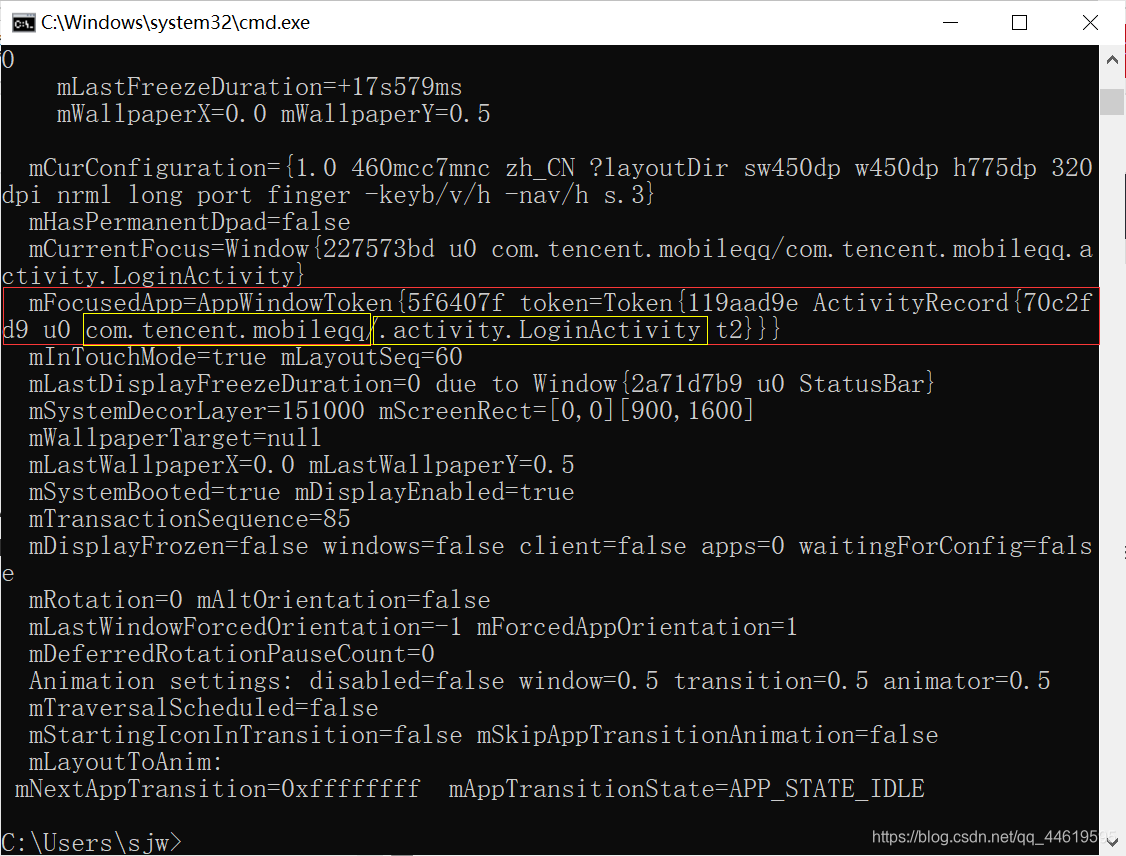
这就实现了~

魔乐社区(Modelers.cn) 是一个中立、公益的人工智能社区,提供人工智能工具、模型、数据的托管、展示与应用协同服务,为人工智能开发及爱好者搭建开放的学习交流平台。社区通过理事会方式运作,由全产业链共同建设、共同运营、共同享有,推动国产AI生态繁荣发展。
更多推荐
 0
0 0
0- 0


 已为社区贡献1条内容

所有评论(0)