mcp在spring ai与spring alibaba ai 中的应用
不管是spring ai还是spring alibaba ai对ai应用层的支持已经都比较全面,很容易就上手了,只是可惜目前国内大部分都还是jdk1.8而要支持spring ai得升级到jdk17暂时未发现有相应的兼容框架或哪些组织提供支持,所以在传统项目中去支持spring ai的调用还是比较困难而且基础架构都得配套升级,这块还是有一定挑战~不过随着spring ai崛起应该很快会全面普及应用开
上文:Spring AI 与 Spring Alibaba AI 构建智能应用
背景
随着AI全面化发展,spring对ai的支持也覆盖,以下为远程调用mcp服务以及自建mcp服务本地调用案例,仅供参考~
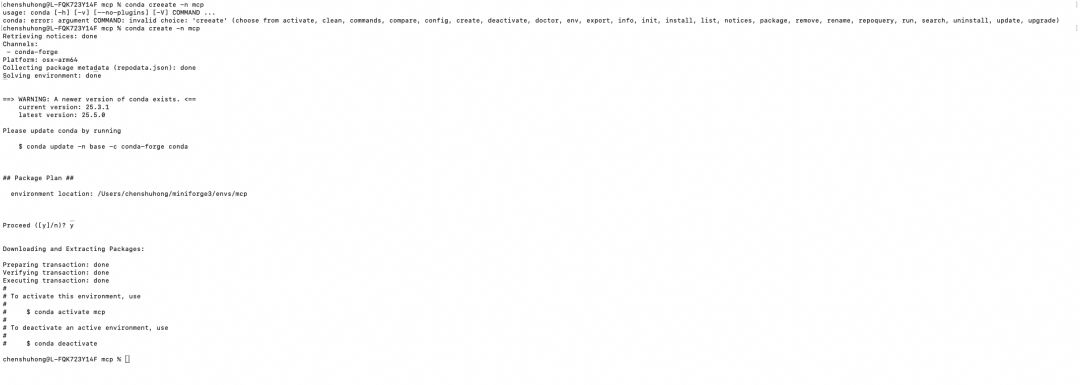
准备工作
|
名称 |
要求 |
备注 |
|
环境准备 |
创建docker环境 |
|
|
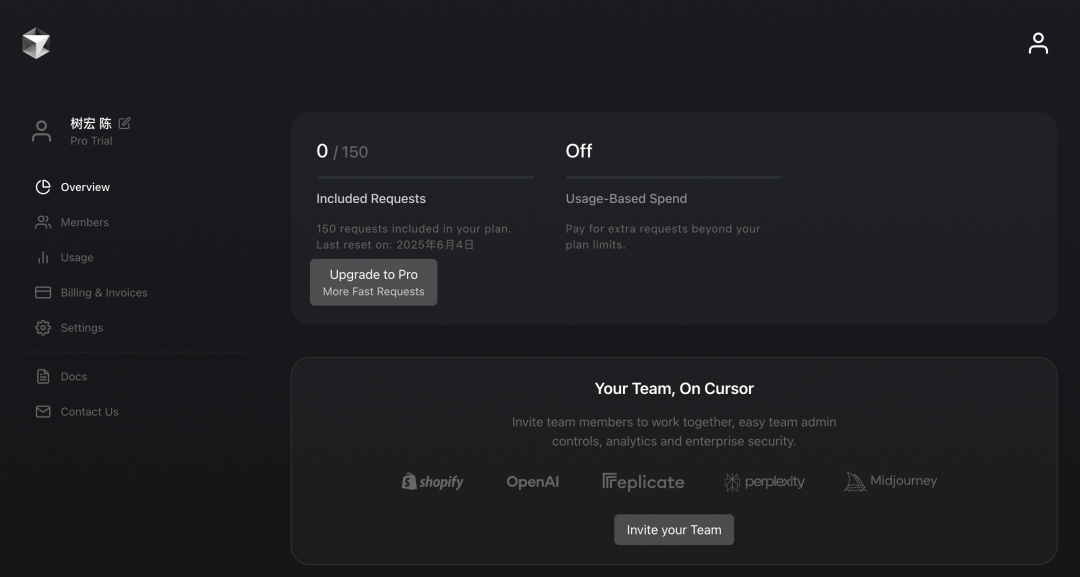
安装cursor |
https://www.cursor.com/cn |
|
|
概念了解 |
https://modelcontextprotocol.io/introduction#general-architecture?login=from_csdn |
先了解 |
|
mcp介绍 |
https://mcp.programnotes.cn/zh/docs/ai-mcp-awsome-server |
|
|
mcp服务平台 |
https://mcp.so/zh/servers |
查找服务 |
远程mcp调用(客户端)
说明:通过接入高德地图的实现mcp远程调用,通过大模型+mcp快速实现应用
准备工作
|
名称 |
要求 |
备注 |
|
基础知识 |
||
|
高德地图mcp及key申请 |
申请Key |
https://lbs.amap.com/api/mcp-server/gettingstarted |
|
jdk |
17 |
必须是17或更高 |
|
阿里云百炼AK |
申请AK |
用个人账号 |
|
配置好cursor |
https://lbs.amap.com/api/mcp-server/gettingstarted |
代码实现
pom.xml
<?xml version="1.0" encoding="UTF-8"?>
<project xmlns="http://maven.apache.org/POM/4.0.0"
         xmlns:xsi="http://www.w3.org/2001/XMLSchema-instance"
         xsi:schemaLocation="http://maven.apache.org/POM/4.0.0 http://maven.apache.org/xsd/maven-4.0.0.xsd">
    <modelVersion>4.0.0</modelVersion>
    <parent>
        <groupId>org.springframework.boot</groupId>
        <artifactId>spring-boot-starter-parent</artifactId>
        <version>3.4.5</version>
    </parent>

    <artifactId>spring-api-mcp-map-client</artifactId>

    <properties>
        <maven.compiler.source>17</maven.compiler.source>
        <maven.compiler.target>17</maven.compiler.target>
        <project.build.sourceEncoding>UTF-8</project.build.sourceEncoding>
        <spring-ai.version>1.0.0-M6</spring-ai.version>
    </properties>

    <dependencies>
        <!-- Spring Boot Web Starter -->
        <dependency>
            <groupId>org.springframework.boot</groupId>
            <artifactId>spring-boot-starter-web</artifactId>
        </dependency>

        <!-- Spring AI 依赖 -->
        <dependency>
            <groupId>org.springframework.ai</groupId>
            <artifactId>spring-ai-mcp</artifactId>
            <version>${spring-ai.version}</version>
        </dependency>
        <dependency>
            <groupId>org.springframework.ai</groupId>
            <artifactId>spring-ai-openai-spring-boot-starter</artifactId>
            <version>${spring-ai.version}</version>
        </dependency>

        <!-- Model Context Protocol SDK -->
        <dependency>
            <groupId>io.modelcontextprotocol.sdk</groupId>
            <artifactId>mcp-spring-webmvc</artifactId>
            <version>0.7.0</version>
        </dependency>
        <dependency>
            <groupId>io.modelcontextprotocol.sdk</groupId>
            <artifactId>mcp</artifactId>
            <version>0.9.0</version>
        </dependency>

        <!-- Lombok -->
        <dependency>
            <groupId>org.projectlombok</groupId>
            <artifactId>lombok</artifactId>
            <version>1.18.38</version>
            <scope>provided</scope>
        </dependency>
    </dependencies>

    <dependencyManagement>
        <dependencies>
            <dependency>
                <groupId>org.springframework.ai</groupId>
                <artifactId>spring-ai-bom</artifactId>
                <version>${spring-ai.version}</version>
                <type>pom</type>
                <scope>import</scope>
            </dependency>
        </dependencies>
    </dependencyManagement>

    <!-- 添加 Spring 里程碑仓库 -->
    <repositories>
        <repository>
            <id>spring-milestones</id>
            <name>Spring Milestones</name>
            <url>https://repo.spring.io/milestone</url>
            <snapshots>
                <enabled>false</enabled>
            </snapshots>
        </repository>
    </repositories>

    <pluginRepositories>
        <pluginRepository>
            <id>spring-milestones</id>
            <name>Spring Milestones</name>
            <url>https://repo.spring.io/milestone</url>
            <snapshots>
                <enabled>false</enabled>
            </snapshots>
        </pluginRepository>
    </pluginRepositories>
</project>
注意:api-key 要用自已的,可以根据上面的申请!
server:
port: 18080
spring:
application:
name: spring-ai-demo
#百炼平台
ai:
    openai:
      api-key: 你的百炼key
      chat:
        options:
          model: deepseek-r1
      base-url: https://dashscope.aliyuncs.com/compatible-mode/
    mcp:
      client:
        toolcallback:
          enabled: true
        version: true
        name: spring-ai-mcp-map-client
        type: async
        connection-timeout: 60s

# 调试日志_
logging:
level:
    io:
      modelcontextprotocol:
        client: DEBUG
        spec: DEBUG
        server: DEBUG
package com.springai.demo.config;
import com.fasterxml.jackson.databind.ObjectMapper;
import io.modelcontextprotocol.client.transport.HttpClientSseClientTransport;
import io.modelcontextprotocol.spec.McpClientTransport;
import org.springframework.ai.mcp.client.autoconfigure.NamedClientMcpTransport;
import org.springframework.context.annotation.Bean;
import org.springframework.context.annotation.Configuration;
import java.util.Collections;
import java.util.List;
@Configuration
publicclass McpConfig {
@Bean
public List<NamedClientMcpTransport> mcpClientTransport() {
McpClientTransport transport = HttpClientSseClientTransport
.builder("https://mcp.amap.com")
.sseEndpoint("/sse?key=你的key")
.objectMapper(new ObjectMapper())
.build();
return Collections.singletonList(new NamedClientMcpTransport("amap", transport));
}
}package com.springai.demo.controller;
import io.modelcontextprotocol.client.McpAsyncClient;
import io.modelcontextprotocol.spec.McpSchema;
import lombok.extern.slf4j.Slf4j;
import org.springframework.ai.chat.prompt.ChatOptions;
import org.springframework.ai.chat.prompt.Prompt;
import org.springframework.ai.mcp.AsyncMcpToolCallbackProvider;
import org.springframework.ai.model.tool.ToolCallingChatOptions;
import org.springframework.ai.openai.OpenAiChatModel;
import org.springframework.ai.tool.ToolCallback;
import org.springframework.beans.factory.annotation.Autowired;
import org.springframework.web.bind.annotation.GetMapping;
import org.springframework.web.bind.annotation.RequestMapping;
import org.springframework.web.bind.annotation.RequestParam;
import org.springframework.web.bind.annotation.RestController;
import reactor.core.publisher.Flux;
import reactor.core.publisher.Mono;
import java.util.List;
import java.util.Map;
/*** 获取 高德天气预报
**/
@RestController
@RequestMapping("/ai/chat")
@Slf4j
publicclass ChatController {
@Autowired
private OpenAiChatModel openAiChatModel;
@Autowired
private AsyncMcpToolCallbackProvider asyncMcpToolCallbackProvider;
@Autowired
List<McpAsyncClient> mcpAsyncClients;
@RequestMapping("/test")
public Mono<McpSchema.CallToolResult> test() {
var mcpClient = mcpAsyncClients.get(0);
return mcpClient.listTools()
.flatMap(tools -> {
log.info("tools: {}", tools);
return mcpClient.callTool(
new McpSchema.CallToolRequest(
"maps_weather",
Map.of("city", "深圳")
)
);
});
}
@GetMapping(value = "/getWeather", produces = "text/octet-stream;charset=UTF-8")
public Flux<String> getWeather(@RequestParam (value = "message", defaultValue = "深圳天气") String message) {
log.info("接收到请求,消息内容: {}", message);
ToolCallback[] toolCallbacks = asyncMcpToolCallbackProvider.getToolCallbacks();
log.info("获取到 {} 个 MCP 工具回调", toolCallbacks.length);
// 打印所有可用工具
for (ToolCallback tool : toolCallbacks) {
log.info("可用工具: {} - 描述: {}", tool.getName(), tool.getDescription());
}
ChatOptions chatOptions = ToolCallingChatOptions.builder()
.toolCallbacks(toolCallbacks)
.build();
Prompt prompt = new Prompt(message, chatOptions);
log.info("创建提示: {}", prompt);
// deepseek模型支持块式调用
// 流式响应
Flux<String> responseFlux = openAiChatModel.stream(prompt)
.map(response -> {
String text = (response.getResult() == null || response.getResult().getOutput() == null
|| response.getResult().getOutput().getText() == null)
? ""
: response.getResult().getOutput().getText();
log.info("收到响应片段: {}", text);
return text;
});
return responseFlux;
}
}测试地址:http://localhost:18080/ai/chat/getWeather?message=%E6%B7%B1%E5%9C%B3%E5%A4%A9%E6%B0%94
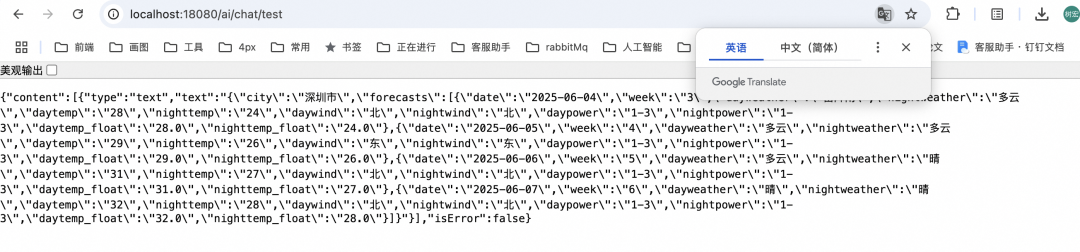
效果不错,不过还是取决于数据源的精准度。
本地MCP调用
说明:通过service提供mcp服务,clinet调用mcp服务(跟rpc没啥太大区别~)
服务端(service)
pom.xml
<?xml version="1.0" encoding="UTF-8"?>
<project xmlns="http://maven.apache.org/POM/4.0.0"
         xmlns:xsi="http://www.w3.org/2001/XMLSchema-instance"
         xsi:schemaLocation="http://maven.apache.org/POM/4.0.0 http://maven.apache.org/xsd/maven-4.0.0.xsd">
    <modelVersion>4.0.0</modelVersion>
    <parent>
        <groupId>org.springframework.boot</groupId>
        <artifactId>spring-boot-starter-parent</artifactId>
        <version>3.4.5</version>
    </parent>

    <artifactId>spring-ai-mcp-local-server</artifactId>

    <properties>
        <maven.compiler.source>17</maven.compiler.source>
        <maven.compiler.target>17</maven.compiler.target>
        <project.build.sourceEncoding>UTF-8</project.build.sourceEncoding>
    </properties>

    <dependencyManagement>
        <dependencies>
        <dependency>
            <groupId>org.springframework.ai</groupId>
            <artifactId>spring-ai-bom</artifactId>
            <version>1.0.0-M7</version>
            <type>pom</type>
            <scope>import</scope>
        </dependency>
    </dependencies>
</dependencyManagement>

    <dependencies>
        <dependency>
            <groupId>org.springframework.ai</groupId>
            <artifactId>spring-ai-starter-mcp-server-webmvc</artifactId>
        </dependency>
    </dependencies>

    <repositories>
        <repository>
            <name>Central Portal Snapshots</name>
            <id>central-portal-snapshots</id>
            <url>https://central.sonatype.com/repository/maven-snapshots/</url>
            <releases>
                <enabled>false</enabled>
            </releases>
            <snapshots>
                <enabled>true</enabled>
            </snapshots>
        </repository>
        <repository>
            <id>spring-milestones</id>
            <name>Spring Milestones</name>
            <url>https://repo.spring.io/milestone</url>
            <snapshots>
                <enabled>false</enabled>
            </snapshots>
        </repository>
        <repository>
            <id>spring-snapshots</id>
            <name>Spring Snapshots</name>
            <url>https://repo.spring.io/snapshot</url>
            <releases>
                <enabled>false</enabled>
            </releases>
        </repository>
    </repositories>

    <build>
        <finalName>${project.artifactId}</finalName>
        <plugins>
            <plugin>
                <groupId>org.springframework.boot</groupId>
                <artifactId>spring-boot-maven-plugin</artifactId>
            </plugin>
        </plugins>
    </build>

</project>
application.yml
server:
port: 18080
spring:
application:
name: spring-ai-mcp-local-server
ai:
    mcp:
      connect-timeout: 60000
      response-timeout: 60000
      server:
        name: spring-ai-mcp-local-server
        connection-timeout: 60s
        type: sync
        sse-message-endpoint: /mcp/gzh

# 调试日志_
logging:
level:
    io:
      modelcontextprotocol:
        client: DEBUG
        spec: DEBUG
        server: DEBUG
package com.springai.demo.config;
importcom.springai.demo.service.MyTools;
importorg.springframework.ai.tool.ToolCallbackProvider;
importorg.springframework.ai.tool.method.MethodToolCallbackProvider;
importorg.springframework.context.annotation.Bean;
importorg.springframework.context.annotation.Configuration;
/**
* @version v1.0
* @ClassName ToolCallConfig
* @Description: 工具类配置
*/
@Configuration
public class ToolCallConfig {
@Bean
public ToolCallbackProvider gzhRecommendTools(MyTools myTools) {
returnMethodToolCallbackProvider.builder().toolObjects(myTools).build();
}
}package com.springai.demo.service;
importorg.springframework.ai.tool.annotation.Tool;
importorg.springframework.context.i18n.LocaleContextHolder;
importorg.springframework.stereotype.Service;
importjava.time.LocalDateTime;
@Service("myTools")
public class MyTools {
@Tool(name = "我的工具", description = "使用我的工具")
public String myTool() {
return "返回: 暂无~";
}
@Tool(description = "获取当前用户日期和时间")
public String getCurrentDateTime() {
returnLocalDateTime.now().atZone(LocaleContextHolder.getTimeZone().toZoneId()).toString();
}
}package com.springai.demo;
import org.springframework.boot.SpringApplication;
import org.springframework.boot.autoconfigure.SpringBootApplication;
@SpringBootApplication
public class McpLocalServiceApplication {
public static void main(String[] args) {
SpringApplication.run(McpLocalServiceApplication.class, args);
}
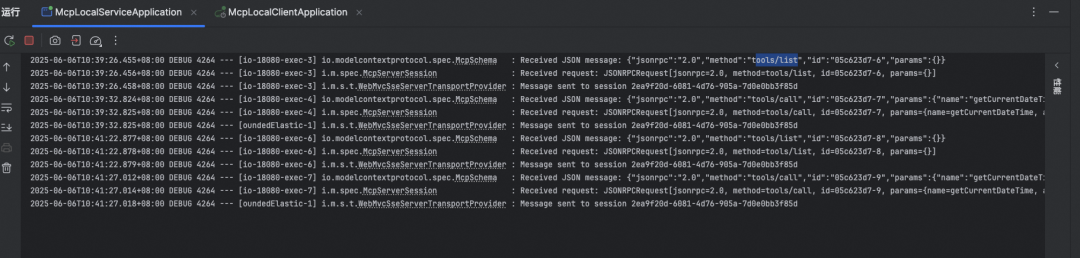
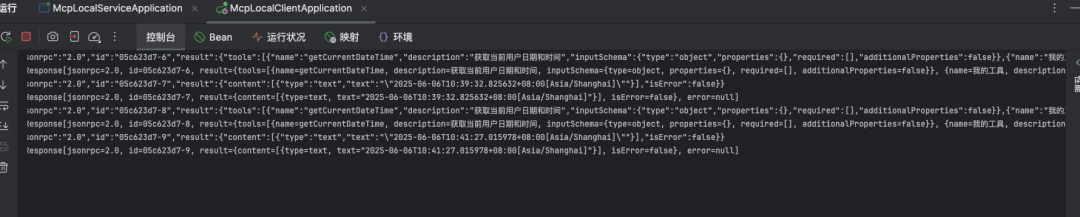
}启动服务可以看到注册的服务信息~
客户端(clinet)
pom.xml
<?xml version="1.0" encoding="UTF-8"?>
<project xmlns="http://maven.apache.org/POM/4.0.0"
         xmlns:xsi="http://www.w3.org/2001/XMLSchema-instance"
         xsi:schemaLocation="http://maven.apache.org/POM/4.0.0 http://maven.apache.org/xsd/maven-4.0.0.xsd">
    <modelVersion>4.0.0</modelVersion>
    <parent>
        <groupId>org.springframework.boot</groupId>
        <artifactId>spring-boot-starter-parent</artifactId>
        <version>3.4.5</version>
    </parent>

    <artifactId>spring-ai-mcp-local-client</artifactId>
    <properties>
        <maven.compiler.source>17</maven.compiler.source>
        <maven.compiler.target>17</maven.compiler.target>
        <project.build.sourceEncoding>UTF-8</project.build.sourceEncoding>
    </properties>
    <dependencies>
        <dependency>
            <groupId>org.springframework.boot</groupId>
            <artifactId>spring-boot-starter-test</artifactId>
            <scope>test</scope>
        </dependency>

        <dependency>
            <groupId>org.springframework.boot</groupId>
            <artifactId>spring-boot-starter-web</artifactId>
        </dependency>
        <dependency>
            <groupId>org.springframework.ai</groupId>
            <artifactId>spring-ai-starter-mcp-client</artifactId>
        </dependency>
<!-- <dependency>-->
<!-- <groupId>org.springframework.ai</groupId>-->
<!-- <artifactId>spring-ai-ollama-spring-boot-starter</artifactId>-->
<!-- </dependency>-->
        <!-- 使用的大模型依赖 -->
        <dependency>
            <groupId>org.springframework.ai</groupId>
            <artifactId>spring-ai-starter-model-ollama</artifactId>
            <version>1.0.0-M7</version>
        </dependency>
    </dependencies>

    <dependencyManagement>
        <dependencies>
            <dependency>
                <groupId>org.springframework.ai</groupId>
                <artifactId>spring-ai-bom</artifactId>
                <version>1.0.0-M7</version>
                <type>pom</type>
                <scope>import</scope>
            </dependency>
        </dependencies>

</dependencyManagement>

    <repositories>
        <repository>
            <name>Central Portal Snapshots</name>
            <id>central-portal-snapshots</id>
            <url>https://central.sonatype.com/repository/maven-snapshots/</url>
            <releases>
                <enabled>false</enabled>
            </releases>
            <snapshots>
                <enabled>true</enabled>
            </snapshots>
        </repository>
        <repository>
            <id>spring-milestones</id>
            <name>Spring Milestones</name>
            <url>https://repo.spring.io/milestone</url>
            <snapshots>
                <enabled>false</enabled>
            </snapshots>
        </repository>
        <repository>
            <id>spring-snapshots</id>
            <name>Spring Snapshots</name>
            <url>https://repo.spring.io/snapshot</url>
            <releases>
                <enabled>false</enabled>
            </releases>
        </repository>
    </repositories>

    <build>
        <finalName>${project.artifactId}</finalName>
        <plugins>
            <plugin>
                <groupId>org.springframework.boot</groupId>
                <artifactId>spring-boot-maven-plugin</artifactId>
            </plugin>
        </plugins>
    </build>

</project>
package com.springai.demo.controller;
import org.springframework.ai.chat.client.ChatClient;
import org.springframework.ai.ollama.OllamaChatModel;
import org.springframework.ai.tool.ToolCallbackProvider;
import org.springframework.beans.factory.annotation.Autowired;
import org.springframework.web.bind.annotation.GetMapping;
import org.springframework.web.bind.annotation.RequestParam;
import org.springframework.web.bind.annotation.RestController;
/**
* @ClassName ToolController
* @Description: 入口
*/
@RestController
publicclass ToolController {
@Autowired
private OllamaChatModel openAiChatModel;
@Autowired
private ToolCallbackProvider toolCallbackProvider;
@GetMapping("/ai/generate")
public String generate(@RequestParam(value = "message", defaultValue = "当前时间") String message) {
ChatClient chatClient = ChatClient.builder(openAiChatModel)
.defaultTools(toolCallbackProvider.getToolCallbacks())
.build();
ChatClient.CallResponseSpec call = chatClient.prompt(message).call();
return call.content();
}
}package com.springai.demo;
import org.springframework.boot.SpringApplication;
import org.springframework.boot.autoconfigure.SpringBootApplication;
@SpringBootApplication
public class McpLocalClientApplication {
public static void main(String[] args) {
SpringApplication.run(McpLocalClientApplication.class, args);
}
}注意:不要使用deepseek,不支持工具类,暂不清楚工具类原因或模型原因;
server:
port: 18081
spring:
application:
name: spring-ai-mcp-local-client
ai:
    ollama:
      client:
        connect-timeout: 30s
        read-timeout: 60s
#这里可以改为百炼自已去试吧
      base-url: http://127.0.0.1:11434/
      chat:
        options:
#注意deepseek不支持工具类(大坑)
          #model: deepseek-r1:7b
          model: qwen3:8b
    mcp:
      connect-timeout: 60000
      response-timeout: 60000
      client:
        connection-timeout: 60s
        name: spring-ai-mcp-local-client
# type: sync
        toolcallback:
          enabled: true
#你的本地mcp服务(是不是跟rpc很像)
        sse:
          connections:
            server1:
              url: http://localhost:18080


# 调试日志_
logging:
level:
    io:
      modelcontextprotocol:
        client: DEBUG
        spec: DEBUG
        server: DEBUG
启动服务~
方问后缀为:/ai/generate?message=现在几点?
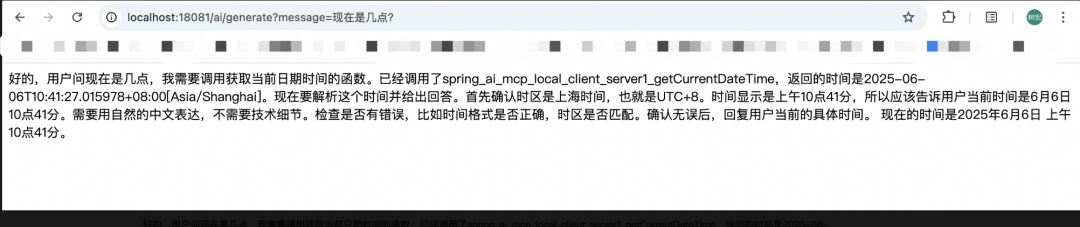
这里说下,这里调到接口后,会结合我们的工具及大远程(本地)将我们的工具给到大模型去调用,然后大模型根据意图及相关配置进行rag调用,最终总结输出。所以现在来看来,在spring则做应用层来集成非常easy~
最后
不管是spring ai还是spring alibaba ai对ai应用层的支持已经都比较全面,很容易就上手了,只是可惜目前国内大部分都还是jdk1.8而要支持spring ai得升级到jdk17暂时未发现有相应的兼容框架或哪些组织提供支持,所以在传统项目中去支持spring ai的调用还是比较困难而且基础架构都得配套升级,这块还是有一定挑战~不过随着spring ai崛起应该很快会全面普及应用开发

魔乐社区(Modelers.cn) 是一个中立、公益的人工智能社区,提供人工智能工具、模型、数据的托管、展示与应用协同服务,为人工智能开发及爱好者搭建开放的学习交流平台。社区通过理事会方式运作,由全产业链共同建设、共同运营、共同享有,推动国产AI生态繁荣发展。
更多推荐

 29
29 0
0- 0


 已为社区贡献8条内容

所有评论(0)