【c++中间件】cpp-httplib 介绍 && 使用
cpp-httplib是一个轻量级的C++ HTTP客户端/服务器库,具有跨平台、支持HTTP/1.1、SSL/TLS等特点。只需包含单个头文件即可使用,安装简单。该库通过哈希表存储URL路径与回调函数的映射关系,当收到请求时会调用对应的处理函数。文章提供了核心类接口说明(Request、Response、Server、Client)和一个简单示例,展示了如何创建服务器、注册GET请求处理函数并启

Ⅰ. cpp-httplib 介绍与安装
C++ HTTP 库(cpp-httplib)是一个轻量级的 C++ HTTP 客户端/服务器库,它提供了简单的 API 来创建 HTTP 服务器和客户端,支持同步和异步操作。
以下是一些关于 cpp-httplib 的主要特点:
-
轻量级:
cpp-httplib的设计目标是简单和轻量,只需要一个头文件包含即可,不依赖于任何外部库。 -
跨平台:它支持多种操作系统,包括
Windows、Linux和macOS。 -
同步和异步操作:库提供了同步和异步两种操作方式,允许开发者根据需要选择。
-
支持 HTTP/1.1:它实现了
HTTP/1.1协议,包括持久连接和管道化。 -
Multipart form-data:支持发送和接收
multipart/form-data类型的请求,这对于文件上传非常有用。 -
SSL/TLS 支持:通过使用
OpenSSL或mbedTLS库,cpp-httplib支持HTTPS和WSS。 -
简单易用:
API设计简洁,易于学习和使用。 -
性能:尽管是轻量级库,但性能表现良好,适合多种应用场景。
-
社区活跃:
cpp-httplib有一个活跃的社区,不断有新的功能和改进被加入。
安装非常简单,只需要以下命令:
git clone https://github.com/yhirose/cpp-httplib.git
Ⅱ. cpp-httplib 使用
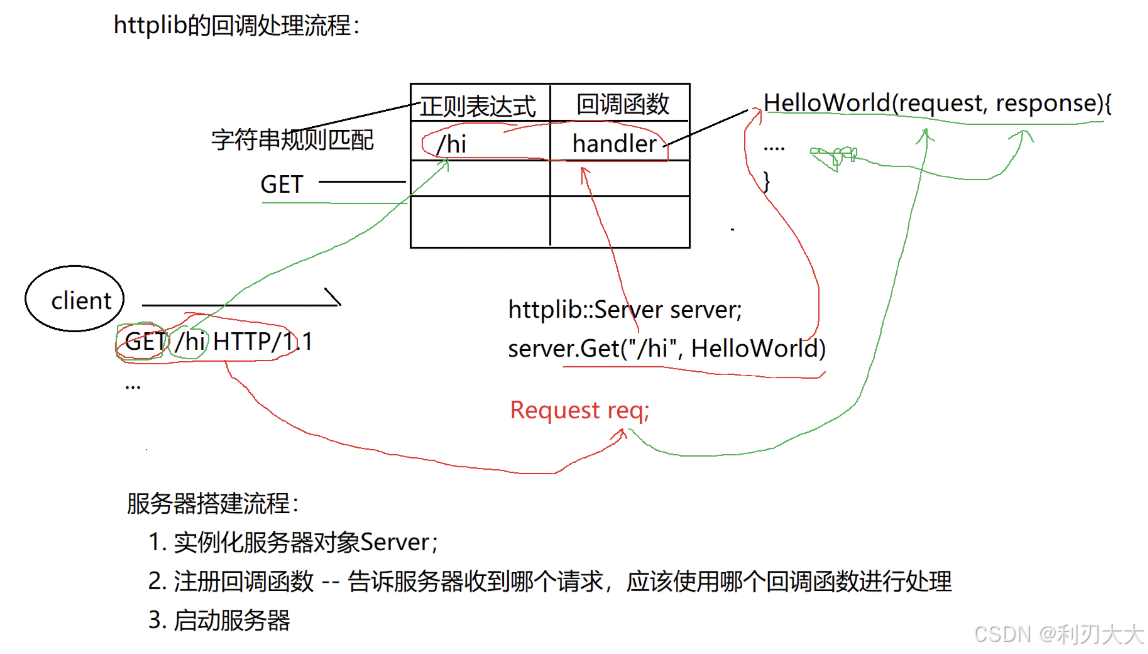
下图是 cpp-httplib 的回调处理流程,核心是用一个哈希表来记录不同规则对于的 <正则表达式,回调函数> 的关系!
比如下图我们在 GET 规则中添加了 /hi 和其对应回调函数 HelloWorld,当我们去访问 http://ip地址:端口/hi 的时候,服务器就会执行该回调函数 HelloWorld 将对应的响应填充然后进行返回!
下面介绍以下这个 http 库中的类和接口:
namespace httplib {
    // 请求数据结构,封装HTTP请求信息
    struct Request {
        std::string method;   // 请求方法 (如 GET, POST, PUT, DELETE)
        std::string path;     // 请求的路径
        Headers headers;      // 请求头
        std::string body;     // 请求体内容
        Params params;        // 请求参数
    };

    // 响应数据结构,封装HTTP响应信息
    struct Response {
        std::string version;  // HTTP版本 (如 "HTTP/1.1")
        int status = -1;      // HTTP响应状态码 (如 200, 404, 500)
        std::string reason;   // 响应状态说明 (如 "OK", "Not Found")
        Headers headers;      // 响应头
        std::string body;     // 响应体内容

        // 设置响应体内容以及内容类型
        void set_content(const std::string &s, const std::string &content_type);

        // 设置响应头
        void set_header(const std::string &key, const std::string &val);
    };

    // 服务器类,处理客户端请求
    class Server {
    public:
        // 请求处理器类型,接收请求并返回响应
        using Handler = std::function<void(const Request &, Response &)>;

        // 注册 GET 请求处理函数
        Server &Get(const std::string &pattern, Handler handler);

        // 注册 POST 请求处理函数
        Server &Post(const std::string &pattern, Handler handler);

        // 注册 PUT 请求处理函数
        Server &Put(const std::string &pattern, Handler handler);

        // 注册 DELETE 请求处理函数
        Server &Delete(const std::string &pattern, Handler handler);

        // 启动服务器并监听指定的主机和端口
        bool listen(const std::string &host, int port);
    };

    // 客户端类,发起HTTP请求
    class Client {
    public:
        // 构造函数,指定主机和端口
        explicit Client(const std::string &host, int port);

        // 发起 GET 请求
        Result Get(const std::string &path, const Headers &headers);

        // 发起 POST 请求
        Result Post(const std::string &path, const std::string &body, const std::string &content_type);

        // 发起 PUT 请求
        Result Put(const std::string &path, const std::string &body, const std::string &content_type);

        // 发起 DELETE 请求
        Result Delete(const std::string &path, const std::string &body, const std::string &content_type);
    };
}
测试样例
按照上面图片中提到的服务器搭建流程,我们写一个测试样例:
#include "../header/httplib.h"

int main()
{
    // 1. 实例化服务器对象
    httplib::Server server;

    // 2. 注册回调函数   void(const httplib::Request &, httplib::Response &)
    server.Get("/hi", [](const httplib::Request &req, httplib::Response &rsp){
        std::cout << req.method << std::endl;
        std::cout << req.path << std::endl;
        for (auto it : req.headers) {
            std::cout << it.first << ": " << it.second << std::endl;
        }
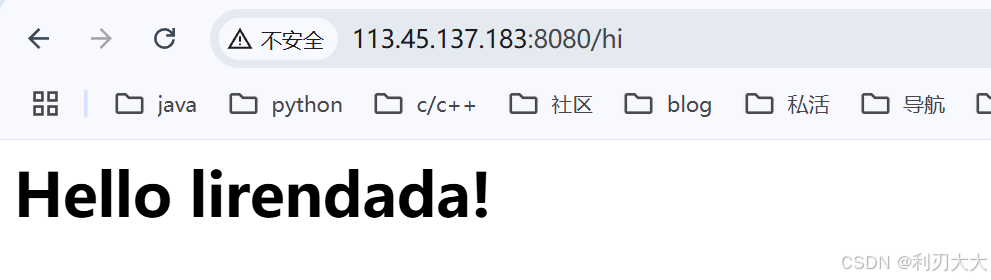
        std::string body = "<html><body><h1>Hello lirendada!</h1></body></html>";
        rsp.set_content(body, "text/html");
        rsp.status = 200;
    });

    // 3. 启动服务器
    server.listen("0.0.0.0", 8080);
    return 0;
}
makefile 文件:
main : main.cc
	g++ -std=c++17 $^ -o $@ -lpthread

魔乐社区(Modelers.cn) 是一个中立、公益的人工智能社区,提供人工智能工具、模型、数据的托管、展示与应用协同服务,为人工智能开发及爱好者搭建开放的学习交流平台。社区通过理事会方式运作,由全产业链共同建设、共同运营、共同享有,推动国产AI生态繁荣发展。
更多推荐

 4
4 0
0- 0


 已为社区贡献4条内容

所有评论(0)