mac xrdp远程 linux,远程连接linux桌面之xrdp
官方的解释:Based on the work ofFreeRDPandrdesktop, xrdp uses the remote desktop protocol to present a GUI to the user.The goal of this project is to provide a fully functional Linux terminal server, capabl
官方的解释:
Based on the work ofFreeRDPandrdesktop, xrdp uses the remote desktop protocol to present a GUI to the user.
The goal of this project is to provide a fully functional Linux terminal server, capable of accepting connections from rdesktop, freerdp, and Microsoft‘s own terminal server / remote desktop clients.
Unlike Windows NT/2000/2003/2008/2012 server, xrdp will not display a Windows desktop but an X window desktop to the user.
Xrdp uses Xvnc or X11rdp to manage the X session. To learn about how xrdp currently works, clickhereandhere.
优点:不用装客户端工具,windows自带的就可以,较vnc安全性高!
1.安装linux 桌面环境,如果本身已经是图形界面,跳过这步即可!
确认以下组件被安装:
yum gruopinstall "Desktop" "Desktop Platform" " X window system"
安装完成,启动桌面系统。
init 5
确认图形界面已经启动:
runlevel
2.安装xrdp
用yum安装
yum install -y xrdp tigervnc-server
启动xrdp
/etc/init.d/xrdp start
确认xrdp跟vncserver都已经启动:
netstat -tlnp


防火墙中放开3389端口的访问!
3.从windows客户端连接linux服务器IP
开始菜单-->运行--> mstsc
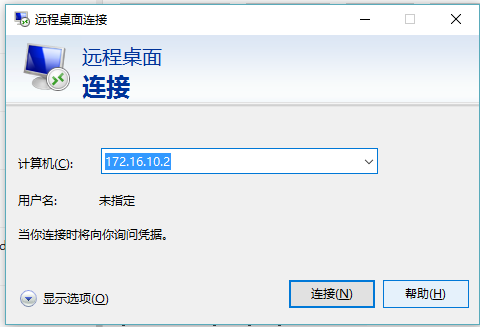
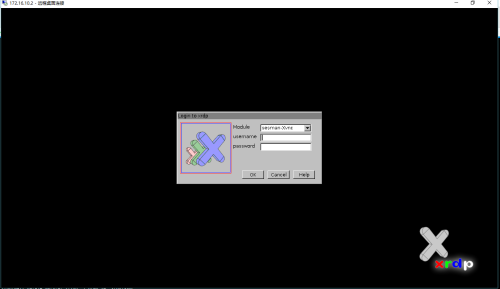
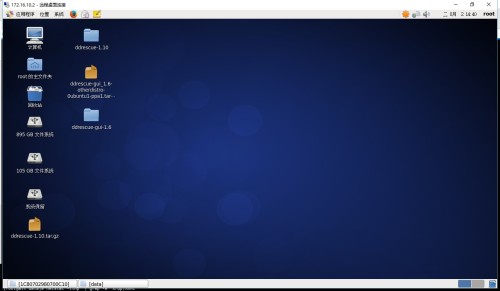
输入用户名密码,回车,登陆成功!!!

魔乐社区(Modelers.cn) 是一个中立、公益的人工智能社区,提供人工智能工具、模型、数据的托管、展示与应用协同服务,为人工智能开发及爱好者搭建开放的学习交流平台。社区通过理事会方式运作,由全产业链共同建设、共同运营、共同享有,推动国产AI生态繁荣发展。
更多推荐


 0
0 0
0- 0


 已为社区贡献3条内容

所有评论(0)