springboot解决CORS跨域的三种方式
一、实现WebMvcConfigurer接口二、实现filter过滤器方式SpringBoot 2.6及以上版本SpringBoot 2.6以下版本二、实现filter过滤器方式三、注解@CrossOrigin@CrossOrigin可配置在方法上,也可配置在类上。创建两个普通的SpringBoot项目A、B,A配置8081端口,B配置8082端口。在A的resources/static目录下创建
目录
一、实现WebMvcConfigurer接口
二、实现filter过滤器方式
SpringBoot 2.6及以上版本
SpringBoot 2.6以下版本
一、实现WebMvcConfigurer接口
<pre class="prettyprint hljs java" style="padding: 0.5em; font-family: Menlo, Monaco, Consolas, "Courier New", monospace; color: rgb(68, 68, 68); border-radius: 4px; display: block; margin: 0px 0px 1.5em; font-size: 14px; line-height: 1.5em; word-break: break-all; overflow-wrap: break-word; white-space: pre; background-color: rgb(246, 246, 246); border: none; overflow-x: auto; font-style: normal; font-variant-ligatures: normal; font-variant-caps: normal; font-weight: 400; letter-spacing: normal; orphans: 2; text-align: start; text-indent: 0px; text-transform: none; widows: 2; word-spacing: 0px; -webkit-text-stroke-width: 0px; text-decoration-thickness: initial; text-decoration-style: initial; text-decoration-color: initial;">@Configuration
public class WebConfig implements WebMvcConfigurer {
/**
* 添加跨域支持
*/
@Override
public void addCorsMappings(CorsRegistry registry) {
// 允许跨域访问的路径 '/**'表示应用的所有方法
registry.addMapping("/**")
// 允许跨域访问的来源 '*'表示所有域名来源
.allowedOriginPatterns("*")
// .allowedOrigins("*") // 允许跨域访问的来源 SpringBoot2.4.0之前的版本
// 允许跨域请求的方法 '*'表示所有
.allowedMethods("GET", "HEAD", "POST", "PUT", "DELETE", "OPTIONS")
// 是否允许发送cookie true-允许 false-不允许 默认false。对服务器有特殊要求的请求,比如请求方法是PUT或DELETE,或者Content-Type字段的类型是application/json,这个值只能设为true
.allowCredentials(true)
// 预检间隔时间1小时,单位为秒。指定本次预检请求的有效期,在有效期间,不用发出另一条预检请求。
// 浏览器发出CORS简单请求,只需要在头信息之中增加一个Origin字段
// 浏览器发出CORS非简单请求,会在正式通信之前,增加一次OPTIONS查询请求,称为"预检"请求(preflight)。浏览器先询问服务器,当前网页所在的域名是否在服务器的许可名单之中,以及可以使用哪些HTTP动词和头信息字段。只有得到肯定答复,浏览器才会发出正式的XMLHttpRequest请求,否则就报错。
.maxAge(3600)
// 允许跨域请求可携带的header,'*'表所有header头。CORS请求时,XMLHttpRequest对象的getResponseHeader()方法只能拿到6个基本字段:Cache-Control、Content-Language、Content-Type、Expires、Last-Modified、Pragma。如果想拿到其他字段,就必须在Access-Control-Expose-Headers里面指定
.allowedHeaders("*");
}
}</pre>
二、实现filter过滤器方式
<pre class="prettyprint hljs java" style="padding: 0.5em; font-family: Menlo, Monaco, Consolas, "Courier New", monospace; color: rgb(68, 68, 68); border-radius: 4px; display: block; margin: 0px 0px 1.5em; font-size: 14px; line-height: 1.5em; word-break: break-all; overflow-wrap: break-word; white-space: pre; background-color: rgb(246, 246, 246); border: none; overflow-x: auto; font-style: normal; font-variant-ligatures: normal; font-variant-caps: normal; font-weight: 400; letter-spacing: normal; orphans: 2; text-align: start; text-indent: 0px; text-transform: none; widows: 2; word-spacing: 0px; -webkit-text-stroke-width: 0px; text-decoration-thickness: initial; text-decoration-style: initial; text-decoration-color: initial;">@WebFilter
@Configuration
public class CorsFilter implements Filter {
@Override
public void doFilter(ServletRequest req, ServletResponse res, FilterChain chain) throws IOException, ServletException {
HttpServletResponse response = (HttpServletResponse) res;
response.setHeader("Access-Control-Allow-Origin", "*");
response.setHeader("Access-Control-Allow-Credentials", "true");
response.setHeader("Access-Control-Allow-Methods", "POST, GET, PATCH, DELETE, PUT");
response.setHeader("Access-Control-Max-Age", "3600");
response.setHeader("Access-Control-Allow-Headers", "Origin, X-Requested-With, Content-Type, Accept");
chain.doFilter(req, res);
}
}</pre>
三、注解@CrossOrigin
<pre class="prettyprint hljs kotlin" style="padding: 0.5em; font-family: Menlo, Monaco, Consolas, "Courier New", monospace; color: rgb(68, 68, 68); border-radius: 4px; display: block; margin: 0px 0px 1.5em; font-size: 14px; line-height: 1.5em; word-break: break-all; overflow-wrap: break-word; white-space: pre; background-color: rgb(246, 246, 246); border: none; overflow-x: auto; font-style: normal; font-variant-ligatures: normal; font-variant-caps: normal; font-weight: 400; letter-spacing: normal; orphans: 2; text-align: start; text-indent: 0px; text-transform: none; widows: 2; word-spacing: 0px; -webkit-text-stroke-width: 0px; text-decoration-thickness: initial; text-decoration-style: initial; text-decoration-color: initial;">@CrossOrigin(originPatterns = "*", allowCredentials = "true")</pre>
@CrossOrigin可配置在方法上,也可配置在类上。
四、实战
创建两个普通的SpringBoot项目A、B,A配置8081端口,B配置8082端口。
在A的resources/static目录下创建一个html文件index.html:
<pre class="prettyprint hljs xml" style="padding: 0.5em; font-family: Menlo, Monaco, Consolas, "Courier New", monospace; color: rgb(68, 68, 68); border-radius: 4px; display: block; margin: 0px 0px 1.5em; font-size: 14px; line-height: 1.5em; word-break: break-all; overflow-wrap: break-word; white-space: pre; background-color: rgb(246, 246, 246); border: none; overflow-x: auto; font-style: normal; font-variant-ligatures: normal; font-variant-caps: normal; font-weight: 400; letter-spacing: normal; orphans: 2; text-align: start; text-indent: 0px; text-transform: none; widows: 2; word-spacing: 0px; -webkit-text-stroke-width: 0px; text-decoration-thickness: initial; text-decoration-style: initial; text-decoration-color: initial;"><!DOCTYPE html>
<html lang="en">
<head>
<meta charset="UTF-8">
<title>Title</title>
</head>
<!-- jquery库可百度jquery cdn -->
<script src="https://cdn.bootcdn.net/ajax/libs/jquery/3.6.0/jquery.js"></script>
<script> function btnClick() {
$.get('http://localhost:8082/hello/hello', function (msg) {
$("#app").html(msg);
});
}
function btnClick2() {
$.post('http://localhost:8082/hello/hello', function (msg) {
$("#app").html(msg);
});
} </script>
<body>
<div id="app"></div>
<input type="button" onclick="btnClick()" value="get_button">
<input type="button" onclick="btnClick2()" value="post_button">
</body>
</html></pre>
B提供2个web接口:
<pre class="prettyprint hljs kotlin" style="padding: 0.5em; font-family: Menlo, Monaco, Consolas, "Courier New", monospace; color: rgb(68, 68, 68); border-radius: 4px; display: block; margin: 0px 0px 1.5em; font-size: 14px; line-height: 1.5em; word-break: break-all; overflow-wrap: break-word; white-space: pre; background-color: rgb(246, 246, 246); border: none; overflow-x: auto; font-style: normal; font-variant-ligatures: normal; font-variant-caps: normal; font-weight: 400; letter-spacing: normal; orphans: 2; text-align: start; text-indent: 0px; text-transform: none; widows: 2; word-spacing: 0px; -webkit-text-stroke-width: 0px; text-decoration-thickness: initial; text-decoration-style: initial; text-decoration-color: initial;">@RestController
@RequestMapping("/hello")
public class HelloController {
// @CrossOrigin(originPatterns = "*", allowCredentials = "true")
@GetMapping("/hello")
public String hello() {
System.out.println("get hello");
return "get hello";
}
// @CrossOrigin(originPatterns = "*", allowCredentials = "true")
@PostMapping("/hello")
public String hello2() {
System.out.println("post hello");
return "post hello";
}
}</pre>
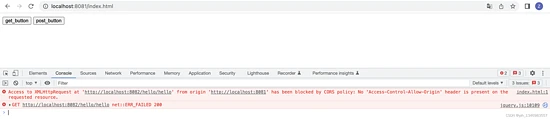
分别启动A、B服务,浏览器访问A的index.html,点击按钮,浏览器控制台报错如下:
<pre class="hljs less" style="padding: 0.5em; font-family: Menlo, Monaco, Consolas, "Courier New", monospace; color: rgb(68, 68, 68); border-radius: 4px; display: block; margin: 0px 0px 0.75em; font-size: 14px; line-height: 1.5em; word-break: break-all; overflow-wrap: break-word; white-space: pre; background-color: rgb(246, 246, 246); border: none; overflow-x: auto; font-style: normal; font-variant-ligatures: normal; font-variant-caps: normal; font-weight: 400; letter-spacing: normal; orphans: 2; text-align: start; text-indent: 0px; text-transform: none; widows: 2; word-spacing: 0px; -webkit-text-stroke-width: 0px; text-decoration-thickness: initial; text-decoration-style: initial; text-decoration-color: initial;">http://localhost:8081/index.html</pre>
<pre class="prettyprint hljs livescript" style="padding: 0.5em; font-family: Menlo, Monaco, Consolas, "Courier New", monospace; color: rgb(68, 68, 68); border-radius: 4px; display: block; margin: 0px 0px 1.5em; font-size: 14px; line-height: 1.5em; word-break: break-all; overflow-wrap: break-word; white-space: pre; background-color: rgb(246, 246, 246); border: none; overflow-x: auto; font-style: normal; font-variant-ligatures: normal; font-variant-caps: normal; font-weight: 400; letter-spacing: normal; orphans: 2; text-align: start; text-indent: 0px; text-transform: none; widows: 2; word-spacing: 0px; -webkit-text-stroke-width: 0px; text-decoration-thickness: initial; text-decoration-style: initial; text-decoration-color: initial;">Access to XMLHttpRequest at 'http://localhost:8082/hello/hello' from origin 'http://localhost:8081' has been blocked by CORS policy: No 'Access-Control-Allow-Origin' header is present on the requested resource.</pre>
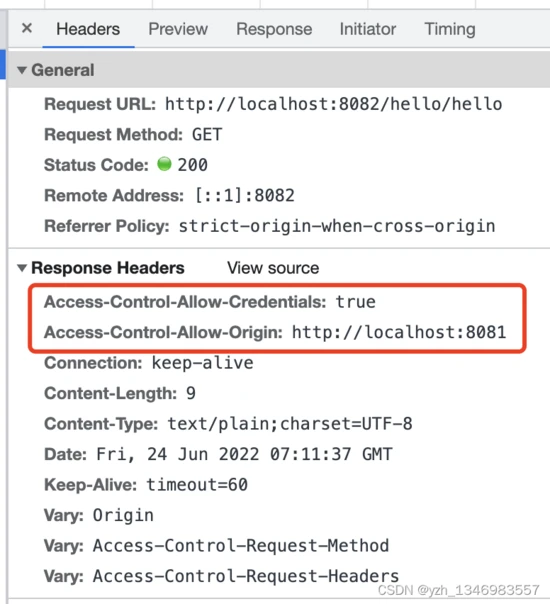
为B项目使用方式一,添加跨域支持,重启,再次点击按钮,可正常访问,观察响应头多了支持跨域的信息:
五、cookie的跨域
从Chrome51开始,浏览器cookie添加了一个新属性SameSite,以防止 CSRF 攻击和用户跟踪。
SameSite可取值:Strict、Lax、None。
Strict最为严格,完全禁止第三方 Cookie,跨站点时,任何情况下都不会发送 Cookie。换言之,只有当前网页的 URL 与请求目标一致,才会带上 Cookie。
Lax规则稍稍放宽,大多数情况也是不发送第三方 Cookie,但是导航到目标网址的 Get 请求除外。导航到目标 URL 的 GET 请求仅包括三种情况:链接、预加载请求和 GET 表单。
网站可以选择显式关闭SameSite属性,将其设为None。不过,前提是必须同时设置Secure属性(Cookie 只能通过 HTTPS 协议发送),否则无效。
SpringBoot 2.6及以上版本
网上查到可使用配置(但 亲测无效 !):
<pre class="prettyprint hljs vbscript" style="padding: 0.5em; font-family: Menlo, Monaco, Consolas, "Courier New", monospace; color: rgb(68, 68, 68); border-radius: 4px; display: block; margin: 0px 0px 1.5em; font-size: 14px; line-height: 1.5em; word-break: break-all; overflow-wrap: break-word; white-space: pre; background-color: rgb(246, 246, 246); border: none; overflow-x: auto; font-style: normal; font-variant-ligatures: normal; font-variant-caps: normal; font-weight: 400; letter-spacing: normal; orphans: 2; text-align: start; text-indent: 0px; text-transform: none; widows: 2; word-spacing: 0px; -webkit-text-stroke-width: 0px; text-decoration-thickness: initial; text-decoration-style: initial; text-decoration-color: initial;">server.servlet.session.cookie.same-site=none
server.servlet.session.cookie.secure=true</pre>
SpringBoot 2.6以下版本
如果使用 Tomcat 作为服务器,则可以通过以下配置设置会话 cookie 的 SameSite 属性( 亲测无效 !)。
<pre class="hljs vbscript" style="padding: 0.5em; font-family: Menlo, Monaco, Consolas, "Courier New", monospace; color: rgb(68, 68, 68); border-radius: 4px; display: block; margin: 0px 0px 0.75em; font-size: 14px; line-height: 1.5em; word-break: break-all; overflow-wrap: break-word; white-space: pre; background-color: rgb(246, 246, 246); border: none; overflow-x: auto; font-style: normal; font-variant-ligatures: normal; font-variant-caps: normal; font-weight: 400; letter-spacing: normal; orphans: 2; text-align: start; text-indent: 0px; text-transform: none; widows: 2; word-spacing: 0px; -webkit-text-stroke-width: 0px; text-decoration-thickness: initial; text-decoration-style: initial; text-decoration-color: initial;">server.servlet.session.cookie.secure=true</pre>
<pre class="prettyprint hljs java" style="padding: 0.5em; font-family: Menlo, Monaco, Consolas, "Courier New", monospace; color: rgb(68, 68, 68); border-radius: 4px; display: block; margin: 0px 0px 1.5em; font-size: 14px; line-height: 1.5em; word-break: break-all; overflow-wrap: break-word; white-space: pre; background-color: rgb(246, 246, 246); border: none; overflow-x: auto; font-style: normal; font-variant-ligatures: normal; font-variant-caps: normal; font-weight: 400; letter-spacing: normal; orphans: 2; text-align: start; text-indent: 0px; text-transform: none; widows: 2; word-spacing: 0px; -webkit-text-stroke-width: 0px; text-decoration-thickness: initial; text-decoration-style: initial; text-decoration-color: initial;">@Configuration
public class TomcatCookieConfig {
@Bean
public TomcatContextCustomizer sameSiteCookiesConfig() {
return context -> {
final Rfc6265CookieProcessor cookieProcessor = new Rfc6265CookieProcessor();
// SameSite
cookieProcessor.setSameSiteCookies(SameSiteCookies.NONE.getValue());
context.setCookieProcessor(cookieProcessor);
};
}
}</pre>
如果您使用的是 Spring-Session,那么您可以使用以下配置来设置 cookie 的 SameSite 属性。
<pre class="prettyprint hljs xml" style="padding: 0.5em; font-family: Menlo, Monaco, Consolas, "Courier New", monospace; color: rgb(68, 68, 68); border-radius: 4px; display: block; margin: 0px 0px 1.5em; font-size: 14px; line-height: 1.5em; word-break: break-all; overflow-wrap: break-word; white-space: pre; background-color: rgb(246, 246, 246); border: none; overflow-x: auto; font-style: normal; font-variant-ligatures: normal; font-variant-caps: normal; font-weight: 400; letter-spacing: normal; orphans: 2; text-align: start; text-indent: 0px; text-transform: none; widows: 2; word-spacing: 0px; -webkit-text-stroke-width: 0px; text-decoration-thickness: initial; text-decoration-style: initial; text-decoration-color: initial;"><dependency>
<groupId>org.springframework.session</groupId>
<artifactId>spring-session-core</artifactId>
</dependency></pre>
<pre class="prettyprint hljs java" style="padding: 0.5em; font-family: Menlo, Monaco, Consolas, "Courier New", monospace; color: rgb(68, 68, 68); border-radius: 4px; display: block; margin: 0px 0px 1.5em; font-size: 14px; line-height: 1.5em; word-break: break-all; overflow-wrap: break-word; white-space: pre; background-color: rgb(246, 246, 246); border: none; overflow-x: auto; font-style: normal; font-variant-ligatures: normal; font-variant-caps: normal; font-weight: 400; letter-spacing: normal; orphans: 2; text-align: start; text-indent: 0px; text-transform: none; widows: 2; word-spacing: 0px; -webkit-text-stroke-width: 0px; text-decoration-thickness: initial; text-decoration-style: initial; text-decoration-color: initial;">@Configuration
public class SpringSessionConfiguration {
@Bean
public CookieSerializer cookieSerializer() {
DefaultCookieSerializer cookieSerializer = new DefaultCookieSerializer();
// Strict-严格模式 Lax-松懈模式 None-无
cookieSerializer.setSameSite("None");
cookieSerializer.setUseSecureCookie(true);
return cookieSerializer;
}
}</pre>
自己的解决方式
<pre class="prettyprint hljs cs" style="padding: 0.5em; font-family: Menlo, Monaco, Consolas, "Courier New", monospace; color: rgb(68, 68, 68); border-radius: 4px; display: block; margin: 0px 0px 1.5em; font-size: 14px; line-height: 1.5em; word-break: break-all; overflow-wrap: break-word; white-space: pre; background-color: rgb(246, 246, 246); border: none; overflow-x: auto; font-style: normal; font-variant-ligatures: normal; font-variant-caps: normal; font-weight: 400; letter-spacing: normal; orphans: 2; text-align: start; text-indent: 0px; text-transform: none; widows: 2; word-spacing: 0px; -webkit-text-stroke-width: 0px; text-decoration-thickness: initial; text-decoration-style: initial; text-decoration-color: initial;">@Configuration
public class CookieConfig {
private static String domain;
@Value("${domain}")
public void setDomain(String domain) {
CookieConfig.domain = domain;
}
public static HttpCookie generateHttpCookie(String name, String value) {
return ResponseCookie.from(name, value)
.domain(domain)
// cookie跨域设置
.sameSite("None")
// 在https下传输,配合sameSite=None使用
.secure(true)
.path("/")
// 有效期24小时
.maxAge(60 * 60 * 24)
.build();
}
}</pre>
<pre class="prettyprint hljs kotlin" style="padding: 0.5em; font-family: Menlo, Monaco, Consolas, "Courier New", monospace; color: rgb(68, 68, 68); border-radius: 4px; display: block; margin: 0px 0px 1.5em; font-size: 14px; line-height: 1.5em; word-break: break-all; overflow-wrap: break-word; white-space: pre; background-color: rgb(246, 246, 246); border: none; overflow-x: auto; font-style: normal; font-variant-ligatures: normal; font-variant-caps: normal; font-weight: 400; letter-spacing: normal; orphans: 2; text-align: start; text-indent: 0px; text-transform: none; widows: 2; word-spacing: 0px; -webkit-text-stroke-width: 0px; text-decoration-thickness: initial; text-decoration-style: initial; text-decoration-color: initial;">@GetMapping("/hello")
public String hello(HttpServletResponse response) {
HttpCookie cookie2 = CookieConfig.generateHttpCookie("age", "18");
response.addHeader(HttpHeaders.SET_COOKIE, cookie2.toString());
HttpCookie cookie3 = CookieConfig.generateHttpCookie("id", "77");
response.addHeader(HttpHeaders.SET_COOKIE, cookie3.toString());
System.out.println("get hello");
return "get hello";
}</pre>

魔乐社区(Modelers.cn) 是一个中立、公益的人工智能社区,提供人工智能工具、模型、数据的托管、展示与应用协同服务,为人工智能开发及爱好者搭建开放的学习交流平台。社区通过理事会方式运作,由全产业链共同建设、共同运营、共同享有,推动国产AI生态繁荣发展。
更多推荐

 0
0 0
0- 0


 已为社区贡献6条内容

所有评论(0)