linux安装nginx 1.25.2
1.下载nginx-1.25.2.tar.gz放在/opt下
wget http://nginx.org/download/nginx-1.22.1.tar.gz
2.解包 Nginx 软件包:
tar -xvf nginx-1.22.1.tar.gz
3.安装 Nginx 依赖:
在安装 Nginx 之前,需要先安装一些依赖库:pcre、openssl、gcc、zlib(推荐使⽤yum源⾃动安装)
yum -y install gcc zlib zlib-devel pcre-devel openssl openssl-devel4.进入解压后的目录:
使用 cd 命令进入解压后的 Nginx 目录:
cd nginx-1.22.15.配置 Nginx:
使用 ./configure 命令配置 Nginx ,后缀with-http_ssl_module安装http_ssl_module模块
./configure --with-http_ssl_module6.编译 Nginx:
make7.安装 Nginx:9.
make install8.进入 sbin 目录并启动 Nginx:
cd /usr/local/nginx/sbin
./nginx
9.访问服务器的 80 端口:
一旦 Nginx 启动并监听了 80 端口,使用浏览器访问服务器的 IP 地址,例如 http://服务器IP,即可查看 Nginx 默认的欢迎页面
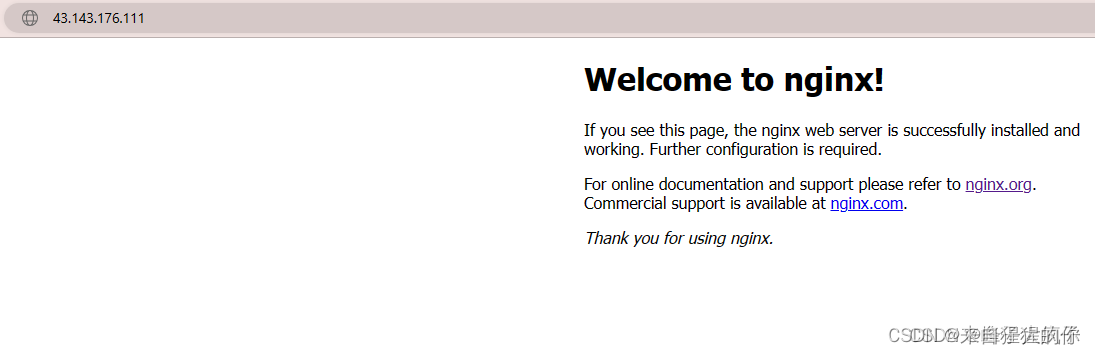
10.配置ssl证书
将ssl证书server.key 和server.crt放在/usr/local/nginx/conf/conf.d/key 下。
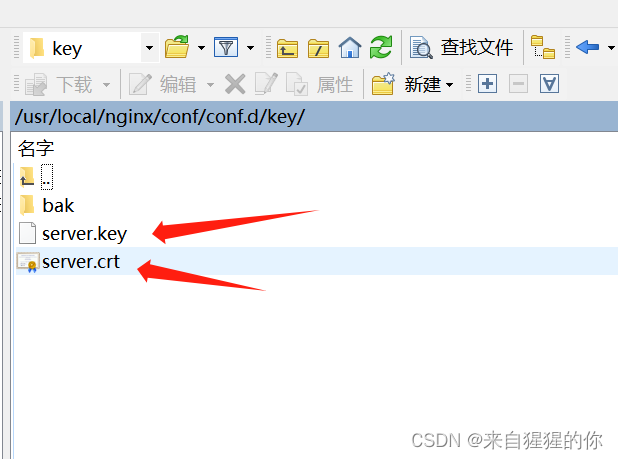
11. 配置https-www.conf文件,如下修改ssl_certificate和 ssl_certificate_key。指向证书所在路径。
说明:
#配置HTTPS的默认访问端口为443。
    #如果未在此处配置HTTPS的默认访问端口,可能会造成Nginx无法启动。
    #如果您使用Nginx 1.15.0及以上版本,请使用listen 443 ssl代替listen 443和ssl on。
server {
listen 443 ssl;
server_name www.xxxxxx.com;
keepalive_timeout 70;
ssl_certificate /usr/local/nginx/conf/conf.d/key/xxxx.pem;
ssl_certificate_key /usr/local/nginx/conf/conf.d/key/xxxx.key;
ssl_prefer_server_ciphers on;
ssl_protocols TLSv1 TLSv1.1 TLSv1.2;
ssl_ciphers RC4:HIGH:!aNULL:!CAMELLIA:!SEED:!DES:!MD5:!EXP;
access_log /log/nginx/https-access.log;
error_log /log/nginx/https-error.log;
location ^~ /combine/(css|images|js|txt|html)/ {
alias /home/webapps/rhapp/combine/;
expires 4h;
}
location ^~ /console/(css|images|js|txt|html)/ {
alias /home/webapps/rhapp/console/;
expires 4h;
}
location ^~ /fileStore/ {
alias /home/webapps/rhapp/fileStore/;
expires 4h;
}
location ^~ /fileStore/png/ {
alias /home/webapps/rhapp/fileStore/png/;
expires 4h;
}
location ^~ /fileStore/jpg/ {
alias /home/webapps/rhapp/fileStore/jpg/;
expires 4h;
}
location /favicon.ico {
alias /home/webapps/rhapp/combine/favicon.ico;
expires 4h;
}
location /user {
proxy_set_header Host $host;
proxy_set_header x-for $remote_addr;
proxy_set_header x-server $host;
proxy_set_header x-agent $http_user_agent;
proxy_pass http://ccu;
proxy_redirect http:// https://;
}
location / {
proxy_set_header Host $host;
proxy_set_header x-for $remote_addr;
proxy_set_header x-server $host;
proxy_set_header x-agent $http_user_agent;
proxy_pass http://ccu;
proxy_redirect http:// https://;
error_page 404 https://www.xxx.com/console;
}
location /combine {
proxy_set_header Host $host;
proxy_set_header x-for $remote_addr;
proxy_set_header x-server $host;
proxy_set_header x-agent $http_user_agent;
proxy_pass http://ccu;
proxy_redirect http:// https://;
}
location /quartz {
proxy_set_header Host $host;
proxy_set_header x-for $remote_addr;
proxy_set_header x-server $host;
proxy_set_header x-agent $http_user_agent;
proxy_pass http://qp;
proxy_redirect http:// https://;
}
location /job {
proxy_set_header Host $host;
proxy_set_header x-for $remote_addr;
proxy_set_header x-server $host;
proxy_set_header x-agent $http_user_agent;
proxy_pass http://qp;
proxy_redirect http:// https://;
}
#location /mall {
#proxy_set_header Host $host;
# proxy_set_header x-for $remote_addr;
# proxy_set_header x-server $host;
# proxy_set_header x-agent $http_user_agent;
# proxy_pass http://mall;
# proxy_redirect http:// https://;
# }
}
12.Nginx 常用命令
在/usr/local/nginx/sbin 路径下执行各种命令。
启动 Nginx:使用 ./nginx 命令启动 Nginx 服务器。这会在前台启动 Nginx 并开始监听指定的端口。
终止 Nginx:使用 ./nginx -s stop 命令来停止正在运行的 Nginx 服务器。这会向 Nginx 发送关闭信号,使其停止运行。
看nginx版本
./nginx -V
[root@server-ee2f5168-32ba-4247-98a3-fd53b04f8526 sbin]# ./nginx -V
nginx version: nginx/1.25.2
built by gcc 4.8.5 20150623 (Red Hat 4.8.5-44) (GCC)
built with OpenSSL 1.0.2k-fips  26 Jan 2017
TLS SNI support enabled
configure arguments: --with-http_ssl_module
验证nginx文件正确性
./nginx -t[root@server-ee2f5168-32ba-4247-98a3-fd53b04f8526 sbin]# ./nginx -t
nginx: the configuration file /usr/local/nginx/conf/nginx.conf syntax is ok
nginx: configuration file /usr/local/nginx/conf/nginx.conf test is successful
重新加载配置文件:使用
./nginx -s reload命令重新加载 Nginx 的配置文件,而不需要停止服务器。当你修改了 Nginx 的配置文件(nginx.conf)后,可以使用这个命令使配置生效,而不中断服务。

魔乐社区(Modelers.cn) 是一个中立、公益的人工智能社区,提供人工智能工具、模型、数据的托管、展示与应用协同服务,为人工智能开发及爱好者搭建开放的学习交流平台。社区通过理事会方式运作,由全产业链共同建设、共同运营、共同享有,推动国产AI生态繁荣发展。
更多推荐


 1
 0
- 0


 已为社区贡献1条内容

所有评论(0)