数据挖掘/机器学习常用数据集
UCI 红酒品质数据集简介数据集名称:Wine Quality Data Set来源:由葡萄酒化学分析数据组成,收集自葡萄酒制造商。数据公开在UCI机器学习仓库中。数据集概述目的:预测红酒的品质评分(quality),根据其化学属性。数据特征:包含11个连续型的化学特性和一个品质评分标签。特征(输入变量)fixed acidity(固定酸)volatile acidity(挥发酸)citric a
2~5数据集下载链接 通过网盘分享的文件:
链接: https://pan.baidu.com/s/1Jo6sKviFMC33rzcYulPC1w?pwd=37ak 提取码: 37ak 下载地址
https://pan.baidu.com/s/1Jo6sKviFMC33rzcYulPC1w?pwd=37ak
文章目录
https://pan.baidu.com/s/1Jo6sKviFMC33rzcYulPC1w?pwd=37ak
1. 鸢尾花数据集(分类/聚类)
1.1 数据集介绍
Iris数据集是常用的分类实验数据集,由Fisher, 1936收集整理。Iris也称鸢尾花卉数据集,是一类多重变量分析的数据集。数据集包含150个数据样本,分为3类,每类50个数据,每个数据包含4个属性。可通过花萼长度,花萼宽度,花瓣长度,花瓣宽度4个属性预测鸢尾花卉属于(Setosa,Versicolour,Virginica)三个种类中的哪一类。
该数据集包含了4个属性:
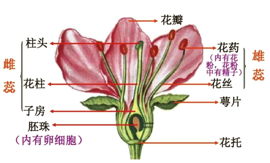
& Sepal.Length(花萼长度),单位是cm;
& Sepal.Width(花萼宽度),单位是cm;
& Petal.Length(花瓣长度),单位是cm;
& Petal.Width(花瓣宽度),单位是cm;
种类:Iris Setosa(山鸢尾)、Iris Versicolour(变色鸢尾),以及Iris Virginica(维吉尼亚鸢尾)。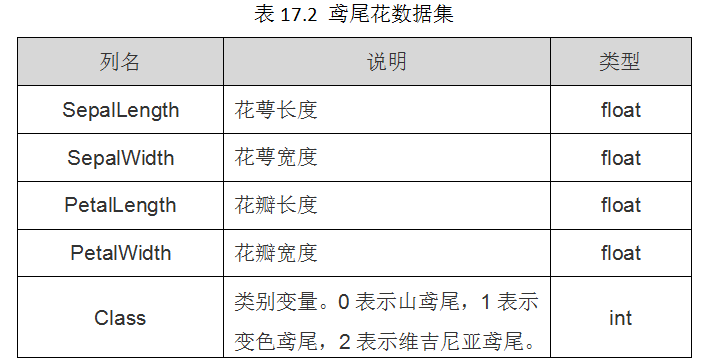
1.2 数据集读取
from sklearn.datasets import load_iris   #导入数据集iris
iris = load_iris()  #载入数据集
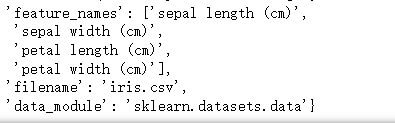
iris
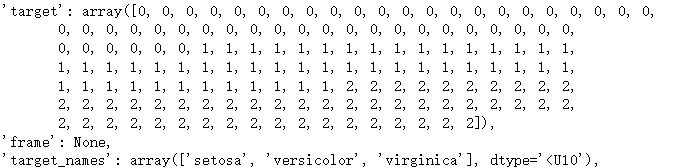
这里的Data是X数据target是Y数据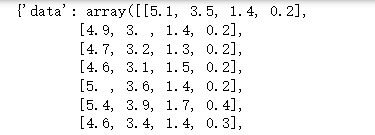
1.3 数据集解析
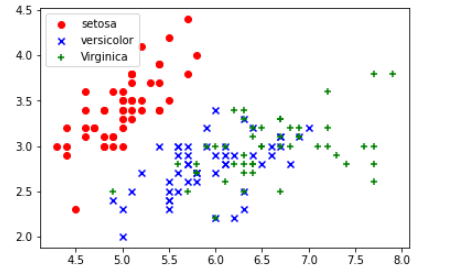
绘制散点图
import matplotlib.pyplot as plt
import numpy as np
DD = iris.data
X = [x[0] for x in DD]
Y = [x[1] for x in DD]
#plt.scatter(X, Y, c=iris.target, marker='x')
plt.scatter(X[:50], Y[:50], color='red', marker='o', label='setosa') #前50个样本
plt.scatter(X[50:100], Y[50:100], color='blue', marker='x', label='versicolor') #中间50个
plt.scatter(X[100:], Y[100:],color='green', marker='+', label='Virginica') #后50个样本
plt.legend(loc=2) #loc=1,2,3,4分别表示label在右上角,左上角,左下角,右下角
plt.show()
决策树分析(分类)
from sklearn import tree
# 使用决策树训练
X = iris['data']
Y = iris['target']
clf=tree.DecisionTreeClassifier(max_depth=3)
clf.fit(X,Y)
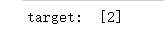
#这里预测当前输入的值的所属分类
print('target: ', [clf.predict([[12,1,-1,10]])[0]])
K-means
import numpy as np
import matplotlib.pyplot as plt
from sklearn.cluster import KMeans
from sklearn import datasets
from sklearn.metrics import silhouette_score, adjusted_rand_score

# 设置随机种子
np.random.seed(5)

# 加载鸢尾花数据
iris = datasets.load_iris()
X = iris.data
y_true = iris.target

# 设定聚类簇的个数(鸢尾花数据有3个类别)
k = 3

# 建立KMeans模型
kmeans = KMeans(n_clusters=k, random_state=5)
# 进行聚类
y_pred = kmeans.fit_predict(X)

# 获取簇心
centers = kmeans.cluster_centers_
print("Cluster Centers:\n", centers)

# 计算轮廓系数(越接近1说明聚类越好)
sil_score = silhouette_score(X, y_pred)
print(f'Silhouette Score: {sil_score:.3f}')
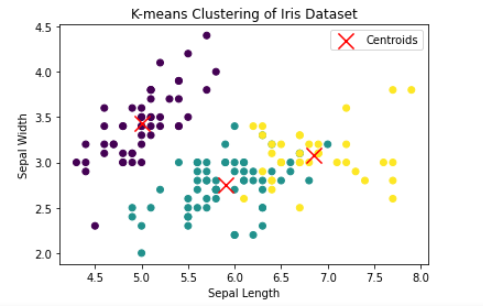
# 可视化聚类结果(用前两个特征做二维散点图)
plt.scatter(X[:, 0], X[:, 1], c=y_pred, cmap='viridis', marker='o')
plt.scatter(centers[:, 0], centers[:, 1], c='red', marker='x', s=200, label='Centroids')
plt.xlabel('Sepal Length')
plt.ylabel('Sepal Width')
plt.title('K-means Clustering of Iris Dataset')
plt.legend()
plt.show()
2. 红酒数据集
2.1 数据集介绍
UCI 红酒品质数据集简介
数据集名称:Wine Quality Data Set
来源:由葡萄酒化学分析数据组成,收集自葡萄酒制造商。数据公开在UCI机器学习仓库中。
数据集概述
目的:预测红酒的品质评分(quality),根据其化学属性。
数据特征:包含11个连续型的化学特性和一个品质评分标签。
特征(输入变量)
fixed acidity(固定酸)
volatile acidity(挥发酸)
citric acid(柠檬酸)
residual sugar(残糖)
chlorides(氯化物)
free sulfur dioxide(游离二氧化硫)
total sulfur dioxide(总二氧化硫)
density(密度)
pH(pH值)
sulphates(硫酸盐)
alcohol(酒精浓度)
目标变量(输出)
quality:一个整数评分(通常在0-10之间),由专业品酒师评定。这个评分是对红酒品质的主观评价。
数据特点
样本数:约 1599 个红酒样本。
数据类型:所有特征均为连续值,目标为整数类型的品质评分。
应用:主要用于回归任务(预测酒的品质)或分类(将品质划分为不同类别,比如“低”、“中”、“高”)。
其他信息
用途:适合作为回归与分类的入门项目,用于练习特征工程、模型训练与评估。
挑战:评价的主观性导致数据类别可能存在偏差,且不同评分之间的差异可能不大。
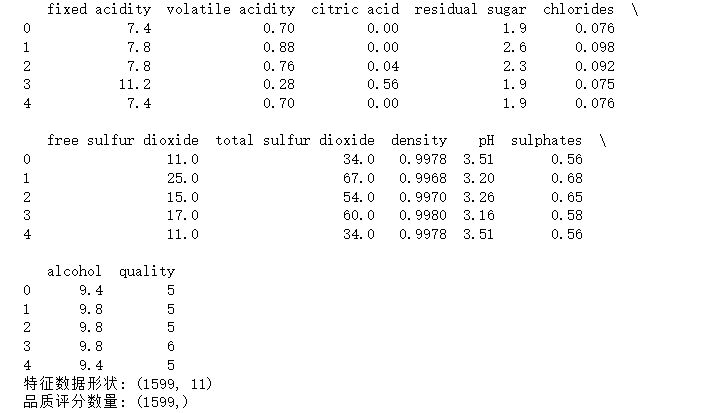
2.2 数据集读取
import pandas as pd

# 数据集文件路径(请根据你的实际路径修改)
file_path = 'winequality-red.csv'

# 读取CSV文件
data = pd.read_csv(file_path, delimiter=';')  # 因为UCI数据集使用';'作为分隔符

# 查看数据的前几行
print(data.head())

# 提取特征和标签
X = data.drop('quality', axis=1)     # 特征
y = data['quality']                     # 目标变量(品质)

# 输出数据维度
print(f"特征数据形状: {X.shape}")
print(f"品质评分数量: {y.shape}")
2.3 数据集解析
决策树分类
from sklearn.model_selection import train_test_split
from sklearn.metrics import accuracy_score
from sklearn.tree import DecisionTreeClassifier

# 将品质转换为类别
# 低: 3-4, 中: 5-6, 高: 7及以上
def quality_to_category(q):
    if q <= 4:
        return 'low'
    elif q <= 6:
        return 'medium'
    else:
        return 'high'

y_category = y.apply(quality_to_category)

# 分割数据集
X_train, X_test, y_train, y_test = train_test_split(X, y_category, test_size=0.2, random_state=42)

# 训练决策树分类器
clf = DecisionTreeClassifier(random_state=42)
clf.fit(X_train, y_train)

# 预测
y_pred = clf.predict(X_test)

# 评估
accuracy = accuracy_score(y_test, y_pred)
print(f'分类准确率: {accuracy:.2f}')
分类的使用
import numpy as np

# 已有模型(示例中的clf),假设已训练完毕

def predict_wine_quality(new_sample):
    """
    预测新样本的酒的品质类别(低/中/高)。

    参数:
        new_sample: 一个长度等于特征数的数组或列表,如 [fixed acidity, volatile acidity, citric acid, ...]

    返回:
        品质类别(字符串):'low', 'medium', 'high'
    """
    # 转换为2D数组,因为模型需要样本维度为2
    sample = np.array(new_sample).reshape(1, -1)
    # 预测类别
    pred_category = clf.predict(sample)[0]
    return pred_category

# 示例:假设新样本的化学特征如下(请替换为实际数据)
new_sample = [7.4, 0.7, 0.0, 1.9, 0.076, 11, 34, 0.9978, 3.51, 0.56, 9.4]

# 预测
predicted_quality = predict_wine_quality(new_sample)
print(f"预测的酒的品质类别为:{predicted_quality}")
回归测试
from sklearn.linear_model import LinearRegression
from sklearn.metrics import mean_squared_error

# 分割数据
X_train, X_test, y_train, y_test = train_test_split(X, y, test_size=0.2, random_state=42)

# 训练线性回归模型
reg = LinearRegression()
reg.fit(X_train, y_train)

# 预测
y_pred_reg = reg.predict(X_test)

# 评估
mse = mean_squared_error(y_test, y_pred_reg)
print(f'回归均方误差(MSE): {mse:.2f}')

# 可视化(可选)
import matplotlib.pyplot as plt
plt.scatter(y_test, y_pred_reg, alpha=0.5)
plt.xlabel('真实品质')
plt.ylabel('预测品质')
plt.title('线性回归预测红酒品质')
plt.show()
3. 波士顿房价数据集
3.1 数据集介绍
波士顿房价数据集(Boston Housing Data Set)简介
数据集名称: Boston Housing Data Set
来源: 由哈佛大学的研究人员收集,常用作机器学习中的回归任务示例。
数据集概述
目的: 预测波士顿各个区域的房价中位数(MEDV),帮助分析房价的影响因素。
数据特征: 包含房屋的各种属性和环境指标,反映房价的预测因素。
特征(输入变量)
共13个特征,包括:
CRIM:城镇人均犯罪率
ZN:占地超过25,000平方英尺的住宅用地比例
INDUS:城镇非零售商业用地比例
CHAS:查尔斯河虚拟变量(如果靠近河流,为1,否则为0)
NOX:一氧化氮浓度(区域空气污染指标)
RM:每个住宅的平均房间数
AGE:1940年之前建成的自用房屋比例
DIS:到波士顿五个就业中心的加权距离
RAD:辐射公路的辐射指数(交通便利性指标)
TAX:每一万美元房产税率
PTRATIO:城镇师生比例
B:1000(Bk - 0.63)^2,其中Bk是城镇中黑人比例
LSTAT:人口中地位较低阶层比例
目标变量(输出)
MEDV:房价中位数(以千美元为单位)
数据特点
样本数:大约 506 个样本数据点。
数据类型:大部分特征为连续值。
应用:典型的回归任务,用于预测房价。
其他信息
用途:广泛用于机器学习中的回归模型训练、特征分析和模型评估。
挑战:一些特征存在多重共线性,有利于演示特征选择和模型调优。
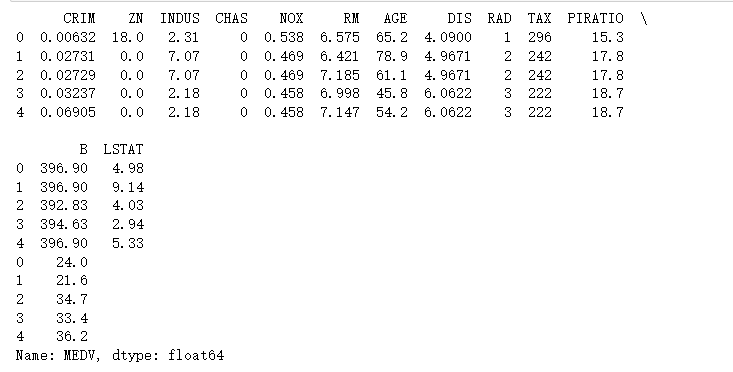
3.2 数据集读取
import pandas as pd

# 文件路径,需要你自己指定
file_path = 'boston.csv'

# 读取csv
boston_df = pd.read_csv(file_path)

# 分离特征和目标
X = boston_df.drop('MEDV', axis=1)
y = boston_df['MEDV']

print(X.head())
print(y.head())
3.3 数据集解析
特征选择
from sklearn.feature_selection import RFECV
from sklearn.linear_model import LinearRegression
from sklearn.model_selection import train_test_split

# 拆分训练/测试集
X_train, X_test, y_train, y_test = train_test_split(X, y, test_size=0.2, random_state=42)

# 设定回归模型
lr = LinearRegression()

# 使用RFECV(递归特征消除交叉验证)进行变量选择
selector = RFECV(estimator=lr, step=1, scoring='neg_mean_squared_error', cv=5)

# 执行特征筛选
selector.fit(X_train, y_train)

# 输出选择的特征
selected_features = X.columns[selector.support_]
print("被选择的特征:", list(selected_features))
训练
# 用筛选出的特征训练模型
X_train_sel = selector.transform(X_train)
X_test_sel = selector.transform(X_test)

# 训练线性回归模型
model = LinearRegression()
model.fit(X_train_sel, y_train)

# 预测
y_pred = model.predict(X_test_sel)
评估
from sklearn.metrics import mean_squared_error, r2_score

mse = mean_squared_error(y_test, y_pred)
r2 = r2_score(y_test, y_pred)
print(f"均方误差(MSE):{mse:.4f}")
print(f"决定系数(R^2):{r2:.4f}")
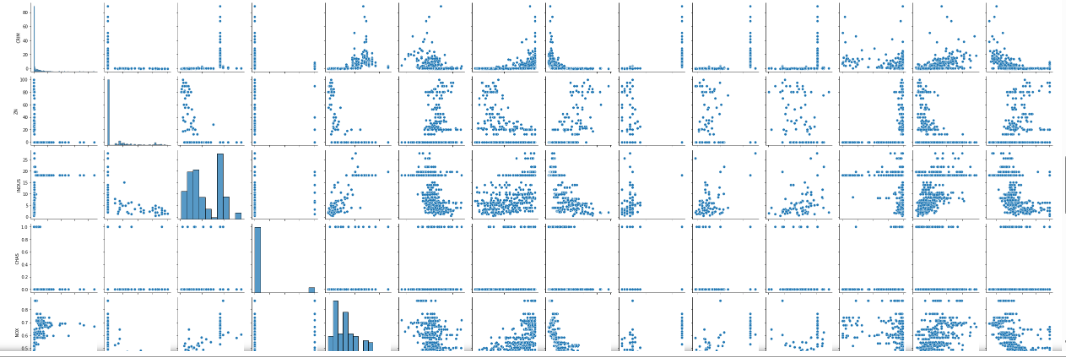
对数据进行探索,用seaborn
import pandas as pd
import seaborn as sns
import matplotlib.pyplot as plt

# 读取你本地的csv数据(请确保路径正确)
df = pd.read_csv('boston.csv')  # 替换为你的文件路径

# 假设列名是
# ['CRIM', 'ZN', 'INDUS', 'CHAS', 'NOX', 'RM', 'AGE', 'DIS', 'RAD', 'TAX', 'PTRATIO', 'B', 'LSTAT', 'MEDV']

# 你可以直接用全部特征来绘制pairplot
features = df.columns.drop('MEDV')
data_for_pairplot = df[features].copy()
data_for_pairplot['MEDV'] = df['MEDV']

# 绘制pairplot
sns.pairplot(data_for_pairplot)
plt.suptitle("使用本地数据集的pairplot", y=1.02)
plt.show()
4. 声纳数据集
4.1 数据集介绍
UCI声纳数据集(Sonar Data Set)简介
数据集名称: Sonar Data Set
来源: UCI机器学习仓库(UC Irvine Machine Learning Repository)
简要概述
目的: 任务是基于声纳信号特征判断目标是“岩石(Rock)”还是“金属(Mine/Metal)”。这是一个二分类问题。
应用背景: 通过分析声波回声信号,判断声源的类型。
数据结构
特征: 每个样本由60个连续的声纳信号特征组成(实际是从声波采样得到的振幅的统计特征)。每个特征都是连续值。
标签: 目标类别为:
“Rock”(岩石),标记为0(或“Mine”)
“Mine”(金属),标记为1
样本数: 总共有208个实例。
主要特点
数据集较小,适合用作二分类任务、模型验证和特征分析。
特征高度相关,适合测试特征选择和降维方法。
信号特征具有一定的复杂性和重复性,实际应用中具有一定的代表性。
典型用途
作为二分类任务的示例数据集
用于机器学习中的特征选择、模型比较
声学信号分析入门
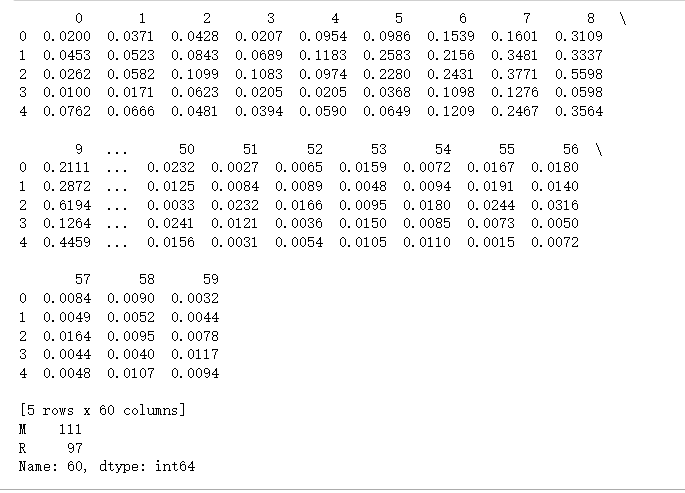
4.2 数据集读取
import pandas as pd

# 读取本地文件(路径自行修改)
df = pd.read_csv('sonar.all-data', header=None)

X = df.iloc[:, :-1]
y = df.iloc[:, -1]

print(X.head())
print(y.value_counts())
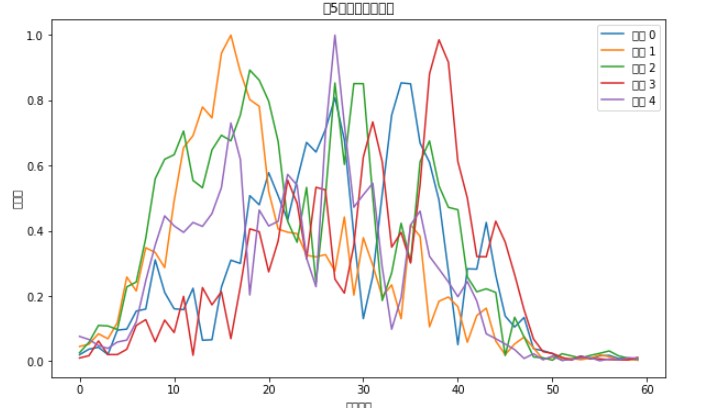
import matplotlib.pyplot as plt

#plt.rcParams['font.family'] = ['Microsoft YaHei']
# 或者设置为黑体
plt.rcParams['font.sans-serif'] = ['SimHei']
# 解决负号显示问题
plt.rcParams['axes.unicode_minus'] = False

# 假设X是你的特征数据,之前已经加载
# 选择前5行数据
rows_to_plot = X.iloc[:5]

# 绘制每一行的折线图
plt.figure(figsize=(10, 6))
for idx, row in rows_to_plot.iterrows():
    plt.plot(row.values, label=f'样本 {idx}')

plt.xlabel('特征索引')
plt.ylabel('特征值')
plt.title('前5行特征的折线图')
plt.legend()
plt.show()
4.3 数据集解析
import pandas as pd
from sklearn.model_selection import train_test_split
from sklearn.ensemble import RandomForestClassifier
from sklearn.metrics import accuracy_score, confusion_matrix, classification_report
from sklearn.preprocessing import LabelEncoder

le = LabelEncoder()
y_encoded = le.fit_transform(y)  # 'Rock' -> 0, 'Mine' -> 1

# 5. 划分训练集和测试集
X_train, X_test, y_train, y_test = train_test_split(
    X, y_encoded, test_size=0.2, random_state=42, stratify=y_encoded
)

# 6. 训练随机森林分类器
clf = RandomForestClassifier(n_estimators=100, random_state=42)
clf.fit(X_train, y_train)

# 7. 预测
y_pred = clf.predict(X_test)

# 8. 评估
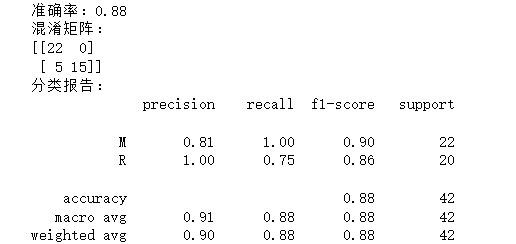
accuracy = accuracy_score(y_test, y_pred)
print(f"准确率:{accuracy:.2f}")

print("混淆矩阵:")
print(confusion_matrix(y_test, y_pred))

print("分类报告:")
print(classification_report(y_test, y_pred, target_names=le.classes_))
5. Mnist手写数字数据集
5.1 数据集介绍
简介
全称:Modified National Institute of Standards and Technology database
用途:广泛用于机器学习、图像识别、深度学习的入门和基准测试
主要内容:手写数字(0-9)图像
数据内容
样本数:总共70,000个样本
训练集:60,000张图像
测试集:10,000张图像
图片尺寸:28×28像素的灰度图
图像格式:
每个数字由像素灰度值组成(0代表白色,255代表黑色)
图像为灰度图,无彩色信息
标签:
每个图像对应一个数字(0到9)
特点
图像简洁,便于快速训练模型
广泛应用于分类任务
已成为ML和DL领域的经典、标准数据集之一
主要用途
图像分类基础入门
测试深度学习模型性能
研究手写识别、图像预处理、特征提取等
5.2 数据集读取
这些数据是在raw文件夹里的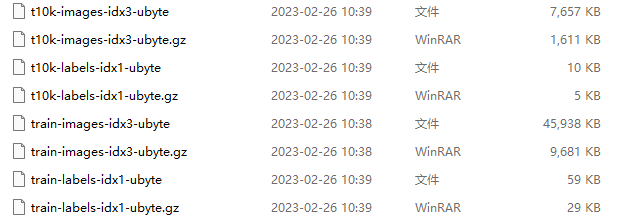
这些文件是 MNIST 数据集 的一部分,通常用于机器学习任务,特别是手写数字的分类。每个文件有特定的作用,具体如下:
t10k-images-idx3-ubyte 和 train-images-idx3-ubyte:
这些文件包含了实际的图像数据,格式是二进制的。每个文件包含了手写数字的图像(就是 MNIST 数据集的图像)。
每张图像的大小是 28x28 像素,灰度图像(即 784 个像素)。
t10k-labels-idx1-ubyte 和 train-labels-idx1-ubyte:
这些文件包含了与图像对应的标签(即每个图像代表的数字)。标签是一个字节的整数,表示图像对应的数字类别(0-9)。
gz 文件:
这些文件是上述文件的压缩版本,使用 .gz 压缩格式。需要先解压缩才能读取内容。
import numpy as np
import struct
import os

data_dir = "raw"

# 读取 images 文件
def read_images(file_name):
    file_path = os.path.join(data_dir, file_name)
    with open(file_path, 'rb') as f:
        magic, num, rows, cols = struct.unpack(">IIII", f.read(16))
        data = np.frombuffer(f.read(), dtype=np.uint8).reshape(num, rows, cols)
    return data

# 读取 labels 文件
def read_labels(file_name):
    file_path = os.path.join(data_dir, file_name)
    with open(file_path, 'rb') as f:
        magic, num = struct.unpack(">II", f.read(8))
        data = np.frombuffer(f.read(), dtype=np.uint8)
    return data

# 读取训练集和测试集
train_images = read_images("train-images-idx3-ubyte")
train_labels = read_labels("train-labels-idx1-ubyte")
test_images  = read_images("t10k-images-idx3-ubyte")
test_labels  = read_labels("t10k-labels-idx1-ubyte")

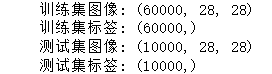
# 输出形状
print("训练集图像:", train_images.shape)
print("训练集标签:", train_labels.shape)
print("测试集图像:", test_images.shape)
print("测试集标签:", test_labels.shape)
import matplotlib.pyplot as plt

# 显示前 10 张训练集图片
plt.figure(figsize=(10, 2))
for i in range(10):
    plt.subplot(1, 10, i+1)
    plt.imshow(train_images[i], cmap="gray")
    plt.title(str(train_labels[i]))
    plt.axis("off")
plt.show()

5.3 数据集解析
from sklearn.linear_model import LogisticRegression
from sklearn.metrics import accuracy_score
from sklearn.model_selection import train_test_split

# 将 28x28 的图像展开成 1D 向量 (784 维)
X = train_images.reshape(len(train_images), -1)
y = train_labels

# 为了演示快一点,我们只取一部分样本(比如 10000 张)
X_small, _, y_small, _ = train_test_split(X, y, train_size=10000, stratify=y, random_state=42)

# 划分训练集和验证集
X_train, X_val, y_train, y_val = train_test_split(X_small, y_small, test_size=0.2, random_state=42)

# 训练逻辑回归分类器
clf = LogisticRegression(max_iter=1000)
clf.fit(X_train, y_train)

# 预测
y_pred = clf.predict(X_val)

# 准确率
acc = accuracy_score(y_val, y_pred)
print("验证集准确率:", acc)
跑不动,,,为什么?
逻辑回归
from sklearn.linear_model import LogisticRegression
from sklearn.metrics import accuracy_score
from sklearn.model_selection import train_test_split
from sklearn.preprocessing import StandardScaler

# 1. 展平并缩放到 [0,1]
X = train_images.reshape(len(train_images), -1).astype("float32") / 255.0
y = train_labels

# 2. 只取一部分数据(这里取 5000 更快,也足够演示)
X_small, _, y_small, _ = train_test_split(X, y, train_size=5000, stratify=y, random_state=42)

# 3. 再分训练/验证
X_train, X_val, y_train, y_val = train_test_split(X_small, y_small, test_size=0.2, random_state=42)

# 4. 特征标准化(对逻辑回归收敛帮助大)
scaler = StandardScaler()
X_train = scaler.fit_transform(X_train)
X_val = scaler.transform(X_val)

# 5. 训练逻辑回归
clf = LogisticRegression(
    max_iter=300,          # 减少迭代次数
    solver='saga',         # 大数据集/稀疏数据适用
    multi_class='multinomial',
    n_jobs=-1,             # 多核加速
    tol=1e-2               # 提高容忍度,加快收敛
)
clf.fit(X_train, y_train)

# 6. 预测
y_pred = clf.predict(X_val)
acc = accuracy_score(y_val, y_pred)
print("验证集准确率:", acc)
0.877
支持向量机(SVM )
from sklearn.svm import SVC
from sklearn.metrics import accuracy_score
from sklearn.model_selection import train_test_split
from sklearn.preprocessing import StandardScaler

# 1. 展平并缩放到 [0,1]
X = train_images.reshape(len(train_images), -1).astype("float32") / 255.0
y = train_labels

# 2. 只取 3000 条加快演示(你机器快可以调大)
X_small, _, y_small, _ = train_test_split(X, y, train_size=3000, stratify=y, random_state=42)

# 3. 再分训练/验证
X_train, X_val, y_train, y_val = train_test_split(X_small, y_small, test_size=0.2, random_state=42)

# 4. 标准化
scaler = StandardScaler()
X_train = scaler.fit_transform(X_train)
X_val = scaler.transform(X_val)

# 5. 训练 RBF 核 SVM(参数可以调整)
svm_clf = SVC(kernel='rbf', C=5, gamma='scale', cache_size=500)  # cache_size 单位MB
svm_clf.fit(X_train, y_train)

# 6. 预测
y_pred = svm_clf.predict(X_val)

# 7. 输出准确率
acc = accuracy_score(y_val, y_pred)
print("SVM 验证集准确率:", acc)
0.88
MLP(多层感知机)
from sklearn.neural_network import MLPClassifier
from sklearn.metrics import accuracy_score
from sklearn.model_selection import train_test_split
from sklearn.preprocessing import StandardScaler

# 1. 展平并缩放到 [0,1]
X = train_images.reshape(len(train_images), -1).astype("float32") / 255.0
y = train_labels

# 2. 只取部分数据做演示(比如 2000 张)以提高训练速度
X_small, _, y_small, _ = train_test_split(X, y, train_size=2000, stratify=y, random_state=42)

# 3. 划分训练集和验证集
X_train, X_val, y_train, y_val = train_test_split(X_small, y_small, test_size=0.2, random_state=42)

# 4. 标准化(对 MLP 收敛非常重要)
scaler = StandardScaler()
X_train = scaler.fit_transform(X_train)
X_val = scaler.transform(X_val)

# 5. 建立 MLP 模型,减少迭代次数
mlp_clf = MLPClassifier(
    hidden_layer_sizes=(128, 64),  # 两层隐藏层
    activation='relu',
    solver='adam',
    max_iter=10,        # 迭代次数减少,加速训练
    batch_size=128,     # 调整 batch_size
    learning_rate_init=0.001,
    tol=1e-3,           # 增加容忍度加快收敛
    verbose=True        # 显示训练过程
)

# 6. 训练
mlp_clf.fit(X_train, y_train)

# 7. 预测
y_pred = mlp_clf.predict(X_val)

# 8. 输出准确率
acc = accuracy_score(y_val, y_pred)
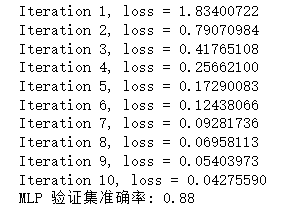
print("MLP 验证集准确率:", acc)

魔乐社区(Modelers.cn) 是一个中立、公益的人工智能社区,提供人工智能工具、模型、数据的托管、展示与应用协同服务,为人工智能开发及爱好者搭建开放的学习交流平台。社区通过理事会方式运作,由全产业链共同建设、共同运营、共同享有,推动国产AI生态繁荣发展。
更多推荐


 30
30 0
0- 0


 已为社区贡献3条内容

所有评论(0)