20251203给飞凌OK3588-C开发板适配Rockchip原厂的Buildroot【linux-5.10】后调通eth0并测速94.1 Mbits/sec【4线】
本文记录了为飞凌OK3588-C开发板适配Rockchip原厂Buildroot(Linux-5.10内核)并调通eth0网络接口的过程。通过修改设备树文件(DTS),调整gmac1和mdio1配置,解决GPIO冲突问题,最终实现了94.1Mbits/sec的网络测速。文中详细展示了GPIO状态比对、DTS修改内容,以及通过排除HDMI2和USB Type-C干扰来确保网络功能正常。测试使用系统自
cd /sys/kernel/debug/pinctrl/pinctrl-rockchip-pinctrl
cd /sys/kernel/debug/
cat /sys/kernel/debug/pinctrl/pinctrl-rockchip-pinctrl/pinmux-pins
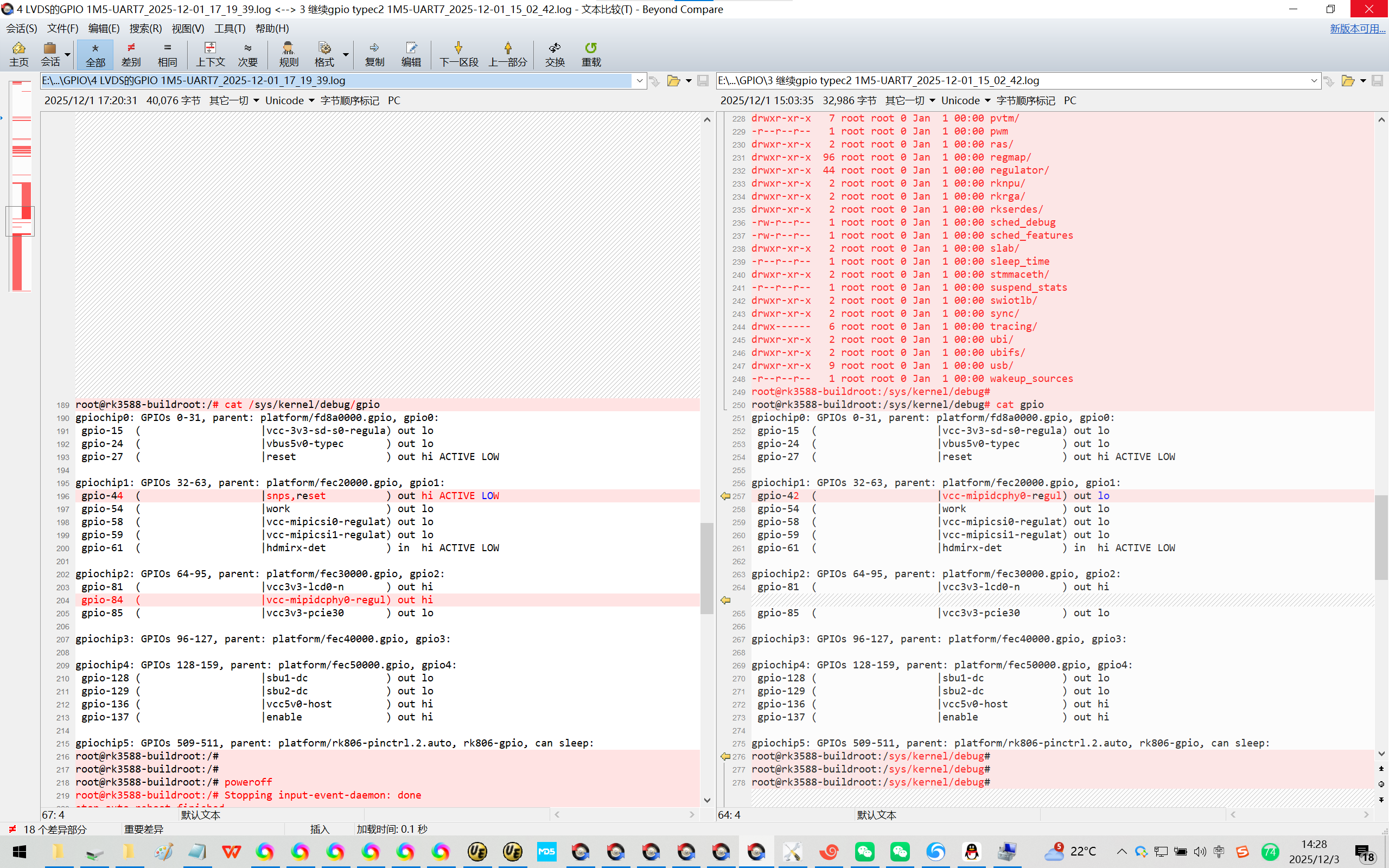
cat /sys/kernel/debug/gpio
20251203给飞凌OK3588-C开发板适配Rockchip原厂的Buildroot【linux-5.10】后调通eth0并测速94.1 Mbits/sec【4线】
2025/12/3 8:53
缘起:为了彻底熟悉飞凌OK3588-C开发板,使用Rockchip原厂的Buildroot【linux-5.10】来适配飞凌OK3588-C开发板。
默认HDMI可以显示的!^_
先适配比较容易/简单的eth0网卡。
直接将飞凌OK3588-C开发板的linux R4版本总以太网相关的DTS搬过来即可!【还需要解决必要的GPIO口冲突!】
当你把荣品RD-RK3588开发板重新适配一把,就相当于从头做了一个项目:【荣品RD-RK3588开发板】。
当然,开发板的功能都是好的,你免除了调试的过程,也就没有解决相关硬件出错的经验/机会了!
结论:荣品的FAE工程师是真的很忙。
代码写的非常写意/潇洒!
【整个DTS,TAB和空格按键都是混用的!^_有些时候看着很难受的!^_】
DTS中的代码排版真的让人看得很难受!
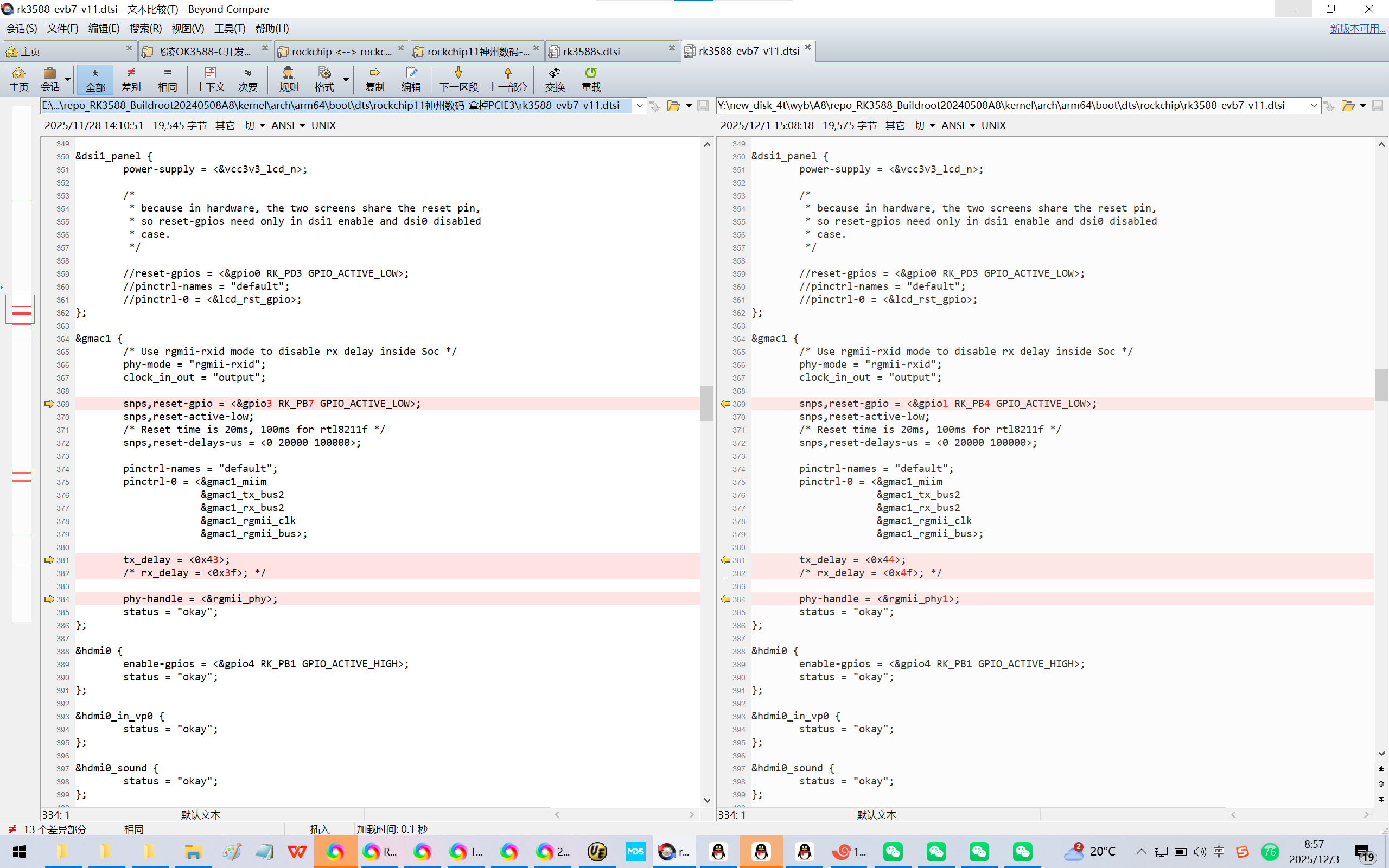
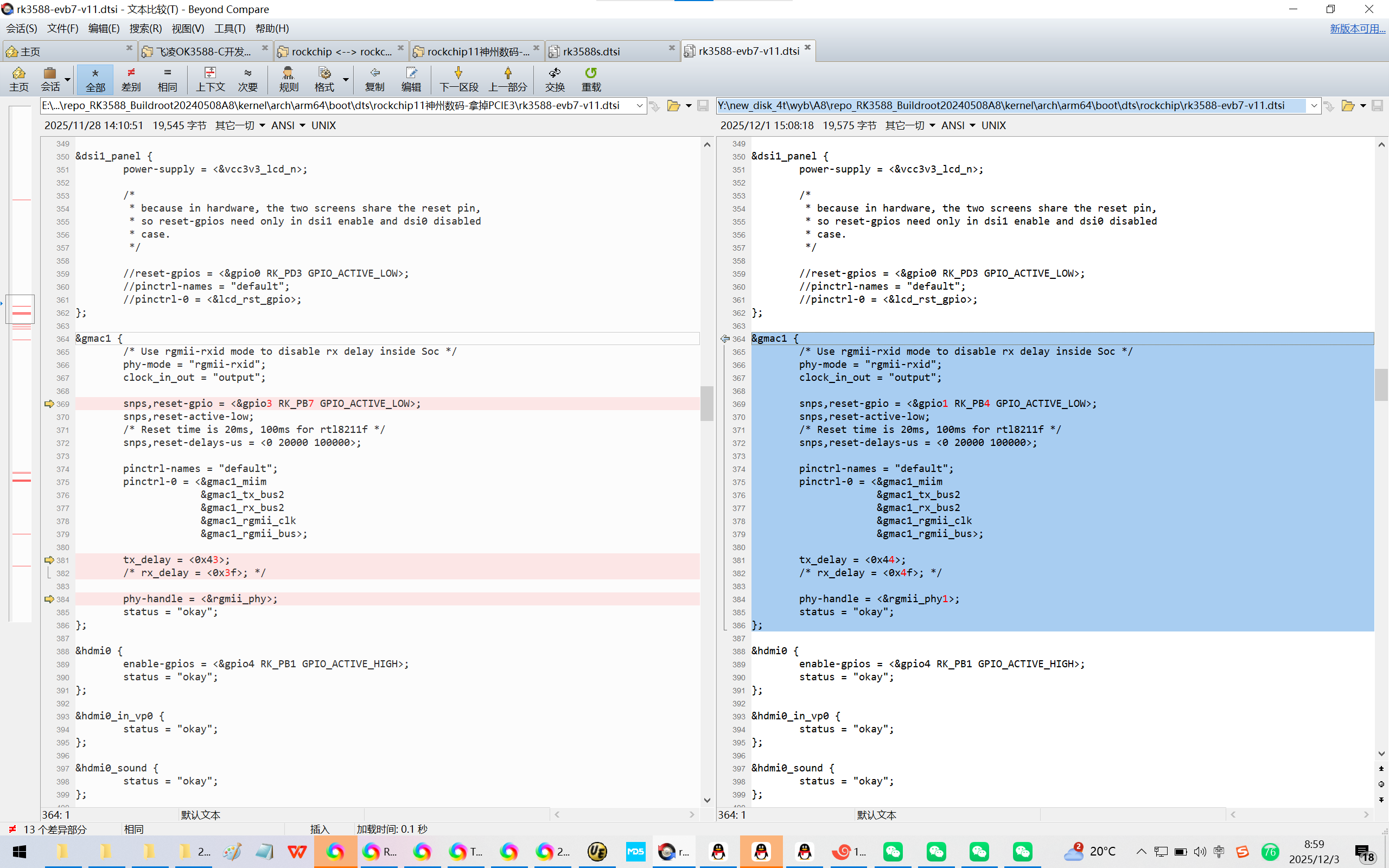
1、配置gmac1
Y:\new_disk_4t\wyb\A8\repo_RK3588_Buildroot20240508A8\kernel\arch\arm64\boot\dts\rockchip\rk3588-evb7-v11.dtsi
&gmac1 {
/* Use rgmii-rxid mode to disable rx delay inside Soc */
phy-mode = "rgmii-rxid";
clock_in_out = "output";
snps,reset-gpio = <&gpio3 RK_PB7 GPIO_ACTIVE_LOW>;
snps,reset-active-low;
/* Reset time is 20ms, 100ms for rtl8211f */
snps,reset-delays-us = <0 20000 100000>;
pinctrl-names = "default";
pinctrl-0 = <&gmac1_miim
&gmac1_tx_bus2
&gmac1_rx_bus2
&gmac1_rgmii_clk
&gmac1_rgmii_bus>;
tx_delay = <0x43>;
/* rx_delay = <0x3f>; */
phy-handle = <&rgmii_phy>;
status = "okay";
};
修改为:
&gmac1 {
/* Use rgmii-rxid mode to disable rx delay inside Soc */
phy-mode = "rgmii-rxid";
clock_in_out = "output";
snps,reset-gpio = <&gpio1 RK_PB4 GPIO_ACTIVE_LOW>;
snps,reset-active-low;
/* Reset time is 20ms, 100ms for rtl8211f */
snps,reset-delays-us = <0 20000 100000>;
pinctrl-names = "default";
pinctrl-0 = <&gmac1_miim
&gmac1_tx_bus2
&gmac1_rx_bus2
&gmac1_rgmii_clk
&gmac1_rgmii_bus>;
tx_delay = <0x44>;
/* rx_delay = <0x4f>; */
phy-handle = <&rgmii_phy1>;
status = "okay";
};
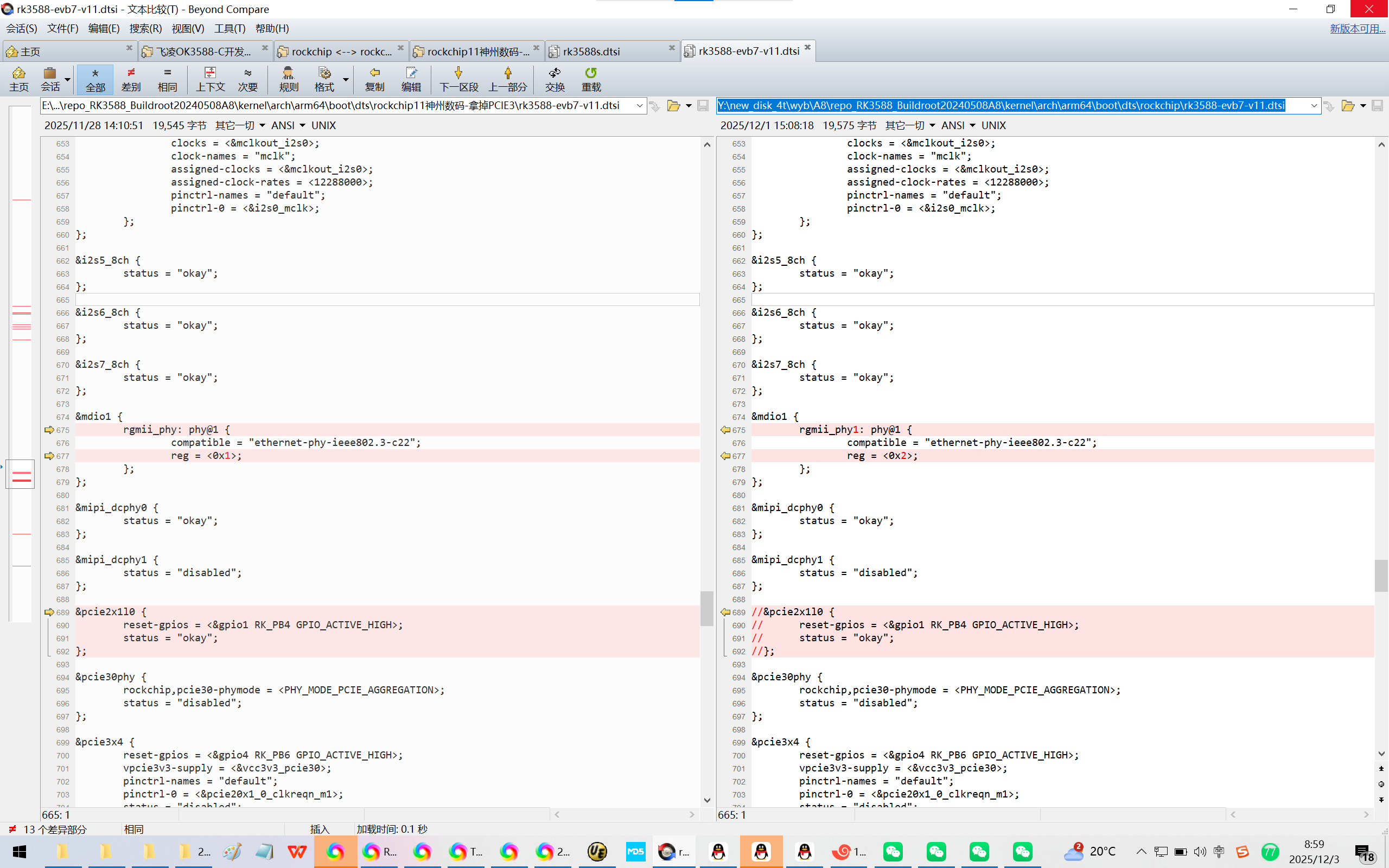
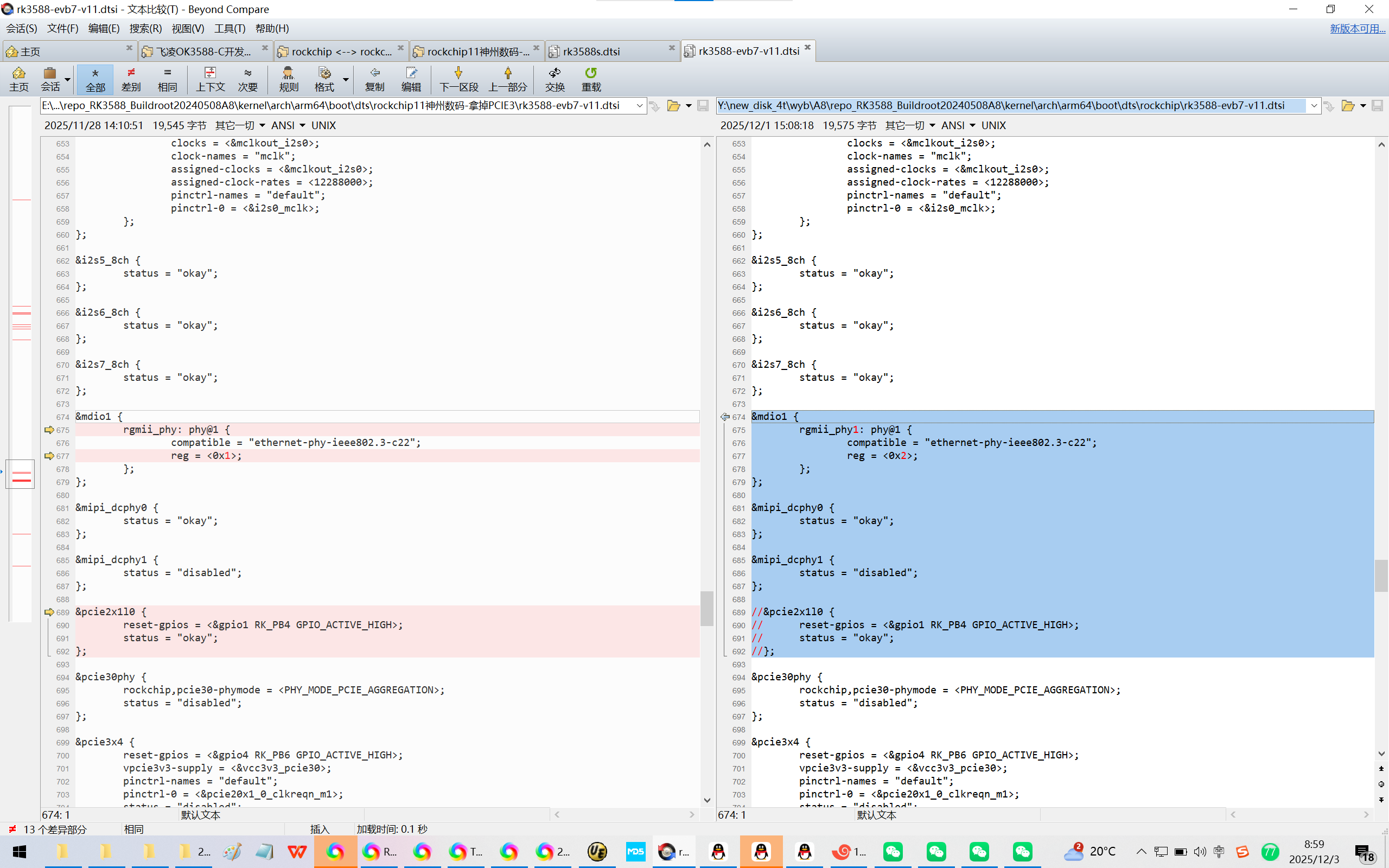
2、配置mdio1
Y:\new_disk_4t\wyb\A8\repo_RK3588_Buildroot20240508A8\kernel\arch\arm64\boot\dts\rockchip\rk3588-evb7-v11.dtsi
&mdio1 {
rgmii_phy: phy@1 {
compatible = "ethernet-phy-ieee802.3-c22";
reg = <0x1>;
};
};
&mipi_dcphy0 {
status = "okay";
};
&mipi_dcphy1 {
status = "disabled";
};
&pcie2x1l0 {
reset-gpios = <&gpio1 RK_PB4 GPIO_ACTIVE_HIGH>;
status = "okay";
};
修改为:
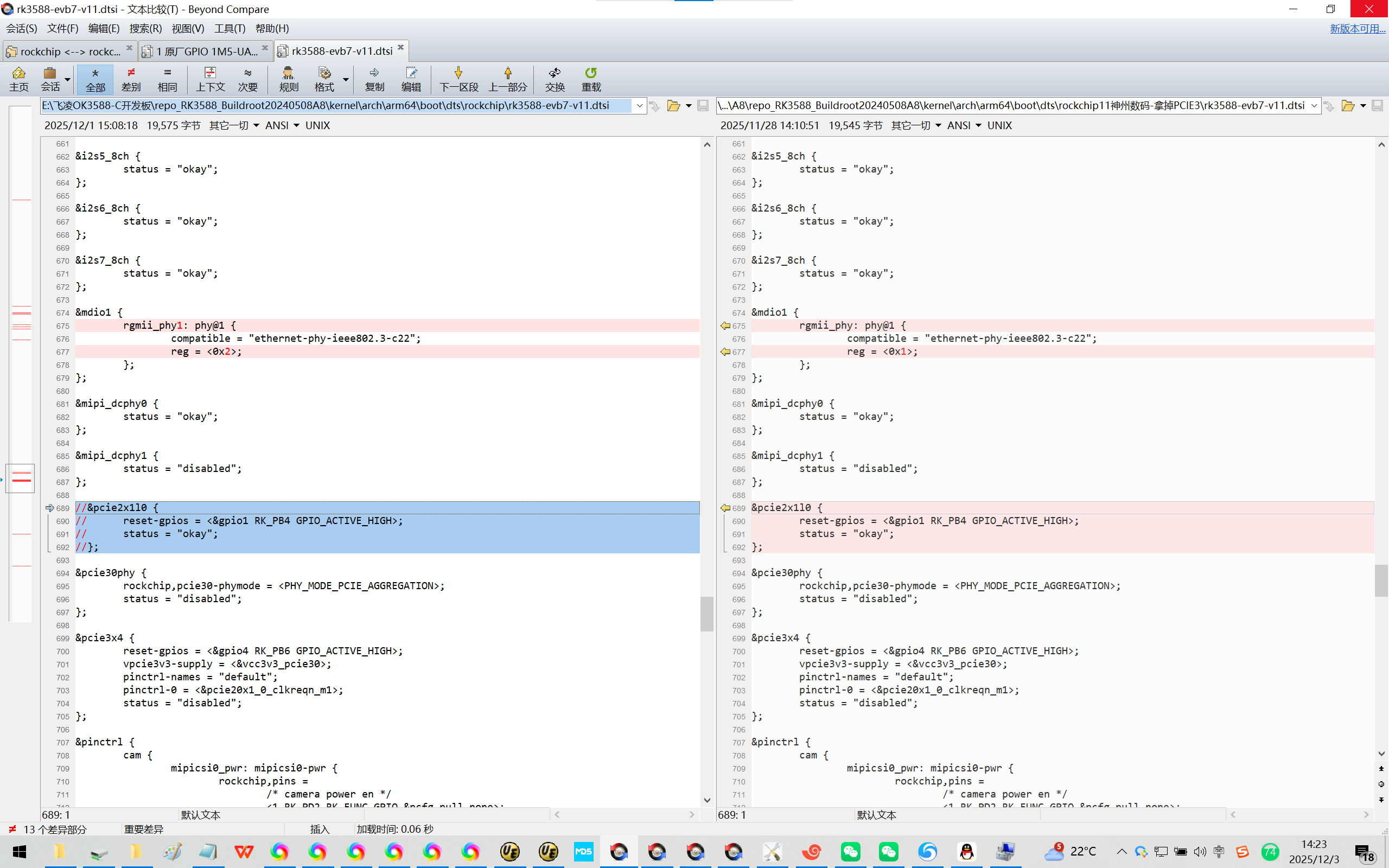
&mdio1 {
rgmii_phy1: phy@1 {
compatible = "ethernet-phy-ieee802.3-c22";
reg = <0x2>;
};
};
&mipi_dcphy0 {
status = "okay";
};
&mipi_dcphy1 {
status = "disabled";
};
//&pcie2x1l0 {
// reset-gpios = <&gpio1 RK_PB4 GPIO_ACTIVE_HIGH>;
// status = "okay";
//};
3、【可选】
Y:\new_disk_4t\wyb\A8\repo_RK3588_Buildroot20240508A8\kernel\arch\arm64\boot\dts\rockchip\rk3588.dtsi
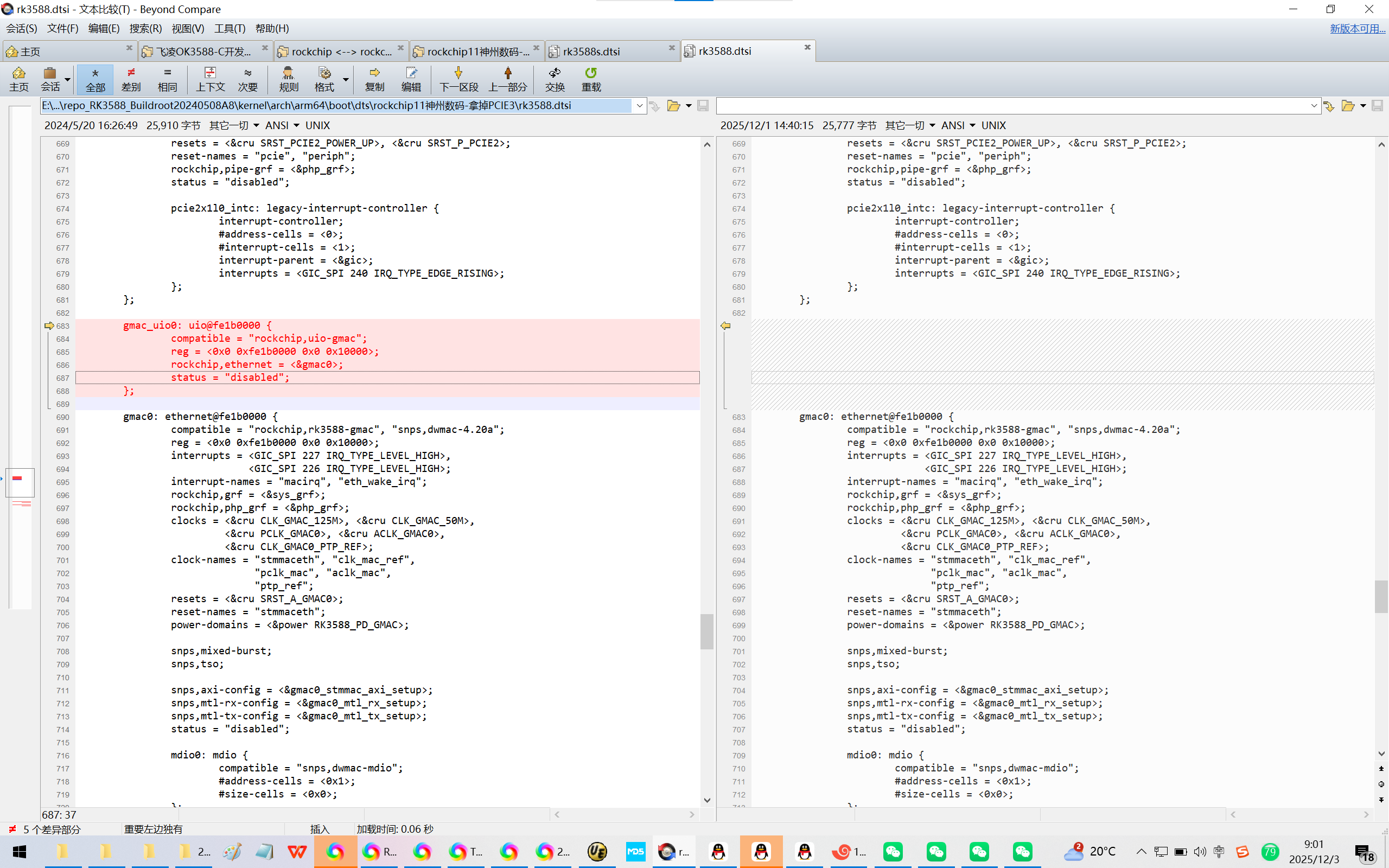
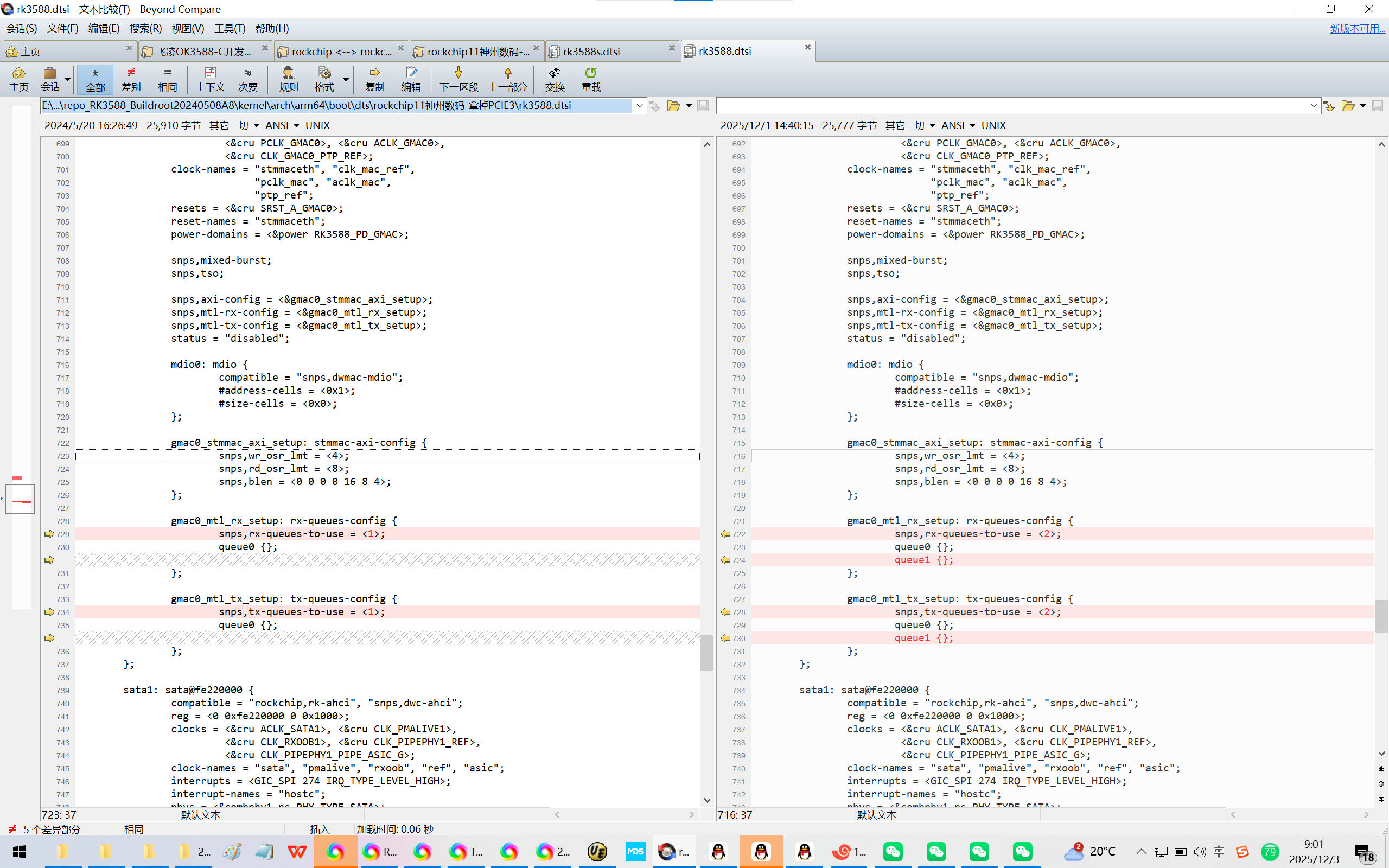
4、【可选】
Y:\new_disk_4t\wyb\A8\repo_RK3588_Buildroot20240508A8\kernel\arch\arm64\boot\dts\rockchip\rk3588s.dtsi
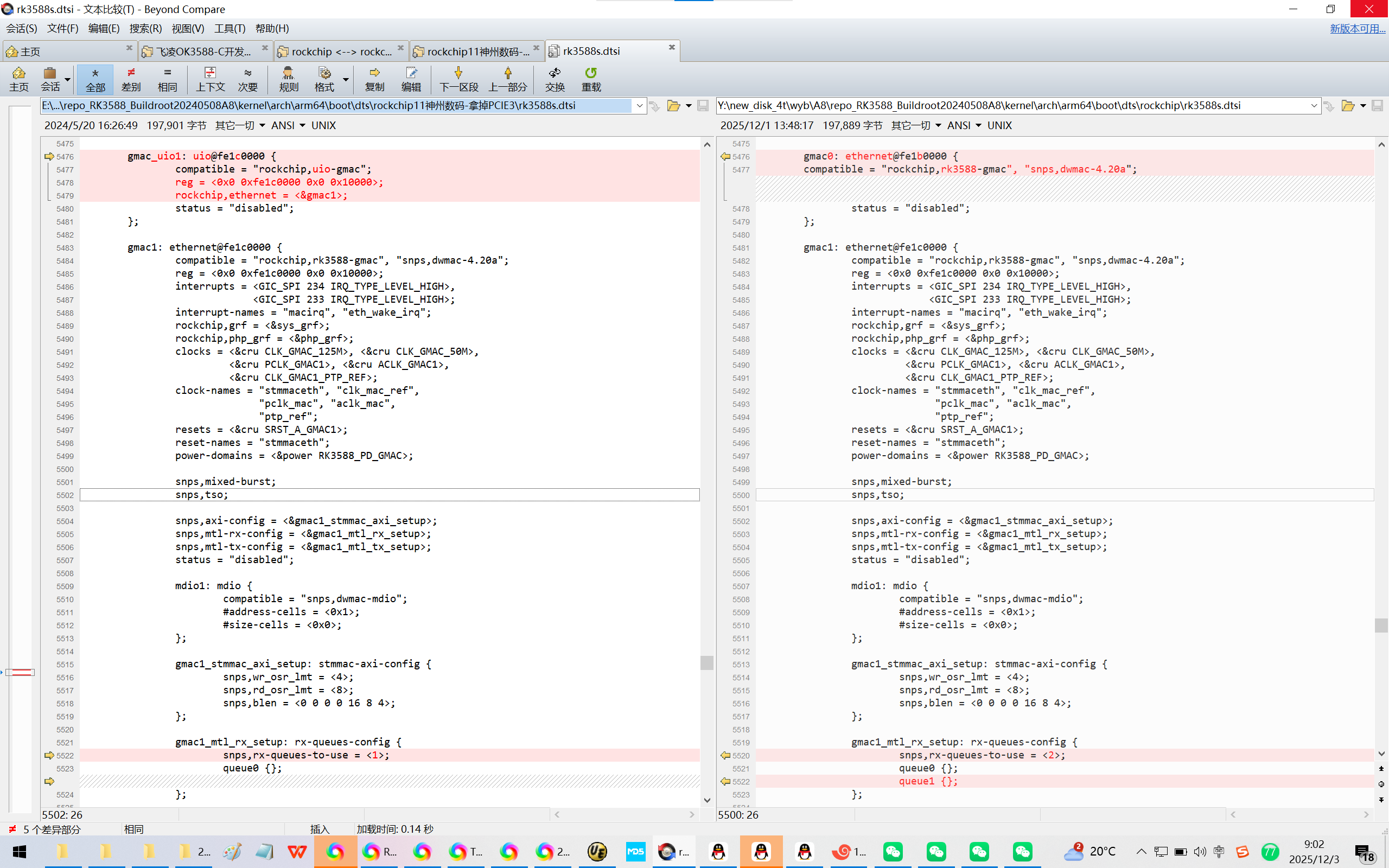
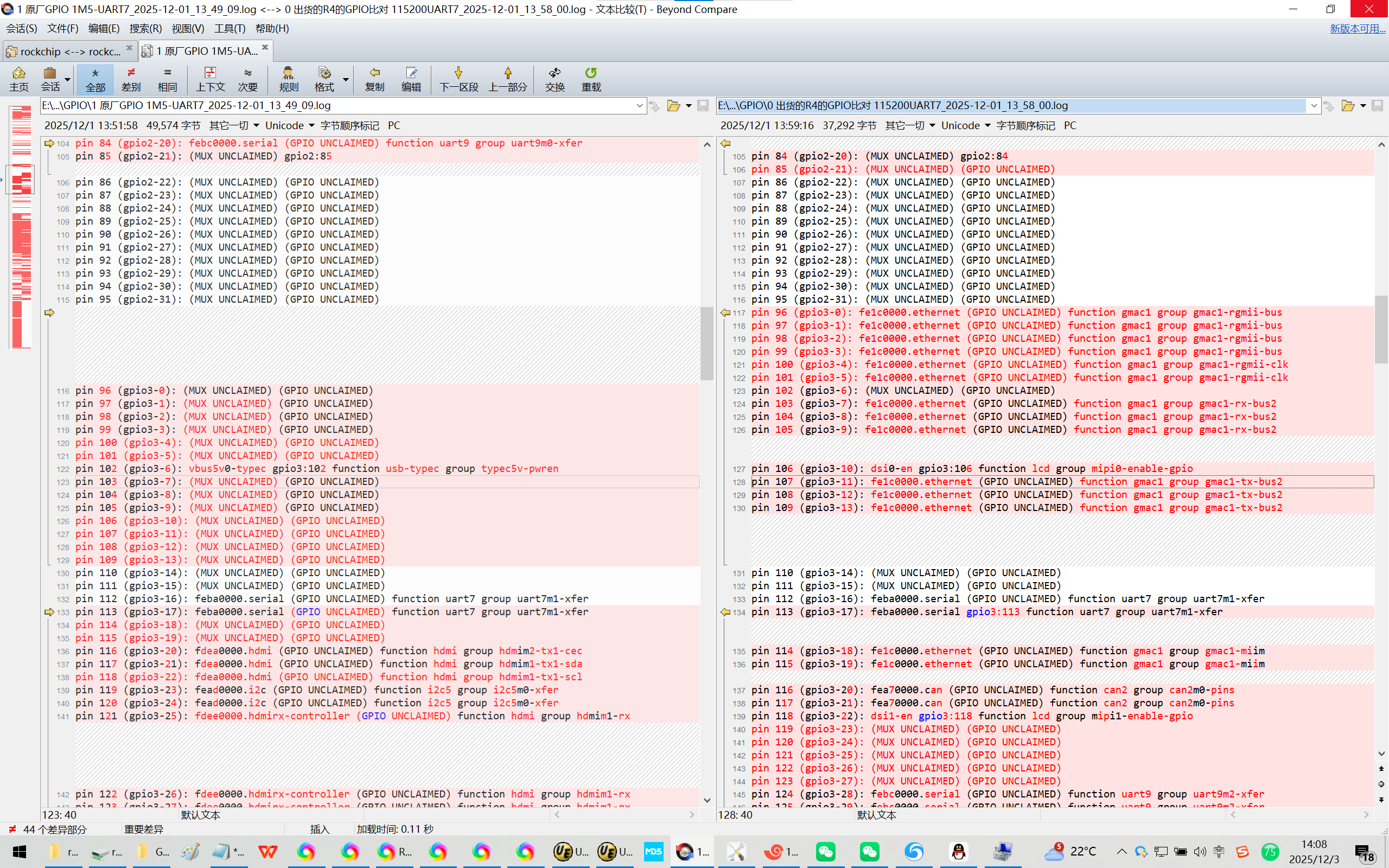
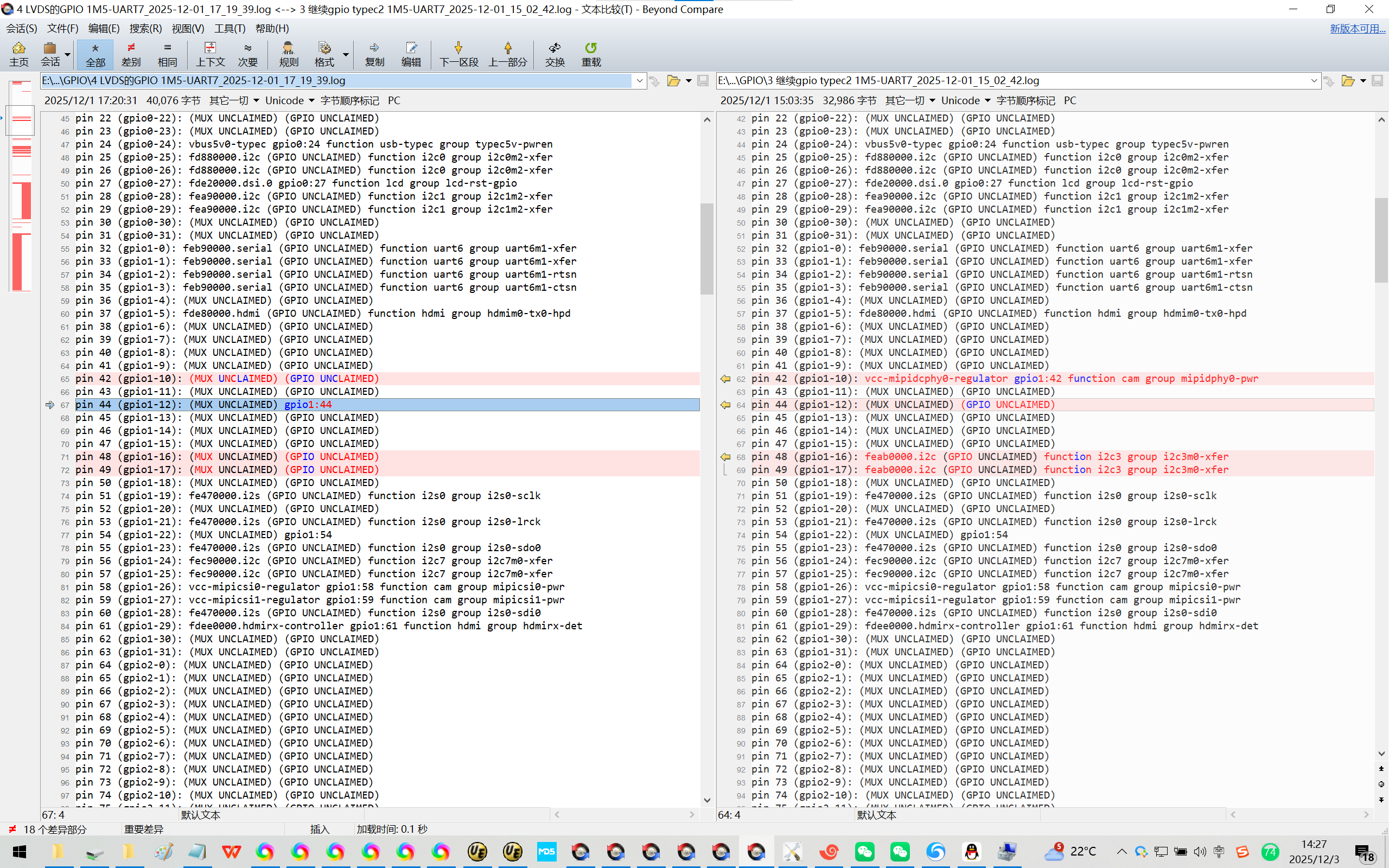
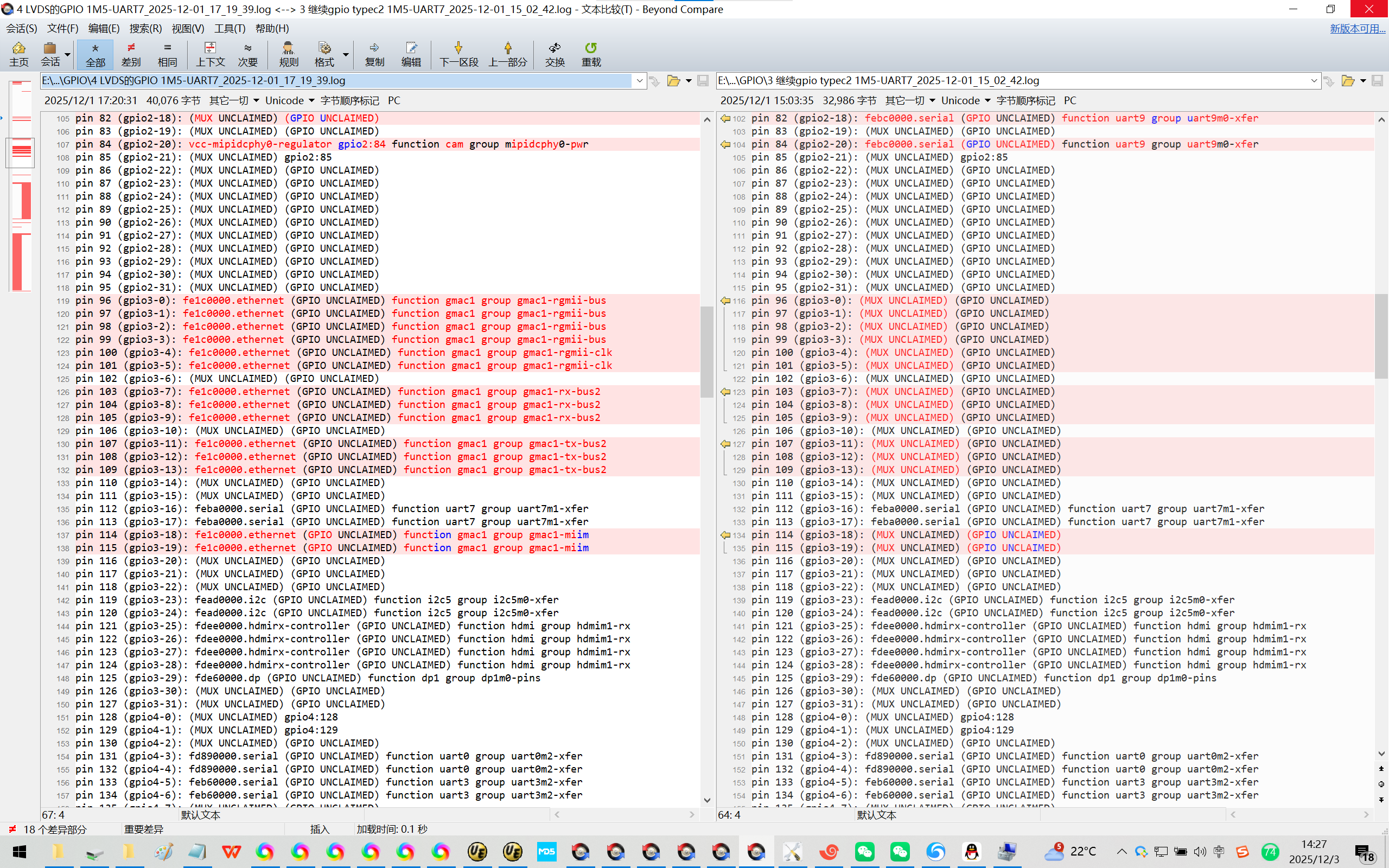
5、GPIO口的比对:
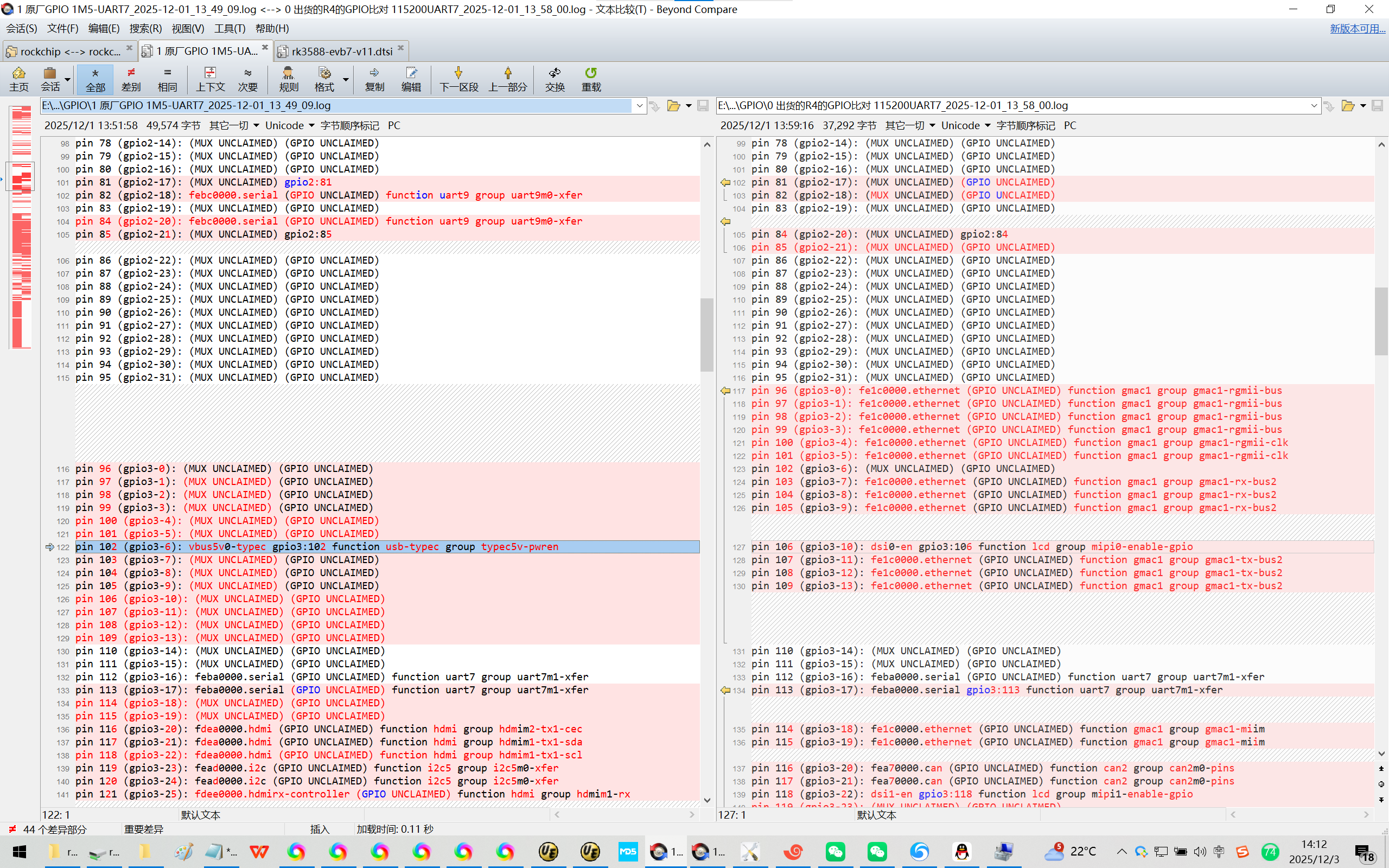
【好用的飞凌R4版本系统的GPIO口状态:】
pin 95 (gpio2-31): (MUX UNCLAIMED) (GPIO UNCLAIMED)
pin 96 (gpio3-0): fe1c0000.ethernet (GPIO UNCLAIMED) function gmac1 group gmac1-rgmii-bus
pin 97 (gpio3-1): fe1c0000.ethernet (GPIO UNCLAIMED) function gmac1 group gmac1-rgmii-bus
pin 98 (gpio3-2): fe1c0000.ethernet (GPIO UNCLAIMED) function gmac1 group gmac1-rgmii-bus
pin 99 (gpio3-3): fe1c0000.ethernet (GPIO UNCLAIMED) function gmac1 group gmac1-rgmii-bus
pin 100 (gpio3-4): fe1c0000.ethernet (GPIO UNCLAIMED) function gmac1 group gmac1-rgmii-clk
pin 101 (gpio3-5): fe1c0000.ethernet (GPIO UNCLAIMED) function gmac1 group gmac1-rgmii-clk
pin 102 (gpio3-6): (MUX UNCLAIMED) (GPIO UNCLAIMED)
pin 103 (gpio3-7): fe1c0000.ethernet (GPIO UNCLAIMED) function gmac1 group gmac1-rx-bus2
pin 104 (gpio3-8): fe1c0000.ethernet (GPIO UNCLAIMED) function gmac1 group gmac1-rx-bus2
pin 105 (gpio3-9): fe1c0000.ethernet (GPIO UNCLAIMED) function gmac1 group gmac1-rx-bus2
pin 106 (gpio3-10): dsi0-en gpio3:106 function lcd group mipi0-enable-gpio
pin 107 (gpio3-11): fe1c0000.ethernet (GPIO UNCLAIMED) function gmac1 group gmac1-tx-bus2
pin 108 (gpio3-12): fe1c0000.ethernet (GPIO UNCLAIMED) function gmac1 group gmac1-tx-bus2
pin 109 (gpio3-13): fe1c0000.ethernet (GPIO UNCLAIMED) function gmac1 group gmac1-tx-bus2
pin 110 (gpio3-14): (MUX UNCLAIMED) (GPIO UNCLAIMED)
pin 111 (gpio3-15): (MUX UNCLAIMED) (GPIO UNCLAIMED)
pin 112 (gpio3-16): feba0000.serial (GPIO UNCLAIMED) function uart7 group uart7m1-xfer
pin 113 (gpio3-17): feba0000.serial gpio3:113 function uart7 group uart7m1-xfer
pin 114 (gpio3-18): fe1c0000.ethernet (GPIO UNCLAIMED) function gmac1 group gmac1-miim
pin 115 (gpio3-19): fe1c0000.ethernet (GPIO UNCLAIMED) function gmac1 group gmac1-miim
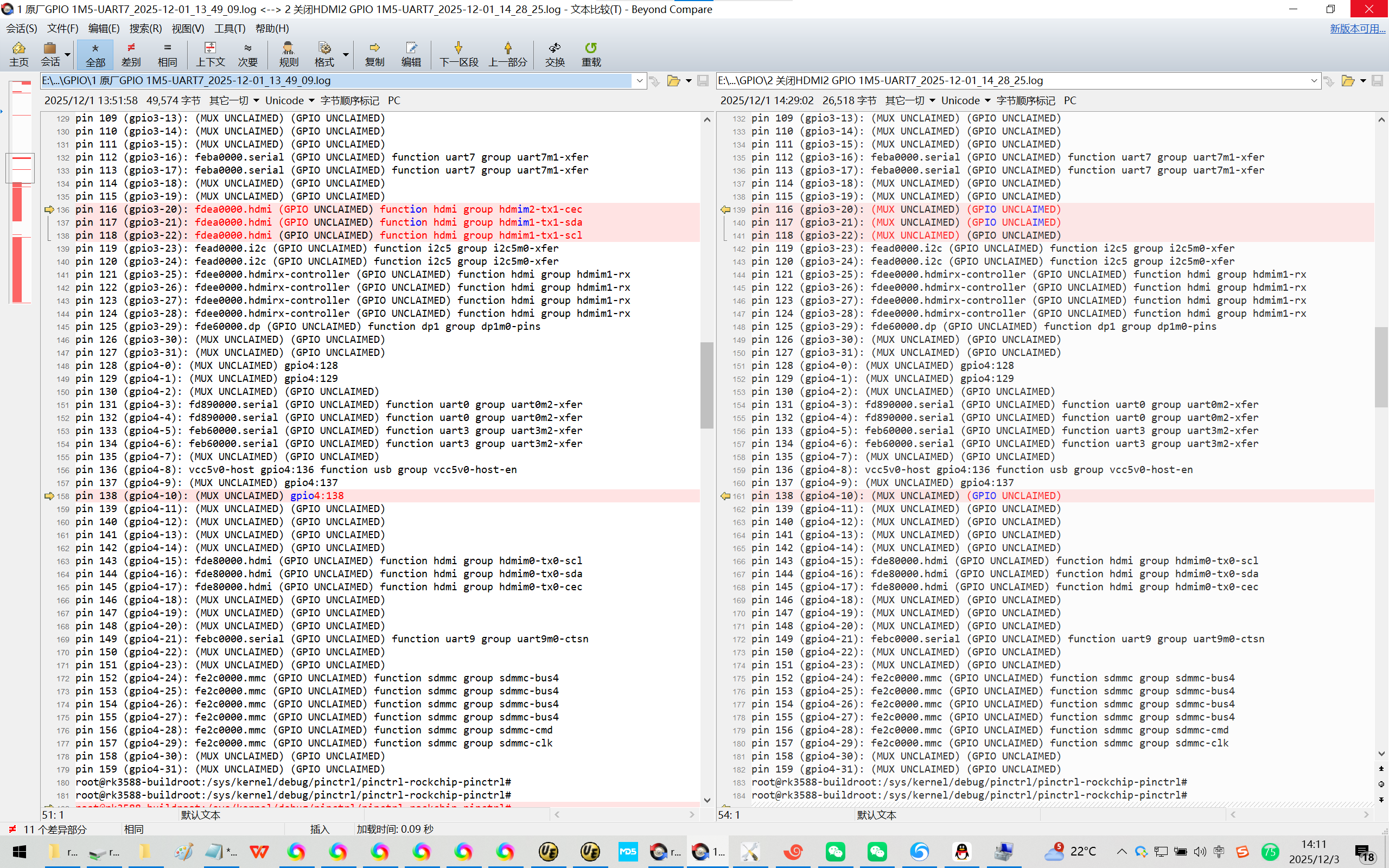
pin 116 (gpio3-20): fea70000.can (GPIO UNCLAIMED) function can2 group can2m0-pins
Rockchip原厂的Buildroot【linux-5.10】的GPIO口状态:
pin 95 (gpio2-31): (MUX UNCLAIMED) (GPIO UNCLAIMED)
pin 96 (gpio3-0): (MUX UNCLAIMED) (GPIO UNCLAIMED)
pin 97 (gpio3-1): (MUX UNCLAIMED) (GPIO UNCLAIMED)
pin 98 (gpio3-2): (MUX UNCLAIMED) (GPIO UNCLAIMED)
pin 99 (gpio3-3): (MUX UNCLAIMED) (GPIO UNCLAIMED)
pin 100 (gpio3-4): (MUX UNCLAIMED) (GPIO UNCLAIMED)
pin 101 (gpio3-5): (MUX UNCLAIMED) (GPIO UNCLAIMED)
pin 102 (gpio3-6): vbus5v0-typec gpio3:102 function usb-typec group typec5v-pwren
pin 103 (gpio3-7): (MUX UNCLAIMED) (GPIO UNCLAIMED)
pin 104 (gpio3-8): (MUX UNCLAIMED) (GPIO UNCLAIMED)
pin 105 (gpio3-9): (MUX UNCLAIMED) (GPIO UNCLAIMED)
pin 106 (gpio3-10): (MUX UNCLAIMED) (GPIO UNCLAIMED)
pin 107 (gpio3-11): (MUX UNCLAIMED) (GPIO UNCLAIMED)
pin 108 (gpio3-12): (MUX UNCLAIMED) (GPIO UNCLAIMED)
pin 109 (gpio3-13): (MUX UNCLAIMED) (GPIO UNCLAIMED)
pin 110 (gpio3-14): (MUX UNCLAIMED) (GPIO UNCLAIMED)
pin 111 (gpio3-15): (MUX UNCLAIMED) (GPIO UNCLAIMED)
pin 112 (gpio3-16): feba0000.serial (GPIO UNCLAIMED) function uart7 group uart7m1-xfer
pin 113 (gpio3-17): feba0000.serial (GPIO UNCLAIMED) function uart7 group uart7m1-xfer
pin 114 (gpio3-18): (MUX UNCLAIMED) (GPIO UNCLAIMED)
pin 115 (gpio3-19): (MUX UNCLAIMED) (GPIO UNCLAIMED)
pin 116 (gpio3-20): fdea0000.hdmi (GPIO UNCLAIMED) function hdmi group hdmim2-tx1-cec
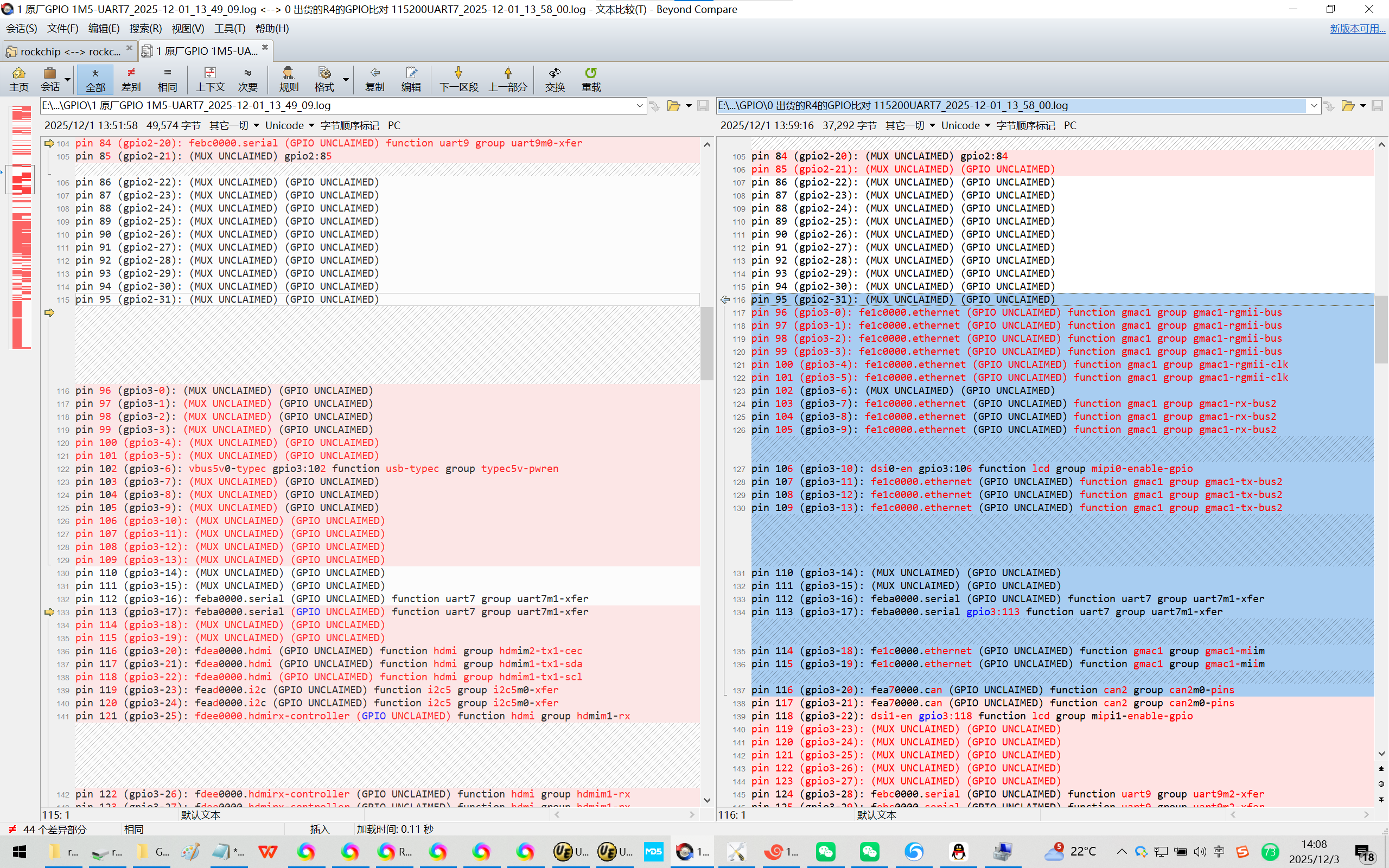
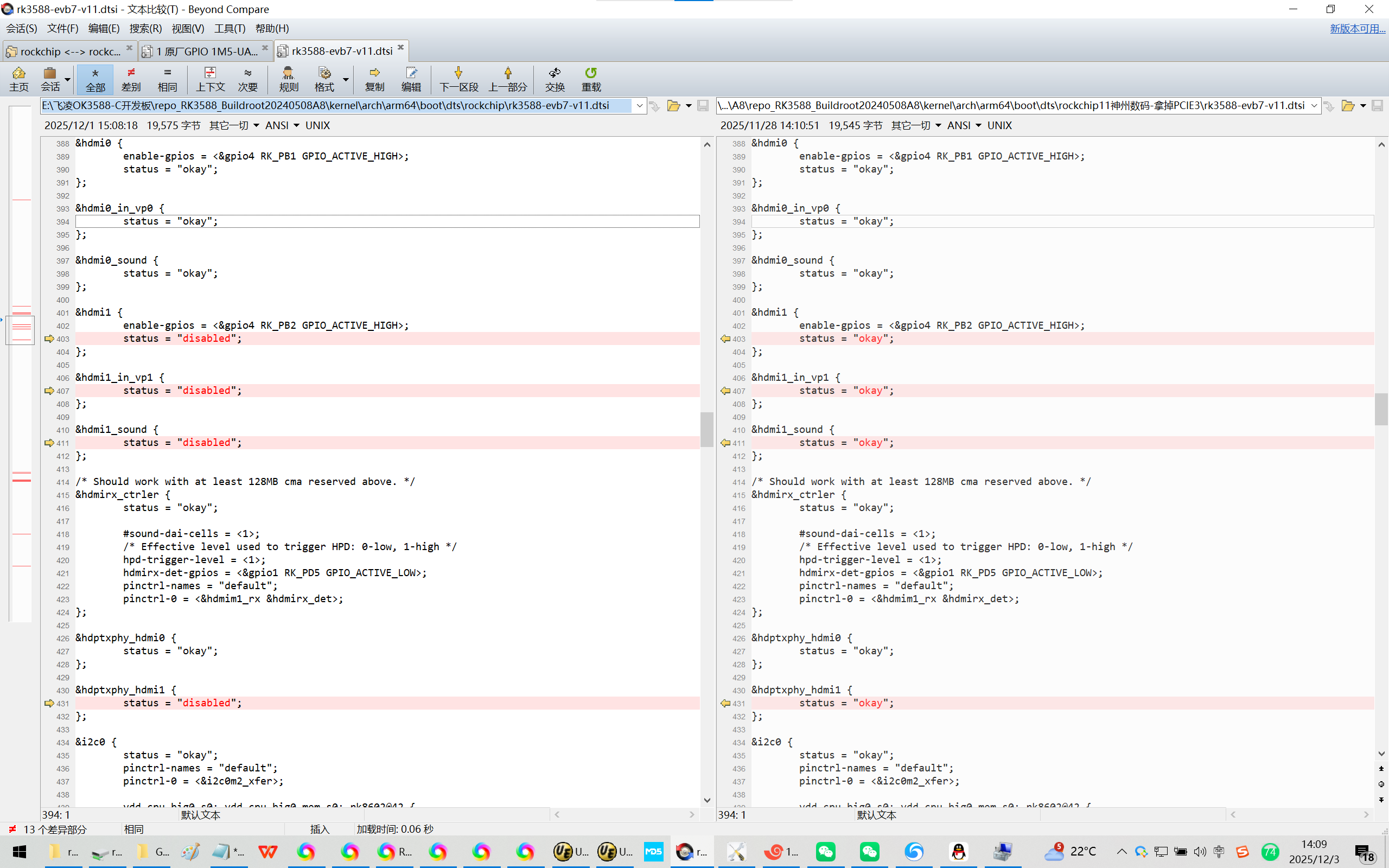
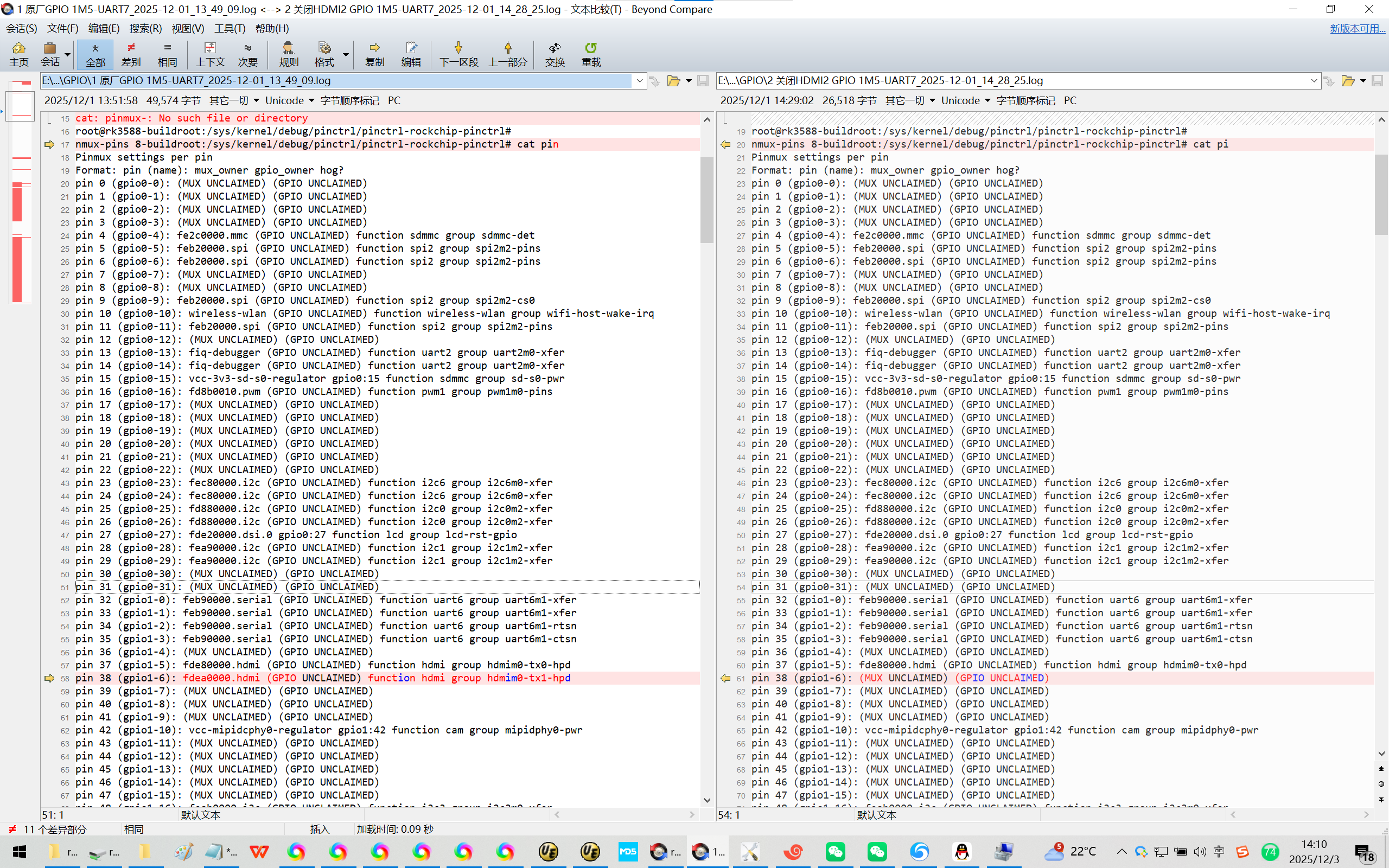
为了排除可能得干扰:拿掉HDMI2【可选】
&hdmi1 {
enable-gpios = <&gpio4 RK_PB2 GPIO_ACTIVE_HIGH>;
status = "disabled";
};
&hdmi1_in_vp1 {
status = "disabled";
};
&hdmi1_sound {
status = "disabled";
};
/* Should work with at least 128MB cma reserved above. */
&hdmirx_ctrler {
status = "okay";
#sound-dai-cells = <1>;
/* Effective level used to trigger HPD: 0-low, 1-high */
hpd-trigger-level = <1>;
hdmirx-det-gpios = <&gpio1 RK_PD5 GPIO_ACTIVE_LOW>;
pinctrl-names = "default";
pinctrl-0 = <&hdmim1_rx &hdmirx_det>;
};
&hdptxphy_hdmi0 {
status = "okay";
};
&hdptxphy_hdmi1 {
status = "disabled";
};
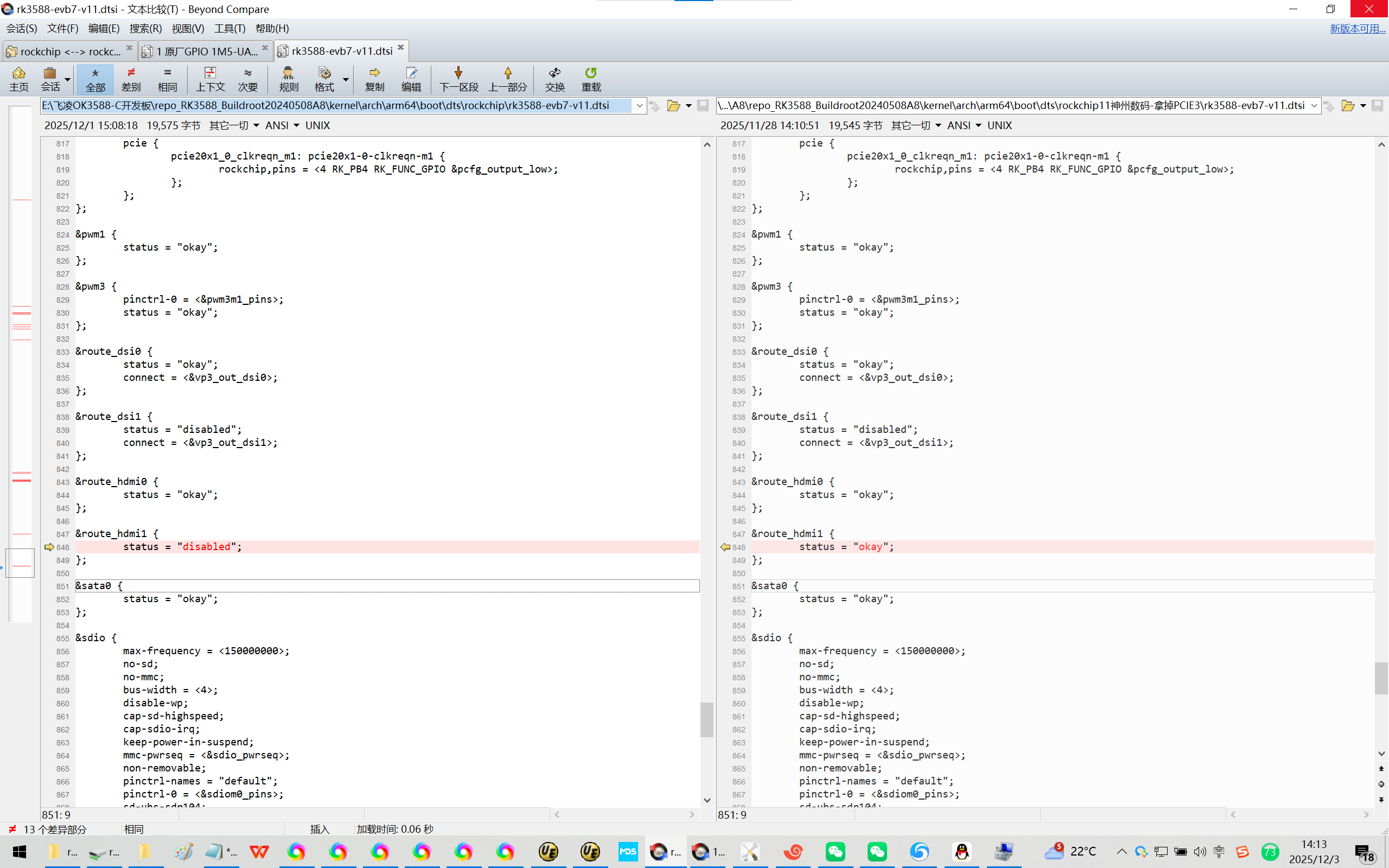
&route_hdmi1 {
status = "disabled";
};
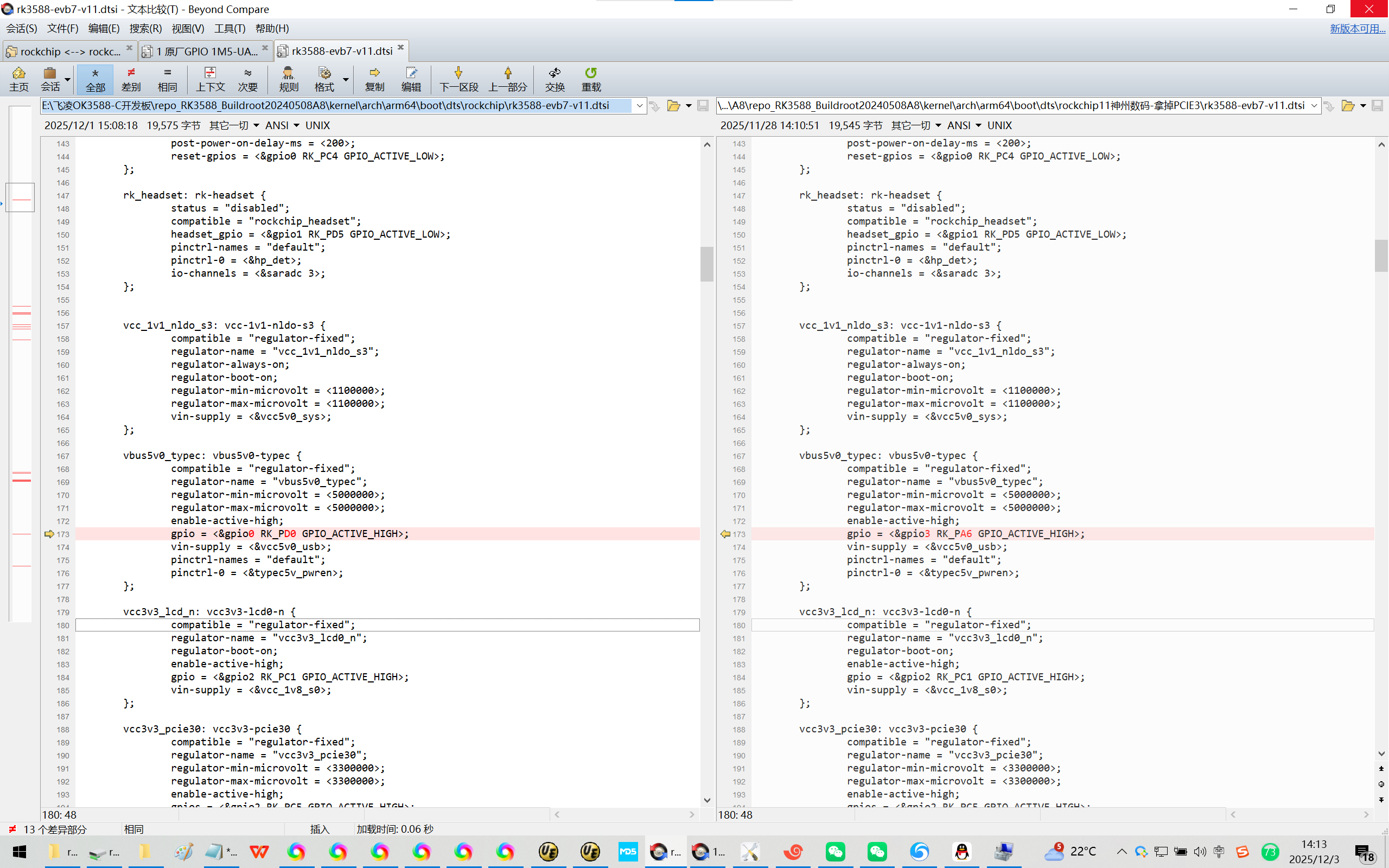
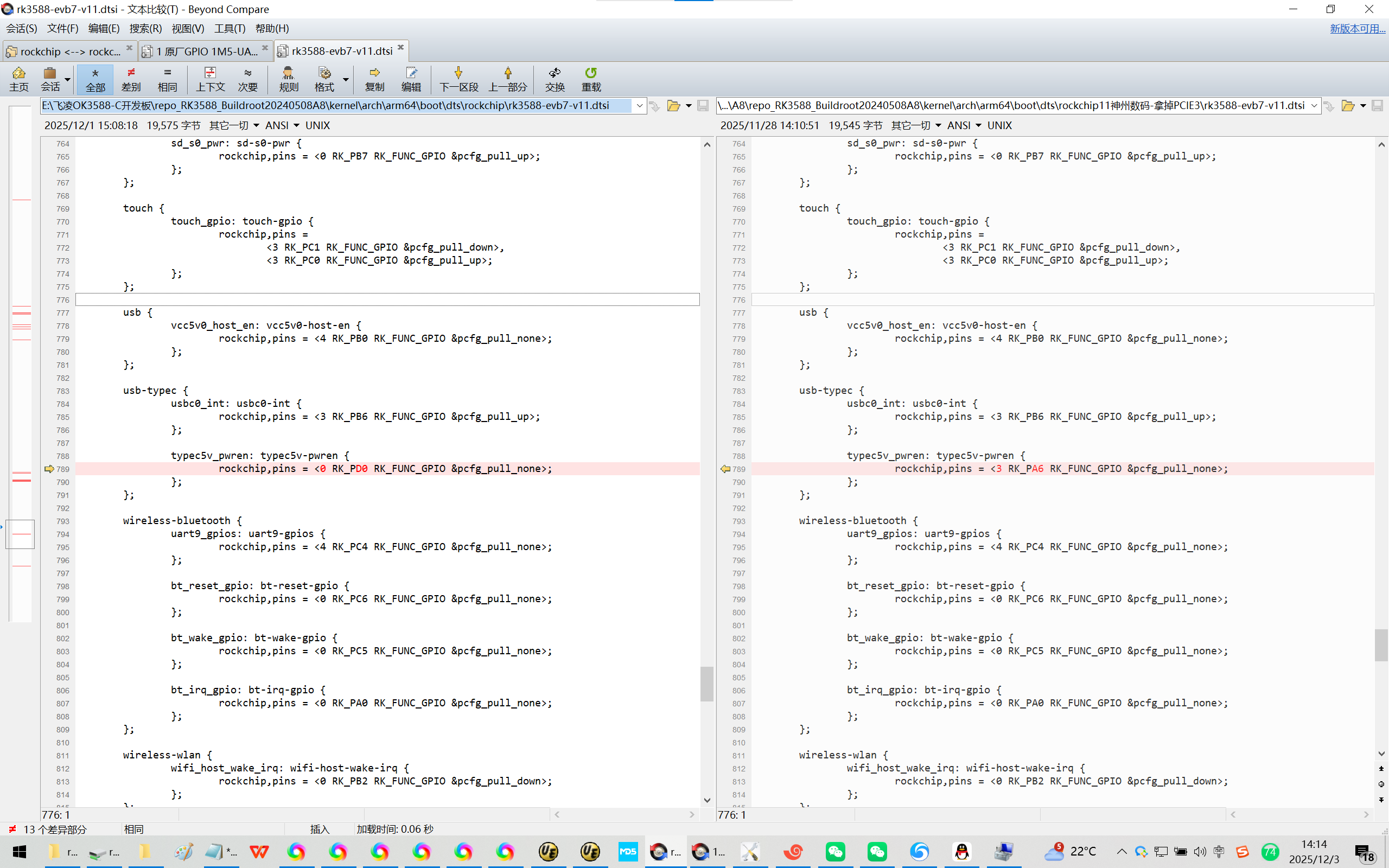
6、为了排除可能得干扰:拿掉vbus5v0-typec【可选】
pin 102 (gpio3-6): vbus5v0-typec gpio3:102 function usb-typec group typec5v-pwren
vbus5v0_typec: vbus5v0-typec {
compatible = "regulator-fixed";
regulator-name = "vbus5v0_typec";
regulator-min-microvolt = <5000000>;
regulator-max-microvolt = <5000000>;
enable-active-high;
gpio = <&gpio0 RK_PD0 GPIO_ACTIVE_HIGH>;
vin-supply = <&vcc5v0_usb>;
pinctrl-names = "default";
pinctrl-0 = <&typec5v_pwren>;
};
usb {
vcc5v0_host_en: vcc5v0-host-en {
rockchip,pins = <4 RK_PB0 RK_FUNC_GPIO &pcfg_pull_none>;
};
};
usb-typec {
usbc0_int: usbc0-int {
rockchip,pins = <3 RK_PB6 RK_FUNC_GPIO &pcfg_pull_up>;
};
typec5v_pwren: typec5v-pwren {
rockchip,pins = <0 RK_PD0 RK_FUNC_GPIO &pcfg_pull_none>;
};
};
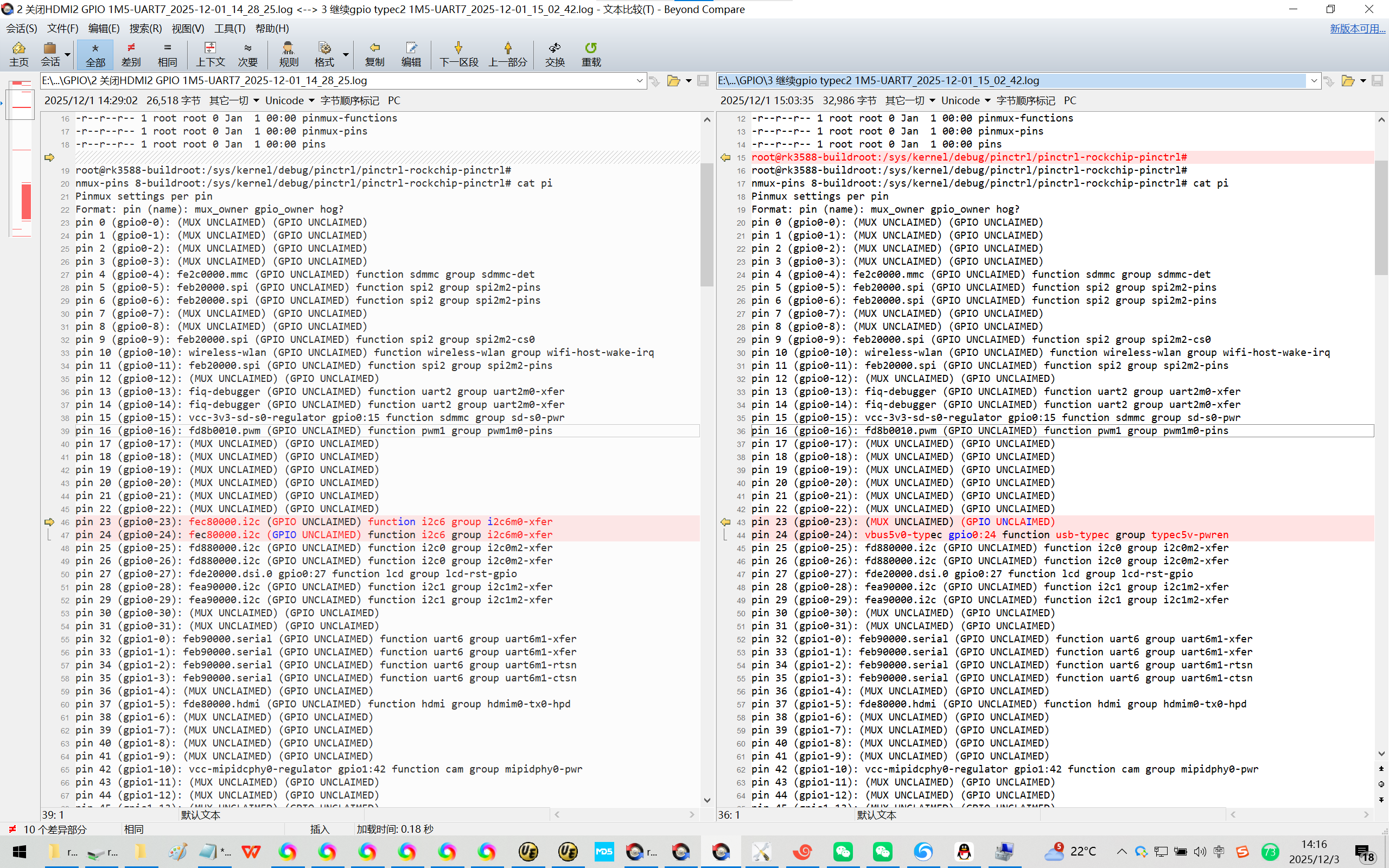
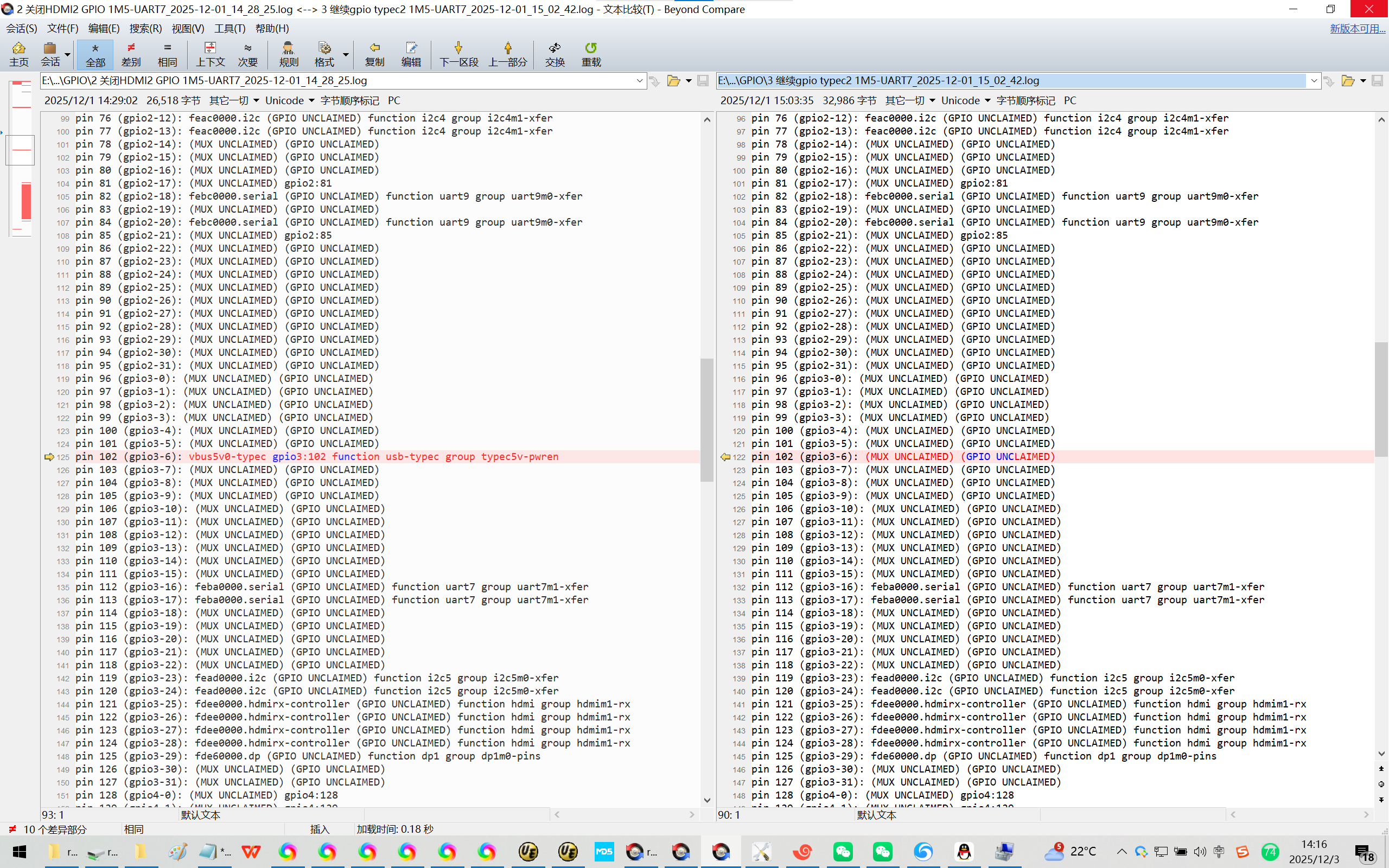
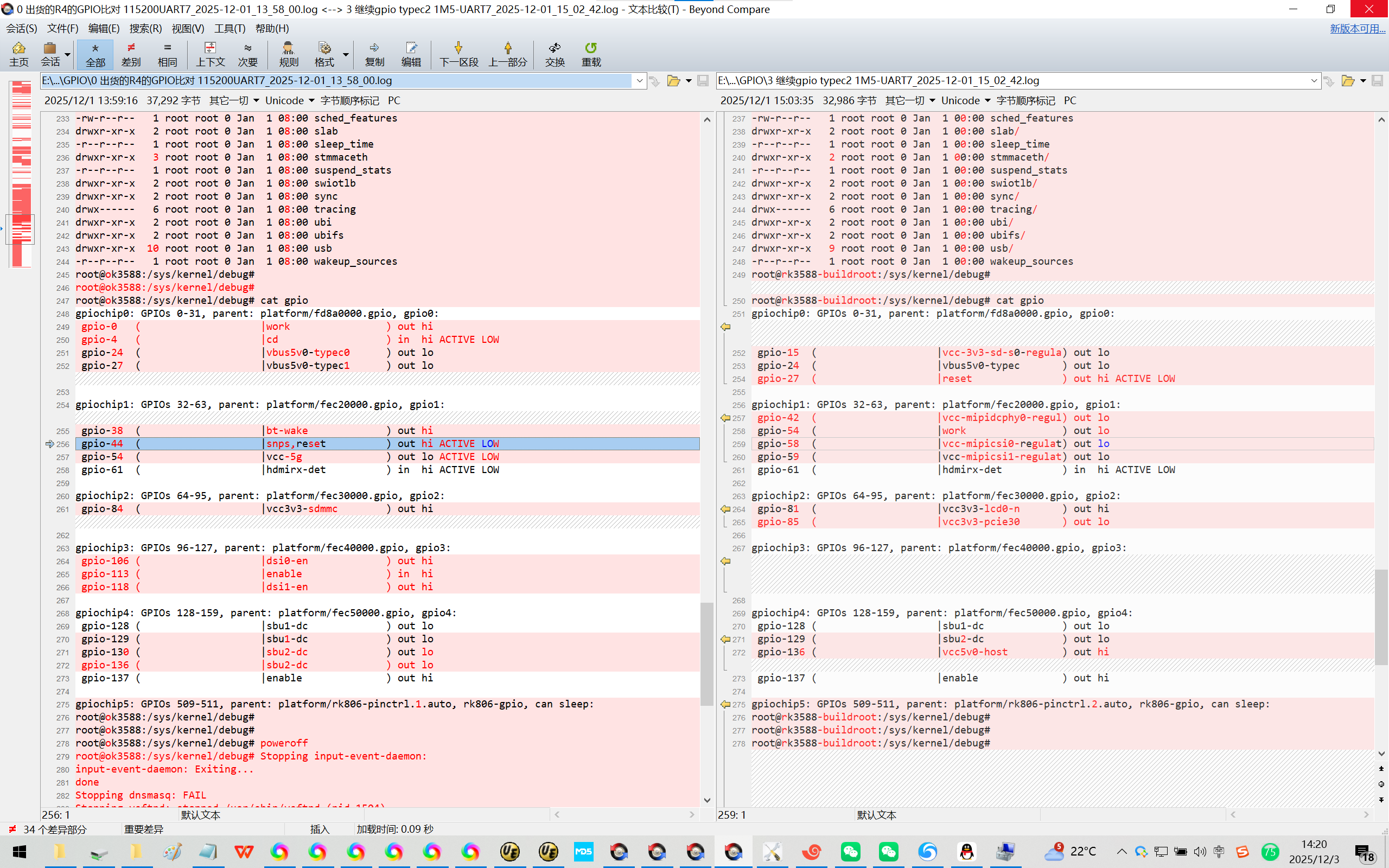
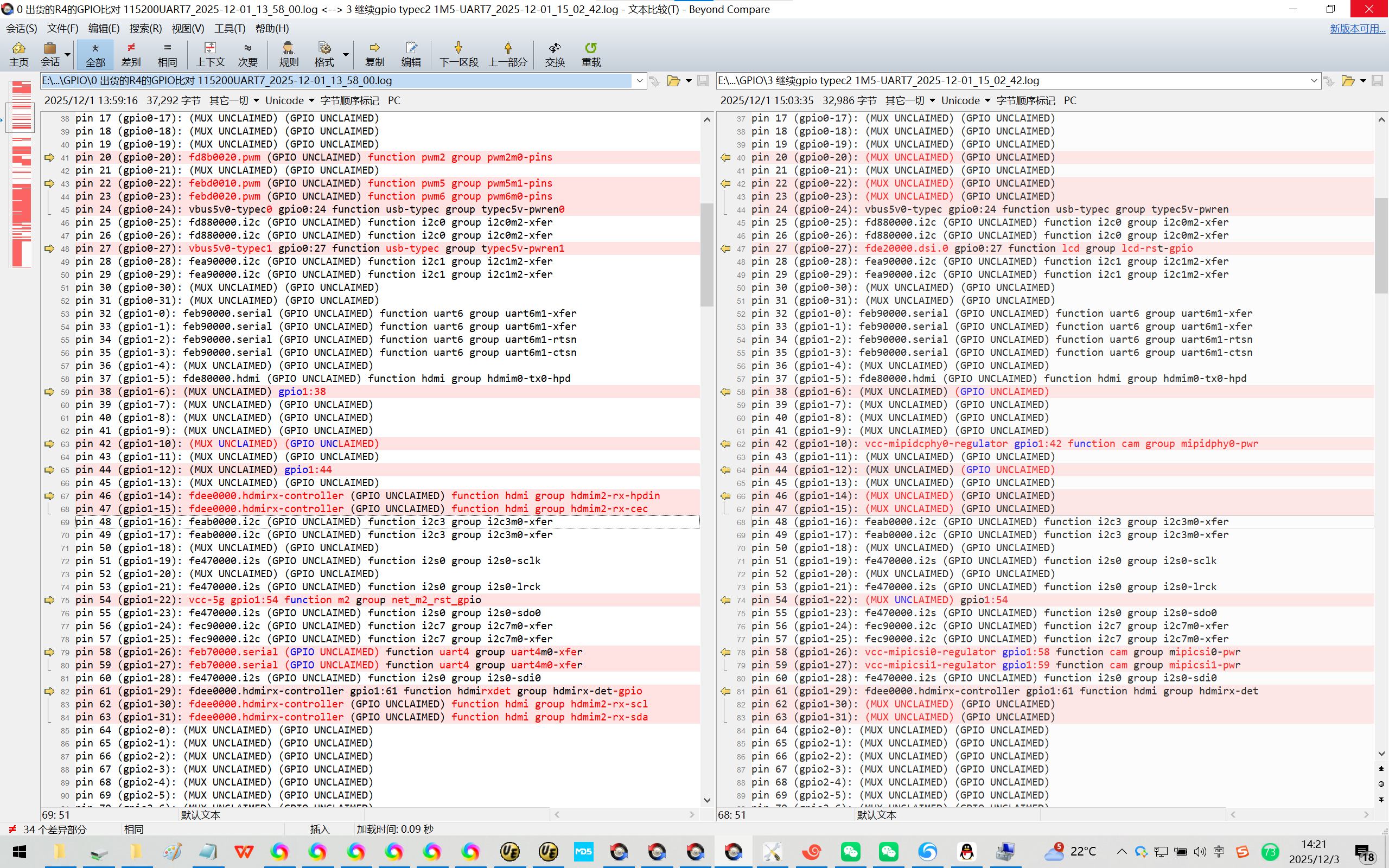
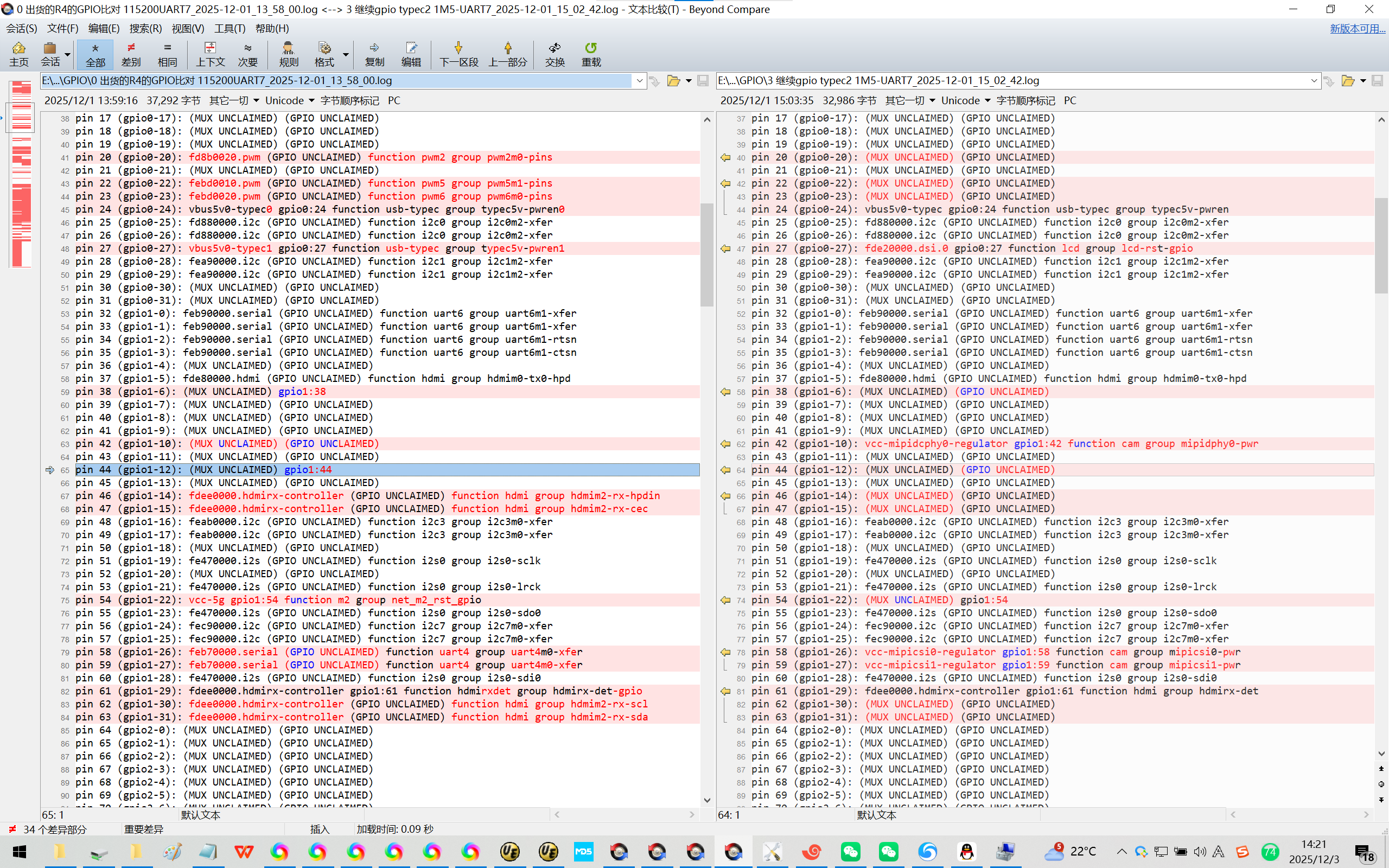
7、gmac1口的GPIO口状态肉眼可见的趋同了!【没有被复用!】
Rockchip原厂的Buildroot【linux-5.10】的GPIO口状态:
pin 95 (gpio2-31): (MUX UNCLAIMED) (GPIO UNCLAIMED)
pin 96 (gpio3-0): (MUX UNCLAIMED) (GPIO UNCLAIMED)
pin 97 (gpio3-1): (MUX UNCLAIMED) (GPIO UNCLAIMED)
pin 98 (gpio3-2): (MUX UNCLAIMED) (GPIO UNCLAIMED)
pin 99 (gpio3-3): (MUX UNCLAIMED) (GPIO UNCLAIMED)
pin 100 (gpio3-4): (MUX UNCLAIMED) (GPIO UNCLAIMED)
pin 101 (gpio3-5): (MUX UNCLAIMED) (GPIO UNCLAIMED)
pin 102 (gpio3-6): (MUX UNCLAIMED) (GPIO UNCLAIMED)
pin 103 (gpio3-7): (MUX UNCLAIMED) (GPIO UNCLAIMED)
pin 104 (gpio3-8): (MUX UNCLAIMED) (GPIO UNCLAIMED)
pin 105 (gpio3-9): (MUX UNCLAIMED) (GPIO UNCLAIMED)
pin 106 (gpio3-10): (MUX UNCLAIMED) (GPIO UNCLAIMED)
pin 107 (gpio3-11): (MUX UNCLAIMED) (GPIO UNCLAIMED)
pin 108 (gpio3-12): (MUX UNCLAIMED) (GPIO UNCLAIMED)
pin 109 (gpio3-13): (MUX UNCLAIMED) (GPIO UNCLAIMED)
pin 110 (gpio3-14): (MUX UNCLAIMED) (GPIO UNCLAIMED)
pin 111 (gpio3-15): (MUX UNCLAIMED) (GPIO UNCLAIMED)
pin 112 (gpio3-16): feba0000.serial (GPIO UNCLAIMED) function uart7 group uart7m1-xfer
pin 113 (gpio3-17): feba0000.serial (GPIO UNCLAIMED) function uart7 group uart7m1-xfer
pin 114 (gpio3-18): (MUX UNCLAIMED) (GPIO UNCLAIMED)
pin 115 (gpio3-19): (MUX UNCLAIMED) (GPIO UNCLAIMED)
pin 116 (gpio3-20): (MUX UNCLAIMED) (GPIO UNCLAIMED)
【好用的飞凌R4版本系统的GPIO口状态:】
pin 95 (gpio2-31): (MUX UNCLAIMED) (GPIO UNCLAIMED)
pin 96 (gpio3-0): fe1c0000.ethernet (GPIO UNCLAIMED) function gmac1 group gmac1-rgmii-bus
pin 97 (gpio3-1): fe1c0000.ethernet (GPIO UNCLAIMED) function gmac1 group gmac1-rgmii-bus
pin 98 (gpio3-2): fe1c0000.ethernet (GPIO UNCLAIMED) function gmac1 group gmac1-rgmii-bus
pin 99 (gpio3-3): fe1c0000.ethernet (GPIO UNCLAIMED) function gmac1 group gmac1-rgmii-bus
pin 100 (gpio3-4): fe1c0000.ethernet (GPIO UNCLAIMED) function gmac1 group gmac1-rgmii-clk
pin 101 (gpio3-5): fe1c0000.ethernet (GPIO UNCLAIMED) function gmac1 group gmac1-rgmii-clk
pin 102 (gpio3-6): (MUX UNCLAIMED) (GPIO UNCLAIMED)
pin 103 (gpio3-7): fe1c0000.ethernet (GPIO UNCLAIMED) function gmac1 group gmac1-rx-bus2
pin 104 (gpio3-8): fe1c0000.ethernet (GPIO UNCLAIMED) function gmac1 group gmac1-rx-bus2
pin 105 (gpio3-9): fe1c0000.ethernet (GPIO UNCLAIMED) function gmac1 group gmac1-rx-bus2
pin 106 (gpio3-10): dsi0-en gpio3:106 function lcd group mipi0-enable-gpio
pin 107 (gpio3-11): fe1c0000.ethernet (GPIO UNCLAIMED) function gmac1 group gmac1-tx-bus2
pin 108 (gpio3-12): fe1c0000.ethernet (GPIO UNCLAIMED) function gmac1 group gmac1-tx-bus2
pin 109 (gpio3-13): fe1c0000.ethernet (GPIO UNCLAIMED) function gmac1 group gmac1-tx-bus2
pin 110 (gpio3-14): (MUX UNCLAIMED) (GPIO UNCLAIMED)
pin 111 (gpio3-15): (MUX UNCLAIMED) (GPIO UNCLAIMED)
pin 112 (gpio3-16): feba0000.serial (GPIO UNCLAIMED) function uart7 group uart7m1-xfer
pin 113 (gpio3-17): feba0000.serial gpio3:113 function uart7 group uart7m1-xfer
pin 114 (gpio3-18): fe1c0000.ethernet (GPIO UNCLAIMED) function gmac1 group gmac1-miim
pin 115 (gpio3-19): fe1c0000.ethernet (GPIO UNCLAIMED) function gmac1 group gmac1-miim
pin 116 (gpio3-20): fea70000.can (GPIO UNCLAIMED) function can2 group can2m0-pins
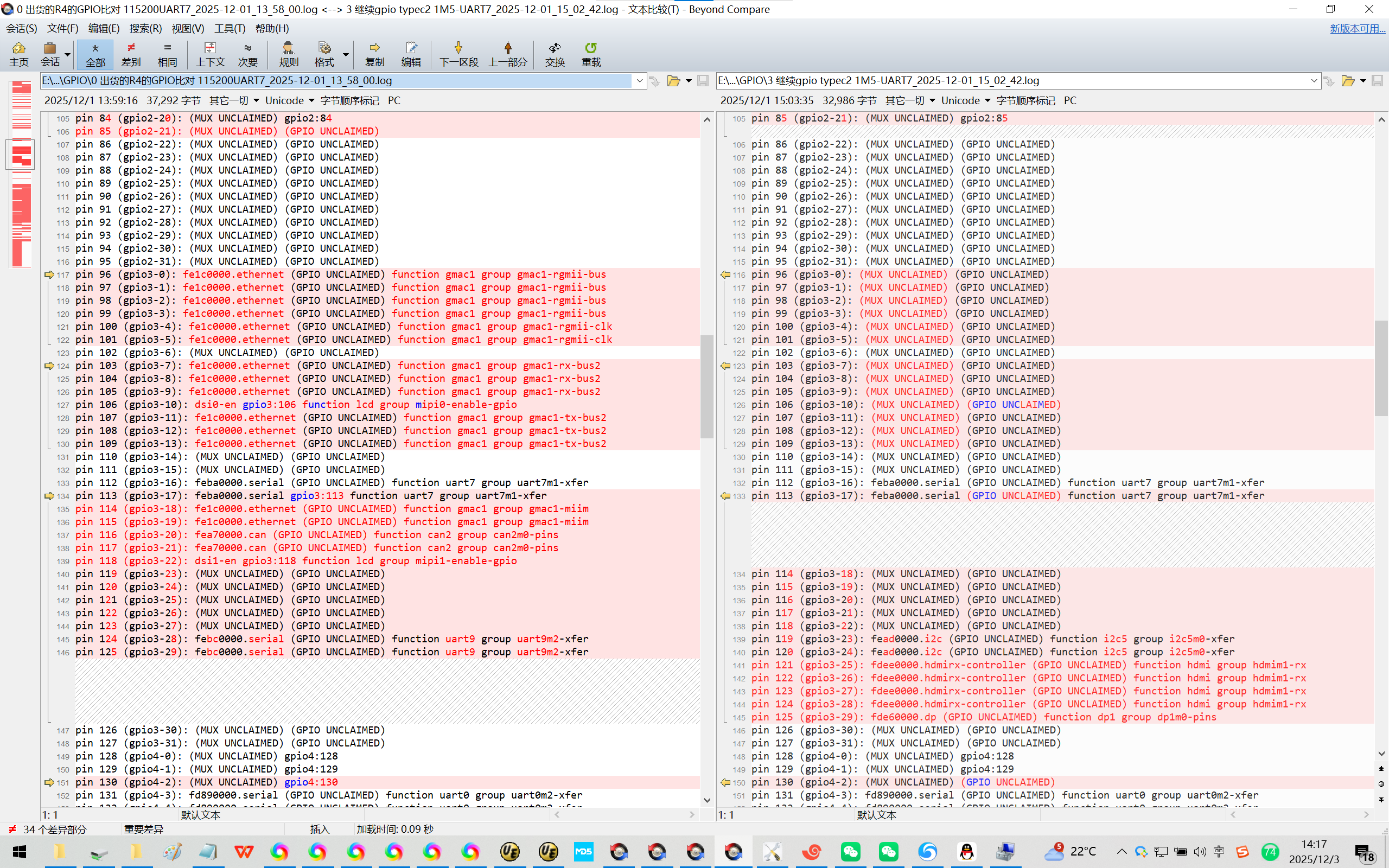
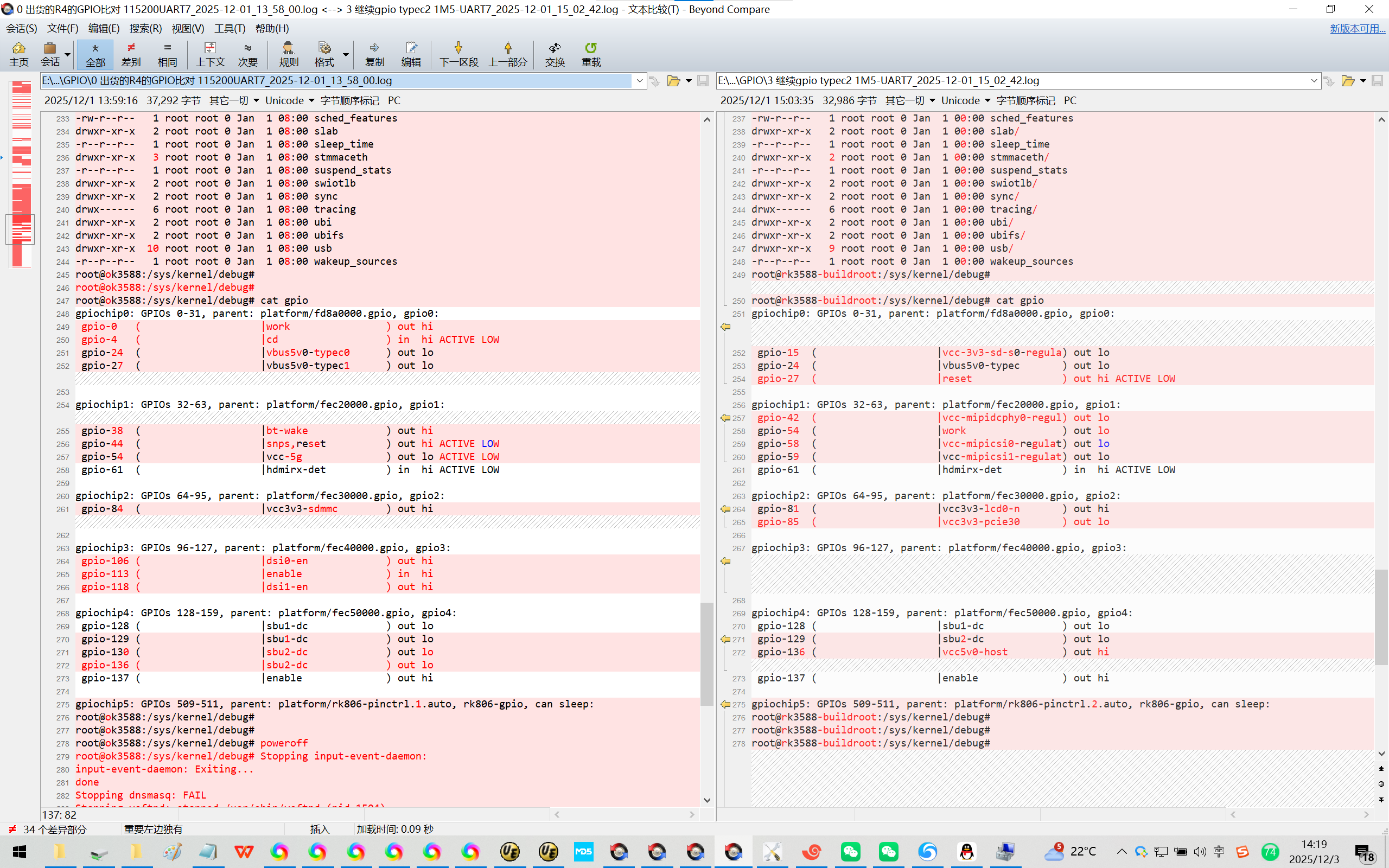
根据经验/艰难得知:【问题出在这里!】
gpio-44 ( |snps,reset ) out hi ACTIVE LOW
8、
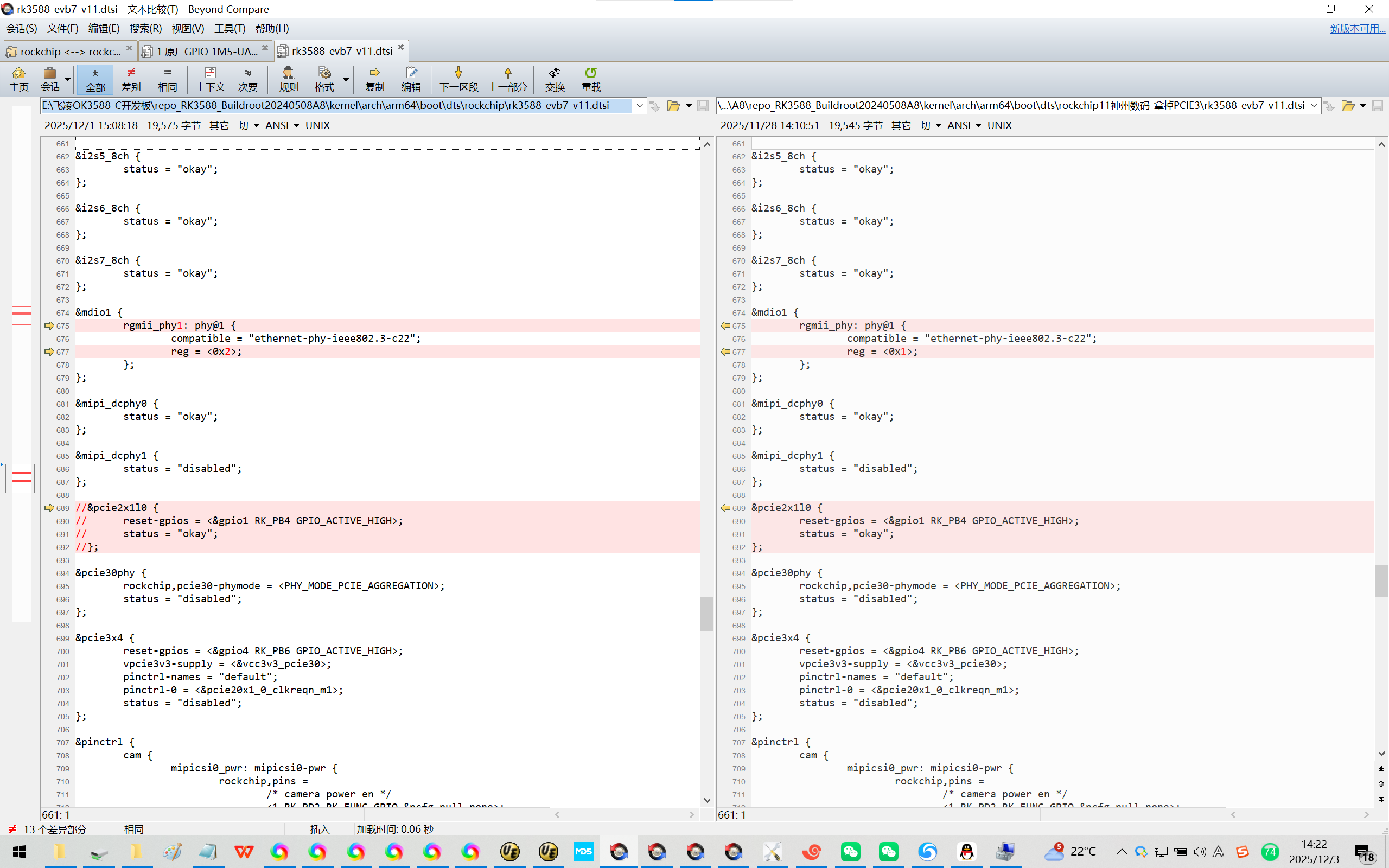
&pcie2x1l0 {
reset-gpios = <&gpio1 RK_PB4 GPIO_ACTIVE_HIGH>;
status = "okay";
};
修改为:
//&pcie2x1l0 {
// reset-gpios = <&gpio1 RK_PB4 GPIO_ACTIVE_HIGH>;
// status = "okay";
//};
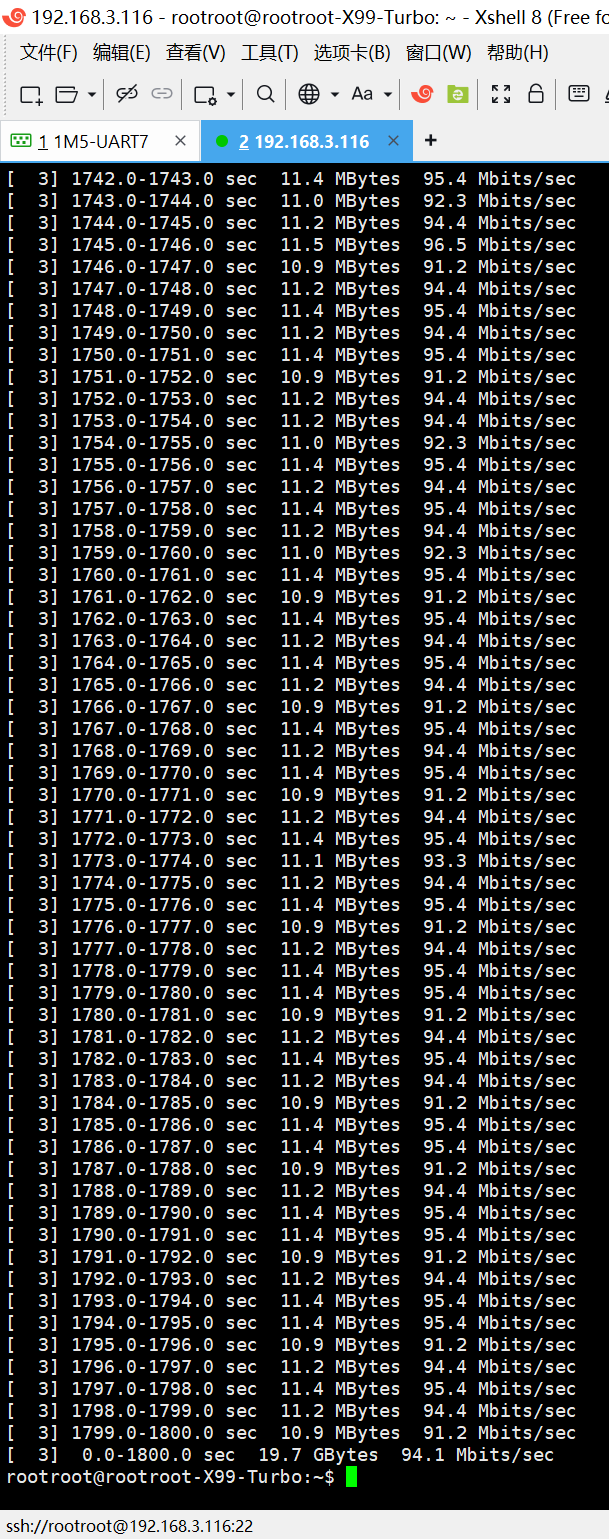
9、使用系统自带的iperf2测试【iperf3需要在编译buildroot的时候手工打开!^_】
飞凌OK3588-C核心板 跑 你提供的 Buildroot【linux-5.10】
先插网线再开机,找不到eth0。
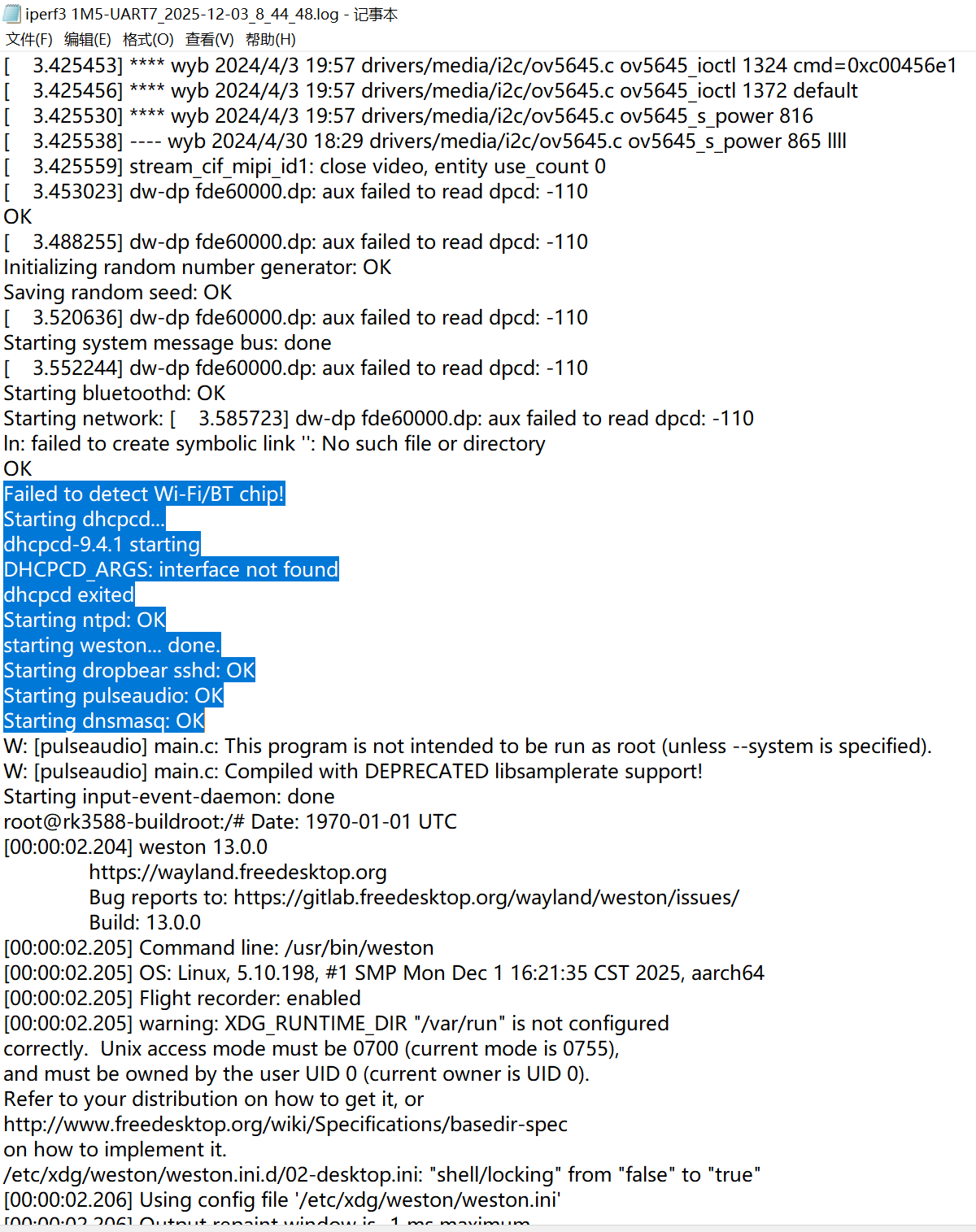
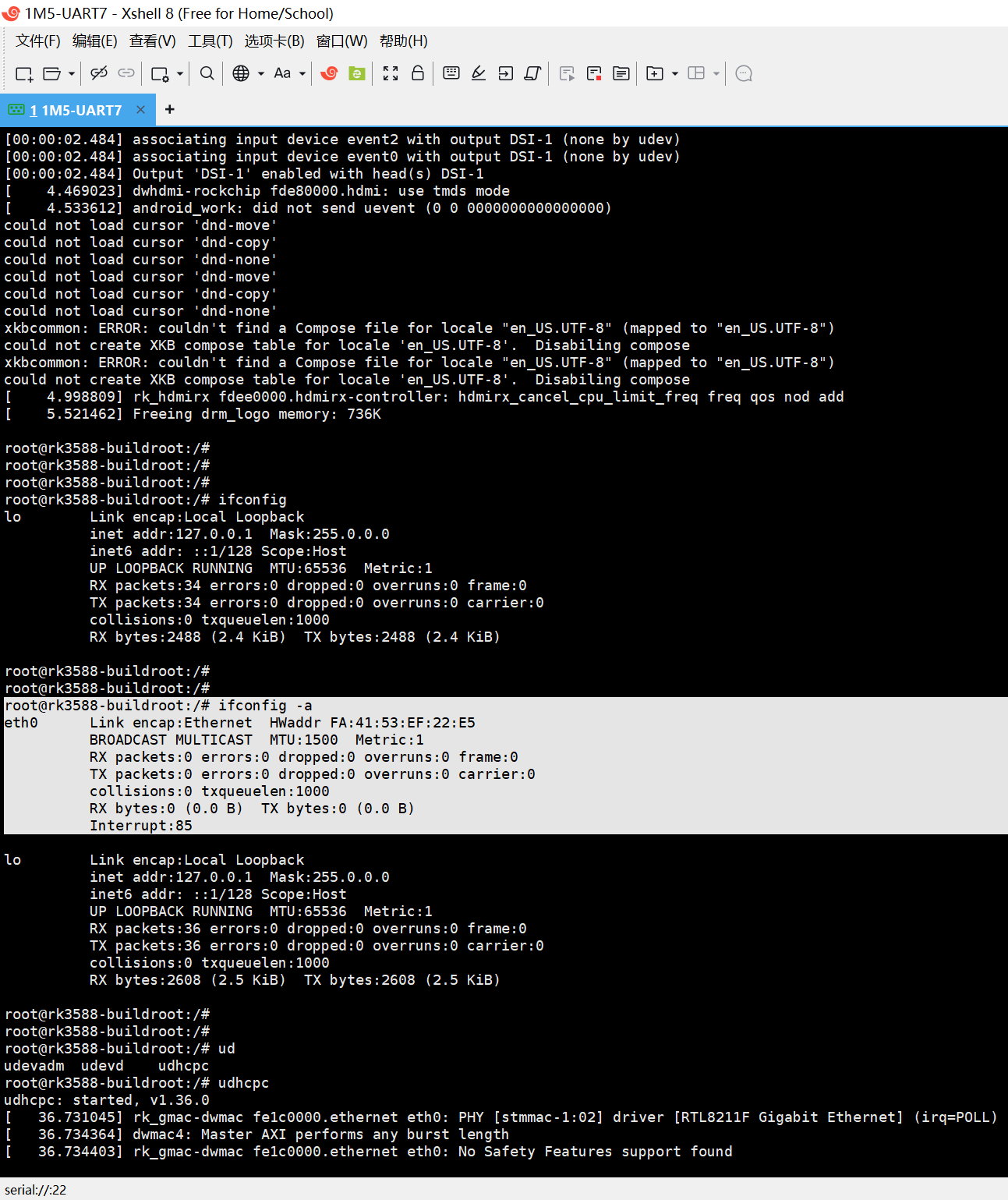
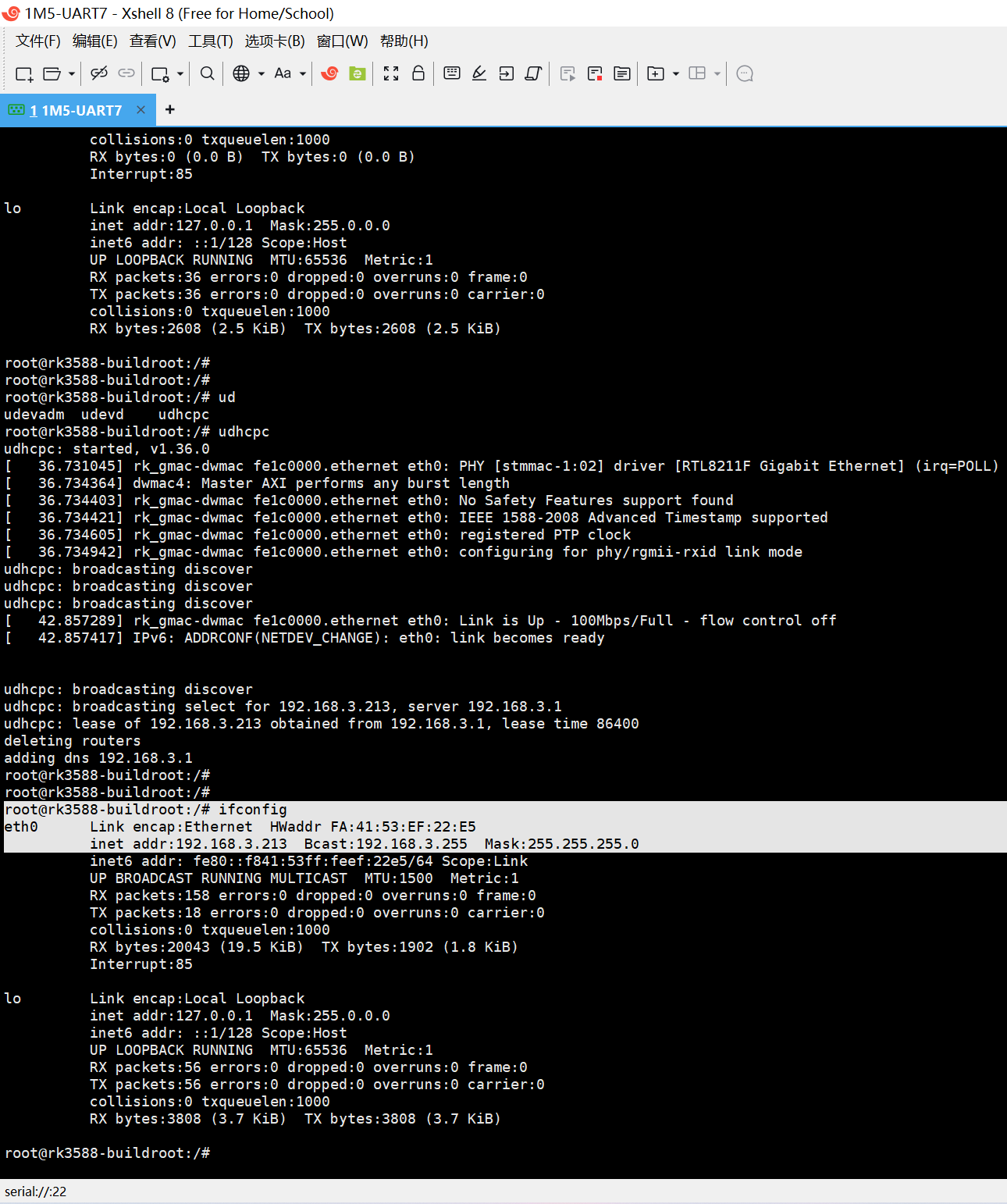
但是 开机之后使用 udhcpc是可以 自动分配IP地址的!。
请问 udhcpc是在哪里 加载的?能否让它加载的晚那么一点?延迟10s?
[BEGIN] 2025/12/3 8:49:42
rootroot@rootroot-X99-Turbo:~$ iperf -c 192.168.3.213 -i 1 -t 1800
------------------------------------------------------------
Client connecting to 192.168.3.213, TCP port 5001
TCP window size: 212 KByte (default)
------------------------------------------------------------
[ 3] local 192.168.3.116 port 34282 connected with 192.168.3.213 port 5001
[ ID] Interval Transfer Bandwidth
[ 3] 0.0- 1.0 sec 12.4 MBytes 104 Mbits/sec
[ 3] 1.0- 2.0 sec 10.9 MBytes 91.2 Mbits/sec
[ 3] 2.0- 3.0 sec 11.4 MBytes 95.4 Mbits/sec
[ 3] 3.0- 4.0 sec 11.4 MBytes 95.4 Mbits/sec
[ 3] 4.0- 5.0 sec 11.4 MBytes 95.4 Mbits/sec
[ 3] 5.0- 6.0 sec 10.9 MBytes 91.2 Mbits/sec
[ 3] 1794.0-1795.0 sec 11.4 MBytes 95.4 Mbits/sec
[ 3] 1795.0-1796.0 sec 10.9 MBytes 91.2 Mbits/sec
[ 3] 1796.0-1797.0 sec 11.2 MBytes 94.4 Mbits/sec
[ 3] 1797.0-1798.0 sec 11.4 MBytes 95.4 Mbits/sec
[ 3] 1798.0-1799.0 sec 11.2 MBytes 94.4 Mbits/sec
[ 3] 1799.0-1800.0 sec 10.9 MBytes 91.2 Mbits/sec
[ 3] 0.0-1800.0 sec 19.7 GBytes 94.1 Mbits/sec
rootroot@rootroot-X99-Turbo:~$
[END] 2025/12/3 9:38:52
Initializing random number generator: OK
Saving random seed: OK
Starting system message bus: [ 3.942144] dw-dp fde60000.dp: aux failed to read dpcd: -110
done
Starting bluetoothd: OK
Starting network: [ 3.974653] dw-dp fde60000.dp: aux failed to read dpcd: -110
ln: failed to create symbolic link '': No such file or directory
Failed to detect Wi-Fi/BT chip!
[ 4.007038] dw-dp fde60000.dp: aux failed to read dpcd: -110
OK
Starting dhcpcd...
dhcpcd-9.4.1 starting
DHCPCD_ARGS: interface not found
Starting ntpd: [ 4.041473] dw-dp fde60000.dp: aux failed to read dpcd: -110
OK
starting weston... done.
Starting dropbear sshd: OK
Starting pulseaudio: OK
Starting dnsmasq: OK
Starting input-event-daemon: done
W: [pulseaudio] main.c: This program is not intended to be run as root (unless --system is specified).
W: [pulseaudio] main.c: Compiled with DEPRECATED libsamplerate support!
root@rk3588-buildroot:/# Date: 1970-01-01 UTC
[00:00:02.245] weston 13.0.0
https://wayland.freedesktop.org
Bug reports to: https://gitlab.freedesktop.org/wayland/weston/issues/
Build: 13.0.0
[00:00:02.246] Command line: /usr/bin/weston
[00:00:02.246] OS: Linux, 5.10.198, #1 SMP Mon Dec 1 16:21:35 CST 2025, aarch64
[00:00:02.246] Flight recorder: enabled
[00:00:02.246] warning: XDG_RUNTIME_DIR "/var/run" is not configured
correctly. Unix access mode must be 0700 (current mode is 0755),
and must be owned by the user UID 0 (current owner is UID 0).
Refer to your distribution on how to get it, or
http://www.freedesktop.org/wiki/Specifications/basedir-spec
on how to implement it.
/etc/xdg/weston/weston.ini.d/02-desktop.ini: "shell/locking" from "false" to "true"
[00:00:02.247] Using config file '/etc/xdg/weston/weston.ini'
[00:00:02.247] Output repaint window is -1 ms maximum.
[00:00:02.248] Loading module '/usr/lib/libweston-13/drm-backend.so'
[00:00:02.251] initializing drm backend
[00:00:02.251] Entering mirror mode.
[00:00:02.251] Trying direct launcher...
[00:00:02.253] using /dev/dri/card0
[00:00:02.253] DRM: does not support atomic modesetting
[00:00:02.253] DRM: does not support GBM modifiers
[00:00:02.253] DRM: does not support async page flipping
[00:00:02.253] DRM: supports picture aspect ratio
[00:00:02.255] Loading module '/usr/lib/libweston-13/gl-renderer.so'
arm_release_ver: g13p0-01eac0, rk_so_ver: 10
[ 4.216852] rk_hdmirx fdee0000.hdmirx-controller: hdmirx_audio_startup: device is no connected or audio is off
[ 4.216862] hdmi-audio-codec hdmi-audio-codec.6.auto: ASoC: error at snd_soc_dai_startup on i2s-hifi: -19
[ 4.223434] mali fb000000.gpu: Loading Mali firmware 0x1010000
[ 4.225761] mali fb000000.gpu: Mali firmware git_sha: ee476db42870778306fa8d559a605a73f13e455c
[ 4.228300] rk_hdmirx fdee0000.hdmirx-controller: hdmirx_audio_startup: device is no connected or audio is off
[ 4.228329] hdmi-audio-codec hdmi-audio-codec.6.auto: ASoC: error at snd_soc_dai_startup on i2s-hifi: -19
[ 4.239923] rk_hdmirx fdee0000.hdmirx-controller: hdmirx_audio_startup: device is no connected or audio is off
[00:00:02.289] EGL version: 1.4 Valhall-"g13p0-01eac0"
[ 4.239942] hdmi-audio-codec hdmi-audio-codec.6.auto: ASoC: error at snd_soc_dai_startup on i2s-hifi: -19
[00:00:02.289] EGL vendor: ARM
[00:00:02.289] EGL client APIs: OpenGL_ES
[00:00:02.289] EGL features:
EGL Wayland extension: yes
context priority: yes
buffer age: no
partial update: yes
swap buffers with damage: no
configless context: yes
surfaceless context: yes
dmabuf support: modifiers
E: [pulseaudio] module-alsa-card.c: Failed to find a working profile.
E: [pulseaudio] module.c: Failed to load module "module-alsa-card" (argument: "device_id="0" name="platform-hdmiin-sound" card_name="alsa_card.platform-hdmiin-sound" namereg_fail=false tsched=no fixed_latency_range=no ignore_dB=no deferred_volume=yes use_ucm=yes avoid_resampling=no card_properties="module-udev-detect.discovered=1""): initialization failed.
E: [pulseaudio] module-rescue-streams.c: module-rescue-stream is obsolete and should no longer be loaded. Please remove it from your configuration.
[00:00:02.304] GL version: OpenGL ES 3.2 v1.g13p0-01eac0.11addb9882ee8209dc0912af75110af7
[00:00:02.304] GLSL version: OpenGL ES GLSL ES 3.20
[00:00:02.304] GL vendor: ARM
[00:00:02.304] GL renderer: Mali-G610
E: [pulseaudio] module-console-kit.c: GetSessionsForUnixUser() call failed: org.freedesktop.DBus.Error.ServiceUnknown: The name org.freedesktop.ConsoleKit was not provided by any .service files
E: [pulseaudio] module.c: Failed to load module "module-console-kit" (argument: ""): initialization failed.
W: [pulseaudio] server-lookup.c: Unable to contact D-Bus: org.freedesktop.DBus.Error.NotSupported: Using X11 for dbus-daemon autolaunch was disabled at compile time, set your DBUS_SESSION_BUS_ADDRESS instead
W: [pulseaudio] main.c: Unable to contact D-Bus: org.freedesktop.DBus.Error.NotSupported: Using X11 for dbus-daemon autolaunch was disabled at compile time, set your DBUS_SESSION_BUS_ADDRESS instead
[ 4.305607] file system registered
[ 4.344971] read descriptors
[ 4.344983] read strings
[00:00:02.403] GL ES 3.2 - renderer features:
read-back format: ARGB8888
glReadPixels supports y-flip: no
wl_shm 10 bpc formats: yes
wl_shm 16 bpc formats: no
wl_shm half-float formats: yes
internal R and RG formats: yes
OES_EGL_image_external: yes
wl_shm sub-image to texture: yes
[00:00:02.403] Using GL renderer
[00:00:02.412] event2 - adc-keys: is tagged by udev as: Keyboard
[00:00:02.412] event2 - adc-keys: device is a keyboard
[00:00:02.413] event0 - rk805 pwrkey: is tagged by udev as: Keyboard
[00:00:02.413] event0 - rk805 pwrkey: device is a keyboard
[00:00:02.414] event3 - rockchip-hdmi0 rockchip-hdmi0: is tagged by udev as: Switch
[00:00:02.414] event3 - not using input device '/dev/input/event3'
[00:00:02.415] event1 - rockchip,hdmiin rockchip,hdmiin: is tagged by udev as: Switch
[00:00:02.415] event1 - not using input device '/dev/input/event1'
[00:00:02.448] libinput: configuring device "adc-keys".
[00:00:02.448] libinput: configuring device "rk805 pwrkey".
[00:00:02.448] Registered plugin API 'weston_drm_output_api_v1' of size 40
[00:00:02.448] Color manager: no-op
[00:00:02.448] Compositor capabilities:
arbitrary surface rotation: yes
screen capture uses y-flip: yes
cursor planes: yes
arbitrary resolutions: no
view mask clipping: yes
explicit sync: yes
color operations: yes
presentation clock: CLOCK_MONOTONIC, id 1
presentation clock resolution: 0.000000001 s
[00:00:02.449] Loading module '/usr/lib/weston/desktop-shell.so'
[00:00:02.451] DRM: head 'HDMI-A-1' found, connector 208 is connected, EDID make 'GSM', model '27MP35', serial ''
Supported EOTF modes: SDR
[00:00:02.452] DRM: head 'DSI-1' found, connector 224 is connected, EDID make 'unknown', model 'unknown', serial ''
Supported EOTF modes: SDR
[00:00:02.452] DRM: head 'DP-1' found, connector 226 is disconnected.
[ 4.431742] dw-dp fde60000.dp: aux failed to read dpcd: -110
[00:00:02.481] DRM: head 'DP-2' found, connector 234 is disconnected.
[00:00:02.481] launching '/usr/libexec/weston-keyboard'
[00:00:02.482] launching '/usr/libexec/weston-desktop-shell'
[00:00:02.482] HDMI-A-1 using at least 2 buffers
[00:00:02.483] Output 'HDMI-A-1' attempts EOTF mode: SDR
[00:00:02.483] Output 'HDMI-A-1' using color profile: stock sRGB color profile
[00:00:02.483] Chosen EGL config details: id: 9 rgba: 8 8 8 0 buf: 24 dep: 0 stcl: 0 int: 0-1 type: win|pbf|swap_preserved vis_id: XRGB8888 (0x34325258)
[00:00:02.483] Output HDMI-A-1 (crtc 71) video modes:
1920x1080@60.0, preferred, current, 148.5 MHz
1920x1080@60.0 16:9, 148.5 MHz
1920x1080i@60.0, 74.2 MHz
1920x1080i@60.0 16:9, 74.2 MHz
1920x1080@50.0 16:9, 148.5 MHz
1920x1080i@50.0 16:9, 74.2 MHz
1600x900@60.0, 108.0 MHz
1280x1024@60.0, 108.0 MHz
1152x864@75.0, 108.0 MHz
1280x720@60.0, 74.2 MHz
1280x720@60.0 16:9, 74.2 MHz
1280x720@50.0 16:9, 74.2 MHz
800x600@75.0, 49.5 MHz
720x576@50.0 16:9, 27.0 MHz
720x480@59.9, 27.0 MHz
720x480@59.9 16:9, 27.0 MHz
[00:00:02.483] associating input device event2 with output HDMI-A-1 (none by udev)
[00:00:02.483] associating input device event0 with output HDMI-A-1 (none by udev)
[00:00:02.483] Output HDMI-A-1 changed to mirror output
[00:00:02.483] Output 'HDMI-A-1' enabled with head(s) HDMI-A-1
[00:00:02.483] DSI-1 using at least 2 buffers
[ 4.444863] dwhdmi-rockchip fde80000.hdmi: use tmds mode
[00:00:02.483] Output 'DSI-1' attempts EOTF mode: SDR
[00:00:02.483] Output 'DSI-1' using color profile: stock sRGB color profile
[00:00:02.483] Chosen EGL config details: id: 9 rgba: 8 8 8 0 buf: 24 dep: 0 stcl: 0 int: 0-1 type: win|pbf|swap_preserved vis_id: XRGB8888 (0x34325258)
[00:00:02.483] Output DSI-1 (crtc 137) video modes:
1080x1920@59.9, preferred, current, 132.0 MHz
[00:00:02.484] associating input device event2 with output DSI-1 (none by udev)
[00:00:02.484] associating input device event0 with output DSI-1 (none by udev)
[00:00:02.484] Output 'DSI-1' enabled with head(s) DSI-1
[ 4.469023] dwhdmi-rockchip fde80000.hdmi: use tmds mode
[ 4.533612] android_work: did not send uevent (0 0 0000000000000000)
could not load cursor 'dnd-move'
could not load cursor 'dnd-copy'
could not load cursor 'dnd-none'
could not load cursor 'dnd-move'
could not load cursor 'dnd-copy'
could not load cursor 'dnd-none'
xkbcommon: ERROR: couldn't find a Compose file for locale "en_US.UTF-8" (mapped to "en_US.UTF-8")
could not create XKB compose table for locale 'en_US.UTF-8'. Disabiling compose
xkbcommon: ERROR: couldn't find a Compose file for locale "en_US.UTF-8" (mapped to "en_US.UTF-8")
could not create XKB compose table for locale 'en_US.UTF-8'. Disabiling compose
[ 4.998809] rk_hdmirx fdee0000.hdmirx-controller: hdmirx_cancel_cpu_limit_freq freq qos nod add
[ 5.521462] Freeing drm_logo memory: 736K
root@rk3588-buildroot:/#
root@rk3588-buildroot:/#
root@rk3588-buildroot:/#
root@rk3588-buildroot:/# ifconfig
lo Link encap:Local Loopback
inet addr:127.0.0.1 Mask:255.0.0.0
inet6 addr: ::1/128 Scope:Host
UP LOOPBACK RUNNING MTU:65536 Metric:1
RX packets:34 errors:0 dropped:0 overruns:0 frame:0
TX packets:34 errors:0 dropped:0 overruns:0 carrier:0
collisions:0 txqueuelen:1000
RX bytes:2488 (2.4 KiB) TX bytes:2488 (2.4 KiB)
root@rk3588-buildroot:/#
root@rk3588-buildroot:/#
root@rk3588-buildroot:/# ifconfig -a
eth0 Link encap:Ethernet HWaddr FA:41:53:EF:22:E5
BROADCAST MULTICAST MTU:1500 Metric:1
RX packets:0 errors:0 dropped:0 overruns:0 frame:0
TX packets:0 errors:0 dropped:0 overruns:0 carrier:0
collisions:0 txqueuelen:1000
RX bytes:0 (0.0 B) TX bytes:0 (0.0 B)
Interrupt:85
lo Link encap:Local Loopback
inet addr:127.0.0.1 Mask:255.0.0.0
inet6 addr: ::1/128 Scope:Host
UP LOOPBACK RUNNING MTU:65536 Metric:1
RX packets:36 errors:0 dropped:0 overruns:0 frame:0
TX packets:36 errors:0 dropped:0 overruns:0 carrier:0
collisions:0 txqueuelen:1000
RX bytes:2608 (2.5 KiB) TX bytes:2608 (2.5 KiB)
root@rk3588-buildroot:/#
root@rk3588-buildroot:/#
root@rk3588-buildroot:/# ud
udevadm udevd udhcpc
root@rk3588-buildroot:/# udhcpc
udhcpc: started, v1.36.0
[ 36.731045] rk_gmac-dwmac fe1c0000.ethernet eth0: PHY [stmmac-1:02] driver [RTL8211F Gigabit Ethernet] (irq=POLL)
[ 36.734364] dwmac4: Master AXI performs any burst length
[ 36.734403] rk_gmac-dwmac fe1c0000.ethernet eth0: No Safety Features support found
[ 36.734421] rk_gmac-dwmac fe1c0000.ethernet eth0: IEEE 1588-2008 Advanced Timestamp supported
[ 36.734605] rk_gmac-dwmac fe1c0000.ethernet eth0: registered PTP clock
[ 36.734942] rk_gmac-dwmac fe1c0000.ethernet eth0: configuring for phy/rgmii-rxid link mode
udhcpc: broadcasting discover
udhcpc: broadcasting discover
udhcpc: broadcasting discover
[ 42.857289] rk_gmac-dwmac fe1c0000.ethernet eth0: Link is Up - 100Mbps/Full - flow control off
[ 42.857417] IPv6: ADDRCONF(NETDEV_CHANGE): eth0: link becomes ready
udhcpc: broadcasting discover
udhcpc: broadcasting select for 192.168.3.213, server 192.168.3.1
udhcpc: lease of 192.168.3.213 obtained from 192.168.3.1, lease time 86400
deleting routers
adding dns 192.168.3.1
root@rk3588-buildroot:/#
root@rk3588-buildroot:/#
root@rk3588-buildroot:/# ifconfig
eth0 Link encap:Ethernet HWaddr FA:41:53:EF:22:E5
inet addr:192.168.3.213 Bcast:192.168.3.255 Mask:255.255.255.0
inet6 addr: fe80::f841:53ff:feef:22e5/64 Scope:Link
UP BROADCAST RUNNING MULTICAST MTU:1500 Metric:1
RX packets:158 errors:0 dropped:0 overruns:0 frame:0
TX packets:18 errors:0 dropped:0 overruns:0 carrier:0
collisions:0 txqueuelen:1000
RX bytes:20043 (19.5 KiB) TX bytes:1902 (1.8 KiB)
Interrupt:85
lo Link encap:Local Loopback
inet addr:127.0.0.1 Mask:255.0.0.0
inet6 addr: ::1/128 Scope:Host
UP LOOPBACK RUNNING MTU:65536 Metric:1
RX packets:56 errors:0 dropped:0 overruns:0 frame:0
TX packets:56 errors:0 dropped:0 overruns:0 carrier:0
collisions:0 txqueuelen:1000
RX bytes:3808 (3.7 KiB) TX bytes:3808 (3.7 KiB)
root@rk3588-buildroot:/#
root@rk3588-buildroot:/#
root@rk3588-buildroot:/# iperf -s
------------------------------------------------------------
Server listening on TCP port 5001
TCP window size: 128 KByte (default)
------------------------------------------------------------
[ 1] local 192.168.3.213 port 5001 connected with 192.168.3.116 port 34282
[ ID] Interval Transfer Bandwidth
[ 1] 0.00-1800.06 sec 19.7 GBytes 94.1 Mbits/sec
^Croot@rk3588-buildroot:/#
[END] 2025/12/3 9:38:50

魔乐社区(Modelers.cn) 是一个中立、公益的人工智能社区,提供人工智能工具、模型、数据的托管、展示与应用协同服务,为人工智能开发及爱好者搭建开放的学习交流平台。社区通过理事会方式运作,由全产业链共同建设、共同运营、共同享有,推动国产AI生态繁荣发展。
更多推荐
 22
22 0
0- 0


 已为社区贡献36条内容

所有评论(0)