TDengine安装教程(linux+windows)
TDengine安装教程
服务端
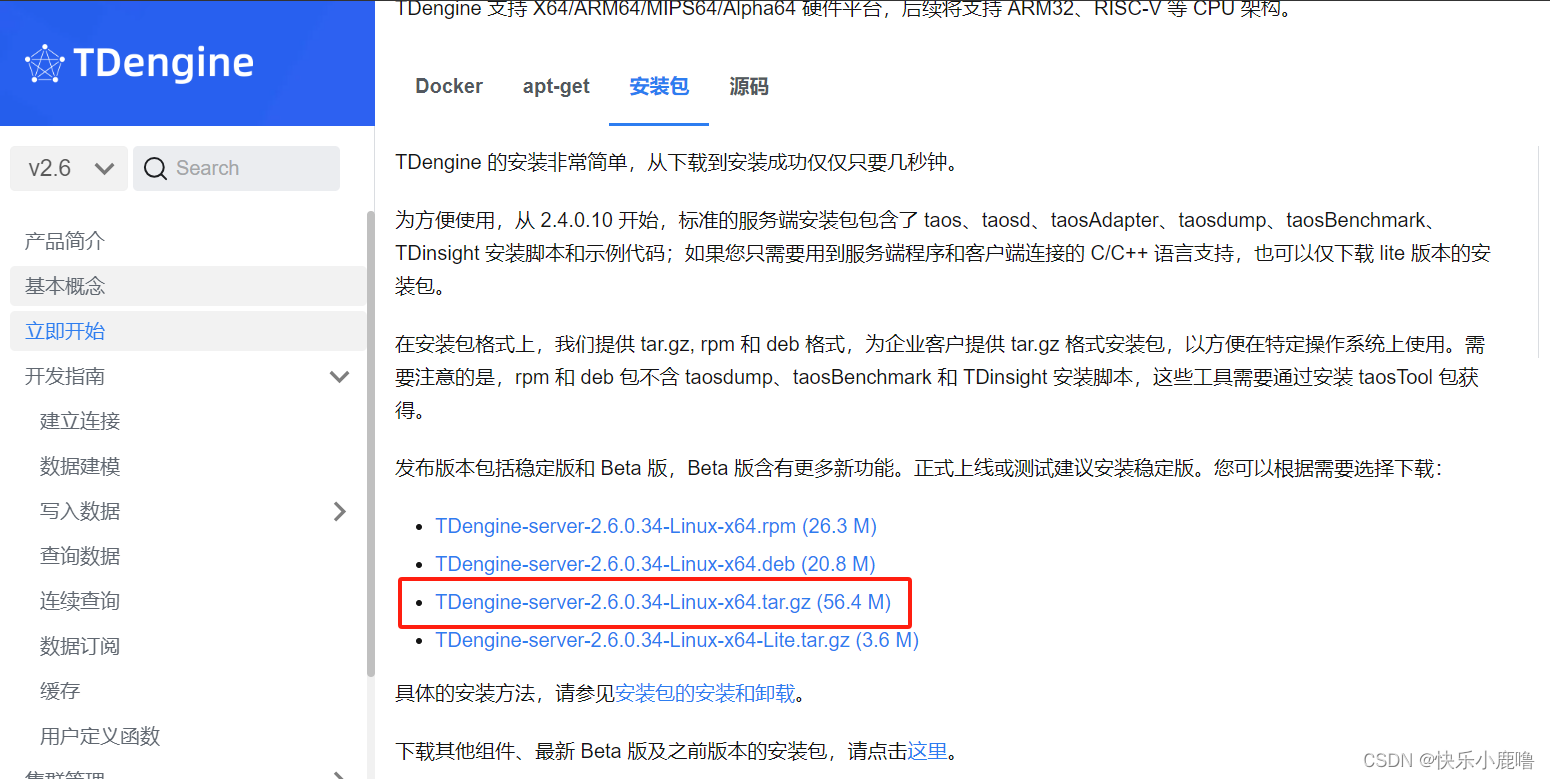
1. 下载链接

安装文档中中限制了服务端和客户端不能同时安装,所以可以在linux中安装服务端,在windows中安装客户端。
TDengine 发布历史及下载链接 | TDengine 文档 | 涛思数据
(3.X版本社区反馈存在很大不稳定因素不建议用于生产)(2.0x版本和3.0x不兼容)
2. 上传并解压
#替换为下载的安装包版本
tar -zxvf TDengine-server-2.6.0.34-Linux-x64.tar.gz
3. 安装
进入解压后的文件目录中,在bin/下进行安装
./install.sh4. 指定目录
#在TDengine的安装目录下新建文件夹
mkdir -p server log
mkdir -p server data
mkdir -p server temp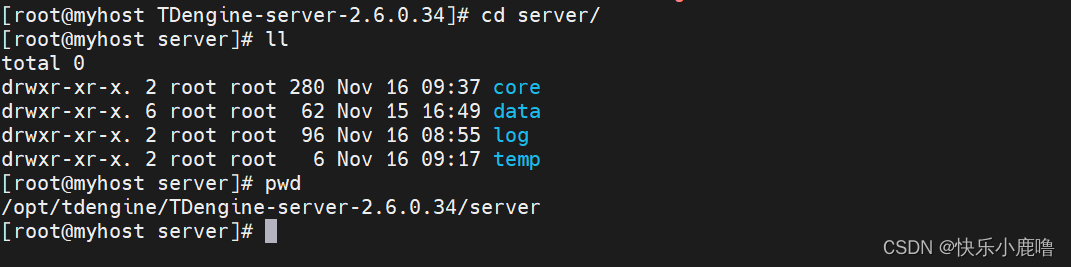
5. 配置
5.1 首先查看本机hostname 如果hostname是localhost(不建议),修改hostname

hostname myhostname5.2 修改taos.cfg配置文件 (重点)
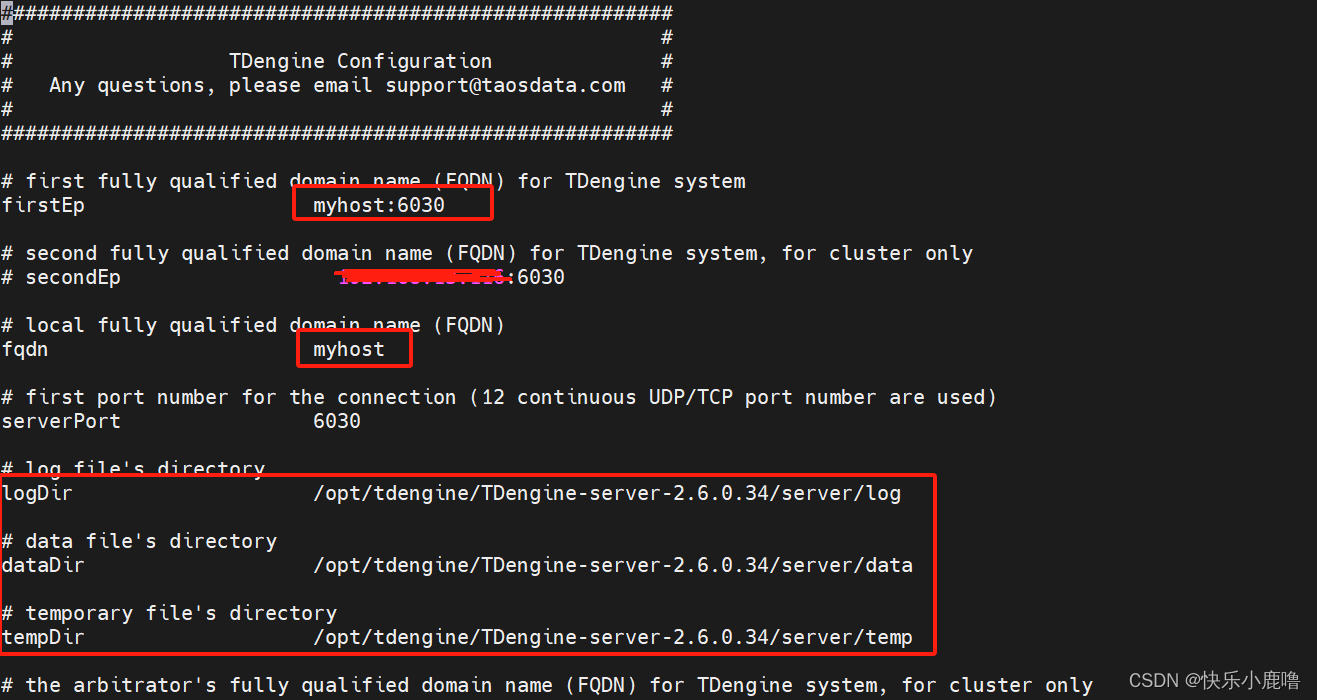
vi /etc/taos/taos.cfg
myhost改为自己的hostname
log/data/temp 目录位置改为新建的目录地址
5.3 设置core
不管是生产还是测试环境,这个一定要设置的。
set_core /opt/tdengine/TDengine-server-2.6.0.34/server/core/
5.4 配置hosts(重要)
vi /etc/hosts
5.5 配置生效
/etc/init.d/network restart6. 启动
#启动
systemctl start taosd
#关闭
systemctl stop taosd
#状态
systemctl status taosd
##taosadapter也要一并启动
systemctl start taosadapter
7. 开启防火墙端口
8.访问
# 添加端口命令
firewall-cmd --zone=public --add-port=端口号/tcp --permanent
# 更新防火墙规则
firewall-cmd --reload
# 查看防火墙开启的所有端口
firewall-cmd --list-port
# 关闭端口命令
sudo firewall-cmd --zone=public --remove-port=端口号/tcp --permanent

这里需要把6030 tcp/udp 和6041端口都打开(后面连接taos是通过6041连接)
##########配置时遇到的问题 Unable to establish connection ###########
C:\TDengine>taos -h ip

Welcome to the TDengine Command Line Interface from Windows, Client Version:2.6.0.34
Copyright (c) 2022 by TAOS Data, Inc. All rights reserved.

taos connect failed, reason: Unable to establish connection.
一开始没打开6030/upd端口,导致本地客户端连接不上服务端
8.1 进入taos数据库
[root@myhost server]# taos

Welcome to the TDengine Command Line Interface from Linux, Client Version:2.6.0.34
Copyright (c) 2022 by TAOS Data, Inc. All rights reserved.

   ******************************  Tab Completion  **********************************
   *   The TDengine CLI supports tab completion for a variety of items,             *
   *   including database names, table names, function names and keywords.          *
   *   The full list of shortcut keys is as follows:                                *
   *    [ TAB ]        ......  complete the current word                            *
   *                   ......  if used on a blank line, display all valid commands  *
   *    [ Ctrl + A ]   ......  move cursor to the st[A]rt of the line               *
   *    [ Ctrl + E ]   ......  move cursor to the [E]nd of the line                 *
   *    [ Ctrl + W ]   ......  move cursor to the middle of the line                *
   *    [ Ctrl + L ]   ......  clear the entire screen                              *
   *    [ Ctrl + K ]   ......  clear the screen after the cursor                    *
   *    [ Ctrl + U ]   ......  clear the screen before the cursor                   *
   **********************************************************************************

taos>
8.2 查看数据库
taos> show databases;
              name              |      created_time       |   ntables   |   vgroups   | replica | quorum |  days  |           keep           |  cache(MB)  |   blocks    |   minrows   |   maxrows   | wallevel |    fsync    | comp | cachelast | precision | update |   status   |
====================================================================================================================================================================================================================================================================================
 test                           | 2023-11-16 09:11:17.624 |       10000 |           8 |       1 |      1 |     10 | 3650                     |          16 |           6 |         100 |        4096 |        1 |        3000 |    2 |         0 | ms        |      0 | ready      |
 log                            | 2023-11-16 08:44:28.836 |          24 |           1 |       1 |      1 |     10 | 30                       |           1 |           3 |         100 |        4096 |        1 |        3000 |    2 |         0 | us        |      0 | ready      |
Query OK, 2 row(s) in set (0.004842s)

taos>
8.3 查询表
 use test;
Database changed.

taos> show tables;
           table_name           |      created_time       | columns |          stable_name           |          uid          |     tid     |    vgId     |
==========================================================================================================================================================
 d8533                          | 2023-11-16 09:11:23.846 |       4 | meters                         |      2814752251975923 |         148 |          10 |
 d636                           | 2023-11-16 09:11:22.222 |       4 | meters                         |      1970337555333502 |         758 |           7 |
 d8485                          | 2023-11-16 09:11:23.761 |       4 | meters                         |      2814751446657081 |
 d7426                          | 2023-11-16 09:11:24.796 |       4 | meters                         |      1125924672451839 |        1476 |           4 |
 d8213                          | 2023-11-16 09:11:22.714 |       4 | meters                         |      2251806744072513 |         413 |           8 |
 d1148                          | 2023-11-16 09:11:24.721 |       4 | meters                         |      1125921350512882 |        1278 |           4 |
 d2982                          | 2023-11-16 09:11:22.180 |       4 | meters                         |      1970335474926219 |         634 |           7 |
 d5653                          | 2023-11-16 09:11:22.227 |       4 | meters                         |      1970337806995940 |         773 |           7 |
 d7219                          | 2023-11-16 09:11:24.181 |       4 | meters                         |      2814764885413004 |         901 |          10 |
 d8642                          | 2023-11-16 09:11:24.161 |       4 | meters                         |      2814763996206782 |         848 |          10 |
Query OK, 10000 row(s) in set (1.390295s)

taos>
没问题
8.4 访问 REST 接口
curl -u root:taosdata -d 'show databases' ip地址:6041/rest/sql客户端
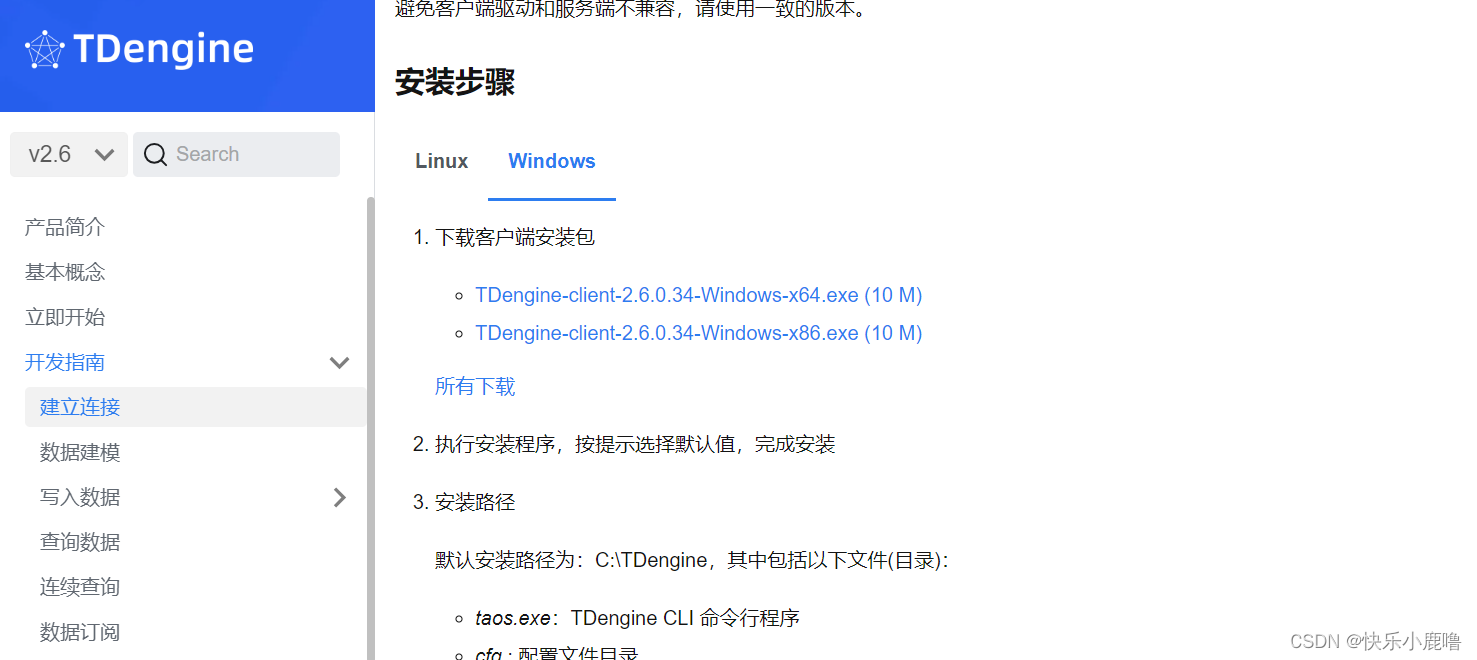
客户端连接(保证服务端已经启动)
C:\TDengine>taos -h ip地址或hostname

Welcome to the TDengine Command Line Interface from Windows, Client Version:2.6.0.34
Copyright (c) 2022 by TAOS Data, Inc. All rights reserved.

taos> exit;
用hostname连接的时候需要在本地添加hostname
C:\Windows\System32\drivers\etc
添加一行
ip地址 hostname
##########配置时遇到的问题 Unable to resolve FQDN"myhost" ###########
需要在本地配置hostname 配置之后 ping通了
C:\TDengine>ping myhost

Pinging myhost [192.168.13.116] with 32 bytes of data:
Reply from 192.168.13.116: bytes=32 time=49ms TTL=62
Reply from 192.168.13.116: bytes=32 time=57ms TTL=62
Reply from 192.168.13.116: bytes=32 time=46ms TTL=62
Reply from 192.168.13.116: bytes=32 time=49ms TTL=62

Ping statistics for 192.168.13.116:
    Packets: Sent = 4, Received = 4, Lost = 0 (0% loss),
Approximate round trip times in milli-seconds:
    Minimum = 46ms, Maximum = 57ms, Average = 50ms


#######连接成功!!
C:\TDengine>taos -h myhost

Welcome to the TDengine Command Line Interface from Windows, Client Version:2.6.0.34
Copyright (c) 2022 by TAOS Data, Inc. All rights reserved.

taos>
安装TDengineGUl
https://blog.csdnnet/itorac/article/details/134096849
测试连接,taos默认用户名和密码为root/taosdata
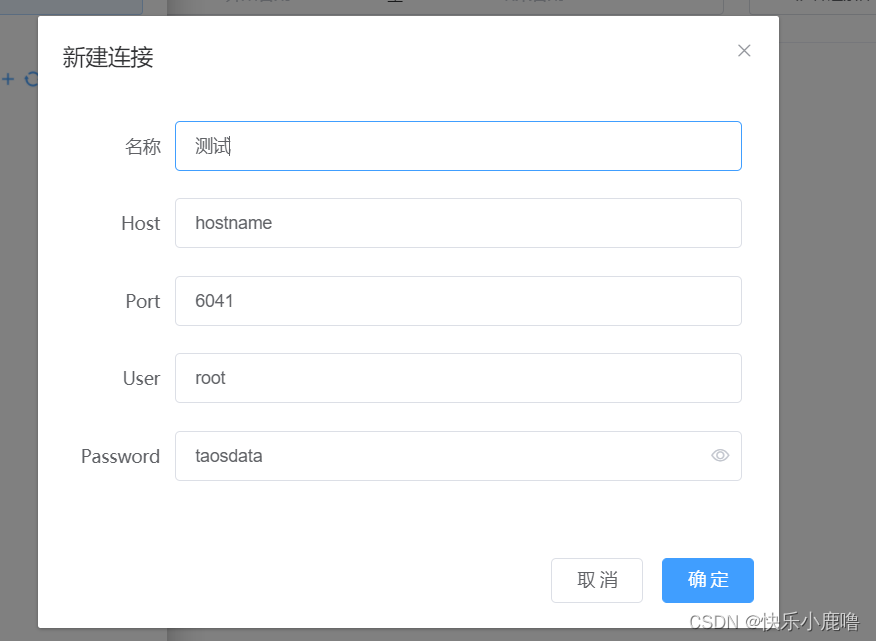
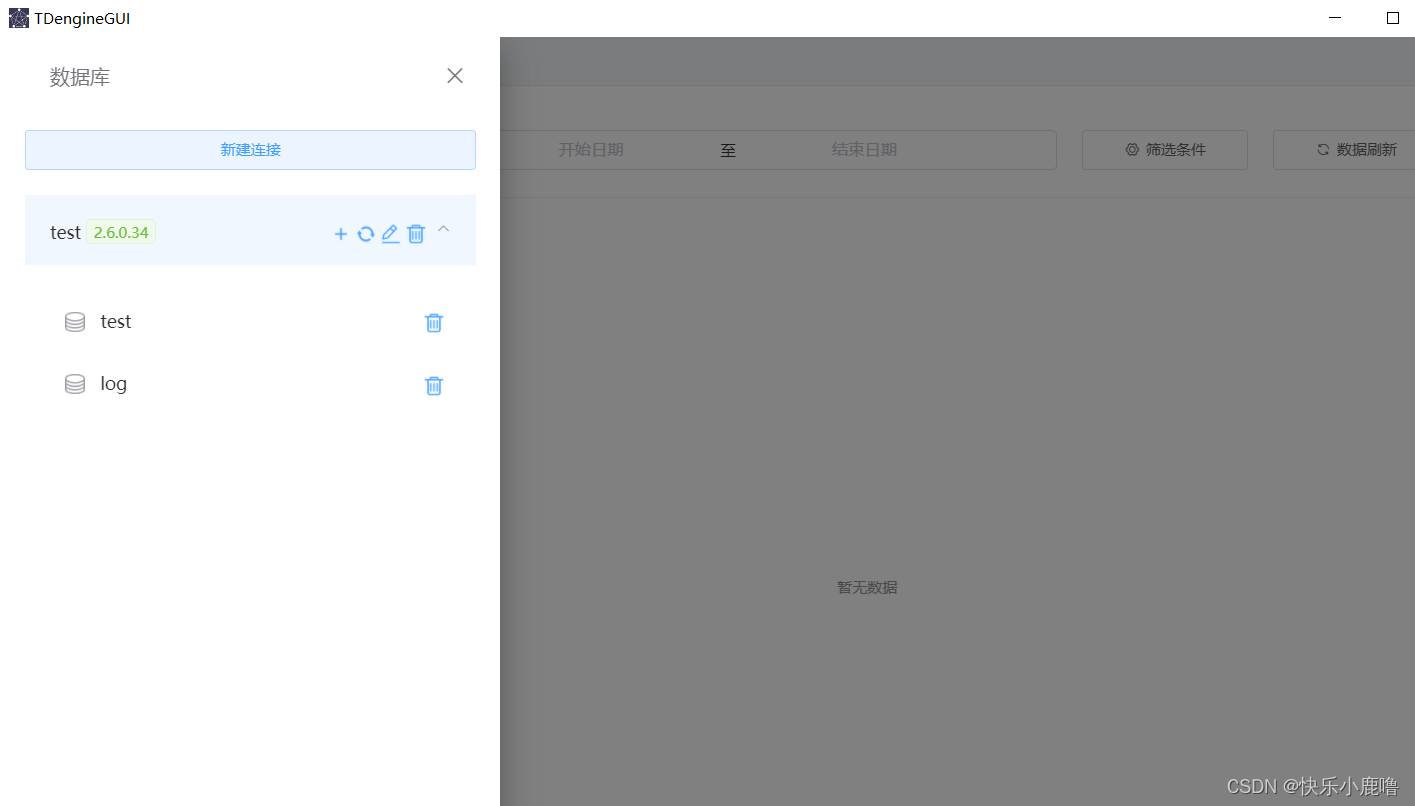
连接成功
TDengine配置完了!!!

魔乐社区(Modelers.cn) 是一个中立、公益的人工智能社区,提供人工智能工具、模型、数据的托管、展示与应用协同服务,为人工智能开发及爱好者搭建开放的学习交流平台。社区通过理事会方式运作,由全产业链共同建设、共同运营、共同享有,推动国产AI生态繁荣发展。
更多推荐


 2
2 0
0- 0


 已为社区贡献2条内容

所有评论(0)