推荐几款好用的开源甘特图,附示例代码
甘特图在车间调度中发挥重要的作用。通过甘特图可以清晰地展示出每个任务的开始时间、结束时间、持续时间和进度情况等信息,同时也可以直观地反映出车间的繁忙程度和资源利用情况。本文将介绍几款功能强大、基于JavaScript的甘特图插件。

获取更多资讯,赶快关注上面的公众号吧!
甘特图在车间调度中发挥重要的作用。通过甘特图可以清晰地展示出每个任务的开始时间、结束时间、持续时间和进度情况等信息,同时也可以直观地反映出车间的繁忙程度和资源利用情况。本文将介绍几款功能强大、基于JavaScript的甘特图插件。
文章目录
FullCalendar
FullCalendar 是一个功能强大的 JavaScript 库,用于创建和管理交互式的日历界面。它广泛应用于各种 Web 应用程序中,支持多种视图和事件管理功能。以下是 FullCalendar 的一些主要特点和功能:
主要特点
- 多种视图:支持月视图、周视图和日视图,可以自定义视图。
- 事件管理:允许用户添加、编辑、删除和拖放事件。
- 时间轴:提供详细的时间轴视图,适用于日程安排。
- 响应式设计:自适应不同设备的屏幕尺寸。
- 可扩展性:支持自定义样式和功能,易于集成其他库(如 jQuery)。
- 国际化:支持多种语言,适应全球用户需求。
- 日历导航:内置前后导航按钮,方便用户浏览不同日期。
- 插件支持:提供丰富的插件接口,扩展功能更加方便。
示例1:基本的月视图日历

<!DOCTYPE html>
<html lang="zh-CN">
<html>
<meta charset='utf-8'/>
<head>
    <script src='https://cdn.jsdelivr.net/npm/fullcalendar@6.1.15/index.global.min.js'></script>
    <style type="text/css">
        html, body {
            margin: 0;
            padding: 0;
            font-family: Arial, Helvetica Neue, Helvetica, sans-serif;
            font-size: 14px;
        }
        #calendar {
            max-width: 1100px;
            margin: 40px auto;
        }
    </style>

    <script>
        document.addEventListener('DOMContentLoaded', function () {
            var calendarEl = document.getElementById('calendar');
            var calendar = new FullCalendar.Calendar(calendarEl, {
                timeZone: 'UTC',
                initialView: 'dayGridMonth',
                events: 'https://fullcalendar.io/api/demo-feeds/events.json',
                editable: true,
                selectable: true
            });
            calendar.render();
        });
    </script>
</head>
<body>
<div id='calendar'></div>
</body>
</html>
示例2:添加拖放功能的日历

<!DOCTYPE html>
<html lang="zh-CN">
<html>
<meta charset='utf-8'/>
<head>

    <script src='https://cdn.jsdelivr.net/npm/fullcalendar@6.1.15/index.global.min.js'></script>
    <style type="text/css">
        html, body {
            margin: 0;
            padding: 0;
            font-family: Arial, Helvetica Neue, Helvetica, sans-serif;
            font-size: 14px;
        }

        #external-events {
            position: fixed;
            z-index: 2;
            top: 20px;
            left: 20px;
            width: 150px;
            padding: 0 10px;
            border: 1px solid #ccc;
            background: #eee;
        }

        #external-events .fc-event {
            cursor: move;
            margin: 3px 0;
        }

        #calendar-container {
            position: relative;
            z-index: 1;
            margin-left: 200px;
        }

        #calendar {
            max-width: 1100px;
            margin: 20px auto;
        }
    </style>

    <script>
        document.addEventListener('DOMContentLoaded', function () {
            var Calendar = FullCalendar.Calendar;
            var Draggable = FullCalendar.Draggable;

            var containerEl = document.getElementById('external-events');
            var calendarEl = document.getElementById('calendar');
            var checkbox = document.getElementById('drop-remove');

            // initialize the external events
            // -----------------------------------------------------------------

            new Draggable(containerEl, {
                itemSelector: '.fc-event',
                eventData: function (eventEl) {
                    return {
                        title: eventEl.innerText
                    };
                }
            });

            // initialize the calendar
            // -----------------------------------------------------------------

            var calendar = new Calendar(calendarEl, {
                headerToolbar: {
                    left: 'prev,next today',
                    center: 'title',
                    right: 'dayGridMonth,timeGridWeek,timeGridDay'
                },
                editable: true,
                droppable: true, // this allows things to be dropped onto the calendar
                drop: function (info) {
                    // is the "remove after drop" checkbox checked?
                    if (checkbox.checked) {
                        // if so, remove the element from the "Draggable Events" list
                        info.draggedEl.parentNode.removeChild(info.draggedEl);
                    }
                }
            });

            calendar.render();
        });
    </script>

</head>
<body>
<div id='external-events'>
    <p>
        <strong>Draggable Events</strong>
    </p>

    <div class='fc-event fc-h-event fc-daygrid-event fc-daygrid-block-event'>
        <div class='fc-event-main'>My Event 1</div>
    </div>
    <div class='fc-event fc-h-event fc-daygrid-event fc-daygrid-block-event'>
        <div class='fc-event-main'>My Event 2</div>
    </div>
    <div class='fc-event fc-h-event fc-daygrid-event fc-daygrid-block-event'>
        <div class='fc-event-main'>My Event 3</div>
    </div>
    <div class='fc-event fc-h-event fc-daygrid-event fc-daygrid-block-event'>
        <div class='fc-event-main'>My Event 4</div>
    </div>
    <div class='fc-event fc-h-event fc-daygrid-event fc-daygrid-block-event'>
        <div class='fc-event-main'>My Event 5</div>
    </div>

    <p>
        <input id='drop-remove' type='checkbox'/>
        <label for='drop-remove'>remove after drop</label>
    </p>
</div>

<div id='calendar-container'>
    <div id='calendar'></div>
</div>
</body>
</html>
示例3:资源日历视图

<!DOCTYPE html>
<html lang="zh-CN">
<html>
<meta charset='utf-8'/>
<head>

    <script src='https://cdn.jsdelivr.net/npm/fullcalendar-scheduler@6.1.15/index.global.min.js'></script>
    <style type="text/css">
        html, body {
            margin: 0;
            padding: 0;
            font-family: Arial, Helvetica Neue, Helvetica, sans-serif;
            font-size: 14px;
        }

        #calendar {
            max-width: 1100px;
            margin: 40px auto;
        }
    </style>

    <script>
        document.addEventListener('DOMContentLoaded', function() {
            var calendarEl = document.getElementById('calendar');

            var calendar = new FullCalendar.Calendar(calendarEl, {
                timeZone: 'UTC',
                schedulerLicenseKey: 'GPL-My-Project-Is-Open-Source',
                headerToolbar: {
                    left: 'today prev,next',
                    center: 'title',
                    right: 'resourceTimelineDay,resourceTimelineTenDay,resourceTimelineMonth,resourceTimelineYear'
                },
                initialView: 'resourceTimelineDay',
                scrollTime: '08:00',
                aspectRatio: 1.5,
                views: {
                    resourceTimelineDay: {
                        buttonText: ':15 slots',
                        slotDuration: '00:15'
                    },
                    resourceTimelineTenDay: {
                        type: 'resourceTimeline',
                        duration: { days: 10 },
                        buttonText: '10 days'
                    }
                },
                editable: true,
                resourceAreaHeaderContent: 'Rooms',
                resources: 'https://fullcalendar.io/api/demo-feeds/resources.json?with-nesting&with-colors',
                events: 'https://fullcalendar.io/api/demo-feeds/events.json?single-day&for-resource-timeline'
            });

            calendar.render();
        });
    </script>

</head>
<body>
<div id='calendar'></div>
</body>
</html>
示例4:带休息时间的资源日历视图
图图图图图图图图图图图图图
点击查看代码
<!DOCTYPE html>
<html lang="zh-CN">
<html>
<meta charset='utf-8'/>
<head>

    <script src='https://cdn.jsdelivr.net/npm/fullcalendar-scheduler@6.1.15/index.global.min.js'></script>
    <style type="text/css">
        html, body {
            margin: 0;
            padding: 0;
            font-family: Arial, Helvetica Neue, Helvetica, sans-serif;
            font-size: 14px;
        }

        #calendar {
            max-width: 1100px;
            margin: 40px auto;
        }
    </style>

    <script>
        document.addEventListener('DOMContentLoaded', function() {
            var calendarEl = document.getElementById('calendar');

            var calendar = new FullCalendar.Calendar(calendarEl, {
                timeZone: 'UTC',
                schedulerLicenseKey: 'GPL-My-Project-Is-Open-Source',
                headerToolbar: {
                    left: 'today prev,next',
                    center: 'title',
                    right: 'resourceTimelineDay,resourceTimelineTenDay,resourceTimelineMonth,resourceTimelineYear'
                },
                initialView: 'resourceTimelineDay',
                scrollTime: '08:00',
                aspectRatio: 1.5,
                views: {
                    resourceTimelineDay: {
                        buttonText: ':15 slots',
                        slotDuration: '00:15'
                    },
                    resourceTimelineTenDay: {
                        type: 'resourceTimeline',
                        duration: { days: 10 },
                        buttonText: '10 days'
                    }
                },
                editable: true,
                resourceAreaHeaderContent: 'Rooms',
                businessHours: {
                    // days of week. an array of zero-based day of week integers (0=Sunday)
                    daysOfWeek: [ 1, 2, 3, 4 ], // Monday - Thursday

                    startTime: '10:00', // a start time (10am in this example)
                    endTime: '18:00', // an end time (6pm in this example)
                },
                resources: 'https://fullcalendar.io/api/demo-feeds/resources.json?with-nesting&with-colors',
                events: 'https://fullcalendar.io/api/demo-feeds/events.json?single-day&for-resource-timeline'
            });

            calendar.render();
        });
    </script>

</head>
<body>
<div id='calendar'></div>
</body>
</html>
Highcharts Gantt
Highcharts Gantt 是 Highcharts 家族的一部分,用于创建互动和高度自定义的甘特图。甘特图是项目管理中常用的工具,用于显示项目计划和进度。Highcharts Gantt 提供了强大的图表功能和灵活的配置选项,适合用来展示项目的任务、里程碑和依赖关系。
主要特点
- 互动性强:支持缩放、平移、拖放等交互操作。
- 高度自定义:可以通过多种选项来自定义任务、时间轴、样式等。
- 丰富的数据支持:支持从各种格式的数据源(如 JSON、CSV)加载数据。
- 依赖关系:可以显示任务之间的依赖关系。
- 多种视图:支持显示日、周、月等不同时间跨度的视图。
- 响应式设计:在不同设备和屏幕尺寸上都有良好的表现。
- 国际化:支持多种语言,适应不同地区的用户需求。
- 高级功能:如关键路径分析、资源分配等。
示例1:带有依赖关系的甘特图

<!DOCTYPE html>
<html lang="zh-CN">
<meta charset='utf-8'/>
<head>

</head>
<body>
<script src="https://code.highcharts.com/gantt/highcharts-gantt.js"></script>
<script src="https://code.highcharts.com/gantt/modules/accessibility.js"></script>
<style type="text/css">
    @import url("https://code.highcharts.com/css/highcharts.css");

    #container {
        max-width: 1800px;
        margin: 1em auto;
    }

    .highcharts-treegrid-node-level-1 {
        font-size: 13px;
        font-weight: bold;
    }

</style>
<figure class="highcharts-figure">
    <div id="container"></div>
</figure>

<script>

    const today = new Date(),
        day = 1000 * 60 * 60 * 24;

    // Set to 00:00:00:000 today
    today.setUTCHours(0);
    today.setUTCMinutes(0);
    today.setUTCSeconds(0);
    today.setUTCMilliseconds(0);


    // THE CHART
    Highcharts.ganttChart('container', {
        chart: {
            styledMode: true
        },
        title: {
            text: 'Highcharts Gantt in Styled Mode'
        },
        subtitle: {
            text: 'Purely CSS-driven design'
        },
        xAxis: {
            min: today.getTime() - (2 * day),
            max: today.getTime() + (32 * day)
        },
        accessibility: {
            keyboardNavigation: {
                seriesNavigation: {
                    mode: 'serialize'
                }
            },
            point: {
                descriptionFormat: '{yCategory}. Start {x:%Y-%m-%d}, end ' +
                    '{x2:%Y-%m-%d}.'
            }
        },
        lang: {
            accessibility: {
                axis: {
                    xAxisDescriptionPlural: 'The chart has a two-part X axis ' +
                        'showing time in both week numbers and days.'
                }
            }
        },
        series: [{
            name: 'Project 1',
            data: [{
                name: 'Planning',
                id: 'planning',
                start: today.getTime(),
                end: today.getTime() + (20 * day)
            }, {
                name: 'Requirements',
                id: 'requirements',
                parent: 'planning',
                start: today.getTime(),
                end: today.getTime() + (5 * day)
            }, {
                name: 'Design',
                id: 'design',
                dependency: 'requirements',
                parent: 'planning',
                start: today.getTime() + (3 * day),
                end: today.getTime() + (20 * day)
            }, {
                name: 'Layout',
                id: 'layout',
                parent: 'design',
                start: today.getTime() + (3 * day),
                end: today.getTime() + (10 * day)
            }, {
                name: 'Graphics',
                parent: 'design',
                dependency: 'layout',
                start: today.getTime() + (10 * day),
                end: today.getTime() + (20 * day)
            }, {
                name: 'Develop',
                id: 'develop',
                start: today.getTime() + (5 * day),
                end: today.getTime() + (30 * day)
            }, {
                name: 'Create unit tests',
                id: 'unit_tests',
                dependency: 'requirements',
                parent: 'develop',
                start: today.getTime() + (5 * day),
                end: today.getTime() + (8 * day)
            }, {
                name: 'Implement',
                id: 'implement',
                dependency: 'unit_tests',
                parent: 'develop',
                start: today.getTime() + (8 * day),
                end: today.getTime() + (30 * day)
            }]
        }]
    });


</script>

</body>
</html>
示例2:资源甘特图

<!DOCTYPE html>
<html lang="zh-CN">
<meta charset='utf-8'/>
<head>

</head>
<body>
<script src="https://code.highcharts.com/gantt/highcharts-gantt.js"></script>
<script src="https://code.highcharts.com/gantt/modules/exporting.js"></script>
<script src="https://code.highcharts.com/gantt/modules/accessibility.js"></script>
<style type="text/css">
    #container {
        max-width: 1800px;
        min-width: 1200px;
        height: 400px;
        margin: 1em auto;
    }

    .scrolling-container {
        overflow-x: auto;
        -webkit-overflow-scrolling: touch;
    }


</style>
<div class="scrolling-container">
    <div id="container"></div>
</div>


<script>

    // Set to 00:00:00:000 today
    let today = new Date();

    const day = 1000 * 60 * 60 * 24,
        dateFormat = Highcharts.dateFormat;

    // Set to 00:00:00:000 today
    today.setUTCHours(0);
    today.setUTCMinutes(0);
    today.setUTCSeconds(0);
    today.setUTCMilliseconds(0);
    today = today.getTime();

    const cars = [{
        model: 'Nissan Leaf',
        current: 0,
        deals: [{
            rentedTo: 'Lisa Star',
            from: today - 1 * day,
            to: today + 2 * day
        }, {
            rentedTo: 'Shane Long',
            from: today - 3 * day,
            to: today - 2 * day
        }, {
            rentedTo: 'Jack Coleman',
            from: today + 5 * day,
            to: today + 6 * day
        }]
    }, {
        model: 'Jaguar E-type',
        current: 0,
        deals: [{
            rentedTo: 'Martin Hammond',
            from: today - 2 * day,
            to: today + 1 * day
        }, {
            rentedTo: 'Linda Jackson',
            from: today - 2 * day,
            to: today + 1 * day
        }, {
            rentedTo: 'Robert Sailor',
            from: today + 2 * day,
            to: today + 6 * day
        }]
    }, {
        model: 'Volvo V60',
        current: 0,
        deals: [{
            rentedTo: 'Mona Ricci',
            from: today + 0 * day,
            to: today + 3 * day
        }, {
            rentedTo: 'Jane Dockerman',
            from: today + 3 * day,
            to: today + 4 * day
        }, {
            rentedTo: 'Bob Shurro',
            from: today + 6 * day,
            to: today + 8 * day
        }]
    }, {
        model: 'Volkswagen Golf',
        current: 0,
        deals: [{
            rentedTo: 'Hailie Marshall',
            from: today - 1 * day,
            to: today + 1 * day
        }, {
            rentedTo: 'Morgan Nicholson',
            from: today - 3 * day,
            to: today - 2 * day
        }, {
            rentedTo: 'William Harriet',
            from: today + 2 * day,
            to: today + 3 * day
        }]
    }, {
        model: 'Peugeot 208',
        current: 0,
        deals: [{
            rentedTo: 'Harry Peterson',
            from: today - 1 * day,
            to: today + 2 * day
        }, {
            rentedTo: 'Emma Wilson',
            from: today + 3 * day,
            to: today + 4 * day
        }, {
            rentedTo: 'Ron Donald',
            from: today + 5 * day,
            to: today + 6 * day
        }]
    }];

    // Parse car data into series.
    const series = cars.map(function (car, i) {
        const data = car.deals.map(function (deal) {
            return {
                id: 'deal-' + i,
                rentedTo: deal.rentedTo,
                start: deal.from,
                end: deal.to,
                y: i,
                name: deal.rentedTo
            };
        });
        return {
            name: car.model,
            data: data,
            current: car.deals[car.current]
        };
    });

    Highcharts.ganttChart('container', {
        series: series,
        plotOptions: {
            series: {
                dataLabels: {
                    enabled: true,
                    format: '{point.name}',
                    style: {
                        fontWeight: 'normal',
                        textOverflow: 'ellipsis'
                    }
                }
            }
        },
        title: {
            text: 'Car Rental Schedule'
        },
        tooltip: {
            pointFormat: '<span>Rented To: {point.rentedTo}</span><br/><span>' +
                'From: {point.start:%e. %b}</span><br/><span>To: {point.end:%e. ' +
                '%b}</span>'
        },
        lang: {
            accessibility: {
                axis: {
                    xAxisDescriptionPlural: 'The chart has a two-part X axis ' +
                        'showing time in both week numbers and days.',
                    yAxisDescriptionSingular: 'The chart has a tabular Y axis ' +
                        'showing a data table row for each point.'
                }
            }
        },
        accessibility: {
            keyboardNavigation: {
                seriesNavigation: {
                    mode: 'serialize'
                }
            },
            point: {
                valueDescriptionFormat: 'Rented to {point.rentedTo} from ' +
                    '{point.x:%A, %B %e} to {point.x2:%A, %B %e}.'
            },
            series: {
                descriptionFormat: '{series.name}, car {add series.index 1} of ' +
                    '{series.chart.series.length}.'
            }
        },
        xAxis: {
            currentDateIndicator: true
        },
        yAxis: {
            type: 'category',
            grid: {
                columns: [{
                    title: {
                        text: 'Model'
                    },
                    categories: series.map(function (s) {
                        return s.name;
                    })
                }, {
                    title: {
                        text: 'Rented To'
                    },
                    categories: series.map(function (s) {
                        return s.current.rentedTo;
                    })
                }, {
                    title: {
                        text: 'From'
                    },
                    categories: series.map(function (s) {
                        return dateFormat('%e. %b', s.current.from);
                    })
                }, {
                    title: {
                        text: 'To'
                    },
                    categories: series.map(function (s) {
                        return dateFormat('%e. %b', s.current.to);
                    })
                }]
            }
        }
    });

</script>
</body>
</html>
示例3:带有导航条的甘特图
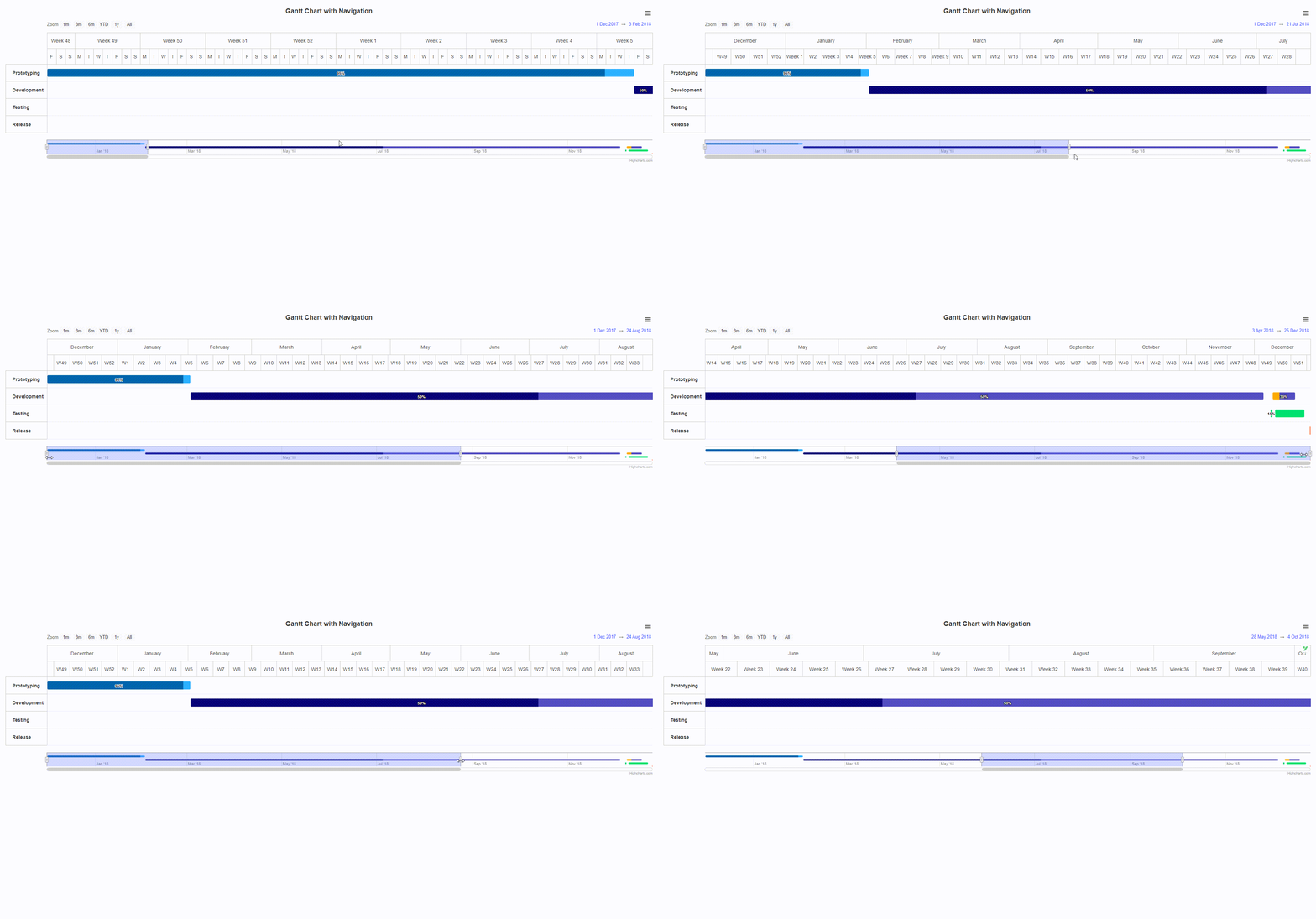
<!DOCTYPE html>
<html lang="zh-CN">
<meta charset='utf-8'/>
<head>


</head>
<body>
<script src="https://code.highcharts.com/gantt/highcharts-gantt.js"></script>
<script src="https://code.highcharts.com/gantt/modules/exporting.js"></script>
<script src="https://code.highcharts.com/gantt/modules/accessibility.js"></script>
<style type="text/css">
    #container {
        max-width: 2200px;
        margin: 1em auto;
    }

</style>
<div id="container"></div>

<script>

    Highcharts.ganttChart('container', {

        title: {
            text: 'Gantt Chart with Navigation'
        },

        yAxis: {
            uniqueNames: true
        },

        navigator: {
            enabled: true,
            liveRedraw: true,
            series: {
                type: 'gantt',
                pointPlacement: 0.5,
                pointPadding: 0.25,
                accessibility: {
                    enabled: false
                }
            },
            yAxis: {
                min: 0,
                max: 3,
                reversed: true,
                categories: []
            }
        },

        scrollbar: {
            enabled: true
        },

        rangeSelector: {
            enabled: true,
            selected: 0
        },

        accessibility: {
            point: {
                descriptionFormat: '{yCategory}. ' +
                    '{#if completed}Task {(multiply completed.amount 100):.1f}% ' +
                    'completed. {/if}' +
                    'Start {x:%Y-%m-%d}, end {x2:%Y-%m-%d}.'
            },
            series: {
                descriptionFormat: '{name}'
            }
        },

        lang: {
            accessibility: {
                axis: {
                    xAxisDescriptionPlural: 'The chart has a two-part X axis ' +
                        'showing time in both week numbers and days.',
                    yAxisDescriptionPlural: 'The chart has one Y axis showing ' +
                        'task categories.'
                }
            }
        },

        series: [{
            name: 'Project 1',
            data: [{
                start: Date.UTC(2017, 11, 1),
                end: Date.UTC(2018, 1, 2),
                completed: {
                    amount: 0.95
                },
                name: 'Prototyping'
            }, {
                start: Date.UTC(2018, 1, 2),
                end: Date.UTC(2018, 11, 5),
                completed: {
                    amount: 0.5
                },
                name: 'Development'
            }, {
                start: Date.UTC(2018, 11, 8),
                end: Date.UTC(2018, 11, 9),
                completed: {
                    amount: 0.15
                },
                name: 'Testing'
            }, {
                start: Date.UTC(2018, 11, 9),
                end: Date.UTC(2018, 11, 19),
                completed: {
                    amount: 0.3,
                    fill: '#fa0'
                },
                name: 'Development'
            }, {
                start: Date.UTC(2018, 11, 10),
                end: Date.UTC(2018, 11, 23),
                name: 'Testing'
            }, {
                start: Date.UTC(2018, 11, 25, 8),
                end: Date.UTC(2018, 11, 25, 16),
                name: 'Release'
            }]
        }]
    });

</script>
</body>
</html>
DHTMLX Gantt
DHTMLX是一个功能强大的JavaScript UI库,用于构建功能丰富的Web应用程序。该库提供了一组用于创建动态数据驱动应用程序的UI组件,包括网格、日历、图表、树结构等。以下是DHTMLX的一些特点和功能:
主要特点
- 丰富的UI组件:DHTMLX提供了各种UI组件,如Grid、Tree、Scheduler、Chart、Form、Menu等,可以帮助开发者快速构建复杂的Web界面。
- 高性能:DHTMLX组件经过优化,能够处理大量数据并快速渲染。
- 跨浏览器兼容性:DHTMLX支持所有主流浏览器,包括Chrome、Firefox、Safari、Edge等。
- 响应式设计:DHTMLX组件支持响应式设计,可以在不同设备和屏幕尺寸上无缝工作。
- 易于集成:DHTMLX可以与流行的框架和库(如React、Angular、Vue.js等)轻松集成。
- 丰富的API:DHTMLX提供了强大的API,开发者可以使用它们对组件进行细粒度的控制和定制。
- 联动甘特图:支持同一页面显示多个甘特图,且在其中一个更新后,其他甘特图同步更新。
下面是几个使用DHTMLX库的简单代码示例:
示例1:资源甘特图
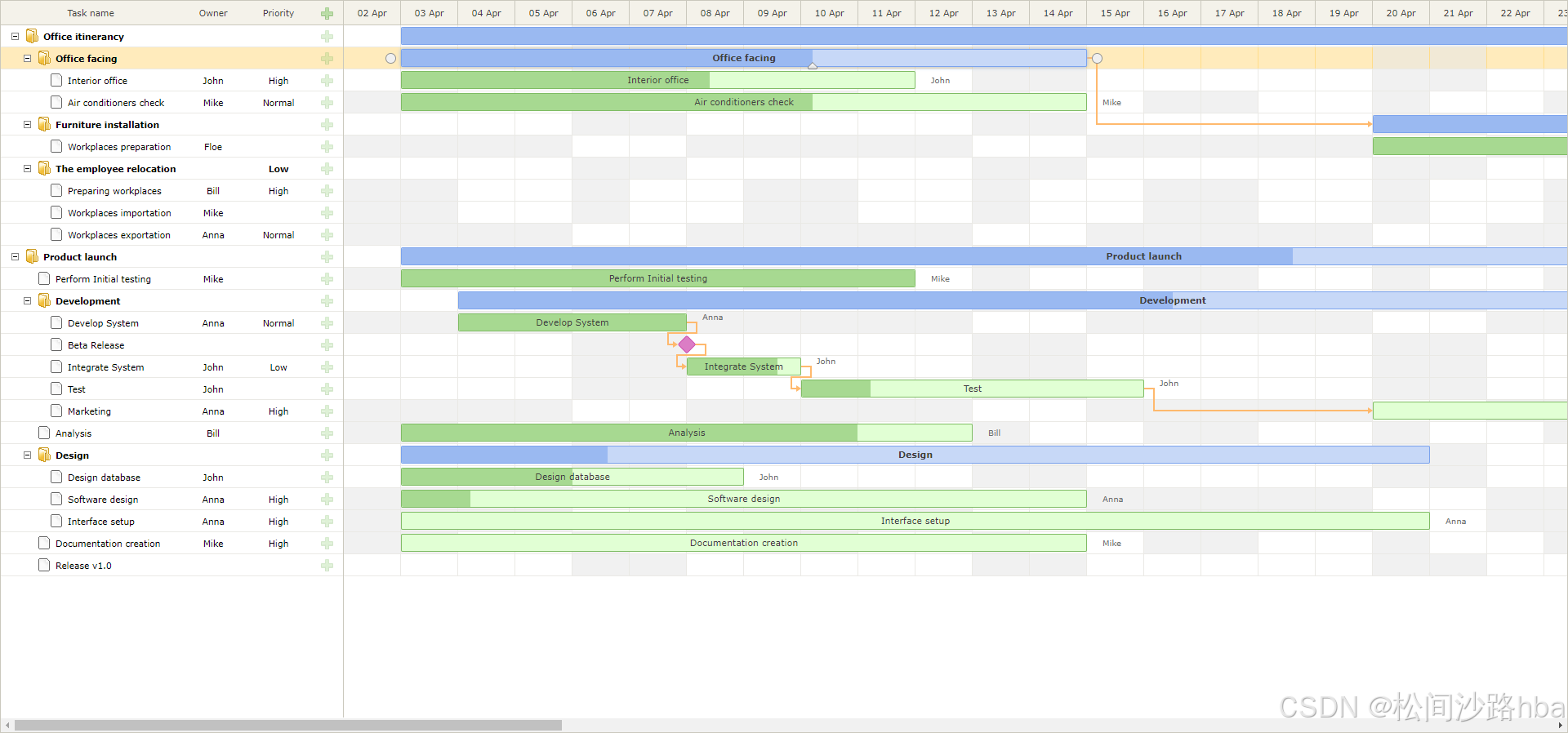
<!DOCTYPE html>
<html lang="en">
<head>
    <meta charset="UTF-8">
    <title>Resource calendars</title>
    <script src="../../codebase/dhtmlxgantt.js?v=8.0.9"></script>
    <link href="../../codebase/skins/dhtmlxgantt_meadow.css?v=8.0.9" rel="stylesheet">

    <script src="../common/resource_project_single_resource.js?v=8.0.9"></script>
    <style>
        html, body {
            height: 100%;
            padding: 0px;
            margin: 0px;
            overflow: hidden;
        }

        .summary-bar {
            font-weight: bold;
        }

        .gantt_task_cell.week_end {
            background-color: rgba(232, 232, 232, 0.6);
        }

        .gantt_task_row.gantt_selected .gantt_task_cell.week_end {
            background-color: rgba(232, 232, 232, 0.6) !important;
        }
    </style>
</head>
<body>
<div id="gantt_here" style='width:100%; height:100%;'></div>
<script>
    gantt.plugins({
        auto_scheduling: true
    });
    gantt.message({
        text: [
            "Assign resources to the tasks.",
            "Each resource can have its own working time calendar.",
            "Double click any task (showed green) in order to open the lightbox and assign a resource."
        ].join("<br><br>"),
        expire: -1
    });

    gantt.serverList("staff", [
        {key: 1, label: "John"},
        {key: 2, label: "Mike"},
        {key: 3, label: "Anna"},
        {key: 4, label: "Bill"},
        {key: 7, label: "Floe"}
    ]);

    gantt.serverList("priority", [
        {key: 1, label: "High"},
        {key: 2, label: "Normal"},
        {key: 3, label: "Low"}
    ]);

    // end test data
    gantt.config.auto_scheduling = true;
    gantt.config.auto_scheduling_strict = true;
    gantt.config.grid_width = 420;
    gantt.config.grid_resize = true;
    gantt.config.open_tree_initially = true;
    gantt.config.work_time = true;

    var labels = gantt.locale.labels;
    labels.column_priority = labels.section_priority = "Priority";
    labels.column_owner = labels.section_owner = "Owner";

    function byId(list, id) {
        for (var i = 0; i < list.length; i++) {
            if (list[i].key == id)
                return list[i].label || "";
        }
        return "";
    }

    gantt.config.columns = [
        {name: "text", label: "Task name", tree: true, width: '*'},
        {
            name: "owner", width: 80, align: "center", template: function (item) {
                return byId(gantt.serverList('staff'), item.owner_id)
            }
        },
        {
            name: "priority", width: 80, align: "center", template: function (item) {
                return byId(gantt.serverList('priority'), item.priority)
            }
        },
        {name: "add", width: 40}
    ];

    gantt.config.lightbox.sections = [
        {name: "description", height: 38, map_to: "text", type: "textarea", focus: true},
        {name: "priority", height: 22, map_to: "priority", type: "select", options: gantt.serverList("priority")},
        {name: "owner", height: 22, map_to: "owner_id", type: "select", options: gantt.serverList("staff")},
        {name: "time", type: "duration", map_to: "auto"}
    ];

    gantt.templates.rightside_text = function (start, end, task) {
        return byId(gantt.serverList('staff'), task.owner_id);
    };

    var regular = gantt.addCalendar({
            worktime: {
                days: [0, 1, 1, 1, 1, 1, 0]
            }
        }),
        twoByTwo = gantt.addCalendar({
            worktime: {
                days: [1, 1, 0, 0, 1, 1, 0]
            }
        }),
        weekendWorker = gantt.addCalendar({
            worktime: {
                days: [1, 0, 0, 0, 0, 0, 1]
            }
        });

    gantt.config.resource_property = "owner_id";
    gantt.config.resource_calendars = {
        1: regular,
        2: twoByTwo,
        3: weekendWorker,
        4: twoByTwo,
        5: regular,
        6: regular,
        7: weekendWorker
    };

    gantt.templates.timeline_cell_class = function (task, date) {
        if (!gantt.isWorkTime({date: date, task: task}))
            return "week_end";
        return "";
    };

    gantt.templates.grid_row_class =
        gantt.templates.task_row_class =
            gantt.templates.task_class = function (start, end, task) {
                var css = [];
                if (task.$virtual || task.type == gantt.config.types.project)
                    css.push("summary-bar");

                return css.join(" ");
            };

    gantt.init("gantt_here");
    gantt.parse(taskData);
</script>
</body>
</html>
示例2:联动甘特图
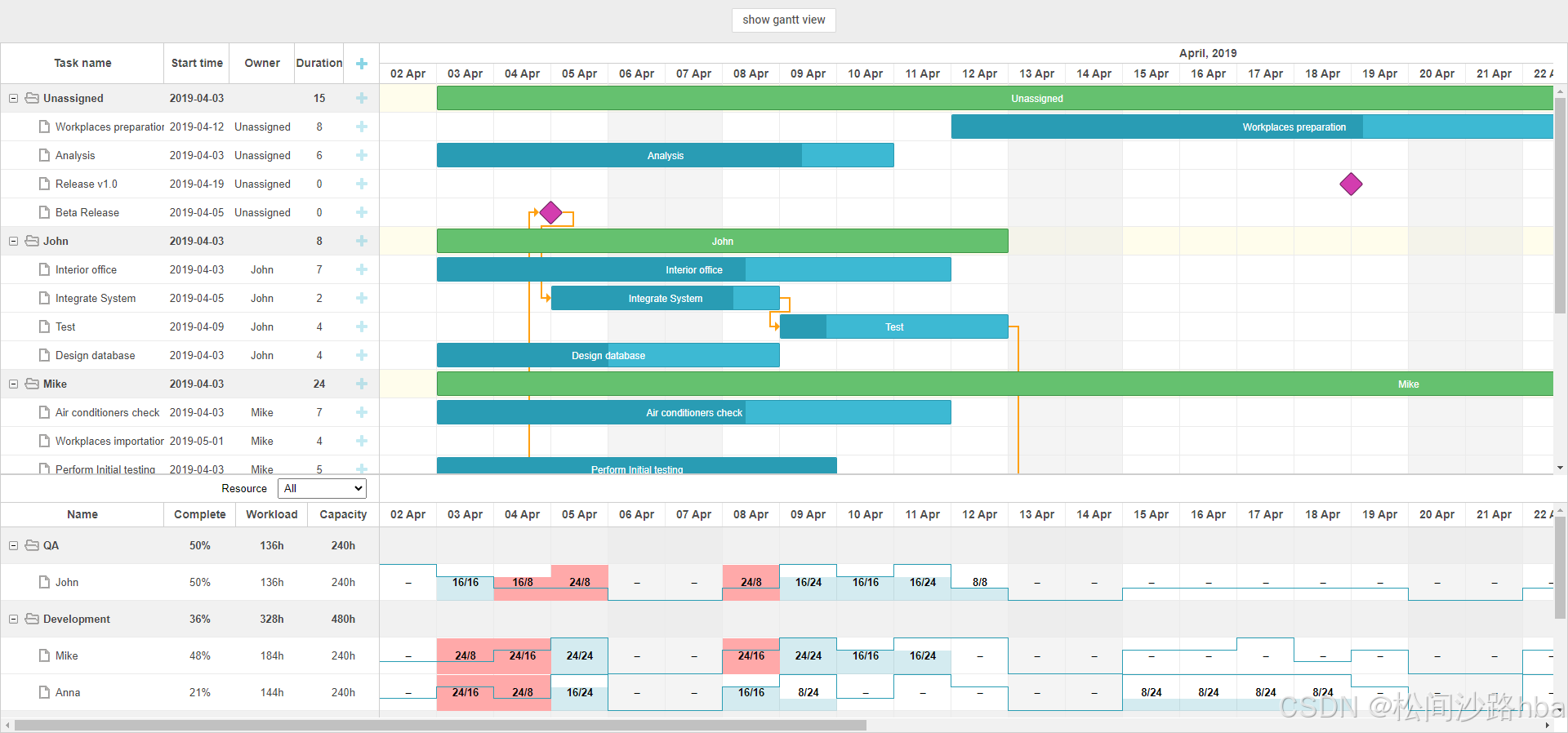
<!DOCTYPE html>
<html>
<head>
<meta http-equiv="Content-type" content="text/html; charset=utf-8">
<title>Assign workload in percents</title>
<script src="../../codebase/dhtmlxgantt.js?v=8.0.9"></script>
<script src="./common/resource_filter.js?v=8.0.9"></script>
<link rel="stylesheet" href="../../codebase/dhtmlxgantt.css?v=8.0.9">
<link rel="stylesheet" href="../common/controls_styles.css?v=8.0.9">
<script src="../common/resource_project_assignments_percents.js?v=8.0.9"></script>
<style>
html, body {
padding: 0px;
margin: 0px;
height: 100%;
}
#gantt_here {
width:100%;
height: 800px;
height:calc(100vh - 52px);
}
.gantt_grid_scale .gantt_grid_head_cell,
.gantt_task .gantt_task_scale .gantt_scale_cell {
font-weight: bold;
font-size: 14px;
color: rgba(0, 0, 0, 0.7);
}
.folder_row {
font-weight: bold;
}
.highlighted_resource,
.highlighted_resource.odd {
background-color: rgba(255, 251, 224, 0.6);
}
.gantt_task_cell.week_end {
background-color: #e8e8e87d;
}
.gantt_task_row.gantt_selected .gantt_task_cell.week_end {
background-color: #e8e8e87d !important;
}
.group_row,
.group_row.odd,
.gantt_task_row.group_row {
background-color: rgba(232, 232, 232, 0.6);
}
.owner-label {
width: 20px;
height: 20px;
line-height: 20px;
font-size: 12px;
display: inline-block;
border: 1px solid #cccccc;
border-radius: 25px;
background: #e6e6e6;
color: #6f6f6f;
margin: 0 3px;
font-weight: bold;
}
.resource-select-panel .gantt_layout_content {
line-height: 35px;
text-align: right;
padding-right: 15px;
overflow: hidden !important;
}
.resource-select {
padding: 3px;
margin-left: 13px;
}
.column_overload .gantt_histogram_fill {
background-color:#ffa9a9;
}
</style>
</head>
<body>
<div class="gantt_control" >
<input type='button' id='default' onclick="toggleGroups(this)" value="Show Resource view">
</div>
<div id="gantt_here"></div>
<script>
gantt.plugins({
grouping: true,
auto_scheduling: true
});
gantt.message({
text:"You can assign work time in percentages from a daily workload.",
expire: -1
});
var UNASSIGNED_ID = 5;
var WORK_DAY = 8;
function shouldHighlightTask(task) {
var store = gantt.$resourcesStore;
var taskResource = task[gantt.config.resource_property],
selectedResource = store.getSelectedId();
if (taskResource == selectedResource || store.isChildOf(taskResource, selectedResource)) {
return true;
}
}
gantt.templates.grid_row_class = function(start, end, task) {
var css = [];
if (gantt.hasChild(task.id)) {
css.push("folder_row");
}
if (task.$virtual) {
css.push("group_row")
}
if (shouldHighlightTask(task)) {
css.push("highlighted_resource");
}
return css.join(" ");
};
gantt.templates.task_row_class = function(start, end, task) {
if (shouldHighlightTask(task)) {
return "highlighted_resource";
}
return "";
};
gantt.templates.timeline_cell_class = function(task, date) {
if (!gantt.isWorkTime({date: date, task: task}))
return "week_end";
return "";
};
function getAllocatedValue(tasks, resource) {
var result = 0;
tasks.forEach(function(item) {
var assignments = gantt.getResourceAssignments(resource.id, item.id);
assignments.forEach(function(assignment){
result += WORK_DAY * assignment.value / 100;
});
});
return result;
}
var cap = {};
function getCapacity(date, resource) {
/* it is sample function your could to define your own function for get Capability of resources in day */
if (gantt.$resourcesStore.hasChild(resource.id)) {
return -1;
}
var val = date.valueOf();
if (!cap[val + resource.id]) {
cap[val + resource.id] = [0, 1, 2, 3][Math.floor(Math.random() * 100) % 4];
}
return cap[val + resource.id] * WORK_DAY;
}
gantt.templates.histogram_cell_class = function(start_date, end_date, resource, tasks) {
if (getAllocatedValue(tasks, resource) > getCapacity(start_date, resource)) {
return "column_overload"
}
};
gantt.templates.histogram_cell_label = function(start_date, end_date, resource, tasks) {
if (tasks.length && !gantt.$resourcesStore.hasChild(resource.id)) {
return getAllocatedValue(tasks, resource) + "/" + getCapacity(start_date, resource);
} else {
if (!gantt.$resourcesStore.hasChild(resource.id)) {
return '–';
}
return '';
}
};
gantt.templates.histogram_cell_allocated = function(start_date, end_date, resource, tasks) {
return getAllocatedValue(tasks, resource);
};
gantt.templates.histogram_cell_capacity = function(start_date, end_date, resource, tasks) {
if (!gantt.isWorkTime(start_date)) {
return 0;
}
return getCapacity(start_date, resource);
};
function shouldHighlightResource(resource) {
var selectedTaskId = gantt.getState().selected_task;
if (gantt.isTaskExists(selectedTaskId)) {
var selectedTask = gantt.getTask(selectedTaskId),
selectedResource = selectedTask[gantt.config.resource_property];
if (resource.id == selectedResource) {
return true;
} else if (gantt.$resourcesStore.isChildOf(selectedResource, resource.id)) {
return true;
}
}
return false;
}
var resourceTemplates = {
grid_row_class: function(start, end, resource) {
var css = [];
if (gantt.$resourcesStore.hasChild(resource.id)) {
css.push("folder_row");
css.push("group_row");
}
if (shouldHighlightResource(resource)) {
css.push("highlighted_resource");
}
return css.join(" ");
},
task_row_class: function(start, end, resource) {
var css = [];
if (shouldHighlightResource(resource)) {
css.push("highlighted_resource");
}
if (gantt.$resourcesStore.hasChild(resource.id)) {
css.push("group_row");
}
return css.join(" ");
}
};
gantt.locale.labels.section_owner = "Owner";
gantt.config.lightbox.sections = [
{ name: "description", height: 38, map_to: "text", type: "textarea", focus: true },
{ name: "owner", type: "resources", map_to: "owner", options: gantt.serverList("people"), default_value:100, unassigned_value: UNASSIGNED_ID},
{ name: "time", type: "duration", map_to: "auto" }
];
gantt.config.resource_render_empty_cells = true;
function getResourceAssignments(resourceId) {
var assignments;
var store = gantt.getDatastore(gantt.config.resource_store);
if (store.hasChild(resourceId)) {
assignments = [];
store.getChildren(resourceId).forEach(function(childId){
assignments = assignments.concat(gantt.getResourceAssignments(childId));
});
} else {
assignments = gantt.getResourceAssignments(resourceId);
}
return assignments;
}
var resourceConfig = {
scale_height: 30,
row_height: 45,
scales: [
{unit: "day", step: 1, date: "%d %M"}
],
columns: [
{
name: "name", label: "Name", tree:true, width:200, template: function(resource) {
return resource.text;
}, resize: true
},
{
name: "progress", label: "Complete", align:"center", template: function(resource) {
var totalToDo = 0,
totalDone = 0;
var assignments = getResourceAssignments(resource.id);
assignments.forEach(function(assignment){
var task = gantt.getTask(assignment.task_id);
totalToDo += task.duration;
totalDone += task.duration * (task.progress || 0);
});
var completion = 0;
if (totalToDo) {
completion = (totalDone / totalToDo) * 100;
}
return Math.floor(completion) + "%";
}, resize: true
},
{
name: "workload", label: "Workload", align:"center", template: function(resource) {
var totalDuration = 0;
var assignments = getResourceAssignments(resource.id);
assignments.forEach(function(assignment){
var task = gantt.getTask(assignment.task_id);
totalDuration += (assignment.value / 100) * task.duration;
});
return (totalDuration || 0) * WORK_DAY + "h";
}, resize: true
},
{
name: "capacity", label: "Capacity", align:"center", template: function(resource) {
var store = gantt.getDatastore(gantt.config.resource_store);
var n = store.hasChild(resource.id) ? store.getChildren(resource.id).length : 1;
var state = gantt.getState();
return gantt.calculateDuration(state.min_date, state.max_date) * n * WORK_DAY + "h";
}
}
]
};
gantt.config.scales = [
{unit: "month", step: 1, format: "%F, %Y"},
{unit: "day", step: 1, format: "%d %M"}
];
gantt.config.auto_scheduling = true;
gantt.config.auto_scheduling_strict = true;
gantt.config.work_time = true;
gantt.config.columns = [
{name: "text", tree: true, width: 200, resize: true},
{name: "start_date", align: "center", width: 80, resize: true},
{name: "owner", align: "center", width: 80, label: "Owner", template: function(task) {
if (task.type == gantt.config.types.project) {
return "";
}
var store = gantt.getDatastore("resource");
var assignments = task[gantt.config.resource_property];
if (!assignments || !assignments.length) {
return "Unassigned";
}
if(assignments.length == 1){
return store.getItem(assignments[0].resource_id).text;
}
var result = "";
assignments.forEach(function(assignment) {
var owner = store.getItem(assignment.resource_id);
if (!owner)
return;
result += "<div class='owner-label' title='" + owner.text + "'>" + owner.text.substr(0, 1) + "</div>";
});
return result;
}, resize: true},
{name: "duration", width: 60, align: "center", resize: true},
{name: "add", width: 44}
];
gantt.config.resource_store = "resource";
gantt.config.resource_property = "owner";
gantt.config.order_branch = true;
gantt.config.open_tree_initially = true;
gantt.config.scale_height = 50;
gantt.config.layout = {
css: "gantt_container",
rows: [
{
gravity: 2,
cols: [
{view: "grid", group:"grids", scrollY: "scrollVer"},
{resizer: true, width: 1},
{view: "timeline", scrollX: "scrollHor", scrollY: "scrollVer"},
{view: "scrollbar", id: "scrollVer", group:"vertical"}
]
},
{ resizer: true, width: 1, next: "resources"},
{
height: 35,
cols: [
{ html: "<label>Resource<select class='resource-select'></select>", css :"resource-select-panel", group: "grids"},
{ resizer: true, width: 1},
{ html: ""}
]
},
{
gravity:1,
id: "resources",
config: resourceConfig,
templates: resourceTemplates,
cols: [
{ view: "resourceGrid", group:"grids", scrollY: "resourceVScroll" },
{ resizer: true, width: 1 },
{ view: "resourceHistogram", capacity:24, scrollX: "scrollHor", scrollY: "resourceVScroll" },
{ view: "scrollbar", id: "resourceVScroll", group: "vertical" }
]
},
{ view: "scrollbar", id: "scrollHor" }
]
};
gantt.$resourcesStore = gantt.createDatastore({
name: gantt.config.resource_store,
type: "treeDatastore",
initItem: function(item) {
item.parent = item.parent || gantt.config.root_id;
item[gantt.config.resource_property] = item.parent;
item.open = true;
return item;
}
});
gantt.$resourcesStore.attachEvent("onAfterSelect", function(id) {
gantt.refreshData();
});
gantt.init("gantt_here");
gantt.attachEvent("onTaskLoading", function(task) {
var ownerValue = task[gantt.config.resource_property];
if(!task.$virtual && (!ownerValue || !Array.isArray(ownerValue) || !ownerValue.length)) {
task[gantt.config.resource_property] = [{resource_id: 5, value:0}];//'Unassigned' group
}
return true;
});
function toggleGroups(input) {
gantt.$groupMode = !gantt.$groupMode;
if (gantt.$groupMode) {
input.value = "show gantt view";
var groups = gantt.$resourcesStore.getItems().map(function(item) {
var group = gantt.copy(item);
group.group_id = group.id;
group.id = gantt.uid();
return group;
});
gantt.groupBy({
groups: groups,
relation_property: gantt.config.resource_property,
group_id: "group_id",
group_text: "text",
delimiter: ", ",
default_group_label: "Not Assigned"
});
} else {
input.value = "show resource view";
gantt.groupBy(false);
}
}
gantt.$resourcesStore.attachEvent("onParse", function() {
var people = [];
gantt.$resourcesStore.eachItem(function(res) {
if (!gantt.$resourcesStore.hasChild(res.id)) {
var copy = gantt.copy(res);
copy.key = res.id;
copy.label = res.text;
copy.unit = "%";
people.push(copy);
}
});
gantt.updateCollection("people", people);
});
gantt.$resourcesStore.parse([
{ id: 1, text: "QA", parent: null },
{ id: 2, text: "Development", parent: null },
{ id: 3, text: "Sales", parent: null },
{ id: 4, text: "Other", parent: null },
{ id: 5, text: "Unassigned", parent: 4, default: true },
{ id: 6, text: "John", parent: 1 },
{ id: 7, text: "Mike", parent: 2 },
{ id: 8, text: "Anna", parent: 2 },
{ id: 9, text: "Bill", parent: 3 },
{ id: 10, text: "Floe", parent: 3 }
]);
gantt.parse(taskData);
</script>
</body>
</html>
示例3:自动调度
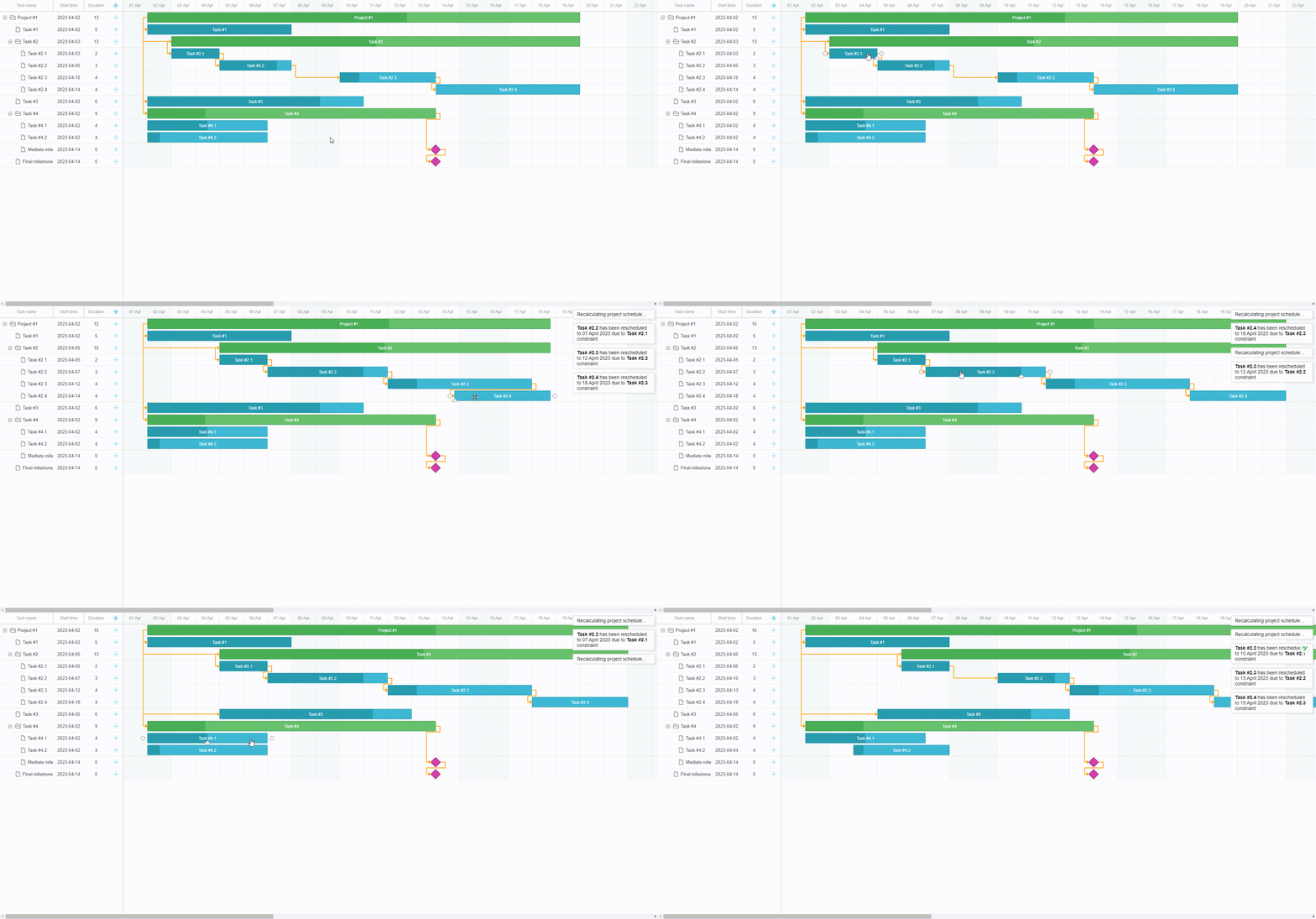
<!DOCTYPE html>
<head>
	<meta http-equiv="Content-type" content="text/html; charset=utf-8">
	<title>Auto Scheduling extension</title>
	<script src="../../codebase/dhtmlxgantt.js?v=8.0.9"></script>

	<link rel="stylesheet" href="../../codebase/dhtmlxgantt.css?v=8.0.9">
	<style>
		html, body {
			height: 100%;
			padding: 0px;
			margin: 0px;
			overflow: hidden;
		}

		.weekend {
			background: #f4f7f4 !important;
		}
	</style>
</head>

<body>
<div id="gantt_here" style='width:100%; height:100%;'></div>
<script>

	gantt.plugins({
		auto_scheduling: true
	});

	gantt.templates.scale_cell_class = function (date) {
		if (!gantt.isWorkTime(date)) {
			return "weekend";
		}
	};
	gantt.templates.timeline_cell_class = function (item, date) {
		if (!gantt.isWorkTime(date)) {
			return "weekend";
		}
	};

	gantt.config.work_time = true;


	gantt.config.auto_scheduling = true;
	gantt.config.auto_scheduling_strict = true;
	gantt.config.auto_scheduling_compatibility = true;

	gantt.config.date_format = "%d-%m-%Y";

	gantt.config.start_date = new Date(2023, 3, 1);
	gantt.config.end_date = new Date(2023, 5, 1);


	gantt.attachEvent("onBeforeAutoSchedule", function () {
		gantt.message("Recalculating project schedule...");
		return true;
	});
	gantt.attachEvent("onAfterTaskAutoSchedule", function (task, new_date, constraint, predecessor) {
		if(task && predecessor){
			gantt.message({
				text: "<b>" + task.text + "</b> has been rescheduled to " + gantt.templates.task_date(new_date) + " due to <b>" + predecessor.text + "</b> constraint",
				expire: 4000
			});
		}
	});


	gantt.init("gantt_here");
	gantt.parse({
		data: [
			{id: 11, text: "Project #1", type: "project", progress: 0.6, open: true},
			{id: 12, text: "Task #1", start_date: "02-04-2023", duration: "5", parent: "11", progress: 1, open: true},
			{id: 13, text: "Task #2", start_date: "03-04-2023", type: "project", parent: "11", progress: 0.5, open: true},
			{id: 14, text: "Task #3", start_date: "02-04-2023", duration: "6", parent: "11", progress: 0.8, open: true},
			{id: 15, text: "Task #4", type: "project", parent: "11", progress: 0.2, open: true},
			{id: 16, text: "Final milestone", start_date: "15-04-2023", type: "milestone", parent: "11", progress: 0, open: true},
			{id: 17, text: "Task #2.1", start_date: "03-04-2023", duration: "2", parent: "13", progress: 1, open: true},
			{id: 18, text: "Task #2.2", start_date: "06-04-2023", duration: "3", parent: "13", progress: 0.8, open: true},
			{id: 19, text: "Task #2.3", start_date: "10-04-2023", duration: "4", parent: "13", progress: 0.2, open: true},
			{id: 20, text: "Task #2.4", start_date: "10-04-2023", duration: "4", parent: "13", progress: 0, open: true},
			{id: 21, text: "Task #4.1", start_date: "02-04-2023", duration: "4", parent: "15", progress: 0.5, open: true},
			{id: 22, text: "Task #4.2", start_date: "02-04-2023", duration: "4", parent: "15", progress: 0.1, open: true},
			{id: 23, text: "Mediate milestone", start_date: "14-04-2023", type: "milestone", parent: "15", progress: 0, open: true}
		],
		links: [
			{id: "10", source: "11", target: "12", type: "1"},
			{id: "11", source: "11", target: "13", type: "1"},
			{id: "12", source: "11", target: "14", type: "1"},
			{id: "13", source: "11", target: "15", type: "1"},
			{id: "14", source: "23", target: "16", type: "0"},
			{id: "15", source: "13", target: "17", type: "1"},
			{id: "16", source: "17", target: "18", type: "0"},
			{id: "17", source: "18", target: "19", type: "0"},
			{id: "18", source: "19", target: "20", type: "0"},
			{id: "21", source: "15", target: "23", type: "0"}
		]
	});

</script>
</body>
AnyGantt
主要特点
- **支持项目和资源图表:**AnyGantt 允许您可视化项目(基于任务)和计划(基于资源)图表。无论使用哪种图表类型,您都可以使用可配置时间线、数据网格等的所有功能。
- **默认设计样式:**样式基于可视化,允许开发人员将功能部分与设计部分分开,并专注于业务逻辑。默认样式让设计任务完全远离!
- **高级文本格式:**对于所有基于文本的元素,例如标签、工具提示或数据网格列,AnyGantt 具有强大的格式化选项。
- **丰富的数据网格控件:**包含基本任务或资源信息的数据网格具有高度可配置性。可以添加任意数量的自定义列,这些列可以包含其他任务或资源数据。每列都可以有自定义文本格式、高度和文本样式设置。数据网格本身可以重新设计以反映重要的数据细节。
- **丰富的视觉设置:**AnyChart甘特图的每个元素都可以借助灵活的设计系统以自己的方式进行配置。
- **任何平台均可使用:**AnyGantt是一个基于JavaScript的组件,可用于任何Web项目。它不依赖于任何服务器端平台,只需要在客户端启用JavaScript的浏览器。
示例1:PERT图
PERT图也称"计划评审技术",它采用网络图来描述一个项目的任务网络,可以反映完成每个任务的开始时间、结束时间和完成该任务所需的时间,可以表达任务之间的依赖关系。
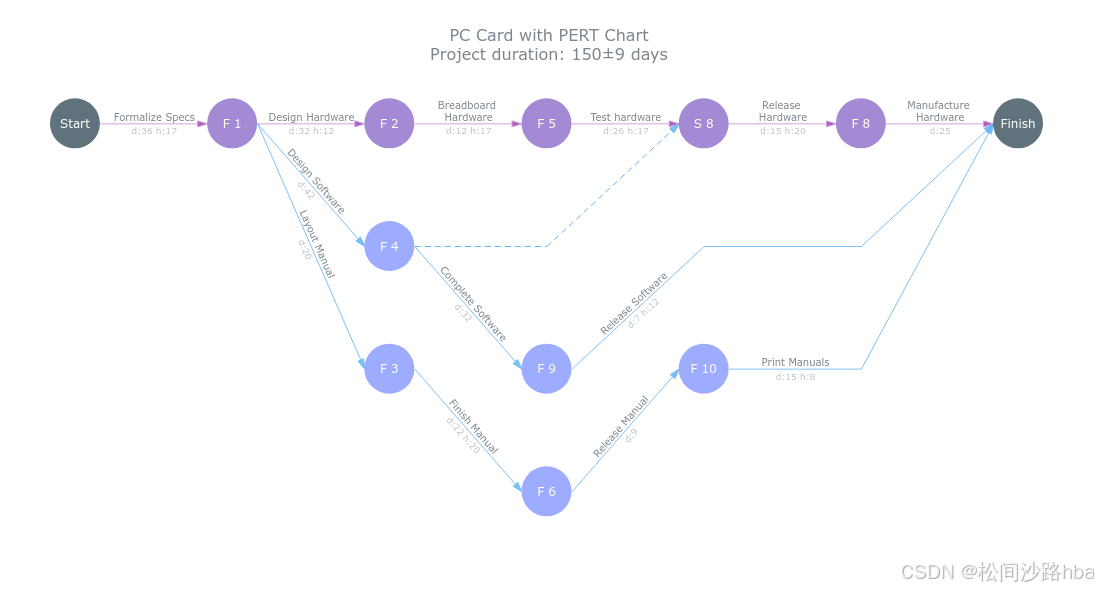
<!doctype html>
<html lang="en">
<head>
<meta charset="UTF-8">
<meta content="IE=edge" http-equiv="X-UA-Compatible">
<meta content="width=device-width, initial-scale=1" name="viewport">
<title>PC Card with PERT Chart</title>
<link href="https://playground.anychart.com/gallery/src/Pert_Charts/PC_Card_with_PERT_Chart/iframe" rel="canonical">
<meta content="AJAX Chart,Chart from JSON,JSON Chart,JSON Plot,PERT Chart,Project Management,Tooltip" name="keywords">
<meta content="AnyChart - JavaScript Charts designed to be embedded and integrated" name="description">
<!--[if lt IE 9]>
<script src="https://oss.maxcdn.com/html5shiv/3.7.3/html5shiv.min.js"></script>
<script src="https://oss.maxcdn.com/respond/1.4.2/respond.min.js"></script>
<![endif]-->
<link href="https://cdn.anychart.com/releases/v8/css/anychart-ui.min.css" rel="stylesheet" type="text/css">
<link href="https://cdn.anychart.com/releases/v8/fonts/css/anychart-font.min.css" rel="stylesheet" type="text/css">
<style>html,
body,
#container {
width: 100%;
height: 100%;
margin: 0;
padding: 0;
}</style>
</head>
<body>
<div id="container"></div>
<script src="https://cdn.anychart.com/releases/v8/js/anychart-base.min.js"></script>
<script src="https://cdn.anychart.com/releases/v8/js/anychart-ui.min.js"></script>
<script src="https://cdn.anychart.com/releases/v8/js/anychart-exports.min.js"></script>
<script src="https://cdn.anychart.com/releases/v8/js/anychart-pert.min.js"></script>
<script src="https://cdn.anychart.com/releases/v8/js/anychart-data-adapter.min.js"></script>
<script type="text/javascript">anychart.onDocumentReady(function () {
// The data used in this sample can be obtained from the CDN
// https://cdn.anychart.com/samples/pert-charts/pc-card-with-pert-chart/data.json
anychart.data.loadJsonFile(
'https://cdn.anychart.com/samples/pert-charts/pc-card-with-pert-chart/data.json',
function (data) {
// set filling method for tree
var treeData = anychart.data.tree(data, 'as-table');
// create PERT chart
var chart = anychart.pert();
// set data
chart
.data(treeData)
// set spacing between milestones
.horizontalSpacing('15.75%')
// set padding for chart
.padding([25, 50, 0, 50]);
// get duration project
var duration = Math.ceil(chart.getStat('pertChartProjectDuration'));
// get deviation project
var deviation = Math.ceil(
chart.getStat('pertChartCriticalPathStandardDeviation')
);
// set title text
chart
.title()
.enabled(true)
.useHtml(true)
.padding([0, 0, 35, 0])
.text(
'PC Card with PERT Chart' +
'<br>Project duration: ' +
duration +
'±' +
deviation +
' days'
);
// set settings for tasks
var tasks = chart.tasks();
// format upper label tasks
tasks.upperLabels().format(function () {
return this.item.get('fullName');
});
// format lower label tasks
tasks.lowerLabels().format(function () {
// format time for tasks
return timeTask(this.duration);
});
// create tasks tooltip
var tasksTooltip = tasks.tooltip();
// tooltip settings
tasksTooltip.separator(true).titleFormat(function () {
// return fullName from data
return this.item.get('fullName');
});
// set settings for critical tasks
chart.criticalPath().tasks().stroke('1 #D5A1DD').color('#9E44B6');
// set settings for milestones
var milestones = chart.milestones();
milestones.fill(function () {
if (this.creator) {
return '#9DACFF';
}
return this.isStart ? '#a5b3b3' : '#60727b';
});
// hover fill/stroke color for milestones item
milestones
.hovered()
.fill(function () {
if (this.creator) {
return anychart.color.lighten('#9DACFF', 0.25);
}
return this.isStart ? '#60727b' : '#60727b';
})
.stroke(function () {
return this.creator ? '1.5 #9DACFF' : null;
});
milestones.labels().format(function () {
if (this.creator) {
var name = this.creator.get('name');
return this.isStart ? 'S ' + name : 'F ' + name;
}
return this.isStart ? 'Start' : 'Finish';
});
milestones.tooltip().format(defuaultMilesoneTooltipTextFormatter);
// set settings for critical milestones
var critMilestones = chart.criticalPath().milestones();
// fill color for critMilestones item
critMilestones.fill(function () {
if (this.creator) {
return '#A489D4';
}
return this.isStart ? '#60727b' : '#60727b';
});
// hover fill/stroke color for critMilestones item
critMilestones
.hovered()
.fill(function () {
if (this.creator) {
return anychart.color.lighten('#A489D4', 0.25);
}
return this.isStart ? '#60727b' : '#60727b';
})
.stroke(function () {
return this.creator ? '1.5 #A489D4' : null;
});
// format labels
critMilestones.labels().format(function () {
if (this.creator) {
var name = this.creator.get('name');
return this.isStart ? 'S ' + name : 'F ' + name;
}
return '>>';
});
// set container id for the chart
chart.container('container');
// initiate chart drawing
chart.draw();
}
);
});
function timeTask(duration) {
var days = Math.floor(duration);
var hours = Math.ceil(24 * (duration - days));
var daysPart = days !== 0 ? 'd:' + days + ' ' : '';
var hoursPart = hours !== 0 ? 'h:' + hours + ' ' : '';
return daysPart + hoursPart;
}
function defuaultMilesoneTooltipTextFormatter() {
var result = '';
var i = 0;
if (this.successors && this.successors.length) {
result += 'Successors:';
for (i = 0; i < this.successors.length; i++) {
result += '\n - ' + this.successors[i].get('fullName');
}
if (this.predecessors && this.predecessors.length) result += '\n\n';
}
if (this.predecessors && this.predecessors.length) {
result += 'Predecessors:';
for (i = 0; i < this.predecessors.length; i++) {
result += '\n - ' + this.predecessors[i].get('fullName');
}
}
return result;
}</script>
</body>
</html>
示例2:计划与实绩对比甘特图
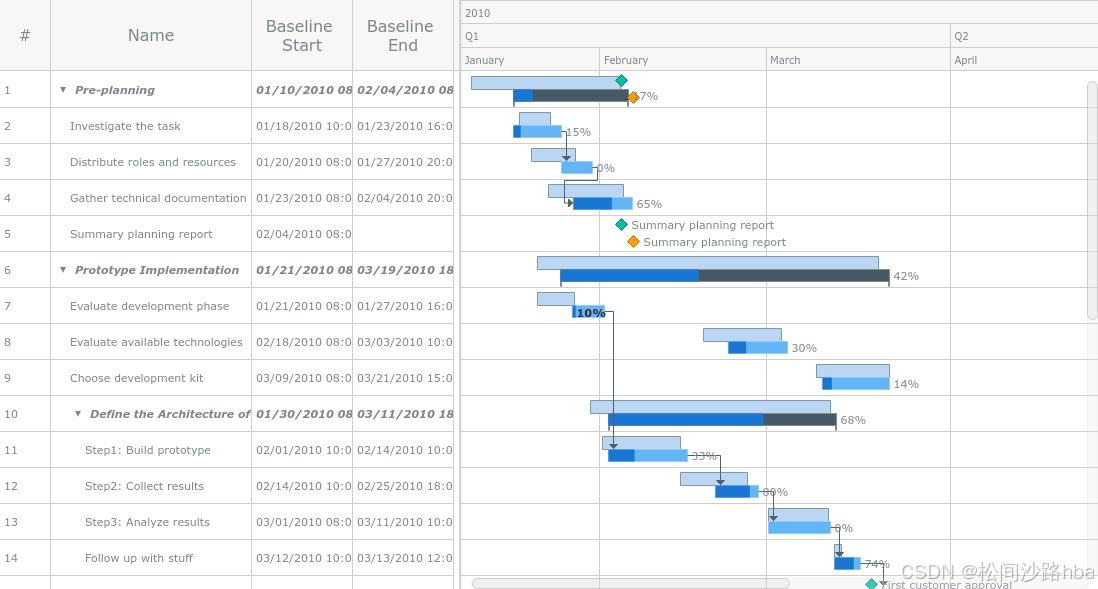
<!doctype html>
<html lang="en">
 <head>
  <meta charset="UTF-8">
  <meta content="IE=edge" http-equiv="X-UA-Compatible">
  <meta content="width=device-width, initial-scale=1" name="viewport">
  <title>Planned-vs-Actual Chart</title>
  <link href="https://playground.anychart.com/gallery/src/Gantt_Charts/Planned-vs-Actual_Chart/iframe" rel="canonical">
  <meta content="AJAX Chart,Chart from JSON,Gantt Chart,Gantt Project Chart,JSON Chart,JSON Plot,Project Management" name="keywords">
  <meta content="AnyChart - JavaScript Charts designed to be embedded and integrated" name="description">
  <!--[if lt IE 9]>
<script src="https://oss.maxcdn.com/html5shiv/3.7.3/html5shiv.min.js"></script>
<script src="https://oss.maxcdn.com/respond/1.4.2/respond.min.js"></script>
<![endif]-->
  <link href="https://cdn.anychart.com/releases/v8/css/anychart-ui.min.css" rel="stylesheet" type="text/css">
  <link href="https://cdn.anychart.com/releases/v8/fonts/css/anychart-font.min.css" rel="stylesheet" type="text/css">
  <style>html,
body,
#container {
  width: 100%;
  height: 100%;
  margin: 0;
  padding: 0;
}</style>
 </head>
 <body>
  <div id="container"></div>
  <script src="https://cdn.anychart.com/releases/v8/js/anychart-base.min.js"></script>
  <script src="https://cdn.anychart.com/releases/v8/js/anychart-ui.min.js"></script>
  <script src="https://cdn.anychart.com/releases/v8/js/anychart-exports.min.js"></script>
  <script src="https://cdn.anychart.com/releases/v8/js/anychart-gantt.min.js"></script>
  <script src="https://cdn.anychart.com/releases/v8/js/anychart-data-adapter.min.js"></script>
  <script type="text/javascript">anychart.onDocumentReady(function () {
  // The data used in this sample can be obtained from the CDN
  // https://cdn.anychart.com/samples/gantt-charts/planned-vs-actual-chart/data.json
  anychart.data.loadJsonFile(
    'https://cdn.anychart.com/samples/gantt-charts/planned-vs-actual-chart/data.json',
    function (data) {
      // create data tree
      var treeData = anychart.data.tree(data, 'as-table');

      // create project gantt chart
      var chart = anychart.ganttProject();

      // set data for the chart
      chart.data(treeData);

      // set start splitter position settings
      chart.splitterPosition(460);

      // get chart data grid link to set column settings
      var dataGrid = chart.dataGrid();

      // set first column settings
      dataGrid.column(0).labels({ hAlign: 'center' });

      // set second column settings
      dataGrid
        .column(1)
        .width(200)
        .labelsOverrider(labelTextSettingsFormatter);

      // set third column settings
      dataGrid
        .column(2)
        .title('Baseline Start')
        .width(100)
        .labelsOverrider(labelTextSettingsFormatter)
        .labels()
        .format(thirdColumnTextFormatter);

      // set fourth column settings
      dataGrid
        .column(3)
        .title('Baseline End')
        .width(100)
        .labelsOverrider(labelTextSettingsFormatter)
        .labels()
        .format(fourthColumnTextFormatter);

      var timeline = chart.getTimeline();

      // place baseline on the top of row
      timeline.baselines().above(true);

      // enable milestones preview
      timeline.milestones().preview().enabled(true);
      timeline.baselineMilestones().preview().enabled(true);

      // set container id for the chart
      chart.container('container');

      // initiate chart drawing
      chart.draw();

      // zoom chart to specified date
      chart.zoomTo(Date.UTC(2010, 0, 8, 15), Date.UTC(2010, 3, 25, 20));
    }
  );
});

// add bold and italic text settings to all parent items
function labelTextSettingsFormatter(label, dataItem) {
  if (dataItem.numChildren()) {
    label.fontWeight('bold').fontStyle('italic');
  }
}

// do pretty formatting for dates in third column
function thirdColumnTextFormatter(data) {
  var field = data.baselineStart;

  // format base line text
  if (field) {
    var baselineStart = new Date(field);
    return (
      formatDate(baselineStart.getUTCMonth() + 1) +
      '/' +
      formatDate(baselineStart.getUTCDate()) +
      '/' +
      baselineStart.getUTCFullYear() +
      ' ' +
      formatDate(baselineStart.getUTCHours()) +
      ':' +
      formatDate(baselineStart.getUTCMinutes())
    );
  }
  // format milestone text
  var actualStart = data.item.get('actualStart');
  var actualEnd = data.item.get('actualEnd');
  if (actualStart === actualEnd || (actualStart && !actualEnd)) {
    var start = new Date(actualStart);
    return (
      formatDate(start.getUTCMonth() + 1) +
      '/' +
      formatDate(start.getUTCDate()) +
      '/' +
      start.getUTCFullYear() +
      ' ' +
      formatDate(start.getUTCHours()) +
      ':' +
      formatDate(start.getUTCMinutes())
    );
  }
  return '';
}

// do pretty formatting for dates in fourth column
function fourthColumnTextFormatter(item) {
  var field = item.baselineEnd;
  if (field) {
    var baselineEnd = new Date(field);
    return (
      formatDate(baselineEnd.getUTCMonth() + 1) +
      '/' +
      formatDate(baselineEnd.getUTCDate()) +
      '/' +
      baselineEnd.getUTCFullYear() +
      ' ' +
      formatDate(baselineEnd.getUTCHours()) +
      ':' +
      formatDate(baselineEnd.getUTCMinutes())
    );
  }
  return '';
}

// do pretty formatting for passed date unit
function formatDate(dateUnit) {
  if (dateUnit < 10) dateUnit = '0' + dateUnit;
  return dateUnit + '';
}</script>
 </body>
</html>
示例3:条件着色资源甘特图示
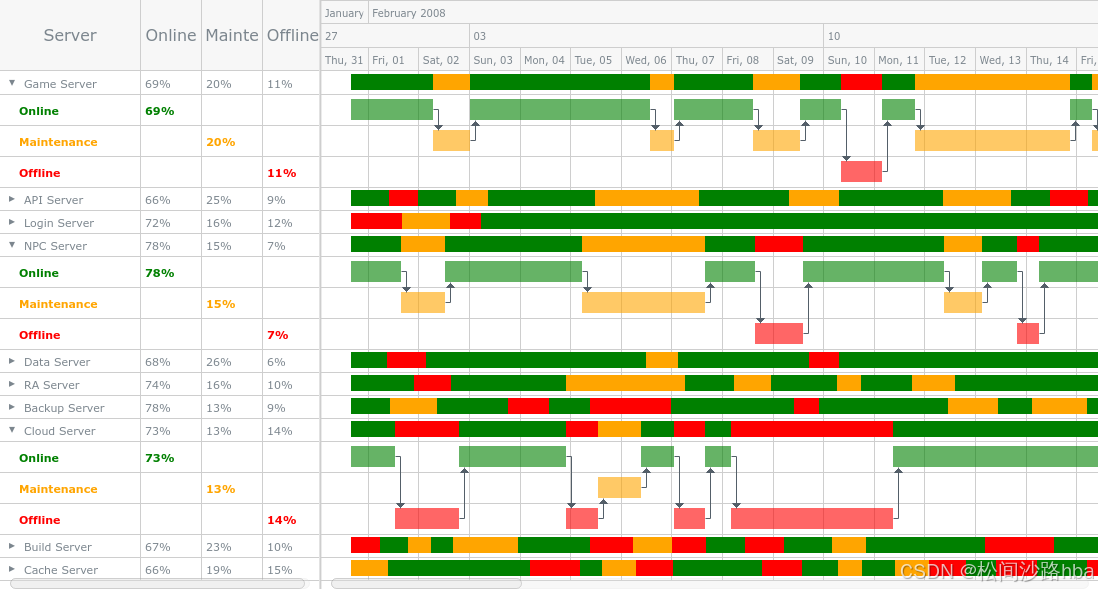
<!doctype html>
<html lang="en">
 <head>
  <meta charset="UTF-8">
  <meta content="IE=edge" http-equiv="X-UA-Compatible">
  <meta content="width=device-width, initial-scale=1" name="viewport">
  <title>Server Status List</title>
  <link href="https://playground.anychart.com/gallery/src/Gantt_Charts/Server_Status_List/iframe" rel="canonical">
  <meta content="AJAX Chart,Chart from JSON,Gantt Chart,Gantt Resource Chart,JSON Chart,JSON Plot,Project Management" name="keywords">
  <meta content="AnyChart - JavaScript Charts designed to be embedded and integrated" name="description">
  <!--[if lt IE 9]>
<script src="https://oss.maxcdn.com/html5shiv/3.7.3/html5shiv.min.js"></script>
<script src="https://oss.maxcdn.com/respond/1.4.2/respond.min.js"></script>
<![endif]-->
  <link href="https://cdn.anychart.com/releases/v8/css/anychart-ui.min.css" rel="stylesheet" type="text/css">
  <link href="https://cdn.anychart.com/releases/v8/fonts/css/anychart-font.min.css" rel="stylesheet" type="text/css">
  <style>html,
body,
#container {
  width: 100%;
  height: 100%;
  margin: 0;
  padding: 0;
}</style>
 </head>
 <body>
  <div id="container"></div>
  <script src="https://cdn.anychart.com/releases/v8/js/anychart-base.min.js"></script>
  <script src="https://cdn.anychart.com/releases/v8/js/anychart-ui.min.js"></script>
  <script src="https://cdn.anychart.com/releases/v8/js/anychart-exports.min.js"></script>
  <script src="https://cdn.anychart.com/releases/v8/js/anychart-gantt.min.js"></script>
  <script src="https://cdn.anychart.com/releases/v8/js/anychart-data-adapter.min.js"></script>
  <script type="text/javascript">anychart.onDocumentReady(function () {
  // The data used in this sample can be obtained from the CDN
  // https://cdn.anychart.com/samples/gantt-charts/server-status-list/data.json
  anychart.data.loadJsonFile(
    'https://cdn.anychart.com/samples/gantt-charts/server-status-list/_data.json',
    function (data) {
      // create data tree on our data
      var treeData = anychart.data.tree(data, 'as-table');

      // create project gantt chart
      var chart = anychart.ganttResource();

      // set data for the chart
      chart.data(treeData);

      // set start splitter position settings
      chart.splitterPosition(320);

      // get chart data grid link to set column settings
      var dataGrid = chart.dataGrid();

      // hide first column
      dataGrid.column(0).enabled(false);

      // get chart timeline
      var timeLine = chart.getTimeline();
      // set base fill
      timeLine.elements().fill(function () {
        // get status from data item
        var status = this.period.status;

        // create fill object
        var fill = {
          // if this element has children, then add opacity to it
          opacity: this.item.numChildren() ? 1 : 0.6
        };

        // set fill color by status
        switch (status) {
          case 'online':
            fill.color = 'green';
            break;
          case 'maintenance':
            fill.color = 'orange';
            break;
          case 'offline':
            fill.color = 'red';
            break;
          default:
        }

        return fill;
      });

      // set base stroke
      timeLine.elements().stroke('none');
      // set select fill
      timeLine.elements().selected().fill('#ef6c00');

      // set first column settings
      var firstColumn = dataGrid.column(1);
      firstColumn.labels().hAlign('left');
      firstColumn
        .title('Server')
        .width(140)
        .labelsOverrider(labelTextSettingsOverrider)
        .labels()
        .format(function () {
          return this.name;
        });

      // set first column settings
      var secondColumn = dataGrid.column(2);
      secondColumn.labels().hAlign('right');
      secondColumn
        .title('Online')
        .width(60)
        .labelsOverrider(labelTextSettingsOverrider)
        .labels()
        .format(function () {
          return this.item.get('online') || '';
        });

      // set first column settings
      var thirdColumn = dataGrid.column(3);
      thirdColumn.labels().hAlign('right');
      thirdColumn
        .title('Maintenance')
        .width(60)
        .labelsOverrider(labelTextSettingsOverrider)
        .labels()
        .format(function () {
          return this.item.get('maintenance') || '';
        });

      // set first column settings
      var fourthColumn = dataGrid.column(4);
      fourthColumn.labels().hAlign('right');
      fourthColumn
        .title('Offline')
        .width(60)
        .labelsOverrider(labelTextSettingsOverrider)
        .labels()
        .format(function () {
          return this.item.get('offline') || '';
        });

      // set container id for the chart
      chart.container('container');

      // initiate chart drawing
      chart.draw();

      // zoom chart to specified date
      chart.zoomTo(
        Date.UTC(2008, 0, 31, 1, 36),
        Date.UTC(2008, 1, 15, 10, 3)
      );
    }
  );
});

function labelTextSettingsOverrider(label, item) {
  switch (item.get('status')) {
    case 'online':
      label.fontColor('green').fontWeight('bold');
      break;
    case 'maintenance':
      label.fontColor('orange').fontWeight('bold');
      break;
    case 'offline':
      label.fontColor('red').fontWeight('bold');
      break;
    default:
  }
}</script>
 </body>
</html>

魔乐社区(Modelers.cn) 是一个中立、公益的人工智能社区,提供人工智能工具、模型、数据的托管、展示与应用协同服务,为人工智能开发及爱好者搭建开放的学习交流平台。社区通过理事会方式运作,由全产业链共同建设、共同运营、共同享有,推动国产AI生态繁荣发展。
更多推荐

 8
8 0
0- 0


 已为社区贡献26条内容

所有评论(0)