登录界面的多语言实现 :c++、html、python、ada、lisp、javascript、c#、ruby、rust、assembly,就问一个字saobusao!!!
在Go语言中,有几个常用的GUI库可供选择,如Walk、fyne和go-qt库等,其中Walk是一个Windows API的封装库,fyne是一个跨平台的GUI库,go-qt是Qt框架的封装。我知道Ada的5个GUI框架(参见其中一些的Awesome Ada List)
QWidget版本
#include "widget.h"
#include "ui_widget.h"
#include <QRgb>
#include <QVBoxLayout>
#include <QHBoxLayout>
#include <QLabel>
#include <QLineEdit>
#include <QCheckBox>
#include <QToolButton>
#include <QSpacerItem>
#include <QLayout>
#include <QGroupBox>
#include <QPushButton>

Widget::Widget(QWidget *parent)
    : QWidget(parent)
    , ui(new Ui::Widget)
{
    ui->setupUi(this);
    this->resize(370,300);
    this->setBackgroundRole(QPalette::HighlightedText);
    this->setPalette(QPalette(QColor(255,255,255)));

    QGroupBox* group = new QGroupBox(this);
    group->setTitle("登录界面");

    group->setGeometry(this->width()/2 - 250/2, group->height()/2 + 30,250,200);

    QHBoxLayout* name = new QHBoxLayout();
    name->addWidget(new QLabel("账号:"));
    name->addWidget(new QLineEdit());

    QHBoxLayout* passwd = new QHBoxLayout();
    passwd->addWidget(new QLabel("密码:"));
    passwd->addWidget(new QLineEdit());

    QHBoxLayout* check = new QHBoxLayout();
    check->addSpacerItem(new QSpacerItem(200,1));
    check->addWidget(new QCheckBox("记住我"));

    QPushButton* admit = new QPushButton();
    admit->setText("登录");
    admit->setMaximumSize(50,30);
    check->addWidget(admit);

    QVBoxLayout* launchUI = new QVBoxLayout(this);
    launchUI->addLayout(name);
    launchUI->addLayout(passwd);
    launchUI->addLayout(check);

    group->setLayout(launchUI);
}

Widget::~Widget()
{
    delete ui;
}
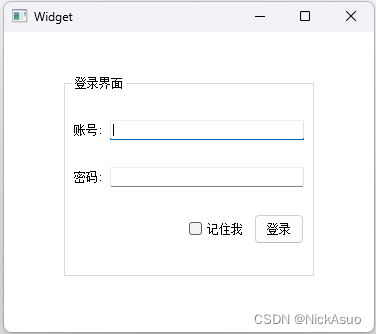
jsp版本
<%@ page language="java" contentType="text/html;"
    pageEncoding="utf-8"%>
<!DOCTYPE html>
<html>
<head>
<title>Insert title here</title>
</head>
<body>
<form action="index.aspx" method="post" style="width: 280px;">
<fieldset>
<legend>登录界面</legend>
<p>
<label for="name">账号:</label>
<input type="text" id="name" name="name"/>
</p>
<p>
<label for="pwd">密码:</label>
<input type="password" id="pwd" name="pwd"/>
</p>
<input type="checkbox" id="remember-me" name="remember-me"/>
<label for="remember-me">记住我</label>
<input type="submit" value="登录"/>
</fieldset>
</form>

</body>
</html>
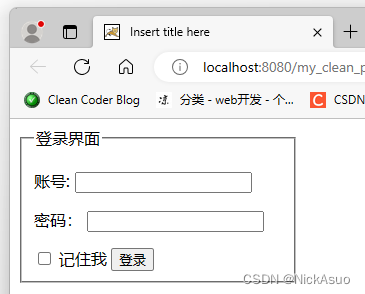
python的Tkinter版本
# python的图形界面库
# TK
# wxWidgets
# Qt
# GTK

# tkinter是python内置的GUI库
# 下一行代码是导入tkinter库的所有内容
from tkinter import *

# 从Frame派生一个Application类,这是所有Widget的父容器
class Application(Frame):
    def __init__(self,master=None):
        Frame.__init__(self,master)
        self.pack()
        self.createWidgets()

    def createWidgets(self):
        self.nameLabel = Label(self,text='账户:')
        self.nameLabel.grid(row=0, column=0)

        self.nameEntry = Entry(self,text='')
        self.nameEntry.grid(row=0, column=1, columnspan=2)

        self.passwordLabel = Label(self, text='密码:')
        self.passwordLabel.grid(row=1, column=0)

        self.passwdEntry = Entry(self, text='')
        self.passwdEntry.grid(row=1, column=1, columnspan=2)

        self.emptyLabel = Label(self, text='')
        self.emptyLabel.grid(row=2, column=0, columnspan=1)

        self.rememberMeCheckbtn = Checkbutton(self,text='请记住我')
        self.rememberMeCheckbtn.grid(row=2, column=1)

        self.launchBtn = Button(self,text='登录')
        self.launchBtn.grid(row=2, column=2)

        # 从Frame派生一个Application类,这是所有Widget的父容器


# 实例化Application
app = Application()


# 设置窗口标题:
app.master.title('登录界面')

# 主消息循环:
app.mainloop()
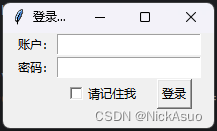
Ada语言版本
我知道Ada的5个GUI框架(参见其中一些的Awesome Ada List)
GtkAda
GNAVI
Claw
Gnoga
QtAda
Go语言版本
在Go语言中,有几个常用的GUI库可供选择,如Walk、fyne和go-qt库等,其中Walk是一个Windows API的封装库,fyne是一个跨平台的GUI库,go-qt是Qt框架的封装。
go语言的包一直引用不正确,报错
- 输入命令: set GO111MODULE=on的方式,不行,查看go env ,看到GO111MODULE值还是为空,所以go get下载包,其实是下载失败了的
- 输入命令:go env -w GO111MODULE=auto,可以看到GO111MODULE值设为auto了,这时候在此去下载依赖包,go get github.com/gin-gonic/gin就会成功
package main

import(
	"fmt"
	"github.com/lxn/walk"
	. "github.com/lxn/walk/declarrative"
)

func main(){
	var mainWindow *walk.MainWindow

	err := MainWindow{
		Title: "Hello World",
		MinSize: Size{width: 300, Height: 200},
		Layout: VBox{},
		Children: []Widget{
			Label{
				Text: "Hello, world!",
			},
		},
	}.Create(&mainWindow)

	if err != nil {
		fmt.Println(err);
		return;
	}

	mainWindow.Run();
}
引用github上第三方库,一直不成功,终究功力有限,所以导致没办法调试,没办法继续开发,后面继续肝它

C#的WPF版本
<Window x:Class="WpfApp4.MainWindow"
        xmlns="http://schemas.microsoft.com/winfx/2006/xaml/presentation"
        xmlns:x="http://schemas.microsoft.com/winfx/2006/xaml"
        xmlns:d="http://schemas.microsoft.com/expression/blend/2008"
        xmlns:mc="http://schemas.openxmlformats.org/markup-compatibility/2006"
        xmlns:local="clr-namespace:WpfApp4"
        mc:Ignorable="d"
        Title="MainWindow" Height="180" Width="250">
    <Grid>
        <StackPanel Margin="10">

            <TextBlock Text="用户名" Foreground="LightGreen"/>
            <TextBox/>

            <TextBlock Text="请输入密码" Foreground="LightGreen"/>
            <PasswordBox x:Name="passwordBox" MaxLength="10" PasswordChar="*"
                     />

            <TextBlock x:Name="textBlock" Foreground="LightBlue" Margin="0,15"/>

            <StackPanel Orientation="Horizontal" Grid.Row="1" HorizontalAlignment="Right">
                <CheckBox Content="请记住我" HorizontalAlignment="Center" IsChecked="True" Margin="10"/>

                <Button Content="登录" Width="70" Height="25" HorizontalAlignment="Right" Foreground="Black"/>
            </StackPanel>

        </StackPanel>

    </Grid>
</Window>
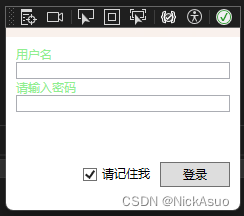
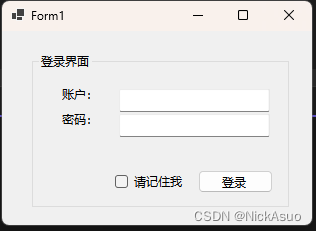
C# Windows窗体版本
namespace WinFormsApp1
{
    partial class Form1
    {
        /// <summary>
        ///  Required designer variable.
        /// </summary>
        private System.ComponentModel.IContainer components = null;

        /// <summary>
        ///  Clean up any resources being used.
        /// </summary>
        /// <param name="disposing">true if managed resources should be disposed; otherwise, false.</param>
        protected override void Dispose(bool disposing)
        {
            if (disposing && (components != null))
            {
                components.Dispose();
            }
            base.Dispose(disposing);
        }

        #region Windows Form Designer generated code

        /// <summary>
        ///  Required method for Designer support - do not modify
        ///  the contents of this method with the code editor.
        /// </summary>
        private void InitializeComponent()
        {
            label1 = new Label();
            textBox1 = new TextBox();
            label2 = new Label();
            textBox2 = new TextBox();
            groupBox1 = new GroupBox();
            button1 = new Button();
            checkBox1 = new CheckBox();
            tableLayoutPanel1 = new TableLayoutPanel();
            groupBox1.SuspendLayout();
            tableLayoutPanel1.SuspendLayout();
            SuspendLayout();
            //
            // label1
            //
            label1.AutoSize = true;
            label1.Location = new Point(3, 0);
            label1.Name = "label1";
            label1.Size = new Size(44, 17);
            label1.TabIndex = 0;
            label1.Text = "账户:";
            //
            // textBox1
            //
            textBox1.Location = new Point(63, 3);
            textBox1.Name = "textBox1";
            textBox1.Size = new Size(151, 23);
            textBox1.TabIndex = 1;
            //
            // label2
            //
            label2.AutoSize = true;
            label2.Location = new Point(3, 25);
            label2.Name = "label2";
            label2.Size = new Size(44, 17);
            label2.TabIndex = 2;
            label2.Text = "密码:";
            //
            // textBox2
            //
            textBox2.Location = new Point(63, 28);
            textBox2.Name = "textBox2";
            textBox2.Size = new Size(151, 23);
            textBox2.TabIndex = 3;
            //
            // groupBox1
            //
            groupBox1.Controls.Add(button1);
            groupBox1.Controls.Add(checkBox1);
            groupBox1.Controls.Add(tableLayoutPanel1);
            groupBox1.Location = new Point(30, 22);
            groupBox1.Name = "groupBox1";
            groupBox1.Size = new Size(257, 155);
            groupBox1.TabIndex = 4;
            groupBox1.TabStop = false;
            groupBox1.Text = "登录界面";
            groupBox1.Enter += groupBox1_Enter;
            //
            // button1
            //
            button1.Location = new Point(166, 117);
            button1.Name = "button1";
            button1.Size = new Size(75, 23);
            button1.TabIndex = 8;
            button1.Text = "登录";
            button1.UseVisualStyleBackColor = true;
            //
            // checkBox1
            //
            checkBox1.AutoSize = true;
            checkBox1.Location = new Point(83, 119);
            checkBox1.Name = "checkBox1";
            checkBox1.Size = new Size(75, 21);
            checkBox1.TabIndex = 5;
            checkBox1.Text = "请记住我";
            checkBox1.UseVisualStyleBackColor = true;
            //
            // tableLayoutPanel1
            //
            tableLayoutPanel1.ColumnCount = 2;
            tableLayoutPanel1.ColumnStyles.Add(new ColumnStyle(SizeType.Percent, 28F));
            tableLayoutPanel1.ColumnStyles.Add(new ColumnStyle(SizeType.Percent, 72F));
            tableLayoutPanel1.Controls.Add(label1, 0, 0);
            tableLayoutPanel1.Controls.Add(textBox2, 1, 1);
            tableLayoutPanel1.Controls.Add(label2, 0, 1);
            tableLayoutPanel1.Controls.Add(textBox1, 1, 0);
            tableLayoutPanel1.Location = new Point(24, 33);
            tableLayoutPanel1.Name = "tableLayoutPanel1";
            tableLayoutPanel1.RowCount = 2;
            tableLayoutPanel1.RowStyles.Add(new RowStyle(SizeType.Percent, 32F));
            tableLayoutPanel1.RowStyles.Add(new RowStyle(SizeType.Percent, 68F));
            tableLayoutPanel1.Size = new Size(217, 80);
            tableLayoutPanel1.TabIndex = 7;
            tableLayoutPanel1.Paint += tableLayoutPanel1_Paint;
            //
            // Form1
            //
            AutoScaleDimensions = new SizeF(7F, 17F);
            AutoScaleMode = AutoScaleMode.Font;
            ClientSize = new Size(310, 194);
            Controls.Add(groupBox1);
            Name = "Form1";
            Text = "Form1";
            groupBox1.ResumeLayout(false);
            groupBox1.PerformLayout();
            tableLayoutPanel1.ResumeLayout(false);
            tableLayoutPanel1.PerformLayout();
            ResumeLayout(false);
        }

        #endregion

        private Label label1;
        private TextBox textBox1;
        private Label label2;
        private TextBox textBox2;
        private GroupBox groupBox1;
        private TableLayoutPanel tableLayoutPanel1;
        private Button button1;
        private CheckBox checkBox1;
    }
}
Lisp语言版本
McCLIM是Common Lisp的一个GUI库。
Emacs Lisp和Common Lisp是两种不同的Lisp方言,Common Lisp提供了更多的内置函数和库,包括许多高级功能,如面向对象编程、图形用户界面开发、多线程编程等。Emacs Lisp的功能和库相对较少,主要集中在与Emacs编辑器相关的任务上。
LTK - The Lisp Toolkit
Andoid版本
Pascalde的Delphi版本
Rust语言Conrod库版本
Conrod 线条
一个易于使用、完全由Rust编写的2D的GUI库。

魔乐社区(Modelers.cn) 是一个中立、公益的人工智能社区,提供人工智能工具、模型、数据的托管、展示与应用协同服务,为人工智能开发及爱好者搭建开放的学习交流平台。社区通过理事会方式运作,由全产业链共同建设、共同运营、共同享有,推动国产AI生态繁荣发展。
更多推荐

 16
16 0
0- 0


 已为社区贡献1条内容

所有评论(0)