基于spring boot的调查问卷系统的设计与实现
Spring Boot作为Java生态中流行的轻量级框架,具备快速开发、简化配置、集成性强等特点,适合构建高内聚、低耦合的Web应用。结合Spring Security、MyBatis等技术栈,可轻松实现用户管理、数据持久化和权限控制,满足问卷系统的复杂业务需求。模块化设计便于功能扩展(如接入短信/邮件通知),Spring Security保障用户隐私和问卷数据安全,符合GDPR等合规要求。该系统
背景与意义
随着数字化时代的快速发展,传统纸质问卷调查方式逐渐暴露出效率低、成本高、数据整理困难等问题。基于Spring Boot的调查问卷系统能够有效解决这些问题,为企业和个人提供高效、便捷的数据收集与分析工具。
技术背景
Spring Boot作为Java生态中流行的轻量级框架,具备快速开发、简化配置、集成性强等特点,适合构建高内聚、低耦合的Web应用。结合Spring Security、MyBatis等技术栈,可轻松实现用户管理、数据持久化和权限控制,满足问卷系统的复杂业务需求。
社会需求
在教育、市场调研、企业内控等领域,对实时数据采集和分析的需求日益增长。在线问卷系统支持多终端访问、自动化统计和可视化报表,显著提升数据决策效率。
核心价值
效率提升
系统支持问卷的快速创建、发布与传播,受访者可随时随地参与,减少时间与空间限制。自动化数据汇总功能避免了人工录入错误,提高调研效率。
成本优化
无纸化操作降低印刷与分发成本,同时减少人力资源投入。Spring Boot的开源特性进一步节省了软件开发的许可费用。
数据深度利用
集成数据分析模块(如ECharts)可将结果转化为直观图表,帮助用户发现潜在规律,为决策提供数据支撑。
扩展性与安全性
模块化设计便于功能扩展(如接入短信/邮件通知),Spring Security保障用户隐私和问卷数据安全,符合GDPR等合规要求。
技术实现方向
后端架构
- 使用Spring Boot搭建RESTful API,实现问卷创建、用户认证、数据提交等核心功能。
- 通过JWT或OAuth2.0确保接口安全,MyBatis-Plus简化数据库操作。
前端交互
- 可采用Vue.js或React构建动态表单,支持拖拽式问卷设计,实时预览功能提升用户体验。
数据存储
- MySQL存储结构化数据(如用户信息、问卷题目),Redis缓存高频访问内容(如热门问卷统计结果)。
部署与运维
- 通过Docker容器化部署,结合Nginx实现负载均衡,确保高并发场景下的系统稳定性。
该系统不仅填补了传统调研工具的不足,也为学术研究、商业分析等领域提供了标准化数据采集方案,具有广泛的应用前景。
技术栈选择
后端框架
Spring Boot 作为核心框架,提供快速开发、自动配置和嵌入式服务器支持。配合Spring MVC处理HTTP请求,Spring Data JPA简化数据库操作。
数据库
MySQL或PostgreSQL作为关系型数据库存储结构化数据(如用户信息、问卷题目)。Redis用于缓存高频访问数据(如热门问卷结果)或临时存储验证码。
前端技术
Thymeleaf或Freemarker作为服务端模板引擎(适用于简单系统)。Vue.js/React+Element UI/Ant Design构建动态前端(适用于复杂交互场景)。
安全与认证
Spring Security实现用户认证、权限控制。JWT(JSON Web Token)用于无状态身份验证,适合前后端分离架构。
核心功能模块
问卷管理模块
- 动态表单生成:通过JSON Schema定义问卷结构,前端动态渲染。
- 问题类型支持:单选、多选、文本输入、评分等,使用策略模式处理不同类型问题的逻辑。
用户模块
- OAuth2.0集成:支持第三方登录(如微信、GitHub)。
- 权限分级:RBAC模型(角色-权限-用户)控制问卷编辑/发布权限。
数据分析模块
- 统计图表:ECharts或Apache ECharts可视化结果。
- 数据导出:Apache POI生成Excel报表,或iText生成PDF。
部署与扩展
容器化
Docker打包应用,结合Docker Compose管理多容器(应用+数据库+Redis)。Kubernetes支持高可用部署。
消息队列
RabbitMQ或Kafka处理异步任务(如邮件通知、数据清洗),提升系统响应速度。
监控与日志
Prometheus+Grafana监控系统性能,ELK(Elasticsearch+Logstash+Kibana)集中管理日志。
代码示例(关键部分)
动态问题处理接口
@PostMapping("/submit")
public ResponseEntity<?> submitAnswer(@RequestBody AnswerDTO answerDTO) {
    // 使用策略模式根据问题类型调用不同处理逻辑
    QuestionStrategy strategy = StrategyFactory.getStrategy(answerDTO.getQuestionType());
    strategy.validate(answerDTO.getAnswer());
    answerService.save(answerDTO);
    return ResponseEntity.ok().build();
}
JPA实体设计
@Entity
public class Question {
    @Id
    @GeneratedValue(strategy = GenerationType.IDENTITY)
    private Long id;

    @Enumerated(EnumType.STRING)
    private QuestionType type; // 枚举定义问题类型

    @ElementCollection
    private List<String> options; // 存储选择题选项
}
调查问卷系统核心模块设计
实体类设计(JPA)
@Entity
@Table(name = "questionnaire")
public class Questionnaire {
    @Id
    @GeneratedValue(strategy = GenerationType.IDENTITY)
    private Long id;
    private String title;
    private String description;

    @OneToMany(mappedBy = "questionnaire", cascade = CascadeType.ALL)
    private List<Question> questions;
}

@Entity
@Table(name = "question")
public class Question {
    @Id
    @GeneratedValue(strategy = GenerationType.IDENTITY)
    private Long id;
    private String content;
    private QuestionType type; // 枚举:单选/多选/文本

    @ManyToOne
    @JoinColumn(name = "questionnaire_id")
    private Questionnaire questionnaire;

    @OneToMany(mappedBy = "question", cascade = CascadeType.ALL)
    private List<Option> options;
}

@Entity
@Table(name = "answer")
public class Answer {
    @Id
    @GeneratedValue(strategy = GenerationType.IDENTITY)
    private Long id;

    @ManyToOne
    @JoinColumn(name = "question_id")
    private Question question;

    private String content;
}
问卷服务层实现
@Service
public class QuestionnaireService {
    @Autowired
    private QuestionnaireRepository questionnaireRepository;

    public Questionnaire createQuestionnaire(QuestionnaireDTO dto) {
        Questionnaire questionnaire = new Questionnaire();
        questionnaire.setTitle(dto.getTitle());
        questionnaire.setDescription(dto.getDescription());

        List<Question> questions = dto.getQuestions().stream()
            .map(qDto -> {
                Question question = new Question();
                question.setContent(qDto.getContent());
                question.setType(qDto.getType());
                question.setQuestionnaire(questionnaire);

                if (qDto.getOptions() != null) {
                    List<Option> options = qDto.getOptions().stream()
                        .map(optDto -> {
                            Option option = new Option();
                            option.setContent(optDto.getContent());
                            option.setQuestion(question);
                            return option;
                        }).collect(Collectors.toList());
                    question.setOptions(options);
                }
                return question;
            }).collect(Collectors.toList());

        questionnaire.setQuestions(questions);
        return questionnaireRepository.save(questionnaire);
    }
}
RESTful API 控制器
@RestController
@RequestMapping("/api/questionnaires")
public class QuestionnaireController {
    @Autowired
    private QuestionnaireService questionnaireService;

    @PostMapping
    public ResponseEntity<Questionnaire> create(@RequestBody QuestionnaireDTO dto) {
        return ResponseEntity.ok(questionnaireService.createQuestionnaire(dto));
    }

    @GetMapping("/{id}")
    public ResponseEntity<Questionnaire> getById(@PathVariable Long id) {
        return questionnaireService.findById(id)
            .map(ResponseEntity::ok)
            .orElse(ResponseEntity.notFound().build());
    }

    @PostMapping("/{id}/submit")
    public ResponseEntity<?> submitAnswers(
        @PathVariable Long id,
        @RequestBody List<AnswerDTO> answers) {
        // 处理答卷提交逻辑
        return ResponseEntity.ok().build();
    }
}
问卷统计功能实现
@Service
public class StatisticsService {
    @Autowired
    private AnswerRepository answerRepository;

    public Map<Long, AnswerStats> getQuestionStats(Long questionnaireId) {
        List<Object[]> results = answerRepository.countAnswersByQuestion(questionnaireId);

        return results.stream()
            .collect(Collectors.toMap(
                arr -> (Long) arr[0], // questionId
                arr -> new AnswerStats(
                    (Long) arr[1], // totalAnswers
                    (String) arr[2] // mostCommonAnswer
                )
            ));
    }
}
安全配置(Spring Security)
@Configuration
@EnableWebSecurity
public class SecurityConfig extends WebSecurityConfigurerAdapter {
    @Override
    protected void configure(HttpSecurity http) throws Exception {
        http.csrf().disable()
            .authorizeRequests()
            .antMatchers("/api/questionnaires/**").permitAll()
            .antMatchers("/admin/**").hasRole("ADMIN")
            .anyRequest().authenticated()
            .and()
            .formLogin().disable();
    }
}
前端交互示例(Thymeleaf)
<form th:action="@{/api/questionnaires/{id}/submit(id=${questionnaire.id})}" method="post">
    <div th:each="question : ${questionnaire.questions}">
        <h4 th:text="${question.content}"></h4>

        <div th:if="${question.type == 'SINGLE_CHOICE'}">
            <div th:each="option : ${question.options}">
                <input type="radio" th:name="${'q_' + question.id}" th:value="${option.id}">
                <label th:text="${option.content}"></label>
            </div>
        </div>

        <div th:if="${question.type == 'TEXT'}">
            <textarea th:name="${'q_' + question.id}"></textarea>
        </div>
    </div>
    <button type="submit">提交问卷</button>
</form>
关键实现要点包括:
- 使用JPA实现问卷、问题、选项的级联操作
- 采用DTO模式隔离持久层与表现层
- 通过Spring Data JPA实现复杂统计查询
- 设计RESTful API支持前后端分离
- 提供基础的安全控制配置
系统可扩展方向包括增加问卷模板、用户权限细分、答题验证逻辑等功能模块。
数据库设计
用户表(user)
存储用户基本信息,如用户名、密码、角色(管理员/普通用户)。
字段示例:
id(主键,自增)username(唯一,用于登录)password(加密存储)role(枚举:ADMIN/USER)
问卷表(questionnaire)
存储问卷的标题、描述、创建时间和状态(草稿/发布/结束)。
字段示例:
id(主键)title(问卷标题)description(问卷说明)creator_id(外键,关联用户表)status(枚举:DRAFT/PUBLISHED/CLOSED)create_time(创建时间)
问题表(question)
存储问题内容、类型(单选/多选/文本)及关联的问卷ID。
字段示例:
id(主键)content(问题文本)type(枚举:SINGLE_CHOICE/MULTIPLE_CHOICE/TEXT)questionnaire_id(外键,关联问卷表)
选项表(option)
针对选择题的选项内容,关联问题ID。
字段示例:
id(主键)content(选项文本)question_id(外键,关联问题表)
答卷表(answer_sheet)
记录用户提交的答卷,关联问卷和用户。
字段示例:
id(主键)user_id(外键,关联用户表)questionnaire_id(外键,关联问卷表)submit_time(提交时间)
答案表(answer)
存储用户对每个问题的具体回答,关联答卷和问题。
字段示例:
id(主键)answer_sheet_id(外键,关联答卷表)question_id(外键,关联问题表)content(文本答案或选项ID拼接)
系统测试
功能测试
- 用户模块:测试注册、登录、权限控制(如管理员能否管理问卷)。
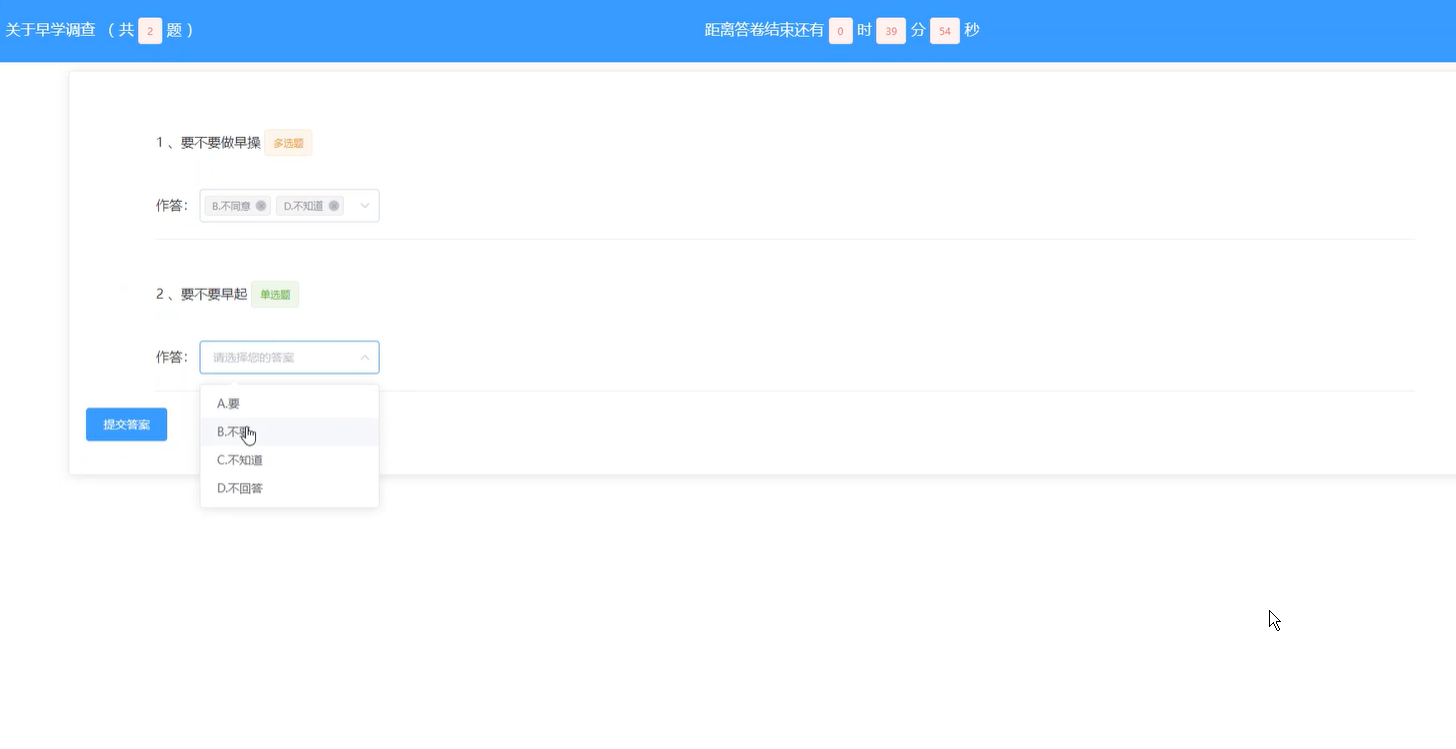
- 问卷模块:验证问卷创建、编辑、发布和关闭功能。
- 问题模块:检查问题添加、删除及类型切换(如单选转多选)。
- 答卷模块:模拟用户提交答卷,验证答案存储和关联是否正确。
性能测试
- 使用JMeter模拟多用户并发提交问卷,检测系统响应时间和数据库负载。
- 针对大数据量问卷(如10万条问题)测试查询效率,优化索引设计(如对
questionnaire_id建立索引)。
安全测试
- 注入测试:模拟SQL注入攻击,验证参数化查询是否有效。
- 权限测试:普通用户尝试访问管理员接口,检查拦截逻辑。
API测试(Postman示例)
POST /api/questionnaire/create
Body: { "title": "满意度调查", "description": "反馈意见", "status": "DRAFT" }
Headers: { "Authorization": "Bearer {token}" }
前端集成测试
- 使用Selenium自动化测试问卷填写页面,验证动态问题渲染(如选择题选项加载)。
- 检查表单提交后是否跳转正确页面并显示成功提示。
实现要点
-
Spring Boot配置:
- 使用Spring Data JPA或MyBatis-Plus操作数据库。
- 通过
@ManyToOne和@OneToMany注解管理实体关联。
-
事务管理
@Transactional public void submitAnswer(AnswerSheet sheet, List<Answer> answers) { answerSheetRepository.save(sheet); answerRepository.saveAll(answers); // 确保原子性 } -
缓存优化
- 对高频访问的问卷列表使用Redis缓存,减少数据库压力。

魔乐社区(Modelers.cn) 是一个中立、公益的人工智能社区,提供人工智能工具、模型、数据的托管、展示与应用协同服务,为人工智能开发及爱好者搭建开放的学习交流平台。社区通过理事会方式运作,由全产业链共同建设、共同运营、共同享有,推动国产AI生态繁荣发展。
更多推荐

 24
24 0
0- 0


 已为社区贡献16条内容

所有评论(0)