Python DrissionPage 爬虫 linux 部署说明 centos
本文介绍了在Linux服务器上安装谷歌浏览器及使用DrissionPage进行无头模式爬取的方法。主要内容包括: 谷歌浏览器安装步骤:提供Ubuntu和CentOS系统的安装命令,并说明如何验证安装路径。 DrissionPage无头模式配置:展示了如何根据系统类型(Linux/非Linux)自动配置浏览器参数,包括Linux系统下的无头模式优化设置。 示例代码:演示了一个完整的爬取流程,包含UR
·
2025/08/11 最新教程
DrissionPage 官网地址:https://drissionpage.cn/
1.1 服务器安装谷歌浏览器 如果你已安装自行跳过 看1.2
打开谷歌下载地址
https://www.google.cn/chrome/?hl=zh-CN&standalone=1
点击下面的其他平台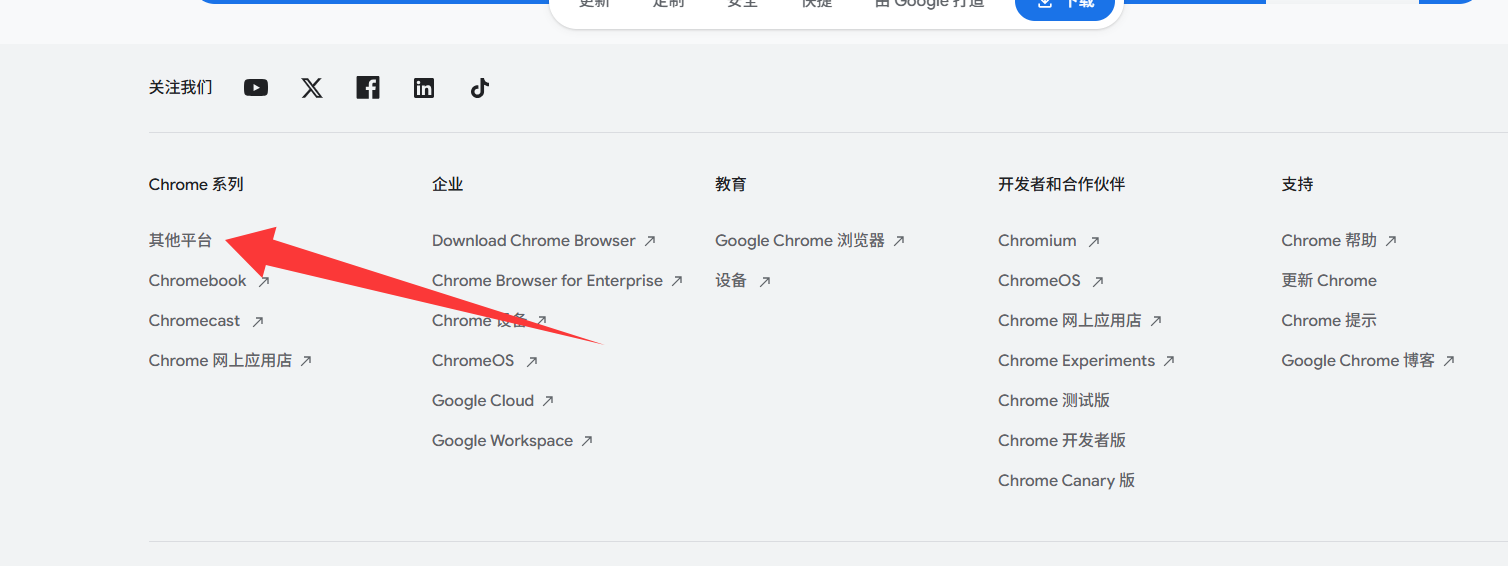
选择linux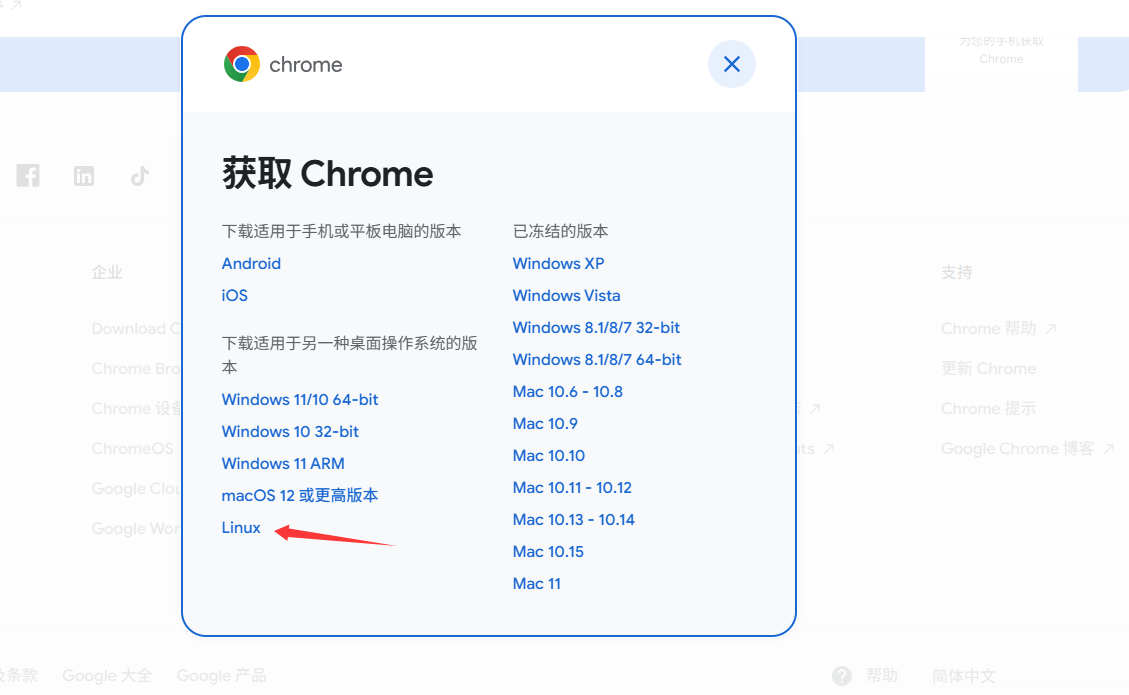
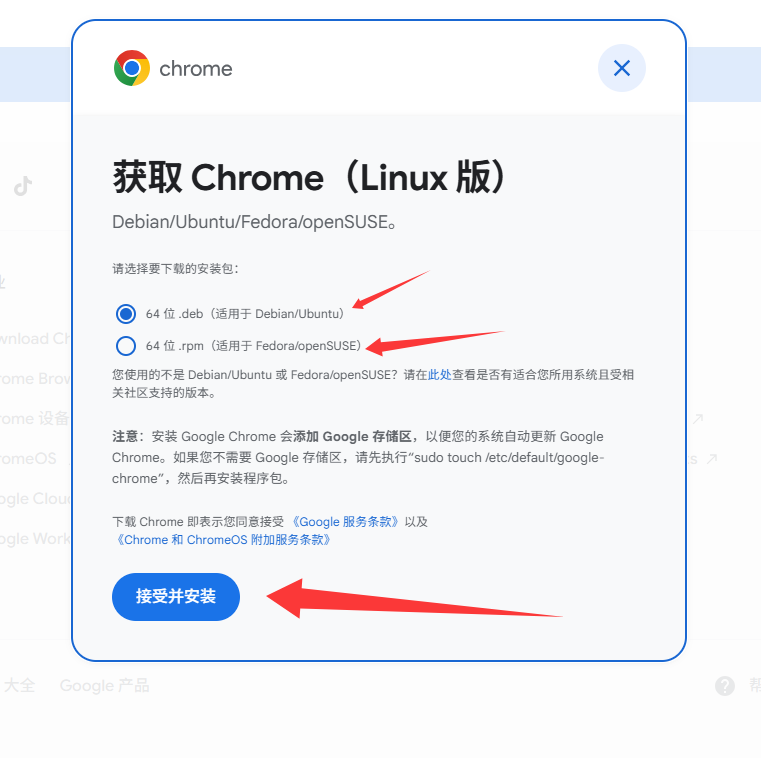
默认选择的是 ubuntu的 可选择rpm的 rpm是centos的
ubuntu直接使用下面命令安装 缺什么安装什么
dpkg -i google-chrome-stable_current_amd64.deb
centos使用 下面安装
yum install ./google-chrome-stable_current_x86_64.rpm
安装过程中会出现y/n 直接y即可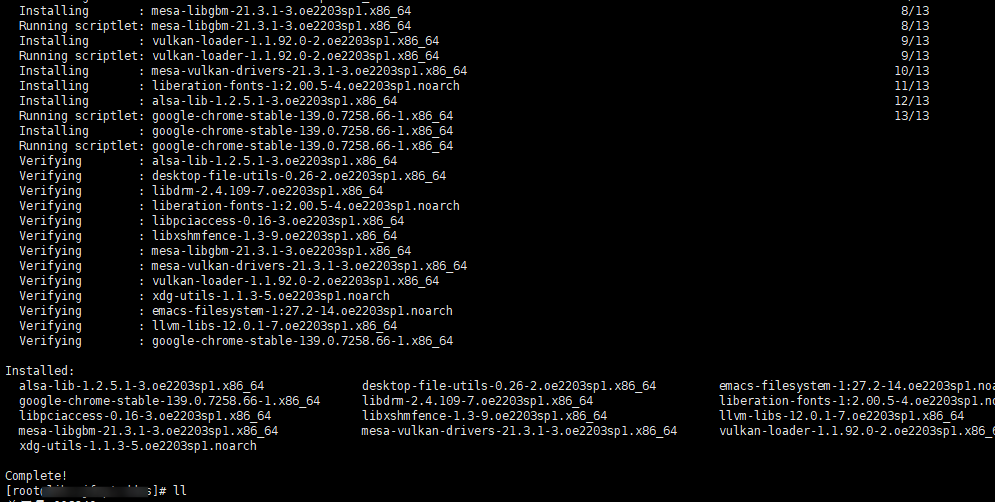
安装完成以后查看安装的目录 使用命令
which google-chrome

1.2 DrissionPage 无头模式调用代码示例
下面的demo很简单 在windows上执行会打开浏览器 然后 等待加载完成返回打印cookie信息 linux上面会无头加载浏览器 然后打印cookie信息
需要注意的是里面有指向上面安装的 谷歌浏览器地址
from DrissionPage import ChromiumPage, ChromiumOptions
import time
from urllib.parse import urlparse
import logging
import sys  # 需导入sys模块判断系统类型

# 配置日志
logging.basicConfig(
    level=logging.INFO,
    format='%(asctime)s - %(levelname)s - %(message)s'
)
logger = logging.getLogger(__name__)

# 配置常量
CACHE_EXPIRY = 1800  # 30分钟(1800秒)
REFRESH_THRESHOLD = 600  # 10分钟(600秒)- 小于此时间则重新请求更新


def init_browser():
    """初始化浏览器配置:Linux系统启用无头模式,其他系统禁用"""
    co = ChromiumOptions()

    # 判断当前系统是否为Linux
    if sys.platform.startswith('linux'):
        # Linux系统:启用无头模式
        co.headless(True)
        co.set_argument("--headless=new")
        co.set_argument("--blink-settings=imagesEnabled=true")
        # 额外添加Linux下的浏览器优化参数
        co.set_argument("--no-sandbox")
        co.set_argument("--disable-dev-shm-usage")
        # 可选:设置窗口大小(非无头模式下更友好)
        co.set_argument("--window-size=1280,720")
        co.set_paths(browser_path="/usr/bin/google-chrome")
    else:
        # 非Linux系统(如Windows、macOS):禁用无头模式(显示浏览器窗口)
        co.headless(False)  # 显式关闭无头模式
    return co


if __name__ == "__main__":
    # 示例:爬取指定URL列表
    url = "https://www.baidu.com/"
    try:
        parsed_url = urlparse(url)
        host = parsed_url.netloc
        if not host:
            logger.error(f"无效URL: {url},无法解析域名")

        # 初始化浏览器
        co = init_browser()
        page = ChromiumPage(co)

        try:
            # 访问目标URL并等待页面加载完成
            logger.info(f"开始访问: {url} (目标域名: {host})")
            page.get(url)
            # 等待页面完全加载
            # 核心修改:通过循环检查页面标题判断加载状态
            max_wait_time = 15  # 最大等待时间(秒)
            check_interval = 1  # 检查间隔(秒)
            start_time = time.time()
            page_loaded = False

            # 循环等待页面标题加载完成
            while time.time() - start_time < max_wait_time:
                try:
                    # 检查页面标题是否有效(非空)
                    if page.title and page.title.strip() != "":
                        page_loaded = True
                        break
                except Exception as e:
                    logger.warning(f"检查页面标题时出错: {str(e)}")

                time.sleep(check_interval)

            if not page_loaded:
                logger.warning(f"页面加载超时({max_wait_time}秒),标题未加载完成")

            # 额外等待2秒确保JS执行
            time.sleep(2)
            try:
                # 获取User-Agent
                ua = page.run_js("return navigator.userAgent")
                # 从请求头获取UA作为备选
                if not ua:
                    ua = page.request_headers.get('User-Agent', '')
            except:
                ua = ""

            # 获取所有Cookie并格式化为字符串
            try:
                # 尝试不同的Cookie获取方式,确保兼容性
                cookies = page.cookies().as_str()
                if not cookies:
                    cookies_dict = page.cookies()
                    cookies = '; '.join([f"{k}={v}" for k, v in cookies_dict.items()])
            except Exception as e:
                logger.warning(f"获取Cookie失败: {str(e)}")
                cookies = ""

            print(cookies)


        finally:
            # 关闭页面和浏览器
            page.quit()

    except Exception as e:
        logger.error(f"处理URL {url} 时出错: {str(e)}", exc_info=True)
下面代码为实际客户需要的 循环网站登录以后cookie和ua写入redis里面 我简化了一下
from DrissionPage import ChromiumPage, ChromiumOptions
import redis
import json
import time
from urllib.parse import urlparse
import logging
import os
import random


# 随机User-Agent池(模拟不同浏览器)
USER_AGENTS = [
    "Mozilla/5.0 (Windows NT 10.0; Win64; x64) AppleWebKit/537.36 (KHTML, like Gecko) Chrome/114.0.0.0 Safari/537.36",
    "Mozilla/5.0 (Macintosh; Intel Mac OS X 10_15_7) AppleWebKit/605.1.15 (KHTML, like Gecko) Version/16.5 Safari/605.1.15",
    "Mozilla/5.0 (Windows NT 10.0; Win64; x64; rv:109.0) Gecko/20100101 Firefox/115.0",
    "Mozilla/5.0 (X11; Linux x86_64) AppleWebKit/537.36 (KHTML, like Gecko) Chrome/114.0.0.0 Safari/537.36"
]

# 配置日志
logging.basicConfig(
    level=logging.INFO,
    format='%(asctime)s - %(levelname)s - %(message)s'
)
logger = logging.getLogger(__name__)

# Redis配置(与代理接口保持一致)
redis_client = redis.Redis(
    host='127.0.0.1',
    port=6379,
    db=0,
    password='***********',
    decode_responses=True
)

# 配置常量
CACHE_EXPIRY = 1800  # 30分钟(1800秒)
REFRESH_THRESHOLD = 600  # 10分钟(600秒)- 小于此时间则重新请求更新

# 配置Chrome浏览器
def init_browser():
    """初始化浏览器配置"""
    co = ChromiumOptions()
    # 1. 基础隐身配置(关键:使用set_argument替代add_argument)
    co.set_argument("--disable-blink-features=AutomationControlled")  # 关闭自动化检测
    co.set_argument("--no-sandbox")
    co.set_argument("--disable-dev-shm-usage")
    co.set_argument("--disable-gpu")
    co.set_argument("--window-size=1280,720")  # 模拟正常窗口大小

    # 2. 随机User-Agent
    co.set_argument(f"--user-agent={random.choice(USER_AGENTS)}")

    # 3. 模拟真实浏览器指纹
    co.set_argument("--lang=en-US,en;q=0.9")
    co.set_argument("--accept-language=en-US,en;q=0.9")
    co.set_argument("--referrer=https://www.google.com/")

    # 4. 无头模式伪装
    co.headless(True)
    co.set_argument("--headless=new")
    co.set_argument("--blink-settings=imagesEnabled=true")

    # 5. 设置浏览器路径
    co.set_paths(browser_path="/usr/bin/google-chrome")

    # 关键:移除set_experimental_option,改用启动参数禁用自动化提示
    co.set_argument("--exclude-switches=enable-automation")  # 等效于excludeSwitches
    co.set_argument("--disable-automation-extension")  # 禁用自动化扩展
    return co


def get_redis_ttl(key):
    """获取Redis键的剩余过期时间(秒),返回-1表示无过期时间,-2表示键不存在"""
    try:
        return redis_client.ttl(key)
    except Exception as e:
        logger.error(f"获取Redis TTL失败: {str(e)}")
        return -2

def fetch_and_store_cookies(url):
    """爬取指定URL的Cookie和User-Agent并存储到Redis,带缓存检查逻辑"""
    try:
        # 解析URL获取域名(作为Redis的Key)
        parsed_url = urlparse(url)
        host = parsed_url.netloc
        if not host:
            logger.error(f"无效URL: {url},无法解析域名")
            return False

        # 检查Redis中是否已有缓存及剩余过期时间
        ttl = get_redis_ttl(host)
        if ttl != -2:  # 键存在
            if ttl == -1:
                # 无过期时间的键,强制更新
                logger.info(f"域名 {host} 的缓存无过期时间,将强制更新")
            elif ttl > REFRESH_THRESHOLD:
                # 缓存剩余时间大于10分钟,不需要更新
                logger.info(f"域名 {host} 的缓存剩余时间 {ttl//60} 分钟,无需更新")
                return True
            else:
                # 缓存剩余时间小于等于10分钟,需要更新
                logger.info(f"域名 {host} 的缓存剩余时间 {ttl//60} 分钟,将更新缓存")

        # 初始化浏览器
        co = init_browser()
        page = ChromiumPage(co)

        try:
            # 访问目标URL并等待页面加载完成
            logger.info(f"开始访问: {url} (目标域名: {host})")
            page.get(url)
            # 等待页面完全加载
            # 核心修改:通过循环检查页面标题判断加载状态
            max_wait_time = 15  # 最大等待时间(秒)
            check_interval = 1  # 检查间隔(秒)
            start_time = time.time()
            page_loaded = False

            # 循环等待页面标题加载完成
            while time.time() - start_time < max_wait_time:
                try:
                    # 检查页面标题是否有效(非空)
                    if page.title and page.title.strip() != "":
                        page_loaded = True
                        break
                except Exception as e:
                    logger.warning(f"检查页面标题时出错: {str(e)}")

                time.sleep(check_interval)

            if not page_loaded:
                logger.warning(f"页面加载超时({max_wait_time}秒),标题未加载完成")

            # 额外等待2秒确保JS执行
            time.sleep(2)

            # 获取User-Agent
            try:
                ua = page.run_js("return navigator.userAgent")
                # 从请求头获取UA作为备选
                if not ua:
                    ua = page.request_headers.get('User-Agent', '')
            except:
                ua = ""

            if not ua:
                ua = "Mozilla/5.0 (Windows NT 10.0; Win64; x64) AppleWebKit/537.36 (KHTML, like Gecko) Chrome/124.0.0.0 Safari/537.36"
                logger.warning(f"获取UA失败,使用默认值: {ua}")

            # 获取所有Cookie并格式化为字符串
            try:
                # 尝试不同的Cookie获取方式,确保兼容性
                cookies = page.cookies().as_str()
                if not cookies:
                    cookies_dict = page.cookies()
                    cookies = '; '.join([f"{k}={v}" for k, v in cookies_dict.items()])
            except Exception as e:
                logger.warning(f"获取Cookie失败: {str(e)}")
                cookies = ""

            # 存储到Redis(JSON格式,30分钟过期)
            data = {
                "user_agent": ua,
                "cookie": cookies
            }
            # 设置或更新缓存,过期时间重置为30分钟
            redis_client.setex(host, CACHE_EXPIRY, json.dumps(data))
            logger.info(f"成功更新域名 {host} 的数据到Redis (UA: {ua[:50]}..., Cookie长度: {len(cookies)})")
            return True

        finally:
            # 关闭页面和浏览器
            page.quit()

    except Exception as e:
        logger.error(f"处理URL {url} 时出错: {str(e)}", exc_info=True)
        return False

if __name__ == "__main__":
    # 示例:爬取指定URL列表响应的cookie
    target_urls = [
        "https://www.cnki.net/",
        "https://www.baidu.com/"
        # 可添加更多URL
    ]

    # 逐个处理URL
    for url in target_urls:
        fetch_and_store_cookies(url)
        # 避免请求过于频繁
        time.sleep(2)
是不是很简单 到这里教程就结束了

魔乐社区(Modelers.cn) 是一个中立、公益的人工智能社区,提供人工智能工具、模型、数据的托管、展示与应用协同服务,为人工智能开发及爱好者搭建开放的学习交流平台。社区通过理事会方式运作,由全产业链共同建设、共同运营、共同享有,推动国产AI生态繁荣发展。
更多推荐

 18
18 0
0- 0


 已为社区贡献4条内容

所有评论(0)