java给钉钉邮箱发送邮件
·
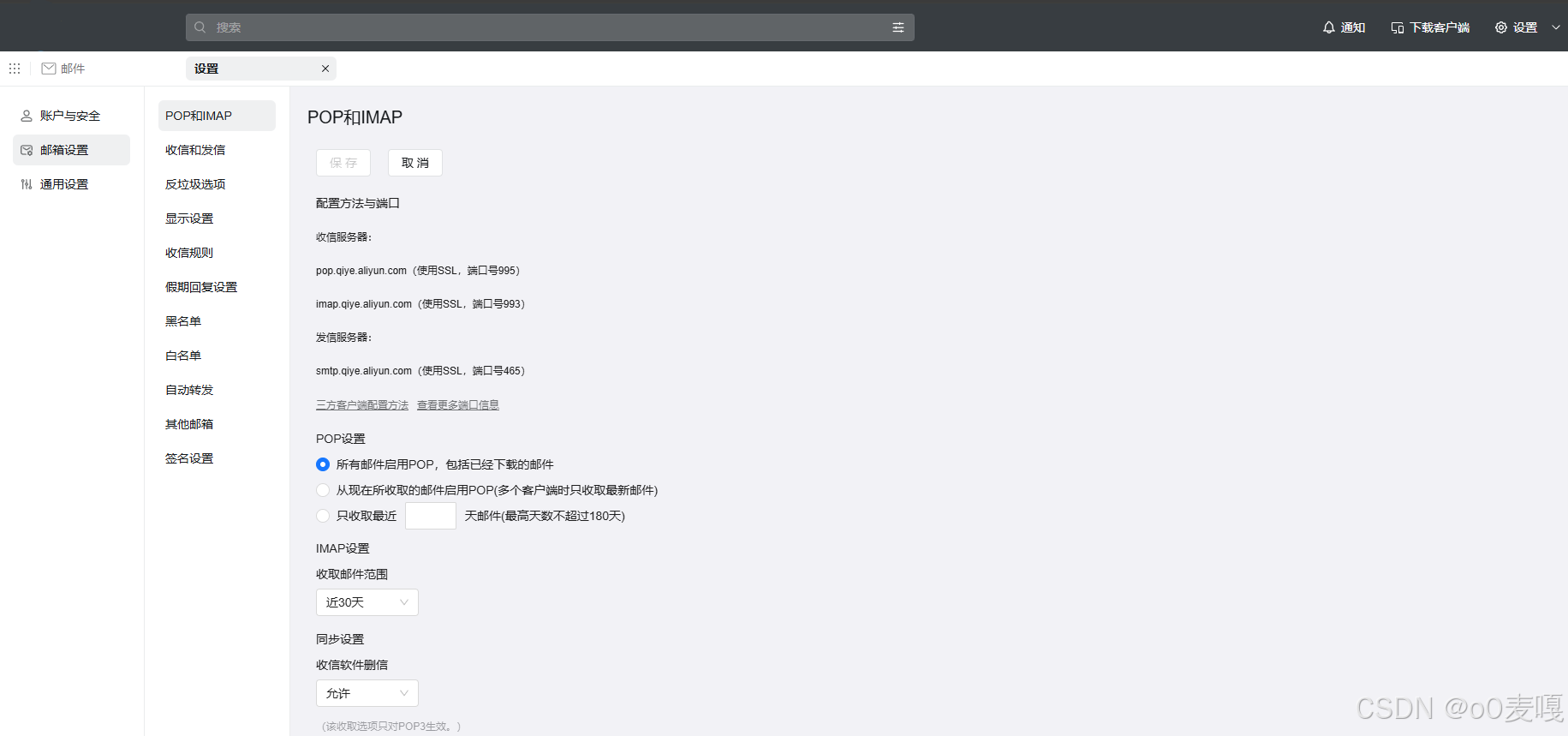
1.开通POP和IMAP
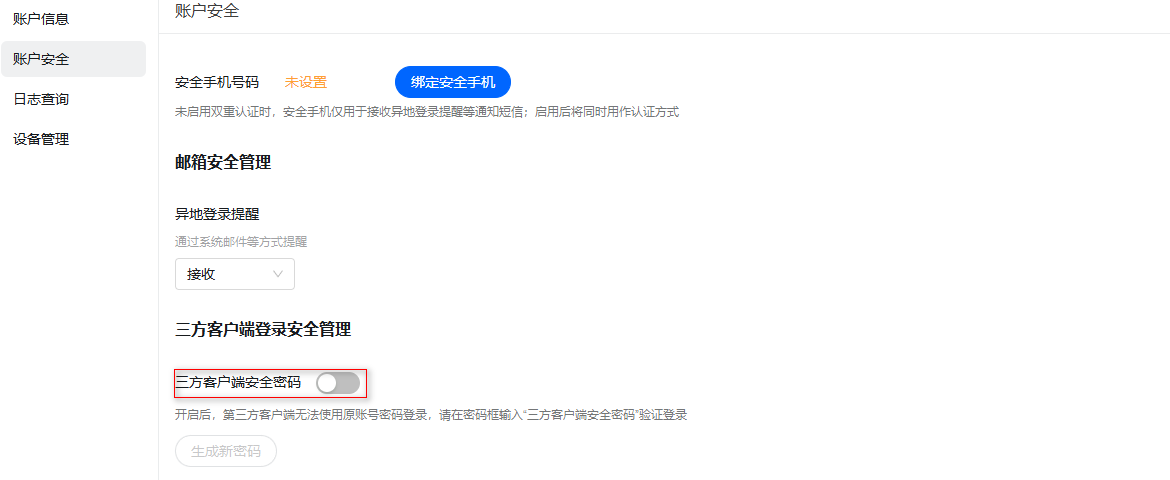
2.关闭【三方客户端登录安全管理】或者使用这里生成的密码
3.引入pom
<dependency>
	<groupId>javax.mail</groupId>
	<artifactId>mail</artifactId>
	<version>1.4.7</version>
</dependency>
4.逻辑
String host = "smtp.qiye.aliyun.com";
String port = "465";
String username = "xxxxxx@dingtalk.com"; // 钉钉发送者邮箱
String password = "xxxxxx"; // 发送者邮箱账号
String toEmail = "xxxxx@dingtalk.com"; // 钉钉接收者邮箱
String subject = "邮件标题"

try {
	Properties props = new Properties();
	props.setProperty("mail.smtp.host", host);
	props.setProperty("mail.smtp.port", port);
	props.setProperty("mail.smtp.socketFactory.class","javax.net.ssl.SSLSocketFactory");
 	props.setProperty("mail.smtp.socketFactory.fallback", "false");
	// 启用调试
	//props.setProperty("mail.debug", "true");
	props.setProperty("mail.smtp.socketFactory.port", port);
	props.setProperty("mail.smtp.auth", "true");
	// 建立邮件会话
	Session session = Session.getDefaultInstance(props, new Authenticator() {
		@Override
		protected PasswordAuthentication getPasswordAuthentication() {
			return new PasswordAuthentication(username, password);
		}
	});
	// 建立邮件对象
	MimeMessage message = new MimeMessage(session);
	message.setFrom(new InternetAddress(username));
	message.setRecipients(Message.RecipientType.TO, toEmail);
	message.setSubject(subject);
	MimeMultipart multipart = new MimeMultipart();
	BodyPart contentPart = new MimeBodyPart();
	// 邮件正文
	contentPart.setContent(content, "text/html;charset=utf-8");
	 multipart.addBodyPart(contentPart);
	// 附件
	MimeBodyPart attachmentBodyPart = new MimeBodyPart();
	// 读取本地文件,如果是前端传过来的MultipartFile文件,需要将MultipartFile转为file,再通过下面的方式:
	// File file = MultipartFileToFile(multipartFile);
	// DataSource source = new FileDataSource(file);
	// attachmentBodyPart.setDataHandler(new DataHandler(source));
	DataHandler dataHandler = new DataHandler(new FileDataSource("E:\\soft\\test.doc");
	attachmentBodyPart.setDataHandler(dataHandler);
	attachmentBodyPart.setFileName("test.doc");
	multipart.addBodyPart(attachmentBodyPart);
	// 设置邮件整体内容
	message.setContent(multipart);
	Transport.send(message);
} catch (Exception e) {
	e.printStackTrace();
}
5.直接添加前端传过来的MultipartFile
.....
MimeMultipart multipart = new MimeMultipart();
BodyPart contentPart = new MimeBodyPart();
// 邮件正文
contentPart.setContent(content, "text/html;charset=utf-8");
multipart.addBodyPart(contentPart);
// 附件--这里改下
MimeBodyPart attachmentBodyPart = new MimeBodyPart();
File file = MultipartFileToFile(multipartFile);
DataSource source = new FileDataSource(file);
attachmentBodyPart.setDataHandler(new DataHandler(source));
attachmentBodyPart.setFileName(file.getName());
multipart.addBodyPart(attachmentBodyPart);
// 设置邮件整体内容
message.setContent(multipart);
Transport.send(message);
.....
6.添加多个附件
MimeMultipart multipart = new MimeMultipart();
BodyPart contentPart = new MimeBodyPart();
// 邮件正文
contentPart.setContent(content, "text/html;charset=utf-8");
multipart.addBodyPart(contentPart);
// 附件--这里改下
for (MultipartFile multipartFile : files){
	MimeBodyPart attachmentBodyPart = new MimeBodyPart();
	File file = MultipartFileToFile(multipartFile);
	DataSource source = new FileDataSource(file);
	//添加附件的内容
	attachmentBodyPart.setDataHandler(new DataHandler(source));
	//添加附件的标题
	attachmentBodyPart.setFileName(file.getName());
	multipart.addBodyPart(filePart);
}
// 设置邮件整体内容
message.setContent(multipart);
Transport.send(message);
7.给多个邮箱发邮件
String tos = "a1@dingtalk.com,a2@dingtalk.com,a3@dingtalk.com";
String[] toList = to.split(",");
Address[] addresses = new Address[toList.length];
for (int i = 0; i < toList.length; i++) {
	addresses[i] = new InternetAddress(toList[i]);
}
message.setRecipients(Message.RecipientType.TO, addresses);

魔乐社区(Modelers.cn) 是一个中立、公益的人工智能社区,提供人工智能工具、模型、数据的托管、展示与应用协同服务,为人工智能开发及爱好者搭建开放的学习交流平台。社区通过理事会方式运作,由全产业链共同建设、共同运营、共同享有,推动国产AI生态繁荣发展。
更多推荐


 2
2 0
0- 0


 已为社区贡献4条内容

所有评论(0)