大模型智能体LangGraph
前言
Agent 架构之争已定,收敛至以 Claude Code 和 Deep Agent 为代表的「通用型 Agent」形态。它是 Main Agent - Sub Agent(主从架构),还具备自主规划(Planning)能力和独立的文件系统概念。
Deep Agent
Deep 的 Agent 必须能够实现 “Long Time Run”,这涵盖了两个关键维度:
- Agent 必须能够长时间持续运行而不崩溃(例如,连续玩 24 小时宠物小精灵直至通关),确保任务不会因系统不稳定而中断。
- Agent 必须能连续、保质保量地执行多步骤任务,涉及到大量调用工具(Tools)和外部服务(APIs)。
例如,相比于简单的“发微信告诉妈妈今晚我晚点回家”,更复杂的任务是“找一款 500 元的大品牌秋冬大衣,并在京东、淘宝、拼多多比较,综合所有评论,找到推荐的 3 件,并发到我邮箱”。后一任务可能涉及多达 50 个 tool 或 API 的连续调用。
其次,它是“Agent”
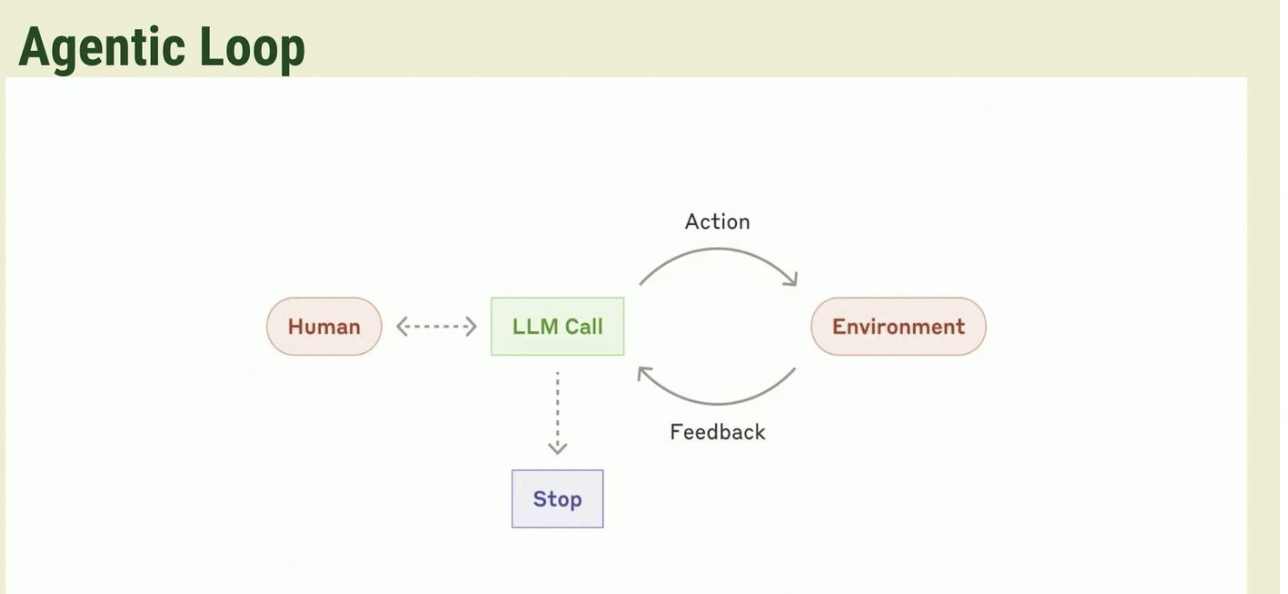
这是一个老生常谈的故事。Workflow 胜在稳定,Agent 胜在上限高。传统做业务开发的同事,往往追求稳定,包括我自己。如果用一句话概括二者的本质区别,我认为是复杂度的转移:
Workflow 将错综复杂的业务逻辑显式地构建为“有向图”;而 Agent 则将这些逻辑抽象为自然语言。在我们将架构简化为“Prompt + Tool”的同时,并没有消除复杂度,仅仅是将复杂度从“流程编排”转移到了“Prompt 设计”之中。
但跳出形态之争,无论你选择 Workflow 还是 Agent,核心逻辑是一致的:我们都在实践 Test-Time Scaling Law。 即通过良好的上下文工程(Context Engineering),让模型“合理”地消耗更多 Token,以换取解决更难题目的能力或更高的任务准确率。
构建 Deep Agent: 把业务知识丝滑地融入到 Agent
目前常见的做法
- 融入 Prompt:绞尽脑汁地编写 prompt,试图把业务逻辑“翻译”成模型能懂的口吻。这种方式往往僵化且死板,难以灵活应对复杂场景。
- 企业知识库 (RAG):虽然能解决知识体量问题。但需要定义 Index、处理向量化、精心切分文档……整个过程笨重。
这些做法都不够“丝滑”。直到 Anthropic 在 2025 年 10 月提出了 Agent Skills,我看到了一种优雅的解法。
Skill 本质上是一个多层级的文件系统。这个文件系统里封装了指令、脚本和相关资源,旨在让 Agent 可以动态地发现和加载这些内容,以便更好地执行特定任务。技能通过将您的专业知识打包成可组合的资源提供给 Claude,从而扩展了 Claude 的能力,将通用代理转化为适合您需求的专业化代理。
用官网 Blog 的例子《Equipping agents for the real world with Agent Skills》:
Claude 对理解 PDF 已经很强了,但在直接操作它们(例如填写表格)的能力上受到限制。因此,Claude 抽象出一个 pdf 的 skill。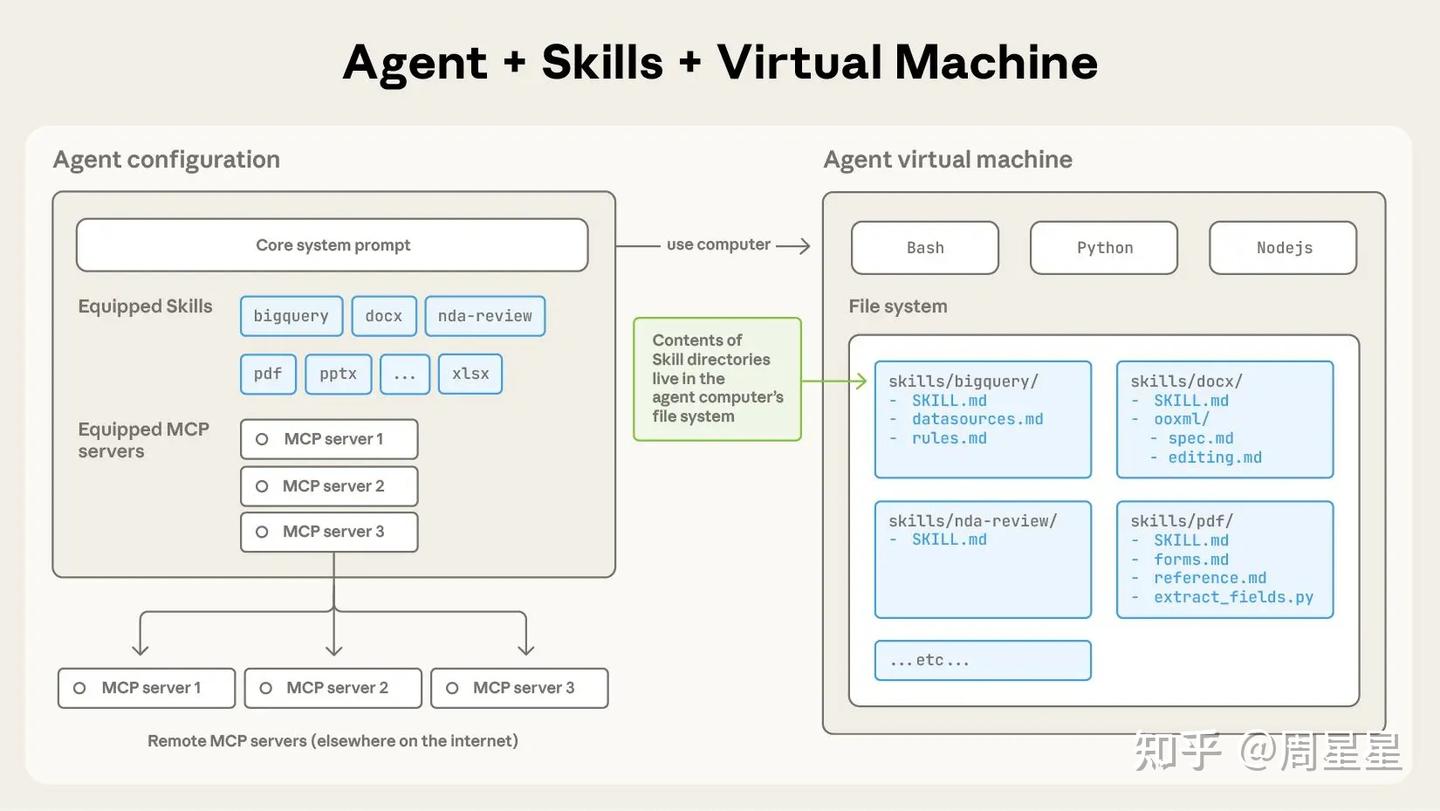
最简单地说,技能是一个包含 SKILL.md 文件的目录。该文件必须以 YAML Frontmatter 开头,其中包含一些必需的元数据:name 和 description。在启动时,代理会将所有已安装技能的 name 和 description 预加载到其系统提示中。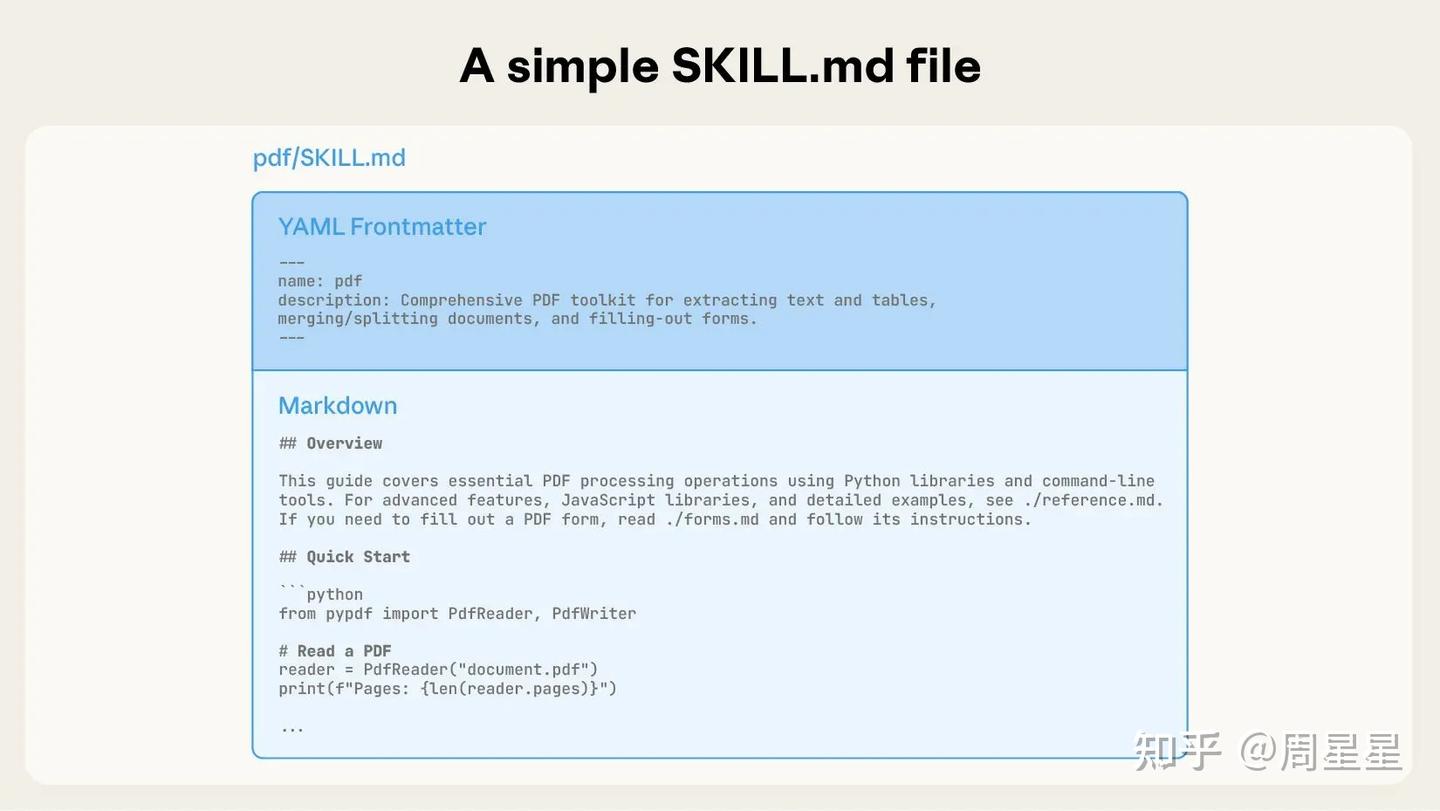
这些元数据是渐进式披露(progressive disclosure)的第一级:它提供了刚好足够的信息,让 Claude 知道何时应该使用每个技能,而无需将所有内容都加载到上下文(context)中。该文件实际的正文是第二级细节。如果 Claude 认为该技能与当前任务相关,它将通过读取完整的 SKILL.md 文件到上下文(context)中来加载该技能。
一个 SKILL.md 文件必须以包含文件名和描述的 YAML Frontmatter 开头,这些内容会在启动时加载到其系统提示中。
随着技能复杂性的增加,它们可能包含太多上下文而无法放入单个 SKILL.md 中,或者包含仅在特定场景下才相关的上下文。在这些情况下,技能可以在其目录内捆绑额外的文件,并从 SKILL.md 中按名称引用它们。这些额外的链接文件是第三级(及更深层次)的细节,Claude 可以选择仅在需要时导航和发现它们。
在下面所示的 PDF 技能中,SKILL.md 引用了两个额外的文件(reference.md 和 forms.md),技能作者选择将它们与核心的 SKILL.md 捆绑在一起。通过将填写表格的指令移动到一个单独的文件(forms.md)中,技能作者能够保持核心技能的精简,相信 Claude 只有在填写表格时才会读取 forms.md。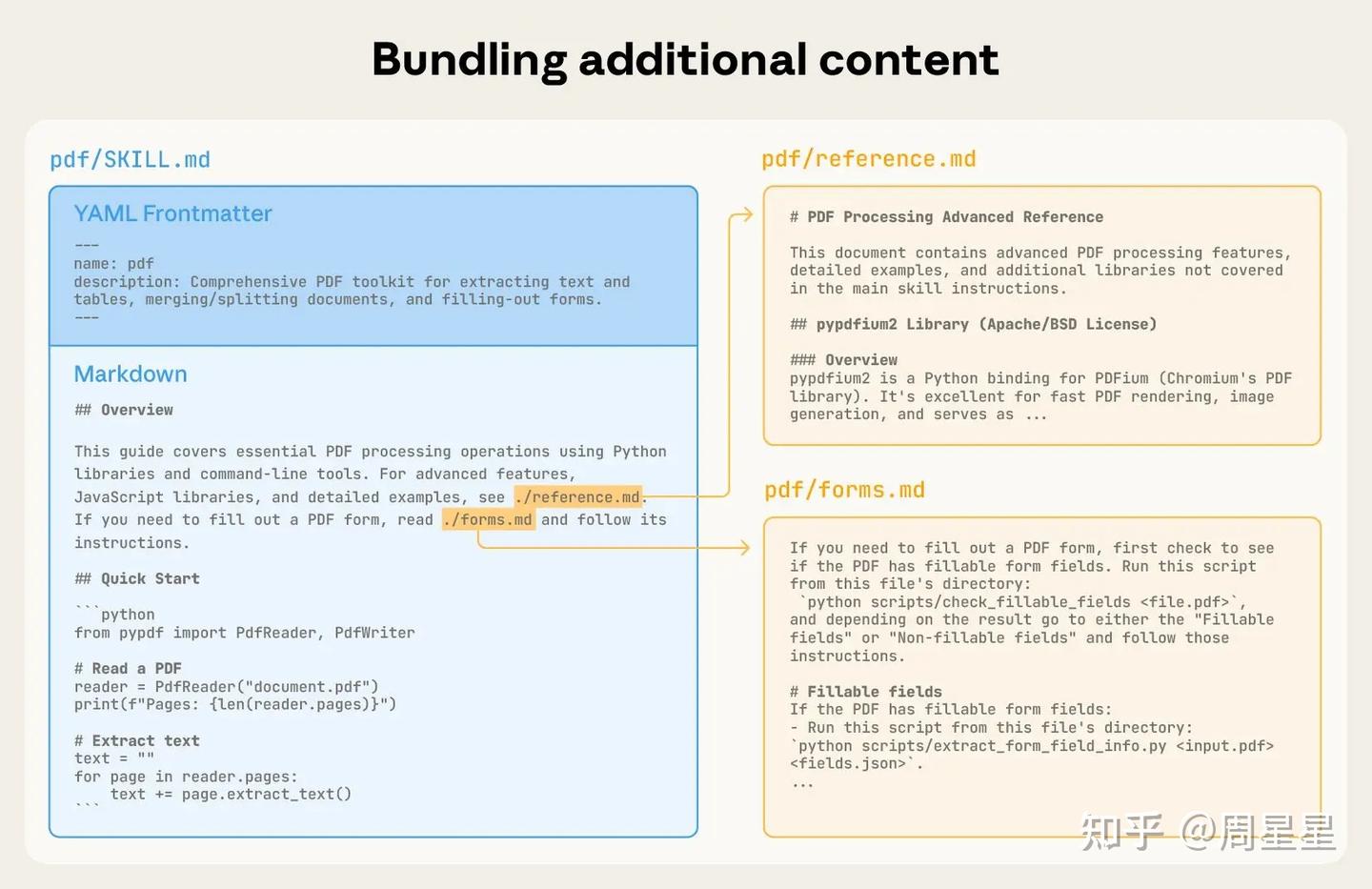
渐进式披露是使 Agent Skills 灵活和可扩展的核心设计原则。就像一本组织良好的手册,从目录开始,接着是特定的章节,最后是详细的附录,技能允许 Claude 仅在需要时加载信息:
- 技能元数据(name 和 description)→ 预加载到系统提示 (System Prompt) 中。
- SKILL.md 的全部内容 → 仅在相关时加载到上下文(context)中。
- 附加文件 (如 forms.md) → 仅在需要时被发现和加载到上下文(context)中。
以下图表展示了当用户消息触发技能时,上下文窗口是如何变化的。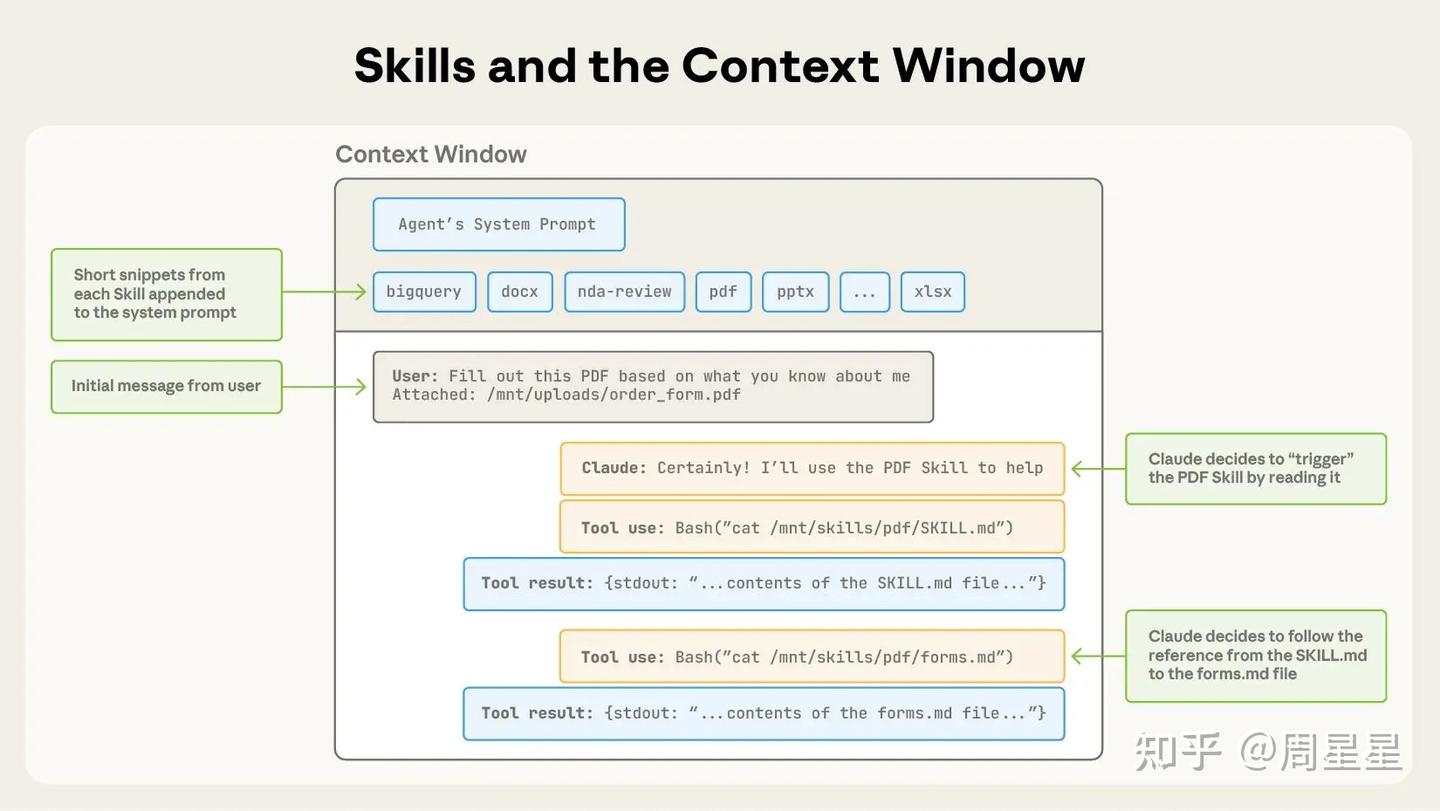
所示的操作序列:
- 开始时,上下文窗口包含核心系统提示和所有已安装技能的元数据,以及用户的初始消息;
- Claude 通过调用 Bash 工具来读取 pdf/SKILL.md 的内容,从而触发 PDF 技能;
- Claude 选择读取技能中捆绑的 forms.md 文件;
- 最后,Claude 在加载了 PDF 技能中的相关指令后,继续执行用户任务。
Skills 还可以包含代码,官网示例中,PDF 技能包含一个预先编写的 Python 脚本,该脚本可以读取 PDF 并提取所有表单字段。Claude 可以运行此脚本,而无需将脚本或 PDF 加载到上下文环境中。而且由于代码具有确定性,因此这个工作流程是一致且可重复的。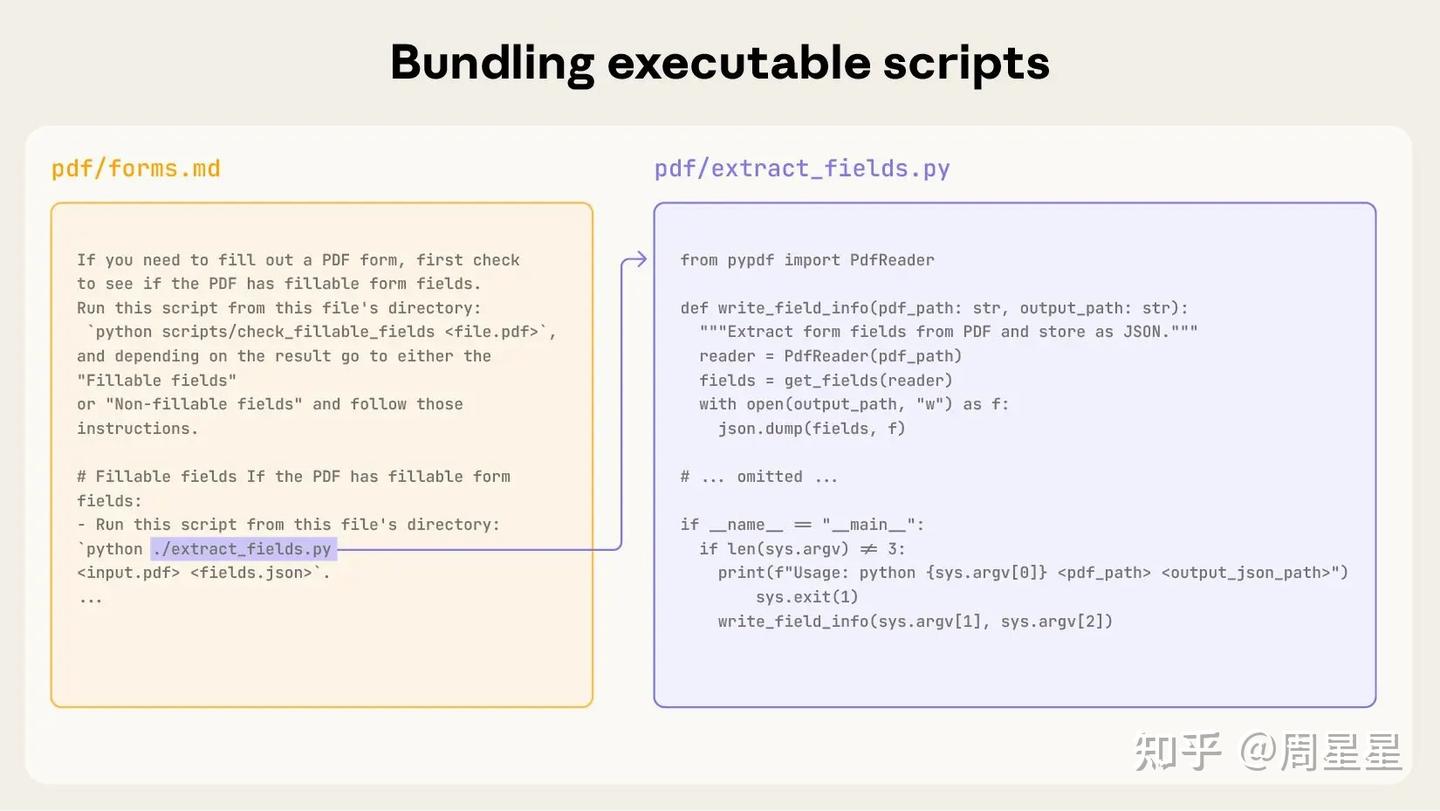
从这个角度来看,skills 多多少少还有取代 tools 或 mcp 的作用。假如你的场景因为外部编写的 mcp 字段定义得不好,其实你可以是可以把它变成 skills,写一些 case,来提升提升调用的准确率的,这样子,从外部的不可控变成自己掌控。skills为什么好?
- 渐进式披露和加载,带来更好的 Context 管理:彻底告别把所有背景信息一次性塞进 Prompt 的暴力做法。通过分级加载,大模型变得更轻快、更专注。
- 能让工程师进入“业务心流”状态:这种文件结构迫使工程师必须梳理清楚业务逻辑。编写 Skill 的过程,本质上就是对业务进行高内聚、低耦合的抽象过程。这感觉是 AI 时代,更好的人机协作方式,人来做高层的业务抽象,AI 来完成具体的事情。
- 高度可复用:Skill 是独立的文件夹。同事想了解和复用你的业务逻辑?直接把文件夹 Copy 给他即可,觉得好用的,直接加入到自己的 skills 就好了。
- 部分代码更稳定:想想,调用代码更加稳定,假如我们是用 mcp_hub tools 时,假如有 50 个 tools,都需加载到 system prompt,但假如用 Agents skills,它是按需加载的。同 1,但更针对工具和代码调用。
有一大堆开源的 skill 可以参考。
在实际工程中,你会发现一个残酷的现实:Claude 模型:能以 98% 的概率稳定触发和调用这些 Skills;非 Claude 模型(如豆包、DeepSeek 等):触发成功率可能仅维持在 80% 左右甚至更低,
无论如何, Claude Skill 是 2025 年 AI 应用我认为的最佳工作。如此简单而美的工作,用最直观、清晰、简练的方式,解决了 Agent 复杂能力的封装与扩展问题。
构建 Deep Agent: Long-Running
langgraph 提出来 4 种方法,让你的 agent 在长时间运行不崩溃,甚至 langgraph 开发了一个包,就叫 Deep Agent。里面提到了 4 种方法。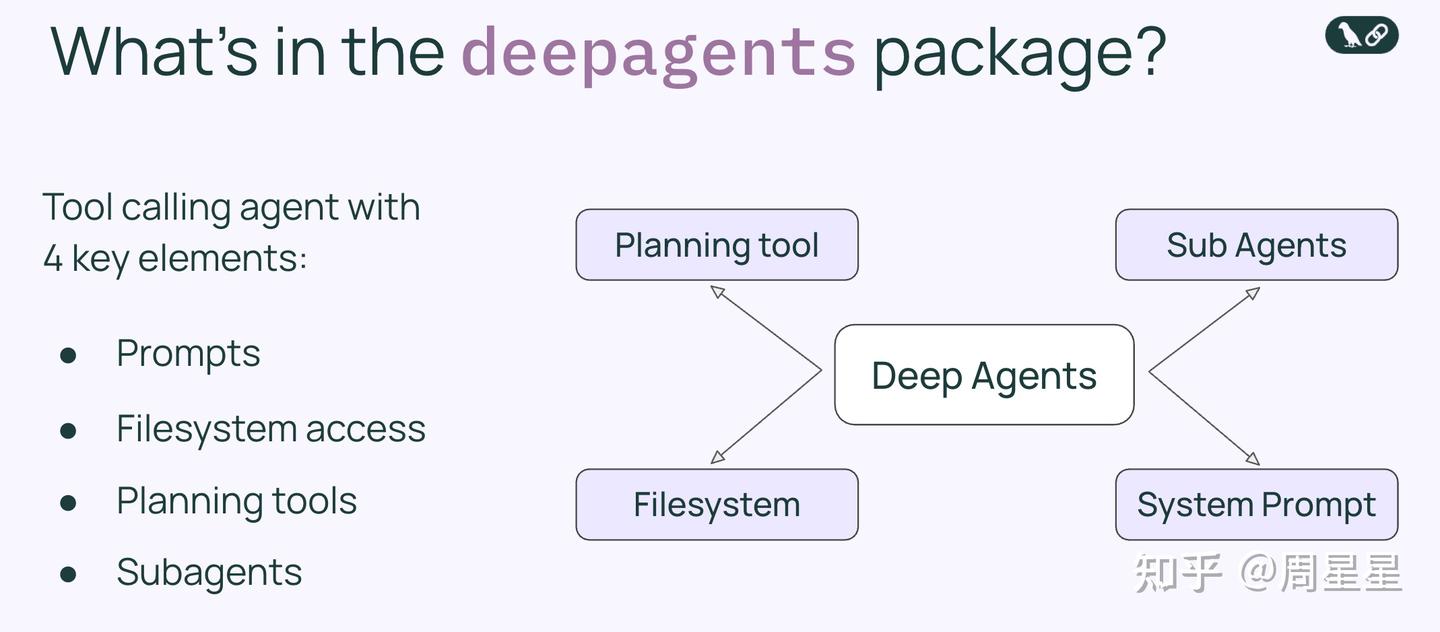
-
Planning:规划是深度代理能够在其目标上执行更长时间跨度任务的重要组成部分。
- 任务分解: 规划工具(例如内置的 write_todos 工具)使得代理可以将复杂的任务分解为离散的步骤,跟踪进度,并根据新信息调整计划。
- 保持焦点: 规划工具通过在模型的上下文(context)中创建待办事项列表等消息,帮助代理在执行过程中保持正确的轨道。
-
Sub-Agents:子代理的目的是允许代理将任务拆分,并实现上下文隔离。
- 上下文隔离: 子任务的执行过程不会污染主智能体的上下文。
- 并行执行: 多个子任务可以同时进行,大幅提升效率。
- 专业化分工: 可以为不同的子智能体配置专属的工具和指令。
- Token 效率: 子智能体完成任务后,只将最终的、高度综合的结果返回给主智能体,极大地压缩了上下文。
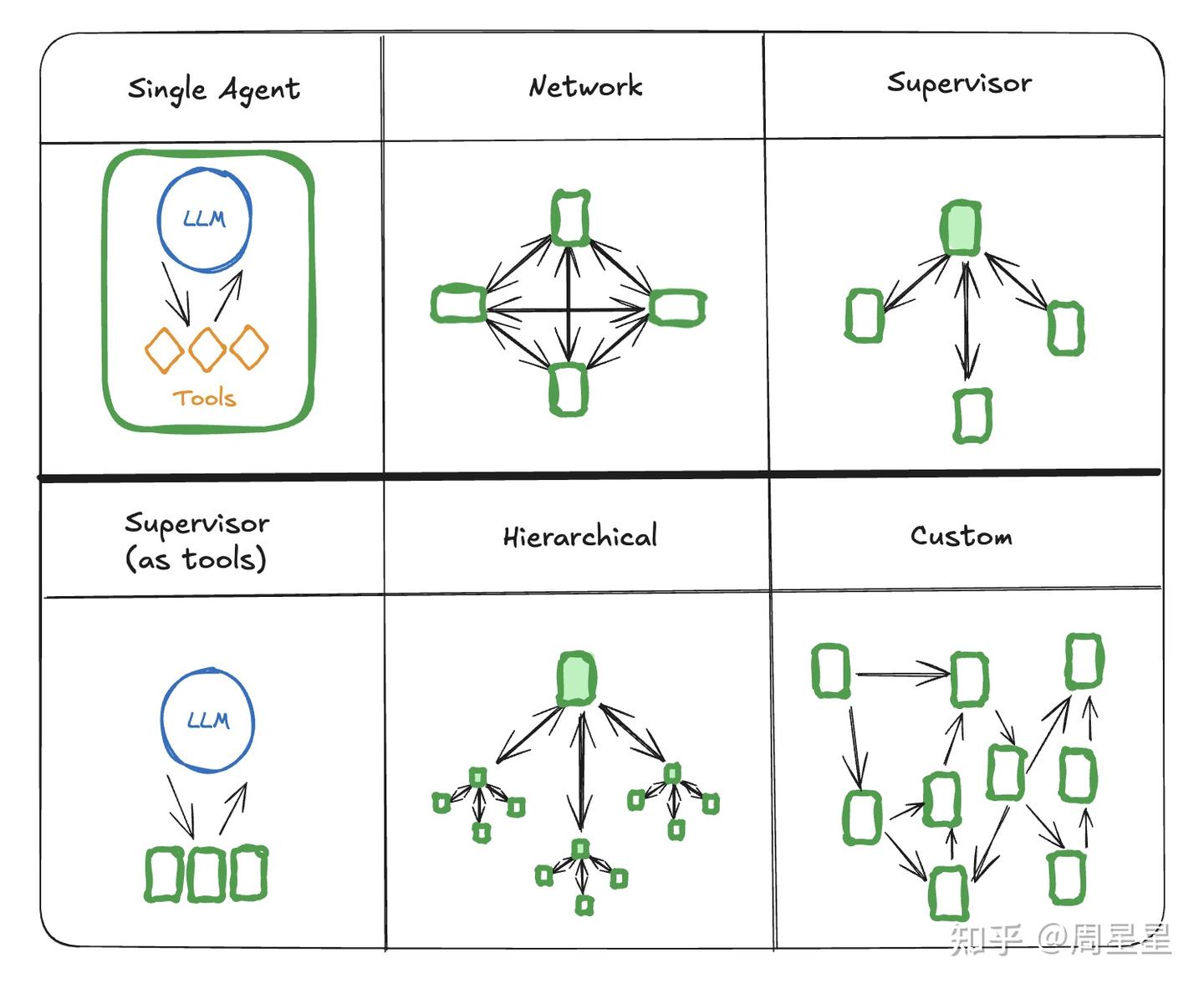
Sub-Agents 的架构已经收敛到一个超强的 main-agent,必要时再按需调用 sub agent 的架构。例如下图的 supervisor。这种架构还有个好处,KV cache 能很好地利用上,省钱+跑得快。
-
File System
- 上下文卸载: 文件系统(如 ls、read_file、write_file、edit_file 等工具)允许代理将大量的上下文卸载到文件中。这有助于防止上下文窗口溢出,并避免由于上下文过多导致的大语言模型性能下降。
- 共享工作区: 文件系统可用作所有代理(包括子代理)协作的共享工作区。
- 长期记忆: 代理可以通过文件系统存储(然后稍后读取)笔记或信息,充当“记忆”功能。此外,文件系统也可以用于存储代理可执行的脚本或“技能”,并通过命令行工具(如 Bash 工具)调用。
-
SyStem Prompt: 系统提示在深度代理的实现中至关重要。最优秀的 code cli 或 deep research 往往拥有非常复杂和详细的系统提示。例如 claude deep research 的 prompt。
-
详细指导: 系统提示通常很长,包含关于如何使用各种工具的详细说明。
-
示例学习: 它们可能包含少量示例(few-shot prompts),指导代理在特定情况下如何行动。
-
复杂性承载: 尽管模型能力强大,但依然需要提供数百甚至数千行的详细指令,这是因为提示工程仍然非常重要。通过细致的提示,可以将应用的复杂性转移到提示本身。这些详细指令通常会定义:
- 何时应该暂停执行并进行规划的识别标准。
- 何时应该生成子智能体,以及何时应该自己完成工作的决策协议。
- 所有可用工具的详细定义、使用方法和最佳实践示例。
- 文件命名和目录结构的标准规范,以保证工作空间的整洁。
-
这四大支柱并非孤立存在,它们相辅相成,共同构成了 Deep Agent 的核心运作机制。而将这一切串联起来的底层技术,正是“上下文工程”。
LangGraph
LangGraph这一基于LangChain的库,它突破了传统线性链式开发的局限,通过图计算模型实现复杂AI应用的构建。LangGraph的核心优势在于:1)支持动态图结构,实现循环和条件路由;2)内置状态管理,维护应用数据流;3)天然支持多智能体协作。
使用LangGraph去构建业务
当你用LangGraph构建智能体时,首先会把它拆解成一个个独立的步骤,称为节点。接着,你需要描述每个节点之间的不同决策和转换关系。最后,通过一个共享状态将节点连接起来,每个节点都能从中读取和写入数据。以下是使用LangGraph去构建 邮件客服Agent的思考过程
业务分析
代理应具备以下功能:
- Read Email 读取客户来信
- 按紧急程度和主题分类邮件
- 搜索相关文档以回答问题
- 起草适当回复
- 将复杂问题转交人工处理
- 必要时安排后续跟进
即流程设计如下图所示: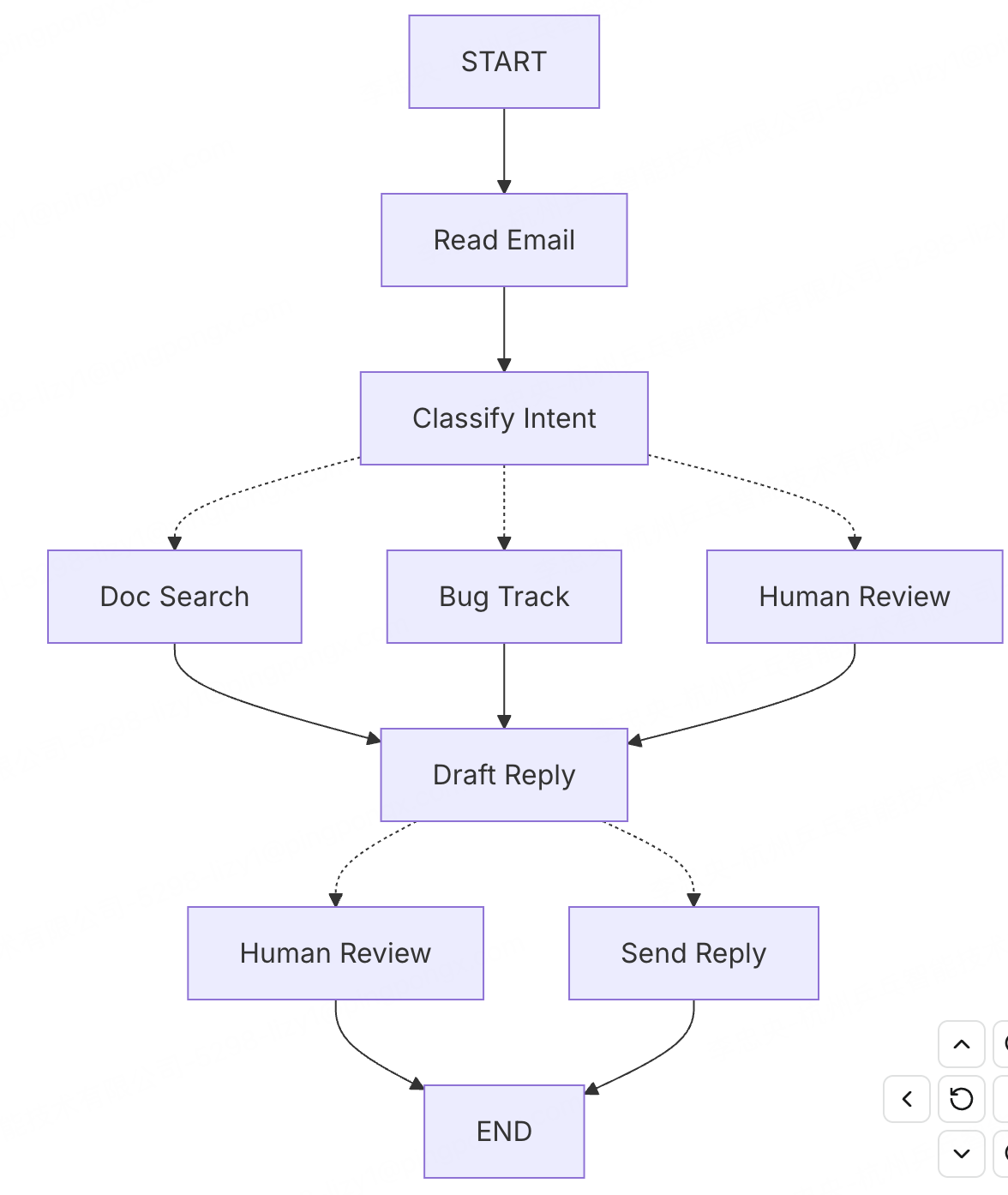
- 读取邮件(Read Email):提取并解析邮件内容
- 分类意图(Classify Intent):使用大型语言模型(LLM)对紧急程度和主题进行分类,然后路由到相应操作
- 文档搜索(Doc Search):查询知识库以获取相关信息
- 错误跟踪(Bug Track):在跟踪系统中创建或更新问题
- 起草回复(Draft Reply):生成适当回复
- 人工审核(Human Review):转交人工代理进行审批或处理
- 发送回复(Send Reply):发送邮件回复
结节与状态的设计
根据流程中每个步骤需要完成的任务去设计节点
- LLM steps: 当需要理解、分析、生成文本或进行推理时. 如 分类意图(Classify Intent), 起草回复(Draft Reply)
- Data steps: 当需要从外部来源检索信息时. 如 文档搜索(Doc Search), 历史记录(Customer history lookup)
- Action steps: 当需要执行外部操作时.如 错误跟踪(Bug Track), 发送回复(Send Reply)
- User input steps:当需要人工介入时. 如 人工审核(Human Review)
from typing import Literal
from langgraph.graph import StateGraph, START, END
from langgraph.types import interrupt, Command, RetryPolicy
from langchain_openai import ChatOpenAI
from langchain.messages import HumanMessage

llm = ChatOpenAI(
    model_name="gpt-5.1",
    temperature=0.7
)

# 查看与解析email
def read_email(state: EmailAgentState) -> dict:
    """Extract and parse email content"""
    # In production, this would connect to your email service
    return {
        "messages": [HumanMessage(content=f"Processing email: {state['email_content']}")]
    }

# 分类
def classify_intent(state: EmailAgentState) -> Command[Literal["search_documentation", "human_review", "draft_response", "bug_tracking"]]:
    """Use LLM to classify email intent and urgency, then route accordingly"""

    # Create structured LLM that returns EmailClassification dict
    structured_llm = llm.with_structured_output(EmailClassification)

    # Format the prompt on-demand, not stored in state
    classification_prompt = f"""
    Analyze this customer email and classify it:

    Email: {state['email_content']}
    From: {state['sender_email']}

    Provide classification including intent, urgency, topic, and summary.
    """

    # 根据email中的信息内容产生分类信息
    classification = structured_llm.invoke(classification_prompt)

    # Determine next node based on classification
    if classification['intent'] == 'billing' or classification['urgency'] == 'critical':
        goto = "human_review"
    elif classification['intent'] in ['question', 'feature']:
        goto = "search_documentation"
    elif classification['intent'] == 'bug':
        goto = "bug_tracking"
    else:
        goto = "draft_response"

    # Store classification as a single dict in state
    return Command(
        update={"classification": classification},
        goto=goto
    )

# 查询文档
def search_documentation(state: EmailAgentState) -> Command[Literal["draft_response"]]:
    """Search knowledge base for relevant information"""

    # Build search query from classification
    classification = state.get('classification', {})
    query = f"{classification.get('intent', '')} {classification.get('topic', '')}"

    try:
        # Implement your search logic here
        # Store raw search results, not formatted text
        search_results = [
            "Reset password via Settings > Security > Change Password",
            "Password must be at least 12 characters",
            "Include uppercase, lowercase, numbers, and symbols"
        ]
    except SearchAPIError as e:
        # For recoverable search errors, store error and continue
        search_results = [f"Search temporarily unavailable: {str(e)}"]

    return Command(
        update={"search_results": search_results},  # Store raw results or error
        goto="draft_response"
    )

# 上报bug
def bug_tracking(state: EmailAgentState) -> Command[Literal["draft_response"]]:
    """Create or update bug tracking ticket"""

    # Create ticket in your bug tracking system
    ticket_id = "BUG-12345"  # Would be created via API

    return Command(
        update={
            "search_results": [f"Bug ticket {ticket_id} created"],
            "current_step": "bug_tracked"
        },
        goto="draft_response"
    )

# 起草回复
def draft_response(state: EmailAgentState) -> Command[Literal["human_review", "send_reply"]]:
    """Generate response using context and route based on quality"""

    classification = state.get('classification', {})

    # Format context from raw state data on-demand
    context_sections = []

    if state.get('search_results'):
        # Format search results for the prompt
        formatted_docs = "\n".join([f"- {doc}" for doc in state['search_results']])
        context_sections.append(f"Relevant documentation:\n{formatted_docs}")

    if state.get('customer_history'):
        # Format customer data for the prompt
        context_sections.append(f"Customer tier: {state['customer_history'].get('tier', 'standard')}")

    # 根据分类结果及搜索结果的内容组装提示词
    draft_prompt = f"""
    Draft a response to this customer email:
    {state['email_content']}

    Email intent: {classification.get('intent', 'unknown')}
    Urgency level: {classification.get('urgency', 'medium')}

    {chr(10).join(context_sections)}

    Guidelines:
    - Be professional and helpful
    - Address their specific concern
    - Use the provided documentation when relevant
    """

    response = llm.invoke(draft_prompt)

    # Determine if human review needed based on urgency and intent
    needs_review = (
        classification.get('urgency') in ['high', 'critical'] or
        classification.get('intent') == 'complex'
    )

    # 判断是否需要人工审核
    goto = "human_review" if needs_review else "send_reply"

    return Command(
        update={"draft_response": response.content},  # Store only the raw response
        goto=goto
    )

def human_review(state: EmailAgentState) -> Command[Literal["send_reply", END]]:
    """Pause for human review using interrupt and route based on decision"""

    classification = state.get('classification', {})

    # 当 interrupt() 被调用时,LangGraph 会抛出 GraphInterrupt 异常并停止执行,此时 Checkpointer 已保存当前状态。
    # 恢复时需通过 Command(resume=...) 对象传入人工输入
    # 注意: 整个函数会被重新执行
    human_decision = interrupt({
        "email_id": state.get('email_id',''),
        "original_email": state.get('email_content',''),
        "draft_response": state.get('draft_response',''),
        "urgency": classification.get('urgency'),
        "intent": classification.get('intent'),
        "action": "Please review and approve/edit this response"
    })

    if human_decision.get("approved"):
        # 如果发现状态审核过了就进入send_reply环节
        return Command(
            update={"draft_response": human_decision.get("edited_response", state.get('draft_response',''))},
            goto="send_reply"
        )
    else:
        # 如果没审梳过就END,中断
        return Command(update={}, goto=END)

def send_reply(state: EmailAgentState) -> dict:
    """Send the email response"""
    # Integrate with email service
    print(f"Sending reply: {state['draft_response'][:100]}...")
    return {}
对于我们的邮件Agent,我们需要跟踪:
- 原始邮件及发件人信息(无法后续重建)
- 分类结果(需供多个后续/下游节点使用)
- 搜索结果及客户数据(重新获取成本高昂)
- 草稿回复(需在审核过程中持久化)
- 执行元数据(用于调试和恢复)
from typing import TypedDict, Literal

# 邮件分类 email classification
class EmailClassification(TypedDict):
    intent: Literal["question", "bug", "billing", "feature", "complex"]
    urgency: Literal["low", "medium", "high", "critical"]
    topic: str
    summary: str

class EmailAgentState(TypedDict):
    #  email 信息
    email_content: str
    sender_email: str
    email_id: str

    # 分类结果
    classification: EmailClassification | None

    #  search/API results
    search_results: list[str] | None  # List of raw document chunks
    customer_history: dict | None  # Raw customer data from CRM

    # 草稿回复
    draft_response: str | None
		# 消息元数据
    messages: list[str] | None
构建流程
现在我们把节点连接成一个可运行的图。由于节点自己处理路由决策,我们只需要几个关键的边。
from langgraph.checkpoint.memory import MemorySaver
from langgraph.types import RetryPolicy

# Create the graph
workflow = StateGraph(EmailAgentState)

# Add nodes with appropriate error handling
workflow.add_node("read_email", read_email)
workflow.add_node("classify_intent", classify_intent)

# Add retry policy for nodes that might have transient failures
workflow.add_node(
    "search_documentation",
    search_documentation,
    retry_policy=RetryPolicy(max_attempts=3)
)
workflow.add_node("bug_tracking", bug_tracking)
workflow.add_node("draft_response", draft_response)
workflow.add_node("human_review", human_review)
workflow.add_node("send_reply", send_reply)

# Add only the essential edges
workflow.add_edge(START, "read_email")
workflow.add_edge("read_email", "classify_intent")
workflow.add_edge("send_reply", END)

# Compile with checkpointer for persistence, in case run graph with Local_Server --> Please compile without checkpointer
memory = MemorySaver()
app = workflow.compile(checkpointer=memory)

# 模拟收到客户邮件
initial_state = {
    "email_content": "I was charged twice for my subscription! This is urgent!",
    "sender_email": "customer@example.com",
    "email_id": "email_123",
    "messages": []
}

# Run with a thread_id for persistence
config = {"configurable": {"thread_id": "customer_123"}}
result = app.invoke(initial_state, config)
# The graph will pause at human_review
print(f"human review interrupt:{result['__interrupt__']}")

# When ready, provide human input to resume
from langgraph.types import Command

human_response = Command(
    resume={
        "approved": True,
        "edited_response": "We sincerely apologize for the double charge. I've initiated an immediate refund..."
    }
)

# 恢复执行
final_result = app.invoke(human_response, config)
print(f"Email sent successfully!")
Workflow + Agents
根据多智能体架构形态去实现流程, 完成科学计数
# Step 1: Define tools and model

from langchain.tools import tool
from langchain.chat_models import init_chat_model


model = init_chat_model(
    "gpt-5.1",
    temperature=0
)


# Define tools
@tool
def multiply(a: int, b: int) -> int:
    """Multiply `a` and `b`.

    Args:
        a: First int
        b: Second int
    """
    return a * b


@tool
def add(a: int, b: int) -> int:
    """Adds `a` and `b`.

    Args:
        a: First int
        b: Second int
    """
    return a + b


@tool
def divide(a: int, b: int) -> float:
    """Divide `a` and `b`.

    Args:
        a: First int
        b: Second int
    """
    return a / b


# Augment the LLM with tools
tools = [add, multiply, divide]
tools_by_name = {tool.name: tool for tool in tools}
model_with_tools = model.bind_tools(tools)

# Step 2: Define state
# 定义状态
from langchain.messages import AnyMessage
from typing_extensions import TypedDict, Annotated
import operator


class MessagesState(TypedDict):
    messages: Annotated[list[AnyMessage], operator.add]
    llm_calls: int

# Step 3: Define model node
# 定义模型结点
from langchain.messages import SystemMessage


def llm_call(state: dict):
    """LLM decides whether to call a tool or not"""

    ## 这边return的是MessagesState
    return {
        "messages": [
            model_with_tools.invoke(
                [
                    SystemMessage(
                        content="You are a helpful assistant tasked with performing arithmetic on a set of inputs."
                    )
                ]
                + state["messages"]
            )
        ],
        "llm_calls": state.get('llm_calls', 0) + 1
    }


# Step 4: Define tool node
# 定义工具结点

from langchain.messages import ToolMessage


def tool_node(state: dict):
    """Performs the tool call"""

    result = []
    for tool_call in state["messages"][-1].tool_calls:
        tool = tools_by_name[tool_call["name"]]
        observation = tool.invoke(tool_call["args"])
        result.append(ToolMessage(content=observation, tool_call_id=tool_call["id"]))

    ## 这边return的是MessagesState
    return {"messages": result}

# Step 5: Define logic to determine whether to end
# 逻辑分支逻辑: 没有工具就结束

from typing import Literal
from langgraph.graph import StateGraph, START, END


# Conditional edge function to route to the tool node or end based upon whether the LLM made a tool call
def should_continue(state: MessagesState) -> Literal["tool_node", END]:
    """Decide if we should continue the loop or stop based upon whether the LLM made a tool call"""

    messages = state["messages"]
    last_message = messages[-1]

    # If the LLM makes a tool call, then perform an action
    if last_message.tool_calls:
        return "tool_node"

    # Otherwise, we stop (reply to the user)
    return END

# Step 6: Build agent

# 构建工作流
agent_builder = StateGraph(MessagesState)

# Add nodes
agent_builder.add_node("llm_call", llm_call)
agent_builder.add_node("tool_node", tool_node)

# Add edges to connect nodes
agent_builder.add_edge(START, "llm_call")
agent_builder.add_conditional_edges(
    "llm_call",
    should_continue,
    ["tool_node", END]
)
agent_builder.add_edge("tool_node", "llm_call")

# Compile the agent
agent = agent_builder.compile()


# 执行
from langchain.messages import HumanMessage
messages = [HumanMessage(content="Add 3 and 4.")]
messages = agent.invoke({"messages": messages})
for m in messages["messages"]:
    m.pretty_print()
================================ Human Message > =================================
Add 3 and 4.
================================== Ai Message ==================================
Tool Calls:
add (call_9l60V7mwVrN70qhRKcCo9Yp5)
Call ID: call_9l60V7mwVrN70qhRKcCo9Yp5
Args:
a: 3
b: 4
================================= Tool Message =================================
7
================================== Ai Message ==================================
7
换一种角度,它也是多智能体架构形态中端到端Agent架构,它在持续的反馈循环中运行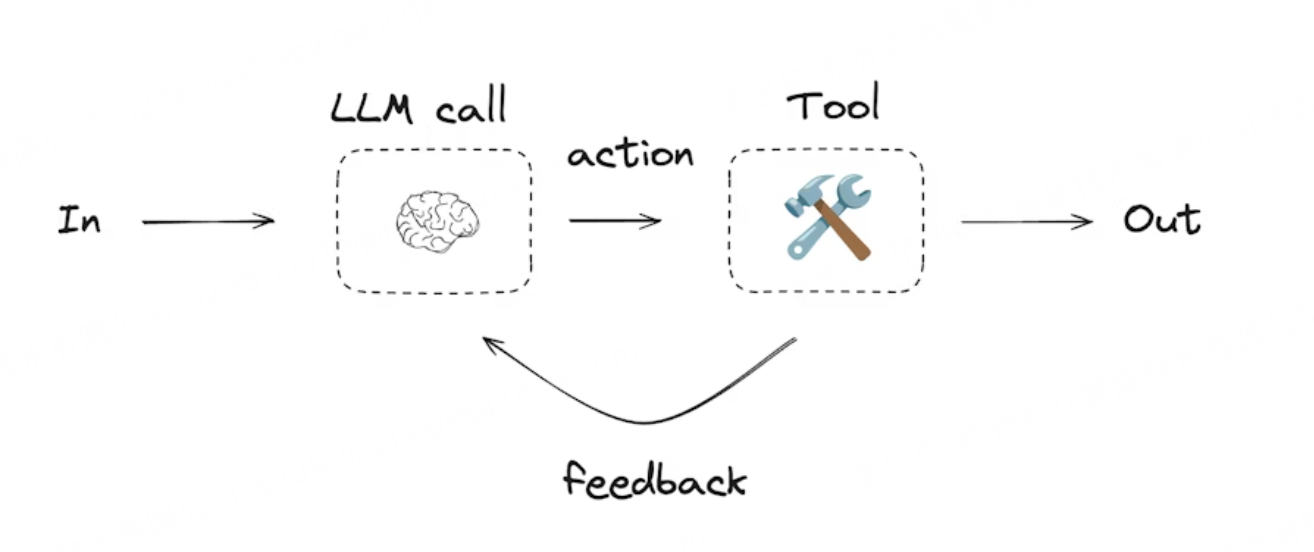
Deep Agents
Deep Agents体具备以下功能:
1. 规划工具 planning tool
2. 用于存储上下文和长期记忆的文件系统(file System)
3. 执行子任务的能力(subAgent)
当你使用 create_deep_agent 创建深度智能体时,我们会自动将 TodoList、Filesystem和 SubAgent附加到你的智能体上。
# Step 1: Define tools, model, and agent factory
from langchain.tools import tool
from langchain.chat_models import init_chat_model
from langchain.messages import HumanMessage
from deepagents import create_deep_agent

model = init_chat_model(
    "gpt-5.1",
    temperature=0
)

# Step 2: Define arithmetic tools
@tool
def multiply(a: int, b: int) -> int:
    """Multiply `a` and `b`."""

    return a * b


@tool
def add(a: int, b: int) -> int:
    """Adds `a` and `b`."""

    return a + b


@tool
def divide(a: int, b: int) -> float:
    """Divide `a` and `b`."""

    return a / b


## 定义subagent模板
def make_arithmetic_subagent(
    name: str,
    tool_fn,
    operation_hint: str,
    result_word: str,
) -> dict:
    """Create a dedicated subagent config for a single arithmetic primitive."""

    return {
        "name": name,
        "description": f"Handles {operation_hint} requests with high accuracy.",
        "system_prompt": f"""You are solely responsible for {operation_hint}.
- Call the attached tool exactly once for each request.
- Return responses in the format:
Result: <number>
Reasoning: <10-word explanation referencing the {result_word}>.""",
        "tools": [tool_fn],
    }


# Step 3: Configure subagents (one per primitive) and create the deep agent
# 定义主agent提示词模板, 主做planning tool
system_prompt = """You orchestrate arithmetic workloads.
- Do NOT call math tools directly.
- Delegate via task(\"add-subagent\"|\"multiply-subagent\"|\"divide-subagent\") for each primitive.
- Summarize the final answer plainly for the user."""

## 定义三个subagent
subagents = [
    make_arithmetic_subagent("add-subagent", add, "addition", "sum"),
    make_arithmetic_subagent("multiply-subagent", multiply, "multiplication", "product"),
    make_arithmetic_subagent("divide-subagent", divide, "division", "quotient"),
]

agent = create_deep_agent(
    model=model,
    tools=[],  # root agent relies on the subagents instead of direct tool access
    system_prompt=system_prompt,
    subagents=subagents,
)


def main() -> None:
    """Run a demo invocation of the deep agent with the subagent in play."""

    messages = [
        HumanMessage(content="把 6 + 4 的结果乘以 3,再除以 2,告诉我最终数字。")
    ]
    result_state = agent.invoke({"messages": messages})
    for message in result_state["messages"]:
        message.pretty_print()


if __name__ == "__main__":
    main()
================================ Human Message =================================
把 6 + 4 的结果乘以 3,再除以 2,告诉我最终数字。
================================== Ai Message ==================================
Tool Calls:
task (call_q9bxpJxZvrOTpCskIuztQAcy)
Call ID: call_q9bxpJxZvrOTpCskIuztQAcy
Args:
description: Compute 6 + 4
subagent_type: add-subagent
task (call_PMWNzDMWLU0eoODAncgXlNXt)
Call ID: call_PMWNzDMWLU0eoODAncgXlNXt
Args:
description: Compute 6 * 3
subagent_type: multiply-subagent
task (call_7ViBPgnrwaWUdwuuSL6UvPif)
Call ID: call_7ViBPgnrwaWUdwuuSL6UvPif
Args:
description: Compute 12 / 2
subagent_type: divide-subagent
================================= Tool Message =================================
Name: task
Result: 10
Reasoning: Adding 6 and 4 gives total sum of 10.
================================= Tool Message =================================
Name: task
Result: 18
Reasoning: Multiplying 6 by 3 gives the product 18.
================================= Tool Message =================================
Name: task
Result: 6
Reasoning: Dividing 12 by 2 yields quotient 6, a whole number.
================================== Ai Message ==================================
最终的数字是 15。
站在巨人的肩膀上
《Agent 元年复盘:从 Claude Code 到 Deep Agent,Agent 的架构之争已经结束》
《Workflows and agents》
《Thinking in LangGraph》
《Deep Agents 》

魔乐社区(Modelers.cn) 是一个中立、公益的人工智能社区,提供人工智能工具、模型、数据的托管、展示与应用协同服务,为人工智能开发及爱好者搭建开放的学习交流平台。社区通过理事会方式运作,由全产业链共同建设、共同运营、共同享有,推动国产AI生态繁荣发展。
更多推荐


 10
10 0
0- 0


 已为社区贡献5条内容

所有评论(0)