zynq petalinux编译用户自定义系统
见图
·
Design Flow Step                       Tool/Workflow

 Hardware Platform Creation             Vivado
Create PetaLinux Project                petalinux-create -t project
Initialize PetaLinux Project            petalinux-config --get-hw-description
Configure System-level Options          petalinux-config
Create User Components                  petalinux-create -t COMPONENT
Configure the Linux Kernel              petalinux-config -c kernel
Configure the Root Filesystem           petalinux-config -c rootfs
Build the system                        petalinux-build
Test the System                         petalinux-boot
Deploy the System                       petalinux-package
If you are using a 64-bit Linux host, you must install the appropiate 32-bit compatablelibraries. Please refer to section Required Tools and Libraries.
petalinux 安装
首先下载petalinux工具安装包
http://www.xilinx.com/support/download/index.html/content/xilinx/en/downloadNav/embedded-design-tools/2016-1.html
http://www.xilinx.com/support/download/index.html/content/xilinx/en/downloadNav/petalinux.html
将Petalinux 工具安装在/opt目录下:
$cd /opt $./petalinux-v2016.1-final-installer.run /opt
这将生成/opt/petalinux-v2016.1-final目录。
webtalk选项用于xilinx收集用户使用数据,关闭方法如下:
$cd /opt $./petalinux-v2016.1-final-installer.run /opt
开发流程见图
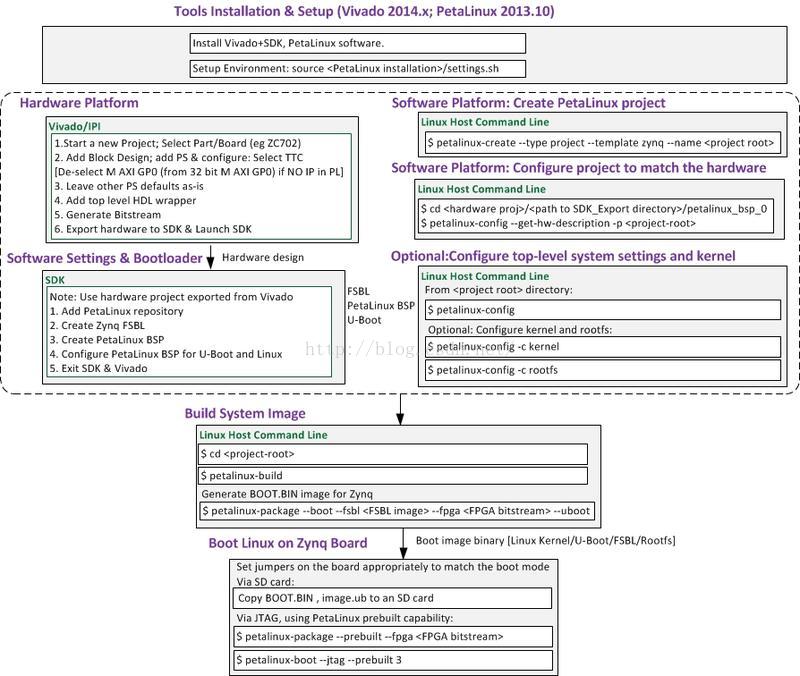
创建工程:
petalinux-create -t project -s Avnet-Digilent-ZedBoard-v2016.1-final.bsp
定制化系统:

package:
gsc@gsc-250:~/zynzq7000/Project_based_petalinux/Avnet-Digilent-ZedBoard-2016.1/images/linux$ petalinux-package --boot --fsbl zynq_fsbl.elf --fpga system_wrapper.bit --u-boot
魔乐社区(Modelers.cn) 是一个中立、公益的人工智能社区,提供人工智能工具、模型、数据的托管、展示与应用协同服务,为人工智能开发及爱好者搭建开放的学习交流平台。社区通过理事会方式运作,由全产业链共同建设、共同运营、共同享有,推动国产AI生态繁荣发展。
更多推荐



 0
0 0
0- 0


 已为社区贡献7条内容

所有评论(0)