改进A星算法实现多个机器人、AGV小车路径规划与动态避障
改进A星算法实现多个机器人、AGV小车路径规划与动态避障,完整Matlab代码 环境创建,障碍物位置,机器人(小车)位置均可调节,购可赠改进A星算法流程图与代码详解。
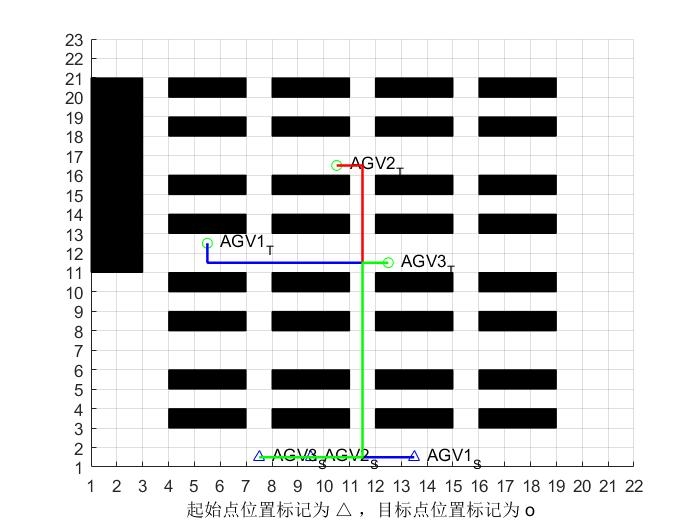
在机器人和AGV小车的应用场景中,路径规划与动态避障是非常关键的功能。今天来给大家分享一下如何通过改进A星算法来实现多个机器人、AGV小车的路径规划与动态避障,并且附上完整的Matlab代码。
一、环境创建
首先,我们需要创建一个模拟环境。在Matlab中,可以使用矩阵来表示地图。例如:
% 创建一个10x10的地图
map = zeros(10,10);
% 设置障碍物位置
map(3,3) = 1; % 表示(3,3)位置是障碍物
map(5,5) = 1; % 表示(5,5)位置是障碍物
这里通过将矩阵中的某些元素设为1来表示障碍物,其他为0的地方则是可通行区域。
二、机器人(小车)位置设置
接下来,设置机器人(小车)的初始位置和目标位置。
% 机器人1的初始位置
start1 = [1,1];
% 机器人1的目标位置
goal1 = [8,8];
% 机器人2的初始位置
start2 = [2,2];
% 机器人2的目标位置
goal2 = [7,7];
三、改进A星算法
改进A星算法主要是在传统A星算法的基础上进行优化,以适应多个机器人的情况。这里简单说一下改进思路,就是在搜索路径时,考虑其他机器人的位置和路径,避免碰撞。
function [path, cost] = improvedAStar(map, start, goal, otherStarts)
    % 初始化
    openSet = {start};
    cameFrom = containers.Map();
    gScore = containers.Map();
    gScore(start) = 0;
    fScore = containers.Map();
    fScore(start) = heuristic(start, goal);

    while ~isempty(openSet)
        [current, minFScore] = minFScoreFromOpenSet(openSet, fScore);
        if current == goal
            path = reconstructPath(cameFrom, current);
            cost = gScore(current);
            return;
        end
        openSet(openSet == current) = [];

        neighbors = getNeighbors(current, map);
        for neighbor = neighbors
            tentativeGScore = gScore(current) + 1;
            if ~gScore.isKey(neighbor) || tentativeGScore < gScore(neighbor)
                cameFrom(neighbor) = current;
                gScore(neighbor) = tentativeGScore;
                fScore(neighbor) = tentativeGScore + heuristic(neighbor, goal);
                if ~ismember(neighbor, openSet)
                    openSet{end+1} = neighbor;
                end
            end
        end

        % 动态避障处理
        for otherStart = otherStarts
            if ~isempty(openSet)
                for i = 1:length(openSet)
                    if distance(openSet{i}, otherStart) < 2
                        openSet(i) = [];
                    end
                end
            end
        end
    end
    path = [];
    cost = Inf;
end

function [current, minFScore] = minFScoreFromOpenSet(openSet, fScore)
    minFScore = Inf;
    current = [];
    for node = openSet
        if fScore(node) < minFScore
            minFScore = fScore(node);
            current = node;
        end
    end
end

function path = reconstructPath(cameFrom, current)
    totalPath = {current};
    while cameFrom.isKey(current)
        current = cameFrom(current);
        totalPath{1,1} = {current, totalPath{1,1}};
    end
    path = totalPath{1};
end

function neighbors = getNeighbors(node, map)
    [x, y] = ind2sub(size(map), find(map == 0));
    validNeighbors = [];
    for i = 1:length(x)
        if distance([x(i), y(i)], node) == 1
            validNeighbors = [validNeighbors; [x(i), y(i)]];
        end
    end
    neighbors = validNeighbors;
end

function h = heuristic(node, goal)
    h = distance(node, goal);
end

function d = distance(p1, p2)
    d = norm(p1 - p2);
end在这个改进的A星算法代码中,improvedAStar函数是核心。它在传统A星算法的基础上增加了动态避障的处理。通过在搜索过程中检查与其他机器人初始位置的距离,避免将可能发生碰撞的节点加入开放列表。
四、路径规划与显示
最后,我们来进行路径规划并显示结果。
% 机器人1路径规划
[path1, cost1] = improvedAStar(map, start1, goal1, {start2});
% 机器人2路径规划
[path2, cost2] = improvedAStar(map, start2, goal2, {start1});

% 显示地图
figure;
imagesc(map);
axis equal;
hold on;

% 显示机器人1路径
plot(path1(:,2), path1(:,1), 'r', 'LineWidth', 2);
% 显示机器人2路径
plot(path2(:,2), path2(:,1), 'b', 'LineWidth', 2);

% 显示机器人1初始位置
plot(start1(2), start1(1), 'ro', 'MarkerSize', 10, 'LineWidth', 2);
% 显示机器人1目标位置
plot(goal1(2), goal1(1), 'go', 'MarkerSize', 10, 'LineWidth', 2);
% 显示机器人2初始位置
plot(start2(2), start2(1), 'ro', 'MarkerSize', 10, 'LineWidth', 2);
% 显示机器人2目标位置
plot(goal2(2), goal2(1), 'go', 'MarkerSize', 10, 'LineWidth', 2);

hold off;
运行这段代码,就能看到两个机器人在有障碍物的环境中成功规划出路径并动态避障的效果啦。
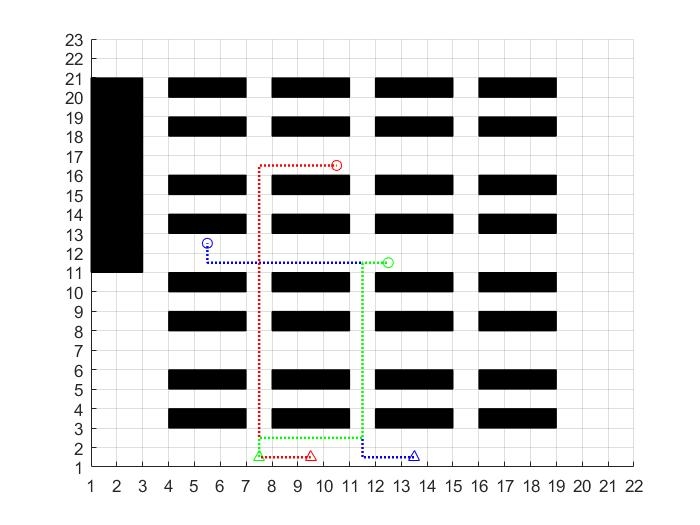
通过上述代码,我们实现了基于改进A星算法的多个机器人、AGV小车路径规划与动态避障功能。希望对大家有所帮助!如果有需要改进A星算法流程图与代码详解的朋友,可以私信我哦,购买代码就赠送啦。
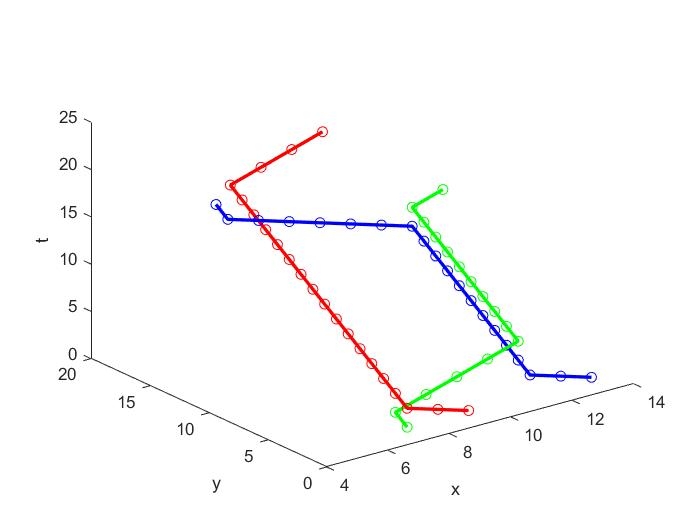
以上就是整个实现过程,大家可以根据自己的需求进一步调整和优化代码。有什么问题欢迎在评论区交流呀!

魔乐社区(Modelers.cn) 是一个中立、公益的人工智能社区,提供人工智能工具、模型、数据的托管、展示与应用协同服务,为人工智能开发及爱好者搭建开放的学习交流平台。社区通过理事会方式运作,由全产业链共同建设、共同运营、共同享有,推动国产AI生态繁荣发展。
更多推荐


 3
3 0
0- 0


 已为社区贡献15条内容

所有评论(0)