设置vscode用Cmake进行编译
需要设置两个文件: tasks.json 和 launch.jsontask 文件(terminal ->config task)是设置编译器的参数设置launch 文件(Debug -> add configuration)是负责调试相关参数设置例子文件如下:launch.json{// Use IntelliSense to learn about possible attribu
方法一: 这个是很早以前的方法
需要设置两个文件: tasks.json 和 launch.json
task 文件( terminal -> config task)是设置编译器的参数设置
launch 文件(Debug -> add configuration)是负责调试相关参数设置
例子文件如下:
launch.json
{
    // Use IntelliSense to learn about possible attributes.
    // Hover to view descriptions of existing attributes.
    // For more information, visit: https://go.microsoft.com/fwlink/?linkid=830387
    "version": "0.2.0",
    "configurations": [
        {
            "name": "(gdb) Launch",
            "type": "cppdbg",
            "request": "launch",
            "program": "${workspaceFolder}/build/main",
            "args": [],
            "stopAtEntry": true,
            "cwd": "${workspaceFolder}",
            "environment": [],
            "externalConsole": false,
            "MIMode": "gdb",
            "setupCommands": [
                {
                    "description": "Enable pretty-printing for gdb",
                    "text": "-enable-pretty-printing",
                    "ignoreFailures": true
                }
            ]
        }
    ]
}
task.json
{
    // See https://go.microsoft.com/fwlink/?LinkId=733558
    // for the documentation about the tasks.json format
    "version": "2.0.0",
    "tasks": [
        {
            "label": "CMake Debug and Make",
            "type": "shell",
            "options": {
                "cwd": "${workspaceRoot}/build"
            },
            "command": "cmake -DCMAKE_BUILD_TYPE=Debug .. && make",
            "group": "build",
            "presentation": {
                // Reveal the output only if unrecognized errors occur.
                "reveal": "silent"
            },
            // Use the standard MS compiler pattern to detect errors, warnings and infos
            "problemMatcher": [
                "$gcc"
            ]
        }
    ]
}
例子程序放到了这里,hello world示例程序,下载即可跑
方法二: 极力推荐,2023/03/01 更新此方法
1. 直接将带有cmakelist的工程,打开这个工程的folder,点开cmakelist文件, 按下ctr+shift+P
输入cmake
选择cmake: configure选项
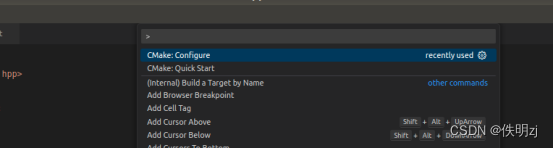
直接一键配好cmake,这样makefile就生成在cmake文件夹里
2. build

点击下面的build按钮,直接编译成功
3. debug
点击步骤二的小爬虫,就可以直接打断点debug了
非常简单,你学费了吗?
不得不说vscode越做越强大了

魔乐社区(Modelers.cn) 是一个中立、公益的人工智能社区,提供人工智能工具、模型、数据的托管、展示与应用协同服务,为人工智能开发及爱好者搭建开放的学习交流平台。社区通过理事会方式运作,由全产业链共同建设、共同运营、共同享有,推动国产AI生态繁荣发展。
更多推荐

 0
0 0
0- 0


 已为社区贡献6条内容

所有评论(0)