java下载文件前后端代码_java 附件上传、下载前后端代码
前言:业务需要:附件上传,需要同时满足浏览器上传,和APP上传附件,并且浏览器端不可使用form表单提交,因为表单提交无法直接获取返回值,除非刷新页面才可显示上传的附件。所以此处使用ajaxfileupload.js,后台使用的框架是SSH,所以写了一个servlet来处理上传附件。ajaxfileupload.js是一个异步上传文件的jQuery插件语法:$.ajaxFileUpload([op
前言:业务需要:附件上传,需要同时满足浏览器上传,和APP上传附件,并且浏览器端不可使用form表单提交,因为表单提交无法直接获取返回值,除非刷新页面才可显示上传的附件。所以此处使用ajaxfileupload.js,后台使用的框架是SSH,所以写了一个servlet来处理上传附件。
ajaxfileupload.js是一个异步上传文件的jQuery插件
语法:$.ajaxFileUpload([options])
options参数说明:
1、url 上传处理程序地址。
2,fileElementId 需要上传的文件域的ID,即的ID。
3,secureuri 是否启用安全提交,默认为false。
4,dataType 服务器返回的数据类型。可以为xml,script,json,html。如果不填写,jQuery会自动判断。
5,success 提交成功后自动执行的处理函数,参数data就是服务器返回的数据。
6,error 提交失败自动执行的处理函数。
7,data 自定义参数。这个东西比较有用,当有数据是与上传的图片相关的时候,这个东西就要用到了。
8, type 当要提交自定义参数时,这个参数要设置成post
错误提示:
1,SyntaxError: missing ; before statement错误
如果出现这个错误就需要检查url路径是否可以访问
2,SyntaxError: syntax error错误
如果出现这个错误就需要检查处理提交操作的服务器后台处理程序是否存在语法错误
3,SyntaxError: invalid property id错误
如果出现这个错误就需要检查文本域属性ID是否存在
4,SyntaxError: missing } in XML expression错误
如果出现这个错误就需要检查文件name是否一致或不存在
代码部分:
HTML:
提交
JavaScript:
/**
* 上传附件
* @param fileId 附件上传input ID
* @param sourceType 上传类型 1、任务附件 2、回复附件 3、 任务结束附件
* @param fileList 显示附件列表容器id
* @param textFile 显示选中附件名称容器id
* @returns {Boolean}
*/
function ajaxFileUpload(fileId,sourceType,fileList,textFile) {
var replyId = $("#replyId").val();
if(sourceType != 2){
replyId = "";
}
if(replyId == undefined){
replyId="";
}
//显示正在上传的文件
$("#fileList tr").css("display","");//显示正在上传的文件
var taskId = $("#taskId").val();
var userid = $("#userID").val();
var name = $("#userName").val();
var url = "/Upload?taskId="+taskId+"&replyId="+replyId+"&userid="+userid+"&name="+name+"&sourceType="+sourceType+"&isApp=noapp";
if($("#"+fileId).val()!=""){
$.ajaxFileUpload
(
{
url: url, //用于文件上传的服务器端请求地址
secureuri: false, //是否需要安全协议,一般设置为false
fileElementId: fileId, //文件上传域的ID
dataType: 'json', //返回值类型 一般设置为json
success: function (data, status) //服务器成功响应处理函数
{
if(status=="success" && data.message=="success"){
//alert("上传成功");
$("#"+fileList).empty();
for(var i=0;i
var html='
'+'
成功'+'
'+data.list[i].fileName+' - '+data.list[i].fileSize/1000+'K'+"
"+'
';$("#"+fileList).append(html);
}
if(sourceType == "3"){//如果是结束任务时上传的附件,需要局部刷新附件列表
getTaskAnnexList(taskId);
}
$("#"+textFile).val("");
var file = $("#"+fileId);
file.after(file.clone().val(""));
file.remove();
}else if(status=="success" && data.message=="failure"){
alert(data.result);
}
},
error: function (data, status, e)//服务器响应失败处理函数
{
alert(e);
}
}
)
return false;
}else{}
}
/**
* 显示选中的文件(一个显示名字,多个显示个数)
* @param obj
* @param textFile 显示选中附件名称容器id
* @param fileList 显示附件列表容器id
*/
function showUploadFileName(obj,textFile,fileList){
var t_files = obj.files;
for (var i = 0, len = t_files.length; i < len; i++) {
if(t_files[i].size>10*1024*1024){
alert(t_files[i].name+" 大小超过了10M了,请重新上传");
return;
}else{
if(t_files.length>1){
$("#"+textFile).val(t_files[0].name+"等"+t_files.length+"个文件");
}else{
$("#"+textFile).val(obj.value);
}
}
var html = '
'+'
上传'+'
'+t_files[i].name+' - '+t_files[i].size/1000+'K'+'
'+'
';$("#"+fileList).prepend(html);
}
}
java 后台代码
web.xml:
Upload
com.ccidit.features.task.util.upload
Upload
/Upload
servlet:
package com.ccidit.features.task.util;
import it.sauronsoftware.jave.AudioAttributes;
import it.sauronsoftware.jave.Encoder;
import it.sauronsoftware.jave.EncoderException;
import it.sauronsoftware.jave.EncodingAttributes;
import it.sauronsoftware.jave.InputFormatException;
import java.io.File;
import java.io.IOException;
import java.io.InputStream;
import java.io.PrintWriter;
import java.sql.Connection;
import java.sql.ResultSet;
import java.sql.SQLException;
import java.sql.Statement;
import java.text.DateFormat;
import java.text.SimpleDateFormat;
import java.util.Date;
import java.util.Iterator;
import java.util.List;
import java.util.UUID;
import javax.servlet.ServletException;
import javax.servlet.annotation.WebServlet;
import javax.servlet.http.HttpServlet;
import javax.servlet.http.HttpServletRequest;
import javax.servlet.http.HttpServletResponse;
import net.sf.json.JSONArray;
import net.sf.json.JSONObject;
import org.apache.commons.fileupload.FileItem;
import org.apache.commons.fileupload.FileUploadBase;
import org.apache.commons.fileupload.disk.DiskFileItemFactory;
import org.apache.commons.fileupload.servlet.ServletFileUpload;
import org.jaudiotagger.audio.AudioFileIO;
import org.jaudiotagger.audio.mp3.MP3AudioHeader;
import org.jaudiotagger.audio.mp3.MP3File;
import com.ccidit.core.common.jdbc.dao.util.JDBCTools;
/**
* Servlet implementation class FileDemo
*/
@WebServlet("/FileDemo")
public class upload extends HttpServlet {
/**
*
*/
private static final long serialVersionUID = 564190060577130813L;
public void doGet(HttpServletRequest request, HttpServletResponse response)
throws ServletException, IOException {
String taskId ="";// request.getParameter("taskId");
String replyId ="";// request.getParameter("replyId");//回复楼层的id
Integer userid = 0;// Integer.parseInt(request.getParameter("userid"));
String username ="";// request.getParameter("name");
Integer sourceType =0;// Integer.parseInt(request.getParameter("sourceType"));//附件来源类型(1、直属某一任务2、属于任务下某条回复的附件)
//得到上传文件的保存目录,将上传的文件存放于WEB-INF目录下,不允许外界直接访问,保证上传文件的安全
String savePath = "D:/MyInstall/myeclipse2013/tomcat7.0.67/webapps/ueditor/taskAnnex";
//String savePath = "C:/tomcat7.0.67/webapps/ueditor/taskAnnex"; //250
//String path="/home/attachFiles/userpic"; //线上
//上传时生成的临时文件保存目录
String tempPath = this.getServletContext().getRealPath("/WEB-INF/temp");
File tmpFile = new File(tempPath);
if (!tmpFile.exists()) {
//创建临时目录
tmpFile.mkdir();
}
File tmpFile1 = new File(savePath);
if (!tmpFile1.exists()) {
//文件保存路径
tmpFile1.mkdir();
}
//消息提示
String message = "";
try{
//使用Apache文件上传组件处理文件上传步骤:
//1、创建一个DiskFileItemFactory工厂
DiskFileItemFactory factory = new DiskFileItemFactory();
//设置工厂的缓冲区的大小,当上传的文件大小超过缓冲区的大小时,就会生成一个临时文件存放到指定的临时目录当中。
factory.setSizeThreshold(1024*100);//设置缓冲区的大小为100KB,如果不指定,那么缓冲区的大小默认是10KB
//设置上传时生成的临时文件的保存目录
factory.setRepository(tmpFile);
//2、创建一个文件上传解析器
ServletFileUpload upload = new ServletFileUpload(factory);
//解决上传文件名的中文乱码
upload.setHeaderEncoding("UTF-8");
//3、判断提交上来的数据是否是上传表单的数据
if(!ServletFileUpload.isMultipartContent(request)){
//按照传统方式获取数据
return;
}
//设置上传单个文件的大小的最大值,字节
upload.setFileSizeMax(200*1024*1024);
//设置上传文件总量的最大值,最大值=同时上传的多个文件的大小的最大值的和
upload.setSizeMax(1024*1024*200);
//4、使用ServletFileUpload解析器解析上传数据,解析结果返回的是一个List集合,每一个FileItem对应一个Form表单的输入项
List list = upload.parseRequest(request);
Iterator i = list.iterator();
FileItem item;
if(request.getParameter("taskId") != null){
taskId = request.getParameter("taskId");
replyId = request.getParameter("replyId");//回复楼层的id
userid = Integer.parseInt(request.getParameter("userid"));
username = request.getParameter("name");
sourceType = Integer.parseInt(request.getParameter("sourceType"));//附件来源类型(1、直属某一任务2、属于任务下某条回复的附件)
}
while (i.hasNext()) {
item = (FileItem) i.next();
//如果fileitem中封装的是普通输入项的数据
if(item.isFormField()){
String name = item.getFieldName();
//解决普通输入项的数据的中文乱码问题
String value = item.getString("UTF-8");
if(name.equals("taskId")){
taskId=value;
}
if(name.equals("replyId")){
replyId=value;
}
if(name.equals("name")){
username=value;
}
if(name.equals("userid")){
userid=Integer.parseInt(value);
}
if(name.equals("sourceType")){
sourceType=Integer.parseInt(value);
}
//System.out.println(name + "=" + value);
}else{//如果fileitem中封装的是上传文件
//得到上传的文件名称,
String filename = item.getName();
//System.out.println(filename);
if(filename==null || filename.trim().equals("")){
continue;
}
//注意:不同的浏览器提交的文件名是不一样的,有些浏览器提交上来的文件名是带有路径的,如: c:\a\b\1.txt,而有些只是单纯的文件名,如:1.txt
//处理获取到的上传文件的文件名的路径部分,只保留文件名部分
filename = filename.substring(filename.lastIndexOf("\\")+1);
//得到上传文件的扩展名
String fileExtName = filename.substring(filename.lastIndexOf(".")+1);
//如果需要限制上传的文件类型,那么可以通过文件的扩展名来判断上传的文件类型是否合法
//System.out.println("上传的文件的扩展名是:"+fileExtName);
//获取item中的上传文件的输入流
InputStream in = item.getInputStream();
//得到文件保存的名称
String saveFilename = makeFileName(filename);
//得到文件的保存目录
String realSavePath = savePath;//makePath(saveFilename, savePath);
//System.out.println(realSavePath);
int size = (int) item.getSize();
//创建一个文件输出流
/* FileOutputStream out = new FileOutputStream(realSavePath + "\\" + saveFilename);
//创建一个缓冲区
byte buffer[] = new byte[1024];
//判断输入流中的数据是否已经读完的标识
int len = 0;
//循环将输入流读入到缓冲区当中,(len=in.read(buffer))>0就表示in里面还有数据
while((len=in.read(buffer))>0){
//使用FileOutputStream输出流将缓冲区的数据写入到指定的目录(savePath + "\\" + filename)当中
out.write(buffer, 0, len);
}
//关闭输入流
in.close();
//关闭输出流
out.close();*/
//删除处理文件上传时生成的临时文件
//存储文件
File file = new File(realSavePath);
String uploadPath = file.getPath();
File savedFile = new File(realSavePath,saveFilename);
item.write(savedFile);
item.delete();
if(fileExtName.equals("amr") || fileExtName.equals("mp3")){//音频文件转换
String[] a = saveFilename.split("\\.");
String fileType = a[a.length-1];
if(fileExtName.equals("amr")){
changeToMp3(realSavePath+"/"+saveFilename,realSavePath+"/"+saveFilename.replace(".amr", ".mp3"));
//获取语音时间长度
File source = new File(realSavePath+"/"+saveFilename.replace(".amr", ".mp3"));
MP3File f = (MP3File)AudioFileIO.read(source);
MP3AudioHeader audioHeader = (MP3AudioHeader)f.getAudioHeader();
this.addRwAnnex(taskId, "/ueditor/taskAnnex"+"/"+saveFilename.replace(".amr", ".mp3"), filename, audioHeader.getTrackLength(), "mp3", replyId, sourceType,userid,username,saveFilename.replace(".amr", ".mp3"));
}else{
//获取语音时间长度
File source = new File(realSavePath+"/"+saveFilename);
MP3File f = (MP3File)AudioFileIO.read(source);
MP3AudioHeader audioHeader = (MP3AudioHeader)f.getAudioHeader();
this.addRwAnnex(taskId, "/ueditor/taskAnnex"+"/"+saveFilename, filename, audioHeader.getTrackLength(), fileExtName, replyId, sourceType,userid,username,saveFilename);
}
}else{
this.addRwAnnex(taskId, "/ueditor/taskAnnex"+"/"+saveFilename, filename, size, fileExtName, replyId, sourceType,userid,username,saveFilename);
}
message = "文件上传成功!";
}
}
}catch (FileUploadBase.FileSizeLimitExceededException e) {
e.printStackTrace();
request.setAttribute("message", "单个文件超出最大值!!!");
return;
}catch (FileUploadBase.SizeLimitExceededException e) {
e.printStackTrace();
request.setAttribute("message", "上传文件的总的大小超出限制的最大值!!!");
return;
}catch (Exception e) {
message= "文件上传失败!";
e.printStackTrace();
}
response.setCharacterEncoding("UTF-8");
response.setContentType("application/json; charset=utf-8");
JSONArray JSONStringlist = getAnnexList(taskId,replyId,sourceType);//获取附件列表
JSONObject obj = new JSONObject();
obj.put("message", "success");
obj.put("list", JSONStringlist);
PrintWriter out1 = null;
try {
out1 = response.getWriter();
out1.write(obj.toString());
} catch (IOException e) {
e.printStackTrace();
} finally {
if (out1 != null) {
out1.close();
}
}
}
/**
* amr 转mp3
* @param sourcePath
* @param targetPath
*/
public static void changeToMp3(String sourcePath, String targetPath) {
File source = new File(sourcePath);
File target = new File(targetPath);
AudioAttributes audio = new AudioAttributes();
Encoder encoder = new Encoder();
audio.setCodec("libmp3lame");
EncodingAttributes attrs = new EncodingAttributes();
attrs.setFormat("mp3");
attrs.setAudioAttributes(audio);
try {
encoder.encode(source, target, attrs);
} catch (IllegalArgumentException e) {
e.printStackTrace();
} catch (InputFormatException e) {
e.printStackTrace();
} catch (EncoderException e) {
e.printStackTrace();
}
}
/**
* @Method: makeFileName
* @Description: 生成上传文件的文件名
*/
private String makeFileName(String filename){
//为防止文件覆盖的现象发生,要为上传文件产生一个唯一的文件名
Date currentDate2 = new Date();
SimpleDateFormat df2 = new SimpleDateFormat("yyyyMM");
SimpleDateFormat df3 = new SimpleDateFormat("yyyyMMDDHHMMSS");
String str2 =df2.format(currentDate2);
String str3 =df3.format(currentDate2);
String[] a = filename.split("\\.");
String fileType = a[a.length-1];
String saveFileName =filename.replace("."+fileType, "")+ str3+"."+fileType;//保存的文件名
return saveFileName;
//return UUID.randomUUID().toString() + "_" + filename;
}
/**
* 为防止一个目录下面出现太多文件,要使用hash算法打散存储
* @Method: makePath
* @Description:
* @Anthor:
*
* @param filename 文件名,要根据文件名生成存储目录
* @param savePath 文件存储路径
* @return 新的存储目录
*/
private String makePath(String filename,String savePath){
//得到文件名的hashCode的值,得到的就是filename这个字符串对象在内存中的地址
int hashcode = filename.hashCode();
int dir1 = hashcode&0xf; //0--15
int dir2 = (hashcode&0xf0)>>4; //0-15
//构造新的保存目录
String dir = savePath + "\\" + dir1 + "\\" + dir2; //upload\2\3 upload\3\5
//File既可以代表文件也可以代表目录
File file = new File(dir);
//如果目录不存在
if(!file.exists()){
//创建目录
file.mkdirs();
}
return dir;
}
public void doPost(HttpServletRequest request, HttpServletResponse response)
throws ServletException, IOException {
doGet(request, response);
}
/**
* 添加任务附件记录
*/
public void addRwAnnex(String taskId,String fileDownloadUrl,String fileName,double fileSize,String fileType,String replyId,Integer sourceType,Integer userid,String name,String saveFileName){
String uid = UUID.randomUUID().toString();
String id = uid.replaceAll("-","");
Date date=new Date();
DateFormat format=new SimpleDateFormat("yyyy-MM-dd HH:mm");
String time=format.format(date);
String sql = "insert into rw_annex values('"+id+"','"+taskId+"','"+time+"',"+fileSize+",'"+fileType+"','"+fileName+"',"+userid+",'"+name+"','"+fileDownloadUrl+"','"+replyId+"','"+sourceType+"','"+saveFileName+"')";
Statement stmt = null;
ResultSet rs = null;
Connection conn = JDBCTools.getConnection();
try {
stmt = conn.createStatement();
int a = stmt.executeUpdate(sql);
}catch (SQLException e) {
// TODO Auto-generated catch block
e.printStackTrace();
}finally{
JDBCTools.commit(conn);
JDBCTools.release(conn, stmt, rs);
}
}
/**
* 获取附件记录
*/
public JSONArray getAnnexList(String taskId,String replyId,Integer sourceType){
String list="";
String sql = "select * from rw_annex where taskId = '"+taskId+"' and replyId = '"+replyId+"' and sourceType = '"+sourceType+"'order by uploadTime desc";
Statement stmt = null;
ResultSet rs = null;
Connection conn = JDBCTools.getConnection();
JSONArray array = new JSONArray();
try {
stmt = conn.createStatement();
rs = stmt.executeQuery(sql);
while(rs.next()){
JSONObject obj = new JSONObject();
obj.put("annexId", rs.getString("annexId"));
obj.put("taskId", rs.getString("taskId"));
obj.put("uploadTime", rs.getString("uploadTime"));
obj.put("fileSize", rs.getString("fileSize"));
obj.put("fileType", rs.getString("fileType"));
obj.put("fileName", rs.getString("fileName"));
obj.put("uploadPeopleId", rs.getString("uploadPeopleId"));
obj.put("uploadPeopleName", rs.getString("uploadPeopleName"));
obj.put("fileDownloadUrl", rs.getString("fileDownloadUrl"));
obj.put("replyId", rs.getString("replyId"));
obj.put("sourceType", rs.getString("sourceType"));
obj.put("saveFileName", rs.getString("saveFileName"));
array.put(obj);
}
//list = array;
}catch (SQLException e) {
// TODO Auto-generated catch block
e.printStackTrace();
}finally{
JDBCTools.commit(conn);
JDBCTools.release(conn, stmt, rs);
}
return array;
}
}
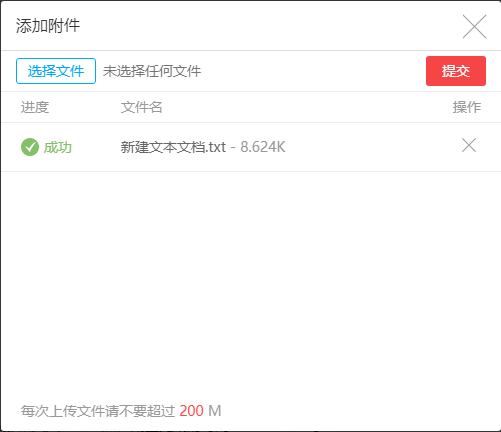
成果展示:
java IO 流下载代码:
web.xml:
DownLoad
com.DownLoad
DownLoad
/DownLoad
后台servlet:
package com;
import java.io.FileInputStream;
import java.io.IOException;
import java.io.PrintWriter;
import javax.servlet.ServletException;
import javax.servlet.ServletOutputStream;
import javax.servlet.http.HttpServlet;
import javax.servlet.http.HttpServletRequest;
import javax.servlet.http.HttpServletResponse;
public class DownLoad extends HttpServlet {
private static final long serialVersionUID = 1L;
public void doGet(HttpServletRequest request, HttpServletResponse response)
throws ServletException, IOException {
FileInputStream fileInputStream = null;
ServletOutputStream servletOutputStream = null;
// C:\Windows\System32\drivers\etc
String filePath = "C:\\Windows\\System32\\drivers\\etc\\HOSTS";
String fileName = "HOSTS";
try {
response.setContentType("application/x-msdownload;");
response.setHeader("Content-disposition", "attachment; filename=" + new String(fileName.getBytes("GBK"), "GBK"));
// 将本地文件装载到内存
fileInputStream = new FileInputStream(filePath);
// 实例化输出流
servletOutputStream = response.getOutputStream();
byte[] buff = new byte[2048];
int bytesRead;
// 每次尝试读取buff.length长字节,直到读完、bytesRead为-1
while ((bytesRead = fileInputStream.read(buff, 0, buff.length)) != -1) {
// 每次写bytesRead长字节
servletOutputStream.write(buff, 0, bytesRead);
}
// 刷新缓冲区
servletOutputStream.flush();
} catch (IOException e) {
} finally {
if (fileInputStream != null) {
try {
fileInputStream.close();
} catch (IOException e) {
}
}
if (servletOutputStream != null) {
try {
servletOutputStream.close();
} catch (IOException e) {
}
}
}
}
public void doPost(HttpServletRequest request, HttpServletResponse response)
throws ServletException, IOException {
this.doGet(request, response);
}
public void init() throws ServletException {
// Put your code here
}
}
html部分:
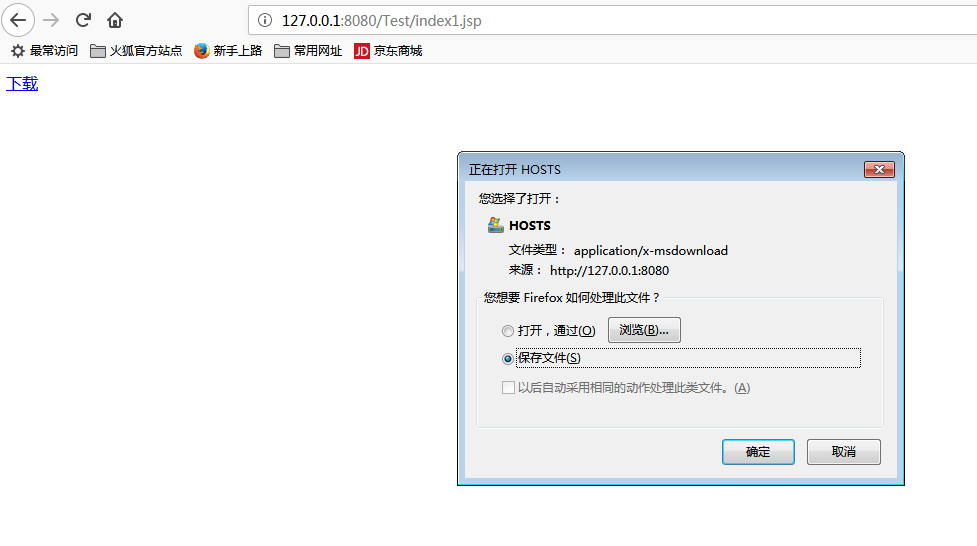
效果:
最后补充 ajaxfileupload.js 链接:http://pan.baidu.com/s/1miIaVGW 密码:tg5v

魔乐社区(Modelers.cn) 是一个中立、公益的人工智能社区,提供人工智能工具、模型、数据的托管、展示与应用协同服务,为人工智能开发及爱好者搭建开放的学习交流平台。社区通过理事会方式运作,由全产业链共同建设、共同运营、共同享有,推动国产AI生态繁荣发展。
更多推荐


 0
0 0
0- 0


 已为社区贡献5条内容

所有评论(0)