ubuntu18.04下载国内镜像及安装事项
Debian是一种自由的操作系统,它基于Linux内核和GNU项目的软件。Debian的目标是提供一个稳定、安全、高效和易于使用的系统,适用于各种硬件平台和应用场景。Debian的特点包括:丰富的软件包:Debian拥有超过60000个软件包,涵盖了各个领域,如办公、教育、游戏、编程、科学、多媒体等。用户可以通过apt工具方便地安装和更新软件包。多架构支持:Debian支持多种处理器架构,如x86
ubuntu18.04下载国内镜像及安装事项
注意:Ubuntu18.04安装Qt5.12.x运行提示错误
Could not load the Qt platform plugin "xcb" in "" even though it was found.
sudo apt-get install libxcb* -y
sudo apt-get install libxkbcommon* -y
qt.qpa.plugin: Could not load the Qt platform plugin “xcb“ in ““ even though it was found.
这句话意思是Qt应用程序时缺少xcb平台插件。这可能是因为未安装相应的Qt平台插件库,或者环境变量未正确设置。
我们可以通过一下命令解决
debian、Ubuntu系统:
sudo apt-get install libxcb-xinerama0
centos系统:
sudo yum install libxcb-xinerama
Chapter1 ubuntu18.04下载国内镜像及安装事项
1. Ubuntu介绍
Debian是一种自由的操作系统,它基于Linux内核和GNU项目的软件。Debian的目标是提供一个稳定、安全、高效和易于使用的系统,适用于各种硬件平台和应用场景。Debian的特点包括:
-
丰富的软件包:Debian拥有超过60000个软件包,涵盖了各个领域,如办公、教育、游戏、编程、科学、多媒体等。用户可以通过apt工具方便地安装和更新软件包。
-
多架构支持:Debian支持多种处理器架构,如x86、x86_64、arm、mips、ppc等。用户可以根据自己的硬件选择合适的版本。
-
社区驱动:Debian是一个由志愿者组成的社区项目,遵循自由软件的理念和标准。任何人都可以参与到Debian的开发和维护中,或者提供反馈和建议。
-
发行版分支:Debian提供了三个发行版分支,分别是稳定版(stable)、测试版(testing)和不稳定版(unstable)。稳定版是经过充分测试和验证的版本,适合于生产环境和长期使用。测试版是包含了最新软件包的版本,适合于喜欢尝试新功能的用户。不稳定版是开发者使用的版本,可能存在一些错误和不兼容性。
-
安全更新:Debian为稳定版提供了及时的安全更新,修复了已知的漏洞和威胁。用户可以通过apt工具自动获取和安装安全更新。
2. 镜像与linux内核下载(Linux的内核源码下载链接4.19.299)
http://mirrors.aliyun.com/ubuntu-releases/18.04/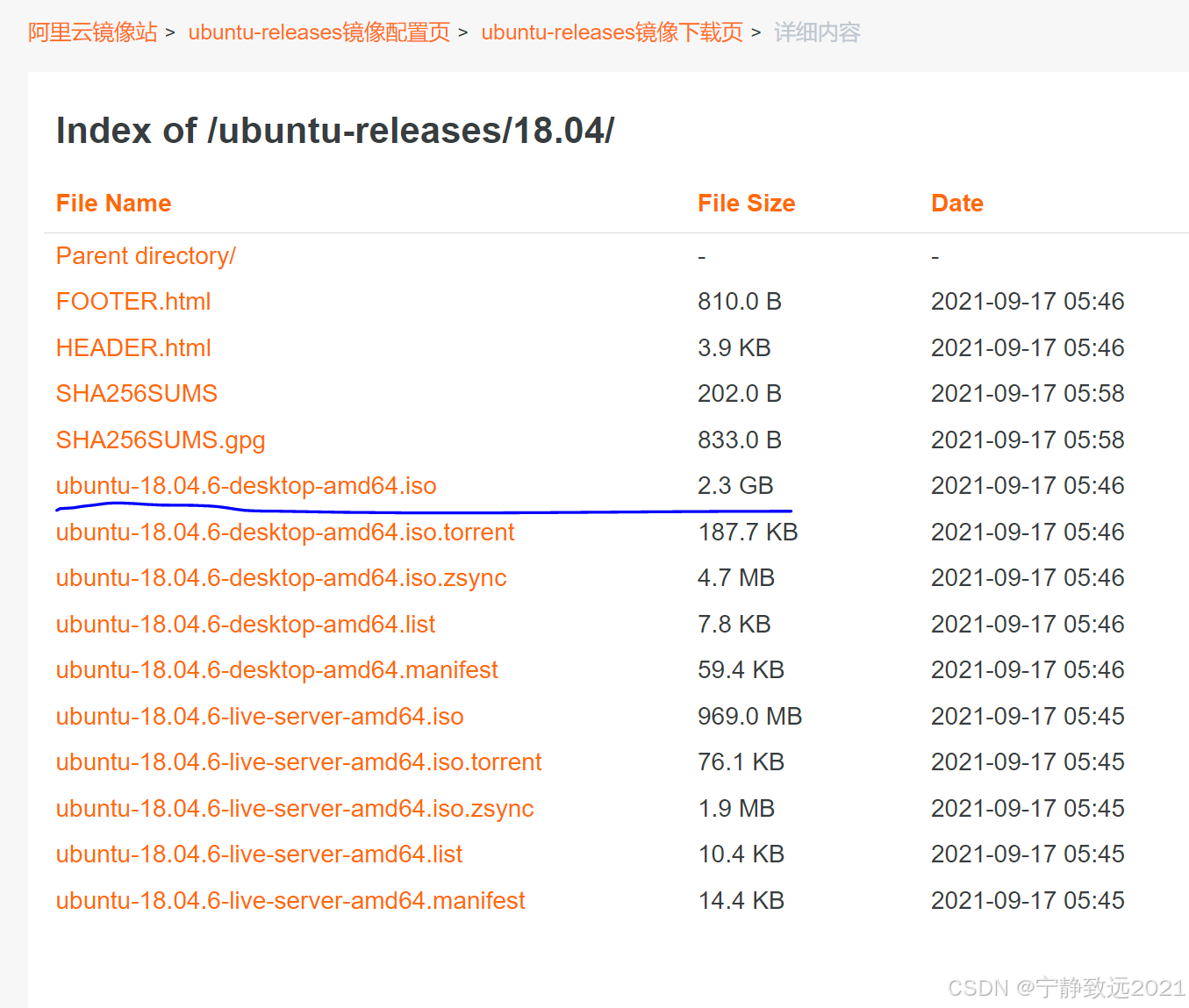
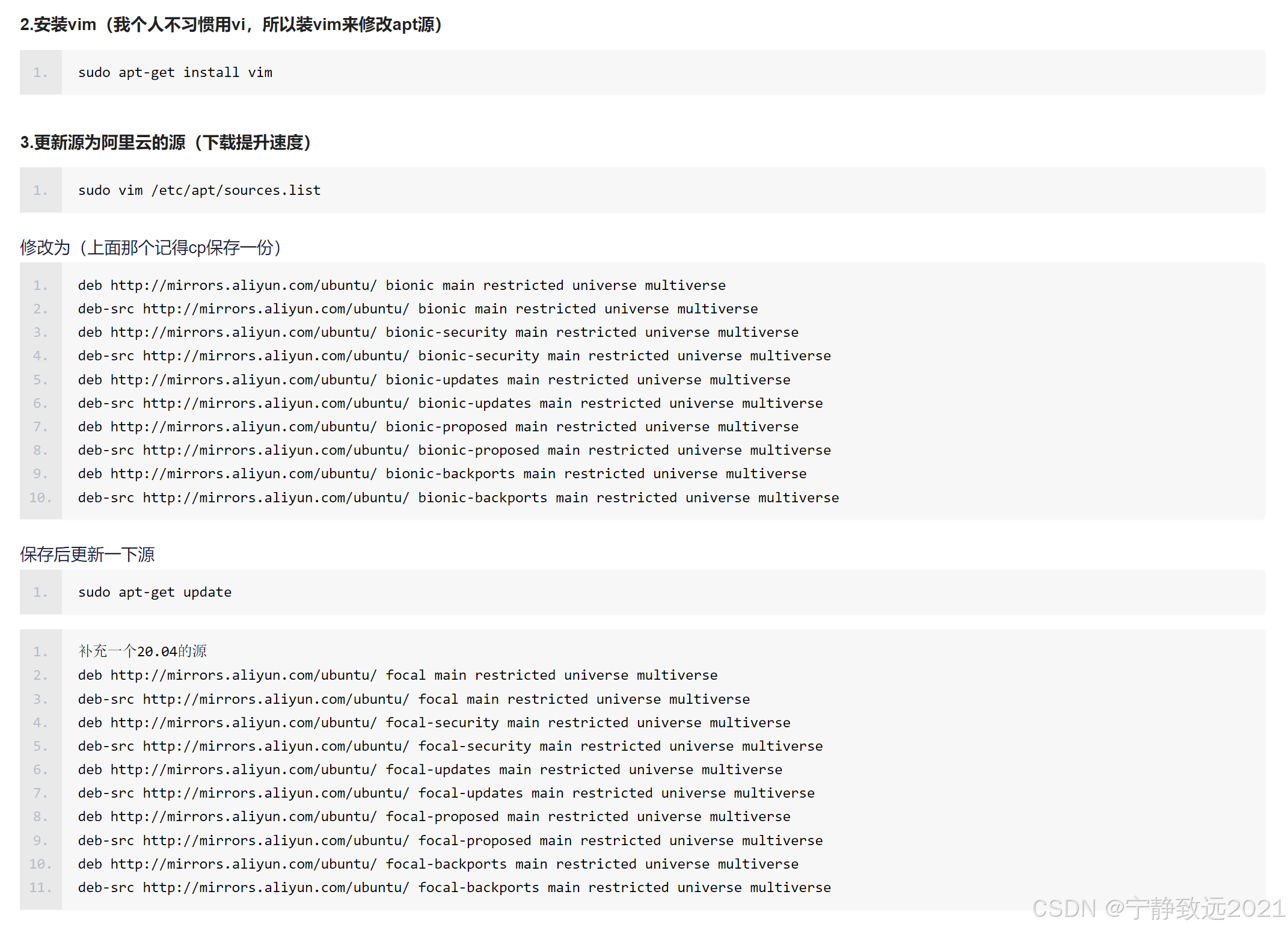
2.1 不同镜像原地址
将系统原文件中镜像地址全部更改为国内的镜像源地址,可以更改为以下任意一个地址(使用比较多的镜像源地址阿里,网易,清华,中科大镜像源地址),保存即可。
阿里源
18.04
deb http://mirrors.aliyun.com/ubuntu/ bionic main restricted universe multiverse
deb http://mirrors.aliyun.com/ubuntu/ bionic-security main restricted universe multiverse
deb http://mirrors.aliyun.com/ubuntu/ bionic-updates main restricted universe multiverse
deb http://mirrors.aliyun.com/ubuntu/ bionic-proposed main restricted universe multiverse
deb http://mirrors.aliyun.com/ubuntu/ bionic-backports main restricted universe multiverse
deb-src http://mirrors.aliyun.com/ubuntu/ bionic main restricted universe multiverse
deb-src http://mirrors.aliyun.com/ubuntu/ bionic-security main restricted universe multiverse
deb-src http://mirrors.aliyun.com/ubuntu/ bionic-updates main restricted universe multiverse
deb-src http://mirrors.aliyun.com/ubuntu/ bionic-proposed main restricted universe multiverse
deb-src http://mirrors.aliyun.com/ubuntu/ bionic-backports main restricted universe multiverse
清华源
deb https://mirrors.tuna.tsinghua.edu.cn/ubuntu/ bionic main restricted universe multiverse
deb-src https://mirrors.tuna.tsinghua.edu.cn/ubuntu/ bionic main restricted universe multiverse
deb https://mirrors.tuna.tsinghua.edu.cn/ubuntu/ bionic-updates main restricted universe multiverse
deb-src https://mirrors.tuna.tsinghua.edu.cn/ubuntu/ bionic-updates main restricted universe multiverse
deb https://mirrors.tuna.tsinghua.edu.cn/ubuntu/ bionic-backports main restricted universe multiverse
deb-src https://mirrors.tuna.tsinghua.edu.cn/ubuntu/ bionic-backports main restricted universe multiverse
deb https://mirrors.tuna.tsinghua.edu.cn/ubuntu/ bionic-security main restricted universe multiverse
deb-src https://mirrors.tuna.tsinghua.edu.cn/ubuntu/ bionic-security main restricted universe multiverse
deb https://mirrors.tuna.tsinghua.edu.cn/ubuntu/ bionic-proposed main restricted universe multiverse
deb-src https://mirrors.tuna.tsinghua.edu.cn/ubuntu/ bionic-proposed main restricted universe multiverse
中科大源
deb https://mirrors.ustc.edu.cn/ubuntu/ bionic main restricted universe multiverse
deb-src https://mirrors.ustc.edu.cn/ubuntu/ bionic main restricted universe multiverse
deb https://mirrors.ustc.edu.cn/ubuntu/ bionic-updates main restricted universe multiverse
deb-src https://mirrors.ustc.edu.cn/ubuntu/ bionic-updates main restricted universe multiverse
deb https://mirrors.ustc.edu.cn/ubuntu/ bionic-backports main restricted universe multiverse
deb-src https://mirrors.ustc.edu.cn/ubuntu/ bionic-backports main restricted universe multiverse
deb https://mirrors.ustc.edu.cn/ubuntu/ bionic-security main restricted universe multiverse
deb-src https://mirrors.ustc.edu.cn/ubuntu/ bionic-security main restricted universe multiverse
deb https://mirrors.ustc.edu.cn/ubuntu/ bionic-proposed main restricted universe multiverse
deb-src https://mirrors.ustc.edu.cn/ubuntu/ bionic-proposed main restricted universe multiverse
2.2 更换文件的方法步骤
1. 备份Ubuntu默认的源地址
sudo cp /etc/apt/sources.list /etc/apt/sources.list.backup
2. 更新源服务器列表
由于ubuntu上直接更换文件内容可能不是特别方便,这里提供一种更方便的方法。接下来将介绍两种方法。
(1)替换法
在桌面上新建一个文件名为sources.list的文件
sudo touch sources.list
使用Text Editor打开文件,复制上面任一镜像原内容至文件中,保存即可。
最后复制文件替换Ubuntu默认的源地址文件。
cd /etc/apt
sudo cp ../../home/pc/Desktop/sources.list ./
(2)直接修改法
sudo gedit /etc/apt/sources.list
将原文件中镜像地址全部更改为以上面任一镜像地址。
3. 更新
更换好源之后执行下面命令更新:
sudo apt-get update
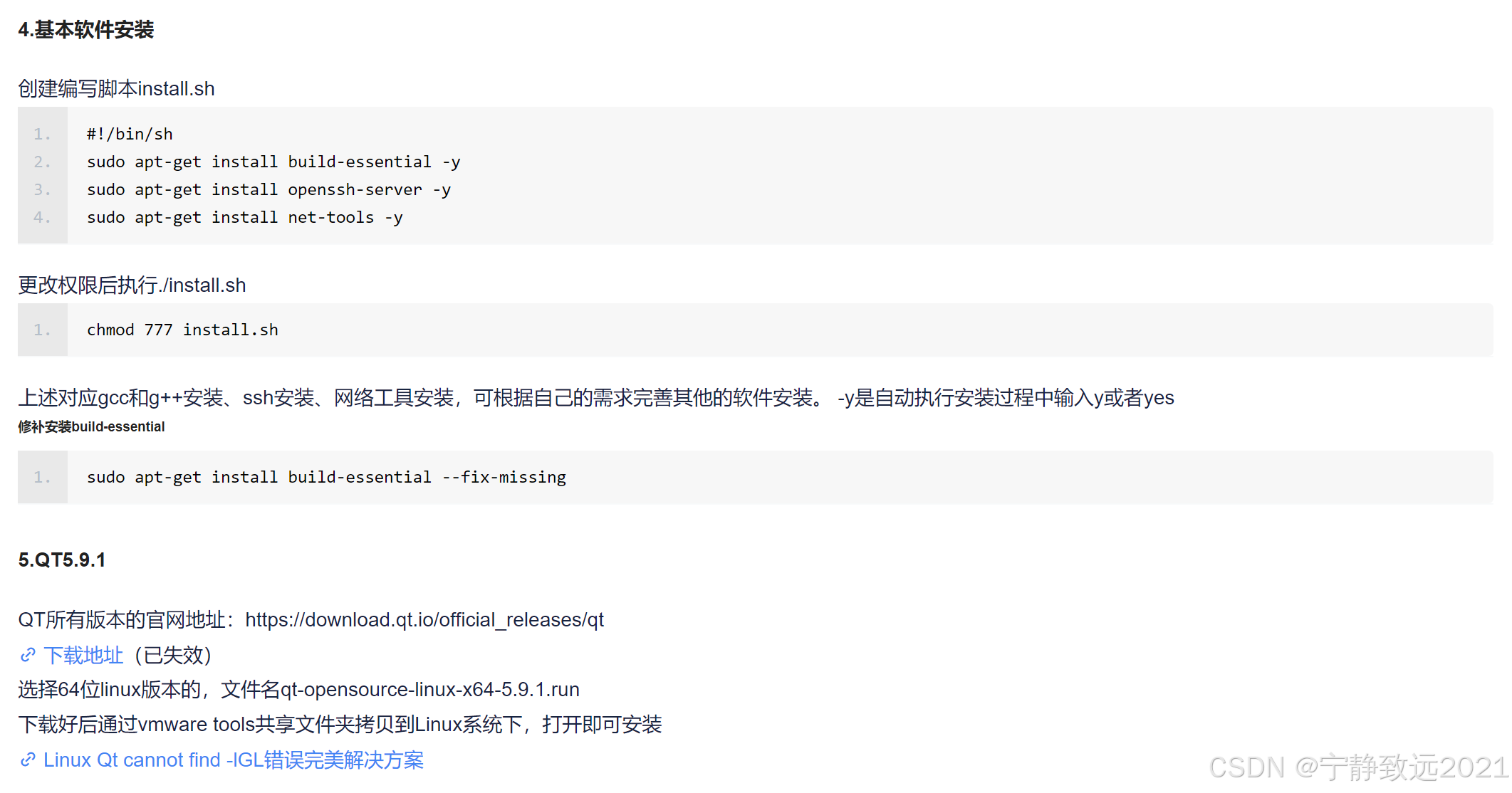
#!/bin/bash

sudo apt-get install build-essential -y
sudo apt-get install openssh-server openssh-client -y
sudo apt-get install net-tools -y
sudo apt-get install git -y
sudo apt-get install vim -y
sudo apt-get install libfontconfig1 -y
sudo apt-get install mesa-common-dev -y
sudo apt-get install libglu1-mesa-dev -y
注意:Ubuntu18.04安装Qt5.12.x运行提示错误
Could not load the Qt platform plugin "xcb" in "" even though it was found.
sudo apt-get install libxcb* -y
sudo apt-get install libxkbcommon* -y
3. 下载安装依赖
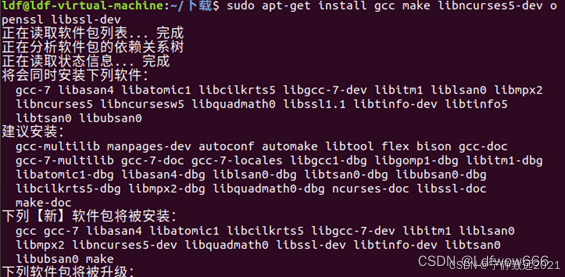
sudo apt-get install gcc make libncurses5-dev openssl libssl-dev

sudo apt-get install build-essential

sudo apt-get install pkg-config

sudo apt-get install libc6-dev

sudo apt-get install bison

sudo apt-get install flex

sudo apt-get install libelf-dev
安装过程中可能出现图12所示的报错,是因为链接不到镜像源。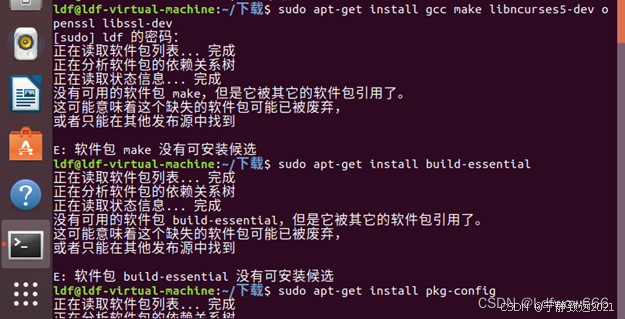
如果碰到以上问题可以进入软件更新,选择合适的镜像源。如下所示: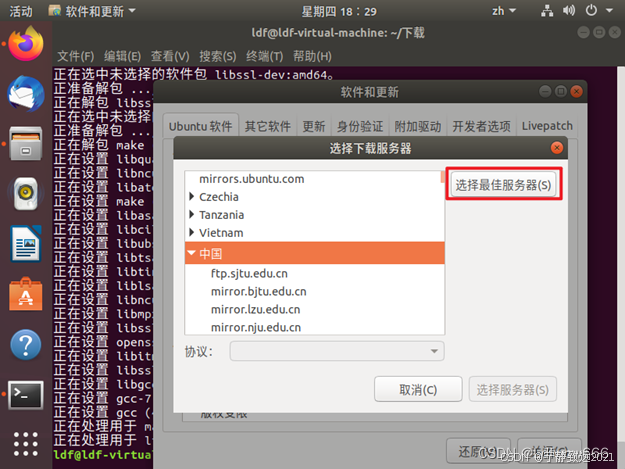
Chapter2 Ubuntu18.04 安装后应该做的事(更新中)
Chapter3 Ubuntu 18安装和各种问题处理
原文链接:https://blog.csdn.net/wycqing/article/details/136486666
1、Ubuntu 18.04 LTS 更换国内源
1.1、更换/etc/apt/sources.list文件里的源
- 备份源列表
Ubuntu配置的默认源并不是国内的服务器,下载更新软件都比较慢。首先备份源列表文件sources.list:
首先备份源列表
sudo cp /etc/apt/sources.list /etc/apt/sources.list_backup
2. 打开sources.list文件修改
选择合适的源,替换原文件的内容,保存编辑好的文件, 以阿里云更新服务器为例(可以分别测试阿里云、清华、中科大、163源的速度,选择最快的):
打开sources.list文件
sudo gedit /etc/apt/sources.list
编辑/etc/apt/sources.list文件, 在文件最前面添加阿里云镜像源:
ubuntu镜像_ubuntu下载地址_ubuntu安装教程-阿里巴巴开源镜像站
阿里源
deb http://mirrors.aliyun.com/ubuntu/ bionic main restricted universe multiverse
deb http://mirrors.aliyun.com/ubuntu/ bionic-security main restricted universe multiverse
deb http://mirrors.aliyun.com/ubuntu/ bionic-updates main restricted universe multiverse
deb http://mirrors.aliyun.com/ubuntu/ bionic-proposed main restricted universe multiverse
deb http://mirrors.aliyun.com/ubuntu/ bionic-backports main restricted universe multiverse
deb-src http://mirrors.aliyun.com/ubuntu/ bionic main restricted universe multiverse
deb-src http://mirrors.aliyun.com/ubuntu/ bionic-security main restricted universe multiverse
deb-src http://mirrors.aliyun.com/ubuntu/ bionic-updates main restricted universe multiverse
deb-src http://mirrors.aliyun.com/ubuntu/ bionic-proposed main restricted universe multiverse
deb-src http://mirrors.aliyun.com/ubuntu/ bionic-backports main restricted universe multiverse
3. 刷新列表
 sudo apt-get update
 sudo apt-get upgrade
 sudo apt-get install build-essential
下载速度瞬间就起飞了。
更换sources.list速度依然还是很慢就请继续往下看第二种方法。
1.2、更换software&updates里的select best server**
这种方法不需要改什么文件,直接在select best server里自动选择。
首先在Show Applications找Software & Updates:
搜索software & updates

魔乐社区(Modelers.cn) 是一个中立、公益的人工智能社区,提供人工智能工具、模型、数据的托管、展示与应用协同服务,为人工智能开发及爱好者搭建开放的学习交流平台。社区通过理事会方式运作,由全产业链共同建设、共同运营、共同享有,推动国产AI生态繁荣发展。
更多推荐

 24
24 0
0- 0


 已为社区贡献16条内容

所有评论(0)