python中如何安装包
python中如何安装包使用pip安装numpy包时遇到问题解决办法使用pip安装numpy包时遇到问题今天在给安装python中的numpy包时遇到了一下问题:在cmd中输入pip install numpy语句后,出现:Could not install packages due to an EnvironmentError: [WinError 5] 拒绝访问。: ‘c:\progr...
python中如何安装包
使用pip安装numpy包时遇到问题
今天在给安装python中的numpy包时遇到了一下问题:
在cmd中输入pip install numpy语句后,出现:
Could not install packages due to an EnvironmentError: [WinError 5] 拒绝访问。: ‘c:\program files\python37\Lib\site-packages\numpy’
Consider using the --user option or check the permissions.
You are using pip version 19.0.3, however version 19.1 is available.
You should consider upgrading via the ‘python -m pip install --upgrade pip’ command.
如图: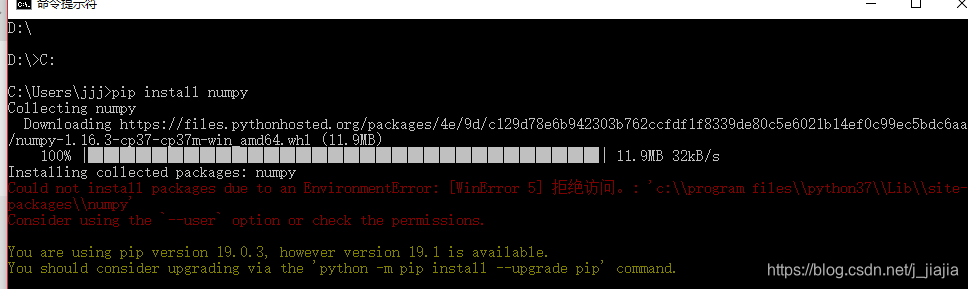
解决办法
直接将pip install numpy
换成pip install --user numpy就可以了
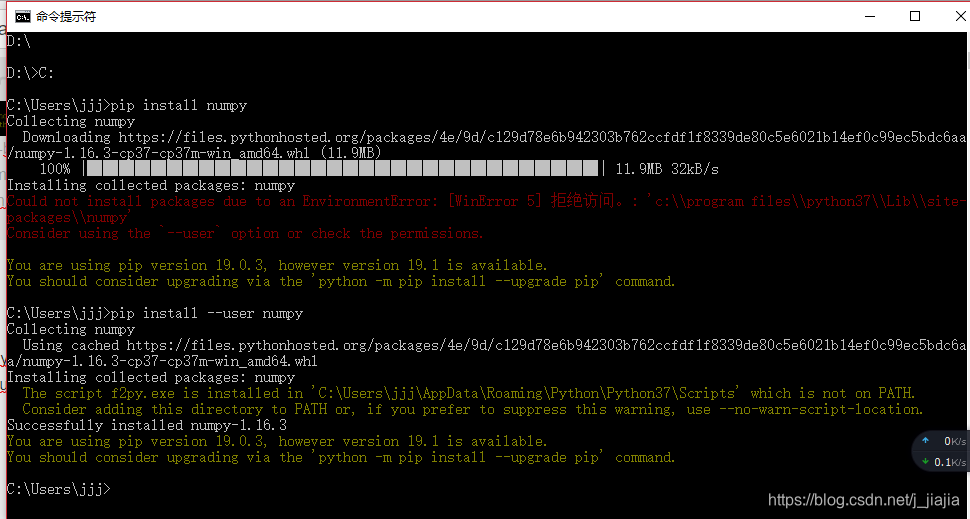
如何在cmd中查看python安装了哪些包?
直接在cmd中输入pip list就行啦~

魔乐社区(Modelers.cn) 是一个中立、公益的人工智能社区,提供人工智能工具、模型、数据的托管、展示与应用协同服务,为人工智能开发及爱好者搭建开放的学习交流平台。社区通过理事会方式运作,由全产业链共同建设、共同运营、共同享有,推动国产AI生态繁荣发展。
更多推荐



 3
3 0
0- 0


 已为社区贡献3条内容

所有评论(0)