【2025】springboot企业绩效管理系统(源码+文档+调试+答疑)
SpringBoot企业绩效管理系统的开发背景主要源于现代企业对于高效、准确和合规的薪酬绩效管理的迫切需求。

目录
该项目含有源码、文档、PPT、图文修改教程、配套开发软件、软件安装教程、项目发布教程、相关文档模板等学习内容。
一、项目介绍:
SpringBoot企业绩效管理系统的开发背景主要源于现代企业对于高效、准确和合规的薪酬绩效管理的迫切需求。以下是对其背景的详细阐述:
一、企业薪酬绩效管理的重要性
在现代企业中,薪酬绩效管理已成为人力资源管理的核心部分,直接影响着员工的工作积极性、满意度以及企业的整体运营效率和成本控制。随着企业规模的扩大和业务复杂性的增加,传统的薪酬绩效管理方式,如手工计算、电子表格等,已无法满足高效、准确和合规的管理需求。
二、法规政策与行业标准的变化
不断变化的税务法规、劳动法规定以及行业标准也对薪酬绩效管理提出了更高的要求。企业需要确保薪酬计算的准确性和合法性,以降低合规风险,并适应不断变化的法规政策环境。
三、信息技术的快速发展
随着信息技术的快速发展,云计算、大数据、人工智能等技术在企业管理中的应用越来越广泛。SpringBoot作为一款流行的Java开发框架,以其简化开发、快速部署和易于维护的特点,被广泛应用于企业级应用的开发。利用SpringBoot框架开发企业薪酬绩效管理系统,不仅能够提高管理效率,还能更好地集成和适应各种法规政策的变化,确保薪酬绩效管理的准确性和合规性。
四、数据安全与隐私保护的需求
薪资数据涉及到员工的个人隐私和企业的敏感信息,因此保障数据的安全性和隐私性至关重要。SpringBoot框架及其生态系统提供了丰富的安全控制和加密技术,有助于构建安全可靠的薪酬绩效管理系统。
五、企业数字化转型的推动
在数字化转型的大背景下,企业需要利用先进的技术手段来优化管理流程,提高管理效率。SpringBoot企业绩效管理系统的开发正是企业数字化转型的一个重要组成部分,它能够帮助企业实现薪酬绩效管理的自动化、智能化和合规化,提升企业的整体竞争力。
综上所述,SpringBoot企业绩效管理系统的开发背景主要源于现代企业对于高效、准确和合规的薪酬绩效管理的迫切需求,以及信息技术快速发展和企业数字化转型的推动。该系统旨在提高薪酬绩效管理的效率和准确性,降低人为错误,并为企业的人力资源决策提供数据支持。
二、文档学习资料:


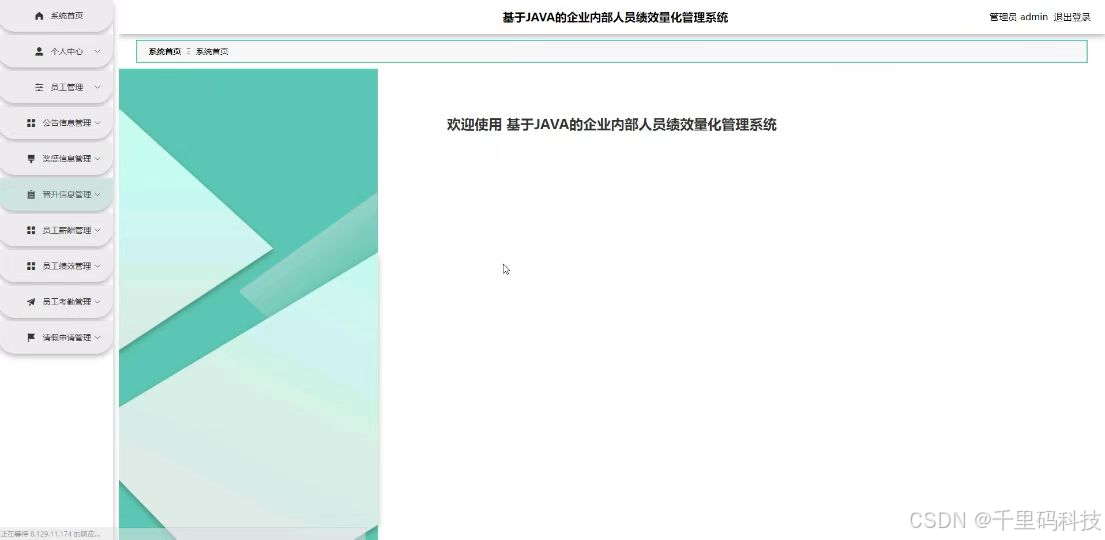
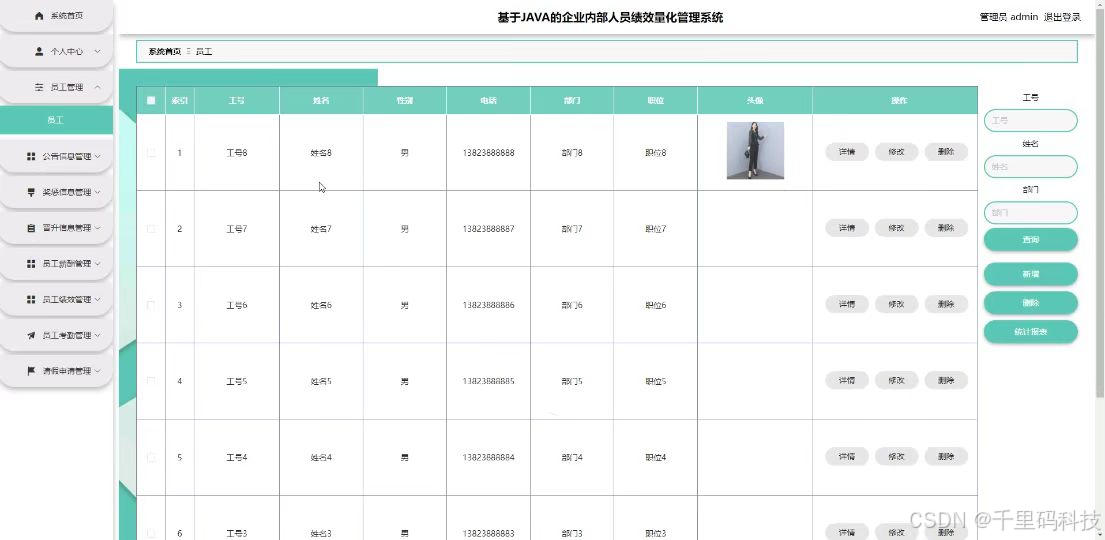
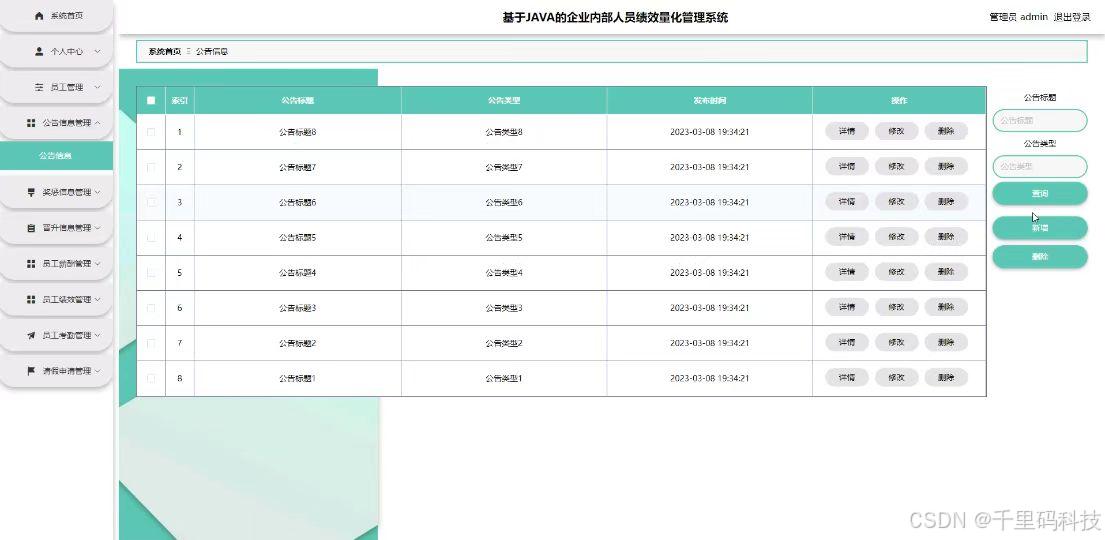
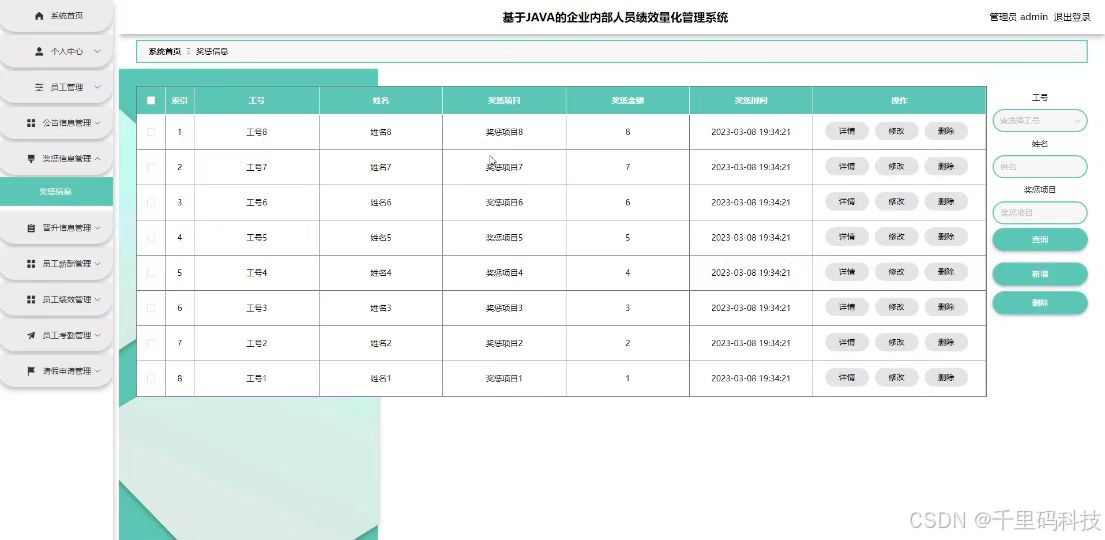
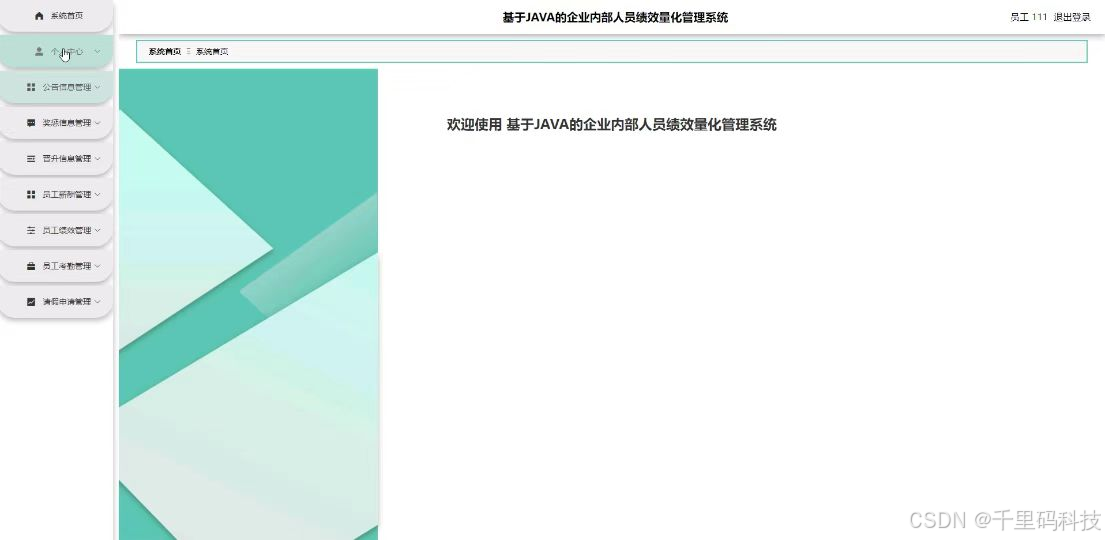
三、模块截图:

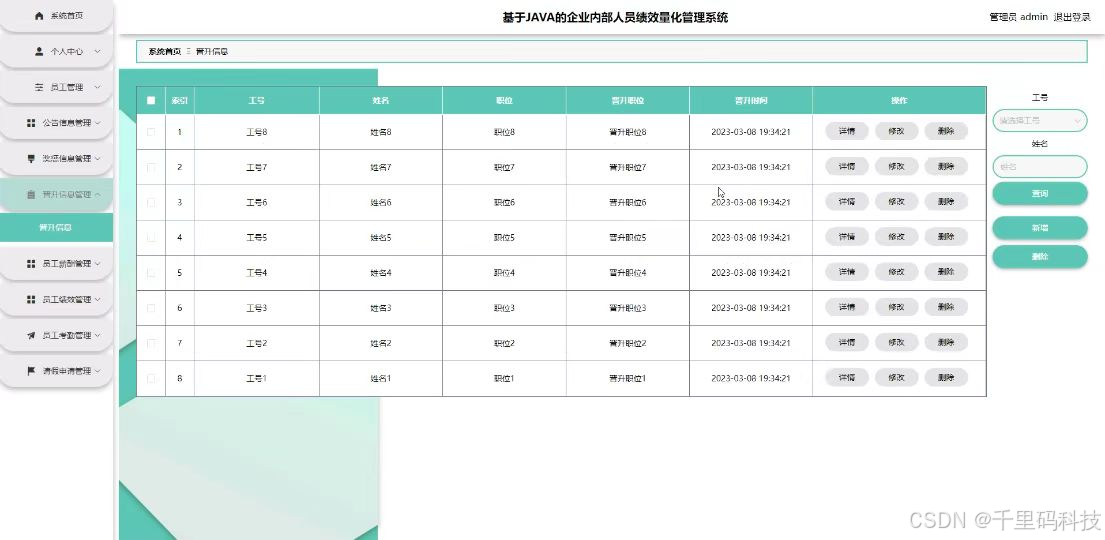
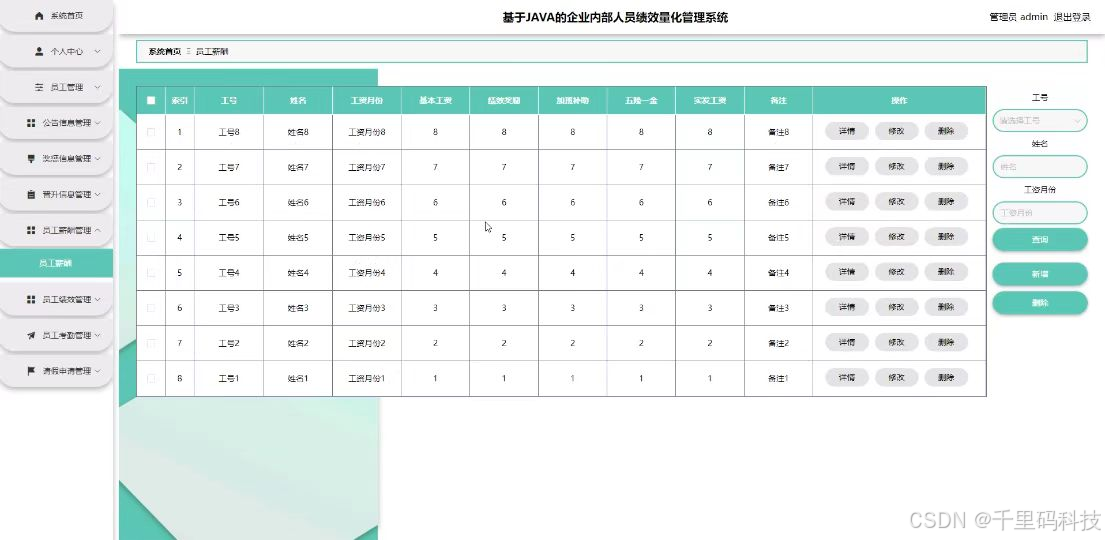
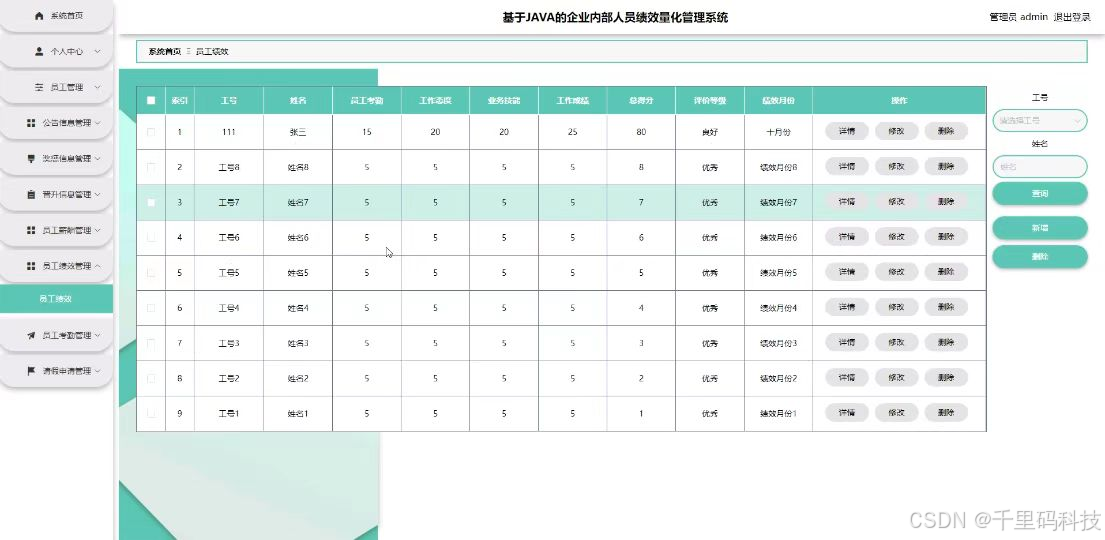
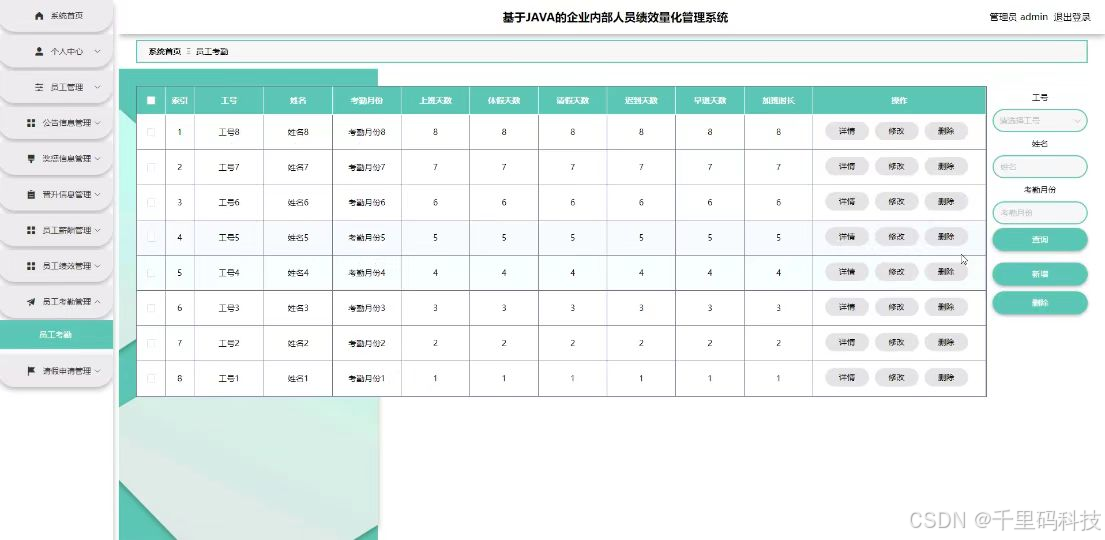
四、开发技术与运行环境:
后端技术栈:
- Spring Boot:使用Spring Boot作为后端框架,简化开发流程,提供快速开发的能力。
- Spring Security:用于实现用户认证和授权功能,保护系统的安全性。
- Spring Data JPA:用于简化对数据库的操作,提供CRUD功能。
- MySQL:作为数据库存储管理平台的数据。
- MyBatis-Plus:MyBatis-Plus 主要负责处理数据库操作,提高数据库操作的便捷性和效率。
前端技术栈:
- Vue.js:使用Vue.js作为前端框架,实现组件化开发,提高开发效率。
- Vue Router:用于实现前端路由功能,实现单页应用的页面跳转。
- Vuex:用于实现前端状态管理,统一管理应用的状态。
- Element UI:使用Element UI作为UI组件库,提供丰富的UI组件,加快开发速度。
- Axios:用于发送HTTP请求,与后端进行数据交互。
- HTML/CSS/JavaScript:用于构建系统的用户界面。HTML 负责网页的结构布局,CSS 负责样式设计,JavaScript 负责交互逻辑的实现。在系统中,这些技术用于实现前端页面的展示和交互功能,提高用户体验。
其他技术:
- Maven:用于项目构建和依赖管理,简化项目的管理和部署。
运行环境:
1. 开发环境:
IDE:如IDEA或eclipse,用于编码和调试。
本地数据库:如MySQL,用于数据存储和查询。
本地服务器:如Tomcat7.0,用于部署和运行Web应用。
五、代码展示(示范代码注释):
/**
 * 用户
 * 后端接口
 * @author
 * @email
*/
@RestController
@Controller
@RequestMapping("/yonghu")
public class YonghuController {
    private static final Logger logger = LoggerFactory.getLogger(YonghuController.class);

    private static final String TABLE_NAME = "yonghu";

    @Autowired
    private YonghuService yonghuService;


    @Autowired
    private TokenService tokenService;

    @Autowired
    private DictionaryService dictionaryService;//字典
    @Autowired
    private GonggaoService gonggaoService;//公告
    @Autowired
    private GuwenService guwenService;//顾问
    @Autowired
    private GuwenChatService guwenChatService;//用户咨询
    @Autowired
    private GuwenYuyueService guwenYuyueService;//顾问预约
    @Autowired
    private JiankangzhishiService jiankangzhishiService;//健康知识
    @Autowired
    private JiankangzhishiCollectionService jiankangzhishiCollectionService;//健康知识收藏
    @Autowired
    private JiankangzhishiLiuyanService jiankangzhishiLiuyanService;//健康知识留言
    @Autowired
    private UsersService usersService;//管理员


    /**
    * 后端列表
    */
    @RequestMapping("/page")
    public R page(@RequestParam Map<String, Object> params, HttpServletRequest request){
        logger.debug("page方法:,,Controller:{},,params:{}",this.getClass().getName(),JSONObject.toJSONString(params));
        String role = String.valueOf(request.getSession().getAttribute("role"));
        if(false)
            return R.error(511,"永不会进入");
        else if("用户".equals(role))
            params.put("yonghuId",request.getSession().getAttribute("userId"));
        else if("顾问".equals(role))
            params.put("guwenId",request.getSession().getAttribute("userId"));
        CommonUtil.checkMap(params);
        PageUtils page = yonghuService.queryPage(params);

        //字典表数据转换
        List<YonghuView> list =(List<YonghuView>)page.getList();
        for(YonghuView c:list){
            //修改对应字典表字段
            dictionaryService.dictionaryConvert(c, request);
        }
        return R.ok().put("data", page);
    }

    /**
    * 后端详情
    */
    @RequestMapping("/info/{id}")
    public R info(@PathVariable("id") Long id, HttpServletRequest request){
        logger.debug("info方法:,,Controller:{},,id:{}",this.getClass().getName(),id);
        YonghuEntity yonghu = yonghuService.selectById(id);
        if(yonghu !=null){
            //entity转view
            YonghuView view = new YonghuView();
            BeanUtils.copyProperties( yonghu , view );//把实体数据重构到view中
            //修改对应字典表字段
            dictionaryService.dictionaryConvert(view, request);
            return R.ok().put("data", view);
        }else {
            return R.error(511,"查不到数据");
        }

    }

    /**
    * 后端保存
    */
    @RequestMapping("/save")
    public R save(@RequestBody YonghuEntity yonghu, HttpServletRequest request){
        logger.debug("save方法:,,Controller:{},,yonghu:{}",this.getClass().getName(),yonghu.toString());

        String role = String.valueOf(request.getSession().getAttribute("role"));
        if(false)
            return R.error(511,"永远不会进入");

        Wrapper<YonghuEntity> queryWrapper = new EntityWrapper<YonghuEntity>()
            .eq("username", yonghu.getUsername())
            .or()
            .eq("yonghu_phone", yonghu.getYonghuPhone())
            .or()
            .eq("yonghu_id_number", yonghu.getYonghuIdNumber())
            ;

        logger.info("sql语句:"+queryWrapper.getSqlSegment());
        YonghuEntity yonghuEntity = yonghuService.selectOne(queryWrapper);
        if(yonghuEntity==null){
            yonghu.setCreateTime(new Date());
            yonghu.setPassword("123456");
            yonghuService.insert(yonghu);
            return R.ok();
        }else {
            return R.error(511,"账户或者用户手机号或者用户身份证号已经被使用");
        }
    }

    /**
    * 后端修改
    */
    @RequestMapping("/update")
    public R update(@RequestBody YonghuEntity yonghu, HttpServletRequest request) throws NoSuchFieldException, ClassNotFoundException, IllegalAccessException, InstantiationException {
        logger.debug("update方法:,,Controller:{},,yonghu:{}",this.getClass().getName(),yonghu.toString());
        YonghuEntity oldYonghuEntity = yonghuService.selectById(yonghu.getId());//查询原先数据

        String role = String.valueOf(request.getSession().getAttribute("role"));
//        if(false)
//            return R.error(511,"永远不会进入");
        if("".equals(yonghu.getYonghuPhoto()) || "null".equals(yonghu.getYonghuPhoto())){
                yonghu.setYonghuPhoto(null);
        }

            yonghuService.updateById(yonghu);//根据id更新
            return R.ok();
    }


    /**
    * 删除
    */
    @RequestMapping("/delete")
    public R delete(@RequestBody Integer[] ids, HttpServletRequest request){
        logger.debug("delete:,,Controller:{},,ids:{}",this.getClass().getName(),ids.toString());
        List<YonghuEntity> oldYonghuList =yonghuService.selectBatchIds(Arrays.asList(ids));//要删除的数据
        yonghuService.deleteBatchIds(Arrays.asList(ids));

        return R.ok();
    }


    /**
     * 批量上传
     */
    @RequestMapping("/batchInsert")
    public R save( String fileName, HttpServletRequest request){
        logger.debug("batchInsert方法:,,Controller:{},,fileName:{}",this.getClass().getName(),fileName);
        Integer yonghuId = Integer.valueOf(String.valueOf(request.getSession().getAttribute("userId")));
        SimpleDateFormat sdf = new SimpleDateFormat("yyyy-MM-dd HH:mm:ss");
        //.eq("time", new SimpleDateFormat("yyyy-MM-dd").format(new Date()))
        try {
            List<YonghuEntity> yonghuList = new ArrayList<>();//上传的东西
            Map<String, List<String>> seachFields= new HashMap<>();//要查询的字段
            Date date = new Date();
            int lastIndexOf = fileName.lastIndexOf(".");
            if(lastIndexOf == -1){
                return R.error(511,"该文件没有后缀");
            }else{
                String suffix = fileName.substring(lastIndexOf);
                if(!".xls".equals(suffix)){
                    return R.error(511,"只支持后缀为xls的excel文件");
                }else{
                    URL resource = this.getClass().getClassLoader().getResource("static/upload/" + fileName);//获取文件路径
                    File file = new File(resource.getFile());
                    if(!file.exists()){
                        return R.error(511,"找不到上传文件,请联系管理员");
                    }else{
                        List<List<String>> dataList = PoiUtil.poiImport(file.getPath());//读取xls文件
                        dataList.remove(0);//删除第一行,因为第一行是提示
                        for(List<String> data:dataList){
                            //循环
                            YonghuEntity yonghuEntity = new YonghuEntity();
//                            yonghuEntity.setUsername(data.get(0));                    //账户 要改的
//                            yonghuEntity.setPassword("123456");//密码
//                            yonghuEntity.setYonghuName(data.get(0));                    //用户姓名 要改的
//                            yonghuEntity.setYonghuPhone(data.get(0));                    //用户手机号 要改的
//                            yonghuEntity.setYonghuIdNumber(data.get(0));                    //用户身份证号 要改的
//                            yonghuEntity.setYonghuPhoto("");//详情和图片
//                            yonghuEntity.setSexTypes(Integer.valueOf(data.get(0)));   //性别 要改的
//                            yonghuEntity.setYonghuEmail(data.get(0));                    //用户邮箱 要改的
//                            yonghuEntity.setCreateTime(date);//时间
                            yonghuList.add(yonghuEntity);


                            //把要查询是否重复的字段放入map中
                                //账户
                                if(seachFields.containsKey("username")){
                                    List<String> username = seachFields.get("username");
                                    username.add(data.get(0));//要改的
                                }else{
                                    List<String> username = new ArrayList<>();
                                    username.add(data.get(0));//要改的
                                    seachFields.put("username",username);
                                }
                                //用户手机号
                                if(seachFields.containsKey("yonghuPhone")){
                                    List<String> yonghuPhone = seachFields.get("yonghuPhone");
                                    yonghuPhone.add(data.get(0));//要改的
                                }else{
                                    List<String> yonghuPhone = new ArrayList<>();
                                    yonghuPhone.add(data.get(0));//要改的
                                    seachFields.put("yonghuPhone",yonghuPhone);
                                }
                                //用户身份证号
                                if(seachFields.containsKey("yonghuIdNumber")){
                                    List<String> yonghuIdNumber = seachFields.get("yonghuIdNumber");
                                    yonghuIdNumber.add(data.get(0));//要改的
                                }else{
                                    List<String> yonghuIdNumber = new ArrayList<>();
                                    yonghuIdNumber.add(data.get(0));//要改的
                                    seachFields.put("yonghuIdNumber",yonghuIdNumber);
                                }
                        }

                        //查询是否重复
                         //账户
                        List<YonghuEntity> yonghuEntities_username = yonghuService.selectList(new EntityWrapper<YonghuEntity>().in("username", seachFields.get("username")));
                        if(yonghuEntities_username.size() >0 ){
                            ArrayList<String> repeatFields = new ArrayList<>();
                            for(YonghuEntity s:yonghuEntities_username){
                                repeatFields.add(s.getUsername());
                            }
                            return R.error(511,"数据库的该表中的 [账户] 字段已经存在 存在数据为:"+repeatFields.toString());
                        }
                         //用户手机号
                        List<YonghuEntity> yonghuEntities_yonghuPhone = yonghuService.selectList(new EntityWrapper<YonghuEntity>().in("yonghu_phone", seachFields.get("yonghuPhone")));
                        if(yonghuEntities_yonghuPhone.size() >0 ){
                            ArrayList<String> repeatFields = new ArrayList<>();
                            for(YonghuEntity s:yonghuEntities_yonghuPhone){
                                repeatFields.add(s.getYonghuPhone());
                            }
                            return R.error(511,"数据库的该表中的 [用户手机号] 字段已经存在 存在数据为:"+repeatFields.toString());
                        }
                         //用户身份证号
                        List<YonghuEntity> yonghuEntities_yonghuIdNumber = yonghuService.selectList(new EntityWrapper<YonghuEntity>().in("yonghu_id_number", seachFields.get("yonghuIdNumber")));
                        if(yonghuEntities_yonghuIdNumber.size() >0 ){
                            ArrayList<String> repeatFields = new ArrayList<>();
                            for(YonghuEntity s:yonghuEntities_yonghuIdNumber){
                                repeatFields.add(s.getYonghuIdNumber());
                            }
                            return R.error(511,"数据库的该表中的 [用户身份证号] 字段已经存在 存在数据为:"+repeatFields.toString());
                        }
                        yonghuService.insertBatch(yonghuList);
                        return R.ok();
                    }
                }
            }
        }catch (Exception e){
            e.printStackTrace();
            return R.error(511,"批量插入数据异常,请联系管理员");
        }
    }

    /**
    * 登录
    */
    @IgnoreAuth
    @RequestMapping(value = "/login")
    public R login(String username, String password, String captcha, HttpServletRequest request) {
        YonghuEntity yonghu = yonghuService.selectOne(new EntityWrapper<YonghuEntity>().eq("username", username));
        if(yonghu==null || !yonghu.getPassword().equals(password))
            return R.error("账号或密码不正确");
        String token = tokenService.generateToken(yonghu.getId(),username, "yonghu", "用户");
        R r = R.ok();
        r.put("token", token);
        r.put("role","用户");
        r.put("username",yonghu.getYonghuName());
        r.put("tableName","yonghu");
        r.put("userId",yonghu.getId());
        return r;
    }

    /**
    * 注册
    */
    @IgnoreAuth
    @PostMapping(value = "/register")
    public R register(@RequestBody YonghuEntity yonghu, HttpServletRequest request) {
//    	ValidatorUtils.validateEntity(user);
        Wrapper<YonghuEntity> queryWrapper = new EntityWrapper<YonghuEntity>()
            .eq("username", yonghu.getUsername())
            .or()
            .eq("yonghu_phone", yonghu.getYonghuPhone())
            .or()
            .eq("yonghu_id_number", yonghu.getYonghuIdNumber())
            ;
        YonghuEntity yonghuEntity = yonghuService.selectOne(queryWrapper);
        if(yonghuEntity != null)
            return R.error("账户或者用户手机号或者用户身份证号已经被使用");
        yonghu.setCreateTime(new Date());
        yonghuService.insert(yonghu);

        return R.ok();
    }

    /**
     * 重置密码
     */
    @GetMapping(value = "/resetPassword")
    public R resetPassword(Integer  id, HttpServletRequest request) {
        YonghuEntity yonghu = yonghuService.selectById(id);
        yonghu.setPassword("123456");
        yonghuService.updateById(yonghu);
        return R.ok();
    }

	/**
	 * 修改密码
	 */
	@GetMapping(value = "/updatePassword")
	public R updatePassword(String  oldPassword, String  newPassword, HttpServletRequest request) {
        YonghuEntity yonghu = yonghuService.selectById((Integer)request.getSession().getAttribute("userId"));
		if(newPassword == null){
			return R.error("新密码不能为空") ;
		}
		if(!oldPassword.equals(yonghu.getPassword())){
			return R.error("原密码输入错误");
		}
		if(newPassword.equals(yonghu.getPassword())){
			return R.error("新密码不能和原密码一致") ;
		}
        yonghu.setPassword(newPassword);
		yonghuService.updateById(yonghu);
		return R.ok();
	}


    /**
     * 忘记密码
     */
    @IgnoreAuth
    @RequestMapping(value = "/resetPass")
    public R resetPass(String username, HttpServletRequest request) {
        YonghuEntity yonghu = yonghuService.selectOne(new EntityWrapper<YonghuEntity>().eq("username", username));
        if(yonghu!=null){
            yonghu.setPassword("123456");
            yonghuService.updateById(yonghu);
            return R.ok();
        }else{
           return R.error("账号不存在");
        }
    }


    /**
    * 获取用户的session用户信息
    */
    @RequestMapping("/session")
    public R getCurrYonghu(HttpServletRequest request){
        Integer id = (Integer)request.getSession().getAttribute("userId");
        YonghuEntity yonghu = yonghuService.selectById(id);
        if(yonghu !=null){
            //entity转view
            YonghuView view = new YonghuView();
            BeanUtils.copyProperties( yonghu , view );//把实体数据重构到view中

            //修改对应字典表字段
            dictionaryService.dictionaryConvert(view, request);
            return R.ok().put("data", view);
        }else {
            return R.error(511,"查不到数据");
        }
    }


    /**
    * 退出
    */
    @GetMapping(value = "logout")
    public R logout(HttpServletRequest request) {
        request.getSession().invalidate();
        return R.ok("退出成功");
    }


    /**
    * 前端列表
    */
    @IgnoreAuth
    @RequestMapping("/list")
    public R list(@RequestParam Map<String, Object> params, HttpServletRequest request){
        logger.debug("list方法:,,Controller:{},,params:{}",this.getClass().getName(),JSONObject.toJSONString(params));

        CommonUtil.checkMap(params);
        PageUtils page = yonghuService.queryPage(params);

        //字典表数据转换
        List<YonghuView> list =(List<YonghuView>)page.getList();
        for(YonghuView c:list)
            dictionaryService.dictionaryConvert(c, request); //修改对应字典表字段

        return R.ok().put("data", page);
    }

    /**
    * 前端详情
    */
    @RequestMapping("/detail/{id}")
    public R detail(@PathVariable("id") Long id, HttpServletRequest request){
        logger.debug("detail方法:,,Controller:{},,id:{}",this.getClass().getName(),id);
        YonghuEntity yonghu = yonghuService.selectById(id);
            if(yonghu !=null){


                //entity转view
                YonghuView view = new YonghuView();
                BeanUtils.copyProperties( yonghu , view );//把实体数据重构到view中

                //修改对应字典表字段
                dictionaryService.dictionaryConvert(view, request);
                return R.ok().put("data", view);
            }else {
                return R.error(511,"查不到数据");
            }
    }


    /**
    * 前端保存
    */
    @RequestMapping("/add")
    public R add(@RequestBody YonghuEntity yonghu, HttpServletRequest request){
        logger.debug("add方法:,,Controller:{},,yonghu:{}",this.getClass().getName(),yonghu.toString());
        Wrapper<YonghuEntity> queryWrapper = new EntityWrapper<YonghuEntity>()
            .eq("username", yonghu.getUsername())
            .or()
            .eq("yonghu_phone", yonghu.getYonghuPhone())
            .or()
            .eq("yonghu_id_number", yonghu.getYonghuIdNumber())
//            .notIn("yonghu_types", new Integer[]{102})
            ;
        logger.info("sql语句:"+queryWrapper.getSqlSegment());
        YonghuEntity yonghuEntity = yonghuService.selectOne(queryWrapper);
        if(yonghuEntity==null){
            yonghu.setCreateTime(new Date());
            yonghu.setPassword("123456");
        yonghuService.insert(yonghu);

            return R.ok();
        }else {
            return R.error(511,"账户或者用户手机号或者用户身份证号已经被使用");
        }
    }

}
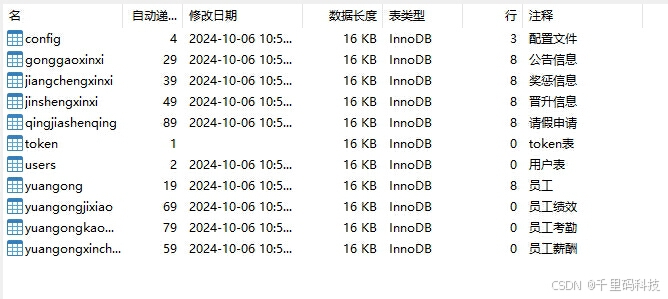
六、数据库表截图(示范表注释):
七、配套学习资料

魔乐社区(Modelers.cn) 是一个中立、公益的人工智能社区,提供人工智能工具、模型、数据的托管、展示与应用协同服务,为人工智能开发及爱好者搭建开放的学习交流平台。社区通过理事会方式运作,由全产业链共同建设、共同运营、共同享有,推动国产AI生态繁荣发展。
更多推荐


 22
22 0
0- 0


 已为社区贡献12条内容

所有评论(0)