python读取小米蓝牙温湿度计2
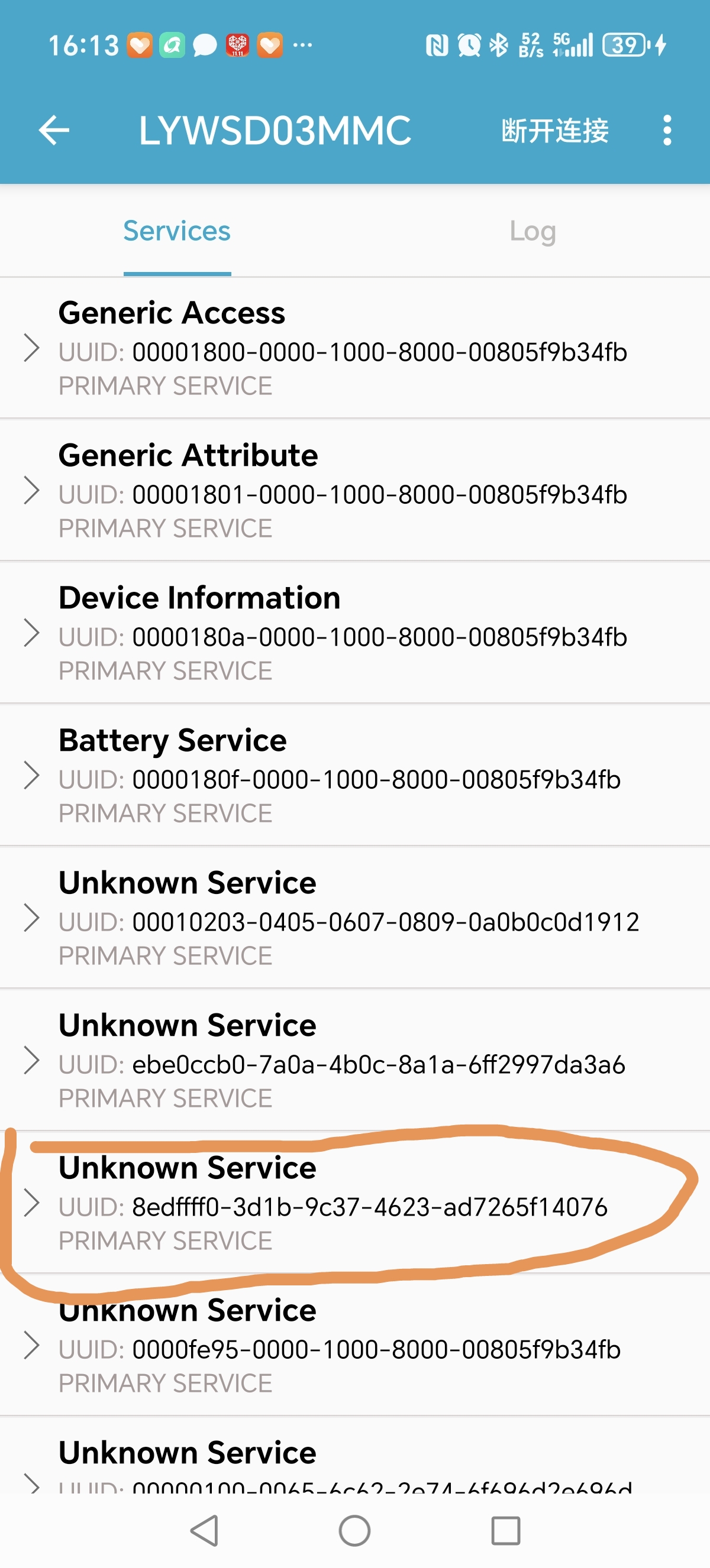
手机用nRF Connect(BLE 调试工具)能找到名称为LYWSD03MMC的设备 ,而且能看到mac地址: A4:C1:38:00:B9:46,点击设备旁边的连接按钮时,从列表中找到Unknown Service
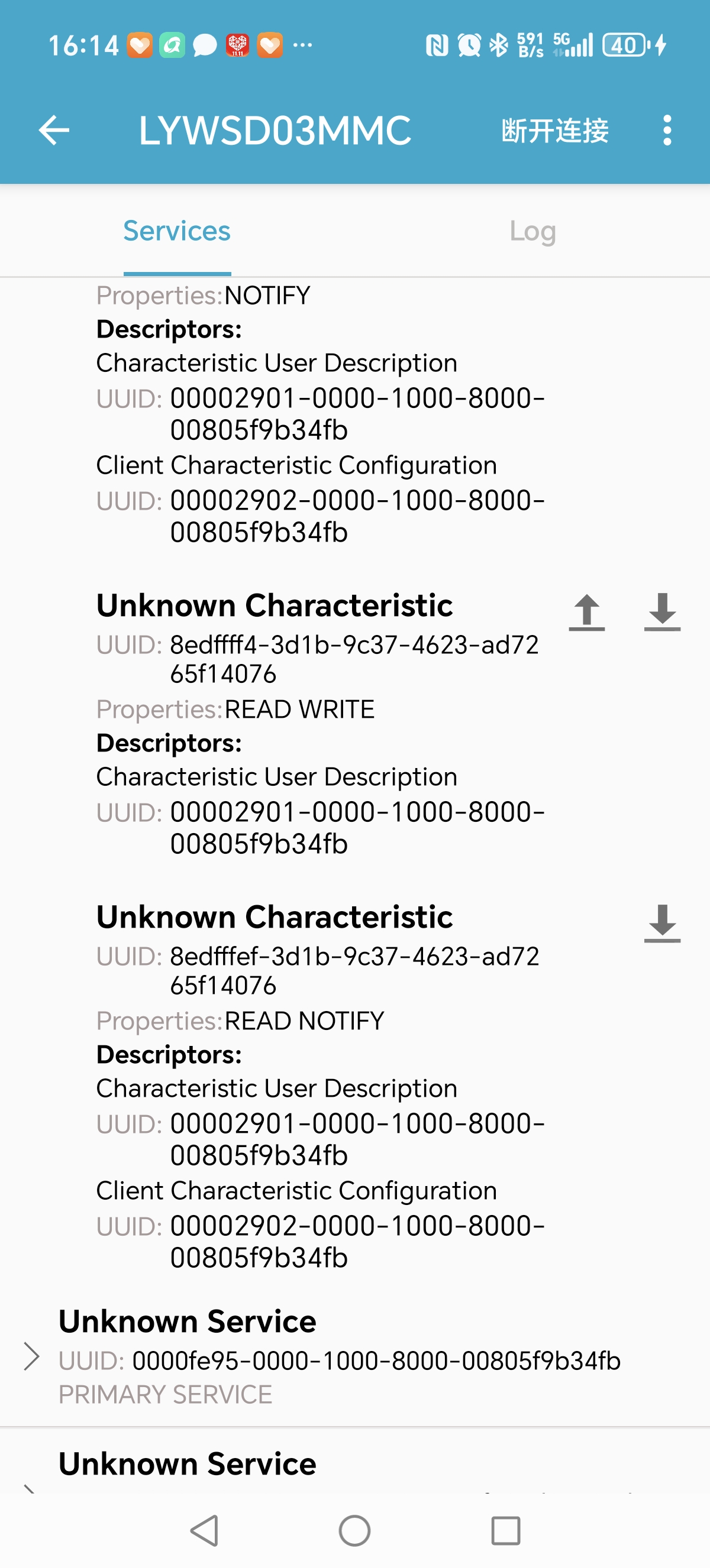
UUID:8edffff0-3d1b-9c37-4623-ad7265f14076 下面的Unknown Characteristic(UUID:8edfffef-3d1b-9c37-4623-ad7265f14076
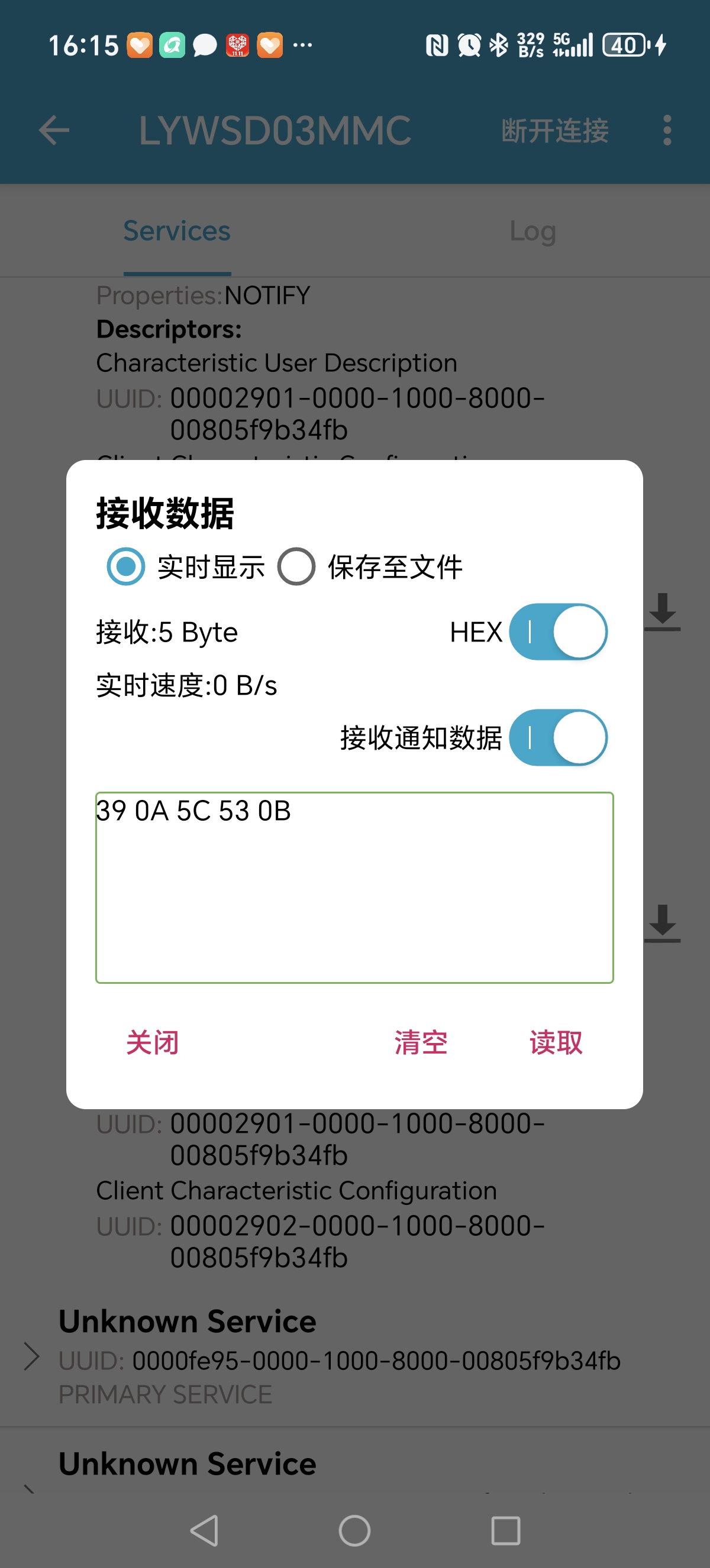
Properties:READ NOTIFY),点击下载图标,弹出接收数据对话框,点击“读取”按钮是,会出现00 09 38 0B 0B,其中前四位是温度,这4位数不过要先看后2位再看前2位,0900转成10进制是2304,就是23.04度。中间两位十六进制“38” 是湿度,转成10进制就是55,最后四位是电压,也是先看后2位再看前2位。
代码如下,搞了2天才搞定,注意这个温度计没有刷固件
import asyncio
from bleak import BleakScanner, BleakClient

# 设备配置信息
TARGET_DEVICE_NAME = "LYWSD03MMC"  # 目标设备名称
SERVICE_UUID = "8edffff0-3d1b-9c37-4623-ad7265f14076"
CHARACTERISTIC_UUID = "8edfffef-3d1b-9c37-4623-ad7265f14076"
# 稳定化配置(进一步优化低功耗设备适配)
SCAN_TIMEOUT = 20  # 单次扫描时长延长至20秒,适配设备慢广播
MAX_SCAN_RETRIES = 8  # 增加扫描重试次数,给设备足够的唤醒时间
MAX_CONNECT_RETRIES = 3  # 连接重试次数保持不变
RETRY_INTERVAL = 3  # 每次重试间隔3秒,比之前略长,更适配低功耗设备


def parse_ble_data(raw_data: bytes):
    """解析原始BLE数据(逻辑不变)"""
    if len(raw_data) < 5:
        raise ValueError(f"原始数据长度异常,预期至少5字节,实际获取{len(raw_data)}字节")

    # 温度解析:先后后前(小端序)
    temp_hex = (raw_data[1] << 8) | raw_data[0]
    temperature = temp_hex / 100

    # 湿度解析
    humidity = raw_data[2]

    # 电压解析:先后后前(小端序)
    voltage_hex = (raw_data[4] << 8) | raw_data[3]
    voltage = voltage_hex / 1000

    return temperature, humidity, voltage


async def scan_target_device(retry_count: int):
    """
    扫描目标设备(带自动等待唤醒逻辑,无需手动重启设备)
    :param retry_count: 当前重试次数
    :return: 目标设备对象
    """
    if retry_count >= MAX_SCAN_RETRIES:
        raise Exception(f"已重试{MAX_SCAN_RETRIES}次,仍未扫描到目标设备:{TARGET_DEVICE_NAME},请检查设备是否通电")

    print(f"【扫描第{retry_count + 1}次】正在扫描目标设备:{TARGET_DEVICE_NAME}(扫描时长{SCAN_TIMEOUT}秒)...")
    devices = await BleakScanner.discover(timeout=SCAN_TIMEOUT)

    # 筛选目标设备(大小写兼容,提高匹配成功率)
    target_device = None
    for device in devices:
        if device.name and TARGET_DEVICE_NAME.upper() == device.name.upper():
            target_device = device
            break

    if target_device:
        print(f"扫描成功!找到目标设备:")
        print(f"设备名称:{target_device.name}")
        print(f"设备地址:{target_device.address}")
        return target_device
    else:
        print(f"第{retry_count + 1}次扫描失败,设备可能处于低功耗静默状态,{RETRY_INTERVAL}秒后自动重试...")
        # 延长重试间隔,给低功耗设备足够的时间唤醒并发送广播
        await asyncio.sleep(RETRY_INTERVAL)
        return await scan_target_device(retry_count + 1)


async def connect_and_read_data(target_device, retry_count: int):
    """连接设备并读取数据(带连接重试)"""
    if retry_count >= MAX_CONNECT_RETRIES:
        raise Exception(f"已重试{MAX_CONNECT_RETRIES}次,仍无法连接到设备:{target_device.name}")

    try:
        print(f"\n【连接第{retry_count + 1}次】正在连接设备:{target_device.name}")
        async with BleakClient(target_device) as client:
            if not client.is_connected:
                raise ConnectionError("客户端未建立有效连接")
            print("设备连接成功!")

            # 读取特征值数据
            raw_data = await client.read_gatt_char(CHARACTERISTIC_UUID)
            print(f"读取到原始字节数据:{raw_data.hex().upper()}")

            # 解析数据
            temperature, humidity, voltage = parse_ble_data(raw_data)
            return temperature, humidity, voltage
    except Exception as e:
        print(f"第{retry_count + 1}次连接失败,错误信息:{e},{RETRY_INTERVAL}秒后自动重试...")
        await asyncio.sleep(RETRY_INTERVAL)
        return await connect_and_read_data(target_device, retry_count + 1)


async def read_lywsd03mmc_data_stable():
    """稳定读取LYWSD03MMC数据(无需手动重启设备)"""
    # 第一步:扫描目标设备(自动等待设备唤醒)
    target_device = await scan_target_device(retry_count=0)

    # 第二步:连接设备并读取数据(带连接重试)
    temperature, humidity, voltage = await connect_and_read_data(target_device, retry_count=0)

    # 第三步:打印解析结果
    print(f"\n========== 数据解析结果 ==========")
    print(f"温度:{temperature:.2f} ℃")
    print(f"湿度:{humidity} %")
    print(f"电压:{voltage:.3f} V")
    print(f"==================================")


if __name__ == "__main__":
    try:
        asyncio.run(read_lywsd03mmc_data_stable())
    except KeyboardInterrupt:
        print("\n程序被用户手动中断")
    except Exception as e:
        print(f"\n程序执行最终失败:{e}")
运行结果:
【扫描第1次】正在扫描目标设备:LYWSD03MMC(扫描时长20秒)...
扫描成功!找到目标设备:
设备名称:LYWSD03MMC
设备地址:A4:C1:38:00:B9:46
【连接第1次】正在连接设备:LYWSD03MMC
设备连接成功!
读取到原始字节数据:B009215A0B
========== 数据解析结果 ==========
温度:24.80 ℃
湿度:33 %
电压:2.906 V
==================================
相关截图
参考资料:
1、使用蓝牙调试助手来获取米家温湿度计2信息 https://bbs.huaweicloud.com/blogs/302544
2、检索连接到小米云的所有设备的令牌以及BLE设备的加密密钥。它支持两种身份验证方式:用户名密码、二维码: https://github.com/PiotrMachowski/Xiaomi-cloud-tokens-extractor
3、小米温湿度计2 刷第三方固件 接入HA 方法: https://cloud.tencent.com/developer/article/2548334
刷机地址 https://pvvx.github.io/ATC_MiThermometer/TelinkMiFlasher
c#代码:
using System;
using System.Collections.Generic;
using System.Threading.Tasks;
using System.Linq;
using System.Threading;
using System.Runtime.InteropServices.WindowsRuntime;
using Windows.Devices.Bluetooth;
using Windows.Devices.Bluetooth.Advertisement;
using Windows.Devices.Bluetooth.GenericAttributeProfile;
using Windows.Storage.Streams;
using Windows.Devices.Enumeration;

namespace LYWSD03MMC_BLE_Reader
{
    class Program
    {
        // 设备配置信息
        private const string TARGET_DEVICE_NAME = "LYWSD03MMC";  // 目标设备名称
        private const string SERVICE_UUID = "8edffff0-3d1b-9c37-4623-ad7265f14076";
        private const string CHARACTERISTIC_UUID = "8edfffef-3d1b-9c37-4623-ad7265f14076";

        // 稳定化配置
        private const int SCAN_TIMEOUT = 20;  // 单次扫描时长延长至20秒
        private const int MAX_SCAN_RETRIES = 8;  // 增加扫描重试次数
        private const int MAX_CONNECT_RETRIES = 3;  // 连接重试次数
        private const int RETRY_INTERVAL = 3;  // 每次重试间隔3秒

        static void Main(string[] args)
        {
            var stopwatch = System.Diagnostics.Stopwatch.StartNew();
            try
            {
                ReadLywsd03mmcDataStable().Wait();
                stopwatch.Stop();
                Console.WriteLine($"\n程序运行耗时:{stopwatch.Elapsed.TotalSeconds:F2} 秒");
            }
            catch (OperationCanceledException)
            {
                stopwatch.Stop();
                Console.WriteLine($"\n程序被用户手动中断,运行耗时:{stopwatch.Elapsed.TotalSeconds:F2} 秒");
            }
            catch (Exception ex)
            {
                stopwatch.Stop();
                Console.WriteLine($"\n程序执行最终失败:{ex.Message}");
                Console.WriteLine($"程序运行耗时:{stopwatch.Elapsed.TotalSeconds:F2} 秒");
            }
        }

        private static async Task ReadLywsd03mmcDataStable()
        {
            // 第一步:扫描目标设备(自动等待设备唤醒)
            BluetoothLEDevice targetDevice = await ScanTargetDevice(retryCount: 0);

            // 第二步:连接设备并读取数据(带连接重试)
            (double temperature, int humidity, double voltage) = await ConnectAndReadData(targetDevice, retryCount: 0);

            // 第三步:打印解析结果
            Console.WriteLine("\n========== 数据解析结果 ==========");
            Console.WriteLine($"温度:{temperature:F2} ℃");
            Console.WriteLine($"湿度:{humidity} %");
            Console.WriteLine($"电压:{voltage:F3} V");
            Console.WriteLine("==================================");
        }

        private static (double temperature, int humidity, double voltage) ParseBleData(byte[] rawData)
        {
            if (rawData.Length < 5)
            {
                throw new ArgumentException($"原始数据长度异常,预期至少5字节,实际获取{rawData.Length}字节");
            }

            // 温度解析:小端序
            ushort tempHex = (ushort)((rawData[1] << 8) | rawData[0]);
            double temperature = tempHex / 100.0;

            // 湿度解析
            int humidity = rawData[2];

            // 电压解析:小端序
            ushort voltageHex = (ushort)((rawData[4] << 8) | rawData[3]);
            double voltage = voltageHex / 1000.0;

            return (temperature, humidity, voltage);
        }

        private static async Task<BluetoothLEDevice> ScanTargetDevice(int retryCount)
        {
            if (retryCount >= MAX_SCAN_RETRIES)
            {
                throw new Exception($"已重试{MAX_SCAN_RETRIES}次,仍未扫描到目标设备:{TARGET_DEVICE_NAME},请检查设备是否通电或处于可发现状态");
            }

            Console.WriteLine($"【扫描第{retryCount + 1}次】正在扫描目标设备:{TARGET_DEVICE_NAME}(扫描时长{SCAN_TIMEOUT}秒)...");

            try
            {
                var watcher = new BluetoothLEAdvertisementWatcher
                {
                    ScanningMode = BluetoothLEScanningMode.Active // 使用主动扫描以发现更多设备
                };

                // 创建任务完成源
                var tcs = new TaskCompletionSource<BluetoothLEDevice>();

                // 处理广告接收事件
                watcher.Received += async (sender, args) =>
                {
                    try
                    {
                        // 检查设备名称是否匹配
                        string deviceName = args.Advertisement.LocalName;
                        if (string.IsNullOrEmpty(deviceName))
                        {
                            // 尝试从广告数据中获取设备名称
                            foreach (var dataSection in args.Advertisement.DataSections)
                            {
                                if (dataSection.DataType == 0x09) // 设备名称数据类型
                                {
                                    var nameBytes = new byte[dataSection.Data.Length];
                                    dataSection.Data.CopyTo(nameBytes.AsBuffer());
                                    deviceName = System.Text.Encoding.UTF8.GetString(nameBytes);
                                    break;
                                }
                            }
                        }

                        // 检查是否是目标设备
                        if (string.Equals(deviceName, TARGET_DEVICE_NAME, StringComparison.OrdinalIgnoreCase))
                        {
                            // 尝试连接设备
                            BluetoothLEDevice device = await BluetoothLEDevice.FromBluetoothAddressAsync(args.BluetoothAddress);
                            if (device != null)
                            {
                                tcs.TrySetResult(device);
                            }
                        }
                    }
                    catch (Exception ex)
                    {
                        Console.WriteLine($"处理设备广告时出错:{ex.Message}");
                    }
                };

                // 处理错误事件
                watcher.Stopped += (sender, args) =>
                {
                    if (args.Error != BluetoothError.Success)
                    {
                        tcs.TrySetException(new Exception($"扫描失败:{args.Error}"));
                    }
                    else if (!tcs.Task.IsCompleted)
                    {
                        // 扫描正常停止但未找到设备
                        tcs.TrySetResult(null);
                    }
                };

                // 开始扫描
                watcher.Start();

                // 创建超时任务
                var timeoutTask = Task.Delay(SCAN_TIMEOUT * 1000);

                // 等待扫描完成或超时
                var completedTask = await Task.WhenAny(tcs.Task, timeoutTask);

                // 停止扫描
                watcher.Stop();

                if (completedTask == timeoutTask)
                {
                    // 超时
                    Console.WriteLine("扫描超时,未找到目标设备");
                }
                else
                {
                    // 扫描完成
                    var device = await tcs.Task;
                    if (device != null)
                    {
                        Console.WriteLine("扫描成功!找到目标设备:");
                        Console.WriteLine($"设备名称:{device.Name}");
                        Console.WriteLine($"设备地址:{device.BluetoothAddress}");
                        return device;
                    }
                }

                Console.WriteLine($"第{retryCount + 1}次扫描失败,{RETRY_INTERVAL}秒后自动重试...");
                await Task.Delay(RETRY_INTERVAL * 1000);
                return await ScanTargetDevice(retryCount + 1);
            }
            catch (Exception ex)
            {
                Console.WriteLine($"扫描过程中发生错误:{ex.Message}");
                Console.WriteLine($"第{retryCount + 1}次扫描失败,{RETRY_INTERVAL}秒后自动重试...");
                await Task.Delay(RETRY_INTERVAL * 1000);
                return await ScanTargetDevice(retryCount + 1);
            }
        }

        private static async Task<(double temperature, int humidity, double voltage)> ConnectAndReadData(BluetoothLEDevice targetDevice, int retryCount)
        {
            if (retryCount >= MAX_CONNECT_RETRIES)
            {
                throw new Exception($"已重试{MAX_CONNECT_RETRIES}次,仍无法连接到设备:{targetDevice.Name}");
            }

            try
            {
                Console.WriteLine($"\n【连接第{retryCount + 1}次】正在连接设备:{targetDevice.Name}");

                // 获取服务
                GattDeviceServicesResult servicesResult = await targetDevice.GetGattServicesForUuidAsync(Guid.Parse(SERVICE_UUID));
                if (servicesResult.Status != GattCommunicationStatus.Success)
                {
                    throw new Exception($"获取服务失败:{servicesResult.Status}");
                }

                GattDeviceService service = servicesResult.Services[0];

                // 获取特征值
                GattCharacteristicsResult characteristicsResult = await service.GetCharacteristicsForUuidAsync(Guid.Parse(CHARACTERISTIC_UUID));
                if (characteristicsResult.Status != GattCommunicationStatus.Success)
                {
                    throw new Exception($"获取特征值失败:{characteristicsResult.Status}");
                }

                GattCharacteristic characteristic = characteristicsResult.Characteristics[0];

                Console.WriteLine("设备连接成功!");

                // 读取特征值数据
                GattReadResult readResult = await characteristic.ReadValueAsync();
                if (readResult.Status != GattCommunicationStatus.Success)
                {
                    throw new Exception($"读取数据失败:{readResult.Status}");
                }

                // 转换数据
                byte[] rawData = new byte[readResult.Value.Length];
                readResult.Value.CopyTo(rawData.AsBuffer());
                Console.WriteLine($"读取到原始字节数据:{BitConverter.ToString(rawData)}");

                // 解析数据
                return ParseBleData(rawData);
            }
            catch (Exception ex)
            {
                Console.WriteLine($"第{retryCount + 1}次连接失败,错误信息:{ex.Message},{RETRY_INTERVAL}秒后自动重试...");
                await Task.Delay(RETRY_INTERVAL * 1000);
                return await ConnectAndReadData(targetDevice, retryCount + 1);
            }
        }
    }
}
c#执行结果:
【扫描第1次】正在扫描目标设备:LYWSD03MMC(扫描时长20秒)...
扫描成功!找到目标设备:
设备名称:LYWSD03MMC
设备地址:181149775214918
【连接第1次】正在连接设备:LYWSD03MMC
设备连接成功!
读取到原始字节数据:17-09-22-24-0B
========== 数据解析结果 ==========
温度:23.27 ℃
湿度:34 %
电压:2.852 V
==================================
程序运行耗时:16.39 秒

魔乐社区(Modelers.cn) 是一个中立、公益的人工智能社区,提供人工智能工具、模型、数据的托管、展示与应用协同服务,为人工智能开发及爱好者搭建开放的学习交流平台。社区通过理事会方式运作,由全产业链共同建设、共同运营、共同享有,推动国产AI生态繁荣发展。
更多推荐


 5
5 0
0- 0


 已为社区贡献2条内容

所有评论(0)