前端后端数据安全传输:AES+RSA混合加密最佳实践
AES+RSA混合加密方案不仅仅是技术的组合,更是一种安全哲学的体现:在复杂的安全需求中寻找优雅的解决方案。它像一座精心设计的桥梁,在前端与后端之间建立了安全可靠的数据通道,既承载着业务的流动,又抵挡着外部的威胁。在实施这一方案时,记住安全是一个持续的过程,而不是一次性的任务。定期审查加密策略、更新密钥、监控异常,才能确保系统长期安全运行。正如安全专家常说的:"安全不是产品,而是过程。通过本文介绍
引言:为什么需要混合加密?
在当今数字化时代,数据安全已成为应用开发的生命线。想象一下这样的场景:用户通过网页或移动应用提交个人身份信息、支付凭证或敏感商业数据,这些信息在互联网的公开通道中传输,就像在拥挤的广场上大声喊出自己的银行密码一样危险。
传统的单一加密方案往往面临两难选择:对称加密(如AES)效率高但密钥分发不安全;非对称加密(如RSA)安全性好但效率低下。AES+RSA混合加密方案巧妙地解决了这一困境,成为现代Web应用数据保护的事实标准。
一、核心设计理念
1.1 各取所长的哲学
-
RSA的盾牌:用于保护关键信息的传递——即AES密钥本身
-
AES的利剑:用于高效处理大量业务数据
-
分离的智慧:用对的工具做对的事,实现安全与性能的平衡
1.2 每次请求都是新的开始
与传统的会话级加密不同,我们采用请求级加密策略:
-
每个请求都是独立的加密单元
-
每次通信使用全新的AES密钥
-
服务器无需维护密钥状态,实现真正的无状态安全
二、完整业务流程解析
2.1 准备阶段:建立安全基础
在正式开始加密通信前,系统需要完成基础配置:
后端准备工作:
-
生成RSA密钥对(公钥和私钥)
-
确定固定的AES初始化向量(IV)
-
将RSA公钥通过安全渠道提供给前端
-
定义RSA算法
package com.zeng.rsademo.utils;

import javax.crypto.Cipher;
import java.security.*;
import java.security.spec.PKCS8EncodedKeySpec;
import java.security.spec.X509EncodedKeySpec;
import java.util.Base64;

public class RSAUtil {


    private static final String PUBLIC_KEY = "MIIBIjANBgkqhkiG9w0BAQEFAAOCAQ8AMIIBCgKCAQEAm2/NUs1AH7EVIsSbEiL+O/W5j6PI0UfdED2OVz5ZzJze9vBfDeDcxcxskMBFb4KuWUbm4arheCi/EY/SkoC5bDVKipEWp8mpBLP21OOX4QEzODT26BfU2iHbbQhWxLILUL4V7s5/bQlsuotKFXkUoHTH4ENg51/pKbE8lzclGgHbD+rCXB5KE0xhic7B8MFaG9lgTKOp/D5OU6XGqb0yHlsSu2tIR6szPUlnEXuXXN9orpPAAKYr1edF/bFWCe//QfnD7gDQF8sNxcIviycCtilC0/46pgE1HAoYyJb5XikmxlSgVE5rT/u5csWexZeWYPD6sH8BhFzp0KGPRYyz/wIDAQAB";
    private static final String PRIVATE_KEY = "MIIEvQIBADANBgkqhkiG9w0BAQEFAASCBKcwggSjAgEAAoIBAQCbb81SzUAfsRUixJsSIv479bmPo8jRR90QPY5XPlnMnN728F8N4NzFzGyQwEVvgq5ZRubhquF4KL8Rj9KSgLlsNUqKkRanyakEs/bU45fhATM4NPboF9TaIdttCFbEsgtQvhXuzn9tCWy6i0oVeRSgdMfgQ2DnX+kpsTyXNyUaAdsP6sJcHkoTTGGJzsHwwVob2WBMo6n8Pk5TpcapvTIeWxK7a0hHqzM9SWcRe5dc32iuk8AApivV50X9sVYJ7/9B+cPuANAXyw3Fwi+LJwK2KULT/jqmATUcChjIlvleKSbGVKBUTmtP+7lyxZ7Fl5Zg8PqwfwGEXOnQoY9FjLP/AgMBAAECggEAES/TDbFJQlfTxPTlSqOY5etdOb878LwX+vg7eXUY+9Fqq/ZXJFM1Rh+872J7KwHRomh/FfvNk3o56kizWWSnXAomdFznmuTm7fCyPcbun8AAuFnO5UnhTL9Koms2IOio7KQgC7hEibttjNDi/63UNIvFIAyDNgI6Z1REJVpBHXdj7zoP73kdVeJT/s1sqGCm1rinDiEa2nKzLfzVpXPArfcsHzqF/ueCCtLlF8K93/4S6gmWYRGs6vv25DPJamBYQMDXCOzdGKcUxFYMIHelQsw7Y52cW8IEBYiSSXC4WWxmvzgtdP6S4xAzvA4l/UBbGa3KJc8VKGV6k0jLcr+5pQKBgQDMnNkUwl68+5UzyA0iL09esP6Ma1Wmq75n9Tmjo1KygXy8p4wxB8oXbnf57D8wYzJomPQFxsOhTAQUmB+bNnO/pAQP1O4vHtU2GMudOnrNztssn1Oo+pkJpQH5qJJDDI7eRyggeNjaC4FP15EOJ/ZWJMTJl1KG8AH9nZtlQa2MNQKBgQDCeUlrRarSGtGODgNsOE+eWhMYLPhqT0Lii/6HYUyf4GtyzWNdyIIG3VuGK18AKg73bOHvFom1/FWxhfnRW/aryTuJHN/Br2J+p0y3/cRu5T0WcNQvhFtfE5l3AGZvaV6A0nFzyXDxmbhUt/vPU053ZcZHQ0afTZbtX5yiCdX94wKBgQCoEY4ehynagaykxAZFtiaz2R69qMzKAvh72+pkh5s+FS6op9d3zrYpWQwjtfKRhGm7kSegNwwqSY5wfCQ6Ehgxqj/L4VNkUSdBMEzP8WE9/FP760OE4ZMjYO6ma9j4SjBwVHKZeapmMF0fgCoePqURTVJ3ZFzdifeYowUpvzEWoQKBgHF84BiGxmHoHqQ8j0jHL8dkH0J7c9huOsUEF1wfrtyZ1XpgW31uNlsVMIUCqGTrJmLDmrGwwFqAT+3SFnBTr4aeX2zrebSIyfzJWt8Aa3Kful9vJpQ4NC4uvN8ST7Tyk6Cvrl94jb2gDE78MynRHrhUnzoVC5CJcetCYaC6BrQrAoGAJw70Lo5FJWVqqZl/PcPbrm6/1+mQcToD2n3hYwfvXpnKTl/9Cxzwwrw7Ed13wArExy0mM1XVCie+v+cHv7E9eDvAC4bNq6R9Kx6GP84e36RMVqidUe5xVj6yqEOPZmV83FLH7vmhIxibn4WuX+GZxGoS3mbRWGsg9Clv9o5QAic=";

    // 生成RSA密钥对
    public static String[] generateKeyPair() throws Exception {
        KeyPairGenerator keyPairGen = KeyPairGenerator.getInstance("RSA");
        keyPairGen.initialize(2048);
        KeyPair keyPair = keyPairGen.generateKeyPair();

        return new String[] {
            Base64.getEncoder().encodeToString(keyPair.getPublic().getEncoded()),
            Base64.getEncoder().encodeToString(keyPair.getPrivate().getEncoded())
        };
    }

    // RSA加密
    public static String encrypt(String data) throws Exception {
        byte[] keyBytes = Base64.getDecoder().decode(PUBLIC_KEY);
        X509EncodedKeySpec keySpec = new X509EncodedKeySpec(keyBytes);
        KeyFactory keyFactory = KeyFactory.getInstance("RSA");
        PublicKey key = keyFactory.generatePublic(keySpec);

        Cipher cipher = Cipher.getInstance("RSA");
        cipher.init(Cipher.ENCRYPT_MODE, key);

        return Base64.getEncoder().encodeToString(cipher.doFinal(data.getBytes("UTF-8")));
    }

    // RSA解密
    public static String decrypt(String encryptedData) throws Exception {
        byte[] keyBytes = Base64.getDecoder().decode(PRIVATE_KEY);
        PKCS8EncodedKeySpec keySpec = new PKCS8EncodedKeySpec(keyBytes);
        KeyFactory keyFactory = KeyFactory.getInstance("RSA");
        PrivateKey key = keyFactory.generatePrivate(keySpec);

        Cipher cipher = Cipher.getInstance("RSA");
        cipher.init(Cipher.DECRYPT_MODE, key);

        byte[] decrypted = cipher.doFinal(Base64.getDecoder().decode(encryptedData));
        return new String(decrypted, "UTF-8");
    }


    public static String getPublicKey() {
        return PUBLIC_KEY;
    }

    public static String getPrivateKey() {
        return PRIVATE_KEY;
    }

    public static void main(String[] args) throws Exception {
        String[] keys = generateKeyPair();
        System.out.println("公钥: " + keys[0]);
        System.out.println("私钥: " + keys[1]);
    }
}- 定义AES算法
package com.zeng.rsademo.utils;

import javax.crypto.Cipher;
import javax.crypto.KeyGenerator;
import javax.crypto.SecretKey;
import javax.crypto.spec.IvParameterSpec;
import javax.crypto.spec.SecretKeySpec;
import java.util.Base64;

public class AESUtil {

    // 固定IV(可以自定义,但必须是16字节)
    private static final byte[] FIXED_IV = "0123456789ABCDEF".getBytes();

    // AES加密方法(使用固定IV)
    public static String encrypt(String data, String key) throws Exception {
        // 初始化密钥
        SecretKeySpec secretKey = new SecretKeySpec(Base64.getDecoder().decode(key), "AES");
        IvParameterSpec ivSpec = new IvParameterSpec(FIXED_IV);

        // 加密
        Cipher cipher = Cipher.getInstance("AES/CBC/PKCS5Padding");
        cipher.init(Cipher.ENCRYPT_MODE, secretKey, ivSpec);
        byte[] encrypted = cipher.doFinal(data.getBytes("UTF-8"));

        return Base64.getEncoder().encodeToString(encrypted);
    }

    // AES解密方法(使用固定IV)
    public static String decrypt(String encryptedData, String key) throws Exception {
        // 初始化密钥
        SecretKeySpec secretKey = new SecretKeySpec(Base64.getDecoder().decode(key), "AES");
        IvParameterSpec ivSpec = new IvParameterSpec(FIXED_IV);

        // 解密
        Cipher cipher = Cipher.getInstance("AES/CBC/PKCS5Padding");
        cipher.init(Cipher.DECRYPT_MODE, secretKey, ivSpec);
        byte[] decrypted = cipher.doFinal(Base64.getDecoder().decode(encryptedData));

        return new String(decrypted, "UTF-8");
    }

    // 生成AES密钥
    public static String generateKey() throws Exception {
        KeyGenerator keyGen = KeyGenerator.getInstance("AES");
        keyGen.init(128);
        SecretKey secretKey = keyGen.generateKey();
        return Base64.getEncoder().encodeToString(secretKey.getEncoded());
    }

}- 定义测试Controller
package com.zeng.rsademo.controller;

import com.fasterxml.jackson.core.JsonProcessingException;
import com.fasterxml.jackson.databind.ObjectMapper;
import com.zeng.rsademo.common.ResponseDto;
import com.zeng.rsademo.utils.RSAUtil;
import org.springframework.web.bind.annotation.GetMapping;
import org.springframework.web.bind.annotation.PostMapping;
import org.springframework.web.bind.annotation.RequestBody;
import org.springframework.web.bind.annotation.RestController;

/**
 * @Author Zeng
 * @Date 2026/1/25
 */
@RestController
public class TestController {


    @PostMapping("/api/v1/test")
    public ResponseDto data(@RequestBody Object data) throws JsonProcessingException {
        System.out.println(new ObjectMapper().writeValueAsString(data));
        return ResponseDto.success(data);
    }


    @GetMapping("/api/v1/test/getKey")
    public String encrypt()
    {

        return RSAUtil.getPublicKey();
    }
}
- 定义后端统一返回结构
package com.zeng.rsademo.common;

import lombok.AllArgsConstructor;
import lombok.Data;

/**
 * @Author Zeng
 * @Date 2026/1/24
 */
@Data
@AllArgsConstructor
public class ResponseDto {
    private String code;
    private String message;
    private Object data;


    public static ResponseDto success(Object data) {
        return new ResponseDto("200", "操作成功", data);
    }

    public static ResponseDto error(String message) {
        return new ResponseDto("500", message,null);
    }
}- 定义后端统一过滤器,解析请求体内加密参数
package com.zeng.rsademo.config;

import com.fasterxml.jackson.databind.JsonNode;
import com.fasterxml.jackson.databind.ObjectMapper;
import com.zeng.rsademo.common.ResponseDto;
import com.zeng.rsademo.utils.AESUtil;
import com.zeng.rsademo.utils.RSAUtil;
import jakarta.servlet.*;
import jakarta.servlet.http.HttpServletRequest;
import jakarta.servlet.http.HttpServletResponse;
import org.springframework.beans.factory.annotation.Autowired;
import org.springframework.core.annotation.Order;
import org.springframework.stereotype.Component;
import org.springframework.web.util.ContentCachingRequestWrapper;

import java.io.IOException;
import java.io.PrintWriter;
import java.nio.charset.StandardCharsets;


/**
 * 解析请求里面的加密参数
 */
@Component
@Order(1)
public class DecryptionRequestFilter implements Filter {

    @Autowired
    private ObjectMapper objectMapper;

    // 请求超时时间(10秒)
    private static final long REQUEST_TIMEOUT = 10 * 1000;


    // 存储AesKey
    private static final ThreadLocal<String> threadLocal = new ThreadLocal<String>();

    public static ThreadLocal<String> getThreadLocal() {
        return threadLocal;
    }


    @Override
    public void doFilter(ServletRequest request, ServletResponse response, FilterChain chain)
            throws IOException, ServletException {

        HttpServletRequest  httpRequest  = (HttpServletRequest) request;
        HttpServletResponse httpResponse = (HttpServletResponse) response;

        // 只处理POST/PUT/PATCH请求
        String method = httpRequest.getMethod();
        if (!"POST".equalsIgnoreCase(method) &&
            !"PUT".equalsIgnoreCase(method) &&
            !"PATCH".equalsIgnoreCase(method)) {
            chain.doFilter(request, response);
            return;
        }

        // 包装请求以便多次读取
        ContentCachingRequestWrapper requestWrapper = new ContentCachingRequestWrapper(httpRequest);

        try {
            // 1. 读取请求体
            byte[] requestBytes;
            try {
                // 触发请求体缓存
                requestWrapper.getInputStream().readAllBytes();
                requestBytes = requestWrapper.getContentAsByteArray();
            } catch (Exception e) {
                returnError(httpResponse, "无法读取请求体: " + e.getMessage());
                return;
            }

            if (requestBytes.length == 0) {
                returnError(httpResponse, "请求体为空");
                return;
            }

            String requestBody = new String(requestBytes, StandardCharsets.UTF_8);

            // 2. 解析加密请求
            JsonNode requestNode;
            try {
                requestNode = objectMapper.readTree(requestBody);
            } catch (Exception e) {
                returnError(httpResponse, "请求格式错误,必须是JSON");
                return;
            }

            if (!requestNode.has("encryptedAESKey") || !requestNode.has("encryptedData")) {
                returnError(httpResponse, "缺少加密参数");
                return;
            }

            String encryptedAESKey = requestNode.get("encryptedAESKey").asText();
            String encryptedData   = requestNode.get("encryptedData").asText();

            // 3. 解密AES密钥
            String aesKey;
            try {
                aesKey = RSAUtil.decrypt(encryptedAESKey);
            } catch (Exception e) {
                returnError(httpResponse, "AES密钥解密失败");
                return;
            }
            threadLocal.set(aesKey);

            // 4. 解密数据
            String decryptedData;
            try {
                decryptedData = AESUtil.decrypt(encryptedData, aesKey);
            } catch (Exception e) {
                returnError(httpResponse, "数据解密失败");
                return;
            }

            // 5. 验证时间戳
            JsonNode dataNode;
            try {
                dataNode = objectMapper.readTree(decryptedData);
            } catch (Exception e) {
                returnError(httpResponse, "解密后的数据格式错误");
                return;
            }

            if (!dataNode.has("timestamp")) {
                returnError(httpResponse, "缺少时间戳");
                return;
            }

            long timestamp   = dataNode.get("timestamp").asLong();
            long currentTime = System.currentTimeMillis();

            if (currentTime - timestamp > REQUEST_TIMEOUT) {
                returnError(httpResponse, "请求已超时");
                return;
            }

            // 6. 移除时间戳,获取纯业务数据
            if (dataNode.isObject()) {
                ((com.fasterxml.jackson.databind.node.ObjectNode) dataNode).remove("timestamp");
            }
            String pureBusinessData = objectMapper.writeValueAsString(dataNode);

            // 8. 创建新的请求包装器,用解密后的数据替换原请求体
            CachedBodyHttpServletRequest decryptedRequest =
                    new CachedBodyHttpServletRequest(httpRequest, pureBusinessData);

            // 9. 继续过滤器链
            chain.doFilter(decryptedRequest, response);

        } catch (Exception e) {
            returnError(httpResponse, "请求处理失败: " + e.getMessage());
        }
    }

    /**
     * 返回错误响应(不继续处理)
     */
    private void returnError(HttpServletResponse response, String message) throws IOException {
        ResponseDto errorResponse = ResponseDto.error(message);
        String      errorJson     = objectMapper.writeValueAsString(errorResponse);

        response.setStatus(400); // 400 Bad Request
        response.setContentType("application/json;charset=UTF-8");
        response.setCharacterEncoding("UTF-8");

        try (PrintWriter writer = response.getWriter()) {
            writer.write(errorJson);
            writer.flush();
        }
    }

    /**
     * 自定义请求包装器,用于替换请求体
     */
    private static class CachedBodyHttpServletRequest extends jakarta.servlet.http.HttpServletRequestWrapper {

        private final byte[] cachedBody;

        public CachedBodyHttpServletRequest(HttpServletRequest request, String body) {
            super(request);
            this.cachedBody = body.getBytes(StandardCharsets.UTF_8);
        }

        @Override
        public jakarta.servlet.ServletInputStream getInputStream() {
            return new jakarta.servlet.ServletInputStream() {
                private int lastIndexRetrieved = -1;

                @Override
                public boolean isFinished() {
                    return lastIndexRetrieved == cachedBody.length - 1;
                }

                @Override
                public boolean isReady() {
                    return true;
                }

                @Override
                public void setReadListener(jakarta.servlet.ReadListener readListener) {
                    throw new UnsupportedOperationException();
                }

                @Override
                public int read() {
                    int i;
                    if (!isFinished()) {
                        i = cachedBody[lastIndexRetrieved + 1];
                        lastIndexRetrieved++;
                        return i;
                    } else {
                        return -1;
                    }
                }
            };
        }

        @Override
        public int getContentLength() {
            return cachedBody.length;
        }

        @Override
        public long getContentLengthLong() {
            return cachedBody.length;
        }
    }
}- 定义响应拦截加密程序
package com.zeng.rsademo.config;

import com.fasterxml.jackson.databind.ObjectMapper;
import com.zeng.rsademo.common.ResponseDto;
import com.zeng.rsademo.utils.AESUtil;
import org.springframework.beans.factory.annotation.Autowired;
import org.springframework.core.MethodParameter;
import org.springframework.http.MediaType;
import org.springframework.http.converter.HttpMessageConverter;
import org.springframework.http.server.ServerHttpRequest;
import org.springframework.http.server.ServerHttpResponse;
import org.springframework.web.bind.annotation.ControllerAdvice;
import org.springframework.web.servlet.mvc.method.annotation.ResponseBodyAdvice;


@ControllerAdvice
public class EncryptionResponseAdvice implements ResponseBodyAdvice<Object> {

    @Autowired
    private ObjectMapper objectMapper;

    @Override
    public boolean supports(MethodParameter returnType,
                            Class<? extends HttpMessageConverter<?>> converterType) {
        // 只处理返回ResponseDto的接口
        return ResponseDto.class.isAssignableFrom(returnType.getParameterType());
    }

    @Override
    public Object beforeBodyWrite(Object body, MethodParameter returnType,
                                  MediaType selectedContentType,
                                  Class<? extends HttpMessageConverter<?>> selectedConverterType,
                                  ServerHttpRequest request, ServerHttpResponse response) {

        try {
            // 1. 获取AES密钥
            String aesKey = DecryptionRequestFilter.getThreadLocal().get();
            if (aesKey == null) {
                // 如果没有AES密钥,返回未加密的响应
                return body;
            }
            // 清空线程变量
            DecryptionRequestFilter.getThreadLocal().remove();

            if (body instanceof ResponseDto) {

                Object data = ((ResponseDto) body).getData();
                // 2. 将响应体转为JSON字符串
                String responseBody = objectMapper.writeValueAsString(data);

                // 3. 使用AES加密响应体
                String encryptedData = AESUtil.encrypt(responseBody, aesKey);

                // 4. 返回加密后的响应
                return ResponseDto.success(encryptedData);
            }
            return body;
        } catch (Exception e) {
            // 加密失败,返回错误信息
            return ResponseDto.error("响应加密失败: " + e.getMessage());
        }
    }
}- 若存在跨域问题,定义统一跨域配置
package com.zeng.rsademo.config;

import org.springframework.context.annotation.Configuration;
import org.springframework.web.servlet.config.annotation.CorsRegistry;
import org.springframework.web.servlet.config.annotation.WebMvcConfigurer;

@Configuration
public class CorsConfig implements WebMvcConfigurer {
    @Override
    public void addCorsMappings(CorsRegistry registry) {
        registry.addMapping("/api/**")
                .allowedOrigins("*")  // 允许所有来源,生产环境应指定具体域名
                .allowedMethods("GET", "POST", "PUT", "DELETE", "OPTIONS")
                .allowedHeaders("*")
                .allowCredentials(false)
                .maxAge(3600);
    }
}
前端准备工作:
-
存储RSA公钥
-
配置与后端一致的固定IV值
-
建立加密模块,准备处理业务数据
-
前端样例代码(基于Ai改造,便于调试)
<!DOCTYPE html>
<html lang="zh-CN">
<head>
<meta charset="UTF-8">
<meta name="viewport" content="width=device-width, initial-scale=1.0">
<title>AES+RSA混合加密前端示例</title>
<!-- 引入jsencrypt库用于RSA加密 -->
<script src="https://cdnjs.cloudflare.com/ajax/libs/jsencrypt/3.3.1/jsencrypt.min.js"></script>
<!-- 引入crypto-js用于AES加密 -->
<script src="https://cdnjs.cloudflare.com/ajax/libs/crypto-js/4.1.1/crypto-js.min.js"></script>
<style>
body {
font-family: Arial, sans-serif;
max-width: 900px;
margin: 0 auto;
padding: 20px;
background-color: #f5f5f5;
line-height: 1.6;
}
.container {
background: white;
padding: 30px;
border-radius: 10px;
box-shadow: 0 2px 10px rgba(0, 0, 0, 0.1);
}
.form-group {
margin-bottom: 15px;
}
label {
display: block;
margin-bottom: 5px;
font-weight: bold;
color: #333;
}
input, select, textarea {
width: 100%;
padding: 8px;
border: 1px solid #ddd;
border-radius: 4px;
box-sizing: border-box;
font-family: monospace;
}
textarea {
resize: vertical;
min-height: 80px;
}
button {
background-color: #007bff;
color: white;
padding: 10px 20px;
border: none;
border-radius: 4px;
cursor: pointer;
font-size: 16px;
margin-right: 10px;
margin-bottom: 5px;
transition: background-color 0.3s;
}
button:hover {
background-color: #0056b3;
}
button.secondary {
background-color: #6c757d;
}
button.secondary:hover {
background-color: #545b62;
}
.result {
margin-top: 20px;
padding: 15px;
background-color: #f8f9fa;
border-radius: 5px;
word-break: break-all;
font-family: monospace;
font-size: 12px;
max-height: 400px;
overflow-y: auto;
border: 1px solid #dee2e6;
}
.step {
background-color: #e9ecef;
padding: 15px;
margin: 15px 0;
border-radius: 5px;
border-left: 4px solid #007bff;
}
h1, h2, h3 {
color: #333;
margin-top: 0;
}
h1 {
border-bottom: 2px solid #007bff;
padding-bottom: 10px;
}
h3 {
margin-top: 0;
color: #007bff;
}
.code-block {
background-color: #f8f8f8;
padding: 10px;
border-left: 3px solid #28a745;
margin: 10px 0;
font-family: monospace;
font-size: 12px;
white-space: pre-wrap;
}
.log-entry {
padding: 5px 0;
border-bottom: 1px solid #eee;
}
.log-entry:last-child {
border-bottom: none;
}
.log-timestamp {
color: #666;
font-size: 11px;
}
.log-message {
color: #333;
}
.info {
color: #17a2b8;
}
.control-group {
display: flex;
gap: 10px;
flex-wrap: wrap;
align-items: center;
}
.status-indicator {
display: inline-block;
width: 12px;
height: 12px;
border-radius: 50%;
margin-right: 5px;
}
</style>
</head>
<body>
<div class="container">
<h1>AES+RSA混合加密演示</h1>
<p>本示例演示了如何使用AES+RSA混合加密方案保护前端数据传输。</p>
<div class="step">
<h3>第一步:配置服务器连接</h3>
<div class="form-group">
<label for="backendUrl">后端API地址:</label>
<div class="control-group">
<input type="text" id="backendUrl" value="http://localhost:8080/api/v1/test/getKey" style="flex: 1;">
<button onclick="fetchPublicKey()">获取RSA公钥</button>
<button onclick="testConnection()" class="secondary">测试连接</button>
</div>
<small>注意:确保后端已实现相应的接口</small>
</div>
<div class="form-group">
<label for="publicKey">
RSA公钥:
<span id="publicKeyStatus">
<span class="status-indicator status-not-ready"></span>未获取
</span>
</label>
<textarea id="publicKey" rows="4" placeholder="点击上方按钮获取RSA公钥..." readonly></textarea>
</div>
</div>
<div class="step">
<h3>第二步:输入表单数据</h3>
<div class="form-group">
<label for="username">用户名:</label>
<input type="text" id="username" value="admin">
</div>
<div class="form-group">
<label for="password">密码:</label>
<input type="password" id="password" value="123456">
</div>
<div class="form-group">
<label for="email">邮箱:</label>
<input type="email" id="email" value="admin@example.com">
</div>
</div>
<div class="step">
<h3>第三步:加密配置</h3>
<div class="form-group">
<label for="iv">AES IV(初始化向量):</label>
<div class="control-group">
<input type="text" id="iv" value="0123456789ABCDEF" style="flex: 1;">
<button onclick="generateRandomIV()" class="secondary">生成随机IV</button>
</div>
<small>IV必须是16个字符(AES-128-CBC)</small>
</div>
<div class="form-group">
<label for="keySize">AES密钥长度:</label>
<select id="keySize">
<option value="128">128位</option>
<option value="192">192位</option>
<option value="256" selected>256位</option>
</select>
</div>
</div>
<div class="step">
<h3>第四步:执行加密</h3>
<div class="control-group">
<button onclick="generateAndShowEncryptedData()">生成加密数据</button>
<button onclick="sendEncryptedRequest()" id="sendBtn" disabled>发送加密请求</button>
<button onclick="clearLog()" class="secondary">清除日志</button>
<button onclick="runCompleteTest()" class="secondary">运行完整测试</button>
</div>
</div>
<div class="step">
<h3>第五步:查看加密过程和结果</h3>
<div class="result">
<div id="processLog">
<div class="log-entry">
<span class="log-timestamp">[系统启动]</span>
<span class="log-message info">AES+RSA混合加密演示已就绪</span>
</div>
</div>
</div>
</div>
</div>
<script>
// 全局变量
let rsaPublicKey = null;
let aesKey = null;
let encryptedData = null;
let isPublicKeyLoaded = false;
/**
* 从后端获取RSA公钥
*/
async function fetchPublicKey() {
const url = document.getElementById('backendUrl').value;
logToScreen('正在请求RSA公钥...', 'info');
try {
const response = await fetch(url, {
method: 'GET',
headers: {
'Accept': 'application/json',
}
});
if (response.ok) {
rsaPublicKey = await response.text();
logToScreen('接口响应公钥:', 'info');
logToScreen(rsaPublicKey, 'warning');
document.getElementById('publicKey').value = rsaPublicKey;
isPublicKeyLoaded = true;
updatePublicKeyStatus(true);
logToScreen('✓ 已使用接口RSA公钥', 'warning');
} else {
logToScreen('✗ 获取公钥失败: ' + response.statusText, 'error');
// 临时使用测试公钥
useTestPublicKey();
}
} catch (error) {
logToScreen('✗ 获取公钥失败: ' + error.message, 'error');
logToScreen('建议:启动本地HTTP服务器解决CORS问题', 'warning');
updatePublicKeyStatus(false);
}
}
/**
* 测试服务器连接
*/
async function testConnection() {
const baseUrl = document.getElementById('backendUrl').value;
const testUrl = baseUrl.replace(/\/encrypt$/, '/health') || baseUrl + '/test';
logToScreen('正在测试服务器连接...', 'info');
try {
const response = await fetch(testUrl, {
method: 'GET',
headers: {
'Accept': 'application/json'
}
});
if (response.ok) {
logToScreen('✓ 服务器连接正常', 'success');
} else {
logToScreen('⚠ 服务器返回错误状态: ' + response.status, 'warning');
}
} catch (error) {
logToScreen('✗ 服务器连接失败: ' + error.message, 'error');
}
}
/**
* 使用测试公钥
*/
function useTestPublicKey() {
const testPublicKey = `MIIBIjANBgkqhkiG9w0BAQEFAAOCAQ8AMIIBCgKCAQEAm2/NUs1AH7EVIsSbEiL+O/W5j6PI0UfdED2OVz5ZzJze9vBfDeDcxcxskMBFb4KuWUbm4arheCi/EY/SkoC5bDVKipEWp8mpBLP21OOX4QEzODT26BfU2iHbbQhWxLILUL4V7s5/bQlsuotKFXkUoHTH4ENg51/pKbE8lzclGgHbD+rCXB5KE0xhic7B8MFaG9lgTKOp/D5OU6XGqb0yHlsSu2tIR6szPUlnEXuXXN9orpPAAKYr1edF/bFWCe//QfnD7gDQF8sNxcIviycCtilC0/46pgE1HAoYyJb5XikmxlSgVE5rT/u5csWexZeWYPD6sH8BhFzp0KGPRYyz/wIDAQAB`;
rsaPublicKey = testPublicKey;
document.getElementById('publicKey').value = rsaPublicKey;
isPublicKeyLoaded = true;
updatePublicKeyStatus(true);
logToScreen('✓ 已使用测试RSA公钥', 'warning');
logToScreen('⚠ 注意:这是测试公钥,仅用于演示', 'warning');
}
/**
* 清除公钥
*/
function clearPublicKey() {
rsaPublicKey = null;
document.getElementById('publicKey').value = '';
isPublicKeyLoaded = false;
updatePublicKeyStatus(false);
logToScreen('已清除RSA公钥', 'info');
}
/**
* 更新公钥状态显示
*/
function updatePublicKeyStatus(isReady) {
const statusElement = document.getElementById('publicKeyStatus');
const indicator = statusElement.querySelector('.status-indicator');
const statusText = isReady ? '已获取' : '未获取';
indicator.className = 'status-indicator ' + (isReady ? 'status-ready' : 'status-not-ready');
statusElement.innerHTML = `<span class="status-indicator ${isReady ? 'status-ready' : 'status-not-ready'}"></span>${statusText}`;
// 启用/禁用发送按钮
document.getElementById('sendBtn').disabled = !isReady || !encryptedData;
}
/**
* 生成随机IV
*/
function generateRandomIV() {
// 生成16个随机字符作为IV
const chars = 'ABCDEFGHIJKLMNOPQRSTUVWXYZabcdefghijklmnopqrstuvwxyz0123456789';
let iv = '';
for (let i = 0; i < 16; i++) {
iv += chars.charAt(Math.floor(Math.random() * chars.length));
}
document.getElementById('iv').value = iv;
logToScreen('已生成随机IV: ' + iv, 'success');
}
/**
* 生成并显示加密数据
*/
function generateAndShowEncryptedData() {
if (!rsaPublicKey) {
alert('请先获取或设置RSA公钥');
return;
}
clearLog();
logToScreen('开始生成加密数据...', 'info');
try {
// 1. 生成随机AES密钥
const keySize = parseInt(document.getElementById('keySize').value);
aesKey = generateRandomAESKey(keySize);
logToScreen('1. 生成的AES密钥(Base64): ' + aesKey.substring(0, 30) + '...', 'success');
// 2. 组装业务数据
const businessData = {
username: document.getElementById('username').value,
password: document.getElementById('password').value,
email: document.getElementById('email').value,
timestamp: Date.now(),
nonce: Math.random().toString(36).substring(2, 15)
};
logToScreen('2. 原始业务数据:', 'info');
logToScreen(JSON.stringify(businessData, null, 2), 'info');
// 3. 使用AES加密业务数据
const iv = document.getElementById('iv').value;
const businessDataJson = JSON.stringify(businessData);
const aesEncryptedData = encryptWithAES(businessDataJson, aesKey, iv);
logToScreen('3. AES加密后的数据(Base64): ' + aesEncryptedData.substring(0, 50) + '...', 'success');
// 4. 使用RSA加密AES密钥
const rsaEncryptedAESKey = encryptWithRSA(aesKey, rsaPublicKey);
logToScreen('4. RSA加密后的AES密钥(Base64): ' + rsaEncryptedAESKey.substring(0, 50) + '...', 'success');
// 5. 组装最终请求数据
encryptedData = {
encryptedAESKey: rsaEncryptedAESKey,
encryptedData: aesEncryptedData,
};
logToScreen('5. 最终发送的加密数据结构:', 'info');
logToScreen(JSON.stringify({
encryptedAESKey: rsaEncryptedAESKey.substring(0, 30) + '...',
encryptedData: aesEncryptedData.substring(0, 30) + '...',
}, null, 2), 'info');
// 启用发送按钮
document.getElementById('sendBtn').disabled = false;
logToScreen('✓ 加密数据生成完成,可以发送请求', 'success');
} catch (error) {
logToScreen('✗ 加密数据生成失败: ' + error.message, 'error');
console.error('加密错误:', error);
}
}
/**
* 发送加密请求
*/
async function sendEncryptedRequest() {
if (!encryptedData) {
alert('请先生成加密数据');
return;
}
const url = 'http://localhost:8080/api/v1/test';
try {
logToScreen('正在发送加密请求到: ' + url, 'info');
logToScreen('请求数据长度: ' + JSON.stringify(encryptedData).length + ' 字符', 'info');
const startTime = Date.now();
const response = await fetch(url, {
method: 'POST',
headers: {
'Content-Type': 'application/json',
'X-Request-ID': Math.random().toString(36).substring(2, 15)
},
body: JSON.stringify(encryptedData)
});
const endTime = Date.now();
const duration = endTime - startTime;
logToScreen(`请求耗时: ${duration}ms`, 'info');
const result = await response.json();
if (response.ok) {
logToScreen('✓ 请求成功!状态码: ' + response.status, 'success');
logToScreen('响应数据:', 'success');
logToScreen(JSON.stringify(result, null, 2), 'info');
logToScreen('响应数据解密:', 'success');
let iv = document.getElementById('iv').value;
logToScreen(JSON.stringify(decryptWithAES(result.data, aesKey, iv), null, 2), 'info');
} else {
logToScreen('✗ 请求失败!状态码: ' + response.status, 'error');
logToScreen('错误信息:', 'error');
logToScreen(JSON.stringify(result, null, 2), 'error');
}
} catch (error) {
logToScreen('✗ 请求异常: ' + error.message, 'error');
}
}
/**
* 生成随机AES密钥
*/
function generateRandomAESKey(keySize = 256) {
// 根据密钥长度生成相应字节数:128位=16字节,192位=24字节,256位=32字节
const byteLength = keySize / 8;
const array = new Uint8Array(byteLength);
window.crypto.getRandomValues(array);
// 转换为Base64字符串
let binary = '';
for (let i = 0; i < array.length; i++) {
binary += String.fromCharCode(array[i]);
}
return window.btoa(binary);
}
/**
* 使用AES加密数据
*/
function encryptWithAES(data, key, iv) {
try {
// 使用CryptoJS进行AES加密
const keyBytes = CryptoJS.enc.Base64.parse(key);
const ivBytes = CryptoJS.enc.Utf8.parse(iv);
const encrypted = CryptoJS.AES.encrypt(data, keyBytes, {
iv: ivBytes,
mode: CryptoJS.mode.CBC,
padding: CryptoJS.pad.Pkcs7
});
// 返回Base64格式的加密结果
return encrypted.ciphertext.toString(CryptoJS.enc.Base64);
} catch (error) {
console.error('AES加密失败:', error);
throw new Error('AES加密失败: ' + error.message);
}
}
function decryptWithAES(encryptedDataBase64, keyBase64, ivString) {
try {
// 解析密钥和IV
const keyBytes = CryptoJS.enc.Base64.parse(keyBase64);
const ivBytes = CryptoJS.enc.Utf8.parse(ivString);
// 将Base64加密数据转换为CipherParams对象
const cipherParams = CryptoJS.lib.CipherParams.create({
ciphertext: CryptoJS.enc.Base64.parse(encryptedDataBase64)
});
// 执行AES解密
const decrypted = CryptoJS.AES.decrypt(
cipherParams,
keyBytes,
{
iv: ivBytes,
mode: CryptoJS.mode.CBC,
padding: CryptoJS.pad.Pkcs7
}
);
// 将解密结果转换为UTF-8字符串
return decrypted.toString(CryptoJS.enc.Utf8);
} catch (error) {
console.error('AES解密失败:', error);
throw new Error('AES解密失败: ' + error.message);
}
}
/**
* 使用RSA加密数据
*/
function encryptWithRSA(data, publicKey) {
try {
const encrypt = new JSEncrypt();
encrypt.setPublicKey(publicKey);
const encrypted = encrypt.encrypt(data);
if (!encrypted) {
throw new Error('RSA加密失败,可能是公钥格式不正确');
}
return encrypted;
} catch (error) {
console.error('RSA加密失败:', error);
throw new Error('RSA加密失败: ' + error.message);
}
}
/**
* 在屏幕上显示日志
*/
function logToScreen(message, type = 'info') {
const logDiv = document.getElementById('processLog');
const timestamp = new Date().toLocaleTimeString();
const logEntry = document.createElement('div');
logEntry.className = 'log-entry';
let colorClass = '';
switch (type) {
case 'success':
colorClass = 'success';
break;
case 'error':
colorClass = 'error';
break;
case 'warning':
colorClass = 'warning';
break;
case 'info':
colorClass = 'info';
break;
}
logEntry.innerHTML = `
<span class="log-timestamp">[${timestamp}]</span>
<span class="log-message ${colorClass}">${message}</span>
`;
logDiv.appendChild(logEntry);
// 滚动到底部
logDiv.scrollTop = logDiv.scrollHeight;
}
/**
* 清除日志
*/
function clearLog() {
document.getElementById('processLog').innerHTML = `
<div class="log-entry">
<span class="log-timestamp">[${new Date().toLocaleTimeString()}]</span>
<span class="log-message info">日志已清除</span>
</div>
`;
}
/**
* 运行完整测试
*/
async function runCompleteTest() {
clearLog();
logToScreen('开始完整测试流程...', 'info');
// 1. 使用测试公钥
useTestPublicKey();
// 2. 生成随机IV
generateRandomIV();
// 3. 等待一下让UI更新
await new Promise(resolve => setTimeout(resolve, 500));
// 4. 生成加密数据
generateAndShowEncryptedData();
// 5. 记录测试完成
setTimeout(() => {
logToScreen('✓ 完整测试流程完成', 'success');
logToScreen('注意:这是本地测试,未实际发送到服务器', 'info');
}, 1000);
}
// 页面加载时初始化
document.addEventListener('DOMContentLoaded', function () {
logToScreen('页面加载完成,可以开始加密演示', 'success');
});
</script>
</body>
</html>2.2 请求加密流程(前端 -> 后端)
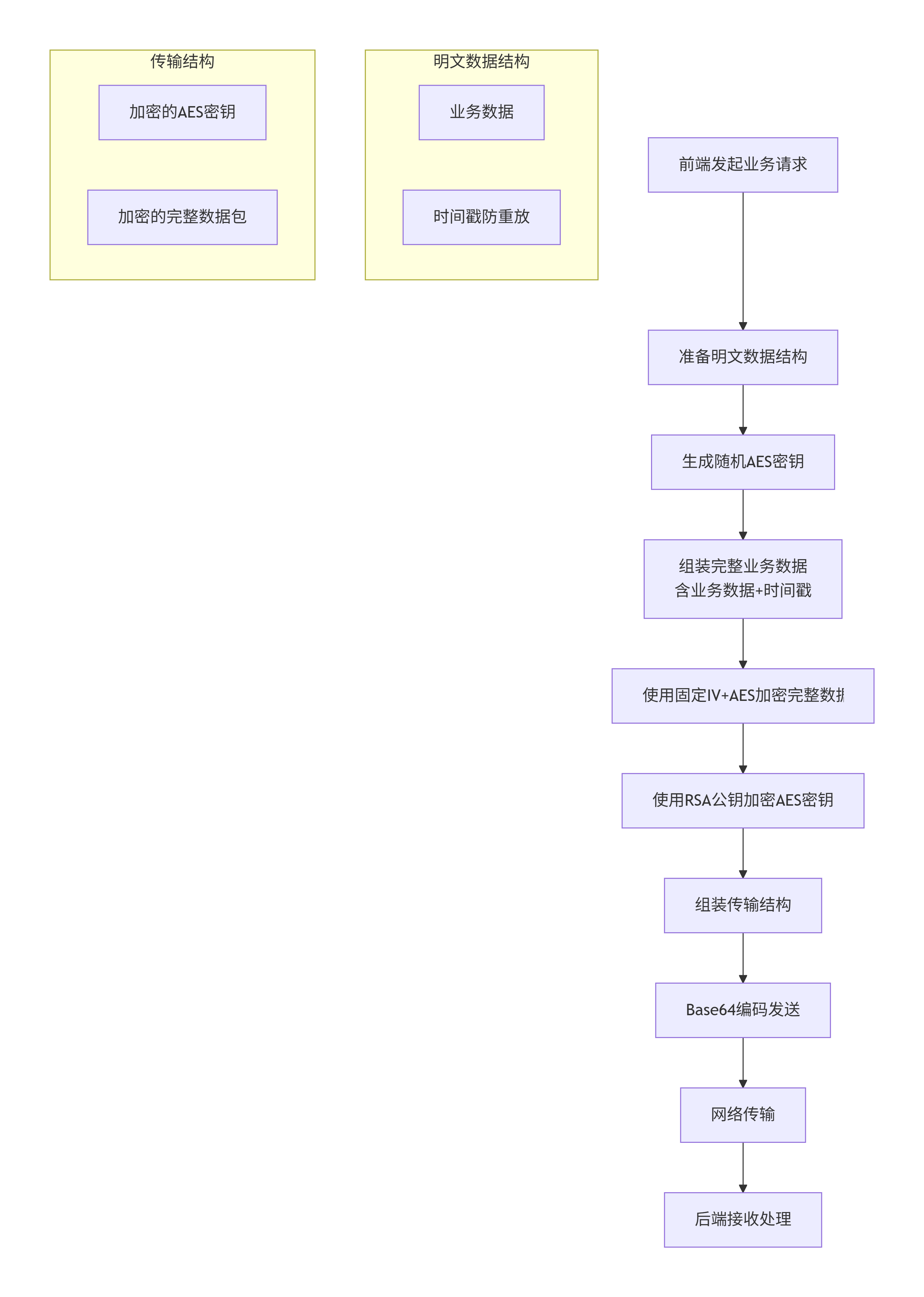
详细步骤说明:
步骤1:请求初始化
当用户在前端执行操作需要向后端发送数据时,加密流程启动。前端首先准备要发送的原始业务数据,这可能包括表单数据、查询参数或任何需要保护的信息。
步骤2:密钥生成
前端生成一个完全随机的AES对称加密密钥。这个密钥的生命周期仅限当前这一次请求,用后即弃。随机性的质量至关重要,必须使用密码学安全的随机数生成器。
步骤3:数据加密
使用刚刚生成的AES密钥和预配置的固定IV,对业务数据进行加密。虽然IV是固定的,但由于每次的AES密钥都不同,加密结果仍然是随机的、安全的。这个过程将原始明文转换为无法直接理解的密文。
步骤4:密钥保护
现在面临关键问题:如何将AES密钥安全地告诉后端?答案是用RSA公钥对其进行加密。这样,只有拥有对应私钥的后端才能解密获取AES密钥。
步骤5:数据组装
将加密后的AES密钥和加密后的业务数据组装成一个结构化的传输包。通常还会加入当前时间戳,用于防止重放攻击——即阻止攻击者重复发送捕获的旧请求。
步骤6:编码发送
对完整数据包进行Base64编码,确保二进制数据能够安全地通过文本协议(如HTTP)传输,然后发送给后端API。
2.3 请求解密流程(后端处理)
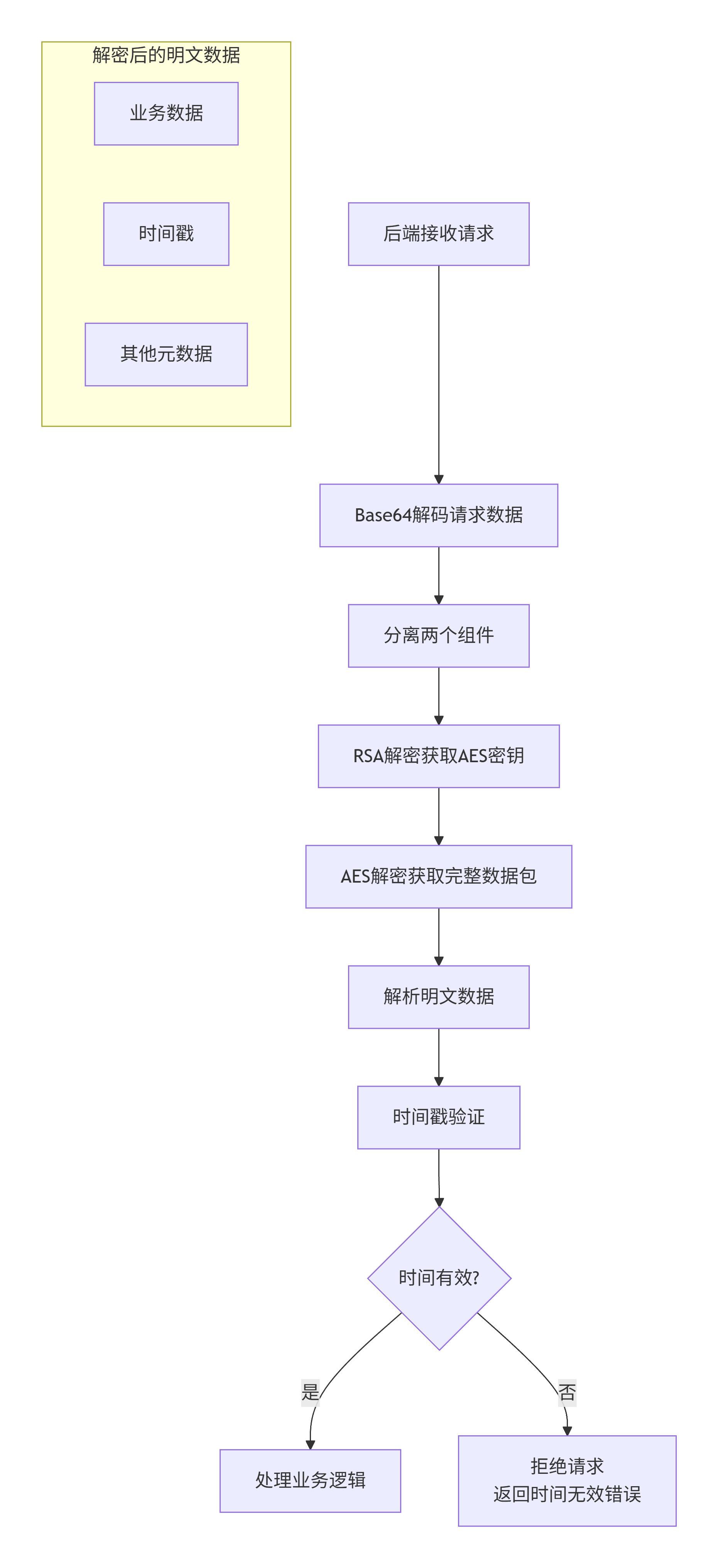
步骤1:接收与解析
后端接收到请求后,首先对Base64编码的数据进行解码,还原出原始的数据结构,分离出加密的AES密钥、加密的业务数据和时间戳。
步骤2:时间验证
检查时间戳的有效性,通常设定一个时间窗口(如5分钟),拒绝过期的请求,这是防御重放攻击的第一道防线。
步骤3:密钥解密
使用RSA私钥解密AES密钥。这个过程确保了即使数据传输过程被截获,攻击者也无法获取能够解密业务数据的AES密钥。
步骤4:数据解密
使用解密得到的AES密钥和预先约定的固定IV,对加密的业务数据进行解密,还原出原始的业务请求内容。
步骤5:业务处理
后端按照正常的业务逻辑处理解密后的数据,执行相应的数据库操作、业务计算等。
2.4 响应加密流程(后端 -> 前端)
响应流程是请求流程的镜像,但有一个关键点:在前端请求过程中,已经生成了AES的密钥,且处于同一个请求内。那么后端可以直接使用这个密钥直接加密响应数据,前端也可以直接使用解密。
步骤1:响应准备
后端处理完业务逻辑后,准备返回给前端的响应数据,可以指定只加密data部分。
步骤2:加密密钥
在接收请求到时候已经拿到了前端传递的AES密钥,存在当前线程内存中,此时可以直接获取这个密钥对响应内容加密。
步骤3:响应加密
使用当前请求内同一个AES密钥和固定IV加密响应数据。
步骤4:返回结果
将加密后的响应数据组装、编码后返回给前端。
2.5 响应解密流程(前端处理)
前端接收到响应后,使用发送请求时生成的随机AES密钥,解密响应数据内的加密内容,最终得到后端返回的业务结果。
三、安全特性深度分析
3.1 前向安全性保障
由于每个请求都使用完全独立的AES密钥,即使某个请求的密钥被破解(理论上极难发生),攻击者也无法解密其他任何请求。这种设计提供了完美的前向安全性。
3.2 多层防御体系
-
传输层:HTTPS提供基础传输安全
-
密钥层:RSA保护AES密钥的安全传递
-
数据层:AES保护实际业务数据
-
时间层:时间戳防止重放攻击
3.3 固定IV的安全性分析
可能有人会问:使用固定IV安全吗?答案是:在这种情况下是安全的。因为:
-
安全的核心在于密钥的随机性,而非IV
-
每次请求都使用全新的随机AES密钥
-
即使IV固定,相同的明文使用不同的密钥加密,结果也完全不同
-
这符合密码学中"一次一密"的精神
四、实际应用场景
4.1 用户登录认证
在用户登录过程中,密码通过混合加密传输,即使HTTPS被中间人攻击,攻击者也无法获取用户密码。
4.2 支付交易处理
支付金额、银行卡信息等敏感数据通过这种方式加密,确保金融交易的安全。
4.3 个人隐私数据
身份证号、电话号码、地址等个人信息在传输过程中得到充分保护。
4.4 商业机密传输
企业间的合同、报价、商业计划等机密文件的安全交换。
五、性能与安全的最佳平衡
5.1 性能优化策略
-
RSA仅用于加密少量数据(AES密钥),大大减少计算开销
-
AES处理大量业务数据,利用其高性能特性
-
固定IV减少了数据传输量
5.2 安全增强建议
-
定期轮换RSA密钥对:建议每季度更换一次
-
监控异常模式:记录解密失败次数,检测可能的攻击
-
密钥长度选择:RSA至少2048位,AES推荐256位
-
完整性与认证:考虑在加密基础上增加HMAC验证
六、行业实践与合规性
6.1 符合安全标准
该方案符合或支持以下安全标准和合规要求:
-
OWASP安全最佳实践
-
PCI DSS支付卡行业数据安全标准
-
GDPR数据保护条例要求
-
中国网络安全等级保护制度
6.2 主流应用案例
-
银行和金融机构的网上银行系统
-
大型电商平台的支付模块
-
政府服务的在线申报系统
-
医疗健康信息的远程传输
结语:构建可信的数字桥梁
AES+RSA混合加密方案不仅仅是技术的组合,更是一种安全哲学的体现:在复杂的安全需求中寻找优雅的解决方案。它像一座精心设计的桥梁,在前端与后端之间建立了安全可靠的数据通道,既承载着业务的流动,又抵挡着外部的威胁。
在实施这一方案时,记住安全是一个持续的过程,而不是一次性的任务。定期审查加密策略、更新密钥、监控异常,才能确保系统长期安全运行。正如安全专家常说的:"安全不是产品,而是过程。"
通过本文介绍的方案,希望能给你带来帮助。

魔乐社区(Modelers.cn) 是一个中立、公益的人工智能社区,提供人工智能工具、模型、数据的托管、展示与应用协同服务,为人工智能开发及爱好者搭建开放的学习交流平台。社区通过理事会方式运作,由全产业链共同建设、共同运营、共同享有,推动国产AI生态繁荣发展。
更多推荐



 15
15 0
0- 0


 已为社区贡献1条内容

所有评论(0)