2024年MyBatis 查询数据库_mybatis查询某个库的所有表名,2024年最新大数据开发高级面试framework
网上学习资料一大堆,但如果学到的知识不成体系,遇到问题时只是浅尝辄止,不再深入研究,那么很难做到真正的技术提升。
一个人可以走的很快,但一群人才能走的更远!不论你是正从事IT行业的老鸟或是对IT行业感兴趣的新人,都欢迎加入我们的的圈子(技术交流、学习资源、职场吐槽、大厂内推、面试辅导),让我们一起学习成长!
2.4 添加代码
按照后端开发的工程思路来实现 MyBatis 查询所有用户的功能: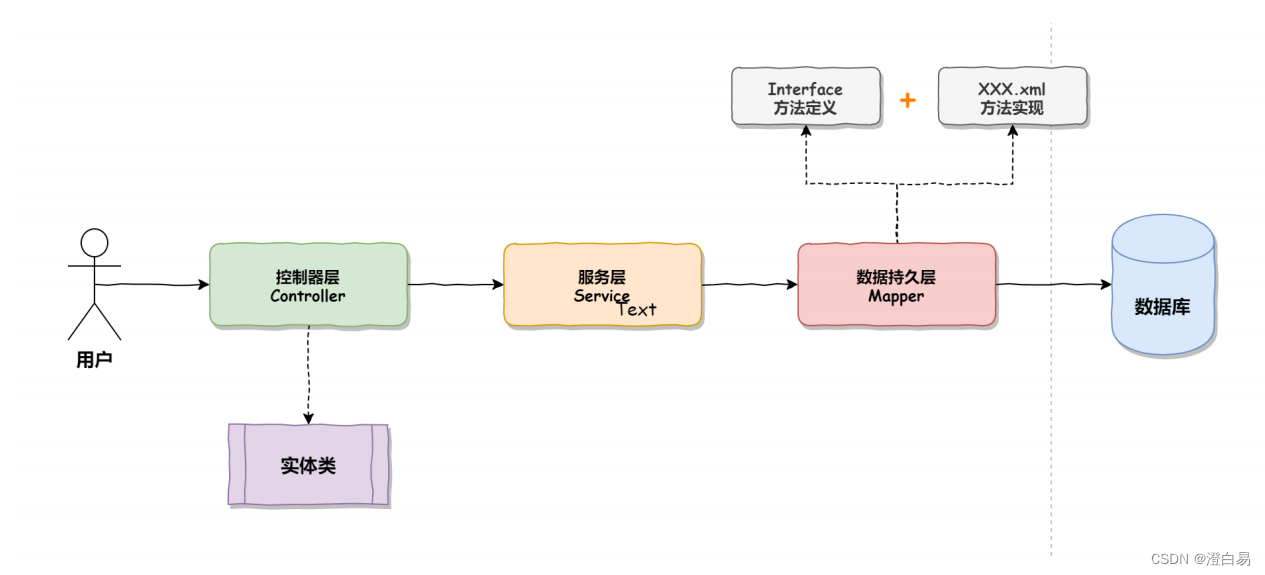
目录结构: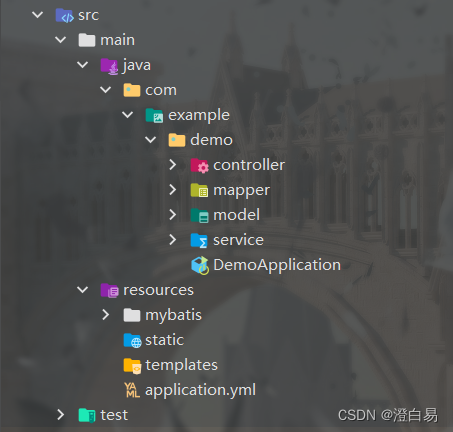
2.4.1 添加实体类
添加用户的实体类:
@Setter
@Getter
@ToString
public class UserInfo {
    private int id;
    private String username;
    private String password;
    private String photo;
    private String createtime;
    private String updatetime;
    private int state;
}
2.4.2 添加 mapper 接口
数据持久层的接口定义:
@Mapper
public interface UserMapper {
	public List<UserInfo> getAll();
}
2.4.3 添加 UserMapper.xml
数据持久层的实现,mybatis 的固定 xml 格式:
<?xml version="1.0" encoding="UTF-8"?>
<!DOCTYPE mapper PUBLIC "-//mybatis.org//DTD Mapper 3.0//EN"
"http://mybatis.org/dtd/mybatis-3-mapper.dtd">
<mapper namespace="com.example.demo.mapper.UserMapper">
</mapper>
UserMapper.xml 查询所有用户的具体实现 SQL:
<?xml version="1.0" encoding="UTF-8"?>
<!DOCTYPE mapper PUBLIC "-//mybatis.org//DTD Mapper 3.0//EN"
"http://mybatis.org/dtd/mybatis-3-mapper.dtd">
<mapper namespace="com.example.demo.mapper.UserMapper">
	<select id="getAll" resultType="com.example.demo.model.UserInfo">
        select * from userinfo
	</select>
</mapper>
标签说明:
<mapper>标签:需要指定 namespace 属性,表示命名空间,值为 mapper 接口的全限定名,包括全包名.类名。<select>查询标签:是用来执行数据库的查询操作的:
id:是和 Interface(接口)中定义的方法名称一样的,表示对接口的具体实现方法。resultType:是返回的数据类型,也就是开头我们定义的实体类。
2.4.4 添加 Service
服务层实现代码如下:
@Service
public class UserService {
	@Resource
	private UserMapper userMapper;
	public List<UserInfo> getAll() {
		return userMapper.getAll();
    }
}
2.4.5 添加 Controller
控制器层的实现代码如下:
@RestController
@RequestMapping("/user")
public class UserController {
    @Resource
    private UserService userService;

    @RequestMapping("/getuserbyid")
    public UserInfo getUserById(Integer id) {
        if (id != null && id > 0) {
            return userService.getUserById(id);
        } else {
            return new UserInfo();
        }
    }
}
3.MyBatis 增删改查操作
操作步骤:
- 添加 controller
- 添加 service
- 添加 mapper (dao)
- 添加 xml
3.1 增加操作
① 添加 controller:
	@RequestMapping("/insert")
    public Integer insert(UserInfo userInfo) {
        return userService.insert(userInfo);
    }
② 添加 service:
public Integer insert(UserInfo userInfo) {
        return userMapper.insert(userInfo);
    }
③ 添加 mapper :
Integer insert(UserInfo userInfo);
④ 添加 xml:
<insert id="add">
  insert into userinfo(username,password,photo,state)
  values(#{username},#{password},#{photo},1)
</insert>
说明:参数占位符 #{} 和 ${}
#{}:预编译处理。${}:字符直接替换。
预编译处理是指:MyBatis 在处理#{}时,会将 SQL 中的 #{} 替换为 ? 号,使用用PreparedStatement 的set 方法来赋值。直接替换:是MyBatis 在处理 ${} 时,就是把 ${} 替换成 变量的值。
特殊的增加
默认情况下返回的是受影响的行号,如果想要返回自增 id,具体实现如下:
controller 实现代码:
public Integer add2(@RequestBody UserInfo userInfo) {
	userService.getAdd2(userInfo);
	return user.getId();
}
mapper 接口:
@Mapper
public interface UserMapper {
	// 添加,返回⾃增id
	void add2(User user);
}
mapper.xml 实现如下:
<insert id="add2" useGeneratedKeys="true" keyProperty="id">
    insert into userinfo(username,password,photo,state)
    values(#{username},#{password},#{photo},1)
</insert>
useGeneratedKeys:这会令 MyBatis 使用 JDBC 的 getGeneratedKeys 方法来取出由数据库内部生成的主键(比如:像 MySQL 和 SQL Server 这样的关系型数据库管理系统的自动递增字段),默认值:false。keyColumn:设置生成键值在表中的列名,在某些数据库(像 PostgreSQL)中,当主键列不是表中的第一列的时候,是必须设置的。如果生成列不止一个,可以用逗号分隔多个属性名称。keyProperty:指定能够唯一识别对象的属性,MyBatis 会使用 getGeneratedKeys 的返回值或 insert 语句的 selectKey 子元素设置它的值,默认值:未设置(unset)。如果生成列不止一个,可以用逗号分隔多个属性名称。
3.2 删除操作
前面三个步骤操作类似,重点看下第四步,数据持久层的实现(xml)。
<delete id="delById" parameterType="java.lang.Integer">
    delete from userinfo where id=#{id}
</delete>
3.3 修改操作
<update id="update">
    update userinfo set username=#{name} where id=#{id}
</update>
3.4 查询操作
3.4.1 单表查询
查询操作需要设置返回类型,绝大数查询场景可以使用 resultType 进行返回,它的优点是使用方便,直接定义到某个实体类即可。
<!-- 查询单条数据(根据id)-->
    <select id="getUserById" resultType="com.example.demo.model.UserInfo">
        select *
        from userinfo
        where id = #{id}
    </select>
3.4.2 多表查询
但有些场景就需要用到返回字典映射(resultMap)比如:
- 字段名称和程序中的属性名不同的情况;
- ⼀对⼀和⼀对多关系。
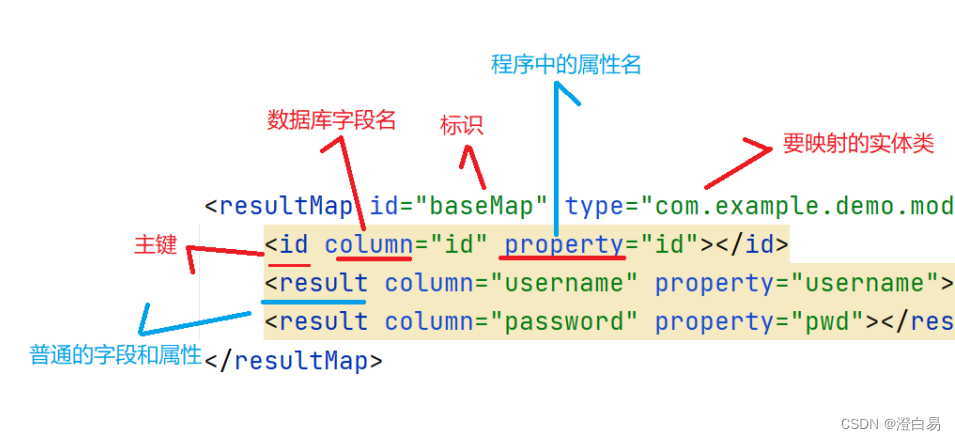
① 字段名和属性名不同的情况
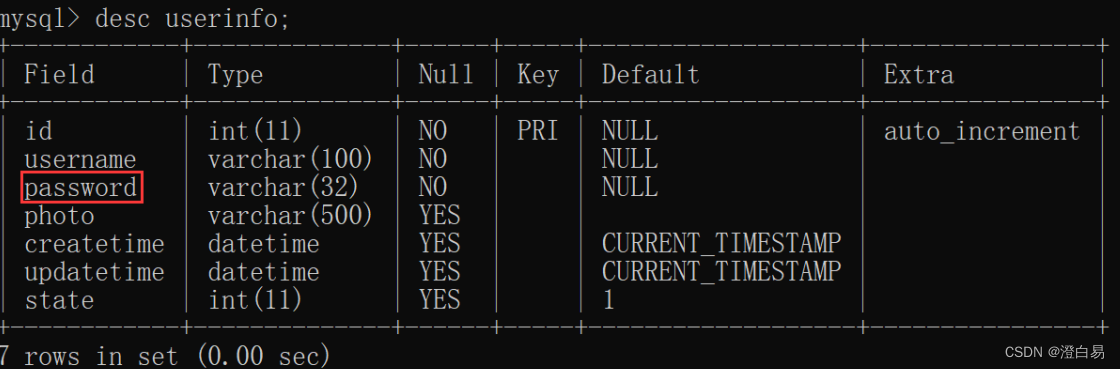
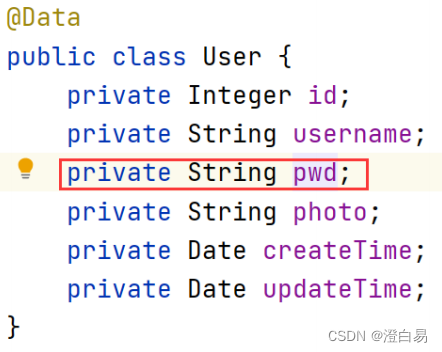
xml 如下:
<resultMap id="BaseMap" type="com.example.demo.model.UserInfo">
<id column="id" property="id"></id>
<result column="username" property="username"></result>
<result column="password" property="pwd"></result>
</resultMap>
<select id="getUserById"
resultMap="com.example.demo.mapper.UserMapper.BaseMap">
    select * from userinfo where id=#{id}
</select>
② 一对一映射
一对一映射要使用 <association> 标签,具体实现如下(一篇文章只对应一个作者):
<resultMap id="BaseMap" type="com.example.demo.model.ArticleInfo">
	<id property="id" column="id"></id>
	<result property="title" column="title"></result>
	<result property="content" column="content"></result>
	<result property="createtime" column="createtime"></result>
	<result property="updatetime" column="updatetime"></result>
	<result property="uid" column="uid"></result>
	<result property="rcount" column="rcount"></result>
	<result property="state" column="state"></result>
	<association property="user"
 resultMap="com.example.demo.mapper.UserMapper.BaseMap"
 columnPrefix="u\_">
	</association>
</resultMap>
<select id="getAll" resultMap="BaseMap">
  select a.*,u.username u_username from articleinfo a
  left join userinfo u on a.uid=u.id
</select>
property属性:指定 Article 中对应的属性,即用户。resultMap属性:指定关联的结果集映射,将基于该映射配置来组织用户数据。columnPrefix属性:绑定一对一对象时,是通过
columnPrefix+association.resultMap.column 来映射结果集字段。
③ 一对多映射
一对多需要使用 <collection> 标签,用法和 <association> 相同,如下所示:
<resultMap id="BaseMap" type="com.example.demo.model.UserInfo">
	<id column="id" property="id" />
	<result column="username" property="username"></result>
	<result column="password" property="password"></result>
	<result column="photo" property="photo"></result>
	<collection property="alist"
 resultMap="com.example.demo.mapper.ArticleInfoMapper.BaseMap"
 columnPrefix="a\_">
	</collection>
</resultMap>
<select id="getUserById" resultMap="BaseMap">
  select u.*,a.title a_title from userinfo u
  left join articleinfo a on u.id=a.uid where u.id=#{id}
</select>
3.4.3 like查询
like 使用 #{} 会报错,可以考虑使用 mysql 的内置函数 concat() 来处理,实现代码如下:
    <select id="getUserByLikeName" resultType="com.example.demo.model.UserInfo">
        select *
        from userinfo
        where username like concat('%', #{username}, '%')
    </select>
4.动态SQL使用
动态 sql 是Mybatis的强大特性之一,能够完成不同条件下不同的 sql 拼接。
可以参考官方文档:Mybatis动态sql
4.1 if 标签
<insert id="add3">
        insert into userinfo(username,
        <if test="photo!=null">
            photo,
        </if>
        password)
        values (#{username},
        <if test="photo!=null">
            #{photo},
        </if>
        #{password})
    </insert>
test中的对象是传入对象的属性,当它不为空时,才拼接里面的内容。
4.2 trim 标签
<trim>标签中有如下属性:
prefix:表示整个语句块,以prefix的值作为前缀suffix:表示整个语句块,以suffix的值作为后缀prefixOverrides:表示整个语句块要去除掉的前缀suffixOverrides:表示整个语句块要去除掉的后缀
网上学习资料一大堆,但如果学到的知识不成体系,遇到问题时只是浅尝辄止,不再深入研究,那么很难做到真正的技术提升。
一个人可以走的很快,但一群人才能走的更远!不论你是正从事IT行业的老鸟或是对IT行业感兴趣的新人,都欢迎加入我们的的圈子(技术交流、学习资源、职场吐槽、大厂内推、面试辅导),让我们一起学习成长!
fix的值作为前缀
suffix:表示整个语句块,以suffix的值作为后缀prefixOverrides:表示整个语句块要去除掉的前缀suffixOverrides:表示整个语句块要去除掉的后缀
[外链图片转存中…(img-e5fM5xM0-1715229666429)]
[外链图片转存中…(img-I4I6hSok-1715229666429)]
网上学习资料一大堆,但如果学到的知识不成体系,遇到问题时只是浅尝辄止,不再深入研究,那么很难做到真正的技术提升。
一个人可以走的很快,但一群人才能走的更远!不论你是正从事IT行业的老鸟或是对IT行业感兴趣的新人,都欢迎加入我们的的圈子(技术交流、学习资源、职场吐槽、大厂内推、面试辅导),让我们一起学习成长!

魔乐社区(Modelers.cn) 是一个中立、公益的人工智能社区,提供人工智能工具、模型、数据的托管、展示与应用协同服务,为人工智能开发及爱好者搭建开放的学习交流平台。社区通过理事会方式运作,由全产业链共同建设、共同运营、共同享有,推动国产AI生态繁荣发展。
更多推荐


 3
3 0
0- 0


 已为社区贡献6条内容

所有评论(0)